En behörighetsflagga (permission flag) är inte en säkerhetsmekanism. Biten som säger "ingen kopiering" lever inuti samma /Encrypt-ordbok som kryptografin, vilket lånar den en luft av upprätthållande (enforcement) den inte har, och det ögonblick du behandlar de två som en och samma sak börjar din revision producera fel svar. Den enda frågan värd att ställa till en PDF är inte "är den krypterad." Den är mer specifik och svårare: vilken algoritm, vilken version av säkerhetshanterare, vilket av de två lösenorden sattes, vilka behörighetsbitar hävdas (claimed), och vilka delar av filen krypteringen faktiskt rör vid. En fil kan formellt sett vara krypterad och i praktiken öppen. Den kan vägra att bli läst men ändå lämna sin metadata i klartext. Den kan låsa ner utskrift i en flagga som vilken visare som helst är fri att ignorera. Att granska (auditing) en PDF innebär att lösa alla dessa separat, och PDF Library for Delphi, losLabs PDF-motor för Delphi och C++Builder, exponerar var och en av dem genom både en platt API med heltals-handtag och ett typat klasslager
Vad /Encrypt-ordboken faktiskt registrerar
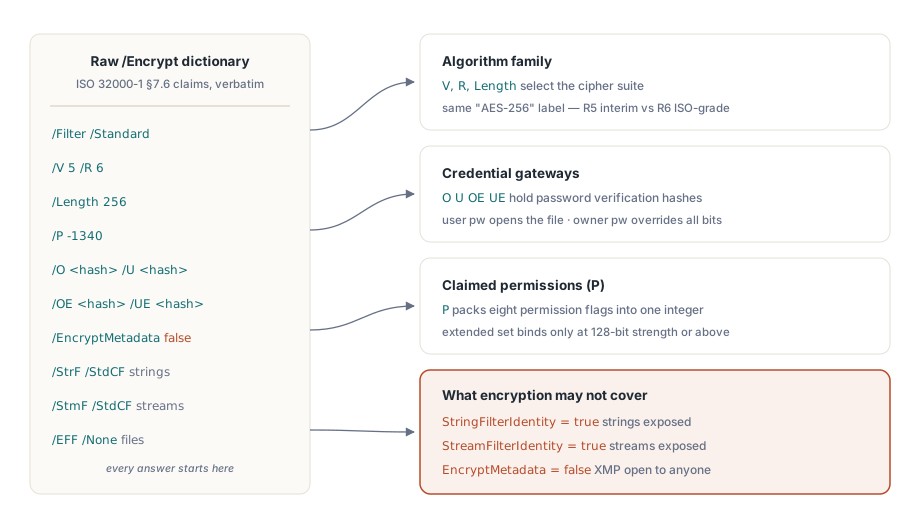
ISO 32000-1 §7.6 definierar dokumentsäkerhet genom en handfull ordboksposter (dictionary entries), och PDF Library for Delphi speglar dem en för en i TPDFEncryption-posten (record). Filterversionen V och revisionen R väljer algoritmfamiljen. Length bär nyckelstorleken. Behörighetsbitarna sitter i P, ägar- och användarlösenordsvalideringssträngarna i O och U (med OE och UE tillagda för AES-256), en EncryptMetadata-flagga rider jämte (rides alongside), och tre andra fält namnger de krypto-filter (crypt filters) som tillämpats på strängar, strömmar (streams) respektive inbäddade filer
Värdet med denna post är att den inte tolkar något åt dig. Den lämnar tillbaka den råa ordboken och låter dig dra slutsatserna, vilket är exakt vad en revision (audit) behöver. Klartext-inuti-krypterat-fallet dyker upp i StringFilterIdentity och StreamFilterIdentity: när något av dem är sant passerar motsvarande data genom Identity-filtret orört, oavsett vad dokumentets krypterade status rapporterar. En skanner som stannar vid "en /Encrypt-ordbok är närvarande" kommer att kalla en sådan fil skyddad när dess strängar och strömmar sitter i klartext. Samma nyans styr metadata. När EncryptMetadata är falskt förblir XMP-paketet läsbart för alla indexerare medan sidinnehållet inte gör det, vilket är värt att veta det ögonblick dina routingregler aktiveras av (key off) ett titel- eller författarfält
En kort säkerhetssond (security probe) med det platta API:et
För de flesta pipelines besvarar fyra platta anrop de vardagliga frågorna. LoadFromFile returnerar 1 vid framgång, och när dokumentet är öppet rapporterar krypteringsinspektörerna mot dess dekrypterade tillstånd:
var
  PDF: TPDFlib;
begin
  PDF := TPDFlib.Create;
  try
    if PDF.LoadFromFile('contract.pdf', UserPassword) <> 1 then
      raise Exception.Create('Open failed: wrong password or damaged file');
    Writeln('status    : ', PDF.EncryptionStatus);     // decrypted / encrypted / unknown
    Writeln('algorithm : ', PDF.EncryptionAlgorithm);  // RC4 vs AES family
    Writeln('strength  : ', PDF.EncryptionStrength);   // nyckellängdsklass
    Writeln('owner pw? : ', PDF.CheckPassword(CandidatePassword));
  finally
    PDF.Free;
  end;
end;
CheckPassword spelar större roll än dess enradiga signatur antyder. PDF definierar två lösenord med ojämlik (unequal) makt. Användarlösenordet krävs för att överhuvudtaget öppna filen. Ägarlösenordet ger fulla rättigheter och åsidosätter (overrides) varje behörighetsbit. Bytesen på disken är identiska i båda fallen, men en session öppnad under ägarlösenordet kan göra saker som användarlösenords-sessionen inte kan, så en revision som inte registrerar vilket inloggningsbevis (credential) som presenterades registrerar halva sanningen. Klasslagret gör åtskillnaden sökbar (queryable). TPDFDocument.HasUserPassword och HasOwnerPassword rapporterar vad filen kräver, medan IsUserPassword och IsOwnerPassword rapporterar vilket lösenord som faktiskt öppnade den nuvarande sessionen. Logga det faktumet. Logga aldrig lösenordsvärdena i sig
Styrkestegen (Strength ladder), där "AES-256" betyder två saker
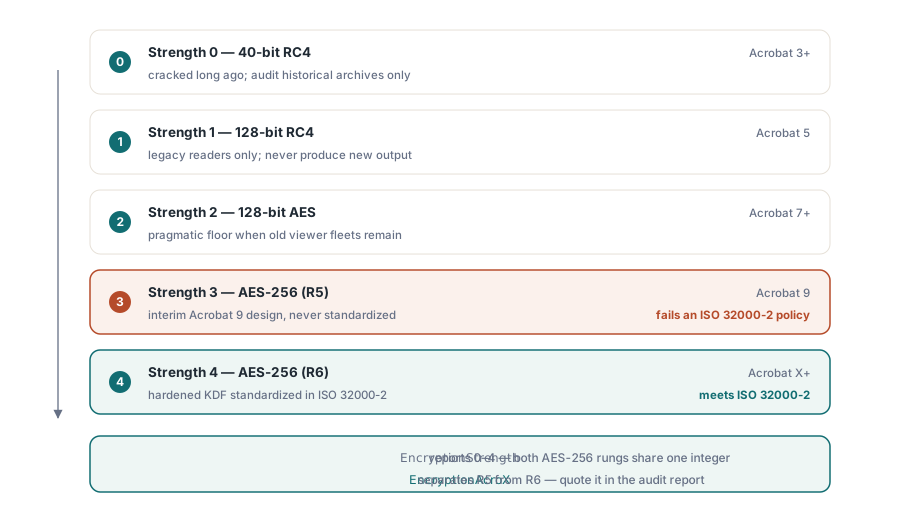
De platta funktionerna Encrypt och EncryptFile tar ett heltal Strength med fem meningsfulla värden: 0 för 40-bitars RC4, 1 för 128-bitars RC4, 2 för 128-bitars AES läsbart från Acrobat 7, 3 för 256-bitars AES som introducerades med Acrobat 9, och 4 för 256-bitars AES som krävs av Acrobat X och senare
Den intressanta delen är att 3 och 4 båda är märkta (labeled) AES-256 och inte är samma schema. Styrka 3 (Strength 3) mappar till säkerhetshanterar-revision 5, en interimsdesign (interim design) som Acrobat 9 skeppade och ISO aldrig antog. Styrka 4 mappar till revision 6, vars nyckelavledningsfunktion (key-derivation function) härdades och standardiserades i ISO 32000-2. För ett dokument du skapar idag finns det ingen anledning att välja 3 framför 4. För en revision är gapet avgörande: en policy som lyder "AES-256 enligt ISO 32000-2" uppfylls av R6 enbart, och en R5-fil som kallar sig själv AES-256 misslyckas med den policyn medan den klarar en naiv styrkekontroll. Klasslagret håller isär de två vid namn, esAES256Bit för R5 mot esAES256BitAcroX för R6, och egenskapen EncryptionAcroX besvarar revisionsfrågan med ett enda boolean-värde
Behörighetsbitar och deras nyckellängds-finstilta
EncodePermissions packar åtta flaggor till det heltal som Encrypt och EncryptFile förväntar sig. Skriv ut (print), kopiera, ändra, och lägg till anteckningar (add-notes) utgör basuppsättningen; fyll-i-formulär, kopiera för tillgänglighet, montera (assemble), och högkvalitativ utskrift utgör den utökade (extended) uppsättningen. Det finstilta, som bibliotekets egna krypteringsdemo rakt ut uppger, är att de utökade fyra får effekt (take effect) först vid 128-bitars styrka och högre. Flaggan för högkvalitativ utskrift lyder under samma regel: rensa (clear) den för att tvinga fram lågupplöst utskrift och ett 40-bitars dokument kommer att ignorera dig, eftersom även den nedgraderingen kräver 128-bitars eller starkare kryptering. Koda en policy för "endast lågupplöst utskrift" i en 40-bitars fil och varje visare skriver ändå ut i full kvalitet
Den djupare frågan är vem som upprätthåller någon av dessa bitar, och svaret är ingen du kan lita på. Behörigheter är instruktioner till kompatibla läsare, inte kryptografiska restriktioner. Dekrypteringsnyckeln är identisk oavsett om kopiering är tillåtet eller nekas, så en nerlåst behörighetsuppsättning (permission set) håller bara ärliga visare ärliga. En läsare som väljer att ignorera bitarna möter inget kryptografiskt hinder alls. Om förpliktelsen är att förhindra extraktion snarare än att avskräcka från det, behöver filen ett användarlösenord och arbetsflödet behöver kontroller på processnivå runt den, och en revisionsrapport bör namnge vilket av de två regimerna varje fil faktiskt lyder under istället för att behandla en behörighetsflagga som ett lås
Att sätta policy och bevisa att den fastnade (stuck)
Att tillämpa kryptering på befintliga filer kräver inte att ladda in dem i objektträdet. EncryptFile bearbetar inmatning till utmatning i ett enda anrop, och revisionsloopen (audit loop) öppnar om resultatet för att bekräfta vad som landade på disken. Det medföljande (shipped) krypteringsdemot följer samma skriv-sedan-läs-tillbaka-form (write-then-read-back shape):
var
  PDF: TPDFlib;
  R: Integer;
begin
  PDF := TPDFlib.Create;
  try
    R := PDF.EncryptFile('in.pdf', 'out.pdf', 'owner-secret', 'user-secret', 4,
      PDF.EncodePermissions(1, 0, 0, 0,    // print allowed; copy/change/notes denied
                            0, 0, 0, 1));  // utökad uppsättning: bara utskrift i full kvalitet
    if (R = 1) and (PDF.LoadFromFile('out.pdf', 'user-secret') = 1) then
    begin
      Writeln('algorithm = ', PDF.EncryptionAlgorithm);
      Writeln('strength  = ', PDF.EncryptionStrength);
      Writeln('owner pw accepted: ', PDF.CheckPassword('owner-secret'));
    end;
  finally
    PDF.Free;
  end;
end;
Team som arbetar vid dokumentlagret får samma operation med typade uppsättningar (typed sets) istället för bit-packning, vilket överlever kodgranskning (code review) med betydligt mindre kisande:
if not Doc.Encrypt('owner-secret', 'user-secret', esAES256BitAcroX,
  [ppCanPrint], [ppCanPrintFull]) then
  raise Exception.Create('Encryption failed');
Oavsett vilket är inläsningssteget (read-back step) inte en valfri ceremoni. Det fångar de driftsättningsmisstag (deployment mistakes) som annars dyker upp månader senare på en kunds maskin: ett gammalt biblioteksbygge som tyst nedgraderar den begärda styrkan, en utmatningsväg (output path) som aldrig skrevs för att katalogen var skrivskyddad, ett behörighetsheltsal (permissions integer) vars argument gick i fel ordning. Alla tre passerar ett lokalt röktst (smoke test) och misslyckas på fältet, och att återöppna utmatningen omvandlar var och en av dem till ett undantag du ser under körningen som skapade filen. GetEncryptionFingerprint returnerar ett kompakt värde du kan spara med jobbposten, så att en senare jämförelse kan berätta ifall två utmatningar delar samma krypteringskonfiguration utan att återöppna någon av dem
Falskt positiva utslag i revisionen som är värda att koda för
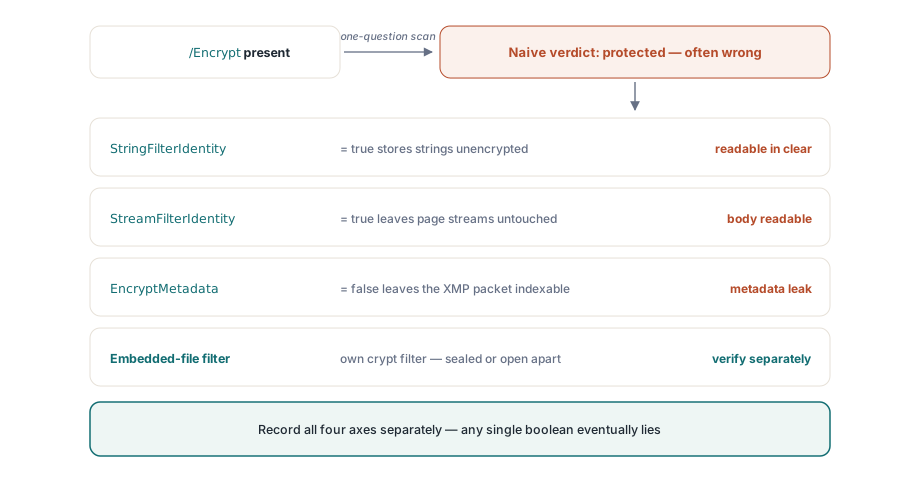
Ett fåtal mönster knuffar konsekvent säkerhetsskannrar till fel slutsats, och var och en kommer från att kollapsa en flerdelsfråga (multi-part question) till ett ja-eller-nej-svar. Identity-kryptofiltret är det renaste exemplet. En /Encrypt-ordbok är närvarande, filen rapporterar som krypterad, och ändå löper strängarna och strömmarna genom Identity-filtret oförändrade, så det riktiga innehållet är klartext. Att läsa StringFilterIdentity och StreamFilterIdentity innan man förklarar någonting skyddat är lösningen
Metadatauppdelningen (metadata split) är subtilare. EncryptMetadata kan vara oense med resten av dokumentet i båda riktningar, vilket lämnar en krypterad fil med ett läsbart XMP-paket eller, mindre ofta, tvärtom. "Filen är krypterad" säger ingenting om huruvida dess metadata är det, vilket spelar roll i det ögonblick en indexerare eller en routingregel griper efter titeln. Inbäddade filer lägger till en tredje axel: PDF tillåter ett dedikerat kryptofilter bara för bilagor, så bilagorna kan vara den enda krypterade delen av ett annars öppet dokument, eller den enda klartextdelen av ett krypterat dokument. Fånga de tre filtertilldelningarna (filter assignments) som separata fält för strängar, strömmar och inbäddade filer, och inga av dessa fällor kan fånga dig. Spara ett enda boolean-värde och det felaktiga utslaget (wrong call) är bara en tidsfråga
Att ta bort kryptering, och välja det för nya filer
En revision (audit) slutar ofta i ett beslut att ta bort skyddet, och mekaniken är inte hindret där. DecryptFile(InputFileName, OutputFileName, Password) skriver en dekrypterad kopia utan en full laddning, och laddade-dokumentets Decrypt gör detsamma i minnet så snart en fil redan är öppen. Båda kräver ett giltigt lösenord; inget kringgår kryptografin. Den verkliga grinden (gate) är policy snarare än kod, så se till att dina intagsregler tydligt anger när borttagning är tillåten och registrera den lösenordsklass som auktoriserade det, eftersom det tekniska steget i sig inte lämnar några spår
Valet för ny utmatning är snävare (narrower) än vad de fem Strength-värdena antyder. Använd Styrka 4 (Strength 4), AES-256 revision 6, såvida du inte måste öppna filer i visare (viewers) äldre än Acrobat X. Styrka 2, AES-128, är det pragmatiska golvet för en åldrande fleet av visare som inte kan uppgraderas. RC4-alternativen vid 0 och 1 finns där så att du kan läsa och granska historiska arkiv, inte så att du kan producera något nytt med dem; att sträcka sig efter dem på en design från 2026 är ett tecken på att ett krav uppströms (upstream) är föråldrat (stale)
Krypteringstillstånd matas rakt in i signeringsbeslut, eftersom en arbetsbänk (workbench) som validerar och signerar dokument behöver samma inläsningsdisciplin (read-back discipline) som denna revision förlitar sig på. Det området täcks i artikeln om arbetsbänken för efterlevnad och signering. När en batch tillämpar EncryptFile över tusentals stora dokument, visar direct-access-guiden till stora PDF:er hur man håller minnet plant (flat) medan den körs. Den fullständiga krypterings-API-referensen lever på PDF Library for Delphi produktsida