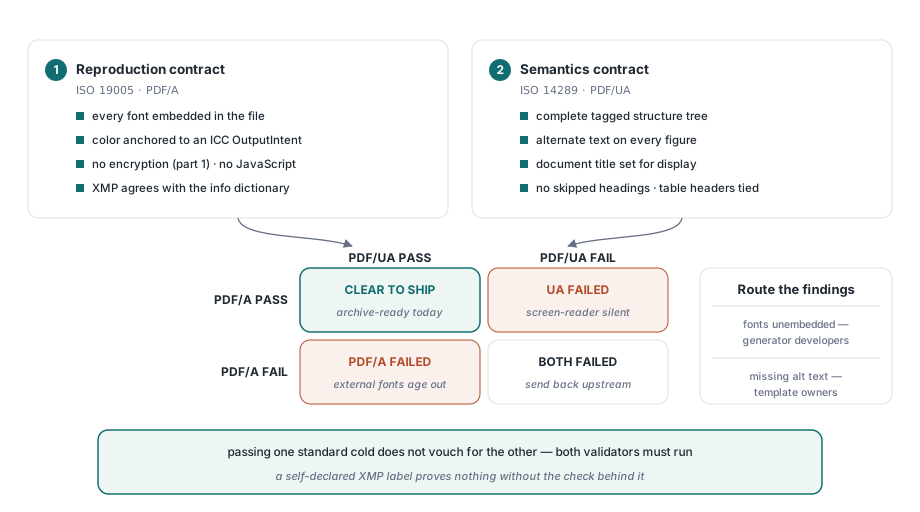
Standardi PDF/A i PDF/UA odgovaraju na dva pitanja koja nemaju nikakve veze jedno sa drugim, a njihovo tretiranje kao jedne zajedničke potvrde za pristupačnost i arhiviranje jeste način na koji oštećene datoteke stižu u arhivu sa oznakom usklađenosti. PDF/A se pita da li će se datoteka i dalje verno renderovati za dvadeset godina. PDF/UA se pita da li tehnologije podrške (assistive technology) mogu da je pročitaju danas. Dokument može glatko proći jedan test, a pasti na drugom, pa jedina poštena presuda dolazi iz pokretanja oba, i to pre nego što se datoteka zapiše na disk, a ne nakon što nizvodni sistem poveruje identifikatoru usklađenosti ugrađenom u njegove metapodatke. Taj identifikator je samoizjava. Ništa u formatu ne zahteva da on bude tačan, i aplikacija koja upisuje "PDF/A-1b" u XMP bez validacije prema standardu proizvodi datoteku koja izgleda usklađeno svakom korisniku koji čita samo oznaku. losLab PDF biblioteka (PDF Library for Delphi) premošćuje taj jaz za Delphi i C++Builder ugrađivanjem oba validatora u samu biblioteku, tako da se provera vrši unutar procesa (in-process) bez potrebe za podizanjem eksternog servisa
Dva standarda koji odbijaju datoteke iz suprotnih razloga
Standard ISO 19005 (PDF/A) je ugovor o reprodukciji. Usklađena datoteka mora da se iscrtava identično decenijama od danas na softveru koji nikada nije video sistem koji ju je proizveo, tako da pravila napadaju spoljne zavisnosti: svaki font mora biti ugrađen, boja mora biti usidrena za ugrađeni ICC OutputIntent ili izražena u prostoru nezavisnom od uređaja, nema šifrovanja u PDF/A-1, no JavaScript (nema JavaScript-a), a XMP metapodaci moraju biti usklađeni sa rečnikom informacija o dokumentu. Standard ISO 14289 (PDF/UA) je umesto toga semantički ugovor. Tehnologije podrške moraju da prođu kroz dokument i iz njega izvuku značenje, koje živi u potpuno drugom sloju: kompletno stablo strukture, alternativni tekst na slikama, naslov dokumenta podešen za prikaz, nivoi zaglavlja koji ne preskaču stepene, odnosi zaglavlja tabela koji opstaju i kada stranica više nije na ekranu
Pošto ova dva standarda kontrolišu različite slojeve, datoteke koje vam stvaraju probleme su one koje se nalaze između njih. Dokument koji je savršen za arhivu može biti potpuno nem za čitač ekrana. Prelepo tagovan dokument može referencirati font na desktopu koji neće postojati za deset godina. Izdavaštvo u javnom sektoru je uobičajeno mesto gde oba zahteva stižu istovremeno, i procesni lanac ih ne može spojiti u jedinstvenu proveru. Nalazi idu različitim ljudima. Neugrađeni fontovi su greška u kodu koji generiše PDF, dok nedostajući alternativni tekst pripada onome ko je vlasnik šablona sadržaja, a izveštaj koji meša ovo dvoje se samo prosleđuje dvaput
Koji deo PDF/A standarda ciljate podjednako je važno kao i to da li ga pogađate. PDF/A-1 je zamrznut na verziji PDF 1.4 i odbija transparentnost i JPEG2000, za kojima moderan izveštajni softver poseže bez razmišljanja. PDF/A-2 (ISO 19005-2, izgrađen na ISO 32000-1) prihvata oba i predstavlja razuman podrazumevani izbor za novu arhivu. PDF/A-3 ide korak dalje i dozvoljava ugrađene datoteke bilo kog tipa, na šta se oslanjaju regulisani formati elektronskih faktura. Tim koji i dalje standardizuje na PDF/A-1b u 2026. godini obično prenosi zahtev koji je neko napisao pre petnaest godina, a ponovno pregovaranje o ciljnom delu standarda je često jeftinije od uklanjanja transparentnosti iz svakog grafikona koji sistem generiše
Strukturirani nalazi u vreme prijema dokumenata
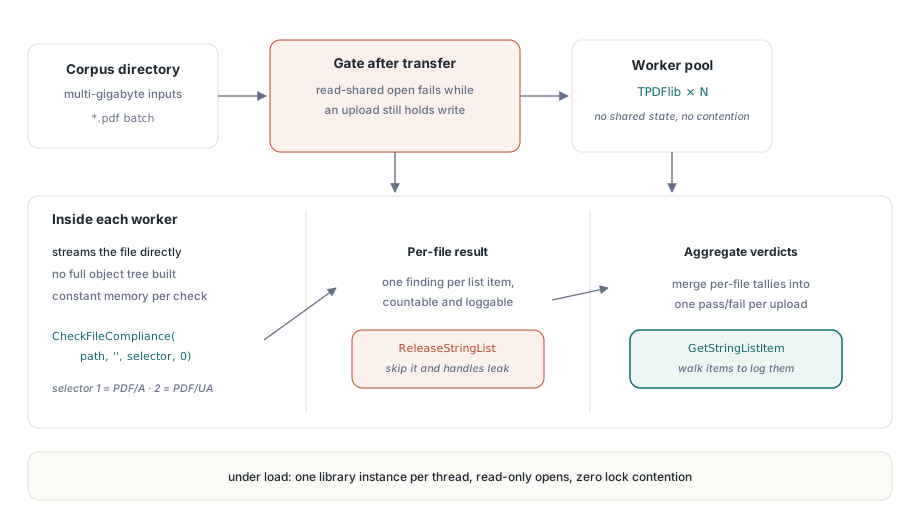
Ulazna tačka ravnog (flat) API-ja je metoda CheckFileCompliance, sa selektorom testa 1 za PDF/A i 2 za PDF/UA. Ona vraća hendler liste stringova čije su stavke pojedinačni nalazi, jedan po liniji, što je upravo oblik kroz koji automatizovana provera želi da prođe:
function GateArchiveUpload(Pdf: TPDFlib; const FileName: string): Boolean;
var
  ListId, I: Integer;
begin
  ListId := Pdf.CheckFileCompliance(FileName, '', 1, 0);  // 1 = PDF/A
  if ListId = 0 then
  begin
    // 0 znači "nema nalaza" ILI "datoteka nije čitljiva" -- razjasni pre prosleđivanja
    Result := Pdf.LastErrorCode = 0;
    Exit;
  end;
  for I := 0 to Pdf.GetStringListCount(ListId) - 1 do
    LogFinding(FileName, Pdf.GetStringListItem(ListId, I));
  Pdf.ReleaseStringList(ListId);
  Result := False;
end;
Dva detalja odlučuju o tome da li ovo može da radi bez nadzora. Prvi je povratna vrednost koja može značiti dve potpuno suprotne stvari. Metoda CheckFileCompliance vraća 0 kada je datoteka potpuno usklađena, ali i kada datoteka uopšte ne može da se otvori, jer se interno prazna lista rezultata u oba slučaja svodi na 0. Provera koja čita vrednost 0 kao prolaz pustiće oštećene otpremljene datoteke pravo u arhivu, pa razrešite dvosmislenost pomoću LastErrorCode pre nego što poverujete nuli, kao što to radi gornji primer. Drugi detalj se odnosi na to gde se datoteka nalazi u svom životnom ciklusu. Tester radi na strimujućem čitaču biblioteke umesto na celom modelu dokumenta, otvarajući datoteku direktno sa deljenjem čitanja (read sharing) i nikada ne pozivajući LoadFromFile, zbog čega može da obradi višenabajtni (multigigabajtni) ulaz bez izgradnje stabla objekata. To isto strimujuće otvaranje ne uspeva dok drugi proces i dalje drži datoteku radi pisanja, a otpremanje u toku je upravo to stanje. Pokrenite proveru tek nakon što se prenos završi
Dizajn zasnovan na strimovanju se isplati pod opterećenjem. Svaka provera otvara svoj ulaz samo za čitanje i deli ga za čitanje, tako da se revizija korpusa skalira kroz radne niti (worker threads) ili procese sa jednom TPDFlib instancom po radniku i bez ikakvih konflikata među njima. Resurs koji zahteva disciplinu je sam hendler. Svaki rezultat različit od nule iz metode CheckFileCompliance ostaje alociran sve dok ne pozovete ReleaseStringList, a dugotrajni servis koji zaboravi da ih oslobodi neće pasti, već će samo polako gubiti memoriju dok neko ne krene da traži uzrok
Izveštaji za ljude, razlike (diffs) za razvojne provere
Lista nalaza je pravi format za automatsku proveru, a pogrešan format za slanje e-pošte timu zaduženom za šablone. Metoda CreatePreflightReport renderuje istu analizu kao čitljiv tekst, CreatePreflightReportEx dodaje selektor formata izveštaja, a SavePreflightReport ga upisuje na disk kako bi izveštaj mogao da putuje unutar isporučenog paketa dokumenata. Mnogi ugovori o arhiviranju čine taj izveštaj isporukom samom po sebi, a ne samo internim artefaktom
Član ove porodice funkcija koji tiho opravdava svoje mesto jeste ComparePreflightReports. Usklađenost je regresiona površina kao i bilo koji drugi deo ponašanja softvera. Izmena šablona, novi licencirani korporativni font ili nadogradnja biblioteke mogu uvesti nalaze koji nisu postojali u prošlom izdanju, a nijedan od njih se ne najavljuje sam. Čuvajte referentne ("zlatne") izveštaje za skupr reprezentativnih dokumenata pod verzijskom kontrolom, regenerišite ih nakon svake promene i pokrenite ComparePreflightReports da biste izračunali razliku (delta). Prazna razlika je artefakt izdanja koji vredi čuvati. Neočekivani nalaz obara proces izgradnje, što je daleko jeftinije mesto za njegovo otkrivanje nego tokom revizije
Generisanje izlaza koji prolazi pri prvom pokretanju
Preflight provera opravdava svoju ulogu na datotekama koje pristižu sa drugih mesta. Za dokumente koje generiše vaš sopstveni kod, pronalaženje prekršaja nakon generisanja i njihovo naknadno krpljenje je sporiji put. PDF Library for Delphi nosi režim za generisanje za svaki standard, i možete uključiti oba za isti dokument:
var
  Pdf: TPDFlib;
  Diag: WideString;
begin
  Pdf := TPDFlib.Create;
  try
    Pdf.NewDocument;
    Pdf.SetPDFAMode(1);
    Pdf.LoadOutputIntentProfile('sRGB-IEC61966-2.1.icc', 'RGB');
    Pdf.SetPDFUAMode('en-US');
    Pdf.SetInformation(1, 'Quarterly Statement');  // /Title: obavezno za PDF/UA
    // ... iscrtaj označeni sadržaj ovde ...
    Diag := Pdf.GetPDFUADiagnostics;
    if Diag <> '' then
      Writeln('fix before shipping: ', Diag);
    Pdf.SaveToFile('statement.pdf');
    // preflight koji broji pokreće se nad sačuvanom datotekom:
    Writeln(Pdf.CreatePreflightReport('statement.pdf', '', 1, 0));
  finally
    Pdf.Free;
  end;
end;
Zamka se krije u trenutku čuvanja. Nekoliko popravki usklađenosti se dešava dok se dokument serijalizuje, a ne kada omogućite režim rada: forsiranje zastavice štampanja na anotacijama, upisivanje podrazumevanog AFRelationship-a za ugrađene PDF/A-3 datoteke, normalizacija redosleda tabulatora i opisa polja obrazaca za PDF/UA. Dokument koji se nalazi u memoriji nije bajt-identičan onome koji stiže na disk, tako da je jedina preflight presuda koja nešto znači ona izračunata iz sačuvane datoteke. Validujte samu datoteku statement.pdf. Nemojte zaključivati o usklađenosti na osnovu objekta koji je još uvek u memoriji, jer bajtovi koje biste ocenjivali nisu bajtovi koje ste isporučili

Scenariji fakturisanja koji nose mašinski čitljiv XML pored vizuelnog dokumenta prate ZUGFeRD i Factur-X obrasce, koji su izgrađeni na PDF/A-3 standardu. Oni bi trebalo eksplicitno da podese odnos priloga pomoću SetPDFA3DefaultAFRelationship, jer standard ISO 19005-3 zahteva da svaka ugrađena datoteka deklariše svoju ulogu u odnosu na dokument. Ako je ostavite nepodešenu, ugrađeni XML je samo binarni objekat (blob) bez navedene svrhe, što validator primećuje
Nezavisni arbitri: veraPDF i Acrobat
Proizvođač softvera ne bi trebalo da bude jedini sudija sopstvenog izlaza. PDF Library for Delphi testeri vam daju brze, strukturirane presude unutar procesa, što je ono što želite na kritičnoj putanji, ali kontrolni prolaz izdanja za arhivsku seriju bi i dalje trebalo da propusti izlaz kroz validator koji niko iz vašeg tima nije napisao. veraPDF je referentna implementacija za PDF/A koju održava zajednica i alat koji većina arhiva navodi u svojim kriterijumima prihvatanja, tako da je to merilo koje treba pratiti. Acrobat-ovi preflight profili pružaju korisnu odluku u slučaju neslaganja kada se veraPDF i interna provera ne slažu. Zabeležite naziv validatora i njegovu verziju pored svakog sačuvanog izveštaja. Tvrdnja da je datoteka prošla veraPDF proveru govori vrlo malo bez broja verzije (build number) koji ju je propustio, jer alat pooštrava svoja pravila između izdanja
Validatori se zaista razilaze na granicama standarda, a kada se to dogodi, rešenje nije izabrati alat koji vam se sviđa. Smanjite datoteku na minimalni primer koji i dalje izaziva neslaganje i pročitajte ga u odnosu na tekst standarda. Sat vremena takvog rada obično otkriva jednu od dve stvari: stvarni bag u alatu koji vredi prijaviti programerima projekta, ili klauzulu koju je vaš tim pogrešno tumačio i koju treba zapisati u beleške o usklađenosti kako sledeća osoba ne bi ponovo raspravljala o istoj stvari
Šifrovani ulaz dobija prečicu. Oba testera uzimaju argument lozinke, ali PDF/A-1 datoteka sa rečnikom enkripcije je već neusklađena, jer ISO 19005-1 u potpunosti zabranjuje šifrovanje, tako da se šifrovani podnesak može odbiti pre nego što se pokrene dublja analiza. Utvrđivanje onoga što rečnik enkripcije zapravo dozvoljava je zaseban zadatak, pokriven u članku o reviziji enkripcije i dozvola PDF-a
PDF/UA nalazi se skoro uvek svode na to kako je stablo strukture izvorno napravljeno, a tehnike tagovanja iza toga opisane su u članku o izgradnji tagovanih PDF stabala strukture u Delphi-ju. Arhive koje takođe zahtevaju digitalne potpise trebale bi da upare ovu proveru sa radnim tokom opisanim u članku o PAdES potpisivanju i validaciji. Kompletna referenca za preflight API nalazi se na stranici proizvoda losLab PDF biblioteka za Delphi