Tabuľka nesie dve vrstvy identity. Je tu mriežka buniek a sú tu metadáta dokumentu, ktoré sa vezú popri nej: názov, autor, firma, kľúčové slová, časové značky. Excel túto druhú vrstvu v mriežke nikdy nezobrazí, a predsa je to práve tá vrstva, ktorú indexuje Windows Search, ktorú SharePoint číta pri pomenovaní dokumentu a podľa ktorej zakladá systém správy záznamov. Keď generovaný zošit zdedí polia Author a Title zo šablóny, z ktorej vznikol, každý nadväzujúci systém zaznamená návrhára šablóny ako autora štyroch tisícok zákazníckych výpisov. Metadáta nie sú správne nikde a nazerá do nich všade
HotXLS túto vrstvu sprístupňuje ako bežné vlastnosti na úrovni zošita v oboch svojich enginoch: vo fasáde BIFF pre .xls aj vo fasáde OOXML pre .xlsx. Pole prečítate po otvorení súboru a zapíšete ho pred jeho uložením. Knižnica rozhodne, do ktorého fyzického kontajnera hodnota dopadne. Pred písaním generátora sa oplatí pochopiť, ktoré polia každý formát skutočne podporuje, kde tieto polia fyzicky žijú a aké je to jediné vratkové pravidlo, ktoré rozhoduje o tom, či .xlsx vôbec nejaké metadáta zaznamená
Dva formáty, dva modely úložiska
Dôvod, prečo tabuľková knižnica potrebuje dve implementácie metadát, a zároveň dôvod, prečo polovičaté nástroje označia jeden formát správne a na druhý zabudnú, je ten, že .xls a .xlsx držia svoje vlastnosti na nesúvisiacich miestach. Zošit BIFF ich zapisuje do prúdov zloženého súboru OLE, predovšetkým do sady vlastností SummaryInformation, ktorá je staršia než samotný Excel, popri záznamu WRITEACCESS vnútri prúdu, ktorý pomenúva toho, kto súbor naposledy uložil. Zošit OOXML ich drží ako časti XML vnútri zip balíka rozdelené podľa účelu: docProps/core.xml obsahuje polia Dublin Core (názov, tvorca, predmet, kľúčové slová, dátumy) a docProps/app.xml obsahuje polia na úrovni aplikácie, ako sú firma a generujúca aplikácia, podľa ECMA-376 Part 1
HotXLS oba tieto modely úložiska sploští do priamych vlastností objektu zošita. Nikdy neotvárate prúd so sadou vlastností ani neupravujete časť XML ručne. Zošitu priradíte reťazce a dátumy a správny kontajner vznikne podľa toho, ktorý formát uložíte
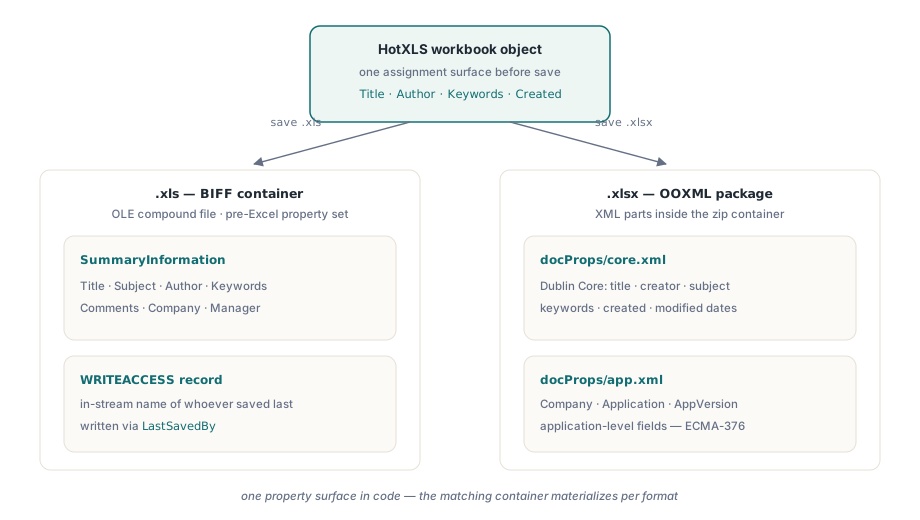
Označovanie generovaných zošitov podľa obchodného záznamu
Na strane XLSX sprístupňuje trieda TXLSXWorkbook vlastnosti Title, Subject, Author, Keywords, Description, Category, LastModifiedBy, Company, Application a AppVersion ako reťazce, plus Created a Modified ako hodnoty typu TDateTime, kde nula znamená nenastavené. Pravidlo, ktoré zatvára dieru s dedením, sa vojde do jednej vety: priraďte každé pole pri každom behu a hodnoty berte z obchodného záznamu namiesto dôvery v to, čo šablóna náhodou niesla
var
  Book: TXLSXWorkbook;
begin
  Book := TXLSXWorkbook.Create;
  try
    if Book.Open('statement-template.xlsx') <> 1 then
      raise Exception.Create('Template not available');

    // Prepíšte každé pole: čokoľvek ponechané nedotknuté
    // sa zdedí po tom, kto navrhol šablónu.
    Book.Title := 'Account Statement 2026-06 / ACME Corp';
    Book.Subject := 'Monthly account statement';
    Book.Author := 'Billing Service 4.2';
    Book.LastModifiedBy := 'Billing Service 4.2';
    Book.Company := 'Northwind Financial';
    Book.Category := 'Customer Delivery';
    Book.Keywords := 'statement;billing;2026-06;acct-10024';
    Book.Description := 'Generated document - manual edits are not retained';
    Book.Created := Now;
    Book.Modified := Now;

    Book.SaveAs('statement-10024.xlsx');
  finally
    Book.Free;
  end;
end;
Pole Keywords sa oplatí premyslieť viac, než sa mu zvyčajne dopraje. Vyhľadávacia infraštruktúra ho indexuje doslovne, Windows Search, SharePoint aj väčšina produktov DMS rovnako, takže konvencia oddelená bodkočiarkami nesúca číslo účtu a obdobie premení každý doručený zošit na dohľadateľný záznam bez jediného dotazu do databázy. Ten istý dosah je zároveň háčikom. Vlastnosti putujú s každou kópiou súboru, ďaleko za hranice prístupových práv systému, ktorý ich zapísal, takže osobné údaje do nich nepatria
Dvojica časových značiek nesie sémantiku, ktorú je lepšie zafixovať v politike než ponechať na zvyk. Created by mala označovať okamih, keď vaša linka dokument vygenerovala, a potom zostať zamrznutá. Modified je pole, ktoré Excel aktualizuje vždy, keď príjemca súbor uloží, takže rozdiel medzi nimi po doručení je priamym dôkazom, že zošit niekto ďalej upravoval, čo urovná nejeden spor o to, čie čísla preposlaná tabuľka vlastne obsahuje. Jedna pasca sa skrýva v nenastavenom stave: je ním doslovná hodnota nula, nie výnimka a nie null, takže auditný kód musí nulu testovať explicitne. Naformátujte nenastavený TDateTime bez tejto poistky a vaše logy sa naplnia sebavedomo nesprávnym dátumom z decembra 1899
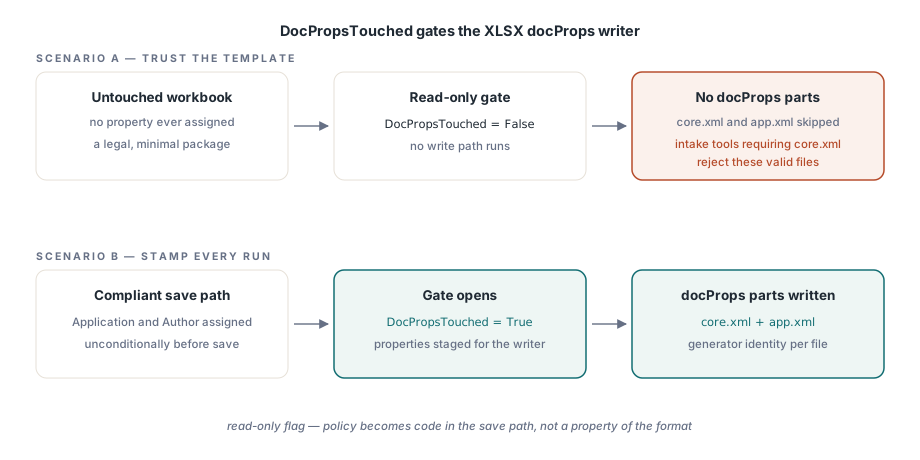
DocPropsTouched: zošit, ktorý odchádza bez docProps
Zapisovač vlastností v XLSX je riadený príznakom DocPropsTouched, ktorý je len na čítanie. Zošit, v ktorom sa žiadna vlastnosť nikdy nepriradila, nevyprodukuje vôbec žiadne časti docProps; HotXLS odmietne zapísať prázdnu kostru metadát. Toto správanie je úhľadné a má dva dôsledky, s ktorými sa oplatí počítať pri návrhu
Prijímací kód na strane konzumenta nesmie predpokladať, že core.xml je v každom balíku. Nástroj, ktorý ho tvrdo vyžaduje, odmietne úplne platné minimálne súbory. A ak vaša compliance vyžaduje, aby každý odchádzajúci dokument niesol aspoň identitu generátora, táto požiadavka sa stáva kódom, nie vlastnosťou formátu: priraďte Application a Author bezpodmienečne v ceste ukladania, keďže nedotknutý zošit je podľa špecifikácie úplne legálny, hoci potichu porušuje vašu politiku
Povrch staršieho formátu XLS a pasca s Comments
Fasáda BIFF nesie staršiu a menšiu sadu polí: Title, Subject, Author, Keywords, Comments, Company a Manager, plus LastSavedBy, alias vlastnosti UserName, ktorá zapisuje záznam WRITEACCESS zobrazovaný Excelom vtedy, keď má súbor uzamknutý iný používateľ
var
  Legacy: IXLSWorkbook;     // rozhranie s počítaním referencií: žiadne ručné Free
begin
  Legacy := TXLSWorkbook.Create;
  if Legacy.Open('archive-1999.xls') <= 0 then
    raise Exception.Create('Cannot open archive file');

  Legacy.Title := 'FY1999 ledger (migrated copy)';
  Legacy.Author := 'Archive Migration Batch';
  Legacy.Company := 'Northwind Financial';
  Legacy.Comments := 'Migrated 2026-06-11; source retained in cold storage';
  Legacy.LastSavedBy := 'migration-svc';   // záznam BIFF WRITEACCESS

  Legacy.SaveAs('archive-1999-stamped.xls');
end;
Jedna kolízia názvov spôsobuje opakované nedorozumenia. Vlastnosť Comments na úrovni dokumentu je tu voľnou textovou poznámkou zobrazenou v dialógu vlastností súboru. Nemá nič spoločné s komentármi v bunkách, ktoré sú objektmi kresliacej vrstvy pripojenými k rozsahom cez úplne samostatné rozhranie. Revízia kódu, ktorá prijme tvrdenie „veď Comments už zapisujeme“ bez overenia, ktoré z nich sa myslí, prijala tvrdenie o nesprávnej funkcii, a stáva sa to častejšie, než by spoločný názov naznačoval. Zdieľajú štyri písmená a ani jeden bajt úložiska
Čítanie metadát pri príjme a diera v predbežnom skúmaní
Čítanie je symetrické. Po volaní Open sa tie isté vlastnosti vrátia naplnené zo súboru, čo mení auditovanie metadát prichádzajúcich zošitov na krátky cyklus
var
  Book: TXLSXWorkbook;
begin
  Book := TXLSXWorkbook.Create;
  try
    if Book.Open(FileName) = 1 then
    begin
      Writeln(Format('%s | title="%s" author="%s" created=%s',
        [ExtractFileName(FileName), Book.Title, Book.Author,
         FormatDateTime('yyyy-mm-dd', Book.Created)]));
      if Book.Created = 0 then
        Writeln('  no creation date recorded');
    end;
  finally
    Book.Free;
  end;
end;
Pri tom počítajte s jedným obmedzením. Neexistuje sonda len pre vlastnosti. Metóda GetSheetNames dokáže vypísať hárky bez načítania zošita, ale prečítanie Title alebo Author znamená plné Open, takže triedenie metadát naprieč veľkým archívom platí plnú cenu analýzy pri každom súbore. Na strane BIFF môžete túto cenu pri auditoch iba na čítanie zoškrtať nastavením _DisableGraphics na true pred otvorením, čo kresliacu vrstvu úplne preskočí. Sedí to cyklu, ktorý číta len vlastnosti a štatistiky buniek, a je to presne nesprávne vo chvíli, keď by tá istá inštancia mohla ukladať, pretože preskočený kresliaci obsah by sa zahodil. Keď dokáže množinu predfiltrovať už samotná štruktúra hárkov, pričom exporty s jediným hárkom sú zjavnou vecou na preskočenie, lacné techniky z nášho článku o výpise hárkov a nenáročnej kontrole zmenšia počet súborov, ktoré sa dostanú k drahému prechodu. A pri hromadných označovacích úlohách, kde sa tisíce výstupov zapisujú a nie kontrolujú, sa bez zmeny uplatnia vzory priepustnosti na strane zápisu z nášho článku o streamovanom zápise pre dávkové úlohy, keďže priradenie vlastností k času uloženia nepridá nič merateľné
Prechod medzi formátmi a zadržanie úniku
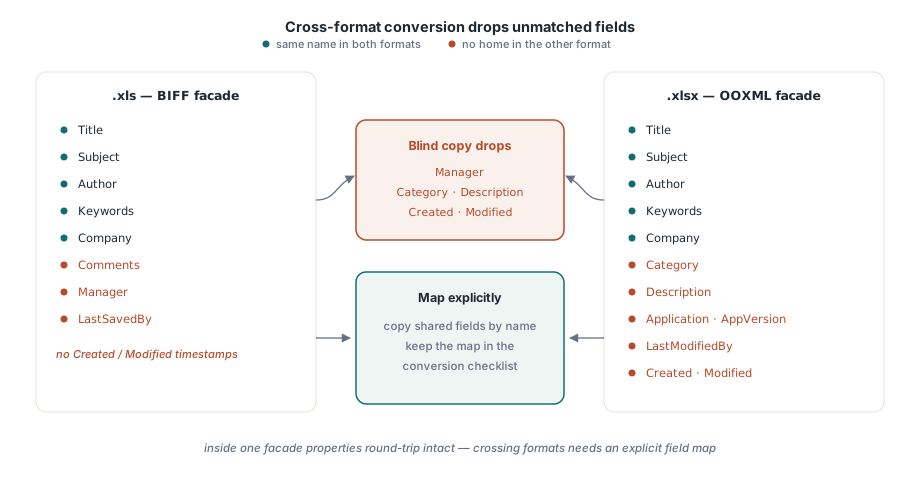
Vlastnosti prejdú cyklom čisto v rámci jednej fasády: otvorte .xlsx, upravte ho, uložte a sada sa vráti neporušená. Prechod medzi formátmi je miesto, kde sa predpoklad rovnocennosti láme, pretože sady polí v BIFF a OOXML si neodpovedajú jedna k jednej. BIFF má Manager a žiadne časové značky; OOXML má Category, Description a dvojicu Created a Modified. Konvertor, ktorý kopíruje naslepo, stratí všetko, čo cieľový formát neudrží, takže polia mapujte explicitne a mapovanie si dajte do kontrolného zoznamu konverzie hneď vedľa všetkého ostatného, čo cestu neprežije
Únik, ktorý otvára dedenie zo šablóny, tečie opačným smerom: sú to informácie, ktoré ste vôbec nechceli poslať von. Mená autorov, interné označenia projektov odložené v kľúčových slovách, koncepčný názov, ktorý nikto neschválil. Disciplína prepíš všetko z generátora vyššie je celou obranou a oplatí sa ju overiť tak, ako by to urobil cudzí človek: otvorením dialógu Vlastnosti, ku ktorému sa dostane každý zákazník, alebo rozbalením .xlsx a prečítaním docProps/core.xml priamo z balíka. To, čo tam uvidíte, je presne to, čo vidí každý indexer ďalej v reťazci
Táto viditeľnosť ďalej v reťazci je zároveň dôvodom, prečo si niekoľko polí zaslúži viac starostlivosti než zvyšok. Title, Author, Keywords (ktoré sa objavujú ako Tags) a Comments alebo Description nesú v SharePointe a vo Windows Search väčšinu indexačnej váhy. Názov, ktorý je naozaj odlišný pre každý dokument a nesie obdobie aj účet, spraví pre dohľadateľnosť viac než akákoľvek schéma pomenúvania priečinkov postavená nad ním, a stojí jedno priradenie na uloženie
Vlastnosti dokumentu sú najlacnejším profesionálnym leskom, aký môže generovaný zošit niesť, a zároveň najčastejšie dodávanou chybou vtedy, keď ich nikto nemá na starosti. Oba povrchy vlastností opísané tu patria komponentu HotXLS Delphi Component, ktorý ich zapisuje natívne pre XLS aj XLSX bez automatizácie Excelu