Освоение аннотаций PDF с компонентом HotPDF.
Аннотации PDF – одна из самых мощных функций для создания интерактивных и совместных документов. Они позволяют пользователям добавлять комментарии, выделения, штампы и мультимедийный контент непосредственно в файлы PDF, не изменяя структуру исходного документа. Это подробное руководство описывает, как реализовать различные типы аннотаций PDF, охватывая все, от простых текстовых аннотаций до расширенных мультимедийных вложений. HotPDF Component, охватывая все, от базовых текстовых аннотаций до расширенных мультимедийных вложений.
Понимание аннотаций PDF: больше, чем просто комментарии.
Аннотации PDF – это объекты, которые можно добавлять на страницы PDF для предоставления дополнительной информации, интерактивности или визуального улучшения. В отличие от обычного содержимого страницы, аннотации хранятся как отдельные объекты, которые можно отображать или скрывать, редактировать или удалять, не затрагивая структуру базового документа. Это делает их идеальными для:
- Просмотра документов: Добавление комментариев, заметок и обратной связи.
- Улучшение форм: Создание интерактивных элементов и справочного текста.
- Интеграция мультимедиа: Встраивание аудио, видео и файловых вложений.
- Визуальная разметка: Выделение важных разделов с помощью штампов и фигур.
- Совместная работа: Обеспечение возможности одновременного внесения вклада от нескольких пользователей без конфликтов.
Быстрый старт: простой пример аннотации текста.
Давайте начнем с простого примера аннотации текста, чтобы понять основные концепции аннотаций PDF.
|
1 2 3 4 5 6 7 8 9 10 11 12 13 14 15 16 17 18 19 20 21 22 23 24 25 26 27 28 29 30 31 32 33 34 35 36 37 38 39 40 41 42 43 44 45 46 47 48 49 50 51 |
program SimpleAnnotation; {$I ..\..\..\Lib\HotPDF.inc} {$APPTYPE CONSOLE} uses {$IFDEF XE2+} System.Classes, System.SysUtils, Vcl.Graphics, {$ELSE} Classes, SysUtils, Graphics, {$ENDIF} HPDFDoc; var HotPDF: THotPDF; begin HotPDF := THotPDF.Create(nil); try // Configure PDF basic properties HotPDF.FileName := 'SimpleAnnotation.pdf'; HotPDF.Title := 'Simple Annotation Demo'; HotPDF.Author := 'HotPDF Component'; // Set font embedding for consistent display HotPDF.FontEmbedding := True; HotPDF.BeginDoc; // Set font HotPDF.CurrentPage.SetFont('Arial', [], 12, 0, False); // Add page content HotPDF.CurrentPage.TextOut(120, 65, 0, 'Click the annotation icon:'); // Add multilingual text annotations HotPDF.CurrentPage.AddTextAnnotation( 'This is a text annotation.' + #13#10 + 'Dies ist eine Textanmerkung.' + #13#10 + 'Ceci est une annotation textuelle.' + #13#10 + 'This is a text annotation.', Rect(120, 80, 140, 100), True, taComment, clBlue ); HotPDF.EndDoc; finally HotPDF.Free; end; end. |
Этот простой пример демонстрирует несколько основных концепций аннотаций PDF.
- Точечное позиционирование: The
Rect(120, 80, 140, 100)параметр определяет область, по которой можно кликнуть в аннотации. - Поддержка нескольких языков: Содержимое включает текст на английском, немецком, французском и китайском языках.
- Управление видимостью: The
Trueпараметр, который изначально открывает аннотацию. - Тип аннотации:
taCommentсоздает стандартную аннотацию комментария. - Визуальная настройка:
clBlueустанавливает цвет аннотации. - Встраивание шрифтов:
FontEmbedding := Trueобеспечивает согласованный отображение во всех программах просмотра.
Полный справочник типов аннотаций.
Компонент HotPDF поддерживает различные типы аннотаций, каждый из которых оптимизирован для конкретных сценариев использования:
1. Текстовые аннотации
Текстовые аннотации - это наиболее распространенный тип, предоставляющий различные варианты отображения:
|
1 2 3 4 5 6 7 8 9 10 11 12 13 14 15 16 17 18 19 20 21 22 23 24 25 26 27 28 29 30 31 32 33 34 35 36 37 38 39 40 41 42 43 44 45 46 47 48 49 50 51 52 53 54 55 |
// Available text annotation type enumeration THPDFTextAnnotationType = ( taComment, // Standard comment bubble taKey, // Key symbol for important notes taNote, // Note icon for general information taHelp, // Help icon for help text taNewParagraph, // New paragraph marker taParagraph, // Paragraph marker taInsert // Content insertion marker ); // Usage examples for different types procedure AddTextAnnotationExamples(PDF: THotPDF); begin WriteLn('Adding text annotations...'); // Section header text PDF.CurrentPage.TextOut(50, 80, 0, 'Text Annotations - Different Types and Colors:'); // Critical annotation with multilingual content PDF.CurrentPage.AddTextAnnotation( 'CRITICAL: This is a critical comment annotation requiring immediate attention.' + #13#10 + 'KRITISCH: Dies ist eine kritische Textanmerkung.' + #13#10 + 'CRITIQUE: Ceci est une annotation critique.', Rect(50, 95, 70, 115), True, taComment, clRed ); // Key point annotation PDF.CurrentPage.AddTextAnnotation( 'KEY POINT: Important information marker' + #13#10 + 'This annotation uses the key icon for emphasis.', Rect(80, 100, 100, 120), False, taKey, $0080FF // Orange ); // Help annotation PDF.CurrentPage.AddTextAnnotation( 'HELP: Click for additional assistance' + #13#10 + 'This help annotation provides user guidance.', Rect(110, 100, 130, 120), False, taHelp, clBlue ); // General note annotation PDF.CurrentPage.AddTextAnnotation( 'NOTE: General information annotation' + #13#10 + 'Standard note for supplementary information.', Rect(140, 100, 160, 120), False, taNote, clGreen ); // Insert marker annotation PDF.CurrentPage.AddTextAnnotation( 'INSERT: Content insertion marker' + #13#10 + 'Indicates where new content should be added.', Rect(170, 100, 190, 120), False, taInsert, $800080 // Purple ); end; |
2. Свободные текстовые аннотации
Свободные текстовые аннотации отображают текст непосредственно на странице, не требуя взаимодействия с пользователем:
|
1 2 3 4 5 6 7 8 9 10 11 12 13 14 15 16 17 18 19 20 21 22 23 24 25 26 27 28 29 30 31 32 33 34 35 36 37 38 39 40 41 42 43 44 45 46 47 |
// Free text alignment options enumeration THPDFFreeTextAnnotationJust = ( ftLeftJust, // Left-aligned text ftCenter, // Center-aligned text ftRightJust // Right-aligned text ); // Example: Create free text annotations with different alignments procedure AddFreeTextAnnotationExamples(PDF: THotPDF); begin WriteLn('Adding free text annotations...'); // Section header PDF.CurrentPage.TextOut(50, 160, 0, 'Free Text Annotations - Different Alignments:'); // Left-justified free text PDF.CurrentPage.AddFreeTextAnnotation( 'LEFT TEXT ANNOTATION', Rect(50, 180, 200, 200), ftLeftJust, $008000 // Green ); // Center-justified free text PDF.CurrentPage.AddFreeTextAnnotation( 'CENTERED Text', Rect(220, 180, 370, 200), ftCenter, $0080FF // Orange ); // Right-justified free text PDF.CurrentPage.AddFreeTextAnnotation( 'RIGHT ANNOTATION', Rect(390, 180, 540, 200), ftRightJust, clFuchsia // Fuchsia ); // Document status annotation PDF.CurrentPage.AddFreeTextAnnotation( 'CONFIDENTIAL DOCUMENT', Rect(200, 210, 400, 230), ftCenter, clRed ); end; |
3. Геометрические аннотации
Линейные и фигурные аннотации обеспечивают визуальное выделение и функции маркировки:
|
1 2 3 4 5 6 7 8 9 10 11 12 13 14 15 16 17 18 19 20 21 22 23 24 25 26 27 28 29 30 31 32 33 34 35 36 37 38 39 40 41 42 43 44 45 46 47 48 49 50 51 52 53 54 55 |
// Line and shape annotation examples procedure AddGeometricAnnotationExamples(PDF: THotPDF); var StartPoint, EndPoint: THPDFCurrPoint; begin WriteLn('Adding geometric annotations...'); // Section header PDF.CurrentPage.TextOut(50, 250, 0, 'Geometric Annotations - Lines and Shapes:'); // Line annotation - diagonal StartPoint.X := 50; StartPoint.Y := 270; EndPoint.X := 150; EndPoint.Y := 290; PDF.CurrentPage.AddLineAnnotation( 'Diagonal line pointing to important content', StartPoint, EndPoint, $0080FF // Orange ); // Line annotation - horizontal StartPoint.X := 170; StartPoint.Y := 280; EndPoint.X := 270; EndPoint.Y := 280; PDF.CurrentPage.AddLineAnnotation( 'Horizontal line for emphasis', StartPoint, EndPoint, clBlue ); // Circle annotation PDF.CurrentPage.AddCircleSquareAnnotation( 'Circle highlighting important area', Rect(50, 300, 120, 320), csCircle, clGreen ); // Square annotation PDF.CurrentPage.AddCircleSquareAnnotation( 'Square frame for emphasis', Rect(140, 300, 210, 320), csSquare, $800080 // Purple ); end; // Circle and square annotation types THPDFCSAnnotationType = (csCircle, csSquare); |
4. Аннотации-штампы
Аннотации со штампами предоставляют предопределенные визуальные маркеры для статуса документа и рабочих процессов.
|
1 2 3 4 5 6 7 8 9 10 11 12 13 14 15 16 17 18 19 20 21 22 23 24 25 26 27 28 29 30 31 32 33 34 35 36 37 38 39 40 41 42 43 44 45 46 47 48 49 50 51 52 53 54 55 56 57 58 59 60 61 62 63 64 65 66 67 68 69 |
// Available stamp type enumeration THPDFStampAnnotationType = ( satApproved, // Green "Approved" stamp satExperimental, // "Experimental" marker satNotApproved, // Red "Not Approved" stamp satAsIs, // "As Is" status satExpired, // "Expired" warning satNotForPublicRelease, // Confidential marker satConfidential, // "Confidential" stamp satFinal, // "Final" marker satSold, // "Sold" status satDepartmental, // Department-specific marker satForComment, // "For Comment" review stamp satTopSecret // "Top Secret" classification ); // Example: Add various stamp annotations procedure AddStampAnnotationExamples(PDF: THotPDF); begin WriteLn('Adding stamp annotations...'); // Section header PDF.CurrentPage.TextOut(50, 340, 0, 'Stamp Annotations - Document Status Markers:'); // Approval stamps PDF.CurrentPage.AddStampAnnotation( 'Document approved for release', Rect(50, 360, 150, 390), satApproved, clGreen ); PDF.CurrentPage.AddStampAnnotation( 'Document rejected - requires revision', Rect(170, 360, 270, 390), satNotApproved, clRed ); // Security stamps PDF.CurrentPage.AddStampAnnotation( 'Confidential information marker', Rect(290, 360, 390, 390), satConfidential, clRed ); PDF.CurrentPage.AddStampAnnotation( 'Final version stamp', Rect(410, 360, 510, 390), satFinal, clBlue ); // Workflow stamps PDF.CurrentPage.AddStampAnnotation( 'For comment and review', Rect(50, 400, 150, 430), satForComment, $800080 // Purple ); PDF.CurrentPage.AddStampAnnotation( 'Experimental version', Rect(170, 400, 270, 430), satExperimental, $0080FF // Orange ); end; |
Мультимедийные аннотации: взаимодействие, выходящее за рамки текста.
Современные рабочие процессы PDF часто требуют интеграции мультимедиа. Компонент HotPDF поддерживает мультимедийные аннотации.
5. Аннотации для вложений файлов.
Аннотации для вложений файлов позволяют встраивать внешние файлы в документы PDF.
|
1 2 3 4 5 6 7 8 9 10 11 12 13 14 15 16 17 18 19 20 21 22 23 24 25 26 27 28 29 30 31 32 33 34 35 36 37 38 39 40 41 42 43 44 45 46 47 48 49 50 51 |
// File attachment annotation example procedure AddMultimediaAnnotationExamples(PDF: THotPDF); var DemoTextFile, DemoAudioFile: string; DemoContent: TStringList; begin WriteLn('Adding multimedia annotations...'); // Section header PDF.CurrentPage.TextOut(50, 450, 0, 'Multimedia Annotations - Files, Audio, and Video:'); // Create demo text file if it doesn't exist DemoTextFile := 'DemoAttachment.txt'; if not FileExists(DemoTextFile) then begin DemoContent := TStringList.Create; try DemoContent.Add('HotPDF Component Demo Attachment'); DemoContent.Add('================================'); DemoContent.Add('This is a sample text file attached to the PDF document.'); DemoContent.Add('It demonstrates the file attachment annotation capability.'); DemoContent.Add('Created: ' + DateTimeToStr(Now)); DemoContent.SaveToFile(DemoTextFile); finally DemoContent.Free; end; end; // File attachment annotation PDF.CurrentPage.AddFileAttachmentAnnotation( 'Demo text file attachment', DemoTextFile, Rect(50, 470, 90, 490), clBlue ); // Multiple file attachment examples PDF.CurrentPage.AddFileAttachmentAnnotation( 'Legal agreement document', 'Contract.docx', Rect(100, 470, 140, 490), clPurple ); PDF.CurrentPage.AddFileAttachmentAnnotation( 'Reference image for comparison', 'Reference.png', Rect(150, 470, 190, 490), clGreen ); end; |
6. Аудио аннотации.
Аудио аннотации позволяют встраивать аудиофайлы для голосовых заметок или пояснений.
|
1 2 3 4 5 6 7 8 9 10 11 12 13 14 15 16 17 18 19 20 21 22 23 24 25 26 27 28 29 30 31 32 33 34 35 36 37 38 39 40 41 42 |
// Sound annotation example procedure AddSoundAnnotationExample(PDF: THotPDF); var DemoAudioFile: string; begin // Check for existing multimedia files and add annotations DemoAudioFile := 'Music.wav'; if FileExists(DemoAudioFile) then begin PDF.CurrentPage.AddSoundAnnotation( 'Demo audio file - Click to play', DemoAudioFile, Rect(110, 470, 150, 490), clGreen ); end else begin PDF.CurrentPage.AddTextAnnotation( 'Audio file not found: ' + DemoAudioFile, Rect(110, 470, 130, 490), False, taNote, $0080FF // Orange ); end; // Multi-language sound annotation example PDF.CurrentPage.AddSoundAnnotation( 'English narration', 'Narration_EN.mp3', Rect(60, 350, 100, 390), clBlue ); PDF.CurrentPage.AddSoundAnnotation( 'Chinese narration', 'Narration_CN.mp3', Rect(110, 350, 150, 390), clGreen ); end; |
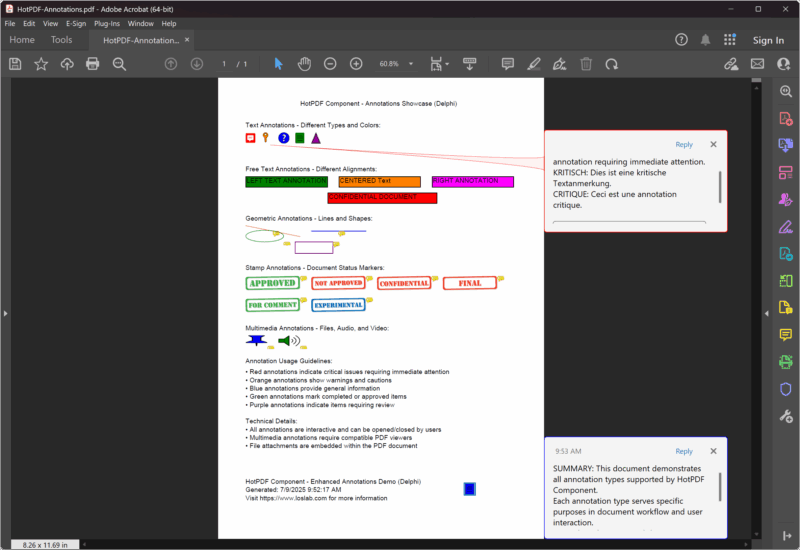
Полный пример аннотации: расширенный демонстрационный проект.
Вот полный, обновленный пример, демонстрирующий все типы аннотаций в одном комплексном проекте:
|
1 2 3 4 5 6 7 8 9 10 11 12 13 14 15 16 17 18 19 20 21 22 23 24 25 26 27 28 29 30 31 32 33 34 35 36 37 38 39 40 41 42 43 44 45 46 47 48 49 50 51 52 53 54 55 56 57 58 59 60 61 62 63 64 65 66 67 68 69 70 71 72 73 74 75 76 77 78 79 80 81 82 83 84 85 86 87 88 89 90 91 92 93 94 95 96 97 98 99 100 101 102 103 104 105 106 107 108 109 110 111 112 113 114 115 116 117 118 119 120 121 122 123 124 125 126 127 128 129 |
{***********************************************************} // HotPDF PDF Component - Enhanced Annotations Demo Delphi // Copyright(c)2007-2025, https://www.loslab.com // This demo showcases comprehensive annotation functionality {***********************************************************} program Annotations; {$I ..\..\..\Lib\HotPDF.inc} {$APPTYPE CONSOLE} uses {$IFDEF XE2+} System.Classes, System.SysUtils, Vcl.Graphics, {$ELSE} Classes, SysUtils, Graphics, {$ENDIF} HPDFDoc; var HotPDF: THotPDF; // ... existing code ... procedure AddDocumentationAndFooter(PDF: THotPDF); begin WriteLn('Adding documentation and footer...'); // Documentation section PDF.CurrentPage.TextOut(50, 510, 0, 'Annotation Usage Guidelines:'); PDF.CurrentPage.TextOut(50, 530, 0, '• Red annotations indicate critical issues requiring immediate attention'); PDF.CurrentPage.TextOut(50, 545, 0, '• Orange annotations show warnings and cautions'); PDF.CurrentPage.TextOut(50, 560, 0, '• Blue annotations provide general information'); PDF.CurrentPage.TextOut(50, 575, 0, '• Green annotations mark completed or approved items'); PDF.CurrentPage.TextOut(50, 590, 0, '• Purple annotations indicate items requiring review'); // Technical information PDF.CurrentPage.TextOut(50, 620, 0, 'Technical Details:'); PDF.CurrentPage.TextOut(50, 635, 0, '• All annotations are interactive and can be opened/closed by users'); PDF.CurrentPage.TextOut(50, 650, 0, '• Multimedia annotations require compatible PDF viewers'); PDF.CurrentPage.TextOut(50, 665, 0, '• File attachments are embedded within the PDF document'); // Footer PDF.CurrentPage.TextOut(50, 730, 0, 'HotPDF Component - Enhanced Annotations Demo (Delphi)'); PDF.CurrentPage.TextOut(50, 745, 0, 'Generated: ' + DateTimeToStr(Now)); PDF.CurrentPage.TextOut(50, 760, 0, 'Visit https://www.loslab.com for more information'); // Add a final summary annotation PDF.CurrentPage.AddTextAnnotation( 'SUMMARY: This document demonstrates all annotation types supported by HotPDF Component.' + #13#10 + 'Each annotation type serves specific purposes in document workflow and user interaction.' + #13#10 + 'For technical support and documentation, visit https://www.loslab.com', Rect(450, 740, 470, 760), False, taNote, clBlue ); end; begin WriteLn('HotPDF Enhanced Annotations Demo (Delphi)'); WriteLn('========================================='); WriteLn('Creating comprehensive PDF with all annotation types...'); WriteLn(''); HotPDF := THotPDF.Create(nil); try try // Configure PDF properties HotPDF.FileName := 'HotPDF-Annotations.pdf'; HotPDF.Title := 'HotPDF Annotations Demo (Delphi)'; HotPDF.Author := 'HotPDF Component'; HotPDF.Subject := 'Comprehensive annotation examples'; HotPDF.Keywords := 'PDF, Annotations, HotPDF, Demo, Interactive, Delphi'; // Set font embedding for consistent display HotPDF.FontEmbedding := True; // Enable FlateDecode compression for smaller file sizes HotPDF.Compression := cmFlateDecode; // Set initial zoom to fit page height in window HotPDF.InitialZoom := izFitV; HotPDF.BeginDoc; // Use standard font HotPDF.CurrentPage.SetFont('Arial', [], 12, 0, False); // Add page title HotPDF.CurrentPage.TextOut(150, 40, 0, 'HotPDF Component - Annotations Showcase (Delphi)'); // Add all annotation examples AddTextAnnotationExamples(HotPDF); AddFreeTextAnnotationExamples(HotPDF); AddGeometricAnnotationExamples(HotPDF); AddStampAnnotationExamples(HotPDF); AddMultimediaAnnotationExamples(HotPDF); AddDocumentationAndFooter(HotPDF); HotPDF.EndDoc; WriteLn('Annotations PDF created successfully!'); WriteLn(''); WriteLn('Output file: ' + HotPDF.FileName); WriteLn(''); WriteLn('The PDF contains:'); WriteLn('• Text annotations with different types and colors'); WriteLn('• Free text annotations with various alignments'); WriteLn('• Geometric annotations (lines, circles, squares)'); WriteLn('• Stamp annotations for document workflow'); WriteLn('• Multimedia annotations (file, audio, video)'); WriteLn('• Comprehensive documentation and usage guidelines'); except on E: Exception do begin WriteLn('Error creating PDF: ' + E.Message); ExitCode := 1; end; end; finally HotPDF.Free; end; end. |
Рекомендации по работе с аннотациями PDF.
1. Современная структура кода и совместимость.
Обновленный компонент HotPDF использует современные методы программирования на Delphi:
|
1 2 3 4 5 6 7 8 9 10 11 12 13 14 15 16 17 18 19 20 21 22 23 24 25 26 27 28 29 30 31 |
// Modern unit structure with conditional compilation uses {$IFDEF XE2+} System.Classes, System.SysUtils, Vcl.Graphics, {$ELSE} Classes, SysUtils, Graphics, {$ENDIF} HPDFDoc; // Enhanced PDF configuration procedure ConfigureModernPDF(PDF: THotPDF); begin // Font embedding for consistent display across viewers PDF.FontEmbedding := True; // FlateDecode compression for smaller file sizes PDF.Compression := cmFlateDecode; // Initial zoom setting for better user experience PDF.InitialZoom := izFitV; // Fit to page height // Complete metadata for better document management PDF.Title := 'Professional PDF with Annotations'; PDF.Author := 'HotPDF Component'; PDF.Subject := 'Comprehensive annotation examples'; PDF.Keywords := 'PDF, Annotations, Interactive, Professional'; end; |
2. Обработка ошибок и надежность.
Реализуйте правильную обработку ошибок для производственных приложений:
|
1 2 3 4 5 6 7 8 9 10 11 12 13 14 15 16 17 18 19 20 21 22 23 24 25 26 27 28 29 30 31 32 33 34 35 36 37 38 39 40 41 42 43 44 45 46 47 |
// Robust file handling with error checking procedure SafeAddFileAttachment(PDF: THotPDF; const FileName: string; const Description: string); begin if FileExists(FileName) then begin PDF.CurrentPage.AddFileAttachmentAnnotation( Description, FileName, Rect(10, 10, 50, 50), clGreen ); end else begin // Add error annotation instead PDF.CurrentPage.AddTextAnnotation( Format('File not found: %s', [ExtractFileName(FileName)]), Rect(10, 10, 30, 30), True, taKey, clRed ); end; end; // Exception handling in main program begin HotPDF := THotPDF.Create(nil); try try // PDF creation code here HotPDF.BeginDoc; // ... annotation code ... HotPDF.EndDoc; WriteLn('PDF created successfully!'); except on E: Exception do begin WriteLn('Error creating PDF: ' + E.Message); ExitCode := 1; end; end; finally HotPDF.Free; end; end; |
3. Согласованность цветов и визуальный дизайн.
Используйте согласованные цветовые схемы для улучшения пользовательского опыта:
|
1 2 3 4 5 6 7 8 9 10 11 12 13 14 15 16 17 18 19 20 21 22 23 24 25 26 27 28 29 30 31 32 33 34 35 36 37 38 |
// Color constants for consistent annotation design const ANNOTATION_COLOR_ERROR = clRed; ANNOTATION_COLOR_WARNING = $0080FF; // Orange ANNOTATION_COLOR_INFO = clBlue; ANNOTATION_COLOR_SUCCESS = clGreen; ANNOTATION_COLOR_REVIEW = $800080; // Purple // Consistent color application procedure AddColorCodedAnnotations(PDF: THotPDF); begin // Error annotation PDF.CurrentPage.AddTextAnnotation( 'ERROR: Critical issue requiring immediate attention', Rect(50, 100, 70, 120), True, taKey, ANNOTATION_COLOR_ERROR ); // Warning annotation PDF.CurrentPage.AddTextAnnotation( 'WARNING: Caution required', Rect(80, 100, 100, 120), False, taComment, ANNOTATION_COLOR_WARNING ); // Information annotation PDF.CurrentPage.AddTextAnnotation( 'INFO: Additional information available', Rect(110, 100, 130, 120), False, taNote, ANNOTATION_COLOR_INFO ); end; |
Оптимизация производительности для больших документов.
1. Структурированный подход с использованием процедур.
Обновленный пример использует модульный подход для повышения удобства обслуживания:
|
1 2 3 4 5 6 7 8 9 10 11 12 13 14 15 16 17 18 19 20 21 22 23 24 25 26 27 28 29 30 31 32 33 34 35 36 37 38 39 40 41 42 43 44 45 |
// Modular annotation management procedure AddTextAnnotationExamples(PDF: THotPDF); begin WriteLn('Adding text annotations...'); // Text annotation code here end; procedure AddFreeTextAnnotationExamples(PDF: THotPDF); begin WriteLn('Adding free text annotations...'); // Free text annotation code here end; procedure AddGeometricAnnotationExamples(PDF: THotPDF); begin WriteLn('Adding geometric annotations...'); // Geometric annotation code here end; // Main execution with clear structure begin HotPDF := THotPDF.Create(nil); try // Configure PDF HotPDF.FileName := 'HotPDF-Annotations.pdf'; HotPDF.FontEmbedding := True; HotPDF.Compression := cmFlateDecode; HotPDF.InitialZoom := izFitV; HotPDF.BeginDoc; HotPDF.CurrentPage.SetFont('Arial', [], 12, 0, False); // Add all annotation examples in organized manner AddTextAnnotationExamples(HotPDF); AddFreeTextAnnotationExamples(HotPDF); AddGeometricAnnotationExamples(HotPDF); AddStampAnnotationExamples(HotPDF); AddMultimediaAnnotationExamples(HotPDF); AddDocumentationAndFooter(HotPDF); HotPDF.EndDoc; finally HotPDF.Free; end; end; |
2. Управление памятью и очистка ресурсов.
Правильное управление ресурсами для надежной работы:
|
1 2 3 4 5 6 7 8 9 10 11 12 13 14 15 16 17 18 19 20 21 22 23 24 25 26 27 28 29 30 31 32 33 34 35 36 37 38 39 |
// Proper resource management procedure CreateAnnotatedPDF; var HotPDF: THotPDF; TempFiles: TStringList; begin HotPDF := THotPDF.Create(nil); TempFiles := TStringList.Create; try try // Create temporary files for demonstration CreateDemoFiles(TempFiles); // Configure and create PDF ConfigurePDF(HotPDF); HotPDF.BeginDoc; // Add annotations AddAllAnnotations(HotPDF, TempFiles); HotPDF.EndDoc; WriteLn('PDF created successfully!'); except on E: Exception do begin WriteLn('Error: ' + E.Message); raise; // Re-raise for proper error handling end; end; finally // Clean up resources TempFiles.Free; HotPDF.Free; // Clean up temporary files CleanupTempFiles; end; end; |
Расширенные функции и современные улучшения.
1. Сжатие и оптимизация.
Обновленный компонент включает расширенные возможности сжатия:
|
1 2 3 4 |
// Modern compression settings HotPDF.Compression := cmFlateDecode; // Best compression ratio HotPDF.FontEmbedding := True; // Consistent font display HotPDF.InitialZoom := izFitV; // Optimal viewing experience |
2. Расширенная поддержка метаданных.
Полная информация о документах для профессиональных документов:
|
1 2 3 4 5 6 7 8 9 10 |
// Complete metadata configuration procedure ConfigureDocumentMetadata(PDF: THotPDF); begin PDF.Title := 'Professional PDF with Annotations'; PDF.Author := 'HotPDF Component'; PDF.Subject := 'Comprehensive annotation examples'; PDF.Keywords := 'PDF, Annotations, HotPDF, Demo, Interactive, Delphi'; PDF.Creator := 'HotPDF Component Demo'; PDF.Producer := 'HotPDF Component v2.x'; end; |
Заключение.
Обновленный компонент HotPDF обеспечивает комплексную поддержку аннотаций PDF с использованием современных практик разработки на Delphi. Улучшенный демонстрационный проект демонстрирует все типы аннотаций с улучшенной структурой кода, обработкой ошибок и управлением ресурсами.
Ключевые улучшения в обновленной версии:
- Современная структура кода: Используется условная компиляция для совместимости с XE2+.
- Улучшенная обработка ошибок: Надежная обработка исключений и очистка ресурсов.
- Улучшенная производительность: Сжатие FlateDecode и внедрение шрифтов.
- Улучшенная организация: Модульные процедуры для различных типов аннотаций.
- Профессиональные функции: Полная поддержка метаданных и параметры оптимизации.
- Подробные примеры: Все типы аннотаций с практическими примерами использования.
Независимо от того, разрабатываете ли вы системы для просмотра документов, интерактивные формы или мультимедийные презентации, обновленный компонент HotPDF предоставляет инструменты и примеры, необходимые для создания профессиональных PDF-документов с широкими возможностями аннотаций.
Полный исходный код доступен в каталоге Demo/Delphi/Annotations, что обеспечивает надежную основу для ваших проектов аннотаций PDF.