Надёжный способ получить оформленный отчёт Excel из Delphi — оттолкнуться от книги, которую уже построил дизайнер. Кто-то из финансового отдела оформляет счёт-фактуру в Excel: логотип, заголовки столбцов, границы на полосе деталей, жирная строка итогов, форматы валют. Ваш код открывает этот файл, вставляет живые данные в ячейки, зарезервированные для них дизайнером, и сохраняет результат. Внешний вид — их, цифры — ваши. HotXLS, нативная библиотека для Delphi и C++Builder, читающая и записывающая книги XLS и XLSX без управления Excel, даёт вам три операции, необходимые этому подходу: поиск ячейки по её тексту, копирование диапазона с сохранёнными стилями и формулами и вставку строк, чтобы всё, что ниже, сдвигалось вниз вместе с данными
Единственное правило, которое отличает генератор, переживающий правки шаблона, от того, что ломается на первой же, — никогда не адресовать ячейки буквальными номерами строк и столбцов. Шаблон — это документ, который редактируют другие люди. Финансовый отдел добавляет строку налога, увеличивает высоту строки с логотипом, переставляет блок адреса, и формат файла в этом вам совершенно не помогает: сохранение в BIFF или OOXML проходит успешно независимо от того, означает ли строка 10 то же самое, что и в прошлом квартале. Генератор, который пишет первую строку деталей в жёстко закодированную строку 10, при первой же вставке блока над разделом деталей, отштампует позиции поверх не тех ячеек и просуммирует диапазон итогов, который больше не покрывает данные. Ничто не бросает исключение, каждое сохранение возвращает успех, и единственный сигнал — это клиент, заметивший неверный счёт
Привязывайте каждую координату к токену-плейсхолдеру
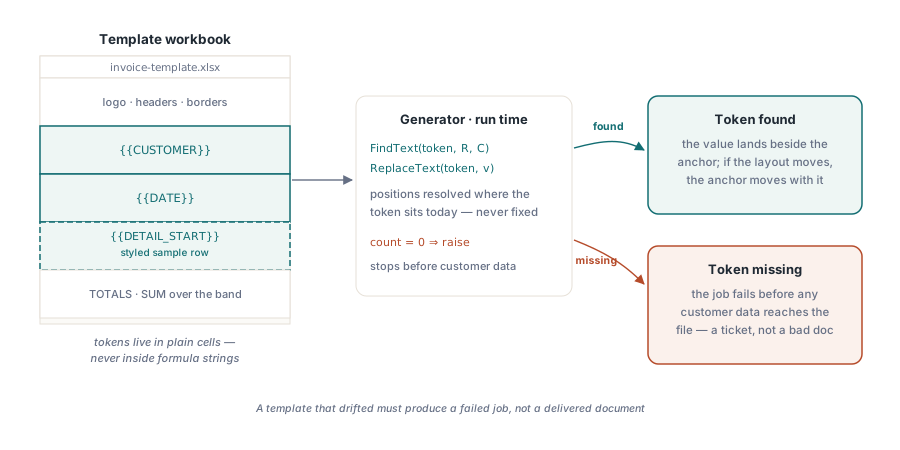
Решение — заставить шаблон нести собственные координаты. Дизайнер записывает токены вроде {{CUSTOMER}}, {{DATE}} и {{DETAIL_START}} в ячейки, которых должен коснуться генератор, а генератор во время выполнения вычисляет каждую позицию по тому, где он находит эти токены. Правки макета больше не имеют значения, потому что токен перемещается вместе с ячейкой, в которой сидит. Вторая половина контракта — правило отказа: если обязательный токен отсутствует, задача останавливается до того, как какие-либо данные клиента попадут в файл. Шаблон, который разошёлся с ожиданиями, должен породить провалившийся тикет задачи, а не доставленный документ
Поиск токенов: FindText и ReplaceText
Оба семейства классов HotXLS предоставляют поиск на уровне рабочего листа. FindText возвращает строку и столбец первой ячейки, чей текст совпадает, с перегрузкой, добавляющей чувствительность к регистру. ReplaceText заменяет каждое вхождение и возвращает, сколько раз он это сделал. Эти два метода покрывают два вида токенов, которые у вас обычно встречаются. Единственный якорь, вроде имени клиента, вы находите один раз и записываете рядом с ним; токен, который должен встречаться ровно один раз, вроде даты отчёта, вы заменяете и проверяете счётчик. На стороне XLSX заполнение, привязывающееся таким образом, выглядит так:
var
  Book: TXLSXWorkbook;
  Sheet: TXLSXWorksheet;
  R, C: Integer;
begin
  Book := TXLSXWorkbook.Create;
  try
    if Book.Open('invoice-template.xlsx') <> 1 then
      raise Exception.Create('Cannot open invoice template');
    Sheet := Book.Sheets[0];               // TXLSXSheets.Items нумеруется с 0

    if not Sheet.FindText('{{CUSTOMER}}', R, C) then
      raise Exception.Create('Template drift: {{CUSTOMER}} anchor missing');
    Sheet.Cells[R, C].Value := 'ACME Corp';

    if Sheet.ReplaceText('{{DATE}}',
         FormatDateTime('yyyy-mm-dd', Date)) = 0 then
      raise Exception.Create('Template drift: {{DATE}} token missing');
    // расширение раздела деталей и сохранение следуют ниже
  finally
    Book.Free;
  end;
end;
Важны две детали. Во-первых, FindText и ReplaceText сопоставляют текстовое значение ячейки; токен, встроенный внутрь строки формулы, для них невидим, поэтому плейсхолдер-токены должны жить в обычных ячейках, никогда внутри формул. Во-вторых, счётчик замен — ваш детектор расхождений. Шаблон, который должен содержать ровно один токен {{DATE}}, но сообщает о нуле замен, был отредактирован, и выбросить исключение в этот момент — именно то, что превращает молчаливое расхождение макета в видимый сбой
Клонирование строки деталей без потери стилей и формул
Раздел деталей счёта растёт вместе с данными. Запись значений прямо в пустые строки под образцовой строкой отбрасывает всё, что подготовил дизайнер: границы, числовые форматы, формулы для каждой строки. Паттерн, который сохраняет всё это, — оставить в шаблоне одну полностью оформленную образцовую строку и клонировать её для каждой позиции. CopyRange дублирует стили и формулы за один вызов, после чего генератор перезаписывает только ячейки со значениями
const
  DetailRow = 10;            // оформленная образцовая строка в шаблоне
var
  I: Integer;
begin
  // Сначала открываем место перед блоком итогов, чтобы диапазон SUM
  // под полосой деталей растягивался вместе с данными.
  if Length(Items) > 1 then
    Sheet.InsertRows(DetailRow + 1, Length(Items) - 1);

  for I := 0 to High(Items) do
  begin
    if I > 0 then              // клонируем стили и формулы из образцовой строки
      Sheet.CopyRange(DetailRow, 1, DetailRow, 5, DetailRow + I, 1);
    Sheet.Cells[DetailRow + I, 1].Value := Items[I].Name;
    Sheet.Cells[DetailRow + I, 2].Value := Items[I].Qty;
    Sheet.Cells[DetailRow + I, 3].Value := Items[I].UnitPrice;
    Sheet.Cells[DetailRow + I, 4].Formula :=
      Format('B%d*C%d', [DetailRow + I, DetailRow + I]);  // без префикса '='
  end;
end;
Присмотритесь внимательно к присваиванию формулы. Свойство Formula в XLSX принимает выражение без ведущего знака равенства, тогда как фасад XLS ожидает '=B10*C10', присвоенное через Value. Смешение этих двух соглашений — самая частая ошибка при переносе кода между семействами классов, и она проваливается без единой жалобы: ячейка просто хранит буквальную строку, которую Excel показывает как текст. Если шаблон украшает полосу деталей объединёнными строками заголовков, помните, что значение несёт только верхняя левая ячейка объединённой области. Правила макета в сопутствующей статье об объединённых ячейках в шаблонах отчётов, управляемых макетом объясняют, почему области объединения должны находиться полностью вне полосы данных
Что перемещает InsertRows, а что оставляет позади
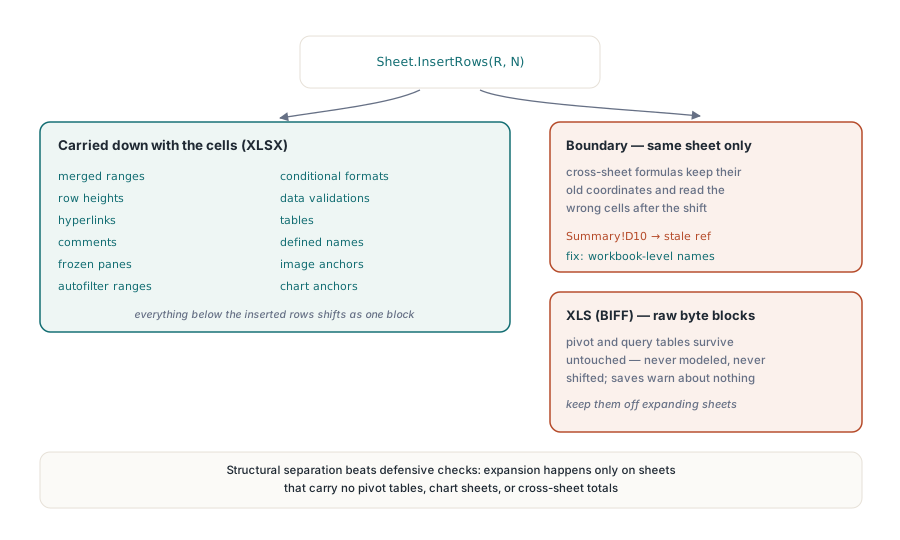
Вставка строк перед блоком итогов — это то, что заставляет диапазон SUM растягиваться по мере роста раздела деталей. На стороне XLSX InsertRows тянет вниз вместе с ячейками длинный список зависимых структур: объединённые диапазоны, высоты строк, гиперссылки, комментарии, закреплённые области, диапазоны автофильтра, условное форматирование, проверку данных, таблицы, именованные диапазоны и якоря изображений и диаграмм. В этом списке есть одна граница, которую стоит запомнить. Переписывание формул затрагивает только ссылки в пределах того же листа. Формула на сводном листе, указывающая в перемещённую область, сохраняет свои старые координаты и тихо читает не те ячейки, поэтому итоги, стягиваемые с разных листов, безопаснее выражать через именованные диапазоны уровня книги. Сопутствующая статья об именованных диапазонах и межлистовых формулах разбирает этот паттерн
Устаревший формат XLS проводит эту границу в более жёстком месте. HotXLS хранит сводные таблицы, таблицы запросов и подключения к внешним данным в файлах BIFF как сырые блоки байтов. Они переживают открытие и сохранение без изменений, но они не смоделированы, поэтому вставка строк никогда их не затрагивает. Шаблон, размещающий сводную таблицу под расширяющимся блоком деталей, сохраняется вообще без предупреждения, пока прямоугольник-источник сводной таблицы уплывает от данных. Выход здесь структурный, а не защитный: держите содержимое сводных таблиц и запросов на листах, в которые генератор никогда не вставляет строки, и устаревание попросту не сможет произойти
Пересчитывайте перед доставкой — или знайте, почему вы это пропустили
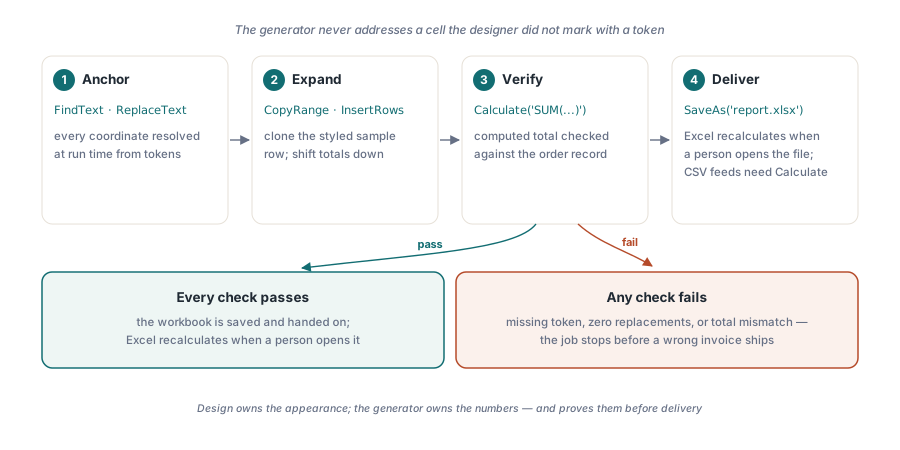
HotXLS не вычисляет формулы во время SaveAs. Когда файл открывает человек, Excel пересчитывает всё сам (фасад XLS открывает CalculationMode и RecalcOnSave, если вам нужно этим управлять), так что отчёту, направляющемуся в почтовый ящик человека, от вас больше ничего не нужно. Картина меняется в тот момент, когда книга питает другую программу. Экспорт в CSV записывает формулы в виде их буквального текста и никогда их не вычисляет, и любой нижестоящий парсер, доверяющий закэшированным значениям, прочитает устаревшие числа или пустоты. Для таких путей вычисляйте на сервере через Calculate, который вычисляет произвольное выражение по загруженной книге и возвращает результат:
var
  Total: Variant;
  LastDetail: Integer;
begin
  LastDetail := DetailRow + Length(Items) - 1;
  Total := Book.Calculate(Format('SUM(Invoice!D%d:D%d)',
    [DetailRow, LastDetail]));
  if (not VarIsNumeric(Total)) or
     (Abs(Total - ExpectedTotal) > 0.005) then
    raise Exception.Create('Invoice total does not match the order record');

  if Book.SaveAs('invoice-2026-0611.xlsx') <> 1 then
    raise Exception.Create('Save failed: check output path and permissions');
end;
Проверка вычисленного итога против записи заказа перед сохранением — дешёвая страховка с хорошей окупаемостью. Она превращает неверный счёт в провалившуюся задачу. Оператор может повторить провалившуюся задачу за секунды; неверный счёт, уже лежащий в почтовом ящике клиента, стоит менеджеру по работе с клиентами извинения и исправления
Два семейства классов, один алгоритм
Та же логика переносится между форматами, а вот код — нет. TXLSWorkbook для устаревшего .xls основан на интерфейсах и счётчике ссылок, с нумерацией листов от 1, и вы никогда не освобождаете его вручную. TXLSXWorkbook для .xlsx — обычный объект, который нужно освобождать через try..finally, с нумерацией листов от 0 и соглашением о формулах, показанным выше. FindText, ReplaceText, CopyRange и InsertRows живут на обеих сторонах, так что схема «привязка — клонирование — пересчёт» переносится чисто. Практический совет — остановиться на одном формате на конвейер или спрятать оба жизненных цикла объектов за собственным тонким адаптером, а не разбрасывать различия по всему генератору
Размер редко имеет значение для такого рода отчётов, которые производит этот паттерн. Клонировать оформленную строку несколько тысяч раз — ничто для современного железа. Путь сохранения становится узким местом только тогда, когда полоса деталей переваливает за шесть цифр строк, и в этот момент включение StreamingWrite отправляет XML рабочего листа прямо в выходной пакет вместо буферизации; статья о потоковой записи для серверных пакетных задач рассказывает, когда этот компромисс себя оправдывает. Диаграммы ведут себя так же, как и остальная часть макета: на стороне XLSX и якорь диаграммы, и ссылки её рядов данных перемещаются, когда над ними выполняется InsertRows, так что диаграмма под строкой итогов остаётся привязанной к нужным данным, тогда как на стороне XLS диаграммы сидят на собственных листах диаграмм и, как и сводные таблицы, никогда не сдвигаются. Это ещё один аргумент в пользу того, чтобы держать презентационные листы подальше от листа, который расширяет генератор
Этот подход «привязка — клонирование — пересчёт» позволяет дизайнеру владеть тем, как выглядит книга, пока ваш код владеет тем, что она говорит, а это обычно и есть то, что делает сгенерированный вывод Excel достойным поддержки. Показанные здесь вызовы поиска, копирования и вставки, вместе с движком формул, используемым для проверки итога перед доставкой, поставляются вместе с HotXLS Delphi Component для Delphi и C++Builder