Вытащить текст, изображения и шрифты из существующего PDF звучит как решённая задача — ровно до того момента, когда через код проходит настоящий корпус документов. Направьте поисковый индексатор на сорок тысяч клиентских файлов, и поломки рассортируются в несколько узнаваемых куч. Слова слипаются, потому что никто не сказал экстрактору, какой ширины промежуток считается пробелом. Другие страницы возвращаются абракадаброй, потому что урезанный шрифт не несёт отображения своих кодов глифов в реальные символы. А «логотип компании» оказывается девятью отдельными объектами-изображениями, сложенными за мягкой маской. Ничто из этого не является ошибкой библиотеки. Это разница между вызовом функции извлечения и пониманием того, что эта функция может и чего не может восстановить из байтов на диске
losLab PDF Library в редакции для Pascal даёт коду на Delphi и C++Builder более одного способа прочитать каждый из этих трёх потоков, и уровни различаются тем, что они гарантируют. Хитрость в том, чтобы подобрать уровень под задачу: поисковый индекс, рецензент редактирования и проход preflight по PDF/A хотят от одной и той же страницы разного, и обращение не к тому вызову тратит усилия впустую или выдаёт результат, которому нельзя доверять
Уровни извлечения текста и что обещает каждый из них
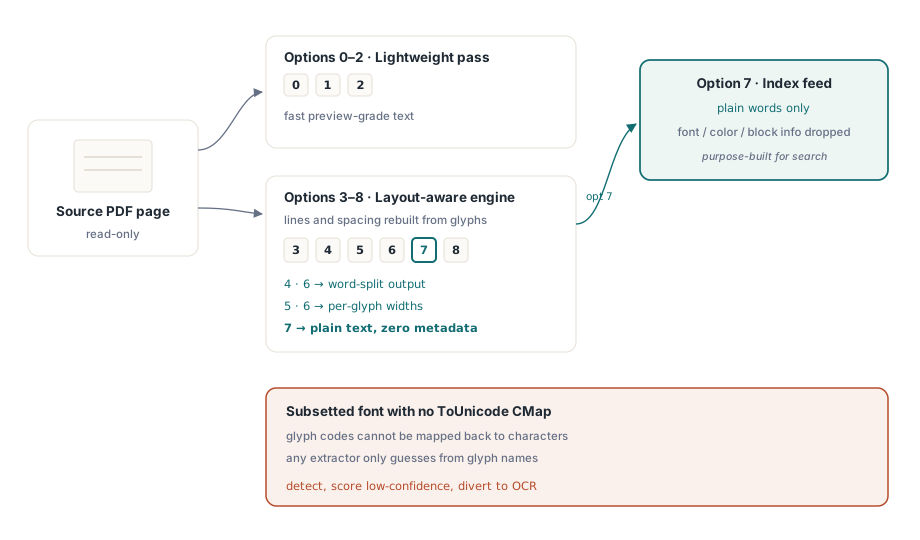
GetPageText принимает значение параметров от 0 до 8, и это число выбирает движок, а не формат. Значения от 0 до 2 запускают облегчённый проход, которого хватает для быстрого предпросмотра. Значения от 3 до 8 идут через движок, учитывающий раскладку, который восстанавливает строки и интервалы по тому, где глифы фактически стоят на странице. Внутри этого диапазона различия важны: 4 и 6 разбивают вывод на слова, 5 и 6 выдают ширины каждого глифа, а 7 возвращает обычный текст с намеренно отброшенными метаданными шрифта, цвета и блока. Именно вариант 7 стоит подавать в поисковый индекс, поскольку индексу нужны слова и ничего больше
Никакая настройка параметров не спасёт документ, который изначально не нёс нужной информации. PDF отображает коды символов в формы глифов, и единственное, что отображает эти коды обратно в читаемый текст, — это ToUnicode CMap шрифта (ISO 32000-1 §9.10). Когда урезанный шрифт поставляется без неё, любой экстрактор оказывается в тупике. Эта библиотека, копирование через буфер обмена в программе просмотра, конкурирующий инструментарий — все они сведены к угадыванию по именам глифов или к возврату пустоты. Практический ответ — обнаружение, а не героизм. Пометьте страницу как ненадёжную и отправьте её на OCR, потому что молча проиндексировать мусор хуже, чем признать, что прочитать его не удалось
Для случаев, которые плоские параметры не покрывают, — своя токенизация, криминалистический разбор потока содержимого, текстовая воронка по собственным правилам — декодер доступен уровнем ниже. TPDFExtractor строится над словарём ресурсов страницы и её коллекцией шрифтов. Его метод ExtractTextW прогоняет сырые текстовые операции потока содержимого обратно через ту же шрифтовую машинерию, чтобы восстановить Unicode, а его событие OnFindObject отдаёт вам каждый объект по мере его прохождения. Большинству кода никогда не нужно опускаться так глубоко. Те приложения, которым нужно, рады, что этот слой публичен, а не закопан
Позиционированные блоки: единица попадания поиска и рецензирования редактирования
Обычный текст говорит, что́ написано на странице. Рано или поздно продукту нужно знать ещё и где именно это написано, чтобы подсветить попадание поиска, обвести кандидата на редактирование или привязать аннотацию к нужному месту. ExtractPageTextBlocks возвращает дескриптор списка текстовых фрагментов, и каждый фрагмент несёт свой текст, свой ограничивающий прямоугольник, а также имя и кегль шрифта, которым он набран:
var
  Pdf: TPDFlib;
  Blocks, I: Integer;
begin
  Pdf := TPDFlib.Create;
  try
    if Pdf.LoadFromFile('contract.pdf', '') <> 1 then
      raise Exception.Create('load failed');
    Pdf.SelectPage(1);
    Blocks := Pdf.ExtractPageTextBlocks(0);
    for I := 0 to Pdf.GetTextBlockCount(Blocks) - 1 do
      Writeln(Format('%s  [%s %.1f pt at %.0f,%.0f]',
        [Pdf.GetTextBlockText(Blocks, I),
         Pdf.GetTextBlockFontName(Blocks, I),
         Pdf.GetTextBlockFontSize(Blocks, I),
         Pdf.GetTextBlockBound(Blocks, I, 0),
         Pdf.GetTextBlockBound(Blocks, I, 1)]));
    Pdf.ReleaseTextBlocks(Blocks);
  finally
    Pdf.Free;
  end;
end;
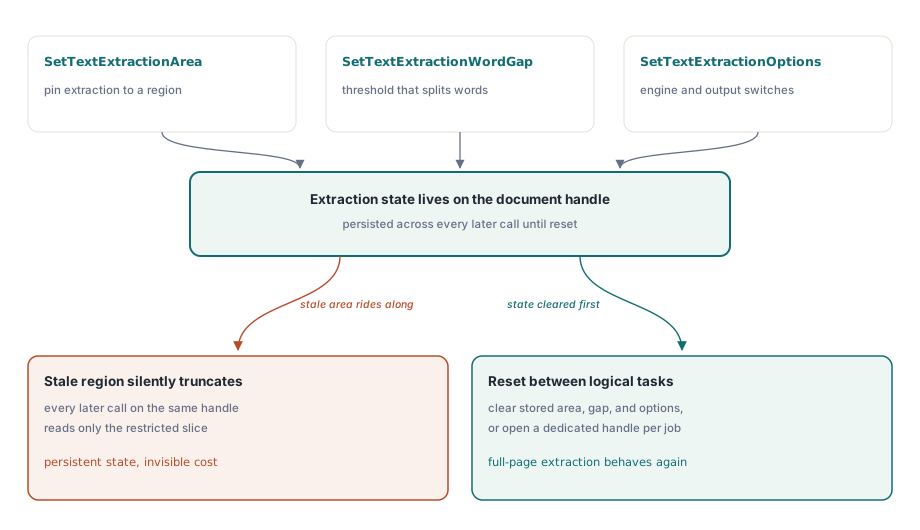
Одна деталь в этой области подводит интеграции чаще всех прочих. SetTextExtractionArea, SetTextExtractionWordGap и SetTextExtractionOptions — это состояние уровня документа, которое сохраняется, а не аргументы, передаваемые при каждом вызове. Настройте ограничение области ради одной функции, скажем чтения только полосы заголовка для классификации документа, и оно молча обрежет каждое последующее извлечение на том же дескрипторе, включая уровни GetPageText с учётом раскладки, к которым вы обратитесь позже. Либо сбрасывайте состояние извлечения между логическими задачами, либо давайте каждой задаче собственный дескриптор документа
Порог промежутка между словами — это рычаг для той первой кучи поломок, где слова слипаются. SetTextExtractionWordGap сообщает движку раскладки, сколько горизонтального пространства, измеренного относительно собственных интервалов между глифами на странице, отделяет одно слово от следующего. Плотной таблице нужен меньший промежуток, чем свободно набранной рекламной странице, поэтому порог, настроенный по классу документов, лучше одной глобальной константы. Он сохраняется на документе, как и остальное состояние извлечения, поэтому планируйте задавать его осознанно, а не один раз и навсегда
Изображения: исходные потоки, а не снимки экрана
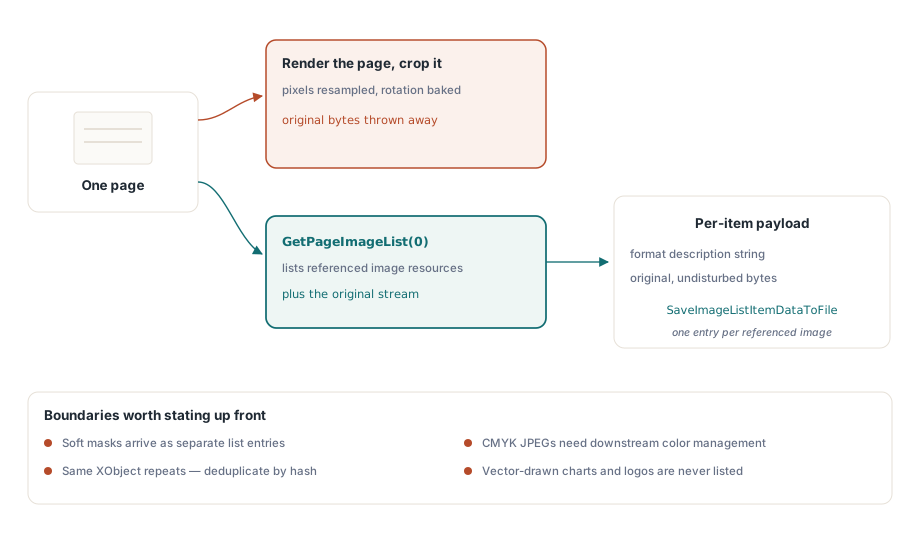
Неверный способ достать изображения из PDF — отрисовать страницу и обрезать её. Это пересемплирует пиксели, запекает любой поворот и выбрасывает то, чем был оригинал. GetPageImageList вместо этого перечисляет фактические ресурсы изображений, на которые ссылается страница, и каждый элемент возвращает свои свойства и свои исходные, нетронутые данные:
var
  ImgList, I: Integer;
begin
  Pdf.SelectPage(1);
  ImgList := Pdf.GetPageImageList(0);
  for I := 0 to Pdf.GetImageListCount(ImgList) - 1 do
  begin
    Writeln(Pdf.GetImageListItemFormatDesc(ImgList, I, 0));
    Pdf.SaveImageListItemDataToFile(ImgList, I, 0,
      Format('page1-img%.2d.bin', [I]));
  end;
  Pdf.ReleaseImageList(ImgList);
end;
Проверяйте GetImageListItemFormatDesc прежде, чем что-либо предполагать об элементе, потому что то, на что ссылается страница, редко бывает одной аккуратной картинкой на каждое видимое изображение. Мягкая маска появляется отдельной записью. Один и тот же XObject часто повторяется на многих страницах, поэтому устраняйте дубликаты по хешу содержимого, прежде чем архивировать экспорт «всех изображений», иначе вы запишете один и тот же логотип сотню раз. Изображениям JPEG в CMYK нужно управление цветом дальше по конвейеру, иначе они отрисуются инвертированными в программах просмотра, принимающих каналы за чистую монету. Когда нужна инвентаризация по всему документу, а не по одной странице за раз, FindImages вместе с SetFindImagesMode сканирует весь файл за один проход
Есть одна граница, которую стоит поднять перед заказчиками до того, как кто-нибудь напишет критерии приёмки: извлечение изображений возвращает только растровые ресурсы. Логотип или диаграмма, нарисованные векторными контурами, не являются изображением в смысле ресурсов и никогда не всплывут ни в одном списке изображений, как бы отчётливо они ни читались как картинка на экране. Когда требование действительно состоит в том, чтобы отдать эту диаграмму файлом, честный подход — отрисовать область страницы в растр, а это другая операция с другой точностью. Двум видам вывода не место в одной папке экспорта без пометки, где что
Шрифты: поверхность аудита, а не функция экспорта
API шрифтов отвечает на вопросы о шрифтах. Он не отдаёт вам сами файлы шрифтов, и это различие определяет всё, что на нём можно построить. После того как FindFonts просканирует документ, перечисление обходит шрифты по идентификатору, а вызовы свойств сообщают о том шрифте, который выбран в данный момент:
var
  I: Integer;
begin
  Pdf.FindFonts;
  for I := 1 to Pdf.FontCount do        // индексы шрифтов начинаются с 1, а не с 0
    if Pdf.SelectFont(Pdf.GetFontID(I)) = 1 then
      Writeln(Format('%s  type=%d  embedded=%d  subset=%d',
        [Pdf.FontName, Pdf.FontType,
         Pdf.GetFontIsEmbedded, Pdf.GetFontIsSubsetted]));
end;
Следите за границами цикла. Индексы шрифтов идут от 1 до FontCount, тогда как индексы текстовых блоков и списка изображений парой абзацев выше начинаются с нуля. Перенесите одно соглашение в другое — и получите ошибку на единицу, которая либо пропустит первый шрифт, либо уйдёт за конец, и она пройдёт поверхностное тестирование, потому что в большинстве документов шрифтов несколько и неверный всё равно выглядит правдоподобно. Определитесь и с рамками. В этом API нет побайтового экспорта шрифтов. Ни один вызов не возвращает встроенную программу шрифта в виде файла TTF или OTF, и перечисление плюс инспекция метаданных — это вся задуманная модель. Такая модель по-прежнему покрывает то, чего производственная работа реально требует от шрифтов: обнаружение урезанных наборов по шаблону имени, аудит встраивания перед архивной конвертацией (невстроенный шрифт — жёсткий блокер PDF/A, о чём подробно говорит статья preflight PDF/A и PDF/UA в Delphi) и диагностику кодировок на случай падения уверенности в извлечении. Есть и лицензионная причина того, что граница проходит здесь. Программа урезанного шрифта — лицензируемый материал и, лишённая большинства своих глифов, всё равно бесполезна как устанавливаемый шрифт. Трактовка её как метаданных для аудита, а не как извлекаемого актива, — позиция, которую вы сможете защитить
Последний вызов отрабатывает своё место при сортировке. Выполните GetFontEncoding для каждого шрифта, прочитайте результат вместе с флагом урезанного набора — и вы сможете предсказать качество извлечения ещё до того, как вытянете хотя бы один символ. Страница, все шрифты которой урезаны и снабжены нестандартными кодировками, оказывается кандидатом на OCR по одному лишь осмотру, что позволяет пакетному конвейеру направить её правильно, не тратя на неё сначала заведомо провальный проход извлечения
Извлечение в масштабе без загрузки документов
В пакетном конвейере загрузка целого документа только ради чтения одной страницы — это потраченный впустую ввод-вывод, и на корпусе он быстро складывается в заметную величину. Однократные варианты, ExtractFilePageText и ExtractFilePageTextBlocks, принимают имя файла, пароль и номер страницы напрямую и пропускают полную загрузку. Для файлов гигабайтного масштаба есть и более низкая передача. Путь прямого доступа открывает файл через потоковое чтение xref, поэтому DAOpenFileReadOnly с последующим DAExtractPageText затрагивает только те объекты, которые действительно нужны этой одной странице. Он приходит со сменой соглашения, которую стоит запомнить: функции DA адресуют страницы через PageRef, дескриптор ссылки на объект, получаемый от DAFindPage, и никогда по сырому номеру страницы. Передайте номер туда, где ждут дескриптор, — и вызов отработает по неверному объекту, не подняв ошибки, а это худший вид ошибки для отладки. Остальной инструментарий прямого доступа разложен в статье слияние, разделение и прямой доступ для больших PDF
Если и есть одна привычка, отделяющая код извлечения, который переживает настоящий корпус, от кода, который хромает, — это отношение к странице как к недоверенному вводу, а не как к чистому источнику данных. Текст, расходящийся с тем, что рисует программа просмотра, почти всегда означает проблему кодировки — лигатуру, схлопнувшуюся в один глиф, или урезанный шрифт без записей ToUnicode, — и лечится это измерением уверенности и переводом плохих страниц на OCR, а не борьбой с байтами. API шрифтов по замыслу никогда не выдаст TTF или OTF, поэтому стройте шрифтовые процессы вокруг вопросов аудита. А сохраняющееся состояние извлечения, и прежде всего прямоугольник области, — это настройка, которой вы владеете на всё время жизни дескриптора документа, а не параметр, о котором забывают после одного вызова. Отработайте эти три рефлекса — и остальной API поведёт себя как надо
Ознакомительные сборки, демонстрационные проекты и полный справочник по API извлечения находятся на странице продукта losLab PDF Library for Delphi