Проверка одной подписи PAdES означает проверку трёх независимых вещей, а зелёная галочка в просмотрщике сообщает вам только о третьей. Во-первых, массив /ByteRange должен покрывать правильные байты: указанные в нём диапазоны обязаны восстанавливать в точности тот входной набор данных, по которому был взят дайджест CMS, без единого подписанного байта за их пределами. Во-вторых, сертификат внутри CMS должен выстраиваться в цепочку до доверенного вами корня и нести подписанный атрибут signing-certificate, которого требует PAdES. В-третьих, если профиль заявляет метку времени, токен RFC 3161 должен привязывать значение подписи к моменту времени до истечения срока действия сертификата. Acrobat сворачивает все три пункта в одну иконку; проверяющий соответствие инструмент держит их раздельно, и так же должен поступать код, который создаёт эти файлы. losLab PDF Library (PDF Library for Delphi) даёт вам сторону подписания этой схемы, повторное встраивание метки времени и аудиторские вызовы для изучения ByteRange до того, как вы ему доверитесь
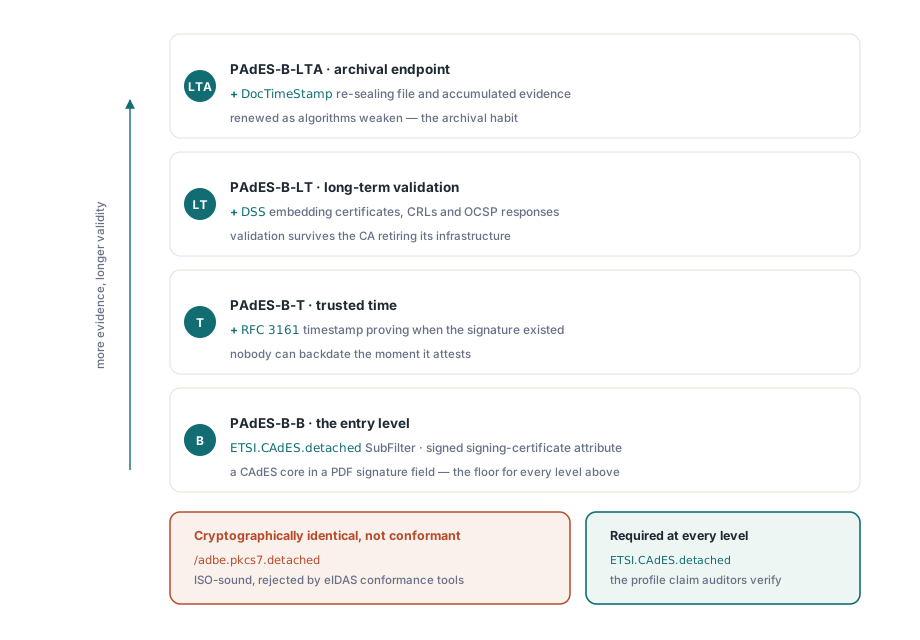
Одно различие сбивает с толку почти каждую первую реализацию PAdES, так что его стоит проговорить ещё до всякого кода. Подпись, записанная с /SubFilter /adbe.pkcs7.detached, — совершенно исправная подпись по ISO 32000-1 §12.8, которую Acrobat объявит действительной. Но это не подпись PAdES, потому что ETSI EN 319 142-1 требует ETSI.CAdES.detached на каждом базовом уровне. Инструмент проверки соответствия eIDAS отклонит первую и примет вторую, хотя криптография в обоих случаях идентична. Профиль — это заявление, которое документ делает о самом себе, и сделать это заявление правильно — один вызов в PDF Library for Delphi
Что превращает подпись PDF в подпись PAdES
ETSI EN 319 142-1 определяет четыре базовых уровня, надстроенных над форматом CMS. PAdES-B-B — точка входа: подпись CAdES в поле подписи PDF с SubFilter ETSI.CAdES.detached и подписанным атрибутом signing-certificate. PAdES-B-T добавляет метку времени RFC 3161 поверх значения подписи, доказывая, что подпись существовала до момента, который никто не может подделать задним числом. PAdES-B-LT встраивает сертификаты, CRL и ответы OCSP, нужные для проверки, в Document Security Store, так что файл остаётся проверяемым и после того, как выпустивший его удостоверяющий центр свернёт свою инфраструктуру. PAdES-B-LTA венчает эту иерархию меткой времени документа, которая заново защищает накопленные доказательства по мере того, как алгоритмы слабеют
PDF Library for Delphi отображает эти понятия на свой API sign-process. Маркер профиля — SetSignProcessCustomSubFilter. Если ваша политика требует указания типа обязательства (proof of origin, proof of approval или один из остальных идентификаторов ETSI с номерами от 1 до 6), это делается через SetSignProcessCommitmentType. Явная политика подписи присоединяется через SetSignProcessSignaturePolicy, которая принимает OID политики и её дайджест. Одно значение по умолчанию заслуживает внимания: если оставить алгоритм дайджеста в режиме auto, библиотека выбирает SHA-256 для подписей ETSI и adbe.pkcs7.detached и откатывается к SHA-1 только на устаревшем пути adbe.pkcs7.sha1. Всё равно задавайте его явно. Аудиторы спрашивают, какой хеш вы использовали, и явное значение в коде защитить проще, чем значение по умолчанию, для объяснения которого нужно лезть в руководство
Создание базовой подписи
Плоский API управляет подписанием как одноразовым конечным автоматом: открыть процесс над исходным файлом, настроить его, завершить в выходной файл, прочитать код результата. Последовательность ниже создаёт подпись PAdES-B-B с SHA-256. Самая важная строка вообще не имеет отношения к самой подписи. Это намеренно завышенный резерв под /Contents, потому что это единственное, что нельзя изменить позже, если к этой подписи когда-нибудь понадобится добавить метку времени
var
  Pdf: TPDFlib;
  SignId: Integer;
begin
  Pdf := TPDFlib.Create;
  try
    SignId := Pdf.NewSignProcessFromFile('invoice.pdf', '');
    if SignId = 0 then
      raise Exception.Create('cannot open source PDF');
    Pdf.SetSignProcessField(SignId, 'Sig1');
    Pdf.SetSignProcessPFXFromFile(SignId, 'company.pfx', PfxPassword);
    Pdf.SetSignProcessInfo(SignId, 'Approved', 'Vienna', 'billing@example.com');
    Pdf.SetSignProcessCustomSubFilter(SignId, 'ETSI.CAdES.detached');
    Pdf.SetSignProcessDigestAlgorithm(SignId, 2);          // SHA-256
    Pdf.SetSignProcessReserveContentsBytes(SignId, 8192);  // место для будущей метки времени
    Pdf.EndSignProcessToFile(SignId, 'invoice-signed.pdf');
    if Pdf.GetSignProcessResult(SignId) <> 1 then
      raise Exception.CreateFmt('signing failed, code %d',
        [Pdf.GetSignProcessResult(SignId)]);
    Pdf.ReleaseSignProcess(SignId);
  finally
    Pdf.Free;
  end;
end;
NewSignProcessFromFile возвращает 0, когда исходный файл вообще не удаётся открыть. После этого GetSignProcessResult различает режимы сбоя, которые реально встречаются в продакшне: 4 означает неверный пароль PDF, 7 — неверный пароль PFX, 9 — файл сертификата без закрытого ключа, 10 — недоступный для записи путь вывода, 11 — сбой при наложении байтов подписи. Запись числового кода рядом с именем входного файла превращает расплывчатое обращение в поддержку в диагностику на одну минуту
Добавление метки времени RFC 3161, которую библиотека сама за вас не получит
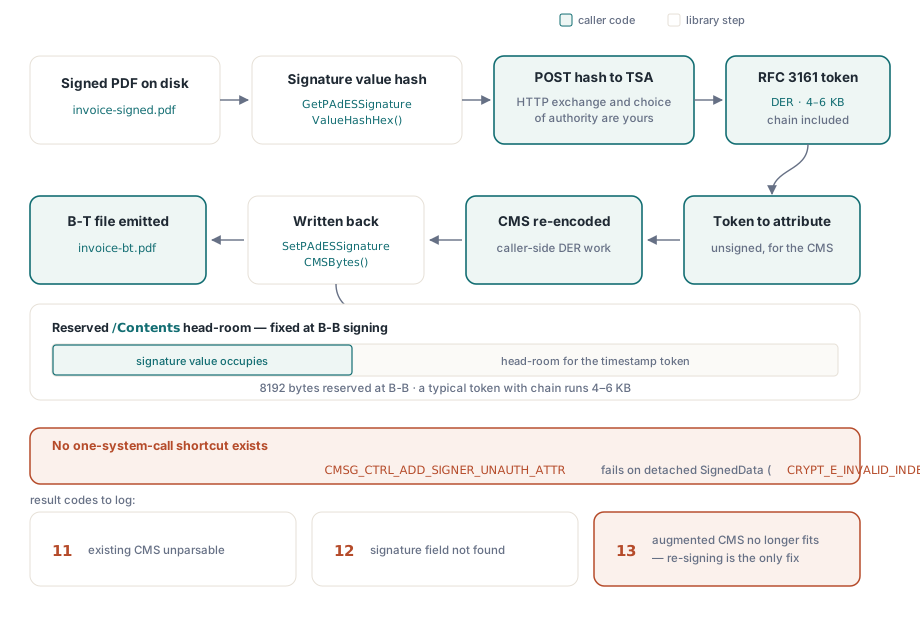
PDF Library for Delphi не поставляется с клиентом TSA, и это осознанная граница, а не пробел. Библиотека вычисляет хеш, который должен заверить орган штампов времени, а затем повторно встраивает дополненный CMS; HTTP-обмен и хирургия над CMS между этими двумя шагами остаются на стороне вызывающего кода. У этого разделения есть жёсткая техническая причина. Управляющий вызов Windows CryptoAPI, номинально добавляющий неподписанные атрибуты, CMSG_CTRL_ADD_SIGNER_UNAUTH_ATTR, завершается ошибкой CRYPT_E_INVALID_INDEX на отсоединённой раскладке SignedData, которую использует PAdES. Поэтому расширенный CMS обязан приходить из кодировщика CMS, находящегося под вашим собственным контролем. Ни одна библиотека не способна незаметно вклеить токен одним системным вызовом, а любая, что утверждает обратное, просто проводит эту хирургию там, где вы её не видите
var
  Pdf: TPDFlib;
  StsId: Integer;
  HashHex, TstDer, TsAttr, AugmentedCms: AnsiString;
begin
  Pdf := TPDFlib.Create;
  try
    StsId := Pdf.NewPAdESSignatureTimeStampProcessFromFile('invoice-signed.pdf', '');
    Pdf.SetPAdESSignatureTimeStampField(StsId, 'Sig1');
    Pdf.SetPAdESSignatureTimeStampDigestAlgorithm(StsId, 2);
    HashHex := Pdf.GetPAdESSignatureValueHashHex(StsId);
    // оба вызова ниже — код приложения: HTTP POST к вашему TSA,
    // и повторное кодирование CMS, присоединяющее токен как неподписанный атрибут
    TstDer := RequestTimeStampToken(HashHex);
    TsAttr := Pdf.BuildPAdESSignatureTimeStampAttribute(TstDer);
    AugmentedCms := AttachUnsignedAttribute(Pdf.GetPAdESSignatureCMSBytes(StsId), TsAttr);
    Pdf.SetPAdESSignatureCMSBytes(StsId, AugmentedCms);
    Pdf.EndPAdESSignatureTimeStampProcessToFile(StsId, 'invoice-bt.pdf');
    if Pdf.GetPAdESSignatureTimeStampProcessResult(StsId) <> 1 then
      raise Exception.Create('timestamp embedding failed');
    Pdf.ReleasePAdESSignatureTimeStampProcess(StsId);
  finally
    Pdf.Free;
  end;
end;
Следите здесь за кодами результата: 12 означает, что названного поля подписи не существует, 11 — что существующий CMS не удалось разобрать, а 13 — что дополненный CMS больше не помещается в зарезервированный заполнитель /Contents. Код 13 — это тот, что действительно больно бьёт, потому что единственное исправление — повторное подписание: типичный токен метки времени вместе с цепочкой сертификатов занимает от 4 до 6 КБ, а резерв в 8192 байта, сделанный на шаге B-B, существует именно для того, чтобы этому шагу было куда приземлиться
Проверка начинается с ByteRange, а не с цепочки сертификатов
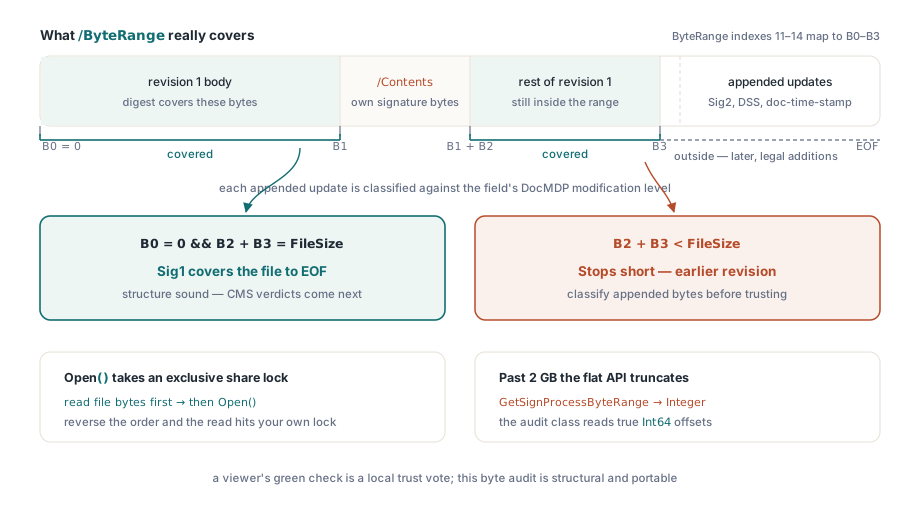
Зелёная галочка в просмотрщике — это решение о доверии, вынесенное относительно хранилища сертификатов конкретной машины, а не структурный вердикт о самом файле. Программная проверка должна начинаться ниже, с вопроса, который инкрементальные обновления делают тонким: какие байты на самом деле покрывает каждая подпись? Каждое из обсуждаемых здесь улучшений — будь то вторая подпись, словарь DSS или метка времени документа — приходит через инкрементальное обновление, и каждое такое обновление добавляет байты за пределами /ByteRange более ранней подписи. Эти добавленные байты законны. Валидатору всё равно приходится классифицировать их относительно политики изменения документа, а уровень DocMDP для конкретного поля, в котором живёт эта политика, читается через GetSignatureDocMDPLevelByName
var
  Doc: TPDFlibSignDoc;
  Names: TStringList;
  I: Integer;
  B0, B1, B2, B3, FileSize: Int64;
begin
  FileSize := TFile.GetSize('invoice-bt.pdf');  // до Open: SignDoc удерживает блокировку совместного доступа
  Doc := TPDFlibSignDoc.Create;
  try
    if not Doc.Open('invoice-bt.pdf', '', False) then
      raise Exception.Create('cannot open for audit');
    Names := TStringList.Create;
    try
      Doc.GetSignatureFieldNames(Names);
      for I := 0 to Names.Count - 1 do
        if Doc.GetSignatureValueObjNum(Names[I]) > 0 then   // >0 означает, что подпись действительно проставлена
        begin
          B0 := StrToInt64(string(Doc.GetSignatureValueByName(Names[I], 11)));
          B1 := StrToInt64(string(Doc.GetSignatureValueByName(Names[I], 12)));
          B2 := StrToInt64(string(Doc.GetSignatureValueByName(Names[I], 13)));
          B3 := StrToInt64(string(Doc.GetSignatureValueByName(Names[I], 14)));
          if (B0 = 0) and (B2 + B3 = FileSize) then
            Writeln(Names[I], ': covers the file to EOF')
          else
            Writeln(Names[I], ': earlier revision, or unexpected ByteRange layout');
        end;
    finally
      Names.Free;
    end;
    Doc.Close;
  finally
    Doc.Free;
  end;
end;
В этом пути аудита живут две ловушки. TPDFlibSignDoc.Open удерживает файл под эксклюзивной блокировкой совместного доступа, так что валидатору, которому ещё и нужно захешировать сырые байты файла для проверки CMS, приходится прочитать файл в память до открытия его для аудита. Поменяйте порядок местами — и чтение упрётся в блокировку, которую вы сами же и установили. Вторая ловушка тихая, а не громкая: аналог плоского API, GetSignProcessByteRange, возвращает Integer, тогда как исходные смещения имеют тип Int64, так что после 2 GB плоский вызов молча усекает значение, и именно поэтому в этом примере смещения извлекаются через класс аудита. Стоит назвать и одно отсутствие. У плоского слоя вообще нет обёртки VerifySignature. Криптографические вердикты приходят из класса TPDFlibSignatureVerifier, который возвращает vsValid, vsInvalid или vsUnknown, либо от внешнего валидатора, которому уже доверяет ваша политика соответствия
Долгосрочная проверка: DSS, VRI и метка времени документа
PAdES-B-LT существует потому, что инфраструктура отзыва смертна. ETSI EN 319 142-1 §5.4.2.2 определяет Document Security Store: словарь на уровне документа, несущий сертификаты, CRL и ответы OCSP, опционально индексированные по каждой подписи через записи VRI, ключом для которых служит хеш поля /Contents соответствующей подписи. Поток PDF Library for Delphi повторяет ту же схему, что и для метки времени. NewPAdESDSSProcessFromFile открывает процесс; AddPAdESDSSCertificate, AddPAdESDSSCRL и AddPAdESDSSOCSP принимают блобы DER; AddPAdESDSSVRI привязывает выбранный материал к одной подписи; EndPAdESDSSProcessToFile записывает всё это как инкрементальное обновление. Сложная часть остаётся на вашей стороне. Получение материала об отзыве и оценка того, достаточно ли он свеж, чтобы его стоило встраивать, — задача вызывающего кода. Библиотека гарантирует, что словари структурно соответствуют стандарту; она не может гарантировать, что ваш респондер OCSP сказал правду
Конечная архивная точка, B-LTA, добавляет метку времени документа: отдельное поле подписи, тип которого — DocTimeStamp, а не Sig, создаваемое через SetSignProcessDocTimeStamp с зарезервированной длиной подписи. Она не заменяет метку времени подписи, поставленную на шаге B-T. Метка времени подписи доказывает, когда существовала конкретная подпись; метка времени документа защищает весь файл целиком, включая доказательства DSS, и это тот элемент, который долгосрочный архив обновляет каждые несколько лет по мере ослабления алгоритмов. Зрелый архивный профиль несёт оба варианта. Для ридеров, появившихся раньше этих структур, TPDFlibSignDoc.EnsurePAdESExtensions записывает расширение разработчика ESIC в каталог документа, объявляя, что файл использует функции, определённые ETSI
Одну реакцию на всё это стоит предупредить заранее, потому что выглядит она как баг, а на деле им не является. Просмотрщик нередко сообщает «действительность неизвестна» о файле, структура PAdES которого совершенно корректна. Доверие и структура — независимые оси. Просмотрщик просто не может выстроить цепочку от подписанта до корня, которому доверяет на этой конкретной машине, а это обычное дело для частных удостоверяющих центров и тестовых сертификатов, даже когда и аудит ByteRange, и проверка CMS проходят успешно. Правильное исправление — корректно распространить корневой сертификат либо сверяться со списками доверия ЕС, когда реальная цель — получение квалифицированного статуса eIDAS, а не трогать код подписания
За взглядом со стороны аудита — то есть перечислением полей подписи по всему корпусу файлов, выгрузкой раскладок ByteRange и массовым чтением уровней DocMDP — обратитесь к сопутствующему материалу о рабочем стенде соответствия и подписания. Подписанные документы, которые должны также удовлетворять архивной политике, находят своё место в процессе, описанном в статье предпечатная проверка PDF/A и PDF/UA в Delphi. Полная документация по API и пробные версии для скачивания — на странице продукта losLab PDF Library для Delphi