Флаг разрешения — это не механизм защиты. Бит, который говорит «копировать нельзя», живёт в том же словаре /Encrypt, что и криптография, и это придаёт ему вид принуждения, которым он не обладает, а как только вы начинаете считать эти две вещи одним целым, ваш аудит начинает выдавать неверные ответы. Единственный стоящий вопрос к PDF — не «зашифрован ли он». Он конкретнее и труднее: какой алгоритм, какая ревизия обработчика безопасности, какой из двух паролей был задан, какие биты разрешений заявлены и каких частей файла шифрование действительно касается. Файл может быть формально зашифрован и практически открыт. Он может отказываться читаться и при этом оставлять свои метаданные в открытом виде. Он может запрещать печать флагом, который любая программа просмотра вправе проигнорировать. Аудит PDF означает разрешение всех этих вопросов по отдельности, и PDF Library for Delphi, движок PDF от losLab для Delphi и C++Builder, открывает каждый из них и через плоский API с целочисленными дескрипторами, и через типизированный слой классов
Что на самом деле фиксирует словарь /Encrypt
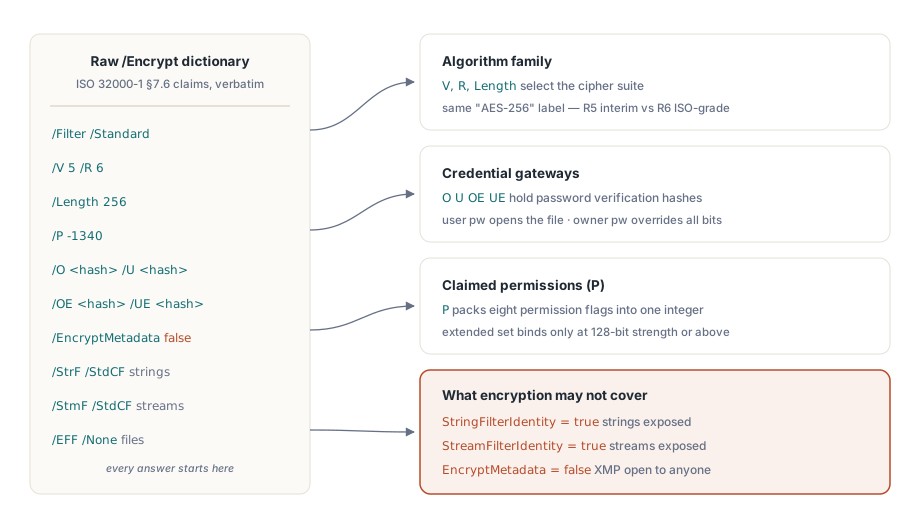
ISO 32000-1 §7.6 определяет защиту документа через несколько записей словаря, и PDF Library for Delphi отражает их одна к одной в записи TPDFEncryption. Версия фильтра V и ревизия R выбирают семейство алгоритмов. Length несёт размер ключа. Биты разрешений находятся в P, строки проверки паролей владельца и пользователя — в O и U (с добавлением OE и UE для AES-256), рядом идёт флаг EncryptMetadata, а ещё три поля называют crypt-фильтры, применяемые соответственно к строкам, потокам и встроенным файлам
Ценность этой записи в том, что она ничего не интерпретирует за вас. Она возвращает сырой словарь и оставляет выводы вам, а это ровно то, что нужно аудиту. Случай «открытый текст внутри зашифрованного» проявляется в StringFilterIdentity и StreamFilterIdentity: когда любой из них истинен, соответствующие данные проходят через фильтр Identity нетронутыми, что бы ни сообщал зашифрованный статус документа. Сканер, останавливающийся на «словарь /Encrypt присутствует», назовёт такой файл защищённым, пока его строки и потоки лежат открыто. Тот же нюанс управляет метаданными. Когда EncryptMetadata равно false, XMP-пакет остаётся читаемым для любого индексатора, а содержимое страниц — нет, и это стоит знать в тот самый момент, когда ваши правила маршрутизации опираются на поле заголовка или автора
Короткая проверка безопасности через плоский API
Для большинства конвейеров четыре плоских вызова отвечают на повседневные вопросы. LoadFromFile возвращает 1 при успехе, и как только документ открыт, инспекторы шифрования сообщают о его расшифрованном состоянии:
var
  PDF: TPDFlib;
begin
  PDF := TPDFlib.Create;
  try
    if PDF.LoadFromFile('contract.pdf', UserPassword) <> 1 then
      raise Exception.Create('Open failed: wrong password or damaged file');
    Writeln('status    : ', PDF.EncryptionStatus);     // расшифрован / зашифрован / неизвестно
    Writeln('algorithm : ', PDF.EncryptionAlgorithm);  // семейство RC4 или AES
    Writeln('strength  : ', PDF.EncryptionStrength);   // класс длины ключа
    Writeln('owner pw? : ', PDF.CheckPassword(CandidatePassword));
  finally
    PDF.Free;
  end;
end;
CheckPassword значит больше, чем подсказывает его однострочная сигнатура. PDF определяет два пароля с неравными полномочиями. Пароль пользователя нужен, чтобы вообще открыть файл. Пароль владельца даёт полные права и перекрывает каждый бит разрешений. Байты на диске в обоих случаях одинаковы, но сессия, открытая под паролем владельца, может то, чего не может сессия под паролем пользователя, поэтому аудит, не фиксирующий, какие учётные данные были предъявлены, фиксирует лишь половину правды. Слой классов делает это различие доступным для запроса. TPDFDocument.HasUserPassword и HasOwnerPassword сообщают, что требует файл, а IsUserPassword и IsOwnerPassword сообщают, какой пароль фактически открыл текущую сессию. Записывайте этот факт в журнал. Никогда не записывайте в журнал сами значения паролей
Лестница Strength, где «AES-256» означает две разные вещи
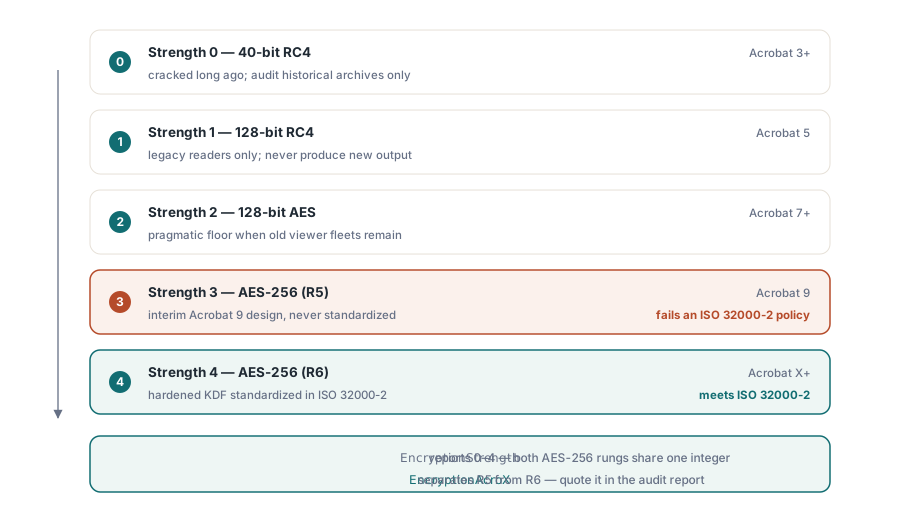
Плоские функции Encrypt и EncryptFile принимают целочисленный Strength с пятью значащими значениями: 0 — RC4 40 бит, 1 — RC4 128 бит, 2 — AES 128 бит, читаемый начиная с Acrobat 7, 3 — AES 256 бит в том виде, в каком его ввёл Acrobat 9, и 4 — AES 256 бит в том виде, в каком его требует Acrobat X и новее
Интересно то, что 3 и 4 оба помечены как AES-256 и при этом не являются одной и той же схемой. Strength 3 соответствует ревизии 5 обработчика безопасности — промежуточной конструкции, которую выпустил Acrobat 9 и которую ISO так и не приняла. Strength 4 соответствует ревизии 6, чья функция вывода ключа была усилена и стандартизирована в ISO 32000-2. Для документа, который вы создаёте сегодня, нет причин выбирать 3 вместо 4. Для аудита же разрыв решающий: политике «AES-256 по ISO 32000-2» удовлетворяет только R6, и файл R5, называющий себя AES-256, эту политику не проходит, зато проходит наивную проверку стойкости. Слой классов разводит их по именам: esAES256Bit для R5 против esAES256BitAcroX для R6, а свойство EncryptionAcroX отвечает на вопрос о ревизии одним логическим значением
Биты разрешений и мелкий шрифт про длину ключа
EncodePermissions упаковывает восемь флагов в целое число, которого ждут Encrypt и EncryptFile. Печать, копирование, изменение и добавление заметок составляют базовый набор; заполнение полей, копирование для доступности, сборка и печать в полном качестве составляют расширенный набор. Мелкий шрифт, о котором прямо говорит собственная демонстрация шифрования из состава библиотеки, состоит в том, что расширенная четвёрка действует только при стойкости 128 бит и выше. Флаг печати в полном качестве подчиняется тому же правилу: снимите его, чтобы принудить к печати в низком разрешении, — и документ на 40 битах вас проигнорирует, потому что это понижение тоже требует шифрования 128 бит или сильнее. Закодируйте политику «печать только в низком разрешении» в 40-битный файл, и любая программа просмотра всё равно напечатает в полном качестве
Более глубокий вопрос — кто вообще принуждает к соблюдению этих битов, и ответ таков: никто, кому вы можете доверять. Разрешения — это указания соответствующим спецификации читателям, а не криптографические ограничения. Ключ расшифровки одинаков независимо от того, разрешено копирование или запрещено, поэтому запертый набор разрешений лишь удерживает честные программы просмотра честными. Читатель, решивший проигнорировать биты, не встретит вообще никакого криптографического препятствия. Если обязанность состоит в том, чтобы предотвратить извлечение, а не отговорить от него, файлу нужен пароль пользователя, а рабочему процессу — контроль на уровне процессов вокруг него, и отчёт аудита должен называть, под каким из двух режимов каждый файл находится на самом деле, а не принимать флаг разрешения за замок
Задание политики и доказательство того, что она закрепилась
Применение шифрования к существующим файлам не требует загрузки их в дерево объектов. EncryptFile обрабатывает вход в выход одним вызовом, а цикл аудита заново открывает результат, чтобы подтвердить, что именно легло на диск. Поставляемая демонстрация шифрования следует той же форме «записать, затем прочитать обратно»:
var
  PDF: TPDFlib;
  R: Integer;
begin
  PDF := TPDFlib.Create;
  try
    R := PDF.EncryptFile('in.pdf', 'out.pdf', 'owner-secret', 'user-secret', 4,
      PDF.EncodePermissions(1, 0, 0, 0,    // печать разрешена; копирование/изменение/заметки запрещены
                            0, 0, 0, 1));  // расширенный набор: только печать в полном качестве
    if (R = 1) and (PDF.LoadFromFile('out.pdf', 'user-secret') = 1) then
    begin
      Writeln('algorithm = ', PDF.EncryptionAlgorithm);
      Writeln('strength  = ', PDF.EncryptionStrength);
      Writeln('owner pw accepted: ', PDF.CheckPassword('owner-secret'));
    end;
  finally
    PDF.Free;
  end;
end;
Команды, работающие на уровне документа, получают ту же операцию с типизированными множествами вместо упаковки битов, и она переживает код-ревью с куда меньшим прищуром:
if not Doc.Encrypt('owner-secret', 'user-secret', esAES256BitAcroX,
  [ppCanPrint], [ppCanPrintFull]) then
  raise Exception.Create('Encryption failed');
В любом случае шаг обратного чтения — не необязательная церемония. Он ловит ошибки развёртывания, которые иначе всплывают месяцы спустя на машине заказчика: старая сборка библиотеки, молча понижающая запрошенную стойкость, путь вывода, куда никогда не писали, потому что каталог был доступен только для чтения, целое число разрешений, чьи аргументы ушли в неверном порядке. Все три проходят локальный дымовой тест и отказывают в поле, а повторное открытие вывода превращает каждую из них в исключение, которое вы видите во время того самого запуска, что создал файл. GetEncryptionFingerprint возвращает компактное значение, которое можно сохранить вместе с записью о задании, так что позднейшее сравнение покажет, разделяют ли два вывода одну и ту же конфигурацию шифрования, без повторного открытия любого из них
Ложные срабатывания аудита, которые стоит учесть в коде
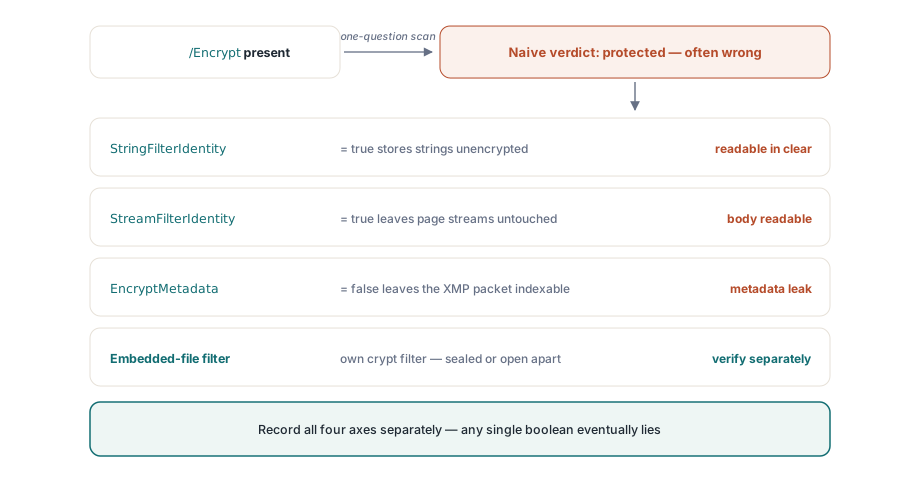
Несколько шаблонов надёжно подталкивают сканеры безопасности к неверному выводу, и каждый происходит от свёртывания многосоставного вопроса в ответ «да или нет». Crypt-фильтр Identity — самый чистый пример. Словарь /Encrypt присутствует, файл сообщает о себе как о зашифрованном, и при этом строки и потоки проходят через фильтр Identity без изменений, так что реальное содержимое лежит открытым текстом. Чтение StringFilterIdentity и StreamFilterIdentity до объявления чего-либо защищённым и есть исправление
Разделение метаданных тоньше. EncryptMetadata может расходиться с остальным документом в обе стороны, оставляя зашифрованный файл с читаемым XMP-пакетом или, реже, наоборот. «Файл зашифрован» не говорит ничего о том, зашифрованы ли его метаданные, а это важно в тот момент, когда индексатор или правило маршрутизации тянется за заголовком. Встроенные файлы добавляют третью ось: PDF допускает отдельный crypt-фильтр только для вложений, поэтому вложения могут быть единственной зашифрованной частью в остальном открытого документа или единственной открытой частью зашифрованного. Фиксируйте три назначения фильтров как отдельные поля для строк, потоков и встроенных файлов — и ни одна из этих ловушек вас не поймает. Храните одно логическое значение — и неверный вывод лишь вопрос времени
Снятие шифрования и его выбор для новых файлов
Аудит часто заканчивается решением снять защиту, и механика тут не препятствие. DecryptFile(InputFileName, OutputFileName, Password) пишет расшифрованную копию без полной загрузки, а Decrypt на загруженном документе делает то же в памяти, когда файл уже открыт. Оба требуют действительного пароля; ни один не обходит криптографию. Настоящий шлюз — это политика, а не код, поэтому пусть ваши правила приёма прямо говорят, когда снятие допустимо, и фиксируют класс пароля, который это санкционировал, потому что сам технический шаг не оставляет следа
Выбор для нового вывода уже, чем подразумевают пять значений Strength. Используйте Strength 4, AES-256 ревизии 6, если только вам не нужно открывать файлы в программах просмотра старше Acrobat X. Strength 2, AES-128, — прагматичный нижний предел для стареющего парка программ просмотра, который нельзя обновить. Варианты RC4 под 0 и 1 существуют, чтобы вы могли читать и проверять исторические архивы, а не чтобы производить с ними что-то новое; обращение к ним в проекте 2026 года — признак того, что требование выше по течению устарело
Состояние шифрования напрямую питает решения о подписании, поскольку рабочему месту, которое проверяет и подписывает документы, нужна та же дисциплина обратного чтения, на которую опирается этот аудит. Эта тема раскрыта в статье рабочее место соответствия и подписания. Когда пакет применяет EncryptFile к тысячам крупных документов, руководство по прямому доступу к большим PDF показывает, как удержать память ровной во время работы. Полный справочник по API шифрования находится на странице продукта PDF Library for Delphi