Dominando as Anotações em PDF com o Componente HotPDF.
As anotações em PDF são um dos recursos mais poderosos para criar documentos interativos e colaborativos. Elas permitem que os usuários adicionem comentários, destaques, carimbos e conteúdo multimídia diretamente aos arquivos PDF, sem modificar a estrutura original do documento. Este guia abrangente explora como implementar vários tipos de anotações em PDF usando o. HotPDF Component, abrangendo tudo, desde anotações de texto básicas até anexos multimídia avançados.
Compreendendo as Anotações em PDF: Mais do que Apenas Comentários.
As anotações em PDF são objetos que podem ser adicionados às páginas de PDF para fornecer informações adicionais, interatividade ou melhorias visuais. Ao contrário do conteúdo normal da página, as anotações são armazenadas como objetos separados que podem ser exibidos ou ocultados, editados ou removidos sem afetar a estrutura do documento subjacente. Isso as torna ideais para:
- Revisão do documento: Adicionando comentários, notas e feedback.
- Melhorias no formulário: Criação de elementos interativos e textos de ajuda.
- Integração de multimídia: Incorporação de áudio, vídeo e anexos de arquivos.
- Marcação visual: Destaque de seções importantes com carimbos e formas.
- Fluxos de trabalho colaborativos: Permitir que vários usuários contribuam sem conflitos.
Início Rápido: Exemplo Simples de Anotação de Texto
Vamos começar com um exemplo básico de anotação de texto para entender os conceitos fundamentais das anotações em PDF:
|
1 2 3 4 5 6 7 8 9 10 11 12 13 14 15 16 17 18 19 20 21 22 23 24 25 26 27 28 29 30 31 32 33 34 35 36 37 38 39 40 41 42 43 44 45 46 47 48 49 50 51 |
program SimpleAnnotation; {$I ..\..\..\Lib\HotPDF.inc} {$APPTYPE CONSOLE} uses {$IFDEF XE2+} System.Classes, System.SysUtils, Vcl.Graphics, {$ELSE} Classes, SysUtils, Graphics, {$ENDIF} HPDFDoc; var HotPDF: THotPDF; begin HotPDF := THotPDF.Create(nil); try // Configure PDF basic properties HotPDF.FileName := 'SimpleAnnotation.pdf'; HotPDF.Title := 'Simple Annotation Demo'; HotPDF.Author := 'HotPDF Component'; // Set font embedding for consistent display HotPDF.FontEmbedding := True; HotPDF.BeginDoc; // Set font HotPDF.CurrentPage.SetFont('Arial', [], 12, 0, False); // Add page content HotPDF.CurrentPage.TextOut(120, 65, 0, 'Click the annotation icon:'); // Add multilingual text annotations HotPDF.CurrentPage.AddTextAnnotation( 'This is a text annotation.' + #13#10 + 'Dies ist eine Textanmerkung.' + #13#10 + 'Ceci est une annotation textuelle.' + #13#10 + 'This is a text annotation.', Rect(120, 80, 140, 100), True, taComment, clBlue ); HotPDF.EndDoc; finally HotPDF.Free; end; end. |
Este exemplo simples demonstra vários conceitos fundamentais das anotações em PDF:
- Alvo de Posição: O
Rect(120, 80, 140, 100)O parâmetro define a área clicável da anotação. - Suporte a Múltiplos Idiomas: O conteúdo inclui texto em inglês, alemão, francês e chinês.
- Controle de Visibilidade: O
TrueO parâmetro abre a anotação inicialmente. - Tipo de Anotação:
taCommentCria uma anotação de comentário padrão. - Personalização Visual:
clBlueDefine a cor da anotação. - Incorporação de Fontes:
FontEmbedding := TrueGarante uma exibição consistente em diferentes visualizadores.
Referência Completa dos Tipos de Anotação.
O componente HotPDF suporta diversos tipos de anotações, cada um otimizado para casos de uso específicos:
1. Anotações de Texto
As anotações de texto são o tipo mais comum e oferecem diversos estilos de exibição:
|
1 2 3 4 5 6 7 8 9 10 11 12 13 14 15 16 17 18 19 20 21 22 23 24 25 26 27 28 29 30 31 32 33 34 35 36 37 38 39 40 41 42 43 44 45 46 47 48 49 50 51 52 53 54 55 |
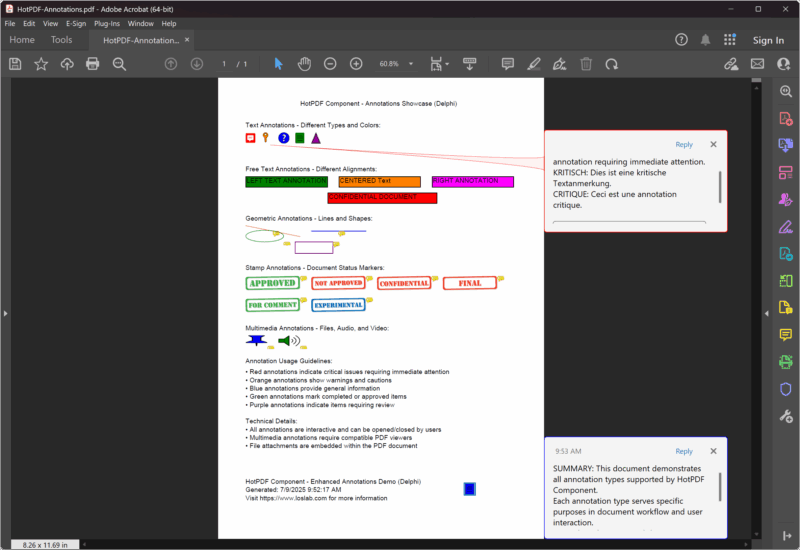
// Available text annotation type enumeration THPDFTextAnnotationType = ( taComment, // Standard comment bubble taKey, // Key symbol for important notes taNote, // Note icon for general information taHelp, // Help icon for help text taNewParagraph, // New paragraph marker taParagraph, // Paragraph marker taInsert // Content insertion marker ); // Usage examples for different types procedure AddTextAnnotationExamples(PDF: THotPDF); begin WriteLn('Adding text annotations...'); // Section header text PDF.CurrentPage.TextOut(50, 80, 0, 'Text Annotations - Different Types and Colors:'); // Critical annotation with multilingual content PDF.CurrentPage.AddTextAnnotation( 'CRITICAL: This is a critical comment annotation requiring immediate attention.' + #13#10 + 'KRITISCH: Dies ist eine kritische Textanmerkung.' + #13#10 + 'CRITIQUE: Ceci est une annotation critique.', Rect(50, 95, 70, 115), True, taComment, clRed ); // Key point annotation PDF.CurrentPage.AddTextAnnotation( 'KEY POINT: Important information marker' + #13#10 + 'This annotation uses the key icon for emphasis.', Rect(80, 100, 100, 120), False, taKey, $0080FF // Orange ); // Help annotation PDF.CurrentPage.AddTextAnnotation( 'HELP: Click for additional assistance' + #13#10 + 'This help annotation provides user guidance.', Rect(110, 100, 130, 120), False, taHelp, clBlue ); // General note annotation PDF.CurrentPage.AddTextAnnotation( 'NOTE: General information annotation' + #13#10 + 'Standard note for supplementary information.', Rect(140, 100, 160, 120), False, taNote, clGreen ); // Insert marker annotation PDF.CurrentPage.AddTextAnnotation( 'INSERT: Content insertion marker' + #13#10 + 'Indicates where new content should be added.', Rect(170, 100, 190, 120), False, taInsert, $800080 // Purple ); end; |
2. Anotações de Texto Livre
As anotações de texto livre exibem o texto diretamente na página, sem exigir interação do usuário:
|
1 2 3 4 5 6 7 8 9 10 11 12 13 14 15 16 17 18 19 20 21 22 23 24 25 26 27 28 29 30 31 32 33 34 35 36 37 38 39 40 41 42 43 44 45 46 47 |
// Free text alignment options enumeration THPDFFreeTextAnnotationJust = ( ftLeftJust, // Left-aligned text ftCenter, // Center-aligned text ftRightJust // Right-aligned text ); // Example: Create free text annotations with different alignments procedure AddFreeTextAnnotationExamples(PDF: THotPDF); begin WriteLn('Adding free text annotations...'); // Section header PDF.CurrentPage.TextOut(50, 160, 0, 'Free Text Annotations - Different Alignments:'); // Left-justified free text PDF.CurrentPage.AddFreeTextAnnotation( 'LEFT TEXT ANNOTATION', Rect(50, 180, 200, 200), ftLeftJust, $008000 // Green ); // Center-justified free text PDF.CurrentPage.AddFreeTextAnnotation( 'CENTERED Text', Rect(220, 180, 370, 200), ftCenter, $0080FF // Orange ); // Right-justified free text PDF.CurrentPage.AddFreeTextAnnotation( 'RIGHT ANNOTATION', Rect(390, 180, 540, 200), ftRightJust, clFuchsia // Fuchsia ); // Document status annotation PDF.CurrentPage.AddFreeTextAnnotation( 'CONFIDENTIAL DOCUMENT', Rect(200, 210, 400, 230), ftCenter, clRed ); end; |
3. Anotações Geométricas
As anotações de linha e forma fornecem ênfase visual e funcionalidade de marcação:
|
1 2 3 4 5 6 7 8 9 10 11 12 13 14 15 16 17 18 19 20 21 22 23 24 25 26 27 28 29 30 31 32 33 34 35 36 37 38 39 40 41 42 43 44 45 46 47 48 49 50 51 52 53 54 55 |
// Line and shape annotation examples procedure AddGeometricAnnotationExamples(PDF: THotPDF); var StartPoint, EndPoint: THPDFCurrPoint; begin WriteLn('Adding geometric annotations...'); // Section header PDF.CurrentPage.TextOut(50, 250, 0, 'Geometric Annotations - Lines and Shapes:'); // Line annotation - diagonal StartPoint.X := 50; StartPoint.Y := 270; EndPoint.X := 150; EndPoint.Y := 290; PDF.CurrentPage.AddLineAnnotation( 'Diagonal line pointing to important content', StartPoint, EndPoint, $0080FF // Orange ); // Line annotation - horizontal StartPoint.X := 170; StartPoint.Y := 280; EndPoint.X := 270; EndPoint.Y := 280; PDF.CurrentPage.AddLineAnnotation( 'Horizontal line for emphasis', StartPoint, EndPoint, clBlue ); // Circle annotation PDF.CurrentPage.AddCircleSquareAnnotation( 'Circle highlighting important area', Rect(50, 300, 120, 320), csCircle, clGreen ); // Square annotation PDF.CurrentPage.AddCircleSquareAnnotation( 'Square frame for emphasis', Rect(140, 300, 210, 320), csSquare, $800080 // Purple ); end; // Circle and square annotation types THPDFCSAnnotationType = (csCircle, csSquare); |
4. Anotações de Carimbo
As anotações de carimbo fornecem marcadores visuais predefinidos para o status do documento e fluxo de trabalho:
|
1 2 3 4 5 6 7 8 9 10 11 12 13 14 15 16 17 18 19 20 21 22 23 24 25 26 27 28 29 30 31 32 33 34 35 36 37 38 39 40 41 42 43 44 45 46 47 48 49 50 51 52 53 54 55 56 57 58 59 60 61 62 63 64 65 66 67 68 69 |
// Available stamp type enumeration THPDFStampAnnotationType = ( satApproved, // Green "Approved" stamp satExperimental, // "Experimental" marker satNotApproved, // Red "Not Approved" stamp satAsIs, // "As Is" status satExpired, // "Expired" warning satNotForPublicRelease, // Confidential marker satConfidential, // "Confidential" stamp satFinal, // "Final" marker satSold, // "Sold" status satDepartmental, // Department-specific marker satForComment, // "For Comment" review stamp satTopSecret // "Top Secret" classification ); // Example: Add various stamp annotations procedure AddStampAnnotationExamples(PDF: THotPDF); begin WriteLn('Adding stamp annotations...'); // Section header PDF.CurrentPage.TextOut(50, 340, 0, 'Stamp Annotations - Document Status Markers:'); // Approval stamps PDF.CurrentPage.AddStampAnnotation( 'Document approved for release', Rect(50, 360, 150, 390), satApproved, clGreen ); PDF.CurrentPage.AddStampAnnotation( 'Document rejected - requires revision', Rect(170, 360, 270, 390), satNotApproved, clRed ); // Security stamps PDF.CurrentPage.AddStampAnnotation( 'Confidential information marker', Rect(290, 360, 390, 390), satConfidential, clRed ); PDF.CurrentPage.AddStampAnnotation( 'Final version stamp', Rect(410, 360, 510, 390), satFinal, clBlue ); // Workflow stamps PDF.CurrentPage.AddStampAnnotation( 'For comment and review', Rect(50, 400, 150, 430), satForComment, $800080 // Purple ); PDF.CurrentPage.AddStampAnnotation( 'Experimental version', Rect(170, 400, 270, 430), satExperimental, $0080FF // Orange ); end; |
Anotações multimídia: Além da interação com texto.
Os fluxos de trabalho modernos de PDF geralmente exigem integração de multimídia. O componente HotPDF suporta anotações multimídia:
5. Anotações de anexos de arquivo.
As anotações de anexos de arquivo permitem incorporar arquivos externos em documentos PDF:
|
1 2 3 4 5 6 7 8 9 10 11 12 13 14 15 16 17 18 19 20 21 22 23 24 25 26 27 28 29 30 31 32 33 34 35 36 37 38 39 40 41 42 43 44 45 46 47 48 49 50 51 |
// File attachment annotation example procedure AddMultimediaAnnotationExamples(PDF: THotPDF); var DemoTextFile, DemoAudioFile: string; DemoContent: TStringList; begin WriteLn('Adding multimedia annotations...'); // Section header PDF.CurrentPage.TextOut(50, 450, 0, 'Multimedia Annotations - Files, Audio, and Video:'); // Create demo text file if it doesn't exist DemoTextFile := 'DemoAttachment.txt'; if not FileExists(DemoTextFile) then begin DemoContent := TStringList.Create; try DemoContent.Add('HotPDF Component Demo Attachment'); DemoContent.Add('================================'); DemoContent.Add('This is a sample text file attached to the PDF document.'); DemoContent.Add('It demonstrates the file attachment annotation capability.'); DemoContent.Add('Created: ' + DateTimeToStr(Now)); DemoContent.SaveToFile(DemoTextFile); finally DemoContent.Free; end; end; // File attachment annotation PDF.CurrentPage.AddFileAttachmentAnnotation( 'Demo text file attachment', DemoTextFile, Rect(50, 470, 90, 490), clBlue ); // Multiple file attachment examples PDF.CurrentPage.AddFileAttachmentAnnotation( 'Legal agreement document', 'Contract.docx', Rect(100, 470, 140, 490), clPurple ); PDF.CurrentPage.AddFileAttachmentAnnotation( 'Reference image for comparison', 'Reference.png', Rect(150, 470, 190, 490), clGreen ); end; |
6. Anotações de áudio.
As anotações de áudio permitem incorporar arquivos de áudio para notas de voz ou explicações:
|
1 2 3 4 5 6 7 8 9 10 11 12 13 14 15 16 17 18 19 20 21 22 23 24 25 26 27 28 29 30 31 32 33 34 35 36 37 38 39 40 41 42 |
// Sound annotation example procedure AddSoundAnnotationExample(PDF: THotPDF); var DemoAudioFile: string; begin // Check for existing multimedia files and add annotations DemoAudioFile := 'Music.wav'; if FileExists(DemoAudioFile) then begin PDF.CurrentPage.AddSoundAnnotation( 'Demo audio file - Click to play', DemoAudioFile, Rect(110, 470, 150, 490), clGreen ); end else begin PDF.CurrentPage.AddTextAnnotation( 'Audio file not found: ' + DemoAudioFile, Rect(110, 470, 130, 490), False, taNote, $0080FF // Orange ); end; // Multi-language sound annotation example PDF.CurrentPage.AddSoundAnnotation( 'English narration', 'Narration_EN.mp3', Rect(60, 350, 100, 390), clBlue ); PDF.CurrentPage.AddSoundAnnotation( 'Chinese narration', 'Narration_CN.mp3', Rect(110, 350, 150, 390), clGreen ); end; |
Exemplo completo de anotação: Projeto de demonstração aprimorado.
Aqui está o exemplo completo e atualizado que demonstra todos os tipos de anotações em um único projeto abrangente:
|
1 2 3 4 5 6 7 8 9 10 11 12 13 14 15 16 17 18 19 20 21 22 23 24 25 26 27 28 29 30 31 32 33 34 35 36 37 38 39 40 41 42 43 44 45 46 47 48 49 50 51 52 53 54 55 56 57 58 59 60 61 62 63 64 65 66 67 68 69 70 71 72 73 74 75 76 77 78 79 80 81 82 83 84 85 86 87 88 89 90 91 92 93 94 95 96 97 98 99 100 101 102 103 104 105 106 107 108 109 110 111 112 113 114 115 116 117 118 119 120 121 122 123 124 125 126 127 128 129 |
{***********************************************************} // HotPDF PDF Component - Enhanced Annotations Demo Delphi // Copyright(c)2007-2025, https://www.loslab.com // This demo showcases comprehensive annotation functionality {***********************************************************} program Annotations; {$I ..\..\..\Lib\HotPDF.inc} {$APPTYPE CONSOLE} uses {$IFDEF XE2+} System.Classes, System.SysUtils, Vcl.Graphics, {$ELSE} Classes, SysUtils, Graphics, {$ENDIF} HPDFDoc; var HotPDF: THotPDF; // ... existing code ... procedure AddDocumentationAndFooter(PDF: THotPDF); begin WriteLn('Adding documentation and footer...'); // Documentation section PDF.CurrentPage.TextOut(50, 510, 0, 'Annotation Usage Guidelines:'); PDF.CurrentPage.TextOut(50, 530, 0, '• Red annotations indicate critical issues requiring immediate attention'); PDF.CurrentPage.TextOut(50, 545, 0, '• Orange annotations show warnings and cautions'); PDF.CurrentPage.TextOut(50, 560, 0, '• Blue annotations provide general information'); PDF.CurrentPage.TextOut(50, 575, 0, '• Green annotations mark completed or approved items'); PDF.CurrentPage.TextOut(50, 590, 0, '• Purple annotations indicate items requiring review'); // Technical information PDF.CurrentPage.TextOut(50, 620, 0, 'Technical Details:'); PDF.CurrentPage.TextOut(50, 635, 0, '• All annotations are interactive and can be opened/closed by users'); PDF.CurrentPage.TextOut(50, 650, 0, '• Multimedia annotations require compatible PDF viewers'); PDF.CurrentPage.TextOut(50, 665, 0, '• File attachments are embedded within the PDF document'); // Footer PDF.CurrentPage.TextOut(50, 730, 0, 'HotPDF Component - Enhanced Annotations Demo (Delphi)'); PDF.CurrentPage.TextOut(50, 745, 0, 'Generated: ' + DateTimeToStr(Now)); PDF.CurrentPage.TextOut(50, 760, 0, 'Visit https://www.loslab.com for more information'); // Add a final summary annotation PDF.CurrentPage.AddTextAnnotation( 'SUMMARY: This document demonstrates all annotation types supported by HotPDF Component.' + #13#10 + 'Each annotation type serves specific purposes in document workflow and user interaction.' + #13#10 + 'For technical support and documentation, visit https://www.loslab.com', Rect(450, 740, 470, 760), False, taNote, clBlue ); end; begin WriteLn('HotPDF Enhanced Annotations Demo (Delphi)'); WriteLn('========================================='); WriteLn('Creating comprehensive PDF with all annotation types...'); WriteLn(''); HotPDF := THotPDF.Create(nil); try try // Configure PDF properties HotPDF.FileName := 'HotPDF-Annotations.pdf'; HotPDF.Title := 'HotPDF Annotations Demo (Delphi)'; HotPDF.Author := 'HotPDF Component'; HotPDF.Subject := 'Comprehensive annotation examples'; HotPDF.Keywords := 'PDF, Annotations, HotPDF, Demo, Interactive, Delphi'; // Set font embedding for consistent display HotPDF.FontEmbedding := True; // Enable FlateDecode compression for smaller file sizes HotPDF.Compression := cmFlateDecode; // Set initial zoom to fit page height in window HotPDF.InitialZoom := izFitV; HotPDF.BeginDoc; // Use standard font HotPDF.CurrentPage.SetFont('Arial', [], 12, 0, False); // Add page title HotPDF.CurrentPage.TextOut(150, 40, 0, 'HotPDF Component - Annotations Showcase (Delphi)'); // Add all annotation examples AddTextAnnotationExamples(HotPDF); AddFreeTextAnnotationExamples(HotPDF); AddGeometricAnnotationExamples(HotPDF); AddStampAnnotationExamples(HotPDF); AddMultimediaAnnotationExamples(HotPDF); AddDocumentationAndFooter(HotPDF); HotPDF.EndDoc; WriteLn('Annotations PDF created successfully!'); WriteLn(''); WriteLn('Output file: ' + HotPDF.FileName); WriteLn(''); WriteLn('The PDF contains:'); WriteLn('• Text annotations with different types and colors'); WriteLn('• Free text annotations with various alignments'); WriteLn('• Geometric annotations (lines, circles, squares)'); WriteLn('• Stamp annotations for document workflow'); WriteLn('• Multimedia annotations (file, audio, video)'); WriteLn('• Comprehensive documentation and usage guidelines'); except on E: Exception do begin WriteLn('Error creating PDF: ' + E.Message); ExitCode := 1; end; end; finally HotPDF.Free; end; end. |
Melhores práticas para anotações em PDF.
1. Estrutura de código moderna e compatibilidade.
O componente HotPDF atualizado utiliza práticas modernas de codificação em Delphi:
|
1 2 3 4 5 6 7 8 9 10 11 12 13 14 15 16 17 18 19 20 21 22 23 24 25 26 27 28 29 30 31 |
// Modern unit structure with conditional compilation uses {$IFDEF XE2+} System.Classes, System.SysUtils, Vcl.Graphics, {$ELSE} Classes, SysUtils, Graphics, {$ENDIF} HPDFDoc; // Enhanced PDF configuration procedure ConfigureModernPDF(PDF: THotPDF); begin // Font embedding for consistent display across viewers PDF.FontEmbedding := True; // FlateDecode compression for smaller file sizes PDF.Compression := cmFlateDecode; // Initial zoom setting for better user experience PDF.InitialZoom := izFitV; // Fit to page height // Complete metadata for better document management PDF.Title := 'Professional PDF with Annotations'; PDF.Author := 'HotPDF Component'; PDF.Subject := 'Comprehensive annotation examples'; PDF.Keywords := 'PDF, Annotations, Interactive, Professional'; end; |
2. Tratamento de erros e robustez.
Implemente um tratamento de erros adequado para aplicativos de produção:
|
1 2 3 4 5 6 7 8 9 10 11 12 13 14 15 16 17 18 19 20 21 22 23 24 25 26 27 28 29 30 31 32 33 34 35 36 37 38 39 40 41 42 43 44 45 46 47 |
// Robust file handling with error checking procedure SafeAddFileAttachment(PDF: THotPDF; const FileName: string; const Description: string); begin if FileExists(FileName) then begin PDF.CurrentPage.AddFileAttachmentAnnotation( Description, FileName, Rect(10, 10, 50, 50), clGreen ); end else begin // Add error annotation instead PDF.CurrentPage.AddTextAnnotation( Format('File not found: %s', [ExtractFileName(FileName)]), Rect(10, 10, 30, 30), True, taKey, clRed ); end; end; // Exception handling in main program begin HotPDF := THotPDF.Create(nil); try try // PDF creation code here HotPDF.BeginDoc; // ... annotation code ... HotPDF.EndDoc; WriteLn('PDF created successfully!'); except on E: Exception do begin WriteLn('Error creating PDF: ' + E.Message); ExitCode := 1; end; end; finally HotPDF.Free; end; end; |
3. Consistência de cores e design visual.
Utilize esquemas de cores consistentes para uma melhor experiência do usuário:
|
1 2 3 4 5 6 7 8 9 10 11 12 13 14 15 16 17 18 19 20 21 22 23 24 25 26 27 28 29 30 31 32 33 34 35 36 37 38 |
// Color constants for consistent annotation design const ANNOTATION_COLOR_ERROR = clRed; ANNOTATION_COLOR_WARNING = $0080FF; // Orange ANNOTATION_COLOR_INFO = clBlue; ANNOTATION_COLOR_SUCCESS = clGreen; ANNOTATION_COLOR_REVIEW = $800080; // Purple // Consistent color application procedure AddColorCodedAnnotations(PDF: THotPDF); begin // Error annotation PDF.CurrentPage.AddTextAnnotation( 'ERROR: Critical issue requiring immediate attention', Rect(50, 100, 70, 120), True, taKey, ANNOTATION_COLOR_ERROR ); // Warning annotation PDF.CurrentPage.AddTextAnnotation( 'WARNING: Caution required', Rect(80, 100, 100, 120), False, taComment, ANNOTATION_COLOR_WARNING ); // Information annotation PDF.CurrentPage.AddTextAnnotation( 'INFO: Additional information available', Rect(110, 100, 130, 120), False, taNote, ANNOTATION_COLOR_INFO ); end; |
Otimização de desempenho para documentos grandes.
1. Abordagem estruturada com procedimentos.
O exemplo atualizado utiliza uma abordagem modular para melhor manutenção:
|
1 2 3 4 5 6 7 8 9 10 11 12 13 14 15 16 17 18 19 20 21 22 23 24 25 26 27 28 29 30 31 32 33 34 35 36 37 38 39 40 41 42 43 44 45 |
// Modular annotation management procedure AddTextAnnotationExamples(PDF: THotPDF); begin WriteLn('Adding text annotations...'); // Text annotation code here end; procedure AddFreeTextAnnotationExamples(PDF: THotPDF); begin WriteLn('Adding free text annotations...'); // Free text annotation code here end; procedure AddGeometricAnnotationExamples(PDF: THotPDF); begin WriteLn('Adding geometric annotations...'); // Geometric annotation code here end; // Main execution with clear structure begin HotPDF := THotPDF.Create(nil); try // Configure PDF HotPDF.FileName := 'HotPDF-Annotations.pdf'; HotPDF.FontEmbedding := True; HotPDF.Compression := cmFlateDecode; HotPDF.InitialZoom := izFitV; HotPDF.BeginDoc; HotPDF.CurrentPage.SetFont('Arial', [], 12, 0, False); // Add all annotation examples in organized manner AddTextAnnotationExamples(HotPDF); AddFreeTextAnnotationExamples(HotPDF); AddGeometricAnnotationExamples(HotPDF); AddStampAnnotationExamples(HotPDF); AddMultimediaAnnotationExamples(HotPDF); AddDocumentationAndFooter(HotPDF); HotPDF.EndDoc; finally HotPDF.Free; end; end; |
2. Gerenciamento de memória e limpeza de recursos.
Gerenciamento adequado de recursos para operação confiável:
|
1 2 3 4 5 6 7 8 9 10 11 12 13 14 15 16 17 18 19 20 21 22 23 24 25 26 27 28 29 30 31 32 33 34 35 36 37 38 39 |
// Proper resource management procedure CreateAnnotatedPDF; var HotPDF: THotPDF; TempFiles: TStringList; begin HotPDF := THotPDF.Create(nil); TempFiles := TStringList.Create; try try // Create temporary files for demonstration CreateDemoFiles(TempFiles); // Configure and create PDF ConfigurePDF(HotPDF); HotPDF.BeginDoc; // Add annotations AddAllAnnotations(HotPDF, TempFiles); HotPDF.EndDoc; WriteLn('PDF created successfully!'); except on E: Exception do begin WriteLn('Error: ' + E.Message); raise; // Re-raise for proper error handling end; end; finally // Clean up resources TempFiles.Free; HotPDF.Free; // Clean up temporary files CleanupTempFiles; end; end; |
Recursos avançados e melhorias modernas.
1. Compressão e otimização.
O componente atualizado inclui opções de compressão aprimoradas:
|
1 2 3 4 |
// Modern compression settings HotPDF.Compression := cmFlateDecode; // Best compression ratio HotPDF.FontEmbedding := True; // Consistent font display HotPDF.InitialZoom := izFitV; // Optimal viewing experience |
2. Suporte aprimorado para metadados.
Metadados completos para documentos profissionais:
|
1 2 3 4 5 6 7 8 9 10 |
// Complete metadata configuration procedure ConfigureDocumentMetadata(PDF: THotPDF); begin PDF.Title := 'Professional PDF with Annotations'; PDF.Author := 'HotPDF Component'; PDF.Subject := 'Comprehensive annotation examples'; PDF.Keywords := 'PDF, Annotations, HotPDF, Demo, Interactive, Delphi'; PDF.Creator := 'HotPDF Component Demo'; PDF.Producer := 'HotPDF Component v2.x'; end; |
Conclusão.
O componente HotPDF atualizado oferece suporte abrangente para anotações em PDF, utilizando práticas de codificação modernas em Delphi. O projeto de demonstração aprimorado mostra todos os tipos de anotações com uma estrutura de código melhorada, tratamento de erros e gerenciamento de recursos.
Principais melhorias na versão atualizada:
- Estrutura de código moderna: Utiliza compilação condicional para compatibilidade com XE2+.
- Tratamento de erros aprimorado: Tratamento robusto de exceções e limpeza de recursos.
- Desempenho aprimorado: Compressão FlateDecode e incorporação de fontes.
- Melhor organização: Procedimentos modulares para diferentes tipos de anotação.
- Recursos profissionais: Suporte completo de metadados e configurações de otimização.
- Exemplos abrangentes: Todos os tipos de anotação com casos de uso práticos.
Quer você esteja criando sistemas de revisão de documentos, formulários interativos ou apresentações multimídia, o componente HotPDF atualizado oferece as ferramentas e exemplos necessários para criar documentos PDF profissionais e ricos em recursos, com suporte abrangente para anotações.
O código-fonte completo está disponível no diretório Demo/Delphi/Annotations, fornecendo uma base sólida para seus projetos de anotação de PDF.