Chega uma solicitação: pegue um lote de demonstrativos já renderizados, apague os números de conta e entregue duas páginas por folha para economizar papel. As duas metades dessa tarefa são cirurgia de content stream em um PDF que você não criou, então não existe um canvas amigável de página para desenhar e nem um gerenciador de fontes para usar de apoio. Você está editando diretamente o grafo de objetos de um documento carregado, anexando operadores brutos de desenho a uma página que outra ferramenta já montou. O HotPDF expõe exatamente dois pontos de entrada para isso, e o mais perigoso dos dois é justamente o que parece inofensivo
HotPDF é um componente PDF nativo VCL para Delphi e C++Builder. A API de documento carregado da rodada nove adicionou os primeiros métodos que criam conteúdo novo em uma página aberta a partir do disco, em vez de uma página construída do zero. Dois deles são o foco aqui: RedactLoadedRect, que pinta um retângulo opaco sobre uma região, e StitchLoadedPage, que escala uma página e a desenha sobre outra. Ambos funcionam escrevendo operadores de content stream da ISO 32000-1 §8.5 no stream /Contents da página. Entender o que esses operadores fazem, e igualmente o que eles não fazem, é a diferença entre uma ferramenta funcional e um vazamento de dados
Como anexar operadores a uma página já carregada
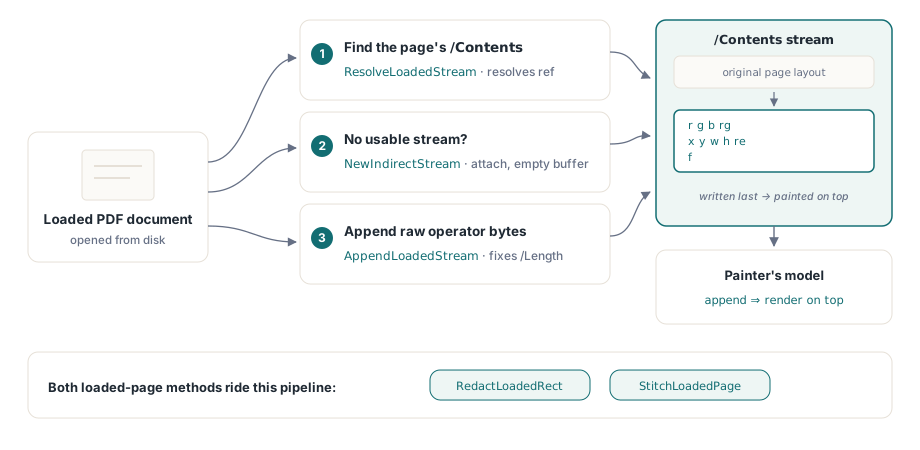
Quando você constrói uma página com a API normal do HotPDF, o componente é dono do content stream e serializa para você as chamadas de TextOut e de vetores. Uma página carregada é diferente: o seu /Contents já é um stream existente, possivelmente compartilhado, possivelmente parte de um array de conteúdo, e você precisa costurá-lo sem corromper o que já está ali. A rodada nove introduziu três pequenos auxiliares que tornam isso seguro. NewIndirectStream aloca um novo THPDFStreamObject indireto com um buffer vazio e uma entrada /Length 0; ResolveLoadedStream segue uma referência indireta até o stream subjacente; e AppendLoadedStream escreve bytes brutos no fim do stream e regrava /Length para que o objeto salvo continue bem formado
O padrão seguido pelos dois métodos públicos é o mesmo. Localize o /Contents da página, resolva-o para um stream e, se não houver um stream utilizável, crie um e anexe-o. Depois adicione os operadores. Como os bytes novos vão para o fim do stream, o modelo de pintura garante que eles sejam renderizados por cima de tudo o que o layout original desenhou. Essa ordem é todo o mecanismo por trás do retângulo de redação, e também é o motivo pelo qual esse retângulo não é o que a maioria das pessoas imagina
RedactLoadedRect: uma cobertura opaca, não remoção de conteúdo
RedactLoadedRect recebe um índice de página baseado em zero, quatro coordenadas de espaço do usuário e três componentes de cor na faixa de 0 a 1:
var
  Pdf: THotPDF;
begin
  Pdf := THotPDF.Create(nil);
  try
    if Pdf.LoadFromFile('statement.pdf') > 0 then
    begin
      // Cobre a faixa do número da conta na página 1 com preto sólido.
      // As coordenadas são o espaço do usuário PDF: origem no canto inferior esquerdo, em pontos.
      Pdf.RedactLoadedRect(0, 56, 690, 320, 706, 0, 0, 0);
      Pdf.SaveLoadedDocument('statement-covered.pdf');
    end;
  finally
    Pdf.Free;
  end;
end;
Por baixo, o método emite três operadores no content stream: uma configuração de cor de preenchimento em DeviceRGB (r g b rg), um path de retângulo (x y w h re) e um preenchimento (f). A largura e a altura são derivadas como X2 - X1 e Y2 - Y1, então você passa dois cantos opostos e deixa o método calcular a extensão. Passe 0, 0, 0 para a cor e você recebe uma faixa preta; passe 1, 1, 1 para uma branca que combine com uma página branca. As coordenadas são o próprio espaço de usuário da página carregada, o que significa que a origem fica no canto inferior esquerdo e as unidades são pontos, e também significa que você precisa do /MediaBox da página para posicionar algo com precisão; GetLoadedPageBox com pbMediaBox fornece isso
Leia isto duas vezes: um retângulo preenchido cobre o conteúdo visualmente, mas não o remove. O texto, a imagem ou a arte vetorial sob o retângulo continuam presentes no PDF, continuam no grafo de objetos e continuam extraíveis por qualquer pessoa que copie a página, rode um extrator de texto ou simplesmente apague seu retângulo do content stream. Isso é mascaramento visual, não redação no sentido legal ou de segurança. Se você está escondendo dados realmente sensíveis - números de conta, prontuários, identidades, qualquer coisa regulada - cobrir isso com uma caixa preta e enviar o arquivo é um vazamento de dados à espera de acontecer. Redação verdadeira exige excluir os objetos de conteúdo subjacentes, não pintar por cima deles
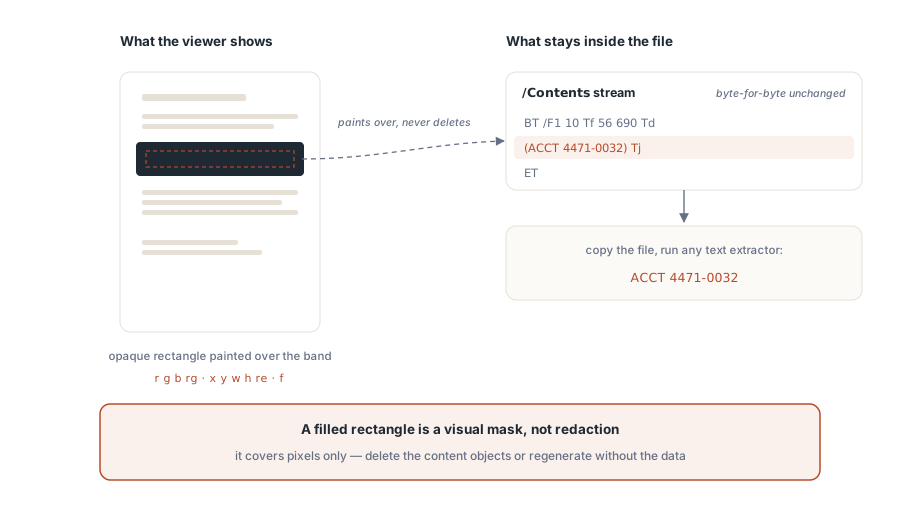
O nome do método diz "Redact", e isso é um aviso útil sobre como o resultado pode ser lido de forma errada, não uma promessa sobre o que ele exclui. A implementação é honesta a esse respeito no próprio comentário: ela se chama de "visual redaction primitive" e observa que a redação com remoção de conteúdo precisa de um interpretador de content stream que percorra e reescreva os operadores existentes. O caminho de documento carregado do HotPDF não faz isso aqui. Então a regra segura é estreita: use RedactLoadedRect para mascaramento cosmético não sensível - ocultar uma marca d'água de rascunho, apagar uma região antes de uma captura de tela, cobrir um logotipo obsoleto em uma prova interna. No momento em que o que está sob a caixa importaria se vazasse, esse método deixa de ser a ferramenta certa, e a resposta correta é regenerar o documento sem os dados ou usar um pipeline real de remoção de conteúdo
StitchLoadedPage: escalar, deslocar e desenhar
Montagem N-up é o problema mais amigável porque nada é escondido, apenas reorganizado. StitchLoadedPage recebe um índice de página de destino, um índice de página de origem, um deslocamento X/Y e um fator de escala, e desenha a página de origem sobre a página de destino nessa posição e tamanho:
// Sobrepõe a página 2 (índice 1) sobre a página 1 (índice 0),
// em 70% da escala e deslocada para cima e para a direita.
Pdf.StitchLoadedPage(0, 1, 40, 380, 0.7);

// Conveniência 2-up: página de origem na metade direita do destino.
Pdf.StitchLoadedPageSideBySide(0, 1);
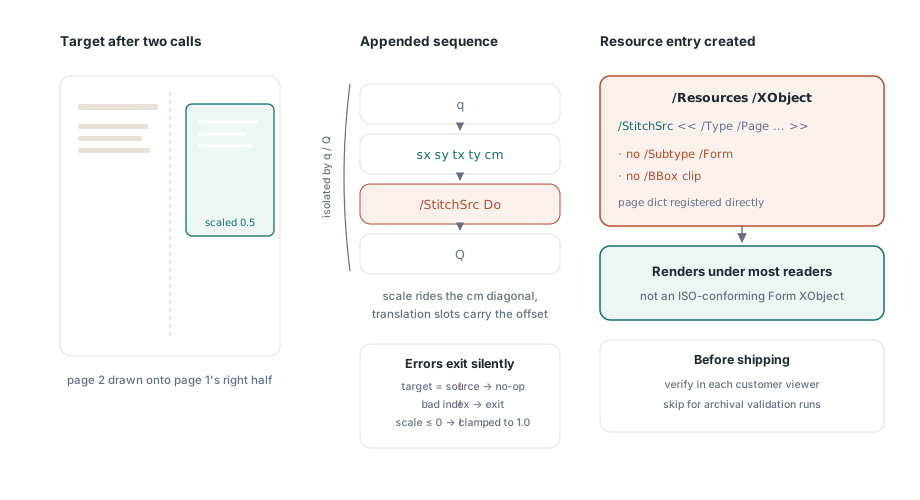
A string de operadores que ele acrescenta é uma sequência padrão de transformar e pintar: q para salvar o estado gráfico, uma matriz cm com a escala na diagonal e o deslocamento nos slots de translação, /StitchSrc Do para invocar um objeto externo e Q para restaurar o estado. O par q/Q importa: ele isola a transformação para que a página montada não vaze seu sistema de coordenadas para nada que venha depois. O método também protege contra os erros óbvios - índices fora de intervalo, destino igual à origem, escala não positiva, que ele limita a 1.0 - e sai em silêncio em vez de lançar exceção, então confira a entrada porque um no-op silencioso parece idêntico a sucesso
StitchLoadedPageSideBySide é uma conveniência fina sobre o método geral. Ele lê a largura do media box do destino, divide por dois e chama StitchLoadedPage com essa metade como deslocamento X e uma escala fixa de 0.5, colocando a origem na metade direita. Esse 0.5 codificado assume que origem e destino têm a mesma largura; se não tiverem, a origem não preencherá sua metade direito, e você vai querer o StitchLoadedPage geral com uma escala calculada por você a partir dos dois media boxes
A estratégia simplificada de XObject e seu compromisso com a ISO
É aqui que a implementação faz um atalho deliberado que você precisa conhecer antes de confiar na saída entre visualizadores. Uma montagem N-up correta envolve o conteúdo da página de origem em um Form XObject - um objeto desenhável autônomo que a ISO 32000-1 §8.10.1 diz que deve carregar /Type /XObject, /Subtype /Form e sua própria caixa de recorte /BBox. A montagem da rodada nove no HotPDF não constrói esse wrapper. Em vez disso, ela registra o próprio dicionário da página de origem diretamente sob /Resources /XObject do destino com o nome StitchSrc, e então o desenha com Do. Um dicionário de página e um Form XObject compartilham bastante do modelo de conteúdo - ambos fazem referência a um content stream e a um resource dictionary - então muitos leitores renderizam o resultado
Mas isso não é um Form XObject conforme a norma. Falta o marcador /Subtype /Form e a sua própria /BBox, o que significa que um consumidor rigoroso pode ignorar o Do ou recortá-lo de maneira diferente do esperado. As TechnicalNotes desta rodada dizem isso de forma direta: a abordagem "renderiza na maioria dos leitores", mas "não é um Form XObject estritamente compatível com a ISO", e a conformidade completa exige sintetizar um stream Form XObject real como uma etapa separada. Então trate a saída de stitch como trataria qualquer construção não conforme: valide nos visualizadores específicos que seus clientes usam, não só no da sua máquina, e, se você precisa de PDFs de arquivo ou limpos para validadores rígidos, não dependa desse caminho. A mesma disciplina vale para tudo o que você constrói sobre o grafo de objetos carregado, e é por isso que uma passagem de preflight de PDF em Delphi merece espaço no pipeline de release sempre que você altera documentos programaticamente
Onde esses métodos se encaixam, e onde não se encaixam
Os dois métodos são ferramentas de content stream, então o modelo mental é o mesmo que você usa para desenho direto. Se você já construiu páginas do zero com o componente, os operadores vetoriais e de cor por trás dessas chamadas vão parecer familiares de HotPDF canvas drawing in Delphi; a diferença é só que aqui você está anexando a um stream que outra pessoa escreveu, e não a um que é seu. Mantenha três limites em mente:
- Redação é cosmética.
RedactLoadedRectpinta por cima do conteúdo e nunca o exclui. Para qualquer coisa sensível, regenere a origem ou use remoção real de conteúdo - uma caixa preta não é segurança - Stitch não é conforme por desenho. A página de origem é referenciada como um pseudo-XObject sem o
/Subtype /Forme o/BBoxda §8.10.1, então confirme a renderização nos visualizadores alvo e evite isso onde for necessária validação rígida - As coordenadas são o espaço de usuário da página. Origem no canto inferior esquerdo, em pontos, guiadas pelo media box da própria página. Leia a caixa com
GetLoadedPageBoxantes de posicionar qualquer coisa, porque a página carregada pode não ter o tamanho que você supôs
Usados dentro desses limites, os dois cobrem um fluxo real de trabalho: reorganizar páginas para impressão, mascarar regiões não confidenciais e gravar o resultado de volta com SaveLoadedDocument - tudo sem um rerender completo. A API de documento carregado que inclui esses primitivos de stitch e máscara acompanha o HotPDF Delphi Component para Delphi e C++Builder, junto com os métodos de campo de formulário, anotação e FDF da mesma rodada