Hello World z komponentu Delphi HotPDF
Witamy w kompleksowym przewodniku po Delphi HotPDF Komponent Program demonstracyjny HelloWorld!
Informacje o komponencie HotPDF
HotPDF Component to potężna i wszechstronna biblioteka przetwarzająca PDF zaprojektowana specjalnie dla programistów Delphi i C++Builder. Ten kompleksowy komponent zapewnia rozbudowany interfejs API, który umożliwia programistom tworzenie, manipulowanie i modyfikowanie dokumentów PDF z łatwością i precyzją.
Kluczowe cechy komponentu HotPDF:
- PDF Tworzenie i generowanie: Twórz dokumenty PDF od podstaw z pełną kontrolą nad układem, formatowaniem i zawartością
- Obsługa tekstu i grafiki: Dodawaj tekst, obrazy, kształty i złożoną grafikę do stron PDF
- Wsparcie wielojęzyczne: Pełna obsługa Unicode dla międzynarodowego renderowania tekstu
- Zarządzanie czcionkami: Osadzaj czcionki, aby uzyskać spójny wygląd dokumentów w różnych systemach
- Opcje kompresji: Użyj algorytmów kompresji, aby zoptymalizować rozmiar pliku
- Funkcje bezpieczeństwa: Szyfrowanie dokumentów, ochrona hasłem i kontrola uprawnień
- Manipulacja dokumentami: Łącz, dziel i modyfikuj istniejące dokumenty PDF
- Obsługa tabel i formularzy: Twórz złożone tabele i interaktywne formularze
HelloWorld.dpr Omówienie programu
HelloWorld.dpr przykładowy program stanowi doskonałe wprowadzenie do komponentu HotPDF
najbardziej podstawowa i najważniejsza funkcja: funkcja TexOut. Ten program demonstracyjny prezentuje także podstawową funkcjonalność tworzenia PDF.
Podstawowa funkcjonalność:
1. PDF Tworzenie dokumentu
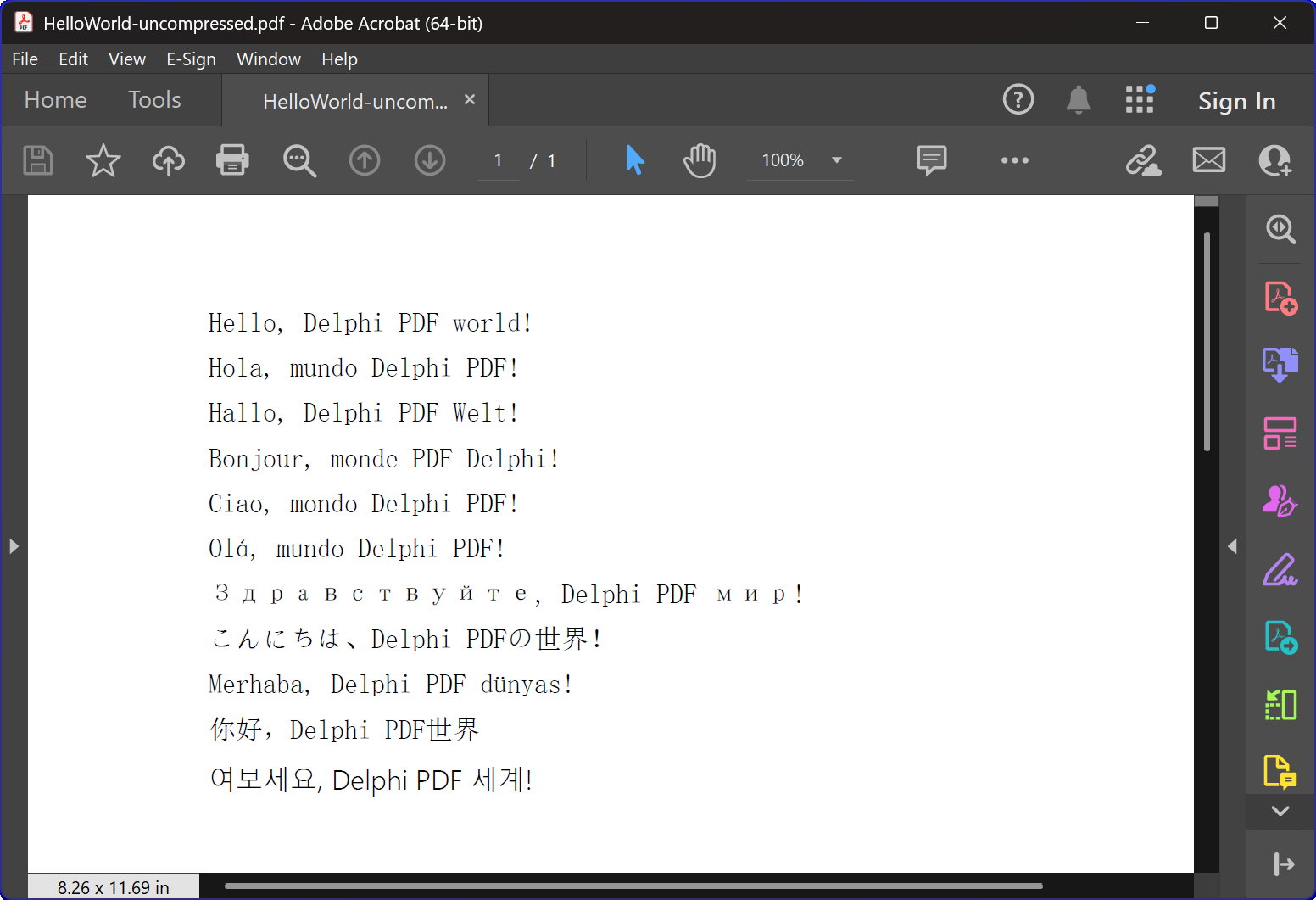
Podstawową funkcją programu jest generowanie dokumentów PDF zawierających wielojęzyczny tekst „Hello World”. The CreatePDF demonstruje:
- Inicjalizacja komponentu: Prawidłowa instalacja i konfiguracja komponentu THotPDF
- Właściwości dokumentu: Ustawianie metadanych, takich jak opcje kompresji i osadzanie czcionek
- Wielojęzyczne renderowanie tekstu: Wyświetlanie tekstu w 11 różnych językach, w tym angielskim, hiszpańskim, niemieckim, francuskim, włoskim, portugalskim, rosyjskim, japońskim, tureckim, chińskim i koreańskim
- Zarządzanie czcionkami: Używanie czcionki Arial Unicode MS do obsługi wyświetlania wielojęzycznego
- Kompresja: Tworzenie skompresowanego dokumentu PDF
2. Zarządzanie oknami i integracja systemu
Program zawiera zaawansowaną funkcjonalność wyliczania okien, która demonstruje:
- Wyliczenie okien systemowych: Korzystanie z interfejsu API systemu Windows
EnumWindowsdo iteracji po wszystkich oknach najwyższego poziomu - Dopasowanie tytułu okna: Implementacja dopasowywania podciągów w celu identyfikacji aplikacji docelowych
- Automatyczne zamykanie okien: Wysyłanie
WM_CLOSEkomunikaty o zamknięciu przeglądarek PDF, w których mogą być otwarte pliki - Zapobieganie konfliktom: Zapewnienie braku konfliktów dostępu do plików podczas tworzenia nowych plików PDF
3. Obsługa błędów i zarządzanie zasobami
Program demonstruje najlepsze praktyki w zakresie:
- Zarządzanie pamięcią: Prawidłowe tworzenie i usuwanie instancji komponentów
- Wyjątek Bezpieczeństwo: Używanie bloków try-finally w celu zapewnienia oczyszczenia zasobów
- Opinia użytkownika: Udostępnianie danych wyjściowych konsoli w celu informowania użytkowników o postępie programu
Szczegóły techniczne implementacji:
Technologia kompresji
Program tworzy dokument PDF z kompresją FlateDecode
Strategia obsługi czcionek
Program wykorzystuje wyrafinowaną strategię wyboru czcionki:
- Arial Unicode MS: Używany w większości języków ze względu na szeroką obsługę znaków
- Osadzanie czcionek: Zapewnia spójny wygląd w różnych systemach
Zgodność między wersjami
Kod zawiera dyrektywy kompilacji warunkowej obsługujące zarówno nowoczesne, jak i starsze wersje Delphi:
- Obsługa XE2+: Używa jednostek z przestrzenią nazw (WinApi.Windows, System.SysUtils itd.)
- Wsparcie dla starszych wersji: Powrót do tradycyjnych nazw jednostek dla starszych wersji Delphi
Wartość edukacyjna
Ten przykład HelloWorld służy wielu celom edukacyjnym:
- Wprowadzenie do komponentów: Zawiera delikatne wprowadzenie do użycia komponentu HotPDF
- Najlepsze praktyki: Demonstruje prawidłowe zarządzanie zasobami i obsługę błędów
- Integracja systemu: Pokazuje, jak zintegrować generowanie PDF z operacjami systemu Windows
- Internacjonalizacja: Ilustruje obsługę tekstu wielojęzycznego w dokumentach PDF
Pierwsze kroki
Aby uruchomić ten przykładowy program:
- Upewnij się, że komponent HotPDF jest poprawnie zainstalowany w Twoim IDE Delphi
- Otwórz plik projektu HelloWorld.dpr
- Skompiluj i uruchom program
- Program automatycznie utworzy plik PDF z kompresją
- Sprawdź wygenerowane pliki, aby zobaczyć renderowanie wielojęzycznego tekstu
Kod źródłowy
Poniżej znajduje się kompletny, dobrze udokumentowany kod źródłowy programu demonstracyjnego HelloWorld:
Zakreślacz składni Urvanov v2.9.1|
1 2 3 4 5 6 7 8 9 10 11 12 13 14 15 16 17 18 19 20 21 22 23 24 25 26 27 28 29 30 31 32 33 34 35 36 37 38 39 40 41 42 43 44 45 46 47 48 49 50 51 52 53 54 55 56 57 58 59 60 61 62 63 64 65 66 67 68 69 70 71 72 73 74 75 76 77 78 79 80 81 82 83 84 85 86 87 88 89 90 91 92 93 94 95 96 97 98 99 100 101 102 103 104 105 106 107 108 109 110 111 112 113 114 115 116 117 118 119 120 121 122 123 124 125 126 127 128 129 130 131 132 133 134 135 136 137 138 139 140 141 142 143 144 145 146 147 148 149 150 151 152 153 154 155 156 157 158 159 160 161 162 163 164 165 166 167 |
{************************************************************} // HotPDF PDF Component // Copyright(c)2007-2025, https://www.loslab.com {************************************************************} // HelloWorld Demo Program for HotPDF Component // This program demonstrates basic PDF creation capabilities // including multilingual text support and compression options {************************************************************} program HelloWorld; {$APPTYPE CONSOLE} // Console application type {$I ..\..\..\Lib\HotPDF.inc} // Include HotPDF configuration file uses // EurekaLog units for memory leak detection and debugging (optional) {$IFDEF EurekaLog} EMemLeaks, // Memory leak detection EResLeaks, // Resource leak detection EDebugJCL, // JCL debugging support EDebugExports, // Export debugging information EFixSafeCallException, // SafeCall exception handling EMapWin32, // Win32 mapping support EAppConsole, // Console application support EDialogConsole, // Console dialog support ExceptionLog7, // Exception logging {$ENDIF EurekaLog} // System units - different namespaces for XE2+ vs older versions {$IFDEF XE2+} WinApi.Windows, // Windows API functions WinApi.Messages, // Windows message constants System.SysUtils, // System utilities System.Classes, // Base classes (TStringList, etc.) Vcl.Graphics, // Graphics support {$ELSE} Windows, // Windows API functions (older Delphi) Messages, // Windows message constants (older Delphi) SysUtils, // System utilities (older Delphi) Classes, // Base classes (older Delphi) Graphics, // Graphics support (older Delphi) {$ENDIF} HPDFDoc; // HotPDF main component unit // Creates a compressed PDF file with multilingual "Hello World" text // Parameters: // FileName: Output PDF file name procedure CreatePDF(const FileName: string); var HotPDF: THotPDF; // Main HotPDF component instance begin // Create HotPDF component instance HotPDF := THotPDF.Create(nil); try // Configure PDF properties HotPDF.AutoLaunch := true; // Automatically open PDF after creation HotPDF.FileName := FileName; // Set output file name // Enable FlateDecode compression HotPDF.Compression := cmFlateDecode; // Enable FlateDecode compression WriteLn('Creating compressed PDF: ', FileName); HotPDF.FontEmbedding := true; // Embed fonts for better compatibility HotPDF.BeginDoc; // Start PDF document creation // Set Unicode font for multilingual text support // Arial Unicode MS supports most languages except Korean // procedure SetFont ( FontName: AnsiString; FontStyle: TFontStyles; ASize: Single; FontCharset: TFontCharset = DEFAULT_CHARSET; IsVertical: boolean = false); // DEFAULT_CHARSET: 1 - Font is chosen based on Name. If the described font is not available on the system, Windows will substitute another font HotPDF.CurrentPage.SetFont('Arial Unicode MS', [], 12, 1, False); // Display "Hello World" in multiple languages // TextOut parameters: (X, Y, Angle, Text) HotPDF.CurrentPage.TextOut(80, 50, 0, 'Hello, Delphi PDF world!'); // English HotPDF.CurrentPage.TextOut(80, 70, 0, 'Hola, mundo Delphi PDF!'); // Spanish HotPDF.CurrentPage.TextOut(80, 90, 0, 'Hallo, Delphi PDF Welt!'); // German HotPDF.CurrentPage.TextOut(80, 110, 0, 'Bonjour, monde PDF Delphi!'); // French HotPDF.CurrentPage.TextOut(80, 130, 0, 'Ciao, mondo Delphi PDF!'); // Italian HotPDF.CurrentPage.TextOut(80, 150, 0, 'Olá, mundo Delphi PDF!'); // Portuguese HotPDF.CurrentPage.TextOut(80, 170, 0, 'Здравствуйте, Delphi PDF мир!'); // Russian HotPDF.CurrentPage.TextOut(80, 190, 0, 'こんにちは、Delphi PDFの世界!'); // Japanese HotPDF.CurrentPage.TextOut(80, 210, 0, 'Merhaba, Delphi PDF dünyası!'); // Turkish HotPDF.CurrentPage.TextOut(80, 230, 0, '你好,Delphi PDF世界'); // Chinese HotPDF.CurrentPage.TextOut(80, 250, 0, '여보세요, Delphi PDF 세계!'); // Korean HotPDF.EndDoc; // Finalize and save the PDF document WriteLn('PDF created successfully: ', FileName); finally HotPDF.Free; // Clean up HotPDF component end; end; // Global variables for window enumeration and PDF creation var Title: String; // Individual title string (unused in current implementation) Titles: TStrings; // List of window titles to search for Window: HWND; // Window handle (unused in current implementation) WindowText: array [0 .. 255] of Char; // Buffer for window text (unused in current implementation) WindowTitle: String; // Window title string (unused in current implementation) I: Integer; // Loop counter (unused in current implementation) // Callback function for EnumWindows API // This function is called for each top-level window in the system // Parameters: // hWnd: Handle to the current window being enumerated // lParam: User-defined data (in our case, pointer to TStrings with target titles) // Returns: True to continue enumeration, False to stop function EnumWindowsProc(HWND: HWND; lParam: lParam): BOOL; stdcall; var Titles: TStrings; // List of target window titles I: Integer; // Loop counter WindowText: array [0 .. 255] of Char; // Buffer to store window text WindowTitle: String; // Current window's title as string begin Result := true; // Continue enumeration by default Titles := TStrings(lParam); // Cast lParam back to TStrings // Get the window title text if GetWindowText(HWND, WindowText, SizeOf(WindowText)) > 0 then begin WindowTitle := String(WindowText); // Convert char array to string // Check if window title contains any of our target strings for I := 0 to Titles.Count - 1 do begin // Use Pos function to check if target string is contained in window title if Pos(Titles[I], WindowTitle) > 0 then begin // Send WM_CLOSE message to close the window PostMessage(HWND, WM_CLOSE, 0, 0); Break; // Exit loop after finding first match end; end; end; end; // Main program execution begins here begin // Close any existing PDF files that might be open in PDF viewers // This prevents file access conflicts when creating new PDFs with same names Titles := TStringList.Create; try // Define list of window title substrings to search for // Any window containing these strings will be closed // This will close Adobe and Foxit PDF reader & editor and many other PDF apps Titles.CommaText := '"HelloWorld.pdf", "Foxit"'; // Enumerate all top-level windows and close matching ones // EnumWindows calls our callback function for each window EnumWindows(@EnumWindowsProc, lParam(Titles)); finally Titles.Free; // Clean up string list end; // Display program header WriteLn('=== HotPDF HelloWorld Demo ==='); WriteLn('This demo creates a compressed PDF file with multilingual text.'); WriteLn(''); // Create compressed PDF CreatePDF('HelloWorld.pdf'); // Display completion message WriteLn(''); WriteLn('PDF file created successfully!'); WriteLn('The PDF file uses FlateDecode compression for optimal file size.'); WriteLn(''); WriteLn('Press Enter to exit...'); ReadLn; // Wait for user input before closing console end. |