Kiedy eksport na 300000 wierszy przebija swój budżet pamięci, wina zwykle spada na liczbę wierszy. Liczba wierszy zwykle jest niewinna. Kosztowne części dużego skoroszytu to te tworzone jako efekt uboczny: pula stylów rosnąca o jeden wpis na komórkę, bo formatowanie dodano wewnątrz pętli, XML arkusza składany w jeden gigantyczny ciąg przy zapisie, milion identycznych ciał formuł przechowywanych po jednym. HotXLS, natywna biblioteka losLab dla Delphi do plików XLS i XLSX, daje ci konkretną dźwignię na każdy z tych kosztów. Żadna nie jest domyślnie włączona, bo każda zmienia jakiś kompromis, więc wiedza o tym, która dźwignia pasuje do którego objawu, jest właściwą umiejętnością wydajnościową
Na co duży skoroszyt wydaje pamięć
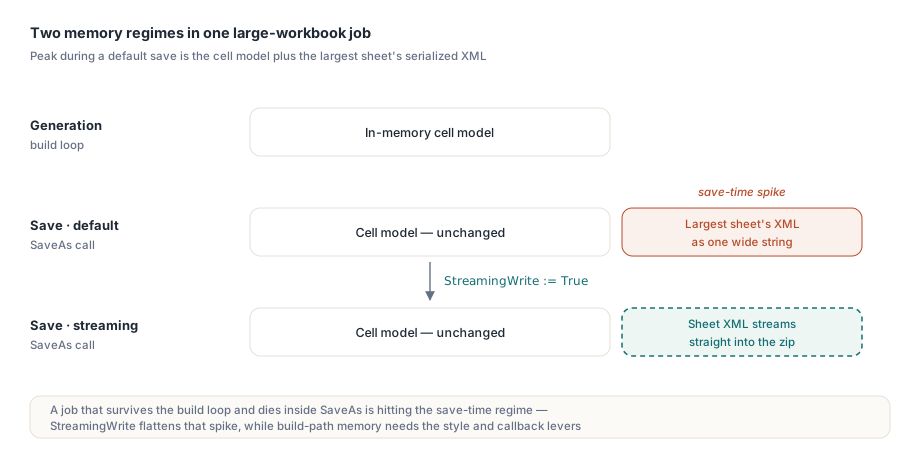
Są dwa odrębne reżimy pamięciowe do przemyślenia. Podczas generowania model komórek w pamięci rośnie z każdą dotkniętą komórką: wartości, formaty i formuły wszystkie stają się obiektami albo wpisami puli. Podczas zapisu domyślna ścieżka XLSX dodatkowo renderuje XML każdego arkusza do szerokiego ciągu przed spakowaniem go do kontenera zip, więc szczytowe zużycie to model plus zserializowana postać największego arkusza. Zadanie, które przeżywa pętlę budowania, a potem umiera wewnątrz SaveAs, uderza w drugi reżim, nie w pierwszy, a lekarstwo na jeden nie robi nic dla drugiego
Rozmiar pliku podlega pokrewnej regule: komórki to tylko jeden składnik obok stylów, ciągów współdzielonych, formuł, obrazów i komentarzy. Przebieg audytu przez ForEachCell i liczności kolekcji na każdym arkuszu mówią ci, który zasób naprawdę dominuje w problematycznym pliku, zanim zoptymalizujesz niewłaściwy. Jeden subtelny szczegół pomiaru: Sheet.Cells.Count po stronie XLSX raportuje liczbę utworzonych komórek w rzadkim magazynie, a nie pole użytego zakresu. Arkusz, którego dane zajmują prostokąt 1000 na 50 z połową komórek pustych, liczy około 25000, a nie 50000. To rozróżnienie ma znaczenie, gdy porównujesz "ogromny" plik klienta ze swoimi wzorcami, bo pole użytego zakresu i faktyczna populacja komórek mogą różnić się o rząd wielkości w rzadkich układach finansowych
StreamingWrite naprawia ścieżkę zapisu, a nie ścieżkę budowania
Ustawienie TXLSXWorkbook.StreamingWrite := True przełącza SaveAs na serializator strumieniowy, który zapisuje XML arkusza wprost do strumienia zip, eliminując pośredni ciąg dla każdego arkusza. Domyślnie ma False dla zgodności zachowania, a włączenie go to zmiana jednej linii:
Book := TXLSXWorkbook.Create;
try
  Sheet := Book.Sheets.Add('Bulk');
  for R := 1 to 100000 do
  begin
    Sheet.Cells[R, 1].Value := R;
    Sheet.Cells[R, 2].Value := 'Row ' + IntToStr(R);
    Sheet.Cells[R, 3].Value := R * 1.5;
  end;
  Book.StreamingWrite := True;   // XML arkusza strumieniuje do kontenera zip
  Book.SaveAs('bulk.xlsx');
finally
  Book.Free;
end;
Bądź precyzyjny co do tego, co to daje: model komórek zbudowany przez pętlę zajmuje dokładnie tyle samo pamięci co wcześniej. StreamingWrite spłaszcza szczyt z chwili zapisu, czyli różnicę między zadaniem wsadowym, które się kończy, a takim, które zawodzi na 95% drogi. Jeśli to sama pętla budowania wyczerpuje pamięć, potrzebne dźwignie to dwie następne
Pule stylów: dodaj raz, użyj indeksu ponownie
Formatowanie XLSX w HotXLS opiera się na pulach: Book.Fonts.Add(...), Fills.AddSolid(...) i Borders.Add(...) zwracają indeks puli liczony od zera, do którego odwołują się komórki. Wołanie Fonts.Add z identycznymi parametrami wewnątrz pętli jest deduplikowane, więc marnuje czas, a nie miejsce. Alignments.Add zachowuje się inaczej: zwraca świeży obiekt przy każdym wywołaniu, więc tworzenie wyrównania dla każdej komórki powiększa pulę liniowo wraz z liczbą wierszy. Jeden nawyk pokrywa oba przypadki. Rozwiąż każdy indeks puli raz, poza pętlą, i przypisuj indeksy wewnątrz niej
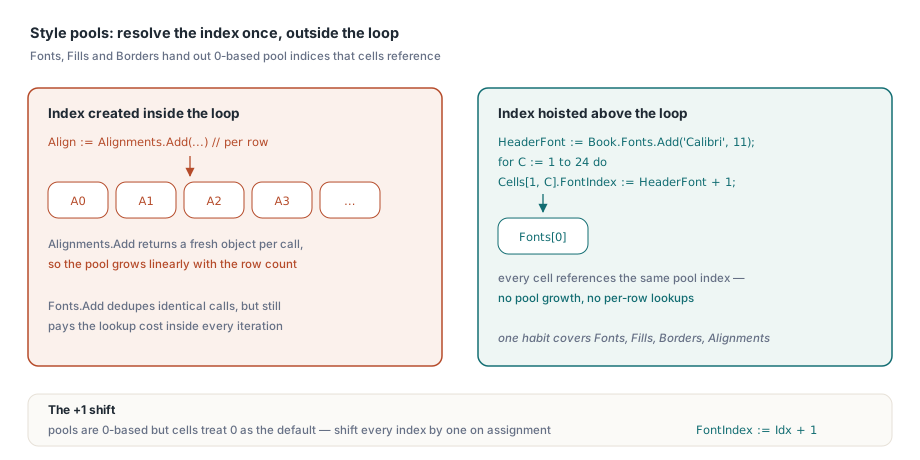
// wynieś wyszukiwania w puli poza gorącą pętlę
HeaderFont := Book.Fonts.Add('Calibri', 11, True, False);   // indeks puli, od zera
for C := 1 to 24 do
  Sheet.Cells[1, C].FontIndex := HeaderFont + 1;            // komórki liczą od jedynki; 0 = domyślny
+ 1 nie jest literówką, a zapomnienie o nim to klasyczny błąd generujący objawy: pule wydają indeksy liczone od zera, podczas gdy właściwości po stronie komórki traktują 0 jako wartość domyślną, więc każdy indeks puli musi zostać przesunięty o jeden przy przypisaniu. Pomyl się przez pominięcie, a twoje nagłówki po cichu wyrenderują się domyślną czcionką skoroszytu — usterka, której nikt nie zauważa aż do przeglądu brandingu
Zastąp ruch Variantów na komórkach wywołaniami zwrotnymi wierszy
Każde Sheet.Cells[R, C].Value := X obejmuje wyszukanie albo utworzenie komórki plus przypisanie Variantu. Przy kilkuset tysiącach komórek ten narzut na dostęp staje się mierzalny w profilach. HotXLS udostępnia na obu fasadach zbiorcze API z wywołaniami zwrotnymi (ForEachCell i ForEachRow do odczytu, WriteCells i WriteRows do zapisu), które przenoszą iterację do wnętrza silnika i podają twojemu kodowi całe wiersze naraz:
procedure TLedgerExport.FillRow(Sender: TObject;
  SheetIndex, Row, FirstCol, LastCol: Integer;
  var Values: Variant; var Skip: Boolean; var Cancel: Boolean);
begin
  if Row > FCount then
  begin
    Cancel := True;     // zatrzymaj cały zapis
    Exit;
  end;
  Values := VarArrayOf([FRows[Row - 1].Account,
                        FRows[Row - 1].PostedOn,
                        FRows[Row - 1].Amount]);
end;

// jedno wywołanie silnika zamiast setek tysięcy trafień we właściwości
Sheet.WriteRows(1, 1, FCount, 3, FillRow);
Flaga Skip w wywołaniu zwrotnym zostawia wiersz nietknięty bez przerywania, a Cancel kończy operację wcześniej, co przydaje się, gdy źródłem jest czytnik, którego długość poznajesz w trakcie. Sparuj WriteRows przy budowaniu ze StreamingWrite przy zapisie, a ścieżka generowania nie ma już żadnego gorącego punktu na poziomie komórki
Dźwignie po stronie odczytu na fasadzie XLS
Duże starsze pliki .xls mają własny zestaw narzędzi. _DisableGraphics := True przed Open pomija parsowanie warstwy rysunkowej w całości, co przyspiesza wczytywanie skoroszytów niosących lata nagromadzonych kształtów i osadzonych obrazów. Ograniczenie jest twarde: warstwy rysunkowej nie ma wtedy w modelu, więc zapisanie takiego skoroszytu wypisuje plik bez jego rysunków. Rezerwuj tę flagę dla zadań analitycznych tylko do odczytu. SetTempDir przekierowuje pliki tymczasowe zapisującego BIFF, co ma znaczenie na serwerach, gdzie domyślna lokalizacja tymczasowa ma limit albo siedzi na wolnym magazynie. UseSharedFormulas grupuje powtarzające się ciała formuł w rekordy formuł współdzielonych, zmniejszając pliki, w których kolumna formuły powtarza się przez sześćdziesiąt tysięcy wierszy
Pętle odczytu po danych XLS mają pułapkę indeksowania wartą zaznaczenia, bo podwaja pracę, gdy obchodzi się z nią defensywnie, i psuje wyniki, gdy się ją przeoczy: UsedRange raportuje swoje granice FirstRow, LastRow, FirstCol i LastCol licząc od zera, podczas gdy Cells.Item[Row, Col] liczy od jedynki. Skan przechodzący po użytym zakresie musi dodać jeden do każdej współrzędnej przy dostępie do komórki, jak w Cells.Item[Row + 1, Col + 1], albo czyta siatkę przesuniętą po przekątnej o jedną komórkę, po cichu gubiąc ostatni wiersz i kolumnę i włączając widmowy pierwszy. Wywołanie zwrotne ForEachCell obchodzi to niedopasowanie całkowicie, co jest jeszcze jednym powodem, by przedkładać je przy skanach całych arkuszy
Sonduj pliki przed ich wczytaniem
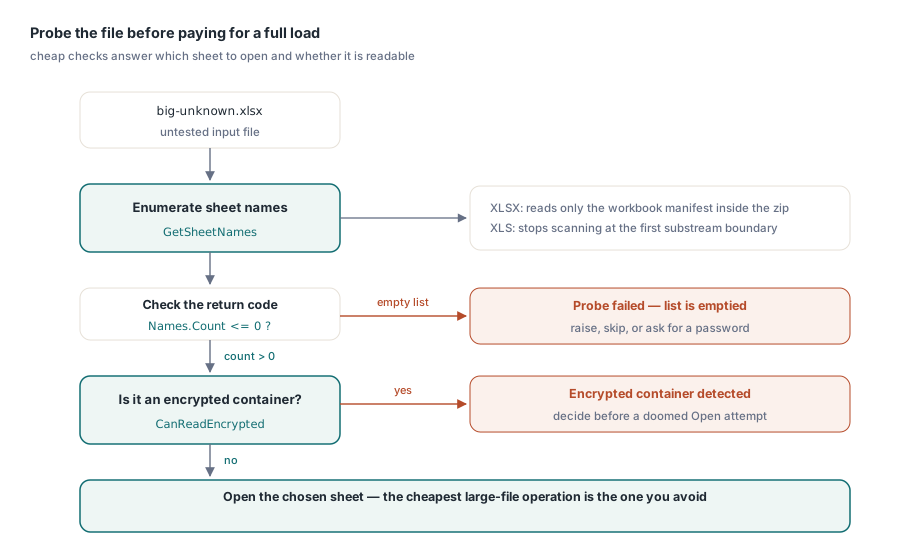
Najtańsza operacja na dużym skoroszycie to ta, której unikasz. GetSheetNames na obu fasadach wypisuje arkusze pliku bez wczytywania danych komórek. Implementacja XLSX czyta tylko manifest skoroszytu wewnątrz zipa i jawnie zostawia instancję skoroszytu niewypełnioną, a fasada XLS przerywa skanowanie na pierwszej granicy podstrumienia. To czyni z niego właściwą kontrolę przedstartową na pytanie "który arkusz ma wziąć na cel to zadanie importu", a CanReadEncrypted odpowiada na pytanie "czy to zaszyfrowany kontener", zanim dojdzie do skazanej na porażkę próby Open
Names := TStringList.Create;
Book := TXLSXWorkbook.Create;
try
  if Book.GetSheetNames('big-unknown.xlsx', Names) <= 0 then
    raise Exception.Create('cannot enumerate sheets');   // porażka czyści listę
  // wybierz arkusz docelowy, potem zdecyduj, czy pełne Open się opłaca
finally
  Book.Free;
  Names.Free;
end;
Zwróć uwagę na konwencję kodu powrotu: te funkcje sondujące sygnalizują porażkę wartościami równymi zeru lub mniejszymi i opróżniają listę wyjściową, więc testuj <= 0, zamiast porównywać z jedną konkretną wartością powodzenia
Dobieranie podejścia do zadania
Dla bezobsługowych potoków generujących wiele dużych plików po kolei obraz dopełniają dwa dalsze nawyki. Obiekty skoroszytu nie są bezpieczne wątkowo przy współdzieleniu, ale nic nie stoi na przeszkodzie jednemu niezależnemu skoroszytowi na wątek roboczy, co czysto zrównolegla konwersję wsadową. A kiedy wyjście idzie do HTTP, a nie na dysk, przeciążenia zapisu z TStream łączą się ze StreamingWrite, więc duża odpowiedź nigdy nie materializuje się jako plik tymczasowy. Obowiązuje jeden przypis operacyjny: zapis do strumienia pisze od bieżącej pozycji bez przewijania, więc ustaw Position := 0, zanim podasz strumień szkieletowi odpowiedzi. Artykuł o zapisie strumieniowym i zadaniach wsadowych rozwija ten wzorzec serwerowy, a artykuł o eksporcie z bazy danych pokazuje, gdzie te dźwignie wpasowują się w raport napędzany zbiorem danych
Na koniec trzymaj jeden wzorzec najgorszego przypadku na rodzinę raportów i mierz jego czas w CI. Regresje wydajności w generowaniu dokumentów rzadko same się ogłaszają. Styl dodany wewnątrz pętli albo sonda zastąpiona pełnym Open nie zmieniają nic funkcjonalnie, a nocny wsad po prostu trwa czterdzieści minut dłużej. Mierzony czasowo test na reprezentatywnym wzorcu na pół miliona komórek zamienia ten dryf w czerwoną kompilację zamiast w incydent operacyjny
Wersje ewaluacyjne, projekty demonstracyjne z przykładem generowania masowego i pełna referencja API są dostępne na stronie HotXLS Delphi Component