Nazwa zdefiniowana to etykieta zastępująca stałą, zakres komórek albo wyrażenie formuły, przechowywana raz w skoroszycie i przywoływana symbolicznie wszędzie tam, gdzie jest potrzebna. Napisz TaxRate w formule, a silnik rozwiąże to do tego, co trzyma definicja nazwy, czy będzie to literał 0.08, czy zakres Data!$A$2:$D$100. Referencja międzyarkuszowa to idea ortogonalna: Data!D2 sięga komórki na innym arkuszu, kwalifikując adres nazwą arkusza. Złóż jedno z drugim, a arkusz podsumowania może sumować arkusz szczegółów przez nazwę, która nigdy nie wspomina dosłownego adresu, czyli dokładnie tak, jak chcesz w skoroszycie, który składa generator, a później audytuje księgowa
HotXLS, natywna biblioteka losLab dla Delphi do plików XLS i XLSX, wystawia tablicę nazw obu formatów z dostępem do tworzenia, wyszukiwania i usuwania, plus silnik formuł rozwiązujący nazwy i referencje międzyarkuszowe w procesie. Oba formaty trzymają osobne hierarchie klas, a różnice między ich API nazw są tą częścią, która podkłada nogę kodowi przenoszonemu z jednego do drugiego
Dwa magazyny nazw, które nie dzielą interfejsu
Po stronie XLS TXLSWorkbook.GetNames zwraca kolekcję IXLSNames, której przeciążenie Add(Name, RefersTo, Visible) zapisuje nazwę do tablicy nazw BIFF. Poszczególne wpisy wracają jako obiekty IXLSName niosące Name, RefersTo, rozwiązany RefersToRange i metodę Delete. Po stronie XLSX TXLSXWorkbook.DefinedNames to kolekcja TXLSXDefinedNames z Add, FindByName i DeleteByName
Konwencje wyszukiwania rozchodzą się w sposób, który wychodzi przy przenoszeniu kodu, a nie przy kompilacji. Domyślna właściwość Item kolekcji XLS przyjmuje Variant, więc rozwiązują się na niej zarówno Names[0], jak i Names['TaxRate']. Kolekcja XLSX nie ma takiej właściwości domyślnej; wołasz FindByName('TaxRate'), które zwraca nil, gdy nazwy nie ma. Kod napisany dla jednej fasady kompiluje się z drugą tylko przypadkiem, a awaria zwykle pokazuje się jako dostęp do nil w czasie działania, a nie jako czerwony zygzak w IDE
Zasięg to pierwsza decyzja, nie flaga dodawana później
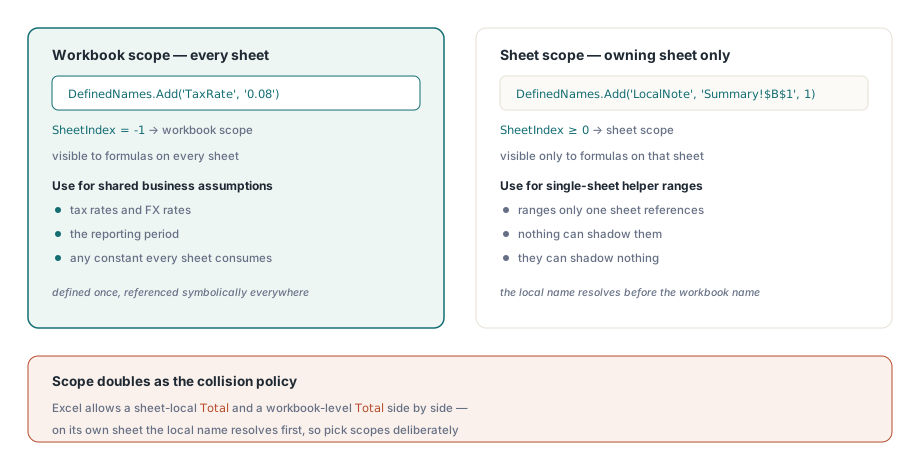
Nazwa zdefiniowana ma zasięg albo skoroszytu, czyli jest widoczna dla formuł na każdym arkuszu, albo arkusza, czyli widoczna tylko dla formuł na arkuszu, który ją posiada. W API XLSX to rozróżnienie to pojedynczy opcjonalny parametr. DefinedNames.Add(AName, AFormula) tworzy nazwę na poziomie skoroszytu, podczas gdy Add(AName, AFormula, ASheetIndex) wiąże ją z jednym arkuszem. Przy odczycie TXLSXDefinedName.SheetIndex zwraca -1 dla zasięgu skoroszytu, a w przeciwnym razie indeks arkusza liczony od zera
Zasięg pełni zarazem rolę twojej polityki kolizji i to jest powód, by rozstrzygnąć go przed napisaniem pierwszej nazwy. Excel dopuszcza lokalne dla arkusza Total na każdym arkuszu plus Total na poziomie skoroszytu, a formuła na danym arkuszu rozwiązuje najpierw tę lokalną. Generowane skoroszyty powinny opierać się na tym świadomie. Założenia biznesowe konsumowane przez kilka arkuszy, takie jak stawki podatkowe, kursy walut i okres raportowy, należą do zasięgu skoroszytu. Zakresy pomocnicze, do których odwołują się formuły jednego tylko arkusza, są bezpieczniejsze w zasięgu arkusza, gdzie nic nie może ich przesłonić i one nie mogą przesłonić niczego
var
  Book: TXLSXWorkbook;
  Data, Summary: TXLSXWorksheet;
begin
  Book := TXLSXWorkbook.Create;
  try
    Data := Book.Sheets.Add('Data');
    Summary := Book.Sheets.Add('Summary');
    // ... wypełnij Data!A2:D100 wierszami szczegółów ...

    Book.DefinedNames.Add('TaxRate', '0.08');                // zasięg skoroszytu, stała
    Book.DefinedNames.Add('DataBlock', 'Data!$A$2:$D$100');  // zasięg skoroszytu, zakres
    Book.DefinedNames.Add('LocalNote', 'Summary!$B$1', 1);   // zasięg tylko arkusza o indeksie 1

    // formuły XLSX nie biorą wiodącego '='
    Summary.Cells[2, 2].Formula := 'SUM(Data!D2:D100)*TaxRate';
    Book.SaveAs('model.xlsx');
  finally
    Book.Free;
  end;
end;
Nazwa zdefiniowana nie musi wskazywać na zakres. TaxRate powyżej odnosi się do gołej stałej 0.08 i to najczystszy sposób publikowania założenia biznesowego. Pojawia się raz w Menedżerze nazw Excela, każda formuła odwołuje się do niej symbolicznie, a zmiana stawki w przyszłym kwartale to jednoliniowa edycja generatora, a nie szukanie po czternastu składanych ciągach formuł
Znak równości, który należy tylko do jednej strony
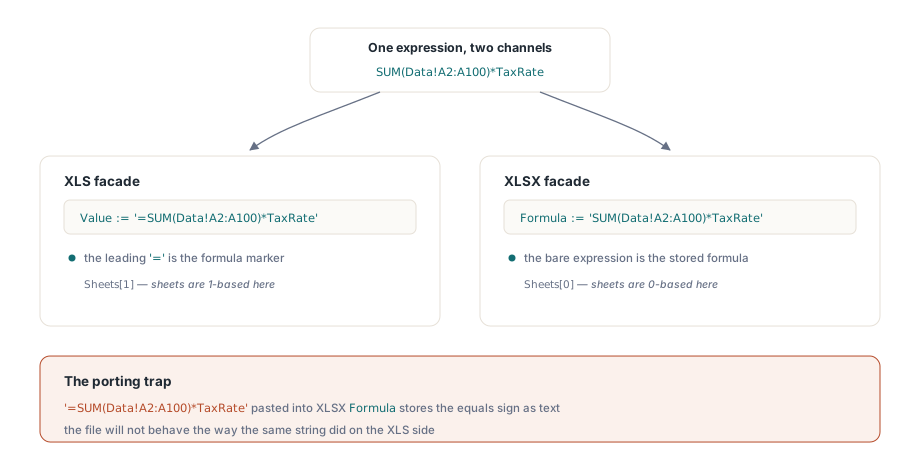
Kanał wprowadzania formuł to miejsce, w którym przenoszony kod psuje się najczęściej, bo obie fasady nie zgadzają się co do znaku równości. Komórki XLS przyjmują formuły przez Value z wiodącym =. Komórki XLSX mają dedykowaną właściwość Formula, która bierze wyrażenie bez prefiksu. Wpisz '=SUM(A1:A10)' do TXLSXCell.Formula, a znak równości stanie się częścią przechowywanego tekstu wyrażenia zamiast znacznikiem, i plik nie zachowa się tak, jak ten sam ciąg zachowywał się po stronie XLS
var
  Book: IXLSWorkbook;   // zliczany interfejsowo: nie zwalniaj
  Names: IXLSNames;
begin
  Book := TXLSWorkbook.Create;
  // zakładamy, że arkusz o nazwie 'Data' trzyma już wiersze szczegółów
  Names := Book.GetNames;
  Names.Add('TaxRate', '0.08');
  Names.Add('Helper', 'Data!$A$2:$A$100', False);  // False = ukryta przed Menedżerem nazw

  // formuły XLS idą przez Value, z prefiksem '='
  Book.Sheets[1].Cells.Item[2, 2].Value := '=SUM(Data!A2:A100)*TaxRate';
  Book.SaveAs('model.xls');
end;
Ten fragment pokazuje jeszcze dwa dziwactwa strony XLS. Kolekcja arkuszy liczy się od jedynki, więc Sheets[1] to pierwszy arkusz, wbrew liczonemu od zera Sheets[0] w XLSX. A trzeci parametr Add tworzy nazwę ukrytą: obecną w pliku i użyteczną dla formuł, a jednak niewidoczną w Menedżerze nazw Excela. Ukryte nazwy to właściwy nośnik dla wewnętrznej instalacji generatora, której użytkownicy końcowi nigdy nie powinni przypadkiem edytować ani usuwać
Referencje międzyarkuszowe i to, co dzieje się przy przesuwaniu wierszy
Oba silniki formuł przyjmują standardową składnię międzyarkuszową. Zwykłe nazwy arkuszy kwalifikują wprost jako Data!A1; nazwa ze spacjami albo interpunkcją potrzebuje pojedynczych apostrofów, jak w 'Sheet With Space'!A1. Wewnątrz tekstu RefersTo nazwy sięgaj po referencje bezwzględne, takie jak Data!$A$2:$D$100, właściwie za każdym razem. Referencja względna wewnątrz nazwy zdefiniowanej rozwiązuje się względem komórki, która jej używa, co jest celową cechą Excela i niezawodnym źródłem zamieszania, gdy odpali przypadkiem
Edycje strukturalne to miejsce, w którym księgowość międzyarkuszowa zarabia na siebie, a strona XLSX utrzymuje przez nie nazwy spójne. InsertRows i DeleteRows przesuwają zakresy nazw zdefiniowanych razem z komórkami, scaleniami, hiperłączami i kotwicami wykresów, więc nazwa wskazująca na Data!$A$2:$D$100 nadal obejmuje blok danych po tym, jak generator otworzy nad nim przerwę. Formuły przychodzą z jednym udokumentowanym zastrzeżeniem: wstawianie wierszy dostosowuje tylko te referencje, które celują w edytowany arkusz. Formuła w Summary odwołująca się do Data!D2:D100 jest przepisywana, gdy wiersze wchodzą do Data, czyli w przypadku, którego zwykle chcesz. Sprawdź to, zamiast zakładać, bo silnik powie ci tanim kosztem:
// silnik obliczeń rozwiązuje nazwy i referencje międzyarkuszowe w procesie
V := Book.Calculate('SUM(Data!D2:D100)*TaxRate');
if VarIsNumeric(V) then
  Log('net total checks out: ' + FloatToStr(V));
Calculate wylicza dowolne wyrażenie na bieżącym stanie skoroszytu, niczego nie zapisując, co czyni je naturalnym prymitywem asercji w testach generatora. Policz oczekiwaną agregację z danych źródłowych w Pascalu, wylicz własną formułę skoroszytu i porównaj oba wyniki. Artykuł o silniku formuł omawia, co silnik wylicza, kiedy i jak rozszerzyć go o funkcje własne
Nazwy _xlnm, które należą do warstwy właściwości
Otwórz tablicę nazw wygenerowanego pliku w niskopoziomowym inspektorze, a znajdziesz wpisy, których nigdy nie pisałeś: _xlnm.Print_Area, _xlnm.Print_Titles i ich krewnych. Tak właśnie OOXML (ECMA-376 / ISO 29500) przechowuje obszary wydruku i powtarzane wiersze tytułowe, czyli jako nazwy zdefiniowane z zarezerwowanymi identyfikatorami. HotXLS zarządza nimi przez dedykowane właściwości arkusza, więc ustawienie PrintArea albo PrintTitleRows zapisuje za ciebie odpowiedni wpis _xlnm.*
Pułapką jest sięganie do tej zarezerwowanej przestrzeni nazw ręcznie. Dodaj wpis _xlnm.Print_Area przez DefinedNames.Add, ustawiając jednocześnie właściwość PrintArea, a skoroszyt niesie dwie sprzeczne definicje jednej zarezerwowanej nazwy — stan, który Excel rozstrzyga w sposób, na jakim żaden produkt nie powinien polegać. Traktuj każdy identyfikator zaczynający się od _xlnm. jako należący do warstwy właściwości. Żeby obejrzeć ustawienia wydruku, czytaj właściwości, a nie tablicę nazw. Artykuł o ochronie i ustawieniach strony omawia właściwości obszaru wydruku w kontekście
Dwie granice warte poznania przed zatwierdzeniem projektu
Nazwy zdefiniowane nie jadą razem przez wygodny pomost z XLS do XLSX. SaveXLSWorkbookAsXLSX kopiuje treść komórek i podstawowe formatowanie, a tablicy nazw nie ma na jego udokumentowanej liście kopiowania, więc skoroszyt, który polegał na swoich nazwach, gubi je przy przeprawie. Odtwórz nazwy przez DefinedNames.Add po konwersji. Ten krok jest mniejszą mordęgą, niż brzmi, bo daje ci chwilę na znormalizowanie ich zasięgów zamiast przenoszenia tego, co plik XLS akurat miał
Druga granica to rozjazd między ciągami formuł a nazwami arkuszy. Excel przepisuje referencje do arkuszy wewnątrz formuł i nazw podczas interaktywnej zmiany nazwy, więc pliki edytowane przez użytkownika w Excelu same zostają spójne. Narażenie jest po stronie generatora: kiedy kod w Pascalu składa ciągi formuł z literału nazwy arkusza, zmiana nazwy w jednym miejscu i zapomnienie o drugim produkuje referencję do arkusza, który już nie istnieje. Trzymaj nazwę arkusza w jednej stałej Delphi i podawaj ją zarówno do Sheets.Add, jak i do składania formuł, a te dwa miejsca nigdy nie będą mogły się poróżnić. To ten sam instynkt, który przemawia za nazywaniem komórek wynikowych raportu zamiast wpisywania adresów na sztywno: szablon, którego komórka sumy jest nazwana, działa dalej po tym, jak projektant wstawi nad nią trzy wiersze, podczas gdy generator piszący do dosłownego B17 po cichu ląduje swoją liczbę w złym miejscu. Artykuł o generowaniu raportów z szablonów buduje dokładnie na tym wzorcu
Kompletne API nazw zdefiniowanych dla obu formatów, wraz z referencją silnika formuł, przychodzi z pakietem HotXLS Delphi Component