Flaga uprawnień nie jest mechanizmem bezpieczeństwa. Bit mówiący „zakaz kopiowania” mieszka w tym samym słowniku /Encrypt co kryptografia, co nadaje mu pozór egzekwowalności, której nie ma, a w chwili, gdy potraktujesz jedno i drugie jako to samo, twój audyt zaczyna produkować błędne odpowiedzi. Jedyne pytanie warte zadania dokumentowi PDF nie brzmi „czy jest zaszyfrowany”. Jest bardziej szczegółowe i trudniejsze: który algorytm, która rewizja procedury obsługi zabezpieczeń, które z dwóch haseł zostało ustawione, jakie bity uprawnień są deklarowane i których części pliku szyfrowanie faktycznie dotyka. Plik może być formalnie zaszyfrowany i praktycznie otwarty. Może odmawiać odczytu, a mimo to zostawiać swoje metadane jawnym tekstem. Może blokować drukowanie flagą, którą każda przeglądarka może swobodnie zignorować. Audyt pliku PDF oznacza rozstrzygnięcie każdej z tych kwestii osobno, a PDF Library for Delphi, silnik PDF firmy losLab dla Delphi i C++Builder, udostępnia każdą z nich zarówno przez płaskie API na uchwytach całkowitoliczbowych, jak i przez typowaną warstwę klas
Co naprawdę zapisuje słownik /Encrypt
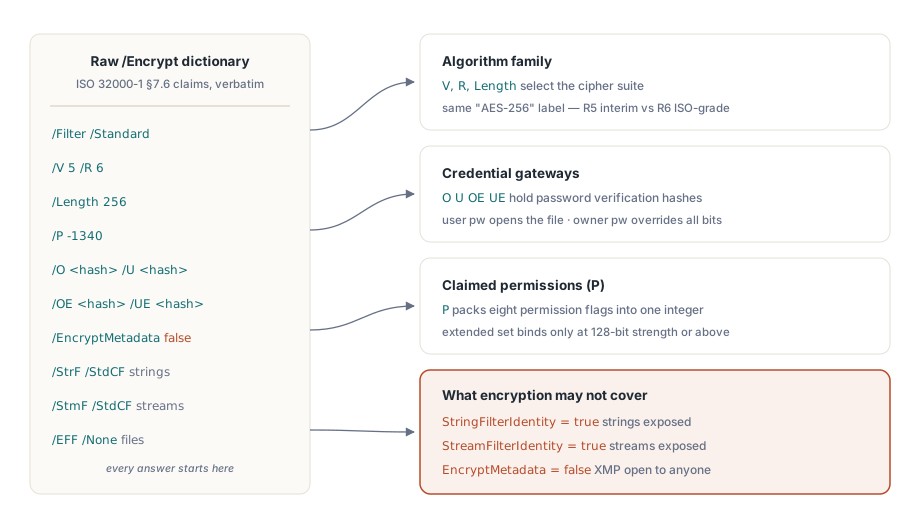
ISO 32000-1 §7.6 definiuje bezpieczeństwo dokumentu przez garść wpisów słownikowych, a PDF Library for Delphi odzwierciedla je jeden do jednego w rekordzie TPDFEncryption. Wersja filtra V i rewizja R wybierają rodzinę algorytmów. Length niesie rozmiar klucza. Bity uprawnień siedzą w P, łańcuchy walidacyjne hasła właściciela i użytkownika w O i U (z dodanymi OE i UE dla AES-256), obok jedzie flaga EncryptMetadata, a trzy kolejne pola nazywają filtry kryptograficzne stosowane odpowiednio do łańcuchów, strumieni i plików osadzonych
Wartość tego rekordu polega na tym, że niczego za ciebie nie interpretuje. Oddaje surowy słownik i pozwala ci wyciągnąć wnioski, a tego właśnie potrzebuje audyt. Przypadek jawnego tekstu wewnątrz zaszyfrowanego pliku ujawnia się w StringFilterIdentity i StreamFilterIdentity: gdy któreś z nich jest prawdą, odpowiadające dane przechodzą przez filtr Identity nietknięte, niezależnie od tego, co zgłasza status zaszyfrowania dokumentu. Skaner, który zatrzymuje się na „słownik /Encrypt jest obecny”, nazwie taki plik chronionym, podczas gdy jego łańcuchy i strumienie leżą otwarte. Ta sama subtelność rządzi metadanymi. Gdy EncryptMetadata jest fałszem, pakiet XMP pozostaje czytelny dla dowolnego indeksera, podczas gdy treść stron już nie, co warto wiedzieć w chwili, gdy twoje reguły routingu sięgają po pole tytułu albo autora
Krótka sonda bezpieczeństwa z płaskim API
W większości potoków cztery płaskie wywołania odpowiadają na codzienne pytania. LoadFromFile zwraca 1 przy powodzeniu, a gdy dokument jest już otwarty, inspektory szyfrowania raportują względem jego odszyfrowanego stanu:
var
  PDF: TPDFlib;
begin
  PDF := TPDFlib.Create;
  try
    if PDF.LoadFromFile('contract.pdf', UserPassword) <> 1 then
      raise Exception.Create('Open failed: wrong password or damaged file');
    Writeln('status    : ', PDF.EncryptionStatus);     // odszyfrowany / zaszyfrowany / nieznany
    Writeln('algorithm : ', PDF.EncryptionAlgorithm);  // rodzina RC4 kontra AES
    Writeln('strength  : ', PDF.EncryptionStrength);   // klasa długości klucza
    Writeln('owner pw? : ', PDF.CheckPassword(CandidatePassword));
  finally
    PDF.Free;
  end;
end;
CheckPassword znaczy więcej, niż sugeruje jego jednolinijkowa sygnatura. PDF definiuje dwa hasła o nierównej mocy. Hasło użytkownika jest wymagane, by w ogóle otworzyć plik. Hasło właściciela daje pełne prawa i nadpisuje każdy bit uprawnień. Bajty na dysku są identyczne w obu przypadkach, ale sesja otwarta hasłem właściciela może zrobić rzeczy, których sesja z hasłem użytkownika zrobić nie może, więc audyt, który nie zapisuje, jakie poświadczenie przedstawiono, zapisuje połowę prawdy. Warstwa klas czyni to rozróżnienie odpytywalnym. TPDFDocument.HasUserPassword i HasOwnerPassword raportują, czego wymaga plik, natomiast IsUserPassword i IsOwnerPassword raportują, które hasło faktycznie otworzyło bieżącą sesję. Zapisz ten fakt w logu. Nigdy nie zapisuj samych wartości haseł
Drabina Strength, gdzie „AES-256” znaczy dwie rzeczy
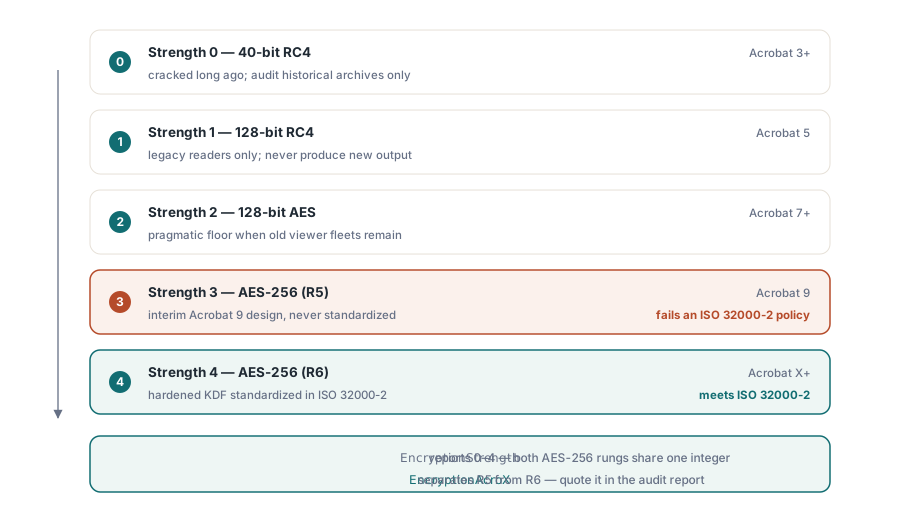
Płaskie funkcje Encrypt i EncryptFile przyjmują całkowitoliczbowy Strength z pięcioma sensownymi wartościami: 0 dla 40-bitowego RC4, 1 dla 128-bitowego RC4, 2 dla 128-bitowego AES czytelnego od Acrobata 7, 3 dla 256-bitowego AES wprowadzonego wraz z Acrobatem 9 oraz 4 dla 256-bitowego AES wymaganego przez Acrobata X i nowsze
Ciekawe jest to, że 3 i 4 są oba etykietowane jako AES-256 i nie są tym samym schematem. Strength 3 odwzorowuje się na rewizję 5 procedury obsługi zabezpieczeń, przejściowy projekt, który dostarczył Acrobat 9, a którego ISO nigdy nie przyjęło. Strength 4 odwzorowuje się na rewizję 6, której funkcja wyprowadzania klucza została wzmocniona i ustandaryzowana w ISO 32000-2. Dla dokumentu tworzonego dzisiaj nie ma powodu, by wybrać 3 zamiast 4. Dla audytu ta różnica jest rozstrzygająca: polityka brzmiąca „AES-256 zgodnie z ISO 32000-2” jest spełniona wyłącznie przez R6, a plik R5 nazywający siebie AES-256 tej polityki nie spełnia, choć przechodzi naiwne sprawdzenie siły. Warstwa klas rozdziela je nazwami, esAES256Bit dla R5 wobec esAES256BitAcroX dla R6, a właściwość EncryptionAcroX odpowiada na pytanie o rewizję pojedynczą wartością logiczną
Bity uprawnień i ich drobny druk o długości klucza
EncodePermissions pakuje osiem flag w liczbę całkowitą, której oczekują Encrypt i EncryptFile. Drukowanie, kopiowanie, zmiana i dodawanie notatek tworzą zestaw podstawowy; wypełnianie pól, kopiowanie na potrzeby dostępności, składanie i drukowanie w pełnej jakości tworzą zestaw rozszerzony. Drobny druk, o którym wprost mówi własne demo szyfrowania biblioteki, głosi, że rozszerzona czwórka działa wyłącznie przy sile 128-bitowej i wyższej. Flaga drukowania w pełnej jakości podlega tej samej regule: wyczyść ją, by wymusić druk w niskiej rozdzielczości, a dokument 40-bitowy cię zignoruje, ponieważ to obniżenie również wymaga szyfrowania 128-bitowego lub silniejszego. Zakoduj politykę „tylko druk w niskiej rozdzielczości” w pliku 40-bitowym, a każda przeglądarka i tak wydrukuje w pełnej jakości
Głębsze pytanie brzmi, kto w ogóle egzekwuje którykolwiek z tych bitów, a odpowiedź brzmi: nikt, komu możesz zaufać. Uprawnienia są instrukcjami dla zgodnych czytników, a nie ograniczeniami kryptograficznymi. Klucz deszyfrujący jest identyczny niezależnie od tego, czy kopiowanie jest dozwolone, czy zabronione, więc zablokowany zestaw uprawnień utrzymuje w uczciwości tylko uczciwe przeglądarki. Czytnik, który postanowi zignorować te bity, nie napotyka żadnej przeszkody kryptograficznej. Jeśli obowiązkiem jest uniemożliwienie ekstrakcji, a nie zniechęcenie do niej, plik potrzebuje hasła użytkownika, a proces potrzebuje wokół niego kontroli na poziomie organizacyjnym, i raport z audytu powinien nazywać, pod którym z tych dwóch reżimów każdy plik faktycznie się znajduje, zamiast traktować flagę uprawnień jak zamek
Ustawianie polityki i dowodzenie, że się przyjęła
Zastosowanie szyfrowania do istniejących plików nie wymaga wczytywania ich do drzewa obiektów. EncryptFile przetwarza wejście na wyjście jednym wywołaniem, a pętla audytu ponownie otwiera wynik, by potwierdzić, co wylądowało na dysku. Dostarczane demo szyfrowania trzyma się tego samego kształtu zapisz-i-odczytaj-z-powrotem:
var
  PDF: TPDFlib;
  R: Integer;
begin
  PDF := TPDFlib.Create;
  try
    R := PDF.EncryptFile('in.pdf', 'out.pdf', 'owner-secret', 'user-secret', 4,
      PDF.EncodePermissions(1, 0, 0, 0,    // druk dozwolony; kopiowanie/zmiana/notatki zabronione
                            0, 0, 0, 1));  // zestaw rozszerzony: tylko druk w pełnej jakości
    if (R = 1) and (PDF.LoadFromFile('out.pdf', 'user-secret') = 1) then
    begin
      Writeln('algorithm = ', PDF.EncryptionAlgorithm);
      Writeln('strength  = ', PDF.EncryptionStrength);
      Writeln('owner pw accepted: ', PDF.CheckPassword('owner-secret'));
    end;
  finally
    PDF.Free;
  end;
end;
Zespoły pracujące na warstwie dokumentu dostają tę samą operację z typowanymi zbiorami zamiast pakowania bitów, co przechodzi przegląd kodu przy znacznie mniejszym mrużeniu oczu:
if not Doc.Encrypt('owner-secret', 'user-secret', esAES256BitAcroX,
  [ppCanPrint], [ppCanPrintFull]) then
  raise Exception.Create('Encryption failed');
Tak czy inaczej, krok odczytu z powrotem nie jest opcjonalną ceremonią. Wyłapuje błędy wdrożeniowe, które w przeciwnym razie ujawnią się miesiące później na maszynie klienta: stara kompilacja biblioteki po cichu obniżająca żądaną siłę, ścieżka wyjściowa, do której nigdy nie zapisano, bo katalog był tylko do odczytu, liczba uprawnień, której argumenty poszły w złej kolejności. Wszystkie trzy przechodzą lokalny test dymny i zawodzą w terenie, a ponowne otwarcie wyjścia zamienia każdy z nich w wyjątek widoczny podczas tego samego przebiegu, który utworzył plik. GetEncryptionFingerprint zwraca zwartą wartość, którą możesz przechować razem z rekordem zadania, więc późniejsze porównanie powie, czy dwa pliki wyjściowe mają tę samą konfigurację szyfrowania, bez otwierania któregokolwiek z nich
Fałszywe alarmy audytu, na które warto zaprogramować odporność
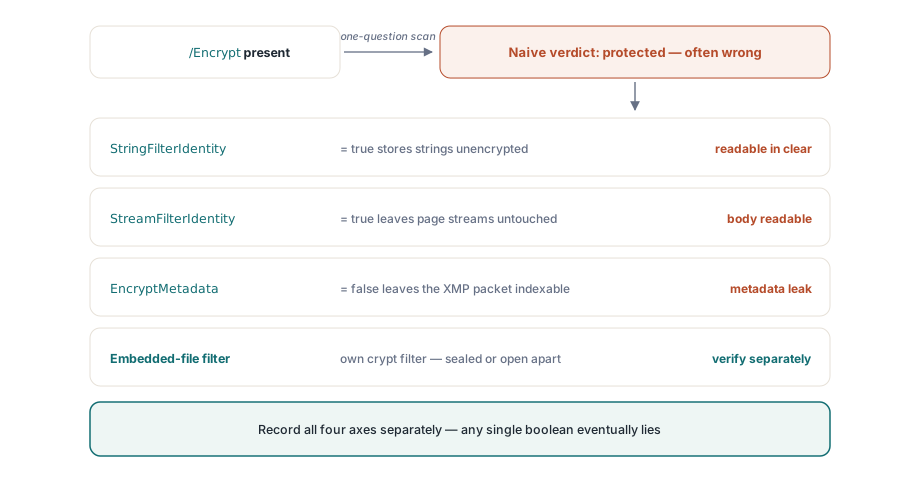
Kilka wzorców niezawodnie pcha skanery bezpieczeństwa ku błędnemu wnioskowi, a każdy z nich bierze się ze sprowadzenia wieloczęściowego pytania do odpowiedzi tak-albo-nie. Filtr kryptograficzny Identity to najczystszy przykład. Słownik /Encrypt jest obecny, plik zgłasza się jako zaszyfrowany, a mimo to łańcuchy i strumienie przechodzą przez filtr Identity bez zmian, więc prawdziwa treść jest jawnym tekstem. Poprawką jest odczytanie StringFilterIdentity i StreamFilterIdentity, zanim cokolwiek uznasz za chronione
Rozdział metadanych jest subtelniejszy. EncryptMetadata może się nie zgadzać z resztą dokumentu w obie strony, zostawiając zaszyfrowany plik z czytelnym pakietem XMP albo, rzadziej, odwrotnie. „Plik jest zaszyfrowany” nie mówi nic o tym, czy zaszyfrowane są jego metadane, a to ma znaczenie w chwili, gdy indekser albo reguła routingu sięga po tytuł. Pliki osadzone dodają trzecią oś: PDF pozwala na dedykowany filtr kryptograficzny wyłącznie dla załączników, więc załączniki mogą być jedyną zaszyfrowaną częścią skądinąd otwartego dokumentu albo jedyną jawną częścią dokumentu zaszyfrowanego. Zapisz trzy przypisania filtrów jako osobne pola dla łańcuchów, strumieni i plików osadzonych, a żadna z tych pułapek cię nie złapie. Przechowuj pojedynczą wartość logiczną, a błędna ocena jest tylko kwestią czasu
Usuwanie szyfrowania i wybór go dla nowych plików
Audyt często kończy się decyzją o zdjęciu ochrony, a mechanika nie jest tu przeszkodą. DecryptFile(InputFileName, OutputFileName, Password) zapisuje odszyfrowaną kopię bez pełnego wczytania, a Decrypt na wczytanym dokumencie robi to samo w pamięci, gdy plik jest już otwarty. Oba wymagają prawidłowego hasła; żadne nie obchodzi kryptografii. Prawdziwą bramką jest polityka, a nie kod, więc niech twoje reguły przyjmowania mówią wprost, kiedy usunięcie jest dozwolone, i zapisują klasę hasła, która to autoryzowała, ponieważ sam krok techniczny nie zostawia śladu
Wybór dla nowego wyjścia jest węższy, niż sugeruje pięć wartości Strength. Używaj Strength 4, AES-256 w rewizji 6, chyba że musisz otwierać pliki w przeglądarkach starszych niż Acrobat X. Strength 2, AES-128, to pragmatyczna podłoga dla starzejącej się floty przeglądarek, której nie da się zaktualizować. Opcje RC4 pod 0 i 1 są po to, byś mógł czytać i audytować archiwa historyczne, a nie po to, byś produkował nimi cokolwiek nowego; sięganie po nie w projekcie z 2026 roku jest oznaką, że wymaganie gdzieś wcześniej się zestarzało
Stan szyfrowania wpływa wprost na decyzje o podpisywaniu, ponieważ warsztat, który waliduje i podpisuje dokumenty, potrzebuje tej samej dyscypliny odczytu z powrotem, na której opiera się ten audyt. Ten grunt omawia artykuł o warsztacie zgodności i podpisywania. Gdy partia stosuje EncryptFile do tysięcy dużych dokumentów, przewodnik po dostępie bezpośrednim do dużych plików PDF pokazuje, jak utrzymać płaskie zużycie pamięci w trakcie. Pełne odniesienie do API szyfrowania znajduje się na stronie produktu PDF Library for Delphi