Hallo wereld van Delphi HotPDF-component
Welkom bij de uitgebreide gids voor de Delphi HotPDF-onderdeel HelloWorld demonstratieprogramma!
Over HotPDF-component
HotPDF Component is een krachtige en veelzijdige PDF-verwerkingsbibliotheek die speciaal is ontworpen voor Delphi- en C++Builder-ontwikkelaars. Deze uitgebreide component biedt een uitgebreide API waarmee ontwikkelaars PDF-documenten gemakkelijk en nauwkeurig kunnen maken, manipuleren en wijzigen.
Belangrijkste kenmerken van HotPDF-component:
- PDF Creatie en generatie: Maak helemaal opnieuw PDF-documenten met volledige controle over de lay-out, opmaak en inhoud
- Tekst- en Graphics-ondersteuning: Voeg tekst, afbeeldingen, vormen en complexe afbeeldingen toe aan PDF-pagina's
- Meertalige ondersteuning: Volledige Unicode-ondersteuning voor internationale tekstweergave
- Lettertypebeheer: Sluit lettertypen in voor een consistente documentweergave op verschillende systemen
- Compressie-opties: Gebruik compressie-algoritmen om de bestandsgrootte te optimaliseren
- Beveiligingsfuncties: Documentencryptie, wachtwoordbeveiliging en toestemmingscontroles
- Documentmanipulatie: Voeg bestaande PDF-documenten samen, splits en wijzig ze
- Ondersteuning voor tabellen en formulieren: Creëer complexe tabellen en interactieve formulieren
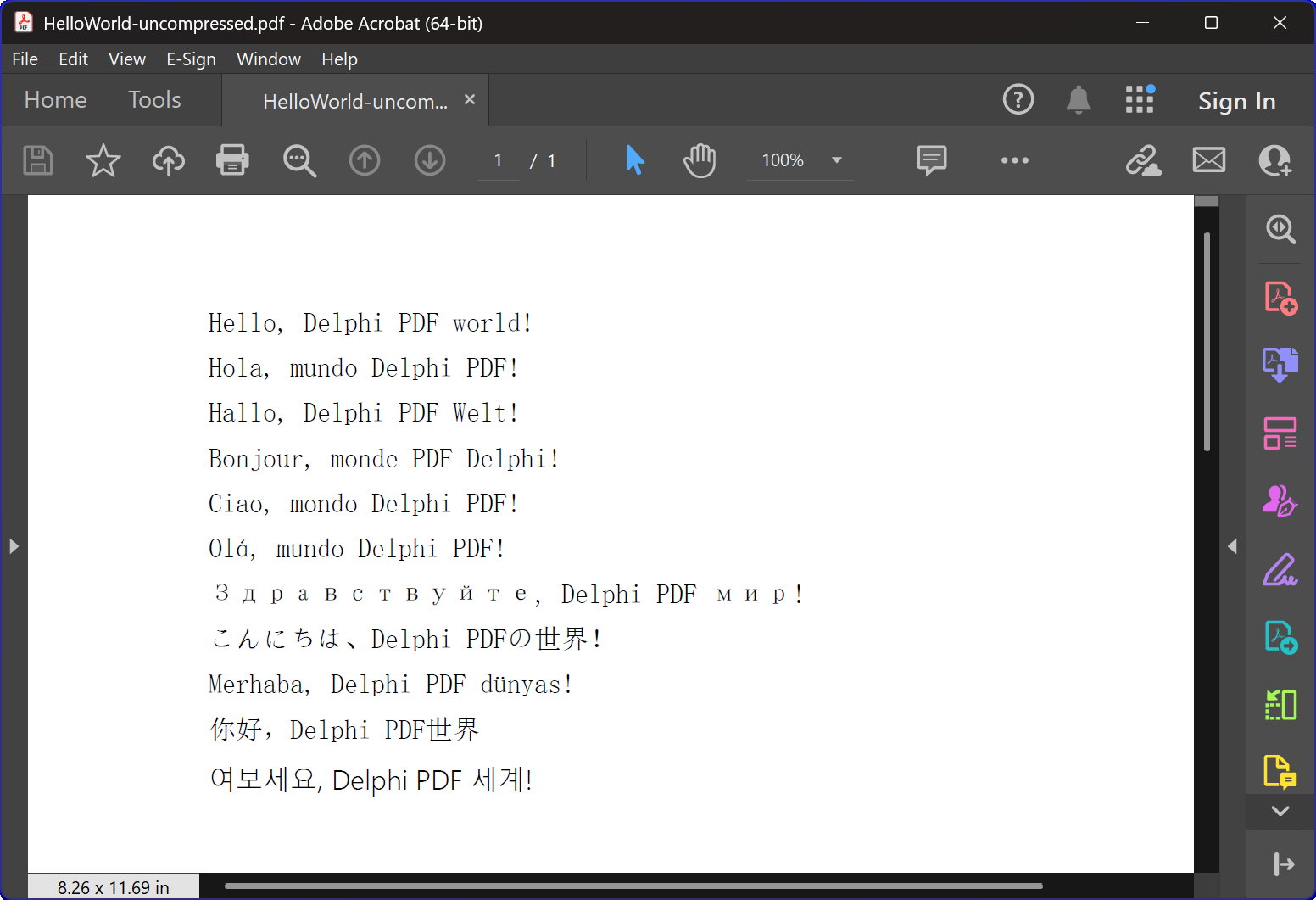
HelloWorld.dpr Programmaoverzicht
De HelloWorld.dpr voorbeeldprogramma dient als een uitstekende introductie tot de HotPDF-componenten
meest fundamentele en belangrijkste kenmerk: de TexOut-functie. Dit demonstratieprogramma demonstreert ook de basisfunctionaliteit voor het maken van PDF.
Kernfunctionaliteit:
1. PDF-documentcreatie
De primaire functie van het programma is het genereren van PDF-documenten met meertalige “Hallo Wereld”-tekst. De CreatePDF procedure toont aan:
- Component-initialisatie: Juiste installatie en configuratie van de THotPDF-component
- Documenteigenschappen: Metagegevens instellen, zoals compressieopties en het insluiten van lettertypen
- Meertalige tekstweergave: Tekst weergeven in 11 verschillende talen, waaronder Engels, Spaans, Duits, Frans, Italiaans, Portugees, Russisch, Japans, Turks, Chinees en Koreaans
- Lettertypebeheer: Gebruik van het Arial Unicode MS-lettertype voor meertalige weergaveondersteuning
- Compressie: Gecomprimeerd PDF-document maken
2. Vensterbeheer en System-integratie
Het programma bevat geavanceerde vensteropsommingsfunctionaliteit die het volgende demonstreert:
- System Vensteropsomming: Met behulp van Windows API
EnumWindowsfunctie om door alle vensters op het hoogste niveau te bladeren - Overeenkomende venstertitel: Implementeren van substringmatching om doelapplicaties te identificeren
- Geautomatiseerde raamsluiting: Verzenden
WM_CLOSEberichten om PDF-viewers te sluiten waarin mogelijk bestanden zijn geopend - Conflictpreventie: Ervoor zorgen dat er geen bestandstoegangsconflicten optreden bij het maken van nieuwe PDF-bestanden
3. Foutafhandeling en resourcebeheer
Het programma demonstreert best practices voor:
- Geheugenbeheer: Correcte creatie en verwijdering van componentinstanties
- Uitzondering veiligheid: Try-final-blokken gebruiken om het opruimen van bronnen te garanderen
- Gebruikersfeedback: Het leveren van console-uitvoer om gebruikers te informeren over de voortgang van het programma
Technische implementatiedetails:
Compressietechnologie
Het programma maakt een PDF-document met FlateDecode-compressie
Strategie voor het omgaan met lettertypen
Het programma maakt gebruik van een geavanceerde strategie voor lettertypeselectie:
- Arial Unicode MS: Wordt voor de meeste talen gebruikt vanwege de brede karakterondersteuning
- Lettertype insluiten: Zorgt voor een consistente weergave op verschillende systemen
Compatibiliteit tussen verschillende versies
De code bevat voorwaardelijke compilatierichtlijnen ter ondersteuning van zowel moderne als oudere Delphi-versies:
- XE2+-ondersteuning: Gebruikt eenheden met een naamruimte (WinApi.Windows, System.SysUtils, enz.)
- Oudere ondersteuning: Valt terug op traditionele eenheidsnamen voor oudere Delphi-versies
Educatieve waarde
Dit HelloWorld-voorbeeld dient meerdere educatieve doeleinden:
- Componentintroductie: Biedt een vriendelijke introductie tot het gebruik van HotPDF-componenten
- Beste praktijken: Demonstreert correct resourcebeheer en foutafhandeling
- System-integratie: Laat zien hoe u de PDF-generatie kunt integreren met Windows-systeembewerkingen
- Internationalisering: Illustreert meertalige tekstverwerking in PDF-documenten
Aan de slag
Om dit voorbeeldprogramma uit te voeren:
- Zorg ervoor dat de HotPDF-component correct is geïnstalleerd in uw Delphi IDE
- Open het HelloWorld.dpr-projectbestand
- Compileer en voer het programma uit
- Het programma maakt automatisch een PDF-bestand met compressie
- Bestudeer de gegenereerde bestanden om de meertalige tekstweergave te zien
Broncode
Hieronder vindt u de volledige, goed gedocumenteerde broncode voor het HelloWorld-demonstratieprogramma:
Urvanov Syntaxis Markeerstift v2.9.1|
1 2 3 4 5 6 7 8 9 10 11 12 13 14 15 16 17 18 19 20 21 22 23 24 25 26 27 28 29 30 31 32 33 34 35 36 37 38 39 40 41 42 43 44 45 46 47 48 49 50 51 52 53 54 55 56 57 58 59 60 61 62 63 64 65 66 67 68 69 70 71 72 73 74 75 76 77 78 79 80 81 82 83 84 85 86 87 88 89 90 91 92 93 94 95 96 97 98 99 100 101 102 103 104 105 106 107 108 109 110 111 112 113 114 115 116 117 118 119 120 121 122 123 124 125 126 127 128 129 130 131 132 133 134 135 136 137 138 139 140 141 142 143 144 145 146 147 148 149 150 151 152 153 154 155 156 157 158 159 160 161 162 163 164 165 166 167 |
{************************************************************} // HotPDF PDF Component // Copyright(c)2007-2025, https://www.loslab.com {************************************************************} // HelloWorld Demo Program for HotPDF Component // This program demonstrates basic PDF creation capabilities // including multilingual text support and compression options {************************************************************} program HelloWorld; {$APPTYPE CONSOLE} // Console application type {$I ..\..\..\Lib\HotPDF.inc} // Include HotPDF configuration file uses // EurekaLog units for memory leak detection and debugging (optional) {$IFDEF EurekaLog} EMemLeaks, // Memory leak detection EResLeaks, // Resource leak detection EDebugJCL, // JCL debugging support EDebugExports, // Export debugging information EFixSafeCallException, // SafeCall exception handling EMapWin32, // Win32 mapping support EAppConsole, // Console application support EDialogConsole, // Console dialog support ExceptionLog7, // Exception logging {$ENDIF EurekaLog} // System units - different namespaces for XE2+ vs older versions {$IFDEF XE2+} WinApi.Windows, // Windows API functions WinApi.Messages, // Windows message constants System.SysUtils, // System utilities System.Classes, // Base classes (TStringList, etc.) Vcl.Graphics, // Graphics support {$ELSE} Windows, // Windows API functions (older Delphi) Messages, // Windows message constants (older Delphi) SysUtils, // System utilities (older Delphi) Classes, // Base classes (older Delphi) Graphics, // Graphics support (older Delphi) {$ENDIF} HPDFDoc; // HotPDF main component unit // Creates a compressed PDF file with multilingual "Hello World" text // Parameters: // FileName: Output PDF file name procedure CreatePDF(const FileName: string); var HotPDF: THotPDF; // Main HotPDF component instance begin // Create HotPDF component instance HotPDF := THotPDF.Create(nil); try // Configure PDF properties HotPDF.AutoLaunch := true; // Automatically open PDF after creation HotPDF.FileName := FileName; // Set output file name // Enable FlateDecode compression HotPDF.Compression := cmFlateDecode; // Enable FlateDecode compression WriteLn('Creating compressed PDF: ', FileName); HotPDF.FontEmbedding := true; // Embed fonts for better compatibility HotPDF.BeginDoc; // Start PDF document creation // Set Unicode font for multilingual text support // Arial Unicode MS supports most languages except Korean // procedure SetFont ( FontName: AnsiString; FontStyle: TFontStyles; ASize: Single; FontCharset: TFontCharset = DEFAULT_CHARSET; IsVertical: boolean = false); // DEFAULT_CHARSET: 1 - Font is chosen based on Name. If the described font is not available on the system, Windows will substitute another font HotPDF.CurrentPage.SetFont('Arial Unicode MS', [], 12, 1, False); // Display "Hello World" in multiple languages // TextOut parameters: (X, Y, Angle, Text) HotPDF.CurrentPage.TextOut(80, 50, 0, 'Hello, Delphi PDF world!'); // English HotPDF.CurrentPage.TextOut(80, 70, 0, 'Hola, mundo Delphi PDF!'); // Spanish HotPDF.CurrentPage.TextOut(80, 90, 0, 'Hallo, Delphi PDF Welt!'); // German HotPDF.CurrentPage.TextOut(80, 110, 0, 'Bonjour, monde PDF Delphi!'); // French HotPDF.CurrentPage.TextOut(80, 130, 0, 'Ciao, mondo Delphi PDF!'); // Italian HotPDF.CurrentPage.TextOut(80, 150, 0, 'Olá, mundo Delphi PDF!'); // Portuguese HotPDF.CurrentPage.TextOut(80, 170, 0, 'Здравствуйте, Delphi PDF мир!'); // Russian HotPDF.CurrentPage.TextOut(80, 190, 0, 'こんにちは、Delphi PDFの世界!'); // Japanese HotPDF.CurrentPage.TextOut(80, 210, 0, 'Merhaba, Delphi PDF dünyası!'); // Turkish HotPDF.CurrentPage.TextOut(80, 230, 0, '你好,Delphi PDF世界'); // Chinese HotPDF.CurrentPage.TextOut(80, 250, 0, '여보세요, Delphi PDF 세계!'); // Korean HotPDF.EndDoc; // Finalize and save the PDF document WriteLn('PDF created successfully: ', FileName); finally HotPDF.Free; // Clean up HotPDF component end; end; // Global variables for window enumeration and PDF creation var Title: String; // Individual title string (unused in current implementation) Titles: TStrings; // List of window titles to search for Window: HWND; // Window handle (unused in current implementation) WindowText: array [0 .. 255] of Char; // Buffer for window text (unused in current implementation) WindowTitle: String; // Window title string (unused in current implementation) I: Integer; // Loop counter (unused in current implementation) // Callback function for EnumWindows API // This function is called for each top-level window in the system // Parameters: // hWnd: Handle to the current window being enumerated // lParam: User-defined data (in our case, pointer to TStrings with target titles) // Returns: True to continue enumeration, False to stop function EnumWindowsProc(HWND: HWND; lParam: lParam): BOOL; stdcall; var Titles: TStrings; // List of target window titles I: Integer; // Loop counter WindowText: array [0 .. 255] of Char; // Buffer to store window text WindowTitle: String; // Current window's title as string begin Result := true; // Continue enumeration by default Titles := TStrings(lParam); // Cast lParam back to TStrings // Get the window title text if GetWindowText(HWND, WindowText, SizeOf(WindowText)) > 0 then begin WindowTitle := String(WindowText); // Convert char array to string // Check if window title contains any of our target strings for I := 0 to Titles.Count - 1 do begin // Use Pos function to check if target string is contained in window title if Pos(Titles[I], WindowTitle) > 0 then begin // Send WM_CLOSE message to close the window PostMessage(HWND, WM_CLOSE, 0, 0); Break; // Exit loop after finding first match end; end; end; end; // Main program execution begins here begin // Close any existing PDF files that might be open in PDF viewers // This prevents file access conflicts when creating new PDFs with same names Titles := TStringList.Create; try // Define list of window title substrings to search for // Any window containing these strings will be closed // This will close Adobe and Foxit PDF reader & editor and many other PDF apps Titles.CommaText := '"HelloWorld.pdf", "Foxit"'; // Enumerate all top-level windows and close matching ones // EnumWindows calls our callback function for each window EnumWindows(@EnumWindowsProc, lParam(Titles)); finally Titles.Free; // Clean up string list end; // Display program header WriteLn('=== HotPDF HelloWorld Demo ==='); WriteLn('This demo creates a compressed PDF file with multilingual text.'); WriteLn(''); // Create compressed PDF CreatePDF('HelloWorld.pdf'); // Display completion message WriteLn(''); WriteLn('PDF file created successfully!'); WriteLn('The PDF file uses FlateDecode compression for optimal file size.'); WriteLn(''); WriteLn('Press Enter to exit...'); ReadLn; // Wait for user input before closing console end. |