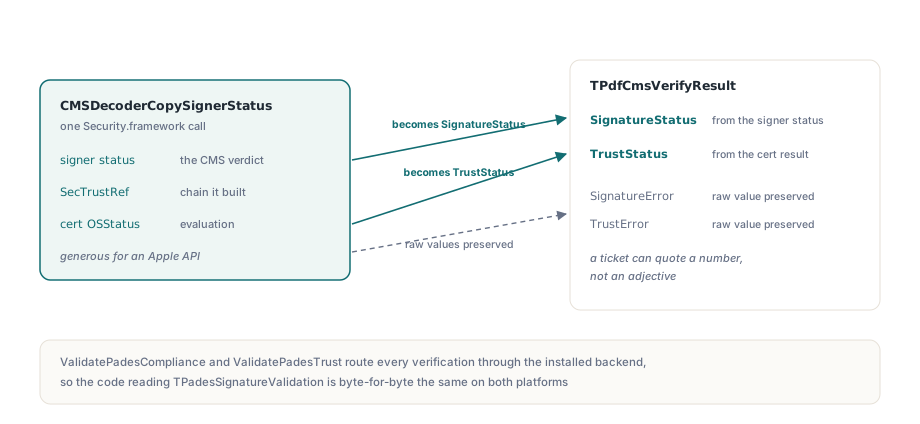
PDFium Delphi Component는 hand-parsed CMS가 아니라 Apple CMSDecoder와 SecTrust 위에 만든 CMS verification backend인 TPdfKeychainCmsVerifier를 통해 macOS에서 PDF signature를 검증합니다. ConfigureKeychainCmsVerifier로 이를 설치하면 한 번의 CMSDecoderCopySignerStatus call이 signature verdict, SecTrust handle과 certificate result code를 돌려주며 이는 TPdfCmsVerifyResult가 Windows에서 이미 가지고 있던 두 column과 정확히 대응합니다
작업을 강제한 상황은 지루하고 흔합니다. document archive의 Lazarus build가 Mac에서 실행되어 signed contract를 열지만 모든 signature가 pcsUnsupported로 돌아옵니다. file에는 문제가 없습니다. Windows 밖에는 signature verification backend가 없었고 PAdES validator가 backend가 없을 때 추측을 거부했을 뿐입니다. PDFiumPas v3.111.0은 IPdfCmsVerifier와 ConfigurePadesCmsVerifier로 seam을 열었고 v3.113.0이 macOS에서 이를 채웠습니다. 이 port에서 흥미로운 부분은 plumbing이 아니라 Apple API가 Windows와 같은 모양이 아닌 세 곳입니다
PDF signature가 두 byte range를 덮는 이유
signature 자체를 담은 byte는 signature가 덮을 수 없기 때문입니다. ISO 32000-1 §12.8.1은 CMS SignedData blob을 signature dictionary의 /Contents string에 넣고 /ByteRange로 그 구멍 양쪽의 모든 것을 덮는 offset과 length pair를 설명합니다. 모든 platform에서 두 segment와 가운데 하나의 gap입니다
이 segment가 crypto layer에 도달하는 방식은 platform마다 다르고 그 차이가 memory cost를 만듭니다. Windows의 CryptVerifyDetachedMessageSignature은 pointer와 length array를 받아 두 span을 buffer에 있는 그대로 넣을 수 있으므로 duplicate가 없습니다. Apple CMSDecoderSetDetachedContent은 하나의 CFData만 받고 multi-segment form이 없으므로 macOS backend는 decode 전에 두 range를 contiguous buffer로 concatenate합니다. signed byte의 full second copy입니다. 400 MB scanned archive에서는 실제 memory peak이고 document 크기에 따라 signature가 아니라 전체 batch와 함께 커지며 사용할 다른 API도 없습니다. customer machine에서 발견하지 말고 batch worker를 그에 맞게 size하세요
한 번의 call이 TPdfCmsVerifyResult의 두 column을 채우는 방식
CMSDecoderCopySignerStatus는 Security.framework entry point치고 유난히 많은 것을 제공합니다. 한 번의 call이 signer status, 그것이 만든 chain의 SecTrustRef와 certificate evaluation의 OSStatus를 반환합니다. 이것들은 PAdES validator가 이미 소비하는 record에 곧바로 들어갑니다. signer status는 SignatureStatus가 되고 certificate result는 TrustStatus가 되며 raw value는 SignatureError와 TrustError에 보존되어 support ticket이 adjective가 아니라 number를 인용할 수 있습니다. caller는 IPdfCmsVerifier를 직접 건드리지 않습니다. ValidatePadesCompliance와 ValidatePadesTrust가 설치된 backend로 모든 verification을 보내므로 TPadesSignatureValidation을 읽는 code는 두 platform에서 byte-for-byte 같습니다. Delphi에서 PDF signature dictionary와 PAdES level을 검사하는 walkthrough에서 설명한 것과 같습니다
uses
  FPdfCrypto, FPdfCryptoMac, FPdfPades;

procedure InstallMacVerifier;
begin
  // signing과 verification은 서로 다른 framework symbol을 resolve하므로
  // 한쪽만 존재할 수 있습니다
  if not KeychainVerificationAvailable then
    raise Exception.CreateFmt('Security.framework symbols missing: %s',
      [KeychainMissingSymbols]);

  ConfigureKeychainCmsVerifier;

  // PadesCmsVerificationBackendName은 이제 'macOS Security.framework'로 답합니다
  if not PadesCmsVerificationAvailable then
    raise Exception.Create('No CMS verification backend is installed');
end;
kCMSSignerInvalidCert가 valid signature를 보고하는 이유
Apple이 그 value에 이름보다 좁은 의미를 부여하기 때문입니다. signature 자체는 검증되었고 certificate chain만 establish되지 않았다는 뜻입니다. 따라서 TPdfKeychainCmsVerifier는 kCMSSignerInvalidCert를 SignatureStatus column의 pcvsValid로 매핑하고 certificate problem은 있어야 할 곳인 TrustStatus를 통해 드러나게 합니다. 이를 signature verdict에 접으면 component가 tamper되지 않은 document가 수정되었다고 operator에게 말하게 되며 이는 signature validator가 낼 수 있는 최악의 false alarm입니다
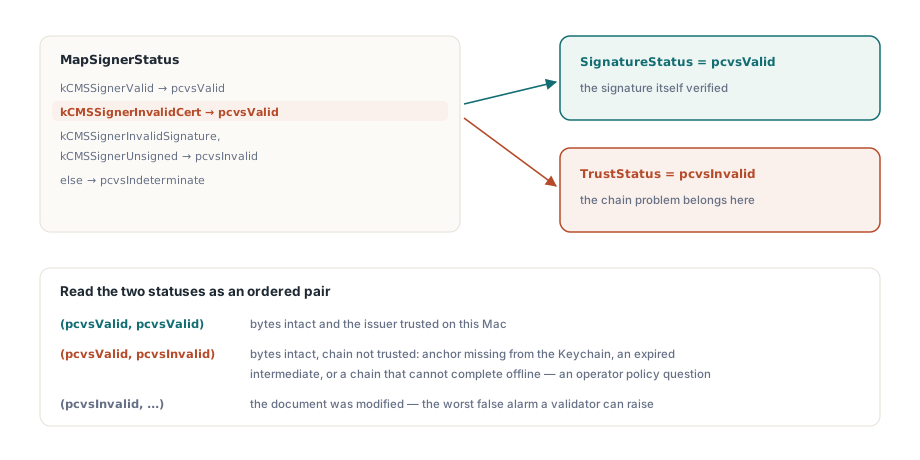
function MapSignerStatus(Status: LongWord): TPdfCmsVerifyStatus;
begin
  case Status of
  kCMSSignerValid:
    Result:= pcvsValid;
  // signature는 검증되었고 chain만 검증되지 않았으며
  // trust status가 이를 별도로 보고합니다
  kCMSSignerInvalidCert:
    Result:= pcvsValid;
  kCMSSignerInvalidSignature, kCMSSignerUnsigned:
    Result:= pcvsInvalid;
  else
    Result:= pcvsIndeterminate;
  end;
end;
두 status를 ordered pair로 읽으면 reporting logic이 자연스럽게 나옵니다. SignatureStatus = pcvsValid와 TrustStatus = pcvsInvalid의 조합은 byte가 intact이고 이 Mac이 해당 issuer를 trust하지 않는 document를 뜻합니다. Keychain에 anchor가 없거나 expired intermediate가 있거나 offline이라 chain을 완성할 수 없는 경우입니다. 이는 document integrity 문제가 아니라 operator policy question이며 cryptographically sound한 PAdES signature를 validator가 거부하는 이유의 대부분을 관통하는 구분입니다
macOS가 실제로 revocation을 확인하는 곳
trust evaluation 내부에서 확인하며 그래서 TPdfCmsVerifyResult.RevocationStatus는 자체 verdict를 가지는 대신 TrustStatus 뒤에 옵니다. SecPolicyCreateRevocation이 policy를 만들고 그 policy가 SecPolicyCreateBasicX509과 함께 CMSDecoderCopySignerStatus에 넘기는 array에 들어가며 OCSP 또는 CRL 작업은 chain이 만들어지는 곳에서 수행됩니다. 별도의 answer가 돌아오지 않으므로 이를 report하면 발명이 됩니다. array 자체에도 작은 ownership rule이 있습니다. CFArrayCreate가 두 policy를 retain하므로 local reference 둘은 곧바로 release하고 single-policy case에서는 array를 완전히 건너뛰어 API가 역시 받을 수 있는 policy를 직접 넘깁니다
offline operation은 connectivity의 우연이 아니라 explicit flag입니다. TPdfCmsVerifyOptions.OnlineRetrieval이 False이면 backend는 kSecRevocationNetworkAccessDisabled를 추가해 machine에 이미 cache된 response 안에서만 evaluation하도록 하고 checkpoint callback은 Windows backend가 보고하는 순서와 같은 순서로 pcvstCryptographicSignature, pcvstChainBuild, pcvstRevocationCheck를 계속 fire합니다. application code는 이 모든 것을 higher-level options record로 설정합니다
var
  Options: TPadesTrustValidationOptions;
  Report: TPadesValidationResult;
  Stream: TFileStream;
begin
  Options:= TPadesTrustValidationOptions.Default;
  Options.CheckRevocation:= True;
  Options.NetworkPolicy:= ptnpOffline;   // cached response만 사용
  Options.CheckTimeStamps:= True;

  Stream:= TFileStream.Create('contract.pdf', fmOpenRead or fmShareDenyWrite);
  try
    Report:= ValidatePadesTrust(Stream, Options);
  finally
    Stream.Free;
  end;

  if Report.SignatureCount= 0 then
    Log('No signature dictionary in this document')
  else if Report.Signatures[0].CmsSignatureStatus <> pcsValid then
    Log('Document integrity failed')
  else if Report.Signatures[0].CertificateTrustStatus <> pcsValid then
    Log('Bytes intact, chain not trusted on this Mac');
end;
Get과 copy: 다른 곳에서 실패하는 release
SecTrustGetCertificateAtIndex는 get semantics를 가지므로 반환하는 reference를 절대 release하면 안 되며 같은 routine에서 몇 줄 옆에 있는 CMSDecoderCopySignerCert와 SecCertificateCopyData는 copy semantics라 반드시 release해야 합니다. Core Foundation은 function name의 한 동사에 전체 rule을 넣지만 type system은 이를 강제하지 않습니다. borrowed reference를 release해도 call site에서는 아무것도 틀리지 않습니다. trust object가 그저 unsound해지고 crash는 certificate chain과 눈에 보이는 관계가 없는 나중의 위치에서 발생합니다
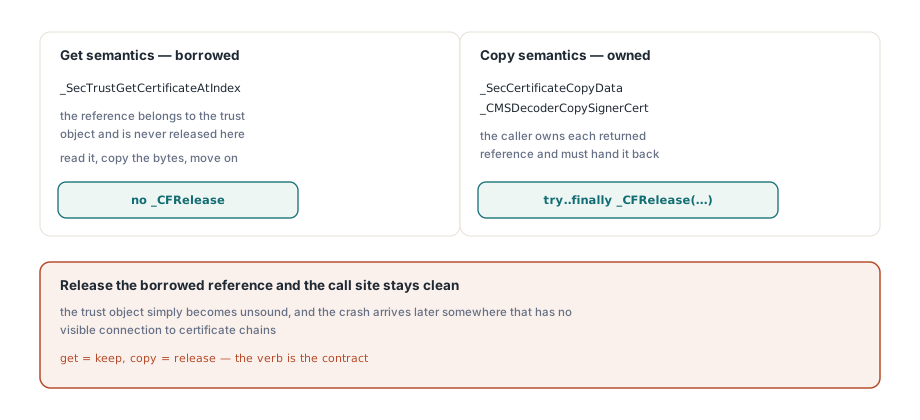
ChainCount:= _SecTrustGetCertificateCount(Trust);
SetLength(Result.ChainCertificates, ChainCount);
for I:= 0 to ChainCount- 1 do
begin
  // Get semantics: 이 reference는 borrowed이며 여기서 release하지 않습니다
  Cert:= _SecTrustGetCertificateAtIndex(Trust, I);
  if Cert= nil then
    Continue;
  // Copy semantics: 이 one은 owned이므로 반환해야 합니다
  CertData:= _SecCertificateCopyData(Cert);
  if CertData= nil then
    Continue;
  try
    Result.ChainCertificates[I]:= CFDataToBytes(CertData);
  finally
    _CFRelease(CertData);
  end;
end;
어떤 backend도 답하지 않을 때 verifier가 보장하는 것
조용한 pass가 아니라 unsupported라는 답을 보장합니다. ConfigurePadesCmsVerifier가 아무것도 설치하지 않았고 platform default도 도움을 주지 못하면 TPdfCmsVerifyResult의 모든 column이 unavailable로 돌아오고 PAdES validator는 이를 pcsUnsupported로 매핑합니다. crypto backend가 없는 build도 signature에 대해 아무것도 주장하지 않고 정직하게 보고합니다. macOS binding도 같은 방향으로 보수적입니다. Security.framework와 CoreFoundation은 dlopen과 dlsym으로 접근하므로 framework가 없거나 이 binding이 틀린 symbol name을 사용하면 link failure나 wrong verdict가 아니라 KeychainVerificationAvailable이 False를 반환하고 KeychainMissingSymbols가 culprit를 이름으로 알려 줍니다. 이것은 어느 target에서든 PDFium native library를 load하는 방법에서 설명한 component의 fail-closed posture와 같습니다
PDF stack에서 signature verification은 조용히 틀리는 것이 크게 unavailable한 것보다 나쁜 영역이며 macOS는 두 결과에 도달하기 쉬운 만큼 충분히 관대한 API를 제공합니다. byte range를 concatenate하는 copy 비용을 받아들이고, signature verdict와 chain verdict를 별도 column에 유지하며 get과 copy 동사를 존중하고 backend가 없으면 없다고 말하게 하세요. Delphi 또는 Free Pascal document workflow를 Mac으로 옮기면서 양쪽에서 PAdES signing과 validation이 필요하다면 PDFium Delphi Component가 Windows backend와 함께 Keychain backend를 하나의 interface 뒤에 제공합니다