Delphi HotPDF 컴포넌트를 사용한 Hello World
다음은 Delphi HotPDF 컴포넌트에 대한 종합 가이드입니다. Delphi HotPDF 컴포넌트 HelloWorld 데모 프로그램!
HotPDF 컴포넌트 소개
HotPDF 컴포넌트는 Delphi 및 C++Builder 개발자를 위해 특별히 설계된 강력하고 다재다능한 PDF 처리 라이브러리입니다. 이 종합적인 컴포넌트는 광범위한 API를 제공하여 개발자가 PDF 문서를 쉽게 만들고 조작하고 수정할 수 있도록 합니다.
HotPDF 컴포넌트의 주요 기능:
- PDF 생성 및 생성: 처음부터 PDF 문서를 만들고 레이아웃, 서식 및 콘텐츠에 대한 완벽한 제어 기능을 제공합니다.
- 텍스트 및 그래픽 지원: 텍스트, 이미지, 도형 및 복잡한 그래픽을 PDF 페이지에 추가합니다.
- 다국어 지원: 국제 텍스트 렌더링을 위한 완벽한 Unicode 지원.
- 글꼴 관리: 글꼴을 포함하여 다양한 시스템에서 일관된 문서 모양을 유지합니다.
- 압축 옵션: 압축 알고리즘을 사용하여 파일 크기를 최적화합니다.
- 보안 기능: 문서 암호화, 암호 보호 및 권한 제어.
- 문서 조작: 병합, 분할 및 기존 PDF 문서 수정.
- 테이블 및 양식 지원: 복잡한 테이블 및 대화형 양식 생성.
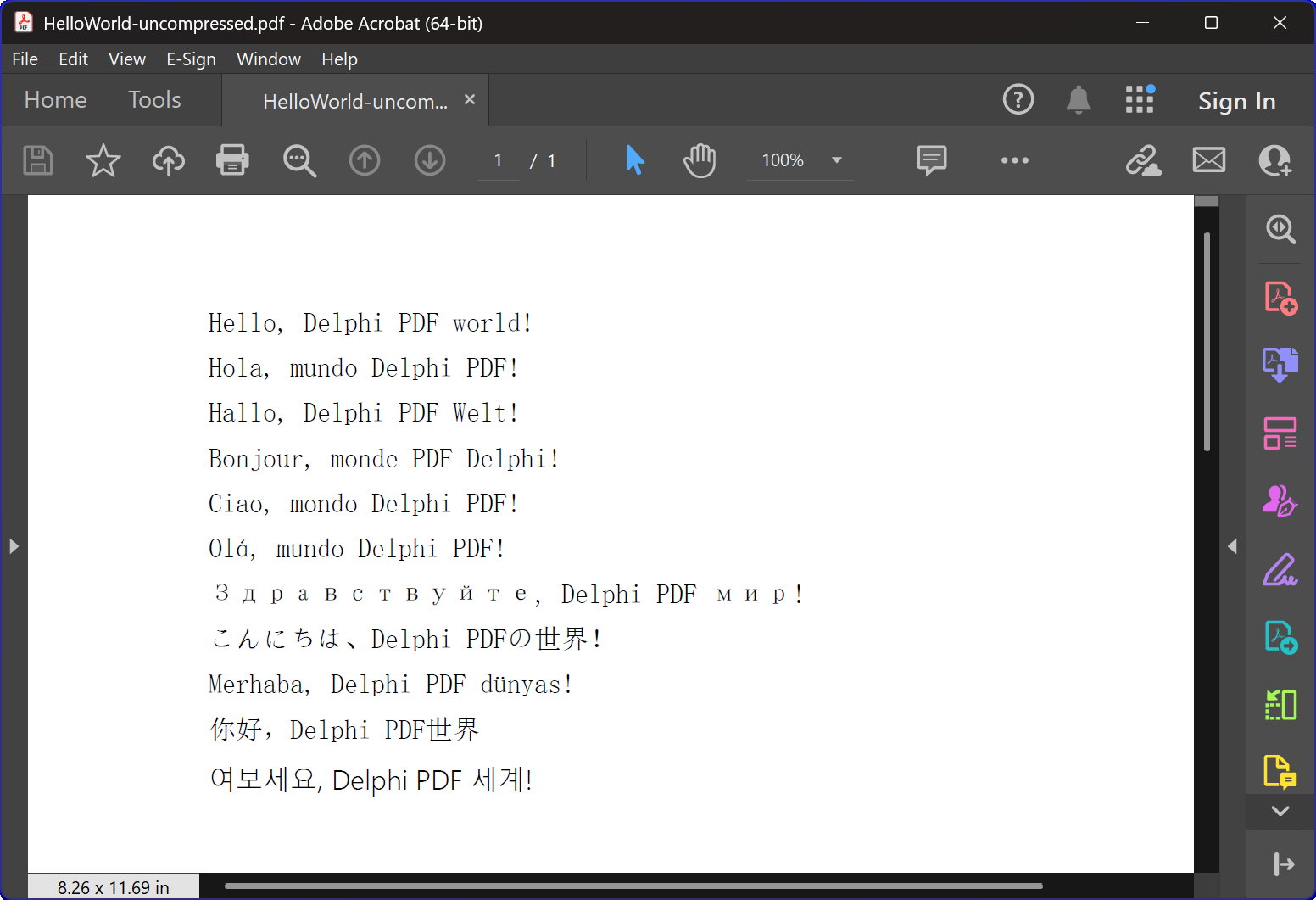
HelloWorld.dpr 프로그램 개요
The HelloWorld.dpr 예제 프로그램은 HotPDF 구성 요소에 대한 훌륭한 소개입니다.
가장 기본적이고 중요한 기능: TexOut 함수. 이 데모 프로그램은 또한 기본적인 PDF 생성 기능을 보여줍니다.
핵심 기능:
1. PDF 문서 생성
이 프로그램의 주요 기능은 다국어 "Hello World" 텍스트를 포함하는 PDF 문서를 생성하는 것입니다. CreatePDF 절차는 다음과 같습니다:
- 구성 요소 초기화: THotPDF 구성 요소의 올바른 설정 및 구성
- 문서 속성: 압축 옵션 및 글꼴 포함과 같은 메타데이터 설정.
- 다국어 텍스트 렌더링: 영어, 스페인어, 독일어, 프랑스어, 이탈리아어, 포르투갈어, 러시아어, 일본어, 터키어, 중국어 및 한국어를 포함한 11개 언어로 텍스트 표시.
- 글꼴 관리: 다국어 표시 지원을 위해 Arial Unicode MS 글꼴 사용.
- 압축: 압축된 PDF 문서 생성.
2. 창 관리 및 시스템 통합.
이 프로그램은 정교한 창목록 기능이 포함되어 있으며, 다음을 보여줍니다:
- 시스템 창 열거: Windows API를 사용합니다.
EnumWindows모든 최상위 창을 순회하는 함수. - 창 제목 일치: 대상 애플리케이션을 식별하기 위해 부분 문자열 매칭을 구현합니다.
- 자동 창문 닫기: 전송 중입니다.
WM_CLOSEPDF 뷰어를 닫을 때 열려 있는 파일이 있는지 확인하는 메시지 표시 - 충돌 방지: 새로운 PDF 파일을 생성할 때 파일 접근 충돌이 발생하지 않도록 보장
3. 오류 처리 및 리소스 관리
이 프로그램은 다음과 같은 최적 사례를 보여줍니다.
- 메모리 관리: 컴포넌트 인스턴스의 올바른 생성 및 해제
- 예외 안전성: 리소스 정리 보장을 위해 try-finally 블록을 사용합니다.
- 사용자 피드백: 프로그램 진행 상황을 사용자에게 알리기 위해 콘솔 출력을 제공합니다.
기술 구현 세부 정보:
압축 기술
이 프로그램은 FlateDecode 압축을 사용하여 PDF 문서를 생성합니다.
글꼴 처리 전략
이 프로그램은 정교한 글꼴 선택 전략을 사용합니다.
- Arial Unicode MS: 대부분의 언어에 사용되며, 광범위한 문자 지원을 제공합니다.
- 글꼴 임베딩: 다양한 시스템에서 일관된 모양을 유지합니다.
버전 간 호환성.
코드는 최신 및 이전 버전의 Delphi를 모두 지원하기 위한 조건부 컴파일 지시문을 포함합니다.
- XE2 이상 지원: 네임스페이스가 있는 유닛(WinApi.Windows, System.SysUtils 등)을 사용합니다.
- 이전 버전 지원: 이전 Delphi 버전의 경우, 기존 단위 이름을 사용합니다.
교육적 가치
이 HelloWorld 예제는 여러 가지 교육적 목적으로 사용됩니다.
- 컴포넌트 소개: HotPDF 컴포넌트 사용법에 대한 쉬운 소개를 제공합니다.
- 모범 사례: 올바른 리소스 관리 및 오류 처리를 보여줍니다.
- 시스템 통합: Windows 시스템 운영과 PDF 생성 통합 방법을 보여줍니다.
- 국제화: PDF 문서에서 다국어 텍스트 처리를 예시로 보여줍니다.
시작하기
이 예제 프로그램을 실행하려면:
- Delphi IDE에 HotPDF 구성 요소가 올바르게 설치되었는지 확인하십시오.
- HelloWorld.dpr 프로젝트 파일을 엽니다.
- 프로그램을 컴파일하고 실행합니다.
- 프로그램은 자동으로 압축된 PDF 파일을 생성합니다.
- 생성된 파일을 검토하여 다국어 텍스트 렌더링 결과를 확인하십시오.
소스 코드
아래는 HelloWorld 데모 프로그램의 완전하고 상세하게 문서화된 소스 코드입니다.
|
1 2 3 4 5 6 7 8 9 10 11 12 13 14 15 16 17 18 19 20 21 22 23 24 25 26 27 28 29 30 31 32 33 34 35 36 37 38 39 40 41 42 43 44 45 46 47 48 49 50 51 52 53 54 55 56 57 58 59 60 61 62 63 64 65 66 67 68 69 70 71 72 73 74 75 76 77 78 79 80 81 82 83 84 85 86 87 88 89 90 91 92 93 94 95 96 97 98 99 100 101 102 103 104 105 106 107 108 109 110 111 112 113 114 115 116 117 118 119 120 121 122 123 124 125 126 127 128 129 130 131 132 133 134 135 136 137 138 139 140 141 142 143 144 145 146 147 148 149 150 151 152 153 154 155 156 157 158 159 160 161 162 163 164 165 166 167 |
{************************************************************} // HotPDF PDF Component // Copyright(c)2007-2025, https://www.loslab.com {************************************************************} // HelloWorld Demo Program for HotPDF Component // This program demonstrates basic PDF creation capabilities // including multilingual text support and compression options {************************************************************} program HelloWorld; {$APPTYPE CONSOLE} // Console application type {$I ..\..\..\Lib\HotPDF.inc} // Include HotPDF configuration file uses // EurekaLog units for memory leak detection and debugging (optional) {$IFDEF EurekaLog} EMemLeaks, // Memory leak detection EResLeaks, // Resource leak detection EDebugJCL, // JCL debugging support EDebugExports, // Export debugging information EFixSafeCallException, // SafeCall exception handling EMapWin32, // Win32 mapping support EAppConsole, // Console application support EDialogConsole, // Console dialog support ExceptionLog7, // Exception logging {$ENDIF EurekaLog} // System units - different namespaces for XE2+ vs older versions {$IFDEF XE2+} WinApi.Windows, // Windows API functions WinApi.Messages, // Windows message constants System.SysUtils, // System utilities System.Classes, // Base classes (TStringList, etc.) Vcl.Graphics, // Graphics support {$ELSE} Windows, // Windows API functions (older Delphi) Messages, // Windows message constants (older Delphi) SysUtils, // System utilities (older Delphi) Classes, // Base classes (older Delphi) Graphics, // Graphics support (older Delphi) {$ENDIF} HPDFDoc; // HotPDF main component unit // Creates a compressed PDF file with multilingual "Hello World" text // Parameters: // FileName: Output PDF file name procedure CreatePDF(const FileName: string); var HotPDF: THotPDF; // Main HotPDF component instance begin // Create HotPDF component instance HotPDF := THotPDF.Create(nil); try // Configure PDF properties HotPDF.AutoLaunch := true; // Automatically open PDF after creation HotPDF.FileName := FileName; // Set output file name // Enable FlateDecode compression HotPDF.Compression := cmFlateDecode; // Enable FlateDecode compression WriteLn('Creating compressed PDF: ', FileName); HotPDF.FontEmbedding := true; // Embed fonts for better compatibility HotPDF.BeginDoc; // Start PDF document creation // Set Unicode font for multilingual text support // Arial Unicode MS supports most languages except Korean // procedure SetFont ( FontName: AnsiString; FontStyle: TFontStyles; ASize: Single; FontCharset: TFontCharset = DEFAULT_CHARSET; IsVertical: boolean = false); // DEFAULT_CHARSET: 1 - Font is chosen based on Name. If the described font is not available on the system, Windows will substitute another font HotPDF.CurrentPage.SetFont('Arial Unicode MS', [], 12, 1, False); // Display "Hello World" in multiple languages // TextOut parameters: (X, Y, Angle, Text) HotPDF.CurrentPage.TextOut(80, 50, 0, 'Hello, Delphi PDF world!'); // English HotPDF.CurrentPage.TextOut(80, 70, 0, 'Hola, mundo Delphi PDF!'); // Spanish HotPDF.CurrentPage.TextOut(80, 90, 0, 'Hallo, Delphi PDF Welt!'); // German HotPDF.CurrentPage.TextOut(80, 110, 0, 'Bonjour, monde PDF Delphi!'); // French HotPDF.CurrentPage.TextOut(80, 130, 0, 'Ciao, mondo Delphi PDF!'); // Italian HotPDF.CurrentPage.TextOut(80, 150, 0, 'Olá, mundo Delphi PDF!'); // Portuguese HotPDF.CurrentPage.TextOut(80, 170, 0, 'Здравствуйте, Delphi PDF мир!'); // Russian HotPDF.CurrentPage.TextOut(80, 190, 0, 'こんにちは、Delphi PDFの世界!'); // Japanese HotPDF.CurrentPage.TextOut(80, 210, 0, 'Merhaba, Delphi PDF dünyası!'); // Turkish HotPDF.CurrentPage.TextOut(80, 230, 0, '你好,Delphi PDF世界'); // Chinese HotPDF.CurrentPage.TextOut(80, 250, 0, '여보세요, Delphi PDF 세계!'); // Korean HotPDF.EndDoc; // Finalize and save the PDF document WriteLn('PDF created successfully: ', FileName); finally HotPDF.Free; // Clean up HotPDF component end; end; // Global variables for window enumeration and PDF creation var Title: String; // Individual title string (unused in current implementation) Titles: TStrings; // List of window titles to search for Window: HWND; // Window handle (unused in current implementation) WindowText: array [0 .. 255] of Char; // Buffer for window text (unused in current implementation) WindowTitle: String; // Window title string (unused in current implementation) I: Integer; // Loop counter (unused in current implementation) // Callback function for EnumWindows API // This function is called for each top-level window in the system // Parameters: // hWnd: Handle to the current window being enumerated // lParam: User-defined data (in our case, pointer to TStrings with target titles) // Returns: True to continue enumeration, False to stop function EnumWindowsProc(HWND: HWND; lParam: lParam): BOOL; stdcall; var Titles: TStrings; // List of target window titles I: Integer; // Loop counter WindowText: array [0 .. 255] of Char; // Buffer to store window text WindowTitle: String; // Current window's title as string begin Result := true; // Continue enumeration by default Titles := TStrings(lParam); // Cast lParam back to TStrings // Get the window title text if GetWindowText(HWND, WindowText, SizeOf(WindowText)) > 0 then begin WindowTitle := String(WindowText); // Convert char array to string // Check if window title contains any of our target strings for I := 0 to Titles.Count - 1 do begin // Use Pos function to check if target string is contained in window title if Pos(Titles[I], WindowTitle) > 0 then begin // Send WM_CLOSE message to close the window PostMessage(HWND, WM_CLOSE, 0, 0); Break; // Exit loop after finding first match end; end; end; end; // Main program execution begins here begin // Close any existing PDF files that might be open in PDF viewers // This prevents file access conflicts when creating new PDFs with same names Titles := TStringList.Create; try // Define list of window title substrings to search for // Any window containing these strings will be closed // This will close Adobe and Foxit PDF reader & editor and many other PDF apps Titles.CommaText := '"HelloWorld.pdf", "Foxit"'; // Enumerate all top-level windows and close matching ones // EnumWindows calls our callback function for each window EnumWindows(@EnumWindowsProc, lParam(Titles)); finally Titles.Free; // Clean up string list end; // Display program header WriteLn('=== HotPDF HelloWorld Demo ==='); WriteLn('This demo creates a compressed PDF file with multilingual text.'); WriteLn(''); // Create compressed PDF CreatePDF('HelloWorld.pdf'); // Display completion message WriteLn(''); WriteLn('PDF file created successfully!'); WriteLn('The PDF file uses FlateDecode compression for optimal file size.'); WriteLn(''); WriteLn('Press Enter to exit...'); ReadLn; // Wait for user input before closing console end. |