literal RGB로 채운 chart series는 workbook theme를 따라가지 않습니다. theme를 바꿔도 series는 예전 color를 유지합니다. HotXLS는 theme-colored chart series fill을 사용해 binary XLS에서 이를 처리합니다. 4198 또는 $1066인 GelFrame record를 series block의 AreaFormat 바로 뒤에 쓰고 OfficeArt scheme index와 tint를 담습니다. 그러면 Excel은 자체가 쓴 themed fill을 render하는 것과 같은 방식으로 series를 render합니다
GelFrame record number가 나온 곳
GelFrame record number는 4198 ($1066)이며 record 자체의 specification section에서는 찾을 수 없습니다. [MS-XLS] 2.4.131은 GelFrame의 내용을 설명하지만 대부분 record section과 달리 rt value를 적지 않습니다. chart substream ABNF도 도움이 되지 않습니다. GELFRAME = 1*2GelFrame *Continue production으로 record name만 줍니다. number는 payload를 문서화한 section에서 여러 page 떨어진 record-number enumeration table에 있습니다. 이 production은 reader를 작성하는 사람이라면 다시 볼 가치가 있습니다. 하나 또는 두 개의 GelFrame record를 허용하고 각 record 뒤에 선택적으로 Continue record가 올 수 있으므로 자신이 쓰지 않은 file에서 parser가 production당 하나의 record만 가정하면 잘못 처리합니다. HotXLS는 단순한 solid theme fill에서 Excel이 생성하는 것과 같이 themed series마다 GelFrame 하나만 emit하며 decoder는 고정 count를 가정하지 않고 record를 self-contained payload로 취급합니다
GelFrame payload 내부: 두 OfficeArt property table
GelFrame payload는 서로 이어진 두 OfficeArt property table입니다. OfficeArtFOPT(OPT1) 뒤에 OfficeArtTertiaryFOPT(OPT2)가 옵니다. 각 table은 two-byte property count와 그 수만큼의 six-byte FOPTE entry로 구성되고 각 entry는 two-byte opid와 four-byte op입니다. opid의 bit 15는 fComplex입니다. set되면 op value가 byte length이고 fixed entry 뒤에 variable tail이 옵니다. 이 tail을 무시하는 decoder는 desynchronize되어 첫 complex property 뒤의 모든 opid를 garbage로 읽습니다
theme fill은 두 table에 분산된 세 property와 fill kind를 선언하는 하나의 property로 표현됩니다. HotXLS는 complex tail 없이 28 byte에 네 property를 씁니다:
- OPT1의
fillType$0180이며 1 (msofillSolid)로 설정 - OPT1의
fillColor$0181이며 older 또는 theme-unaware consumer가 그릴 flattened RGB - OPT2의
fillColorExt$019E이며 base theme color - OPT2의
fillColorExtMod$01A0이며 base에 적용한 tint 또는 shade
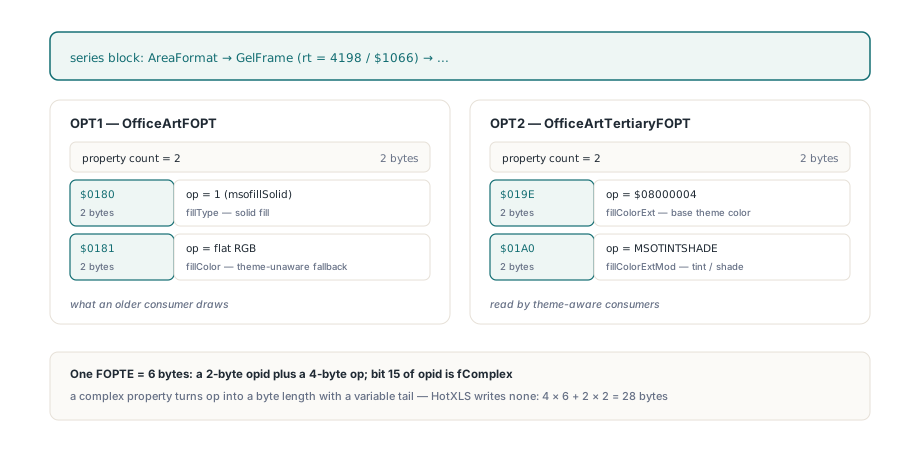
이 분할은 implementation의 우연이 아니라 format이 의도한 것입니다. [MS-ODRAW] 2.2.2는 theme triple을 flat color, base color와 modification으로 설명하므로 theme를 이해하는 consumer는 fill을 다시 계산하고 그렇지 않은 consumer도 합리적인 것을 그립니다. 주변 opid도 같은 pattern을 따르며 old와 current [MS-ODRAW] edition에서 번호가 동일합니다. 두 revision을 함께 읽을 때 편리한 부분이며 fillOpacity $0182, fillBackColor $0183, fillShadeType $019C, fillBackColorExt $01A2, fillBackColorExtMod $01A4가 그 예입니다
scheme index가 red byte에 들어가는 이유
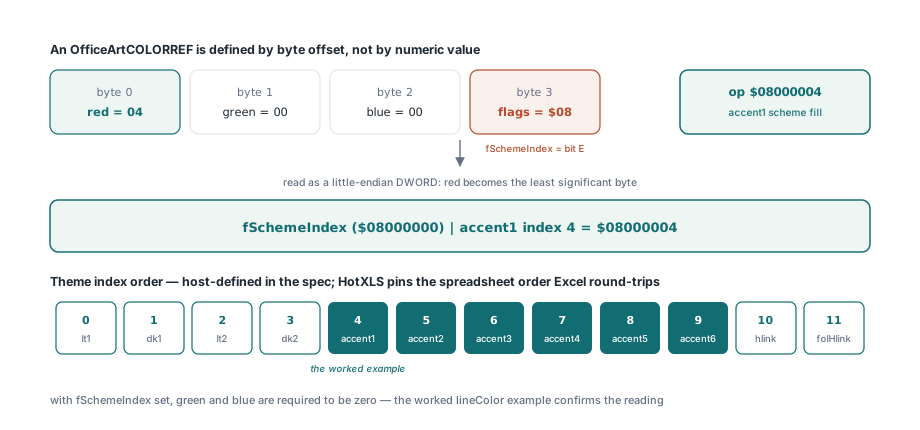
OfficeArtCOLORREF는 numeric value가 아니라 byte offset으로 정의되기 때문입니다. red는 byte 0, green은 byte 1, blue는 byte 2, flag는 byte 3입니다. 모든 FOPTE op가 그렇듯 이 구조를 little-endian DWORD로 읽으면 red가 least significant byte가 됩니다. [MS-ODRAW]의 worked lineColor example도 이를 확인합니다. 따라서 flags bit E인 fSchemeIndex는 numeric value $08000000이고 scheme index 자체는 red byte에 들어가며 green과 blue는 zero여야 합니다. 그래서 Accent1의 op value는 $00000004가 아니라 $08000004이고 당연히 $04000000도 아닙니다
specification이 정의하지 않는 theme index 순서
specification은 scheme index order를 host-defined라고 부르고 table을 주지 않으므로 byte layout만으로는 Excel과 interop할 수 없습니다. HotXLS는 실제 Excel file과 round-trip되는 spreadsheet theme order를 사용합니다:
- 0 = lt1, 1 = dk1, 2 = lt2, 3 = dk2
- 4부터 9 = accent1부터 accent6
- 10 = hlink, 11 = folHlink
tint와 shade: MSOTINTSHADE payload
fillColorExtMod op는 MSOTINTSHADE value이며 direction과 amount를 signed fraction이 아닌 하나의 DWORD에 encode합니다. $20000000은 unmodified를 뜻합니다. lightening tint는 $02F4 shl 16 or amount shl 8 or $10 (MSOTINT)이고 darkening tint는 high word에 $01F4를 둔 같은 shape (MSOSHADE)입니다. amount byte는 직관과 반대로 움직입니다. $FF는 unchanged이고 $00은 full modification입니다. HotXLS는 이를 positive가 lighten하고 negative가 darken하는 하나의 DrawingML-style double로 normalize하며 plus 또는 minus (255 - amount) / 255를 사용합니다. mapping은 Excel UI가 실제로 제공하는 value에서 exact하므로 approximately lossless가 아니라 lossless round-trip입니다. 익숙한 "Lighter 40%"는 amount 153이고 (255 - 153) / 255는 양방향에서 rounding error 없이 0.4가 됩니다. amount 191인 shade는 -64/255로 돌아옵니다. 다음은 legal range로 clamp한 encoder입니다:
if Tint > 0 then                       // MSOTINT - lighter
  TintOp := LongWord($02F4) shl 16 or
    (LongWord(Round(255 * (1 - Tint))) shl 8) or $10
else if Tint < 0 then                  // MSOSHADE - darker
  TintOp := LongWord($01F4) shl 16 or
    (LongWord(Round(255 * (1 + Tint))) shl 8) or $10
else
  TintOp := $20000000;                 // MSOCOLORMODUNDEFINED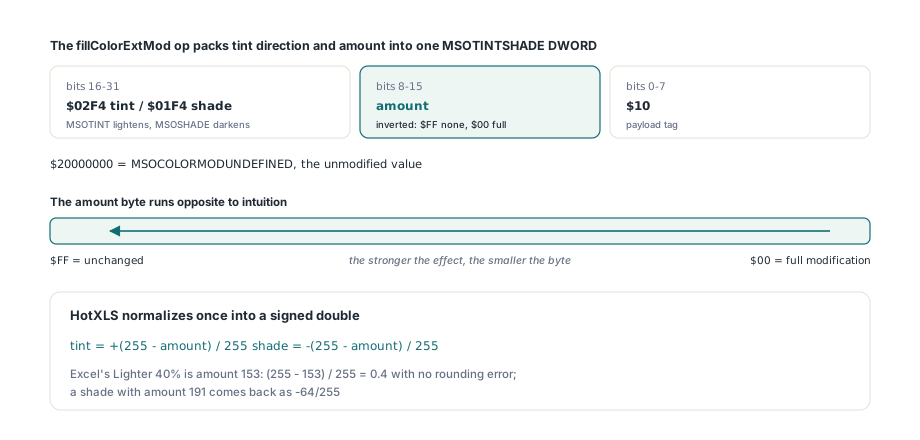
Delphi에서 theme fill 설정 및 읽기
write side에서 theme fill은 per-series style record의 extra field 두 개로 들어갑니다. TXLSChartSeriesStyleInfo에는 HasFillTheme, FillThemeColor, FillThemeTint가 추가되었고 builder는 HasStyle와 HasFillTheme가 둘 다 set된 경우에만 GelFrame을 emit합니다. explicit FillRgb도 함께 설정하면 그 value가 OPT1 fillColor에 그대로 들어가고 그렇지 않으면 HotXLS가 built-in default Office theme table을 통해 tint를 적용해 color를 flatten하므로 theme-only series도 OPT2를 무시하는 consumer에 합리적인 flat color를 가집니다. Default() initialization에도 주의해야 합니다. TXLSChartSeriesInfo는 managed field를 포함하고 plain Boolean member는 그렇지 않으면 stack garbage가 되기 때문입니다:
var
  Wb: TXLSWorkbook;
  Series: array [0..1] of TXLSChartSeriesInfo;
begin
  Wb := TXLSWorkbook.Create;
  try
    Wb.Sheets.Add.Name := 'Data';

    Series[0] := Default(TXLSChartSeriesInfo);   // 이 record를 FillChar하지 않습니다
    Series[0].Name := 'Explicit';
    Series[0].Categories := 'Data!$A$1:$A$2';
    Series[0].Values := 'Data!$B$1:$B$2';
    Series[0].HasStyle := True;
    Series[0].Style.HasFill := True;
    Series[0].Style.FillRgb := $C47244;          // accent1, low byte의 red
    Series[0].Style.HasFillTheme := True;
    Series[0].Style.FillThemeColor := 4;         // accent1
    Series[0].Style.FillThemeTint := 0.4;        // Lighter 40%

    Series[1] := Default(TXLSChartSeriesInfo);
    Series[1].Name := 'ThemeOnly';
    Series[1].Categories := 'Data!$A$1:$A$2';
    Series[1].Values := 'Data!$C$1:$C$2';
    Series[1].HasStyle := True;
    Series[1].Style.HasFillTheme := True;        // explicit RGB 없음: flattened
    Series[1].Style.FillThemeColor := 8;         // accent5

    Wb.Sheets.AddChartSheet('Themed', xlsChartTypeColumn, '', '', '', Series);
    Wb.SaveAs('themed.xls');
  finally
    Wb.Free;
  end;
end;
읽기는 나머지 HotXLS chart inspection이 사용하는 것과 같은 chart model을 통과합니다. GetChartModel은 caller가 free해야 하는 owned TXLSChartModel을 반환하고 각 TXLSChartSeries는 HasFillTheme, FillThemeColor, FillThemeTint를 노출하며 FillRgb도 함께 제공합니다. 이 값은 OPT1 fillColor에서 decode되며 해당 series에서 AreaFormat color보다 우선합니다. 같은 세 value는 canonical semantic snapshot에도 SolidFillThemeSet, SolidFillThemeColor, SolidFillThemeTint로 도달하므로 workbook diff가 설명할 수 없는 RGB drift가 아니라 theme change를 theme change로 보게 됩니다. XLSX side에서 왔다면 이것은 Delphi용 HotXLS Excel chart, image와 drawing guide에서 설명한 styling의 binary-format counterpart입니다:
Wb := TXLSWorkbook.Create;
try
  Wb.Open('themed.xls');
  Model := Wb.Sheets[2]._Chart.GetChartModel;
  try
    Ser := Model.GetSeries(0);
    if Ser.HasFillTheme then
    begin
      WriteLn(Ser.FillThemeColor);            // 4 = accent1
      WriteLn(Ser.FillThemeTint:0:3);         // 0.400
      WriteLn(IntToHex(Ser.FillRgb, 6));      // C47244, the OPT1 fillColor
    end;
  finally
    Model.Free;
  end;
finally
  Wb.Free;
end;
binary XLS의 theme fill이 보장하지 않는 것
정직하게 말해야 할 제한 세 가지가 있습니다. 첫째이자 이 code를 audit하는 사람에게 가장 중요한 점으로 local corpus의 sample file에는 GelFrame record가 하나도 없습니다. conditional-formatting sample에 있는 byte pair 66 10 열한 개는 record boundary가 아닌 곳에 있으며 full-stream record dump에서도 hit은 0개입니다. 여기서 설명한 bit layout은 specification에서 유도한 뒤 세 가지 방식으로 고정했습니다. builder output의 decode symmetry, synthetic $1066 payload를 decoder에 직접 넣는 hand-built byte test, exact flattened RGB assert입니다. captured Excel file보다 약한 evidence이며 그렇지 않은 것처럼 암시해서는 안 됩니다. 둘째, theme-only fill의 flattening은 workbook에서 읽은 theme part가 아니라 built-in default Office theme table을 사용합니다. packaged XLSX와 같은 의미의 theme part가 binary XLS에는 없기 때문이며 workbook 자체의 theme가 flat color를 결정해야 한다면 FillRgb를 직접 제공하세요. 셋째, decoder는 series block 안의 GelFrame만 accept합니다. 같은 record가 chart area나 axis frame에 나타날 수 있는데 거기서 accept하면 background fill을 series에 조용히 귀속하므로 무시합니다. $08000000 flag가 없는 fillColorExt도 plain extended color로 취급하고 HasFillTheme을 set하지 않습니다. chart가 XLSX world에서 작성되어 중간만 거치는 workbook에는 ChartML을 잃지 않고 Excel chart를 편집하는 preservation path가 더 안전하고 이 record가 들어 있는 container는 COM IStorage 없이 Delphi에서 OLE2 compound file을 읽는 방법에서 다룹니다
theme-colored chart fill, GelFrame encoder와 decoder, 전체 BIFF8 chart substream builder는 Delphi와 C++Builder용 HotXLS Delphi spreadsheet component에 포함되어 있으며 Excel을 설치하지 않고 XLS, XLSX와 ODS를 읽고 씁니다