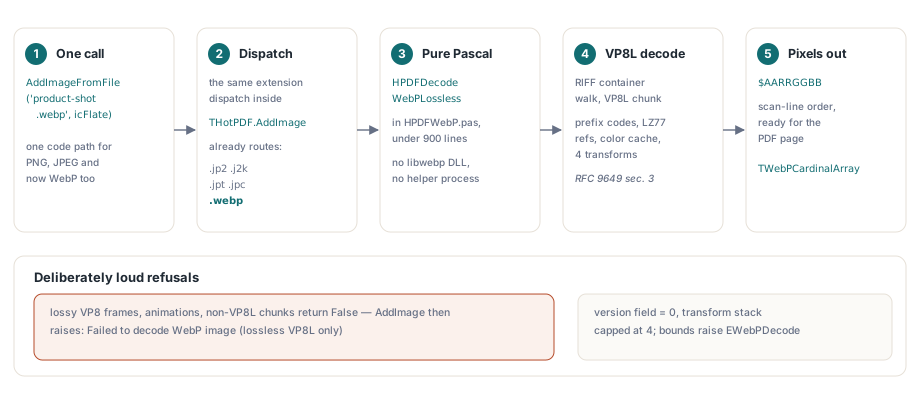
HotPDF 2.747.0은 Object Pascal로 처음부터 작성한 VP8L (WebP lossless) decoder로 WebP image를 decode하므로 THotPDF.AddImageFromFile이 .webp path를 직접 받고 배포할 libwebp DLL이나 실행할 helper process가 필요 없습니다. 이 decoder는 RFC 9649 section 3을 완전히 구현합니다. RIFF container walk, canonical prefix code, LZ77 backward reference, color cache와 네 가지 inverse transform입니다. Lossy VP8 frame은 반쯤 decode하지 않고 명확히 거부합니다
계기는 평범했습니다. design tool은 모든 asset을 modern default라서 WebP로 export하고, asset은 PNG와 JPEG를 십 년 동안 잘 먹어 온 invoice나 catalog generator에 들어가는데 갑자기 input 절반이 거부됩니다. 뻔한 수정은 libwebp를 bind하고 끝내는 것입니다. 그러나 그 수정은 self-contained VCL component를 deployment story가 있는 무언가로 바꾸는 방법이기도 합니다
libwebp를 bind하지 않고 VP8L을 구현한 이유
HotPDF가 codec을 Pascal로 구현한 이유는 고객이 자신의 executable에 compile하는 Delphi component가 runtime DLL을 조용히 끌어들이면 안 되기 때문입니다. native dependency는 32-bit와 64-bit binary를 추적해야 하고, version을 고정해야 하며 deployment를 실행하는 사람에게 code-signing chain을 설명해야 하고 locked-down terminal의 antivirus가 싫어할 수 있는 파일 하나를 더 만듭니다. project에 넣으면 작동한다는 것이 핵심인 component에서는 이 비용이 실제입니다. 다른 쪽 논거는 VP8L이 작다는 것입니다. prefix-code와 LZ77 format, 네 inverse transform, 120-entry neighborhood distance map이며 HPDFWebP.pas의 전체 decoder가 Pascal 900 line 아래입니다. THotPDF.AddImage 안에서 WebP branch는 이미 .jp2, .j2k, .jpt, .jpc를 JPEG 2000 path로 보내는 동일한 extension dispatch에 놓이므로 plumbing은 이미 있었고, Delphi에서 PDF에 JPEG 2000 image를 추가하는 walkthrough에서 설명한 바로 그 위치입니다. PDF image 대신 raw pixel을 원하는 caller는 HPDFDecodeWebPLossless로 바로 가면 scan-line order의 $AARRGGBB value로 채워진 TWebPCardinalArray를 받습니다
uses
  HPDFDoc, HPDFWebP;

var
  Pdf: THotPDF;
  Idx: Integer;
begin
  Pdf := THotPDF.Create(nil);
  try
    Pdf.FileName := 'catalog.pdf';
    Pdf.BeginDoc;
    // .webp는 DLL 없이 built-in VP8L decoder로 dispatch됩니다
    Idx := Pdf.AddImageFromFile('product-shot.webp', icFlate);
    Pdf.CurrentPage.ShowImage(Idx, 50, 500, 240, 180, 0);
    Pdf.EndDoc;
  finally
    Pdf.Free;
  end;
end;
VP8L bitstream이 동시에 두 방향으로 읽히는 이유
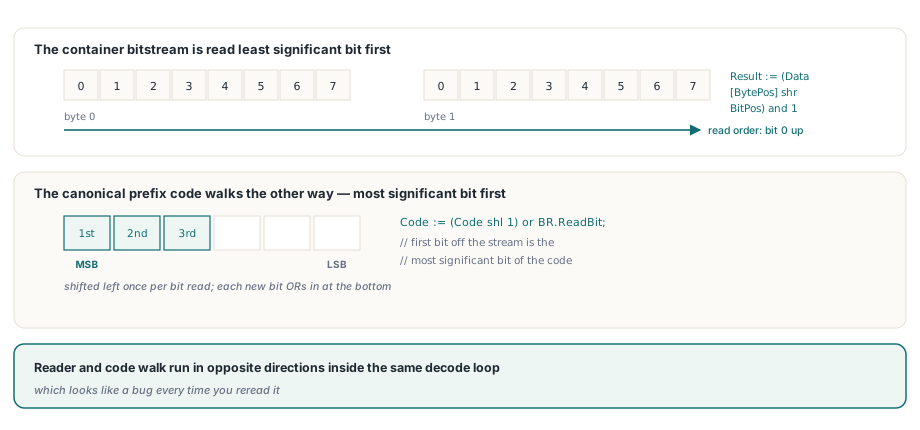
container bit order와 prefix code bit order가 독립적으로 규정되어 있고 VP8L이 둘에 반대 convention을 사용하기 때문입니다. RFC 9649 section 3.2는 bitstream을 least significant bit first로 읽는다고 명확히 말합니다. reader는 byte의 bit 0에서 시작해 위로 진행합니다. 그 stream 안에 들어 있는 canonical prefix code는 most significant bit first로, tree의 root부터 도착하므로 decode walk는 accumulator를 left shift하고 새 bit를 bottom에서 OR합니다. 따라서 같은 loop 안에서 reader와 code walk가 반대 방향으로 진행되며 다시 읽을 때마다 bug처럼 보입니다
function TWebPBitReader.ReadBit: Integer;
begin
  if BytePos >= Length(Data) then
    raise EWebPDecode.Create('WebP bitstream exhausted');
  Result := (Data[BytePos] shr BitPos) and 1;   // LSB first, RFC 9649 3.2
  Inc(BitPos);
  if BitPos = 8 then
  begin
    BitPos := 0;
    Inc(BytePos);
  end;
end;

// canonical walk는 반대 방향으로 진행합니다. stream에서 처음 나온
// bit가 code의 most significant bit입니다
for Len := 1 to 15 do
begin
  Code := (Code shl 1) or BR.ReadBit;
  if Counts[Len] > 0 then
  begin
    if Code - First < Counts[Len] then
      Exit(Symbols[Index + Code - First]);
    First := (First + Counts[Len]) shl 1;
    Index := Index + Counts[Len];
  end
  else
    First := First shl 1;
end;
stream을 조용히 desynchronize하는 RFC 세부 사항 세 가지
RFC 9649에 정확히 한 번만 적혀 있고 지나치기 쉬우며 각각 single bit를 더하거나 덜 읽는 세 semantics가 있습니다. 그것만으로 이후의 모든 table이 noise가 됩니다. 세 가지 모두 HotPDF VP8L decoder에서 발견되었고 똑같은 증상을 만듭니다. 그럴듯해 보이는 image지만 모든 곳이 틀립니다
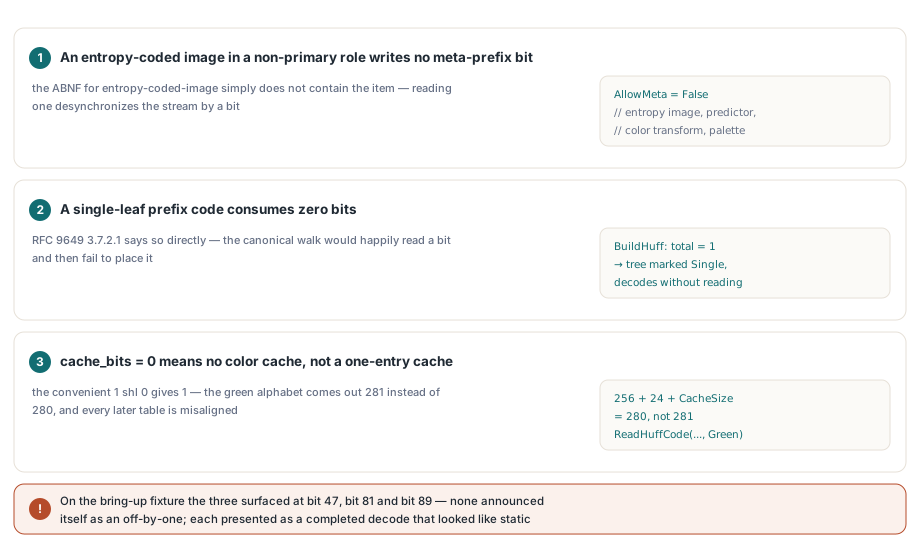
- non-primary role의 entropy-coded image는 meta-prefix bit를 전혀 쓰지 않습니다.
entropy-coded-image의 ABNF에는 그 item이 없으므로 하나 읽으면 stream이 한 bit desynchronize됩니다. HotPDF는 entropy image 자체, predictor와 color transform data, color-indexing palette에AllowMeta = False를 넘깁니다 - single-leaf prefix code는 0 bit를 소비합니다. RFC 9649 section 3.7.2.1이 직접 말하며 canonical walk는 bit를 읽은 뒤 배치하지 못해 실패할 것이므로
BuildHuff는 total symbol count가 1인 경우 tree를Single로 표시하고 reader를 건드리지 않고 그 symbol 하나를 decode합니다 - cache_bits 값 0은 color cache size가 0이라는 뜻이지
1 shl 0이 아닙니다. 편리한 shift는 1을 만들고 green alphabet256 + 24 + CacheSize를 280이 아니라 281로 만들며 그 뒤의 모든 prefix code table read가 misalign됩니다
CacheBits := 0;
CacheSize := 0;                        // cache_bits = 0은 실제로 none을 뜻합니다
if BR.ReadBit = 1 then
begin
  CacheBits := Integer(BR.ReadBits(4));
  if (CacheBits < 1) or (CacheBits > 11) then
    raise EWebPDecode.Create('WebP color cache bits out of range');
  CacheSize := 1 shl CacheBits;
end;

// RFC 9649 3.8.3: spatially coded (ARGB) image만
// meta prefix bit를 가지며 entropy-coded role은 이를 쓰지 않습니다
if AllowMeta then
  UseMeta := BR.ReadBit
else
  UseMeta := 0;

// ...
ReadHuffCode(256 + 24 + CacheSize, Groups[I].Green);   // 281이 아니라 280
ReadHuffCode(256, Groups[I].Red);
ReadHuffCode(256, Groups[I].Blue);
ReadHuffCode(256, Groups[I].Alpha);
ReadHuffCode(40, Groups[I].Dist);
bring-up에 사용한 fixture에서는 세 항목이 bit 47, bit 81, bit 89에서 그 순서대로 나타났습니다. 이 숫자가 이 절의 핵심입니다. 세 항목 모두 off-by-one이라고 말해 주지 않았습니다. 각각 stream이 reference와 일치하지 않게 된 정확한 bit position을 알아내기 전까지는 image가 끝까지 decode되고 static처럼 보이는 image로 나타났습니다
bit-position diffing이 주는 것
Bit-position diffing은 쓸모없는 질문을 한 줄짜리 질문으로 바꿉니다. "이 picture가 왜 틀렸나"가 아니라 "stream이 bit 81에서 왜 갈라졌나"입니다. setup은 저렴합니다. Pillow가 각 .webp fixture와 같은 image를 자체 decode한 .rgba dump를 씁니다. Pascal probe와 작은 Python reference model은 모든 read 옆에 running bit counter를 log합니다. 두 log가 처음으로 달라지는 위치가 bug가 있는 곳입니다. 가장 적게 exercise하는 fixture부터 시작하세요. simple-code path만 타는 flat 32x32 image입니다. 그것을 green으로 만든 다음 gradient, odd dimension과 alpha를 한 fixture씩 추가하세요. bit order를 추측하는 것은 하루를 쓰는 방법입니다
솔직한 단서도 있습니다. reference도 틀렸습니다. Python model은 cache_bits를 읽는 것을 잊었고 transform loop도 끝까지 실행하지 않았으므로 일부 divergence point는 Pascal이 아니라 reference decoder가 sync를 잃은 지점이었습니다. reference implementation이 틀렸다고 해서 test 중인 implementation이 옳아지는 것은 아니며 어느 쪽도 benefit of the doubt를 받지 않습니다. 각 divergence는 RFC text와 대조해 판정해야 합니다. 그 text도 source에서 가져오세요. search summary는 numeric table을 자주 망치며 120-entry distance map, 14 predictor mode와 color cache multiplier $1e35a7bd는 모두 정확하게 옮겨야 합니다
Pascal integer division이 C와 달라지는 지점
VP8L color transform은 signed delta를 가진 3.5 fixed point이며 여기서 Pascal과 C가 합의하지 않습니다. C는 음의 integer를 arithmetic shift하여 floor하고 Pascal div는 0 방향으로 truncate합니다. 음의 product에서는 둘이 항상 1만큼 다르므로 inverse color transform이 전체 image에서 pixel마다 channel step 하나씩 어긋납니다. 따라서 HotPDF는 div에 의존하지 않고 FloorDiv32에서 floor를 명시적으로 수행합니다
// C는 arithmetic shift로 음수에서 floor하지만 Pascal div는
// 0 방향으로 truncate하므로 음수 case에 명시적인 correction이 필요합니다
function FloorDiv32(V: Integer): Integer;
begin
  Result := V div 32;
  if (V < 0) and (V mod 32 <> 0) then
    Dec(Result);
end;

// transform element byte와 color channel byte 사이의 3.5 fixed-point delta이며
// 둘 다 먼저 sign-extend합니다
function ColorDelta(T, C: Integer): Integer;
var
  T8, C8: Integer;
begin
  T8 := T;
  if T8 >= 128 then
    Dec(T8, 256);
  C8 := C;
  if C8 >= 128 then
    Dec(C8, 256);
  Result := FloorDiv32(T8 * C8);
end;
이 종류의 defect는 fixture가 non-negative product만 만들어 div와 floor가 일치할 때 어떤 test에서도 보이지 않습니다. 또한 HotPDF WebP test가 tolerance가 아니라 Pillow가 같은 file을 decode한 결과와 pixel-exact equality를 assert하는 이유이기도 합니다. gradient, odd 100x37 size, 실제 alpha channel이 있는 40x40 image와 flat 32x32 image에서 모든 pixel을 bit 단위로 비교합니다. 한 step의 drift는 perceptual check는 통과하고 bitwise check는 실패합니다
WebP 지원이 의도적으로 거부하는 것
HotPDF는 WebP file의 첫 VP8L chunk만 decode하며 그 밖의 것은 처리하지 않습니다. Lossy VP8 frame, animation 또는 matching chunk가 VP8L이 아닌 container는 HPDFDecodeWebPLossless에서 False를 반환하고 AddImage는 file 이름을 포함한 exception으로 바꿉니다: Failed to decode WebP image (lossless VP8L only). 이것은 누락이 아니라 의도된 경계입니다. 잘못된 format의 file이 gray rectangle을 만들기보다 caller가 pre-convert할 수 있는 위치에서 실패해야 하기 때문입니다. version field는 0이어야 하고 transform stack은 네 entry로 제한되며 모든 bounds violation은 EWebPDecode를 발생시키고 public entry point가 이를 plain False로 바꿉니다. import 시 decode하는 경로는 이미 연 document에서 picture를 꺼내는 반대 방향이며 loaded PDF와 decode filter에서 image를 추출하는 path를 사용합니다. image decoder는 여러분이 만들지 않은 file을 입력받는 parser이기도 합니다. WebP asset이 customer나 public internet에서 온다면 여기의 bounds check는 바닥일 뿐이며 malformed frame이 host를 함께 쓰러뜨리지 않도록 image codec을 isolated worker process에서 실행하는 것이 더 강한 답입니다
실무 결과는 Delphi나 C++Builder application이 PNG를 넣는 것과 같은 방식으로 WebP asset을 PDF에 넣을 수 있다는 것입니다. AddImageFromFile 한 번, ShowImage 한 번이면 되고 installer에 추가할 것은 없습니다. 주변 image와 document pipeline까지 필요하다면 HotPDF Delphi PDF component가 같은 unit set에서 writing, loading과 rendering을 모두 제공합니다