기존 PDF에서 텍스트, 이미지, 폰트를 꺼내는 일은 실제 문서 더미를 통과시켜 보기 전까지는 이미 풀린 문제처럼 들립니다. 고객 파일 4만 개에 검색 색인기를 겨눠 보면 고장이 몇 가지 알아볼 만한 무더기로 갈립니다. 얼마만큼의 간격이 공백으로 쳐지는지 아무도 추출기에 알려 주지 않아 단어가 서로 붙어 버립니다. 어떤 페이지는 서브셋 폰트가 자기 글리프 코드를 실제 문자로 옮길 지도를 지니고 있지 않아 알아볼 수 없는 문자열로 돌아옵니다. 그리고 "회사 로고"는 알고 보니 소프트 마스크 뒤에 겹쳐진 아홉 개의 별개 이미지 객체입니다. 그중 어느 것도 라이브러리의 버그가 아닙니다. 추출 함수를 호출하는 것과, 그 함수가 디스크 위의 바이트에서 무엇을 복원할 수 있고 무엇을 복원할 수 없는지 이해하는 것 사이의 차이일 뿐입니다
Pascal 판인 losLab PDF Library는 Delphi와 C++Builder 코드에 그 세 가지 흐름을 읽는 방법을 하나 이상 제공하며, 각 수준이 보장하는 바는 서로 다릅니다. 요령은 수준을 작업에 맞추는 것입니다. 검색 색인, 편집 마스킹 검토자, PDF/A 프리플라이트 패스는 같은 페이지에서 저마다 다른 것을 원하며, 잘못된 호출에 손을 뻗으면 헛수고를 하거나 믿을 수 없는 출력을 얻습니다
텍스트 추출 수준과 각각이 약속하는 것
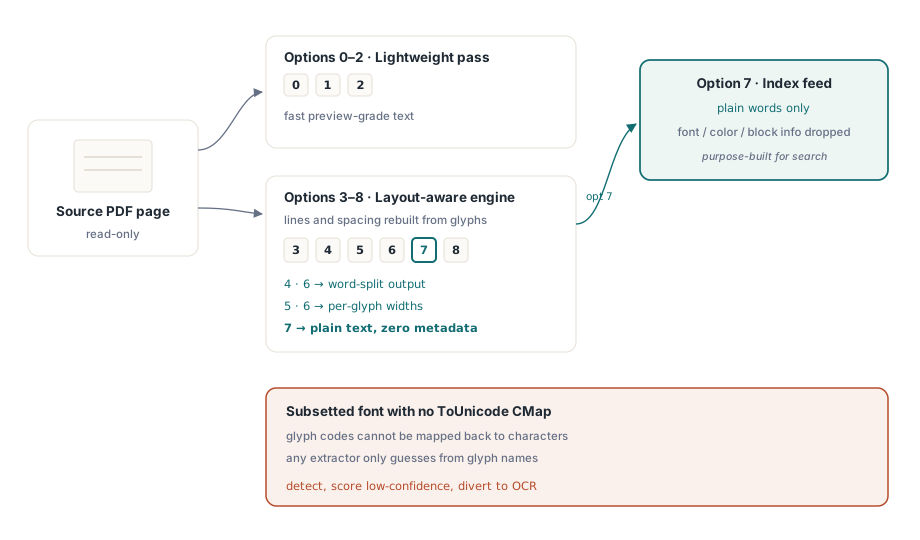
GetPageText는 0에서 8까지의 옵션 값을 받는데, 그 숫자는 형식이 아니라 엔진을 고릅니다. 0에서 2까지는 빠른 미리보기에 적당한 경량 패스를 돌립니다. 3에서 8까지는 레이아웃 인식 엔진을 거치며, 이 엔진은 글리프가 실제로 페이지 위 어디에 놓여 있는지에서 줄과 자간을 재구성합니다. 그 범위 안에서도 변형이 중요합니다. 4와 6은 출력을 단어 단위로 쪼개고, 5와 6은 글리프별 폭을 내보내며, 7은 폰트, 색, 블록 메타데이터를 일부러 버린 순수 텍스트를 반환합니다. 검색 색인에 먹일 것은 옵션 7입니다. 색인은 단어만 원하고 그 밖의 것은 원하지 않기 때문입니다
어떤 옵션 설정도 애초에 정보를 담고 있지 않은 문서를 구해 내지는 못합니다. PDF는 문자 코드를 글리프 모양으로 대응시키고, 그 코드를 읽을 수 있는 텍스트로 되돌리는 유일한 수단은 폰트의 ToUnicode CMap(ISO 32000-1 §9.10)입니다. 서브셋 폰트가 그것 없이 배포되면 모든 추출기가 막힙니다. 이 라이브러리도, 뷰어의 복사 붙여넣기도, 경쟁 툴킷도 모두 글리프 이름으로 짐작하거나 아무것도 반환하지 못하는 처지가 됩니다. 실무적인 대응은 영웅적인 시도가 아니라 탐지입니다. 그 페이지를 낮은 신뢰도로 점수 매겨 OCR로 보내십시오. 쓰레기를 조용히 색인하는 것이 읽을 수 없다고 인정하는 것보다 나쁘기 때문입니다
단순한 옵션으로 감당되지 않는 경우, 이를테면 커스텀 토큰화, 콘텐츠 스트림 포렌식, 여러분 나름의 규칙으로 만든 텍스트 깔때기 같은 것을 위해 한 층 아래의 디코더가 열려 있습니다. TPDFExtractor는 페이지의 리소스 딕셔너리와 폰트 모음 위에 생성됩니다. ExtractTextW 메서드는 원시 콘텐츠 스트림 텍스트 연산을 같은 폰트 기계 장치에 되돌려 통과시켜 유니코드를 복원하고, OnFindObject 이벤트는 객체가 흘러갈 때마다 그것을 여러분에게 건네줍니다. 대부분의 코드는 이렇게까지 깊이 내려갈 일이 없습니다. 내려가야 하는 애플리케이션이라면 이 층이 묻혀 있지 않고 공개되어 있다는 사실에 안도하게 됩니다
위치가 있는 블록: 검색 결과와 편집 마스킹 검토의 단위
순수 텍스트는 페이지가 무엇을 말하는지 알려 줍니다. 하지만 제품은 조만간 그것을 어디에서 말하는지도 알아야 합니다. 검색 결과를 강조하고, 마스킹 후보에 상자를 그리고, 주석을 올바른 자리에 고정하려면 그렇습니다. ExtractPageTextBlocks는 텍스트 런 목록에 대한 핸들을 반환하고, 각 런은 자신의 텍스트와 경계 상자, 그리고 설정된 폰트 이름과 크기를 지닙니다:
var
  Pdf: TPDFlib;
  Blocks, I: Integer;
begin
  Pdf := TPDFlib.Create;
  try
    if Pdf.LoadFromFile('contract.pdf', '') <> 1 then
      raise Exception.Create('load failed');
    Pdf.SelectPage(1);
    Blocks := Pdf.ExtractPageTextBlocks(0);
    for I := 0 to Pdf.GetTextBlockCount(Blocks) - 1 do
      Writeln(Format('%s  [%s %.1f pt at %.0f,%.0f]',
        [Pdf.GetTextBlockText(Blocks, I),
         Pdf.GetTextBlockFontName(Blocks, I),
         Pdf.GetTextBlockFontSize(Blocks, I),
         Pdf.GetTextBlockBound(Blocks, I, 0),
         Pdf.GetTextBlockBound(Blocks, I, 1)]));
    Pdf.ReleaseTextBlocks(Blocks);
  finally
    Pdf.Free;
  end;
end;
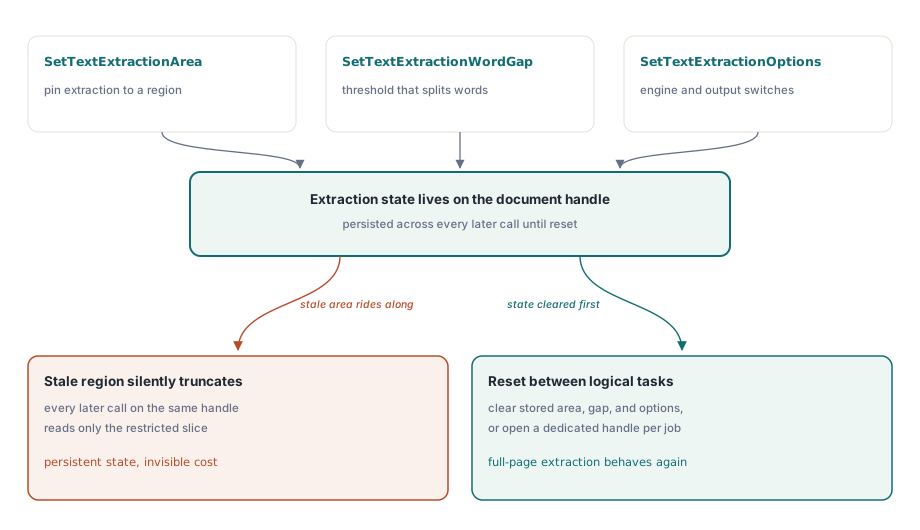
이 영역의 세부 하나가 다른 어떤 것보다 통합 작업의 발목을 자주 잡습니다. SetTextExtractionArea, SetTextExtractionWordGap, SetTextExtractionOptions는 호출마다 넘기는 인자가 아니라 계속 유지되는 문서 수준 상태입니다. 어떤 기능을 위해, 이를테면 문서를 분류하려고 머리글 띠만 읽으려고 영역 제한을 설정하면, 같은 핸들에서 뒤따르는 모든 추출이 조용히 잘려 나갑니다. 나중에 손을 뻗을 레이아웃 인식 GetPageText 수준도 예외가 아닙니다. 논리적 작업 사이에 추출 상태를 초기화하거나, 작업마다 자기 문서 핸들을 주십시오
단어 간격 임계값은 첫 번째 고장 무더기, 즉 서로 붙어 버린 단어들을 다루는 지렛대입니다. SetTextExtractionWordGap은 페이지 자체의 글리프 간격을 기준으로 잰 가로 공간이 얼마나 되어야 한 단어와 다음 단어가 갈리는지를 레이아웃 엔진에 알려 줍니다. 빽빽한 표는 널찍하게 조판된 마케팅 페이지보다 작은 간격을 원하므로, 문서 종류별로 조정한 임계값이 전역 상수 하나보다 낫습니다. 나머지 추출 상태와 마찬가지로 문서에 계속 남으므로, 한 번 설정하고 잊는 대신 의도적으로 설정할 계획을 세우십시오
이미지: 스크린샷이 아니라 원본 스트림
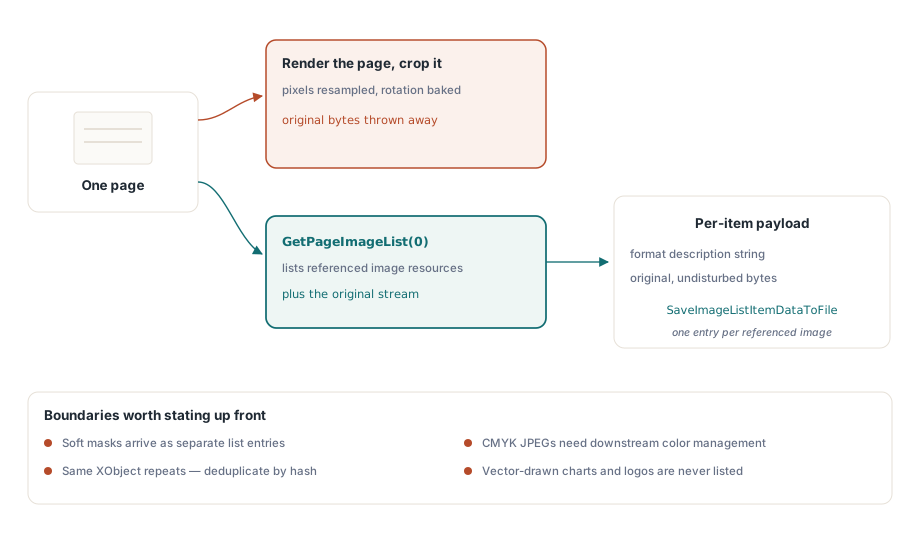
PDF에서 이미지를 꺼내는 잘못된 방법은 페이지를 렌더링해 잘라 내는 것입니다. 그러면 픽셀이 재샘플링되고, 회전이 그대로 구워지며, 원본이 무엇이었든 버려집니다. 대신 GetPageImageList는 페이지가 참조하는 실제 이미지 리소스를 열거하고, 각 항목은 자신의 속성과 손대지 않은 원본 데이터를 돌려줍니다:
var
  ImgList, I: Integer;
begin
  Pdf.SelectPage(1);
  ImgList := Pdf.GetPageImageList(0);
  for I := 0 to Pdf.GetImageListCount(ImgList) - 1 do
  begin
    Writeln(Pdf.GetImageListItemFormatDesc(ImgList, I, 0));
    Pdf.SaveImageListItemDataToFile(ImgList, I, 0,
      Format('page1-img%.2d.bin', [I]));
  end;
  Pdf.ReleaseImageList(ImgList);
end;
어떤 항목에 대해 무언가를 가정하기 전에 GetImageListItemFormatDesc를 확인하십시오. 페이지가 참조하는 것이 눈에 보이는 이미지 하나당 깔끔한 그림 하나인 경우는 드물기 때문입니다. 소프트 마스크는 자기 몫의 별도 항목으로 나타납니다. 같은 XObject가 여러 페이지에 걸쳐 반복되는 일도 흔하므로, "모든 이미지" 내보내기를 보관하기 전에 콘텐츠 해시로 중복을 제거하십시오. 그러지 않으면 같은 로고를 백 번 쓰게 됩니다. CMYK JPEG는 하류에서 색 관리를 적용해야 하며, 그러지 않으면 채널을 액면 그대로 받아들이는 뷰어에서 반전되어 보입니다. 한 번에 한 페이지가 아니라 문서 전체 목록을 원한다면 FindImages와 SetFindImagesMode가 파일 전체를 한 패스로 훑습니다
누군가 인수 기준을 쓰기 전에 이해관계자와 짚어 둘 만한 경계가 하나 있습니다. 이미지 추출은 래스터 리소스만 돌려줍니다. 벡터 경로로 그린 로고나 차트는 리소스 의미에서 이미지가 아니므로, 화면에서 아무리 그림으로 보이더라도 어떤 이미지 목록에도 결코 나타나지 않습니다. 요구 사항이 정말로 그 차트를 파일로 전달하는 것이라면, 솔직한 접근은 페이지 영역을 비트맵으로 렌더링하는 것이며 이는 충실도가 다른 별개의 연산입니다. 두 종류의 출력은 어느 쪽이 무엇인지 밝히는 라벨 없이 같은 내보내기 폴더에 들어가서는 안 됩니다
폰트: 내보내기 기능이 아니라 감사 표면
폰트 API는 폰트에 관한 질문에 답합니다. 폰트 파일 자체를 건네주지는 않으며, 이 구분이 그 위에 지을 수 있는 모든 것의 모양을 결정합니다. FindFonts가 문서를 훑고 나면 열거가 ID로 폰트를 순회하고, 속성 호출들은 현재 선택된 폰트에 대해 보고합니다:
var
  I: Integer;
begin
  Pdf.FindFonts;
  for I := 1 to Pdf.FontCount do        // 폰트 인덱스는 0이 아니라 1부터 시작합니다
    if Pdf.SelectFont(Pdf.GetFontID(I)) = 1 then
      Writeln(Format('%s  type=%d  embedded=%d  subset=%d',
        [Pdf.FontName, Pdf.FontType,
         Pdf.GetFontIsEmbedded, Pdf.GetFontIsSubsetted]));
end;
루프 경계를 주의하십시오. 폰트 인덱스는 1에서 FontCount까지인 반면, 몇 문단 위의 텍스트 블록과 이미지 목록 인덱스는 0부터 시작합니다. 한쪽 관례를 다른 쪽으로 가져가면 첫 폰트를 건너뛰거나 끝을 넘어가는 하나 차이 오류가 나고, 대부분의 문서에는 폰트가 여럿이라 엉뚱한 폰트도 그럴듯해 보이므로 대충 하는 테스트는 통과해 버립니다. 범위도 분명히 해 두십시오. 이 API에는 바이트 수준 폰트 내보내기가 없습니다. 임베드된 폰트 프로그램을 TTF나 OTF 파일로 반환하는 호출은 없고, 열거와 메타데이터 조회가 의도된 모델의 전부입니다. 그래도 그 모델은 실제 운영 업무가 폰트에 요구하는 것을 충분히 감당합니다. 이름 패턴으로 서브셋 여부를 탐지하고, 보존용 변환 전에 임베드 여부를 감사하며(임베드되지 않은 폰트는 Delphi의 PDF/A 및 PDF/UA 프리플라이트에서 다루듯 PDF/A의 확실한 걸림돌입니다), 추출 신뢰도가 떨어질 때 인코딩을 진단합니다. 경계가 여기 놓인 데는 라이선스상의 이유도 있습니다. 서브셋 폰트 프로그램은 라이선스가 걸린 자산이고, 글리프 대부분이 빠져 있어 설치 가능한 폰트로는 어차피 쓸모가 없습니다. 그것을 추출 가능한 자산이 아니라 감사 메타데이터로 다루는 것이 방어할 수 있는 입장입니다
그 마지막 호출은 분류 작업에서 제 몫을 톡톡히 합니다. 각 폰트에 GetFontEncoding을 돌리고 서브셋 플래그와 나란히 읽으면, 문자 하나 꺼내기 전에 추출 품질을 예측할 수 있습니다. 폰트가 모두 비표준 인코딩으로 서브셋화된 페이지는 살펴보기만 해도 OCR 후보이며, 덕분에 배치 파이프라인은 실패할 추출 패스를 먼저 낭비하지 않고 그 페이지를 올바르게 보낼 수 있습니다
문서를 로드하지 않는 대규모 추출
배치 파이프라인에서 한 페이지를 읽으려고 문서 전체를 로드하는 것은 낭비되는 I/O이고, 문서 더미 전체로 보면 금세 쌓입니다. 단일 호출 변형인 ExtractFilePageText와 ExtractFilePageTextBlocks는 파일 이름, 암호, 페이지 번호를 직접 받아 전체 로드를 건너뜁니다. 기가바이트급 파일에는 더 낮은 기어도 있습니다. 직접 접근 경로는 스트리밍 xref 읽기로 파일을 열므로, DAOpenFileReadOnly에 이어 DAExtractPageText를 부르면 그 한 페이지가 실제로 필요로 하는 객체만 건드립니다. 여기에는 외워 둘 만한 관례 변화가 따라옵니다. DA 함수들은 원시 페이지 번호가 아니라 DAFindPage에서 얻는 객체 참조 핸들인 PageRef로 페이지를 지목합니다. 핸들 자리에 번호를 넘기면 호출은 오류를 내지 않은 채 엉뚱한 객체를 대상으로 동작하는데, 이는 디버깅하기 가장 고약한 종류의 실수입니다. 직접 접근 툴킷의 나머지는 대용량 PDF 병합, 분할, 직접 접근에 정리되어 있습니다
실제 문서 더미를 견뎌 내는 추출 코드와 절뚝거리는 코드를 가르는 습관이 하나 있다면, 페이지를 깨끗한 데이터 원천이 아니라 신뢰할 수 없는 입력으로 대하는 것입니다. 뷰어가 그리는 것과 어긋나는 텍스트는 거의 언제나 인코딩 문제입니다. 합자가 글리프 하나로 뭉개졌거나 서브셋 폰트에 ToUnicode 항목이 빠진 것이고, 해법은 바이트와 싸우는 것이 아니라 신뢰도를 측정해 나쁜 페이지를 OCR로 우회시키는 것입니다. 폰트 API는 설계상 결코 TTF나 OTF를 만들어 내지 않으므로, 폰트 워크플로는 감사 질문을 중심으로 지으십시오. 그리고 유지되는 추출 상태, 무엇보다 영역 사각형은 한 번 호출하고 잊어버리는 매개변수가 아니라 문서 핸들이 살아 있는 동안 여러분이 책임지는 설정입니다. 이 세 가지 반사 신경을 제대로 갖추면 나머지 API는 얌전히 동작합니다
평가판 빌드, 데모 프로젝트, 전체 추출 API 레퍼런스는 losLab PDF Library for Delphi 제품 페이지에 있습니다