접근 가능한 PDF는 눈에 보이는 페이지가 결코 드러내지 않는 하나의 구조 위에 얹혀 있습니다. ISO 32000-1 §14.7이 정의하는 구조 트리입니다. 이것은 제목, 문단, 표, 그림의 논리적 계층이며, 그려진 콘텐츠 위에 겹쳐지고 역할 맵을 통해 표준 역할로 대응됩니다. 스크린 리더는 페이지 위의 자국이 아니라 그 트리를 읽습니다. 트리가 없으면, 흠잡을 데 없어 보이는 생성 인보이스도 의미상으로는 텅 빈 문서입니다. 콘텐츠 스트림은 그리기 순서만 기록할 뿐이기 때문입니다. 합계가 품목보다 먼저 낭독될 수도 있고, 바닥글이 문단을 가로질러 끼어들 수도 있으며, 품목 표가 구분 없는 단어 뭉치 하나로 뭉개질 수도 있습니다. 그것을 막는 비용은 압도적으로 여러분에게 유리합니다. 그리면서 구조를 함께 내보내는 것은 몇 분짜리 코드지만, 완성된 문서에 나중에 끼워 넣는 것은 개선 프로젝트입니다. losLab PDF Library(PDF Library for Delphi)는 각 그리기 연산을 그 논리적 역할로 감싸는 소수의 호출을 통해 Delphi와 C++Builder에 이 트리를 노출합니다
마크드 콘텐츠가 구조 트리에 묶이는 방식
두 계층이 협력합니다. 콘텐츠 스트림에서 그리기 연산은 마크드 콘텐츠 시퀀스로 묶이며, 각 시퀀스는 정수 MCID를 지닙니다. 문서 카탈로그에서는 구조 트리가 그 MCID들을 대체 텍스트나 언어 같은 속성을 지닌 타입 요소(H1, P, Table, Figure)의 계층으로 대응시킵니다. 커스텀 요소 타입도 합법이지만, 각각은 역할 맵을 통해 표준 역할로 해석되어야 합니다(ISO 32000-1 §14.8.4). 괘선, 배경, 반복되는 페이지 장식처럼 아무 의미도 담지 않는 콘텐츠는 아티팩트로 표시해, 보조 기술이 문장 중간에 그것을 읽어 버리는 대신 건너뛰게 합니다
PDF Library for Delphi는 두 계층을 괄호 한 쌍 뒤에서 함께 관리합니다. BeginTag가 구조 요소를 열면서 마크드 콘텐츠 시퀀스를 시작하고, 그리기 호출들이 그 안에 들어가며, EndTag가 둘을 함께 닫습니다. 손으로 태깅할 때 발목을 잡는 장부 관리, 즉 MCID와 부모 트리와 페이지 참조는 여러분이 틀릴 수 없는 내부에서 처리됩니다
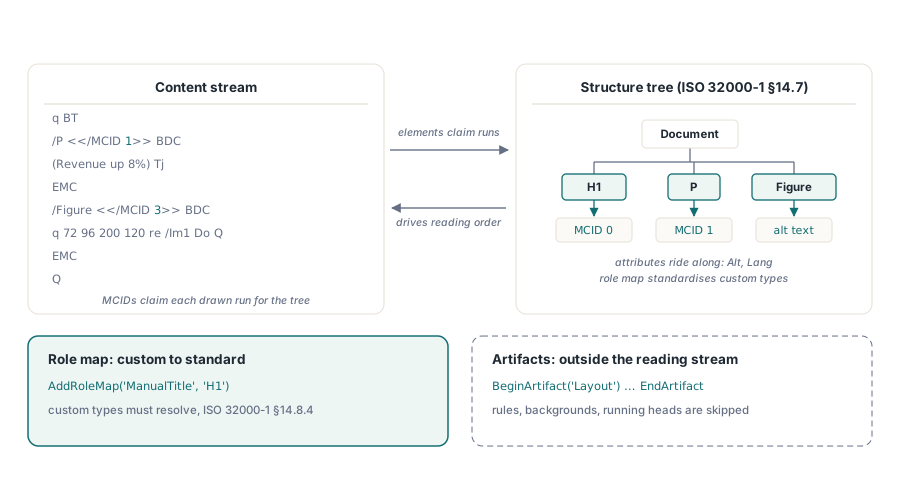
태그를 하나라도 열기 전에 문서 수준 스위치 두 개가 작업의 틀을 잡습니다. SetMarkInfo는 문서가 태그되었음을 선언하는 카탈로그 플래그를 쓰고, IsTaggedPDF는 그것을 되읽습니다. 들어온 파일에 보존할 만한 구조가 있는지 판단할 때 쓰는 값싼 첫 탐침입니다. 언어에는 진입점이 둘 있습니다. SetDocumentLanguage는 문서 기본값만 단독으로 설정하고, SetPDFUAMode는 완전한 PDF/UA 출력을 켜는 과정의 일부로 그것을 설정합니다. 파일은 PDF/UA 준수를 주장하지 않고도 유용하게 태그될 수 있으며, 단계적 도입은 흔히 바로 거기서 시작합니다
나중이 아니라 그리면서 태그하기
실제로 통하는 생성 패턴은 태그 괄호를 나중의 별도 패스가 아니라 모든 그리기 호출의 서명 일부로 취급하는 것입니다:
var
  Lib: TPDFlib;
begin
  Lib := TPDFlib.Create;
  try
    Lib.SetOrigin(1);                          // 좌상단 원점
    Lib.SetPDFUAMode('en-US');                 // 저장 버전을 PDF 1.7로 올립니다
    Lib.SetInformation(1, 'Service Manual');   // PDF/UA에서 /Title은 필수
    Lib.AddRoleMap('ManualTitle', 'H1');       // 커스텀 타입 -> 표준 역할
    Lib.AddStandardFont(4);
    Lib.SetTextSize(18);
    Lib.BeginTagEx2('ManualTitle', '', '', 'en-US', '', 'h1-cover', '');
    Lib.DrawText(72, 96, 'Service Manual');
    Lib.EndTag;
    Lib.BeginTag('Figure', 'Exploded view of the gearbox assembly', '');
    Lib.AddImageFromFile('gearbox.png', 0);
    Lib.EndTag;
    Lib.BeginArtifact('Layout');               // 페이지 장식: 읽기에서 제외
    // ... 괘선과 배경 색조를 그립니다 ...
    Lib.EndArtifact;
    Lib.SaveToFile('manual.pdf');
  finally
    Lib.Free;
  end;
end;
이 시퀀스의 세 호출은 준수 측면에서 무게가 있습니다. SetPDFUAMode는 PDF/UA 출력을 켜면서 문서 버전을 조용히 PDF 1.7로 올리는데, 이는 버전 고정과 충돌합니다. LockSaveVersion으로 PDF 1.4에 묶인 문서는 UA 모드가 켜지는 순간 저장을 거부하고 오류 코드 602를 반환합니다. 보존용 프로파일과 접근성 요구 사항을 서로 다른 팀이 설정할 때 자주 튀어나오는 충돌입니다. SetInformation(1, ...)은 문서 제목을 쓰는데, ISO 14289는 뷰어가 파일 이름 대신 이 제목을 보여 주기를 기대합니다. 제목 누락은 현실에서 가장 흔한 PDF/UA 지적 사항 중 하나입니다. AddRoleMap은 커스텀 ManualTitle 타입을 H1으로 등록하며, 이를 건너뛰면 아래에서 설명할 진단이 대응되지 않은 역할을 지적하게 됩니다
제목 수준에는 페이지 겉모습을 보고 그때그때 고르는 대신 의도적인 정책이 필요합니다. 스크린 리더 사용자는 제목 단축키로 절 사이를 건너뛰므로, 중간 수준이 시각 디자인에서 너무 커 보인다는 이유로 H1에서 H3으로 건너뛰는 템플릿은 그 탐색을 조용히 망가뜨리고, 어떤 시각 검토로도 결코 잡히지 않습니다. HEADING-LEVEL-SKIP 진단이 이름 붙이려고 존재하는 결함이 정확히 이것입니다. 각 템플릿의 시각 스타일을 한 곳에서 고정된 제목 사다리에 한 번 대응시켜 두면 어긋남은 아예 시작되지 않습니다
스크린 리더가 실제로 탐색할 수 있는 표
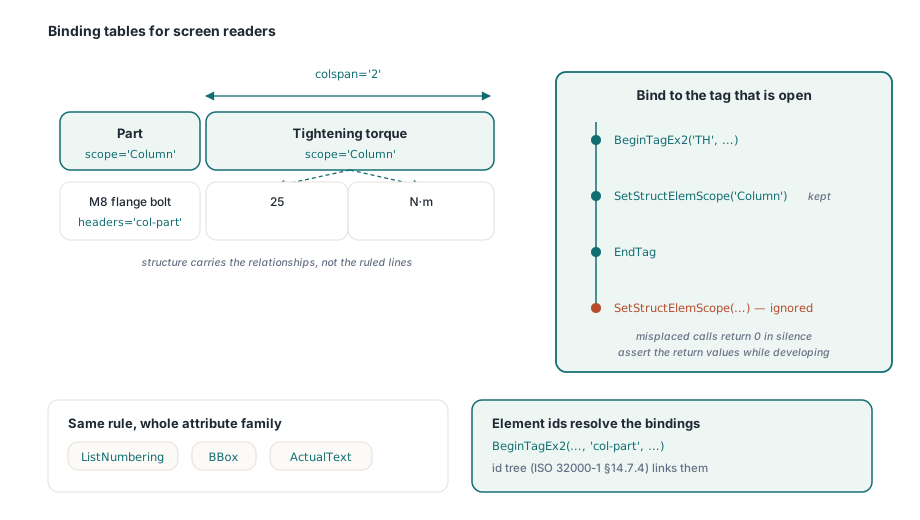
그려진 격자선은 화면 밖에서 아무 의미가 없습니다. 스크린 리더가 탐색하는 것은 구조적 관계입니다. 어느 셀이 헤더인지, 각 헤더가 무엇을 관장하는지, 불규칙한 레이아웃에서 데이터 셀이 헤더에 어떻게 묶이는지입니다. 구조 요소 속성 호출들이 그 셋을 모두 처리합니다:
Lib.BeginTag('Table', '', '');
Lib.BeginTag('TR', '', '');
Lib.BeginTagEx2('TH', '', '', '', '', 'col-part', '');
Lib.SetStructElemScope('Column');          // 이 TH가 열려 있는 동안에만 유효
Lib.DrawText(72, 120, 'Part');
Lib.EndTag;
Lib.BeginTagEx2('TH', '', '', '', '', 'col-torque', '');
Lib.SetStructElemScope('Column');
Lib.SetStructElemColSpan(2);               // 헤더가 값 열과 단위 열을 아우릅니다
Lib.DrawText(200, 120, 'Tightening torque');
Lib.EndTag;
Lib.EndTag;
Lib.BeginTag('TR', '', '');
Lib.BeginTag('TD', '', '');
Lib.SetStructElemHeaders('col-part');      // 불규칙한 표를 위한 명시적 결속
Lib.DrawText(72, 140, 'M8 flange bolt');
Lib.EndTag;
Lib.EndTag;
Lib.EndTag; // Table
순서 규칙은 엄격하고, 아무 소리 없이 강제됩니다. 모든 SetStructElem* 호출은 그 순간 열려 있는 태그에, 즉 그 태그의 BeginTag와 EndTag 사이에 적용되며, 열린 태그가 없거나 속성이 현재 태그에 해당하지 않으면 아무것도 일으키지 않고 0을 반환합니다. 잘못 놓인 호출은 그냥 사라집니다. 개발 중에 반환값을 어서션으로 감싸 두면 아직 눈에 보일 때 어긋남을 잡을 수 있습니다. 그대로 두면, 빠진 scope는 접근성 감사가 실제 스크린 리더로 표를 읽어 볼 때에야 드러납니다. BeginTagEx2로 넘긴 요소 ID는 ID 트리(ISO 32000-1 §14.7.4)에 들어가며, 애초에 SetStructElemHeaders 결속을 해석 가능하게 만드는 것이 바로 그것입니다
같은 속성 계열이 보조 기술이 기대는 나머지 부분도 담당합니다. SetStructElemListNumbering은 목록 항목에 어떤 라벨이 붙는지 선언하므로, 스크린 리더가 글머리 기호 글리프를 읊는 대신 목록 안에서의 위치를 알려 줍니다. SetStructElemBBox는 그림과 표의 경계 상자를 기록하며, 리플로 보기가 콘텐츠를 배치할 때 이를 사용합니다. SetStructElemActualText는 벡터 아트로 조립한 장식 첫 글자처럼 글리프가 읽을 수 있는 문자로 대응되지 않는 런에 대체 텍스트를 제공합니다. 각각은 같은 규칙을 따릅니다. 열린 태그에 묶이거나, 아니면 사라집니다
아티팩트, 언어, 그리고 저장 전 진단 관문
반복되는 페이지 장식, 즉 반복 머리글, 접지 표시, 워터마크, 배경 색조는 BeginArtifact와 EndArtifact 괄호 안에 들어가야 읽기 흐름에 결코 끼어들지 않습니다. 언어는 상속됩니다. 문서 기본값은 SetPDFUAMode 인자에서 오고, 다른 언어로 된 런은 BeginTagEx나 SetStructElemLang으로 요소마다 그것을 덮어씁니다. 영어 매뉴얼 안의 프랑스어 인용문이 제대로 발음되게 해 주는 것이 바로 이것입니다
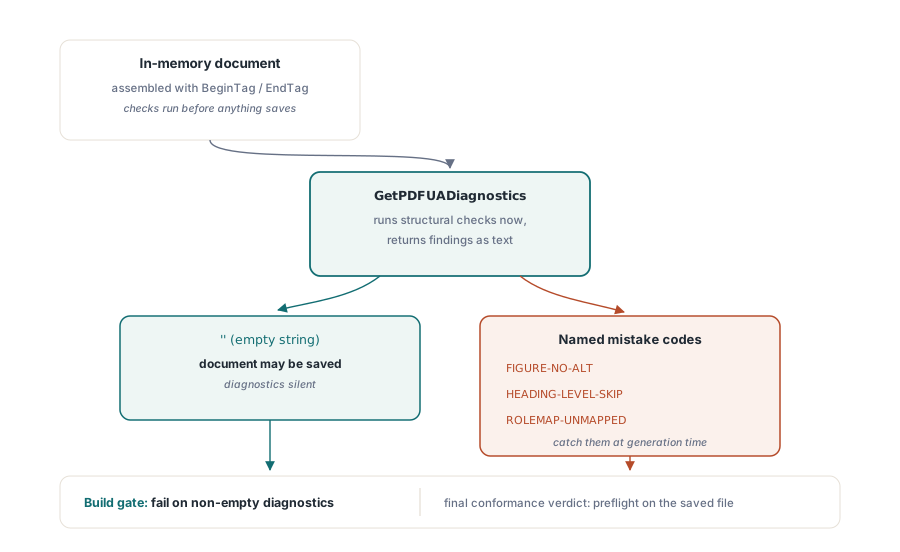
저장하기 전에 GetPDFUADiagnostics가 메모리 안의 문서에 라이브러리의 구조 검사를 돌리고 결과를 텍스트로 반환하며, 빈 문자열은 아무것도 발견되지 않았다는 뜻입니다. 코드 이름이 전형적인 저작 실수를 곧바로 지목합니다. 대체 텍스트가 없는 이미지에는 FIGURE-NO-ALT, H1 뒤에 오는 H3에는 HEADING-LEVEL-SKIP, 등록되지 않은 커스텀 타입에는 ROLEMAP-UNMAPPED입니다. 이것을 빌드에 연결하면(문서 집합을 생성하고, 진단이 비어 있지 않으면 그 단계를 실패시키기) 접근성 회귀는 몇 달 뒤의 감사 지적이 아니라 컴파일 오류에 가까운 실패가 됩니다. 최종 준수 판정은 여전히 저장된 파일에 대한 프리플라이트의 몫이며 이는 Delphi의 PDF/A 및 PDF/UA 프리플라이트에서 다룹니다. 일부 정규화는 직렬화 중에만 적용되기 때문입니다
주석 탐색에는 자체 조절 장치가 있습니다. PDF/UA는 폼 필드와 링크의 키보드 이동이 구조 순서를 따르기를 기대하며, SetTabOrderMode는 뷰어가 존중하는 페이지 수준 탭 순서 항목을 씁니다. 들어온 파일을 점검하는 용도로는 GetTabOrderMode도 있습니다. 키보드만 쓰는 사용자가 버그를 접수하기 전까지 아무도 눈치채지 못하는 종류의 요구 사항이며, 제대로 하는 데는 문서당 호출 하나면 됩니다
구조 트리가 모든 병합에서 살아남지는 않습니다
태그된 문서는 이후의 모든 처리 단계가 트리를 보존할 때에만 태그된 상태로 남으며, PDF Library for Delphi 안의 날카로운 모서리는 병합 목록 계열입니다. MergeFileListFast는 구조 트리 보존을 속도와 맞바꿉니다. 스캔 이미지 배치에는 옳은 거래이고 태그된 보고서에는 그른 거래입니다. 출력은 멀쩡히 열리고 똑같이 렌더링되지만 접근성 계층을 조용히 잃었기 때문입니다. 입력 중 하나라도 태그되어 있다면 기본 MergeFileList나 엄격 변형을 쓰고, IsTaggedPDF를 조립 후 어서션에 포함시켜 평탄화된 배치가 아무도 모르게 출고되지 못하게 하십시오. 대규모 문서 집합의 조립 파이프라인에는 이런 종류의 절충이 더 있으며 이는 대용량 PDF 병합, 분할, 직접 접근에서 살펴봅니다
검증 루프는 라이브러리 바깥에서 닫힙니다. 출력을 Acrobat에서 열어 태그 패널을 살펴보고, 템플릿 계열마다 최소 한 문서는 실제 스크린 리더로 읽어 보십시오. 진단은 구조적 실수를 잡아내지만, 기술적으로는 유효한데 실제로는 어리둥절한 읽기 순서를 잡아내는 것은 사람의 귀뿐입니다. 평가판 빌드와 전체 태깅 API 레퍼런스는 losLab PDF Library for Delphi 제품 페이지에 있습니다