PDF 페이지를 인쇄 미리보기용 Windows 디바이스 컨텍스트에 렌더링하려면 세 가지 좌표계가 같은 코드 한 줄 안에서 맞물려야 하는데, 이 셋은 좀처럼 서로 맞아떨어지지 않는다. PDF 페이지는 왼쪽 아래를 원점으로 삼는 포인트 단위로 측정된다. 화면 DC는 왼쪽 위를 원점으로 삼는 픽셀 단위로 측정되며 여기에 직접 선택하는 확대/축소 비율이 더해진다. 미리보기가 예측해야 할 대상인 프린터 DC는 디바이스 해상도의 픽셀로 측정하지만, 원점을 용지 모서리가 아니라 인쇄 가능 영역의 모서리에 둔다. 이 중 하나라도 틀리면 미리보기는 멀쩡해 보이는데 실제 인쇄물은 한쪽 가장자리를 따라 밀리거나, 확대·축소되거나, 잘려서 나온다. 흔한 증상은 테두리가 있는 양식이 미리보기에서는 가운데 정렬돼 보이지만 실제로는 위쪽과 왼쪽 테두리 선이 잘려 나오는 경우인데, 레이저 프린터가 바깥쪽 몇 밀리미터에는 잉크를 놓을 수 없는데도 그 사실을 미리보기가 반영하지 않았기 때문이다. losLab PDF Library(PDF Library for Delphi)는 디바이스 컨텍스트 렌더링 호출, 가상 프린터 설정 계층, 그리고 프린터 자체의 측정값으로 생성한 미리보기 비트맵까지 이 경로 전체를 다루며, 바로 이 마지막 부분이 여백에 관해 미리보기를 정직하게 만들어 준다
용지 크기와 인쇄 가능 영역은 다르다
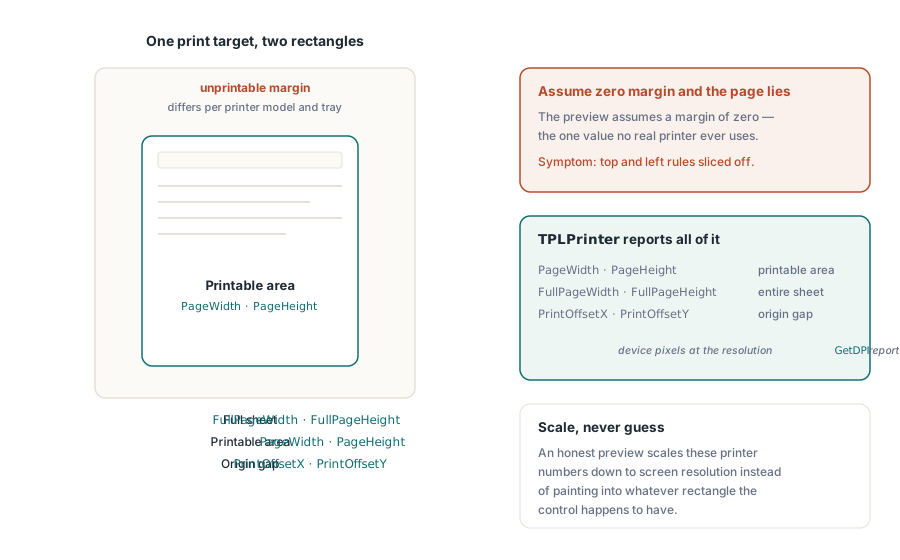
모든 인쇄 대상은 두 개의 사각형으로 설명되며, 대부분의 미리보기 버그는 이 둘 사이의 오프셋에서 발생한다. 용지 사각형은 물리적인 시트 자체다. 인쇄 가능 사각형은 인쇄 엔진이 실제로 도달할 수 있는 더 작은 영역으로, 프린터 모델마다, 때로는 트레이마다 다른 하드웨어 여백만큼 안쪽으로 줄어든다. 라이브러리의 인쇄 계층은 이 둘을 모두 측정한다. 내부의 TPLPrinter 클래스는 인쇄 가능 영역을 위한 PageWidth와 PageHeight, 전체 시트를 위한 FullPageWidth와 FullPageHeight, 그리고 두 원점 사이의 간격을 위한 PrintOffsetX와 PrintOffsetY를 노출하며, 이 값들은 모두 GetDPI가 알려 주는 해상도의 디바이스 픽셀 단위다. 정직한 미리보기는 컨트롤이 우연히 갖게 된 임의의 사각형에 페이지를 그려 넣는 대신, 바로 이 숫자들을 화면 해상도로 축소해서 사용한다. 이 단계를 건너뛰면 미리보기는 조용히 여백을 0으로 가정해 버리는데, 이는 실제 프린터라면 절대 쓰지 않는 값이다
RenderPageToDC를 통한 화면 미리보기
화면상의 미리보기 컨트롤이라면, RenderPageToDC(DPI, Page, DC)가 로드된 문서의 한 페이지를 TPaintBox 캔버스든, 오프스크린 비트맵이든, 메타파일 DC든 상관없이 아무 GDI 디바이스 컨텍스트에나 바로 그려 준다. DPI 인자가 확대/축소 비율을 정한다. 96은 클래식 디스플레이에서 100% 보기에 가까운 값이며, 이 값을 두 배로 하면 렌더링 크기도 두 배가 된다
procedure TPreviewForm.PreviewBoxPaint(Sender: TObject);
begin
  // 이 세 가지는 호출마다 바뀌는 매개변수가 아니라 라이브러리에 지속되는 상태다:
  FPdf.SetRenderDCOffset(FOffsetX, FOffsetY);
  FPdf.SetRenderDCErasePage(1);
  FPdf.SetRenderCropType(0);
  FPdf.RenderPageToDC(FPreviewDpi, FCurrentPage, PreviewBox.Canvas.Handle);
end;
함정은 DC 렌더링 경로가 호출마다 바뀌는 매개변수가 아니라 지속되는 라이브러리 상태로 제어된다는 점이다. SetRenderDCOffset, SetRenderDCErasePage, SetRenderCropType은 각각 무언가가 값을 바꾸기 전까지 계속 유지되므로, 사용자가 확대된 화면을 조정한 뒤 실행되는 썸네일 루프는 이전 코드 경로가 남겨 둔 오프셋이나 크롭 값을 그대로 물려받게 된다. 그 증상은 특정 탐색 순서에서만 미리보기가 어긋나는 것으로 나타나는데, 이런 버그만큼 재현하기 괴로운 것도 드물다. 위 예제처럼 페인트 핸들러 맨 앞에서 관련 상태를 모두 설정해 두면 비용은 전혀 들지 않으면서 이 부류의 버그 자체가 사라진다. 두 번째 배율도 가까이에 숨어 있다. 실제 출력 해상도는 렌더 스케일에 DPI 인자를 곱한 값이며, SetRenderScale의 기본값은 1.0이지만 이 값 역시 한 번 바뀌면 계속 유지되므로, 값을 올려 둔 내보내기 기능이 있으면 무언가가 되돌려 놓기 전까지 이후의 모든 미리보기가 조용히 재조정되어 버린다
스크롤되는 뷰어와 부분 다시 그리기를 위한 전용 변형도 있다. RenderPageToDCClip은 디바이스 컨텍스트와 함께 클립 범위 지정을 받으므로, 창의 특정 영역만 무효화하면 페이지 전체를 다시 래스터화하지 않고 그 영역만 다시 그린다. 큰 포맷 페이지를 높은 배율로 볼 때는 이 차이가 스크롤바를 잘 따라가는 뷰어와 뒤에서 화면이 뭉개지는 뷰어를 가른다
미리보기와 일치하는 인쇄 작업
인쇄 쪽은 가상 프린터를 통해 동작한다. NewCustomPrinter는 시스템 프린터를 라이브러리 전용 설정으로 복제하고, SetupPrinter는 시스템 전체의 DevMode를 건드리지 않으면서 그 복제본을 조정한다: 용지는 설정 항목 1(DMPAPER_* 상수)로, 방향은 설정 항목 11로 지정한다. 이렇게 얻는 이점은 격리다. 서비스는 호스트의 기본 프린터가 Letter로 남아 있는 동안에도 A4 라벨을 인쇄할 수 있으며, 이후에 별도로 되돌려 놓을 필요가 없다

var
  Pdf: TPDFlib;
  Virt: WideString;
  Opt: Integer;
begin
  Pdf := TPDFlib.Create;
  try
    if Pdf.LoadFromFile('report.pdf', '') <> 1 then
      raise Exception.Create('load failed');
    Virt := Pdf.NewCustomPrinter(Pdf.GetDefaultPrinterName);
    Pdf.SetupPrinter(Virt, 1, 9);        // 설정 항목 1 = 용지, DMPAPER_A4
    Pdf.SetupPrinter(Virt, 11, 1);       // 설정 항목 11 = 방향, 1 = 세로
    Opt := Pdf.PrintOptions(1, 1, 'Monthly Report');  // 용지에 맞춤, 자동 회전 + 가운데 정렬
    Pdf.PrintDocument(Virt, 1, Pdf.PageCount, Opt);
  finally
    Pdf.Free;
  end;
end;PrintOptions는 주의 깊게 읽을 가치가 있다. 이 함수는 PrintDocument나 PrintPages에 반드시 전달해야 하는 옵션 핸들을 반환하며, 어딘가에 자동으로 반영되는 전역 상태가 아니다. 옵션을 만들어 놓고 핸들 전달을 잊으면 조용히 실패한다. 작업은 기본값으로 인쇄되고, 용지에 맞추는 정책을 기대했는데 정작 큰 페이지가 잘려서 나오기 전까지는 아무도 그 사실을 알아채지 못한다. 이 정책이 담기는 곳이 바로 페이지 스케일링 인자다. 스케일링을 하지 않으면 치수 정확도가 유지되는데, 이는 자로 재는 양식에서 중요하다. 용지에 맞춤은 모든 것을 시트 크기로 다시 조정한다. 큰 페이지만 축소는 일반 페이지는 그대로 두고 페이지가 인쇄 가능 영역을 넘어설 때만 개입하는데, 문서 종류가 섞여 있는 경우 보통 이것이 옳은 기본값이다. 자동 회전 및 가운데 정렬 플래그는 별도의 코드 경로 없이도 가로 방향 페이지를 처리해 준다
VCL 대화상자 흐름을 통해 이미 TPrinter를 관리하고 있는 애플리케이션이라면 그것을 그대로 넘겨줄 수 있다. PrintDocumentToPrinterObject와 PrintPagesToPrinterObject는 설정된 TPrinter 인스턴스를 그대로 받아들이므로, 사용자에게 보이는 설정 화면은 표준 인쇄 대화상자가 그대로 담당하고 페이지 렌더링만 라이브러리가 처리하게 된다. 두 접근 방식을 한 코드 경로에서 섞어 쓰면 이 글 전체가 없애려 했던 기하학적 어긋남이 다시 슬며시 들어오는 경향이 있으므로, 하나만 선택하라. 가상 프린터 방식은 무인 서비스에, TPrinter 방식은 대화형 애플리케이션에 어울린다
선택적 출력도 같은 방식으로 동작한다. PrintPages는 범위 문자열을 받으므로, 가상 프린터 이름과 '2-5,12', 옵션 핸들을 넘기면 기하학적 계약을 그대로 유지한 채 2쪽부터 5쪽까지와 12쪽을 인쇄하며, 파일로 인쇄하는 변형 함수들도 같은 구문으로 동작한다. 이 파일 변형 함수들은 물리적 장치가 전혀 연결되지 않은 무인 환경에서 실질적인 해답이 된다: 드라이버 큐가 전혀 없는 빌드 서버에서 인쇄 기하학을 회귀 테스트할 수 있다는 뜻이다. 매 빌드마다 같은 문서를 같은 옵션으로 파일 산출물에 렌더링해 두면, 기하학적 회귀는 3주 뒤에 들어오는 고객 신고 대신 바로 diff로 드러난다
프린터 자체의 측정값으로 만드는 미리보기 비트맵
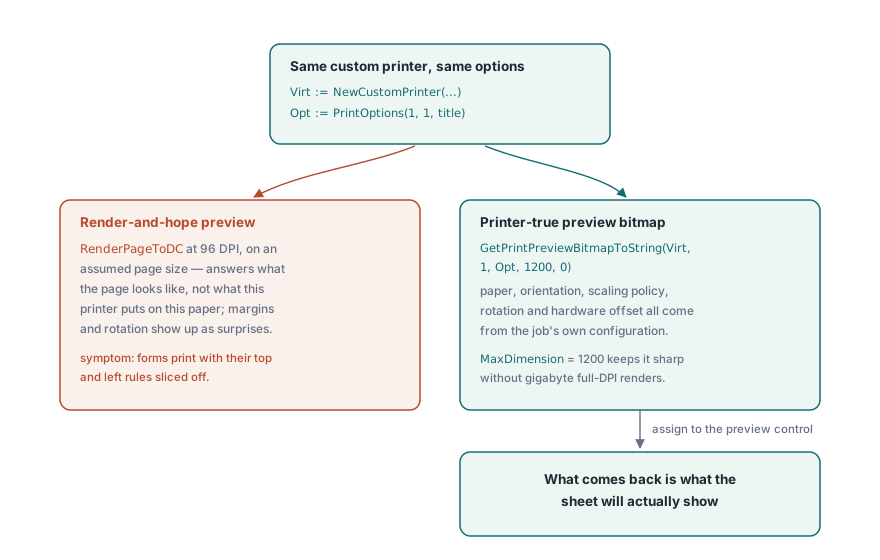
가정된 페이지 크기를 대상으로 96 DPI에서 렌더링한 미리보기는 애초에 잘못된 질문에 답하는 것이다. 그런 미리보기는 이 프린터가 이 용지에 실제로 무엇을 찍을지가 아니라 페이지가 어떻게 생겼는지만 보여준다. GetPrintPreviewBitmapToString은 실제 작업과 동일한 커스텀 프린터와 동일한 옵션 핸들로 미리보기를 만들어 이 간극을 좁혀 주므로, 용지 크기, 방향, 스케일링 정책, 회전, 하드웨어 오프셋이 모두 비트맵에 그대로 반영된다. 돌아오는 결과가 곧 실제로 시트에 인쇄될 모습이다
procedure ShowPrinterTruePreview(Pdf: TPDFlib; const Virt: WideString; Opt: Integer);
var
  Data: AnsiString;
  Strm: TMemoryStream;
  Bmp: TBitmap;
begin
  Data := Pdf.GetPrintPreviewBitmapToString(Virt, 1, Opt, 1200, 0);
  Strm := TMemoryStream.Create;
  try
    Strm.WriteBuffer(PAnsiChar(Data)^, Length(Data));
    Strm.Position := 0;
    Bmp := TBitmap.Create;
    try
      Bmp.LoadFromStream(Strm);
      PreviewImage.Picture.Assign(Bmp);
    finally
      Bmp.Free;
    end;
  finally
    Strm.Free;
  end;
end;
MaxDimension 인자는 비트맵의 긴 변 길이를 제한한다. 1200픽셀이면 미리보기 대화상자에서 충분히 선명하면서도, 프린터의 600 DPI로 완전 해상도 렌더링을 하면 기가바이트 단위까지 치솟을 E 사이즈 도면에서조차 메모리 사용량을 적당히 유지해 준다
사용자의 프린터 선택을 기억하기
세션 사이에 설정을 잊어버리는 인쇄 대화상자는 그 자체로 지원 티켓을 만들어 낸다. DevMode 한 쌍인 GetPrinterDevModeToString과 SetPrinterDevModeFromString은 프린터의 전체 드라이버 설정을, 일반 API가 굳이 모델링하지 않는 드라이버 고유 옵션까지 포함해, 사용자 환경설정에 저장했다가 다음 세션에 복원할 수 있는 불투명한 문자열로 직렬화해 준다. 프린터는 반드시 GetPrinterNames가 주는 이름으로 저장하고, 목록 인덱스로는 절대 저장하지 말라. 인덱스 순서는 프린터가 추가되거나 제거될 때마다 바뀌므로, 저장해 둔 인덱스는 목록이 다시 바뀌는 순간 조용히 엉뚱한 장치를 가리키게 된다. 기억해 둔 장치가 완전히 사라졌을 때의 대체 수단은 GetDefaultPrinterName이 담당한다
트레이 선택은 이 영속성 이야기를 마무리 짓는다. GetPrinterBins는 드라이버가 노출하는 용지 공급원을 알려 주는데, 이는 첫 페이지는 레터헤드 트레이에서, 나머지는 일반 용지에서 가져오는 레터헤드 워크플로에서 중요하다. 이는 사용자가 다른 모든 설정과 함께 애플리케이션이 기억해 주기를 기대하는 정책이며, PDF의 모든 바이트가 정확했더라도 엉뚱한 용지에 인쇄된 작업은 버그로 받아들여진다
미리보기와 인쇄 전체에서 하나의 엔진을 유지하라
마지막 한 가지 결정이 조용히 충실도를 좌우한다. 렌더링 엔진 선택은 화면과 프린터 출력 대상 모두에 적용되므로, 미리보기는 빠른 엔진으로, 인쇄는 정밀한 엔진으로 하고 싶은 유혹이 생긴다. 그 유혹에 넘어가지 말라. 미리보기와 실제 작업을 서로 다른 엔진으로 구동하면 프린터 실측 미리보기가 애초에 없애려 했던 바로 그 충실도 어긋남이 다시 생기며, 게다가 그 문제는 종이 위에서만 드러난다. 내장 엔진, Cairo, PDFium 엔진 사이의 트레이드오프는 Delphi에서의 멀티 엔진 PDF 렌더링에서 다루니, 하나를 선택해 양쪽 모두에 사용하라
인쇄 전에 편하게 로드하기에는 너무 큰 문서는 대용량 PDF 병합, 분할, 직접 접근에서 설명하는 직접 접근 경로로 열 수 있는데, 이 경로는 문서 트리를 만들지 않고 파일 핸들에서 바로 디바이스 컨텍스트로 페이지를 렌더링한다. 전체 인쇄 API 레퍼런스는 losLab PDF Library for Delphi 제품 페이지에서 확인할 수 있다