PAdES 서명 하나를 검증한다는 것은 서로 독립적인 세 가지를 확인한다는 뜻이며, 뷰어의 녹색 체크 표시는 그중 세 번째에 대해서만 알려 줄 뿐이다. 첫째, /ByteRange 배열이 올바른 바이트를 포괄해야 한다: 이 배열이 지정하는 구간들을 이어 붙이면 CMS 다이제스트를 계산한 바로 그 입력이 정확히 재구성되어야 하며, 서명된 바이트가 그 구간 바깥에 남아 있어서는 안 된다. 둘째, CMS 안의 인증서는 신뢰하는 루트까지 체인이 이어져야 하고, PAdES가 요구하는 서명된 signing-certificate 속성을 지니고 있어야 한다. 셋째, 프로필이 타임스탬프를 주장한다면 RFC 3161 토큰이 서명 값을 인증서 만료 이전의 특정 시점에 묶어 주어야 한다. Acrobat은 이 세 가지를 모두 하나의 아이콘으로 뭉뚱그려 보여 주지만, 적합성 검사기는 이들을 분리해서 다루며, 이런 파일을 만드는 코드도 마찬가지여야 한다. losLab PDF Library(PDF Library for Delphi)는 이 중 서명을 만드는 쪽, 타임스탬프 재삽입, 그리고 신뢰하기 전에 ByteRange를 점검하는 감사 호출까지 제공한다
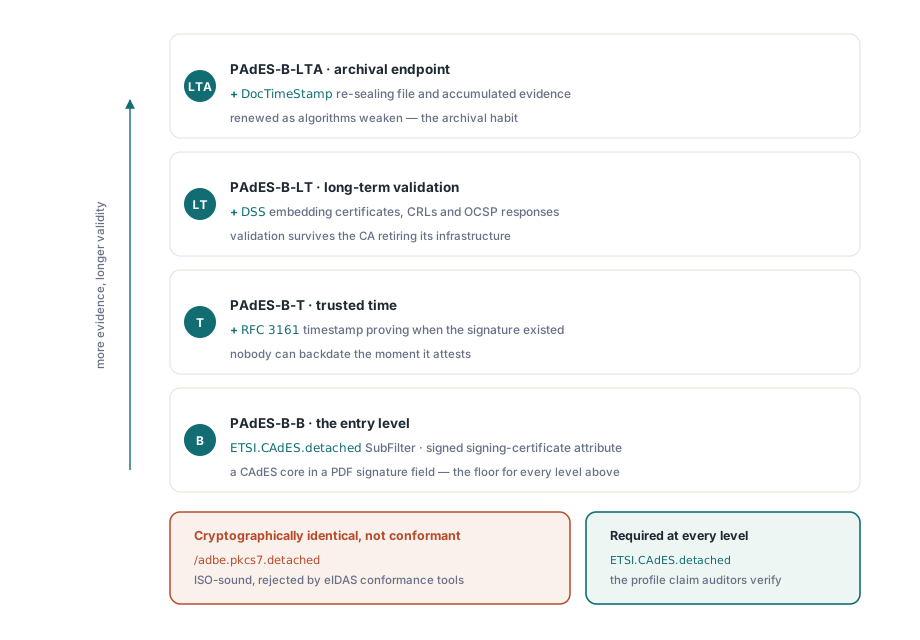
거의 모든 첫 PAdES 구현이 걸려 넘어지는 구분점이 하나 있으니, 코드를 보기 전에 짚어 둘 가치가 있다. /SubFilter /adbe.pkcs7.detached로 작성된 서명은 Acrobat이 유효하다고 보고할 완전히 정상적인 ISO 32000-1 §12.8 서명이다. 하지만 이것은 PAdES 서명이 아닌데, ETSI EN 319 142-1이 모든 베이스라인 수준에서 ETSI.CAdES.detached를 요구하기 때문이다. eIDAS 적합성 검사기는 암호학적으로는 동일함에도 전자는 거부하고 후자는 받아들인다. 프로필은 문서가 스스로에 대해 하는 주장이며, 그 주장을 올바르게 맞추는 것은 PDF Library for Delphi에서 호출 하나로 끝나는 일이다
무엇이 PDF 서명을 PAdES 서명으로 만드는가
ETSI EN 319 142-1은 CMS 포맷 위에 쌓이는 네 가지 베이스라인 수준을 정의한다. PAdES-B-B는 진입점이다: PDF 서명 필드 안에 ETSI.CAdES.detached SubFilter와 서명된 signing-certificate 속성을 갖춘 CAdES 서명이다. PAdES-B-T는 서명 값 위에 RFC 3161 타임스탬프를 추가해, 아무도 소급할 수 없는 특정 시점 이전에 서명이 존재했음을 증명한다. PAdES-B-LT는 검증에 필요한 인증서, CRL, OCSP 응답을 Document Security Store 안에 임베딩해서, 발급 CA가 인프라를 은퇴시킨 이후에도 파일이 계속 검증 가능하도록 만든다. PAdES-B-LTA는 알고리즘이 약해질 때 누적된 증거를 다시 보호해 주는 문서 타임스탬프로 이 스택을 마무리한다
PDF Library for Delphi는 이러한 개념들을 자신의 sign-process API로 매핑한다. 프로필 마커는 SetSignProcessCustomSubFilter다. 정책상 커밋먼트 타입 표시(출처 증명, 승인 증명, 또는 1부터 6까지 번호가 매겨진 다른 ETSI 식별자 중 하나)가 필요하다면 SetSignProcessCommitmentType을 거친다. 명시적인 서명 정책은 SetSignProcessSignaturePolicy로 붙이며, 이 함수는 정책 OID와 그 다이제스트를 인자로 받는다. 주의할 만한 기본 동작이 하나 있다: 다이제스트 알고리즘을 auto로 두면 라이브러리는 ETSI 및 adbe.pkcs7.detached 서명에는 SHA-256을 선택하고, 레거시 adbe.pkcs7.sha1 경로에서만 SHA-1로 대체한다. 그래도 명시적으로 지정하라. 감사자들은 어떤 해시를 사용했는지 묻는데, 코드에 명시된 값은 매뉴얼을 뒤져 가며 설명해야 하는 기본값보다 방어하기 훨씬 쉽다
베이스라인 서명 생성하기
플랫 API는 서명을 일회성 상태 머신처럼 구동한다: 원본 파일에 대해 프로세스를 열고, 설정하고, 출력 파일로 마무리하고, 결과 코드를 읽는다. 아래 시퀀스는 SHA-256을 사용하는 PAdES-B-B 서명을 만들어 낸다. 여기서 가장 중요한 줄은 서명 자체와는 전혀 관계가 없다. 바로 의도적으로 크게 잡은 /Contents 예약 공간인데, 나중에 이 서명에 타임스탬프를 추가해야 할 경우 이것만은 이후에 바꿀 수 없기 때문이다
var
  Pdf: TPDFlib;
  SignId: Integer;
begin
  Pdf := TPDFlib.Create;
  try
    SignId := Pdf.NewSignProcessFromFile('invoice.pdf', '');
    if SignId = 0 then
      raise Exception.Create('cannot open source PDF');
    Pdf.SetSignProcessField(SignId, 'Sig1');
    Pdf.SetSignProcessPFXFromFile(SignId, 'company.pfx', PfxPassword);
    Pdf.SetSignProcessInfo(SignId, 'Approved', 'Vienna', 'billing@example.com');
    Pdf.SetSignProcessCustomSubFilter(SignId, 'ETSI.CAdES.detached');
    Pdf.SetSignProcessDigestAlgorithm(SignId, 2);          // SHA-256
    Pdf.SetSignProcessReserveContentsBytes(SignId, 8192);  // 나중에 타임스탬프를 위한 여유 공간
    Pdf.EndSignProcessToFile(SignId, 'invoice-signed.pdf');
    if Pdf.GetSignProcessResult(SignId) <> 1 then
      raise Exception.CreateFmt('signing failed, code %d',
        [Pdf.GetSignProcessResult(SignId)]);
    Pdf.ReleaseSignProcess(SignId);
  finally
    Pdf.Free;
  end;
end;NewSignProcessFromFile은 원본을 아예 열 수 없을 때 0을 반환한다. 그 이후로는 GetSignProcessResult가 실제 운영 환경에서 발생하는 실패 유형들을 구분해 준다: 4는 잘못된 PDF 비밀번호, 7은 잘못된 PFX 비밀번호, 9는 개인 키가 없는 인증서 파일, 10은 쓸 수 없는 출력 경로, 11은 서명 바이트를 적용하는 중의 실패를 의미한다. 이 숫자 코드를 입력 파일 이름 옆에 기록해 두면 모호한 지원 티켓이 1분짜리 진단으로 바뀐다
라이브러리가 대신 가져다주지 않는 RFC 3161 타임스탬프 추가하기
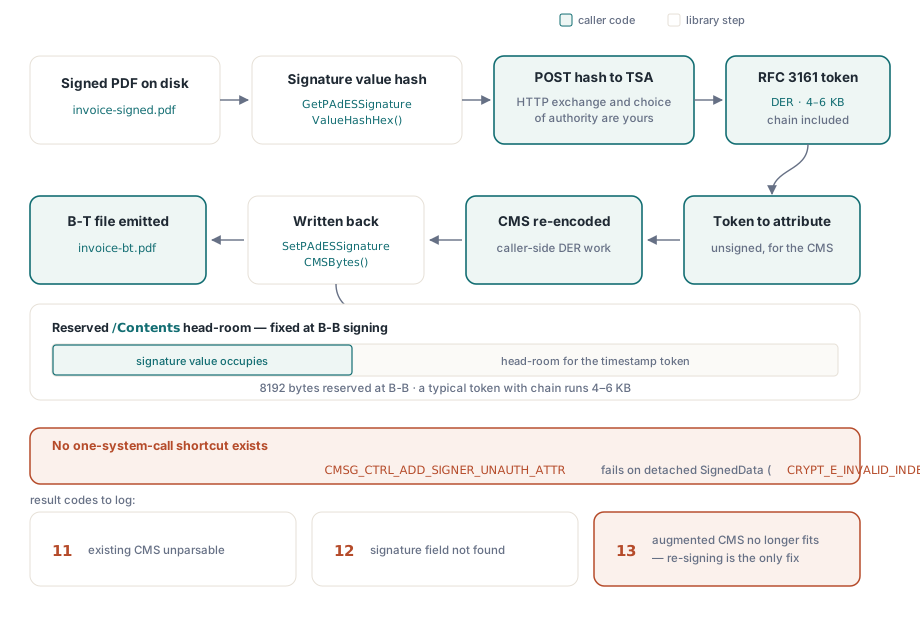
PDF Library for Delphi는 TSA 클라이언트를 제공하지 않는데, 이는 빠뜨린 것이 아니라 의도적으로 그어 둔 경계다. 라이브러리는 타임스탬프 기관이 대신 서명해야 할 해시를 계산하고 이후 확장된 CMS를 다시 삽입해 주지만, 그 사이의 HTTP 통신과 CMS 조작은 호출하는 쪽의 몫이다. 이렇게 나눈 데에는 확실한 기술적 이유가 있다. 명목상 서명되지 않은 속성을 추가해 주는 Windows CryptoAPI 컨트롤인 CMSG_CTRL_ADD_SIGNER_UNAUTH_ATTR은 PAdES가 사용하는 분리형(detached) SignedData 레이아웃에서 CRYPT_E_INVALID_INDEX로 실패한다. 그래서 확장된 CMS는 직접 통제하는 CMS 인코더에서 나와야 한다. 어떤 라이브러리도 시스템 호출 하나로 조용히 토큰을 끼워 넣을 수는 없으며, 그렇게 할 수 있다고 주장하는 라이브러리는 어딘가 보이지 않는 곳에서 그 조작을 하고 있는 것이다
var
  Pdf: TPDFlib;
  StsId: Integer;
  HashHex, TstDer, TsAttr, AugmentedCms: AnsiString;
begin
  Pdf := TPDFlib.Create;
  try
    StsId := Pdf.NewPAdESSignatureTimeStampProcessFromFile('invoice-signed.pdf', '');
    Pdf.SetPAdESSignatureTimeStampField(StsId, 'Sig1');
    Pdf.SetPAdESSignatureTimeStampDigestAlgorithm(StsId, 2);
    HashHex := Pdf.GetPAdESSignatureValueHashHex(StsId);
    // 아래 두 호출은 모두 애플리케이션 코드다: TSA로 보내는 HTTP POST,
    // 그리고 토큰을 서명되지 않은 속성으로 붙이는 CMS 재인코딩
    TstDer := RequestTimeStampToken(HashHex);
    TsAttr := Pdf.BuildPAdESSignatureTimeStampAttribute(TstDer);
    AugmentedCms := AttachUnsignedAttribute(Pdf.GetPAdESSignatureCMSBytes(StsId), TsAttr);
    Pdf.SetPAdESSignatureCMSBytes(StsId, AugmentedCms);
    Pdf.EndPAdESSignatureTimeStampProcessToFile(StsId, 'invoice-bt.pdf');
    if Pdf.GetPAdESSignatureTimeStampProcessResult(StsId) <> 1 then
      raise Exception.Create('timestamp embedding failed');
    Pdf.ReleasePAdESSignatureTimeStampProcess(StsId);
  finally
    Pdf.Free;
  end;
end;
여기서는 결과 코드를 잘 살펴야 한다: 12는 지정한 서명 필드가 존재하지 않는다는 뜻이고, 11은 기존 CMS를 파싱할 수 없었다는 뜻이며, 13은 확장된 CMS가 예약해 둔 /Contents 플레이스홀더에 더 이상 들어가지 않는다는 뜻이다. 13번 코드가 가장 아픈데, 유일한 해결책이 재서명뿐이기 때문이다: 인증서 체인을 포함한 일반적인 타임스탬프 토큰은 4~6KB에 달하며, B-B 단계에서 잡아 둔 8192바이트 예약 공간은 정확히 이 단계가 들어설 자리를 마련해 두기 위해 존재한다
검증은 인증서 체인이 아니라 ByteRange에서 시작한다
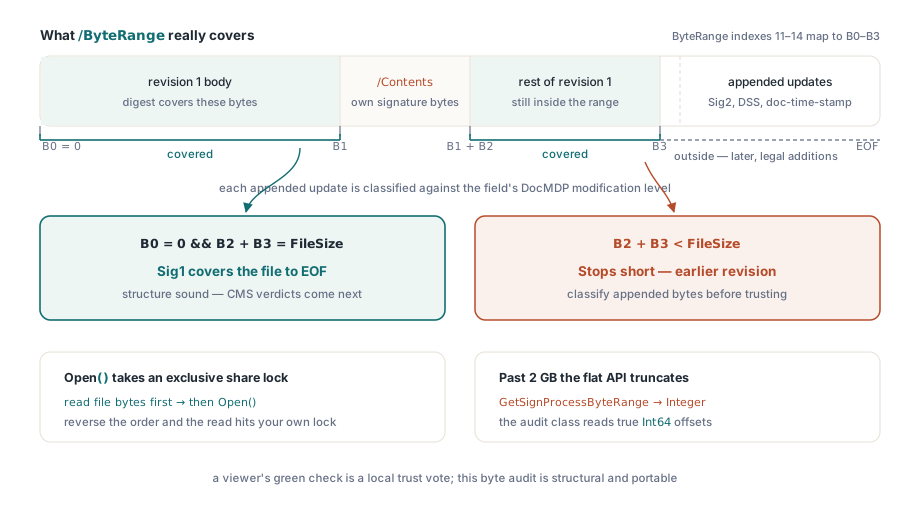
뷰어에 표시되는 녹색 체크 표시는 파일에 대한 구조적 판정이 아니라 그 컴퓨터의 인증서 저장소를 기준으로 한 신뢰 판단일 뿐이다. 프로그래밍 방식의 검증은 그보다 더 낮은 곳, 즉 증분 업데이트가 미묘하게 만들어 버리는 질문에서 시작해야 한다: 각 서명이 실제로 어떤 바이트를 포괄하는가? 두 번째 서명이든, DSS 딕셔너리든, 문서 타임스탬프든, 여기서 다루는 모든 확장 요소는 증분 업데이트를 통해 도착하며, 각 업데이트는 이전 서명의 /ByteRange 바깥에 바이트를 덧붙인다. 이렇게 덧붙여진 바이트들은 정당하다. 그럼에도 검증기는 이를 문서의 수정 정책에 대비해 분류해야 하며, 그 정책이 담기는 필드별 DocMDP 수준은 GetSignatureDocMDPLevelByName으로 읽을 수 있다
var
  Doc: TPDFlibSignDoc;
  Names: TStringList;
  I: Integer;
  B0, B1, B2, B3, FileSize: Int64;
begin
  FileSize := TFile.GetSize('invoice-bt.pdf');  // Open 이전: SignDoc이 공유 잠금을 유지함
  Doc := TPDFlibSignDoc.Create;
  try
    if not Doc.Open('invoice-bt.pdf', '', False) then
      raise Exception.Create('cannot open for audit');
    Names := TStringList.Create;
    try
      Doc.GetSignatureFieldNames(Names);
      for I := 0 to Names.Count - 1 do
        if Doc.GetSignatureValueObjNum(Names[I]) > 0 then   // >0이면 실제로 서명되었다는 뜻
        begin
          B0 := StrToInt64(string(Doc.GetSignatureValueByName(Names[I], 11)));
          B1 := StrToInt64(string(Doc.GetSignatureValueByName(Names[I], 12)));
          B2 := StrToInt64(string(Doc.GetSignatureValueByName(Names[I], 13)));
          B3 := StrToInt64(string(Doc.GetSignatureValueByName(Names[I], 14)));
          if (B0 = 0) and (B2 + B3 = FileSize) then
            Writeln(Names[I], ': covers the file to EOF')
          else
            Writeln(Names[I], ': earlier revision, or unexpected ByteRange layout');
        end;
    finally
      Names.Free;
    end;
    Doc.Close;
  finally
    Doc.Free;
  end;
end;
이 감사 경로에는 두 가지 함정이 있다. TPDFlibSignDoc.Open은 파일을 배타적 공유 잠금으로 유지하므로, CMS 검증을 위해 원본 파일 바이트를 해시하려는 검증기는 감사용으로 파일을 열기 전에 먼저 메모리로 읽어 두어야 한다. 이 순서를 뒤집으면 스스로 걸어 둔 잠금 때문에 읽기가 실패한다. 두 번째 함정은 요란하지 않고 조용하다: 플랫 API의 대응 함수인 GetSignProcessByteRange는 Integer를 반환하지만 실제 오프셋은 Int64이므로, 2GB를 넘으면 플랫 호출은 아무 불평 없이 값을 잘라 버린다. 이 예제가 대신 감사용 클래스를 통해 오프셋을 가져오는 이유가 바로 여기에 있다. 짚어 둘 만한 부재도 하나 있다. 플랫 계층에는 VerifySignature 래퍼가 전혀 없다. 암호학적 판정은 클래스 계층의 TPDFlibSignatureVerifier에서 나오며, 이는 vsValid, vsInvalid, vsUnknown 중 하나를 반환하거나, 아니면 컴플라이언스 정책이 이미 신뢰하는 외부 검증기에서 나온다
장기 검증: DSS, VRI, 그리고 문서 타임스탬프
PAdES-B-LT가 존재하는 이유는 폐기 인프라가 영원하지 않기 때문이다. ETSI EN 319 142-1 §5.4.2.2는 Document Security Store를 규정한다: 인증서, CRL, OCSP 응답을 담는 문서 수준의 딕셔너리로, 각 서명의 /Contents 해시를 키로 삼는 VRI 항목을 통해 서명별로 선택적으로 색인할 수 있다. PDF Library for Delphi의 흐름은 타임스탬프 설계를 그대로 반영한다. NewPAdESDSSProcessFromFile이 프로세스를 열고, AddPAdESDSSCertificate, AddPAdESDSSCRL, AddPAdESDSSOCSP가 DER 블롭을 받으며, AddPAdESDSSVRI가 선택한 자료를 특정 서명 하나에 묶고, EndPAdESDSSProcessToFile이 이 모든 것을 증분 업데이트로 기록한다. 어려운 부분은 여전히 당신 쪽 몫이다. 폐기 관련 자료를 가져오는 일, 그리고 그것이 임베딩할 만큼 충분히 최신인지 판단하는 일은 호출하는 쪽의 책임이다. 라이브러리는 딕셔너리가 구조적으로 적합함을 보증할 뿐, OCSP 응답기가 진실을 말했음을 보증해 주지는 못한다
아카이브의 종착점인 B-LTA는 문서 타임스탬프를 추가한다: 이는 Sig가 아니라 DocTimeStamp 타입을 갖는 별도의 서명 필드로, 예약된 서명 길이와 함께 SetSignProcessDocTimeStamp를 통해 만들어진다. 이것은 B-T 단계의 서명 타임스탬프를 대체하지 않는다. 서명 타임스탬프는 특정 서명 하나가 언제 존재했는지를 증명하는 반면, 문서 타임스탬프는 DSS 증거를 포함한 파일 전체를 보호하며, 알고리즘이 약해짐에 따라 장기 아카이브가 몇 년마다 갱신하는 요소다. 성숙한 아카이브 프로필은 이 둘을 모두 갖춘다. 이러한 구조가 나오기 이전의 리더를 위해, TPDFlibSignDoc.EnsurePAdESExtensions는 문서 카탈로그에 ESIC 개발자 확장을 기록해 이 파일이 ETSI에서 정의한 기능을 사용한다는 것을 알린다
이 모든 것에 대해 한 가지 흔한 반응을 미리 짚어 둘 가치가 있는데, 버그처럼 보이지만 실제로는 버그가 아니기 때문이다. 뷰어는 PAdES 구조가 완전히 올바른 파일에 대해서도 종종 "유효성 확인 불가"라고 보고한다. 신뢰와 구조는 서로 독립적인 축이다. ByteRange 감사와 CMS 검증이 둘 다 통과하더라도, 뷰어는 그저 그 컴퓨터에서 서명자를 신뢰하는 루트까지 체인으로 연결하지 못할 뿐인데, 이는 사설 CA나 테스트 인증서에서는 흔히 있는 일이다. 이에 대한 해법은 서명 코드를 손대는 것이 아니라 루트 인증서를 제대로 배포하거나, 자격을 갖춘 eIDAS 상태가 실제 목표라면 EU 신뢰 목록에 대해 평가하는 것이다
여러 문서 묶음에 걸쳐 서명 필드를 열거하고, ByteRange 레이아웃을 덤프하고, DocMDP 수준을 대량으로 읽는 감사 쪽 관점에 대해서는 컴플라이언스 및 서명 워크벤치에 관한 관련 글을 참고하라. 아카이브 정책도 함께 만족해야 하는 서명된 문서는 Delphi에서의 PDF/A 및 PDF/UA 프리플라이트에서 설명하는 워크플로에 속한다. 전체 API 문서와 평가판 다운로드는 losLab PDF Library for Delphi 제품 페이지에서 확인할 수 있다