허가 플래그는 보안 메커니즘이 아닙니다. "복사 금지"라고 말하는 비트는 암호화와 같은 /Encrypt 딕셔너리 안에 살고 있으며, 이 때문에 실제로는 지니고 있지 않은 강제력의 분위기를 풍깁니다. 이 둘을 하나로 취급하는 순간부터 여러분의 감사는 잘못된 답을 내놓기 시작합니다. PDF에 대해 물을 가치가 있는 유일한 질문은 "암호화되었는가"가 아닙니다. 그보다 더 구체적이고 더 까다롭습니다. 어떤 알고리즘인지, 어떤 보안 핸들러 리비전인지, 두 비밀번호 중 어느 쪽이 설정되었는지, 어떤 허가 비트가 주장되고 있는지, 그리고 암호화가 실제로 파일의 어느 부분에 미치는지입니다. 파일은 형식적으로는 암호화되어 있으면서 실질적으로는 열려 있을 수 있습니다. 읽기를 거부하면서도 메타데이터는 평문으로 남겨 둘 수 있습니다. 어떤 뷰어든 자유롭게 무시할 수 있는 플래그로 인쇄를 잠글 수 있습니다. PDF를 감사한다는 것은 이 모든 것을 따로따로 해결한다는 뜻이며, Delphi와 C++Builder를 위한 losLab의 PDF 엔진인 PDF Library for Delphi는 이들 각각을 평평한 정수 핸들 API와 타입이 지정된 클래스 계층 양쪽 모두를 통해 노출합니다
/Encrypt 딕셔너리가 실제로 기록하는 것
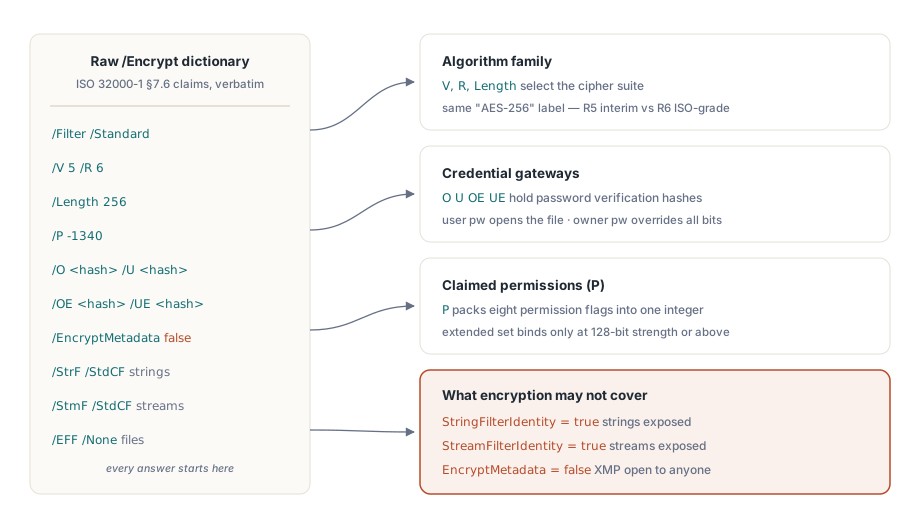
ISO 32000-1 §7.6은 몇 안 되는 딕셔너리 항목들을 통해 문서 보안을 정의하며, PDF Library for Delphi는 TPDFEncryption 레코드에서 이들을 하나씩 그대로 반영합니다. 필터 버전 V와 리비전 R이 알고리즘 계열을 선택합니다. Length는 키 크기를 담습니다. 허가 비트는 P에 있고, 소유자와 사용자 비밀번호 검증 문자열은 O와 U에 있습니다(AES-256에는 OE와 UE가 추가됩니다). EncryptMetadata 플래그가 함께 따라오며, 나머지 세 필드는 각각 문자열, 스트림, 임베드된 파일에 적용되는 암호화 필터의 이름을 담습니다
이 레코드의 가치는 여러분을 대신해 아무것도 해석하지 않는다는 데 있습니다. 원시 딕셔너리를 그대로 돌려주고 결론은 여러분이 내리게 하며, 이것이 감사에 정확히 필요한 것입니다. 암호화된 것 안에 평문이 있는 경우는 StringFilterIdentity와 StreamFilterIdentity에서 나타납니다. 둘 중 하나라도 true라면, 문서의 암호화 상태가 무엇을 보고하든 상관없이 해당 데이터는 손대지 않은 채 Identity 필터를 통과합니다. "/Encrypt 딕셔너리가 존재한다"에서 멈추는 스캐너는 문자열과 스트림이 평문으로 놓여 있는 파일을 보호되었다고 부를 것입니다. 같은 뉘앙스가 메타데이터도 지배합니다. EncryptMetadata가 false이면 XMP 패킷은 페이지 콘텐츠는 그렇지 않은데도 어떤 인덱서에게든 읽을 수 있는 상태로 남으며, 여러분의 라우팅 규칙이 제목이나 작성자 필드를 사용하는 순간 이 사실을 알아둘 가치가 생깁니다
평평한 API로 하는 짧은 보안 조사
대부분의 파이프라인에서는 네 개의 평평한 호출이 일상적인 질문에 답합니다. LoadFromFile은 성공 시 1을 반환하며, 문서가 열리고 나면 암호화 조사기는 그 복호화된 상태를 기준으로 보고합니다:
var
  PDF: TPDFlib;
begin
  PDF := TPDFlib.Create;
  try
    if PDF.LoadFromFile('contract.pdf', UserPassword) <> 1 then
      raise Exception.Create('Open failed: wrong password or damaged file');
    Writeln('status    : ', PDF.EncryptionStatus);     // decrypted / encrypted / unknown
    Writeln('algorithm : ', PDF.EncryptionAlgorithm);  // RC4 대 AES 계열
    Writeln('strength  : ', PDF.EncryptionStrength);   // 키 길이 등급
    Writeln('owner pw? : ', PDF.CheckPassword(CandidatePassword));
  finally
    PDF.Free;
  end;
end;CheckPassword는 그 한 줄짜리 시그니처가 시사하는 것보다 더 중요합니다. PDF는 서로 다른 권한을 가진 두 개의 비밀번호를 정의합니다. 사용자 비밀번호는 파일을 여는 데 그 자체로 필요합니다. 소유자 비밀번호는 완전한 권한을 부여하며 모든 허가 비트를 무시합니다. 디스크 위의 바이트는 어느 쪽이든 동일하지만, 소유자 비밀번호로 연 세션은 사용자 비밀번호 세션이 할 수 없는 일을 할 수 있으므로, 어느 자격 증명이 제시되었는지 기록하지 않는 감사는 진실의 절반만 기록하는 셈입니다. 클래스 계층은 이 구분을 조회 가능하게 만듭니다. TPDFDocument.HasUserPassword와 HasOwnerPassword는 파일이 무엇을 요구하는지 보고하고, IsUserPassword와 IsOwnerPassword는 실제로 어느 비밀번호가 현재 세션을 열었는지 보고합니다. 이 사실은 기록하십시오. 비밀번호 값 자체는 절대 기록하지 마십시오
강도 단계, "AES-256"이 두 가지를 의미하는 곳
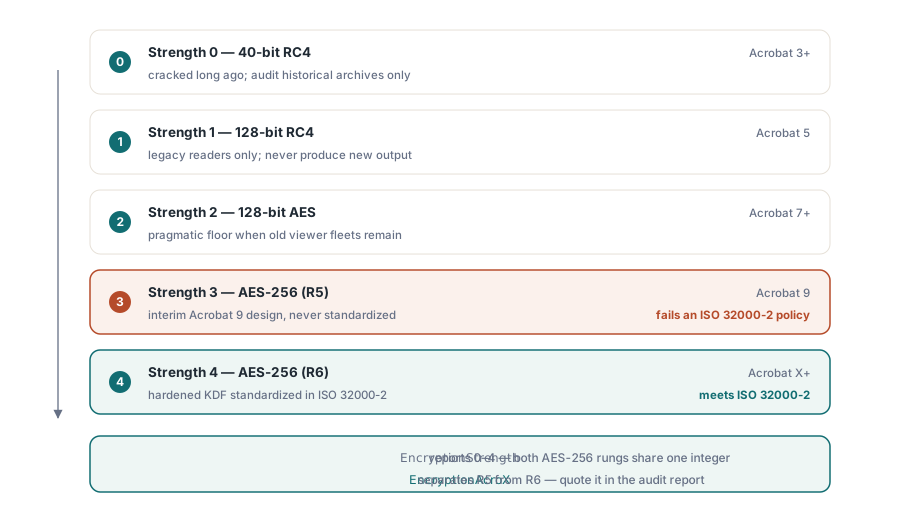
평평한 Encrypt와 EncryptFile 함수는 의미 있는 값 다섯 개를 가진 정수 Strength를 받습니다. 40비트 RC4는 0, 128비트 RC4는 1, Acrobat 7부터 읽을 수 있는 128비트 AES는 2, Acrobat 9와 함께 도입된 256비트 AES는 3, Acrobat X 이후 요구되는 256비트 AES는 4입니다
흥미로운 부분은 3과 4 둘 다 AES-256이라고 표시되지만 같은 방식이 아니라는 점입니다. 강도 3은 보안 핸들러 리비전 5에 대응하며, 이는 Acrobat 9가 배포했지만 ISO가 채택한 적 없는 임시 설계입니다. 강도 4는 리비전 6에 대응하며, 그 키 유도 함수는 강화되어 ISO 32000-2에서 표준화되었습니다. 오늘 새로 만드는 문서에는 3보다 4를 선택하지 않을 이유가 없습니다. 감사에서는 이 격차가 결정적입니다. "ISO 32000-2에 따른 AES-256"이라고 읽히는 정책은 오직 R6로만 충족되며, 스스로를 AES-256이라 부르는 R5 파일은 순진한 강도 검사는 통과하면서도 그 정책은 통과하지 못합니다. 클래스 계층은 이름으로 둘을 구분합니다. R5는 esAES256Bit, R6는 esAES256BitAcroX이며, EncryptionAcroX 속성은 리비전 질문에 단 하나의 불리언으로 답합니다
허가 비트와 그 키 길이에 관한 세부 조항
EncodePermissions는 Encrypt와 EncryptFile이 기대하는 정수에 여덟 개의 플래그를 채워 넣습니다. 인쇄, 복사, 변경, 노트 추가가 기본 집합을 이루고, 필드 채우기, 접근성을 위한 복사, 조립, 고품질 인쇄가 확장 집합을 이룹니다. 라이브러리 자체의 암호화 데모가 그대로 명시하는 세부 조항은, 이 확장 네 가지가 128비트 이상의 강도에서만 효력을 발휘한다는 것입니다. 고품질 인쇄 플래그도 같은 규칙을 따릅니다. 이를 해제해 저해상도 인쇄를 강제하려 해도 40비트 문서는 이를 무시합니다. 그 다운그레이드 역시 128비트 이상의 암호화를 요구하기 때문입니다. "저해상도 인쇄만 허용"하는 정책을 40비트 파일에 인코딩해도 모든 뷰어는 상관없이 완전한 품질로 인쇄합니다
더 깊은 질문은 누가 이 비트들 중 어느 것이라도 강제하는가이며, 답은 여러분이 신뢰할 수 있는 누구도 아니라는 것입니다. 허가는 규격을 준수하는 리더에게 주는 지침이지 암호학적 제약이 아닙니다. 복호화 키는 복사가 허용되든 거부되든 동일하므로, 잠긴 허가 집합은 정직한 뷰어만 정직하게 유지시킬 뿐입니다. 이 비트들을 무시하기로 한 리더는 어떤 암호학적 장애물도 마주하지 않습니다. 목표가 추출을 단념시키는 것이 아니라 실제로 막는 것이라면, 파일에는 사용자 비밀번호가 필요하고 워크플로에는 그 주위를 두르는 프로세스 수준의 통제가 필요하며, 감사 보고서는 허가 플래그를 잠금장치처럼 취급하는 대신 각 파일이 실제로 이 두 체제 중 어느 쪽 아래에 있는지 명시해야 합니다
정책을 설정하고 그것이 유지되었음을 증명하기
기존 파일에 암호화를 적용하는 데는 객체 트리로 로드할 필요가 없습니다. EncryptFile은 한 번의 호출로 입력을 출력으로 처리하며, 감사 루프는 디스크에 실제로 안착한 것을 확인하기 위해 결과를 다시 엽니다. 제공되는 암호화 데모는 동일하게 쓰고 나서 다시 읽는 형태를 따릅니다:
var
  PDF: TPDFlib;
  R: Integer;
begin
  PDF := TPDFlib.Create;
  try
    R := PDF.EncryptFile('in.pdf', 'out.pdf', 'owner-secret', 'user-secret', 4,
      PDF.EncodePermissions(1, 0, 0, 0,    // 인쇄 허용; 복사/변경/노트는 거부
                            0, 0, 0, 1));  // 확장 집합: 고품질 인쇄만
    if (R = 1) and (PDF.LoadFromFile('out.pdf', 'user-secret') = 1) then
    begin
      Writeln('algorithm = ', PDF.EncryptionAlgorithm);
      Writeln('strength  = ', PDF.EncryptionStrength);
      Writeln('owner pw accepted: ', PDF.CheckPassword('owner-secret'));
    end;
  finally
    PDF.Free;
  end;
end;
문서 계층에서 작업하는 팀은 비트 패킹 대신 타입이 지정된 집합으로 같은 연산을 얻으며, 이는 코드 리뷰를 훨씬 덜 눈을 찌푸리며 통과합니다:
if not Doc.Encrypt('owner-secret', 'user-secret', esAES256BitAcroX,
  [ppCanPrint], [ppCanPrintFull]) then
  raise Exception.Create('Encryption failed');
어느 쪽이든 다시 읽는 단계는 선택적인 의례가 아닙니다. 이는 그렇지 않았다면 몇 달 뒤 고객의 컴퓨터에서 드러났을 배포 실수들을 잡아냅니다. 요청된 강도를 조용히 낮추는 오래된 라이브러리 빌드, 디렉터리가 읽기 전용이어서 아예 기록된 적 없는 출력 경로, 인수 순서가 잘못 들어간 허가 정수가 그런 예입니다. 이 세 가지 모두 로컬 스모크 테스트는 통과하고 현장에서 실패하며, 출력물을 다시 여는 것은 이들 각각을 파일을 만든 바로 그 실행 중에 볼 수 있는 예외로 바꿉니다. GetEncryptionFingerprint는 작업 기록과 함께 저장할 수 있는 압축된 값을 반환하므로, 나중에 두 출력물이 같은 암호화 설정을 공유하는지 비교할 때 어느 쪽도 다시 열 필요가 없습니다
코드로 대응할 가치가 있는 감사 오탐
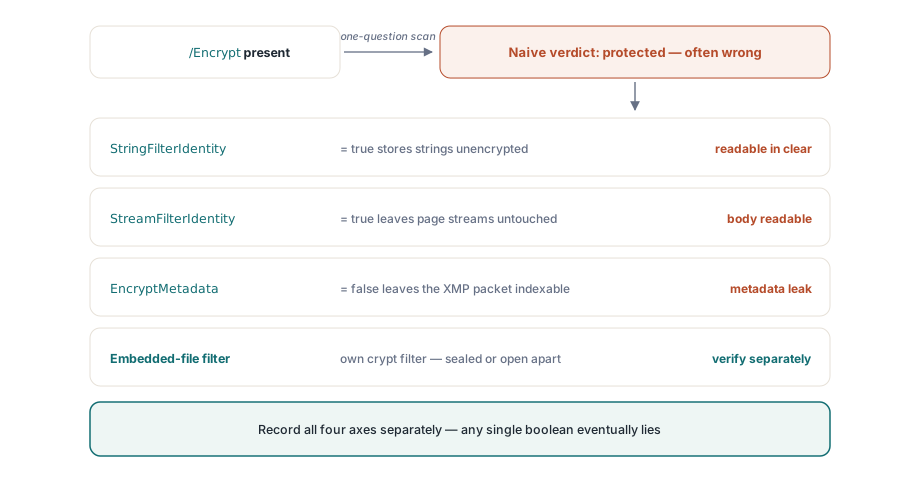
몇 가지 패턴은 보안 스캐너를 신뢰성 있게 잘못된 결론으로 밀어붙이며, 각각은 여러 부분으로 이루어진 질문을 예/아니오 답 하나로 뭉개는 데서 비롯됩니다. Identity 암호화 필터가 가장 깔끔한 예입니다. /Encrypt 딕셔너리가 존재하고 파일은 암호화되었다고 보고하지만, 문자열과 스트림은 손대지 않은 채 Identity 필터를 통과하므로 실제 콘텐츠는 평문입니다. 무언가를 보호되었다고 선언하기 전에 StringFilterIdentity와 StreamFilterIdentity를 읽는 것이 해결책입니다
메타데이터 분리는 더 미묘합니다. EncryptMetadata는 문서의 나머지 부분과 양방향 모두로 어긋날 수 있어서, 암호화된 파일이 읽을 수 있는 XMP 패킷을 남겨두거나, 더 드물게는 그 반대일 수 있습니다. "파일이 암호화되어 있다"는 그 메타데이터도 암호화되어 있는지에 대해서는 아무것도 말해 주지 않으며, 인덱서나 라우팅 규칙이 제목을 참조하는 순간 이는 중요해집니다. 임베드된 파일은 세 번째 축을 더합니다. PDF는 첨부 파일만을 위한 전용 암호화 필터를 허용하므로, 첨부 파일이 그 외에는 열려 있는 문서의 유일하게 암호화된 부분이거나, 암호화된 문서의 유일한 평문 부분일 수 있습니다. 문자열, 스트림, 임베드된 파일에 대해 이 세 필터 할당을 별도의 필드로 포착하면 이런 함정에 걸릴 일이 없습니다. 단일 불리언 하나만 저장하면 잘못된 판단은 시간문제일 뿐입니다
암호화 제거하기, 새 파일을 위해 암호화 선택하기
감사는 흔히 보호를 벗겨내기로 하는 결정으로 끝나며, 그 메커니즘 자체는 여기서 장애물이 아닙니다. DecryptFile(InputFileName, OutputFileName, Password)는 완전한 로드 없이 복호화된 사본을 기록하며, 이미 파일이 열려 있을 때는 로드된 문서의 Decrypt가 메모리에서 같은 일을 합니다. 둘 다 유효한 비밀번호를 요구하며, 어느 쪽도 암호화를 우회하지 않습니다. 진짜 관문은 코드가 아니라 정책이므로, 여러분의 유입 규칙이 제거가 허용되는 시점을 명확히 밝히고 이를 승인한 비밀번호 등급을 기록하게 하십시오. 기술적인 단계 자체는 아무 흔적도 남기지 않기 때문입니다
새 출력물을 위한 선택은 다섯 개의 Strength 값이 암시하는 것보다 좁습니다. Acrobat X보다 오래된 뷰어에서 파일을 열어야 하는 것이 아니라면 강도 4, 즉 AES-256 리비전 6을 사용하십시오. 강도 2, 즉 AES-128은 업그레이드할 수 없는 노후한 뷰어 집단을 위한 현실적인 최저선입니다. 0과 1의 RC4 옵션은 새로운 것을 만들기 위해서가 아니라 과거의 아카이브를 읽고 감사할 수 있도록 남아 있는 것입니다. 2026년의 설계에서 이를 찾는다면 상류의 어떤 요구사항이 오래되었다는 신호입니다
암호화 상태는 서명 결정으로 곧바로 이어집니다. 문서를 검증하고 서명하는 워크벤치는 이 감사가 의존하는 것과 같은 다시 읽기 규율이 필요하기 때문입니다. 그 영역은 규정 준수 및 서명 워크벤치 문서에서 다룹니다. 배치 작업이 수천 개의 대용량 문서에 걸쳐 EncryptFile을 적용할 때는 대용량 PDF를 위한 다이렉트 액세스 가이드가 실행 중 메모리를 평평하게 유지하는 방법을 보여줍니다. 완전한 암호화 API 레퍼런스는 PDF Library for Delphi 제품 페이지에 있습니다