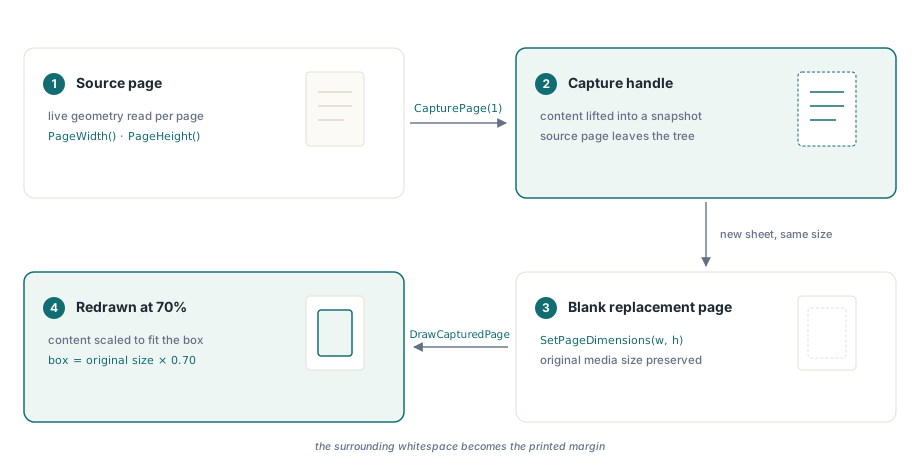
PDFのページの寸法はページ作成時に固定されるため、画像のサイズを変更するようにコンテンツをその場で単純にスケーリングすることはできません。縮小を実用的なものにするライブラリモデルは、キャプチャと再描画(capture-and-redraw)です。各ページのコンテンツをドキュメントからハンドルに取り出し、元のメディアサイズの新しい空白ページを作成して、縮小された境界ボックスにキャプチャされたコンテンツを書き戻します。周囲の空白は余白になります。たとえば、A4ページを70%に縮小すると、幅の15%が両側に配置され、上下にも同じ割合が配置されます。これは、以下の境界線の計算が生成するものとまったく同じです
CapturePageの仕組み
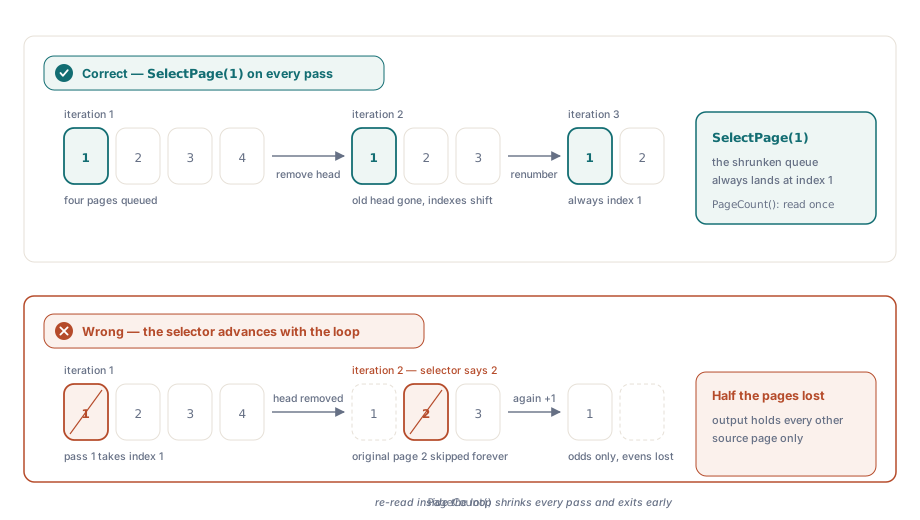
CapturePage はページ番号を受け取り、そのページのコンテンツをメモリ内のキャプチャオブジェクトに昇格させ、ドキュメントのページツリーからページを削除します。この削除は意図的なものであり、反復インデックスに関係なくループが常にページ1を選択する理由です。ページ1がキャプチャされて削除されると、ページ2だったものが新しいページ1になります。以降も同様です。ループカウンターと一緒にページセレクターをインクリメントすると、1ページおきにスキップされ、予想される出力の半分になってしまいます
CapturePage によって返されるキャプチャハンドルは、ページ参照ではありません。コンテンツのスナップショットのようなものです。DrawCapturedPage を呼び出すか、明示的に解放するまで有効なままです。DrawCapturedPage は、そのハンドルと、左オフセット、下オフセット、幅、高さとして与えられる宛先四角形(すべてポイント単位)を受け取ります。ライブラリは、キャプチャされたコンテンツをその四角形に正確に収まるようにスケーリングし、四角形が元の比率と偶然一致する場合にのみアスペクト比を維持します。均一なスケーリングの場合、ページの中央に配置された、元のサイズにスケールファクターを掛けた四角形が必要になります
センタリングの計算
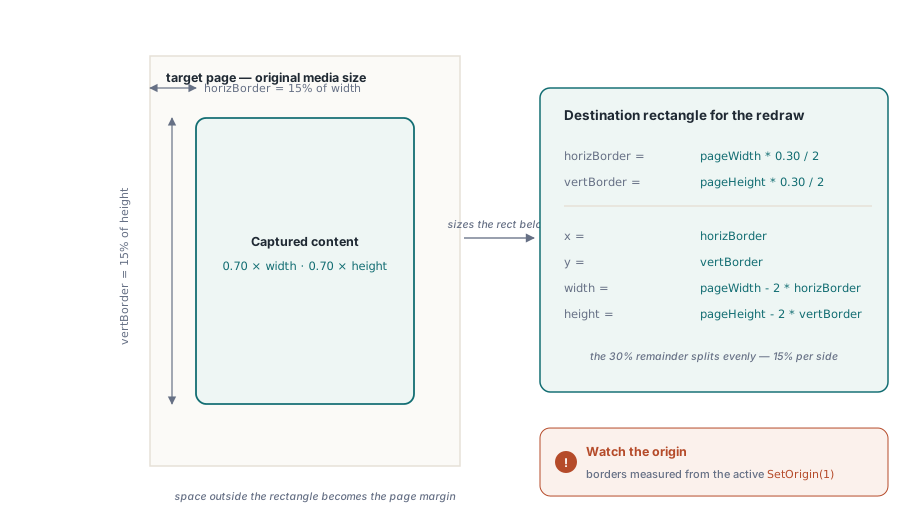
70%のスケールファクターでは、各寸法の残り30%が両側に均等に分割されます。したがって、水平方向のインセットは pageWidth * (1.0 - 0.70) / 2 となり、これは幅の15%です。垂直方向のインセットは、ページの高さを利用して同じ計算式に従います。すると DrawCapturedPage の宛先四角形は (horizBorder, vertBorder) から始まり、pageWidth - 2 * horizBorder と pageHeight - 2 * vertBorder に広がります。この計算はライブラリ固有のものではなく、大きな四角形の内側に小さな四角形を対称的に配置するための単なるジオメトリ(幾何学)です
注目すべき点が1つあります。SetOrigin(1) は、座標の原点を左下ではなく左上に配置します。DrawCapturedPage に渡す境界線の値は、設定した方の原点から測定されるため、ロードと描画の間で原点モードを切り替えると、センタリングがずれてしまいます
C#の例
以下のコードは、キャプチャと再描画のサイクルを通じて Pages.pdf のすべてのページを処理し、結果を newpages.pdf に書き込みます。PDFL は PDFlibDLL64.dll からプロジェクトに追加されたActiveX/COMラッパーオブジェクトです
private void ScalePages_Click(object sender, EventArgs e)
{
    File.Delete("newpages.pdf");

    double pageWidth, pageHeight, horizBorder, vertBorder;
    double scaleFactor = 0.70;
    int capturedPageId, ret;

    PDFL.LoadFromFile("Pages.pdf", "");
    PDFL.SetOrigin(1);

    int numPages = PDFL.PageCount();

    for (int i = 1; i <= numPages; i++)
    {
        // 常にページ1を選択:CapturePage はページを削除するため、ページ2は
        // 次の反復でページ1になる。
        PDFL.SelectPage(1);

        pageWidth  = PDFL.PageWidth();
        pageHeight = PDFL.PageHeight();

        horizBorder = pageWidth  * (1.0 - scaleFactor) / 2;
        vertBorder  = pageHeight * (1.0 - scaleFactor) / 2;

        capturedPageId = PDFL.CapturePage(1);

        PDFL.NewPage();
        PDFL.SetPageDimensions(pageWidth, pageHeight);

        ret = PDFL.DrawCapturedPage(
            capturedPageId,
            horizBorder, vertBorder,
            pageWidth  - 2 * horizBorder,
            pageHeight - 2 * vertBorder);
    }

    PDFL.SaveToFile("newpages.pdf");
}
Delphiの例
Delphiバージョンは、COMレイヤーを介さず TPDFlib を直接使用しますが、呼び出しのシーケンスは同じです。実用的な違いの1つは出力ファイルのガードです。宛先が以前の実行によってビューアでまだ開かれたままでロックされていると SaveToFile が失敗するため、File.Delete の代わりに FileExists と DeleteFile を組み合わせています
procedure TForm1.ScalePagesClick(Sender: TObject);
var
  PDFLib: TPDFlib;
  pageWidth, pageHeight, horizBorder, vertBorder: Double;
  scaleFactor: Double;
  capturedPageId, ret, numPages, i: Integer;
begin
  if FileExists('newpages.pdf') then
    DeleteFile('newpages.pdf');

  scaleFactor := 0.70;

  PDFLib := TPDFlib.Create;
  try
    PDFLib.LoadFromFile('Pages.pdf', '');
    PDFLib.SetOrigin(1);

    numPages := PDFLib.PageCount();

    for i := 1 to numPages do
    begin
      PDFLib.SelectPage(1);

      pageWidth  := PDFLib.PageWidth();
      pageHeight := PDFLib.PageHeight();

      horizBorder := pageWidth  * (1.0 - scaleFactor) / 2;
      vertBorder  := pageHeight * (1.0 - scaleFactor) / 2;

      capturedPageId := PDFLib.CapturePage(1);

      PDFLib.NewPage();
      PDFLib.SetPageDimensions(pageWidth, pageHeight);

      ret := PDFLib.DrawCapturedPage(
        capturedPageId,
        horizBorder, vertBorder,
        pageWidth  - 2 * horizBorder,
        pageHeight - 2 * vertBorder);
    end;

    PDFLib.SaveToFile('newpages.pdf');
  finally
    PDFLib.Free;
  end;
end;
スケールファクターが実際に制御するもの
ここでの 0.70 という値は、レンダリングされたコンテンツが各ページの寸法の70%を占めることを意味し、ファイルが元のバイトサイズの70%になるという意味ではありません。この操作後のファイルサイズは、元のコンテンツの複雑さに依存します。ピクセルデータは同じ解像度でより小さな領域に再描画されるため、大きな画像を含むページは比例して縮小されません。バイトレベルの圧縮が目標である場合、適切なアプローチは LinearizeFile またはストリーム圧縮での再保存であり、ジオメトリ的なスケーリングではありません
70%という数字も厳密な制限ではありません。0.0から1.0の間の任意の値が機能し、1.0を超える値は元のページの境界を越えてコンテンツを拡大します。ページの寸法も増やさない限り、メディアボックスの端でクリッピングされます。PageWidth と PageHeight は境界の計算前にページごとにクエリされるため、奇数ページがA4、偶数ページがA3であるドキュメントは、特別な処理をしなくても各ページサイズで正しく中央に配置された出力を生成します。したがって、サイズの混在したドキュメントは自然に処理されます
問題が発生する可能性のある場所
実際には2つの障害モードが発生します。1つ目は、以前の実行からPDFビューアで出力ファイルが開いたままになっている場合です。プラットフォームによっては SaveToFile が失敗するかゼロバイトを書き込み、新しい出力は決して着地しません。関数の先頭にあるファイル削除のガードは開発用にこれを処理しますが、本番パイプラインでは一時パスに書き込み、成功時に名前を変更する方が安全です
2つ目はページ数の不一致です。CapturePage は処理中にドキュメントからページを削除するため、ループの前に PageCount() から読み取ったカウントが、反復に対する正しい境界となります。ループ内で PageCount() を呼び出すと、パスごとに減少する数値が返されて早期に終了し、最後のページが未処理のまま残ります。例のループ変数は、残りの反復カウンターとしてのみ機能します。前に説明した理由により、選択するページは常に1であるため、ページを選択するためには決して使用されません
ここに示す CapturePage、DrawCapturedPage、SetPageDimensions などのページ操作の呼び出しは、Delphi、C#、VB.NET、C++用の losLab PDF Library の一部です