PDF XML メタデータ、ブックマーク、注釈の技術ガイド
PDF にはページに描画される内容以外にも、ブックマーク、リンク先、XMP メタデータ、添付ファイル、注釈といった補助構造があります。これらは閲覧性、検索性、ワークフロー連携に大きく影響します。
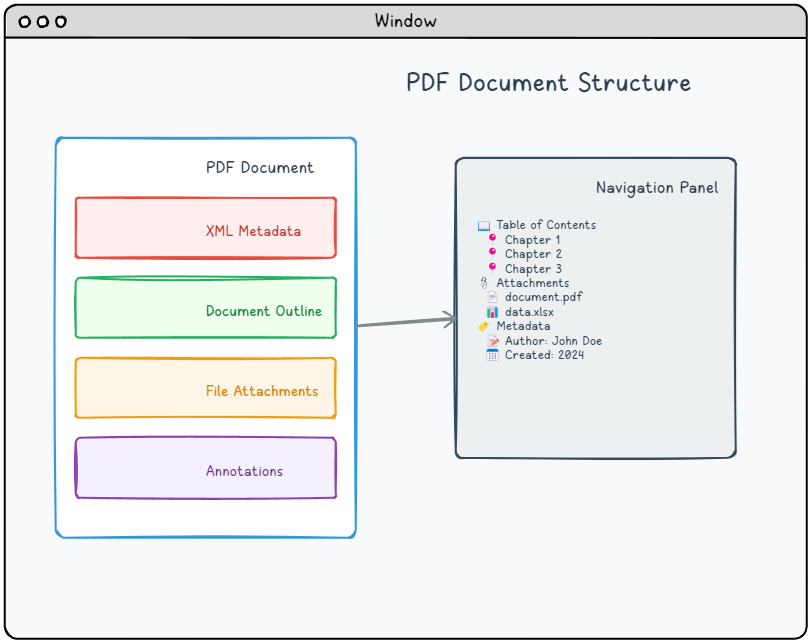
ブックマークと宛先
ブックマークはアウトライン ツリーとして表現され、各項目はページ上の宛先やアクションを参照します。長い技術文書では、正確な宛先が読者の移動性を大きく改善します。
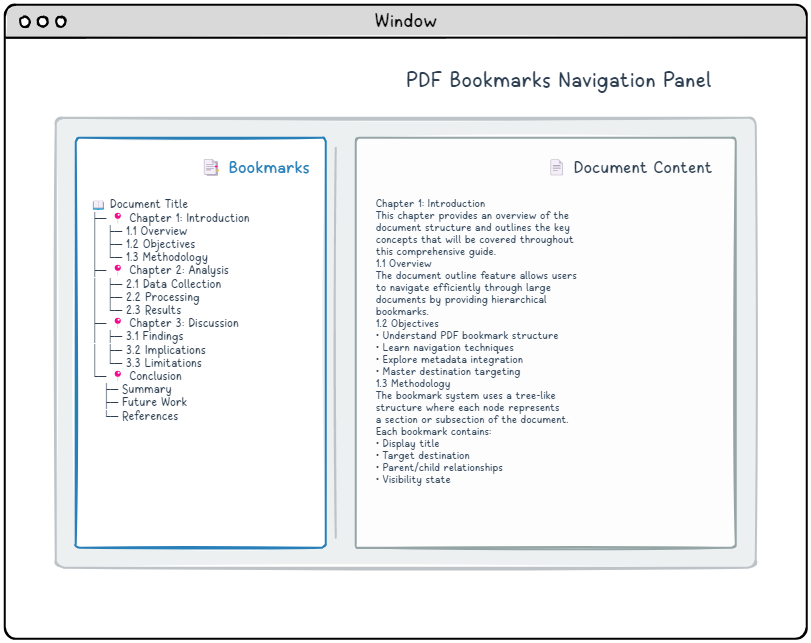
ブックマーク例 1
アウトライン項目と宛先の関係を示す例です。
|
1 2 3 4 5 6 7 8 9 10 11 12 13 14 15 |
8 0 obj <</Type/Outlines/Count 4/First 9 0 R/Last 9 0 R>> endobj 9 0 obj <</Title(Chapter 1: Experiment A)/Count 3/Parent 8 0 R/First 12 0 R/Last 18 0 R>> endobj 12 0 obj <</Title(1: Introduction)/Count 0/Parent 9 0 R/Next 15 0 R>> endobj 15 0 obj <</Title(2: Methodology)/Count 0/Parent 9 0 R/Prev 12 0 R/Next 18 0 R>> endobj 18 0 obj <</Title(3: Result verification)/Count 0/Parent 9 0 R/Prev 15 0 R/>> endobj |
ブックマーク例 2
アウトライン項目と宛先の関係を示す例です。
|
1 2 3 4 5 6 7 8 9 10 11 12 13 14 15 16 17 18 19 20 21 |
6 0 obj <</Length 1235/Type/Metadata/Subtype/XML>>stream <?xpacket begin="锘xBF" id="W5M0MpCehiHzreSzNTczkc9d"?> <x:xmpmeta xmlns:x="adobe:ns:meta/" x:xmptk="Adobe XMP Core 5.2-c001 63.139439, 2010/09/27-13:37:26" ><rdf:RDF xmlns:rdf="http://www.w3.org/1999/02/22-rdf-syntax-ns#" ><rdf:Description rdf:about="" xmlns:pdf="http://ns.adobe.com/pdf/1.3/" xmlns:dc="http://purl.org/dc/elements/1.1/" xmlns:xmp="http://ns.adobe.com/xap/1.0/" ><pdf:Producer>losLab PDF Library</pdf:Producer> <dc:creator>losLab.com</dc:creator> <dc:title>Delphi PDF SDKs</dc:title> <xmp:CreateDate>2025-06-29T10:46:27+08:00</xmp:CreateDate> <xmp:ModifyDate>2025-06-29T10:58:57+08:00</xmp:ModifyDate> <xmp:MetadataDate>2025-06-29T10:46:27+08:00</xmp:MetadataDate> <dc:description>Delphi Development Library for PDF creation & editing</dc:description> <xmp:CreatorTool>HotPDF Component</xmp:CreatorTool> <dc:subject>PDF Developer Library for RAD Studio></dc:subject> <pdf:Keywords>Delphi, PDF SDK, PDF Component</pdf:Keywords> </rdf:Description>Robust Delphi PDF development library</rdf:RDF> </x:xmpmeta> <?xpacket end="w"?> endstream endobj |
ブックマーク例 3
アウトライン項目と宛先の関係を示す例です。
|
1 2 3 |
1 0 obj < < Type Catalog Pages 2 0 R Metadata 10 0 R Outlines 1 0 R>> endobj |
XMP メタデータ
XMP は XML/RDF ベースのメタデータ形式で、タイトル、作成者、作成日、キーワード、カスタム プロパティを構造化して保存できます。検索、アーカイブ、文書管理システムとの連携に有効です。
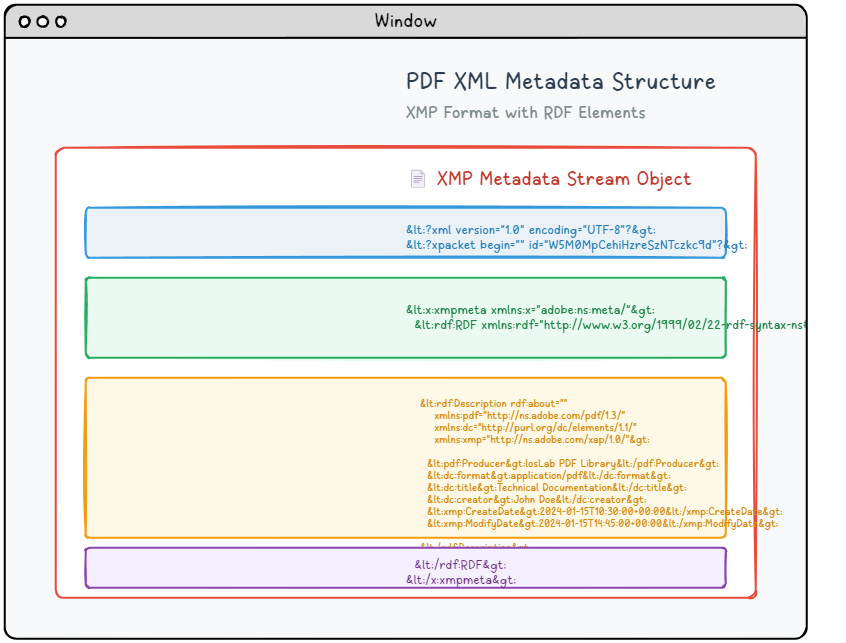
XMP メタデータ例 1
XMP パケットとドキュメント カタログの連携例です。
|
1 2 3 4 5 6 |
8 0 obj < < Type EmbeddedFile Length 35>> stream This is a text file attachment... endstream endobj |
XMP メタデータ例 2
XMP パケットとドキュメント カタログの連携例です。
|
1 2 3 4 5 6 |
9 0 obj < < Names << EmbeddedFiles << Names [ (attachment.txt) << EF << F 8 0 R>> /F (attachment.txt) /Type /Filespec >> ] >> >> /Pages 1 0 R /Type /Catalog >> endobj |
XMP メタデータ例 3
XMP パケットとドキュメント カタログの連携例です。
|
1 2 3 4 5 6 7 8 |
9 0 obj < < Type Page (Other dictionary entries as usual) Annots [ << FS << EF << F 8 0 R>> /F (attachment.txt) /Type /Filespec >> /Subtype /FileAttachment /Contents (attachment.txt) /Rect [ 18 796.88976378 45 823.88976378 ] >> ] >> endobj |
添付ファイルと注釈
PDF には関連ファイルを埋め込んだり、ページ上に注釈、リンク、ハイライト、ファイル添付アイコンを配置したりできます。実装時は、添付の保存場所、表示名、関連ページ、権限設定を明確にします。
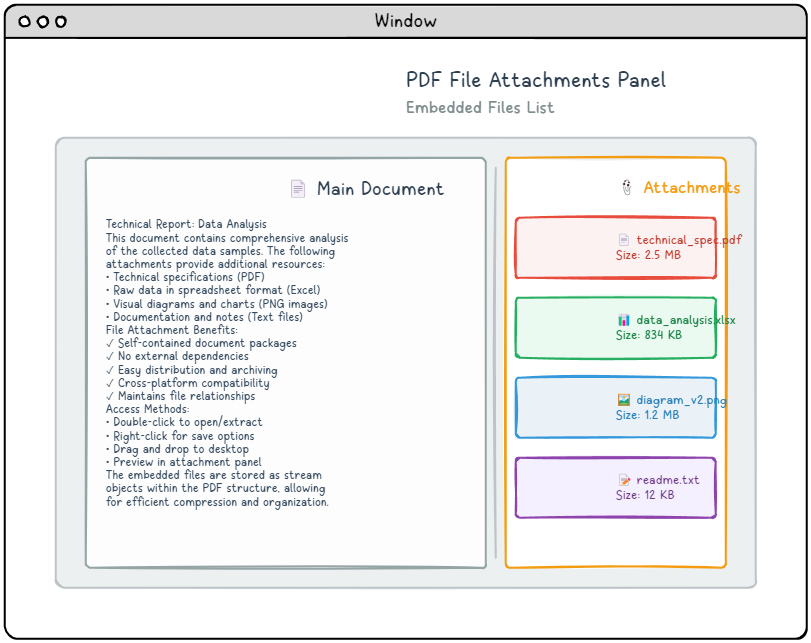
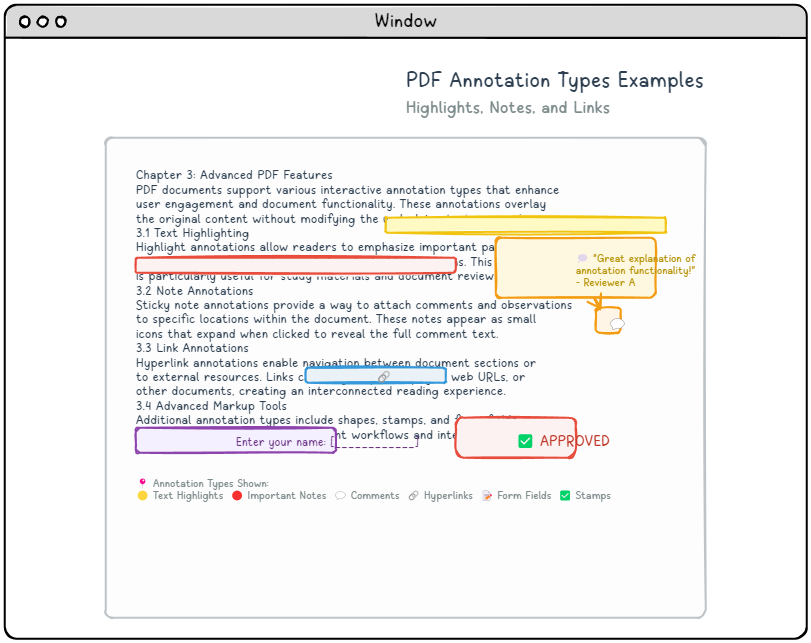
添付と注釈 1
添付ファイル、注釈、リンク アクションを扱う例です。
|
1 2 3 |
12 0 obj < < Type Annot Subtype Link Rect [100 200 300 250] Border [0 0 1] C [0.0 0.0 1.0] Dest [5 0 R XYZ null null null]>> endobj |
添付と注釈 2
添付ファイル、注釈、リンク アクションを扱う例です。
|
1 2 3 |
13 0 obj < < Type Annot Subtype Link Rect [50 50 200 100] A << Type Action S URI URI (https: www.example.com)>> >> endobj |
添付と注釈 3
添付ファイル、注釈、リンク アクションを扱う例です。
|
1 2 3 4 5 6 7 8 9 10 11 12 13 14 15 16 |
14 0 obj < < Type Annot Subtype Square Rect [100 100 200 150] C [1.0 0.0 0.0] BS << W 2 S S>> /AP < < N 15 0 R>> >> endobj 15 0 obj < < Type XObject Subtype Form BBox [0 0 100 50] Length 85>> stream q 1.0 0.0 0.0 RG 2 w 10 10 80 30 re S Q endstream endobj |
添付と注釈 4
添付ファイル、注釈、リンク アクションを扱う例です。
|
1 2 3 4 |
1 0 obj < < Type Catalog Pages 2 0 R Outlines 3 0 R Names << EmbeddedFiles 4 0 R>> /Metadata 5 0 R >> endobj |
実装ガイドライン
- ブックマークの宛先が実在するページを参照しているか確認する。
- XMP と従来の文書情報辞書で値が矛盾しないようにする。
- 添付ファイル名、MIME タイプ、説明を明確にする。
- 注釈は表示矩形、アクション、外観ストリームを合わせて検証する。
補助構造を丁寧に扱うと、PDF は単なる固定ページではなく、検索、レビュー、承認、保管に強い文書になります。