Delphi HotPDF ComponentによるHello World
Delphi HotPDF Componentの包括的なガイドへようこそ。 Delphi HotPDF Component HelloWorldデモプログラム!
HotPDF Componentについて
HotPDF Componentは、DelphiおよびC++Builder開発者向けに設計された強力で多機能なPDF処理ライブラリです。幅広いAPIにより、PDF ドキュメントの作成、操作、変更を正確かつ容易に行えます。
HotPDF Componentの主な機能:
- PDFの作成と出力: レイアウト、書式、内容を完全に制御しながらPDF ドキュメントを一から作成できます。
- テキストとグラフィックのサポート: テキスト、画像、図形、複雑なグラフィックをPDF ページに追加できます。
- 多言語サポート: 国際的なテキスト描画に必要なUnicodeを完全にサポートします。
- フォント管理: 異なるシステムでもドキュメントの外観が一致するようにフォントを埋め込みます。
- 圧縮オプション: 圧縮アルゴリズムによりファイルサイズを最適化します。
- セキュリティ機能: ドキュメントの暗号化、パスワード保護、アクセス権の制御。
- ドキュメントの操作: 既存のPDF ドキュメントを結合、分割、変更。
- 表とフォームのサポート: 複雑な表とインタラクティブなフォームの作成。
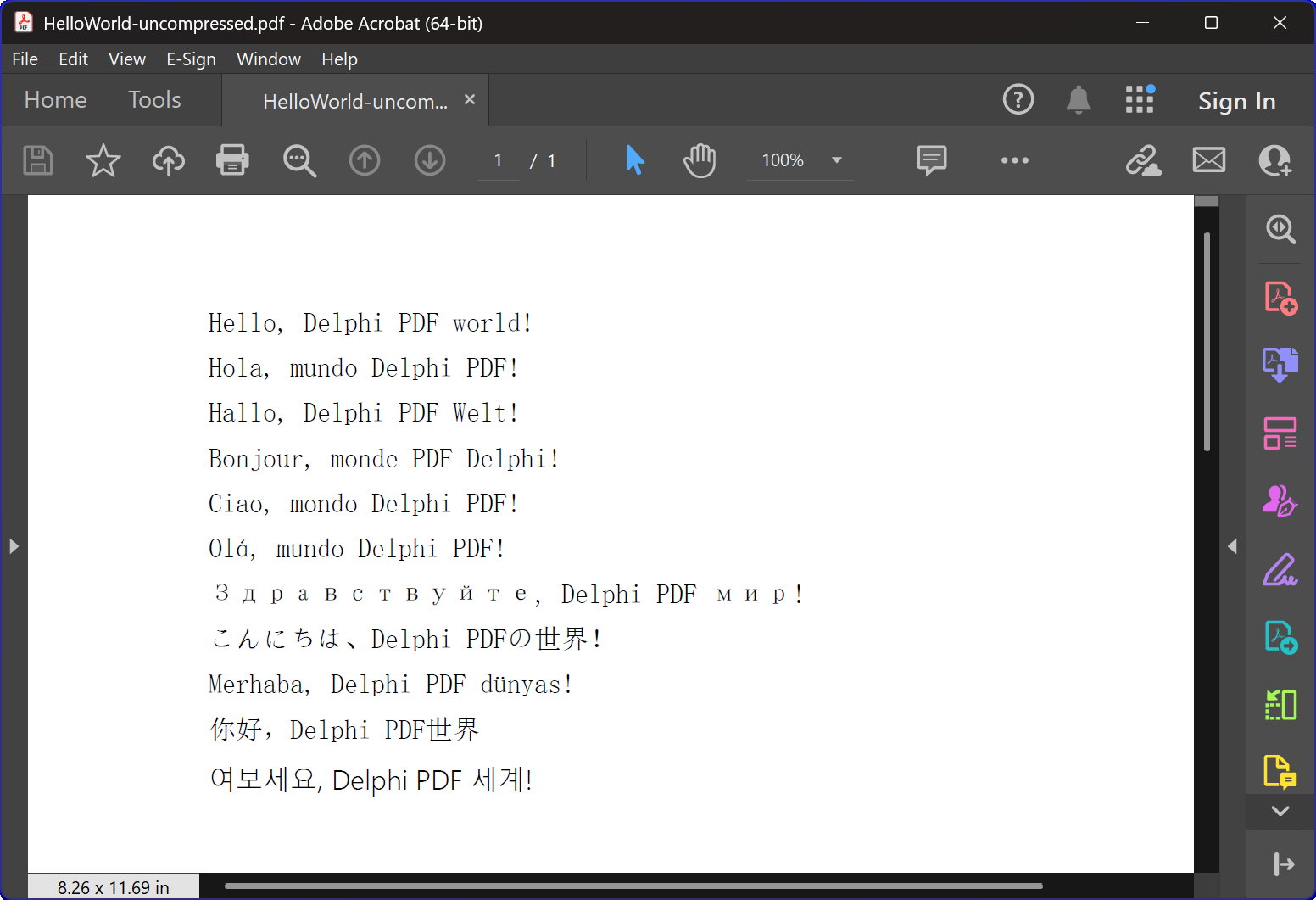
HelloWorld.dpr プログラムの概要
HelloWorld.dprサンプルプログラムは、HotPDFコンポーネントの優れた入門となります。
最も基本的で重要な機能であるTexOut関数を示します。このデモでは、基本的なPDF作成機能も確認できます。
中核機能:
1. PDF ドキュメントの作成
このプログラムの主な役割は、多言語の「Hello World」テキストを含むPDF ドキュメントを作成することです。 CreatePDF この手順では次の内容を示します:
- コンポーネントの初期化: THotPDFコンポーネントを正しく設定して構成します。
- ドキュメントプロパティ: 圧縮オプションやフォント埋め込みなどのメタデータを設定します。
- 多言語テキストのレンダリング: 11種類の言語でテキストを表示します。英語、スペイン語、ドイツ語、フランス語、イタリア語、ポルトガル語、ロシア語、日本語、トルコ語、中国語、韓国語を含みます。
- フォント管理: 多言語表示をサポートするために、Arial Unicode MSフォントを利用。
- 圧縮: 圧縮されたPDF ドキュメントの作成。
2. ウィンドウ管理とシステム統合。
このプログラムには高度なウィンドウ列挙機能が含まれ、次の特徴があります:
- システムウィンドウの列挙: Windows APIの
EnumWindows関数で、すべてのトップレベルウィンドウを走査します。 - ウィンドウタイトルの照合: 部分文字列マッチングにより対象アプリケーションを識別します。
- 自動ウィンドウクローズ:
WM_CLOSEメッセージを送信し、対象ファイルを開いている可能性のあるPDF ビューアを閉じるよう促します。 - 競合の防止: 新しいPDF ファイルの作成時にファイルアクセス競合が起きないようにします。
3. エラー処理とリソース管理
このプログラムは次のベストプラクティスを示します:
- メモリ管理: コンポーネントインスタンスを正しく作成し破棄します。
- 例外安全性: try-finally ブロックを使って、リソースのクリーンアップを確実に行います。
- ユーザーからのフィードバック: コンソール出力を使って、プログラムの進行状況をユーザーに通知します。
技術的な実装の詳細:
圧縮技術
このプログラムは、FlateDecode 圧縮を使って PDF ドキュメントを作成します。
フォントの取り扱い戦略
このプログラムは、高度なフォント選択戦略を採用しています。
- Arial Unicode MS: ほとんどの言語で利用されており、幅広い文字をサポートしています。
- フォント埋め込み: 異なるシステム間での一貫した表示を保証します。
異なるバージョン間の互換性。
このコードには、最新版と古いバージョンのDelphiの両方をサポートするための条件付きコンパイル指令が含まれています。
- XE2 以降のサポート: 名前空間を持つユニット (WinApi.Windows, System.SysUtils など) を利用します。
- 従来のサポート: 古いDelphiバージョンでは従来のユニット名にフォールバックします。
学習上の価値
このHelloWorldサンプルには複数の学習目的があります:
- コンポーネントの導入: HotPDFコンポーネントの基本的な使い方を簡潔に紹介します。
- ベストプラクティス: 適切なリソース管理とエラー処理を示します。
- システム統合: PDF作成をWindowsシステム操作と統合する方法を説明します。
- 国際化: PDF ドキュメントで多言語テキストを扱う方法を示します。
クイックスタート
このサンプルプログラムを実行するには:
- HotPDFコンポーネントがDelphi IDEに正しくインストールされていることを確認します。
- HelloWorld.dprプロジェクトファイルを開きます。
- プログラムをコンパイルして実行します。
- このプログラムは圧縮されたPDF ファイルを自動的に作成します。
- 作成されたファイルを開き、多言語テキストのレンダリングを確認します。
ソースコード。
以下にHelloWorldデモプログラム的完全な、コメント付きソースコード:
|
1 2 3 4 5 6 7 8 9 10 11 12 13 14 15 16 17 18 19 20 21 22 23 24 25 26 27 28 29 30 31 32 33 34 35 36 37 38 39 40 41 42 43 44 45 46 47 48 49 50 51 52 53 54 55 56 57 58 59 60 61 62 63 64 65 66 67 68 69 70 71 72 73 74 75 76 77 78 79 80 81 82 83 84 85 86 87 88 89 90 91 92 93 94 95 96 97 98 99 100 101 102 103 104 105 106 107 108 109 110 111 112 113 114 115 116 117 118 119 120 121 122 123 124 125 126 127 128 129 130 131 132 133 134 135 136 137 138 139 140 141 142 143 144 145 146 147 148 149 150 151 152 153 154 155 156 157 158 159 160 161 162 163 164 165 166 167 |
{************************************************************} // HotPDF PDF Component // Copyright(c)2007-2025, https://www.loslab.com {************************************************************} // HelloWorld Demo Program for HotPDF Component // This program demonstrates basic PDF creation capabilities // including multilingual text support and compression options {************************************************************} program HelloWorld; {$APPTYPE CONSOLE} // Console application type {$I ..\..\..\Lib\HotPDF.inc} // Include HotPDF configuration file uses // EurekaLog units for memory leak detection and debugging (optional) {$IFDEF EurekaLog} EMemLeaks, // Memory leak detection EResLeaks, // Resource leak detection EDebugJCL, // JCL debugging support EDebugExports, // Export debugging information EFixSafeCallException, // SafeCall exception handling EMapWin32, // Win32 mapping support EAppConsole, // Console application support EDialogConsole, // Console dialog support ExceptionLog7, // Exception logging {$ENDIF EurekaLog} // System units - different namespaces for XE2+ vs older versions {$IFDEF XE2+} WinApi.Windows, // Windows API functions WinApi.Messages, // Windows message constants System.SysUtils, // System utilities System.Classes, // Base classes (TStringList, etc.) Vcl.Graphics, // Graphics support {$ELSE} Windows, // Windows API functions (older Delphi) Messages, // Windows message constants (older Delphi) SysUtils, // System utilities (older Delphi) Classes, // Base classes (older Delphi) Graphics, // Graphics support (older Delphi) {$ENDIF} HPDFDoc; // HotPDF main component unit // Creates a compressed PDF file with multilingual "Hello World" text // Parameters: // FileName: Output PDF file name procedure CreatePDF(const FileName: string); var HotPDF: THotPDF; // Main HotPDF component instance begin // Create HotPDF component instance HotPDF := THotPDF.Create(nil); try // Configure PDF properties HotPDF.AutoLaunch := true; // Automatically open PDF after creation HotPDF.FileName := FileName; // Set output file name // Enable FlateDecode compression HotPDF.Compression := cmFlateDecode; // Enable FlateDecode compression WriteLn('Creating compressed PDF: ', FileName); HotPDF.FontEmbedding := true; // Embed fonts for better compatibility HotPDF.BeginDoc; // Start PDF document creation // Set Unicode font for multilingual text support // Arial Unicode MS supports most languages except Korean // procedure SetFont ( FontName: AnsiString; FontStyle: TFontStyles; ASize: Single; FontCharset: TFontCharset = DEFAULT_CHARSET; IsVertical: boolean = false); // DEFAULT_CHARSET: 1 - Font is chosen based on Name. If the described font is not available on the system, Windows will substitute another font HotPDF.CurrentPage.SetFont('Arial Unicode MS', [], 12, 1, False); // Display "Hello World" in multiple languages // TextOut parameters: (X, Y, Angle, Text) HotPDF.CurrentPage.TextOut(80, 50, 0, 'Hello, Delphi PDF world!'); // English HotPDF.CurrentPage.TextOut(80, 70, 0, 'Hola, mundo Delphi PDF!'); // Spanish HotPDF.CurrentPage.TextOut(80, 90, 0, 'Hallo, Delphi PDF Welt!'); // German HotPDF.CurrentPage.TextOut(80, 110, 0, 'Bonjour, monde PDF Delphi!'); // French HotPDF.CurrentPage.TextOut(80, 130, 0, 'Ciao, mondo Delphi PDF!'); // Italian HotPDF.CurrentPage.TextOut(80, 150, 0, 'Olá, mundo Delphi PDF!'); // Portuguese HotPDF.CurrentPage.TextOut(80, 170, 0, 'Здравствуйте, Delphi PDF мир!'); // Russian HotPDF.CurrentPage.TextOut(80, 190, 0, 'こんにちは、Delphi PDFの世界!'); // Japanese HotPDF.CurrentPage.TextOut(80, 210, 0, 'Merhaba, Delphi PDF dünyası!'); // Turkish HotPDF.CurrentPage.TextOut(80, 230, 0, '你好、Delphi PDF世界'); // Chinese HotPDF.CurrentPage.TextOut(80, 250, 0, '여보세요, Delphi PDF 세계!'); // Korean HotPDF.EndDoc; // Finalize and save the PDF document WriteLn('PDF created successfully: ', FileName); finally HotPDF.Free; // Clean up HotPDF component end; end; // Global variables for window enumeration and PDF creation var Title: String; // Individual title string (unused in current implementation) Titles: TStrings; // List of window titles to search for Window: HWND; // Window handle (unused in current implementation) WindowText: array [0 .. 255] of Char; // Buffer for window text (unused in current implementation) WindowTitle: String; // Window title string (unused in current implementation) I: Integer; // Loop counter (unused in current implementation) // Callback function for EnumWindows API // This function is called for each top-level window in the system // Parameters: // hWnd: Handle to the current window being enumerated // lParam: User-defined data (in our case, pointer to TStrings with target titles) // Returns: True to continue enumeration, False to stop function EnumWindowsProc(HWND: HWND; lParam: lParam): BOOL; stdcall; var Titles: TStrings; // List of target window titles I: Integer; // Loop counter WindowText: array [0 .. 255] of Char; // Buffer to store window text WindowTitle: String; // Current window's title as string begin Result := true; // Continue enumeration by default Titles := TStrings(lParam); // Cast lParam back to TStrings // Get the window title text if GetWindowText(HWND, WindowText, SizeOf(WindowText)) > 0 then begin WindowTitle := String(WindowText); // Convert char array to string // Check if window title contains any of our target strings for I := 0 to Titles.Count - 1 do begin // Use Pos function to check if target string is contained in window title if Pos(Titles[I], WindowTitle) > 0 then begin // Send WM_CLOSE message to close the window PostMessage(HWND, WM_CLOSE, 0, 0); Break; // Exit loop after finding first match end; end; end; end; // Main program execution begins here begin // Close any existing PDF files that might be open in PDF viewers // This prevents file access conflicts when creating new PDFs with same names Titles := TStringList.Create; try // Define list of window title substrings to search for // Any window containing these strings will be closed // This will close Adobe and Foxit PDF reader & editor and many other PDF apps Titles.CommaText := '"HelloWorld.pdf", "Foxit"'; // Enumerate all top-level windows and close matching ones // EnumWindows calls our callback function for each window EnumWindows(@EnumWindowsProc, lParam(Titles)); finally Titles.Free; // Clean up string list end; // Display program header WriteLn('=== HotPDF HelloWorld Demo ==='); WriteLn('This demo creates a compressed PDF file with multilingual text.'); WriteLn(''); // Create compressed PDF CreatePDF('HelloWorld.pdf'); // Display completion message WriteLn(''); WriteLn('PDF file created successfully!'); WriteLn('The PDF file uses FlateDecode compression for optimal file size.'); WriteLn(''); WriteLn('Press Enter to exit...'); ReadLn; // Wait for user input before closing console end. |