コンプライアンス検証とデジタル署名を連結するワークベンチは、この順序で 4 つのステップを調整し、その全行程を通じて同一のバイト列に結び付け続けなければならない。まず PDF/A または PDF/UA のプリフライトを実行する。次に、指摘事項が要求する修正を適用し、修正済みのリビジョンを保存する。そして、まさにそのリビジョンに署名する。最後に、署名済みファイルを読み戻し、署名が本当にその内容をカバーしているかを確認する。この順序は見た目の問題ではない。読み戻しを省けば、自分自身の書き込み経路を無条件に信頼していることになる。プリフライトを誤ったリビジョンに対して実行すれば、コンプライアンスレポートは一度も出荷していないファイルを説明するものになってしまう
自作のパイプラインが最も間違えやすいのは、検証と署名の継ぎ目である。両者を別々のツールとして実行し、その間に是正作業を挟むと、少なくとも 3 つの異なるリビジョンのファイルが生まれ、それぞれが独自のバイト列を持つことになる。監査人に手渡すプリフライトレポートはそのうちの 1 つを説明し、署名は別のものを凍結する。ファイル内にはそれらが同一リビジョンであることを示す記述はどこにもなく、実際に異なっていることも多い。Delphi と C++Builder 向けの losLab PDF Developer Library である PDF Library for Delphi は、プリフライトと PAdES 署名を単一のファサードクラスの背後にまとめており、この一連の流れを、どのバイトを扱っているのかを見失うことのない 1 つのプロセスの中で完結させられる。以下に挙げる呼び出しはすべて現在のライブラリに実装されており、それぞれに付記した落とし穴も同様に実在する

1 つの文書に対する 3 つのリビジョン、そして隙間が生まれる仕組み
保存の回数を数えてみるとよい。オリジナルは上流から届く。是正パスがそれを読み込み、コンプライアンスモードを有効にして、修正済みのリビジョンを書き出す。署名パスは増分更新として署名を追記するため、これが 3 回目の書き込みになる。3 回の保存、3 種類のバイトレイアウトがあり、プリフライトレポートはそのうちどれを対象にしているかを明記しない限り無意味である。プリフライトの実行ごと、署名のたびにファイルの SHA-256 を記録しておくことが、検証したリビジョンと署名したリビジョンが同一であることを証明できる安価な足がかりになる
ライブラリのある挙動が、この規律をさらに徹底させる。SetPDFAMode や SetPDFUAMode を通じて要求したコンプライアンス修正は、呼び出した時点では反映されない。それらは保存の際に適用される。注釈の印刷フラグを強制したり、PDF/UA のタブ順序を割り当てたりといった自動修復は、出力ファイルにのみ反映され、それ以外のどこにも現れない。そのため、メモリ上で「修正」したばかりの文書に対してチェックを実行しても、署名者に渡されるバイト列については何もわからない。まず保存し、それから保存済みのファイルをプリフライトにかけること。メモリ上の状態は下書きにすぎず、実在するのはディスク上のファイルだけである
ディスクからのプリフライト、そして 2 通りの意味を持つゼロ
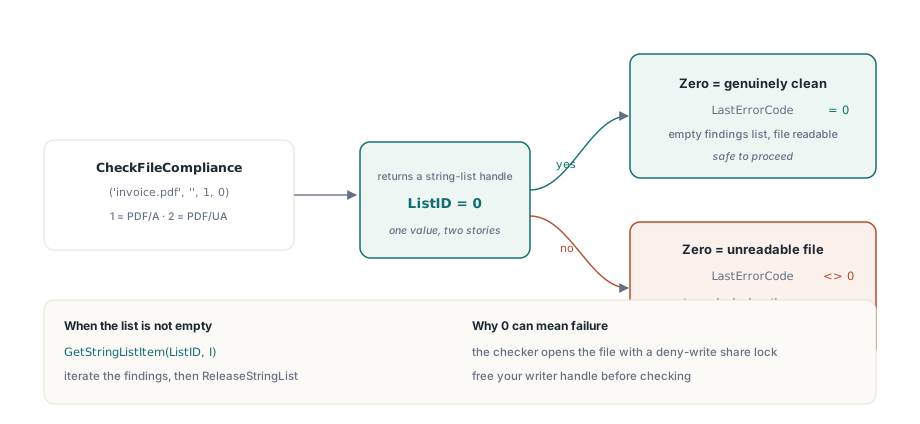
フラット API のプリフライトエントリポイントは CheckFileCompliance(FileName, Password, ComplianceTest, Options) である。テスト 1 は PDF/A(ISO 19005)、テスト 2 は PDF/UA(ISO 14289)を選択する。この関数はライブラリのストリーミングリーダーを介してファイルを開くため、事前に LoadFromFile を呼ぶ必要はなく、1 件の指摘につき 1 エントリを持つ文字列リストのハンドルを返す
var
  PDF: TPDFlib;
  ListID, I: Integer;
begin
  PDF := TPDFlib.Create;
  try
    ListID := PDF.CheckFileCompliance('invoice-fixed.pdf', '', 1, 0);  // 1 = PDF/A
    if ListID = 0 then
    begin
      if PDF.LastErrorCode <> 0 then
        raise Exception.Create('Preflight could not read the file')
      else
        Writeln('No PDF/A findings');
    end
    else
    begin
      for I := 0 to PDF.GetStringListCount(ListID) - 1 do
        Writeln(PDF.GetStringListItem(ListID, I));
      PDF.ReleaseStringList(ListID);
    end;
  finally
    PDF.Free;
  end;
end;
落とし穴は戻り値に潜んでおり、しかもハッピーパスのテストならすべて素通りしてしまう類のものである。ゼロは「指摘なし」を意味する。だがゼロは「ファイルを開けなかった」ことも意味する。実装が、結果リストが空になる場合には常に 0 を返すためで、読み取り失敗もそこに含まれる。0 を green light として読み取るワークベンチは、別のプロセスにロックされているファイルでも喜んで承認してしまうだろう。上記のように LastErrorCode と組み合わせることが、この 2 つのケースを切り分ける方法である。チェッカーはファイルを書き込み拒否の共有モードで開くため、是正ステップ側がまだライターハンドルを保持していれば、コンプライアンスとは無関係の、解放し忘れたストリームが原因でプリフライトは失敗する
パイプラインではなく人間が指摘事項を読む必要がある場合、CreatePreflightReport はそれを読みやすいレポートとしてレンダリングする。ComparePreflightReports は 2 回の実行結果を差分表示するため、是正によって元の指摘が解消され、なおかつ新たな指摘を静かに持ち込んでいないことを示すのに使いやすい
SignProcess でチェック済みリビジョンに署名する
保存済みのリビジョンがプリフライトを通過し、そのハッシュが記録されたら、まさにそのファイルにのみ署名する。SignProcess API はビルダーのように読める。プロセスハンドルを開き、1 行ずつ設定し、コミットしてから結果コードを読み戻す
ProcessID := PDF.NewSignProcessFromFile('invoice-fixed.pdf', '');
if ProcessID = 0 then
  raise Exception.Create('Cannot open source for signing');
PDF.SetSignProcessField(ProcessID, 'ApprovalSig');
PDF.SetSignProcessPFXFromFile(ProcessID, 'company.pfx', PfxPassword);
PDF.SetSignProcessInfo(ProcessID, 'Invoice approval', 'Berlin', 'billing@example.com');
PDF.SetSignProcessCustomSubFilter(ProcessID, 'ETSI.CAdES.detached');  // PAdES baseline
PDF.SetSignProcessDigestAlgorithm(ProcessID, 2);                      // SHA-256
PDF.SetSignProcessReserveContentsBytes(ProcessID, 8192);              // room for a later timestamp
PDF.EndSignProcessToFile(ProcessID, 'invoice-signed.pdf');
if PDF.GetSignProcessResult(ProcessID) <> 1 then
  Writeln('Sign failed, code ', PDF.GetSignProcessResult(ProcessID));
PDF.ReleaseSignProcess(ProcessID);
この一連の流れの中の 2 行は、見た目以上に重い意味を持つ。SetSignProcessCustomSubFilter に ETSI.CAdES.detached を指定することで、レガシーな adbe.pkcs7.detached 系列ではなく、ETSI EN 319 142-1 でプロファイルされた PAdES 署名が選ばれる。これが、欧州のバリデータに受理される署名になるか、フラグを立てられる署名になるかの分かれ目である。SetSignProcessReserveContentsBytes は /Contents のプレースホルダーを埋めるが、ここで選ぶサイズは将来を左右する決断になる。署名タイムスタンプを後から付ける可能性があるなら、拡大した CMS はいま確保しておくスペースに収まらなければならない。プレースホルダーは後から、署名全体をやり直さない限り大きくできないからである。多めに確保すれば数キロバイトを無駄にするだけで済むが、確保が窮屈すぎると、数か月後のタイムスタンプ処理の段階でオーバーフローによって失敗し、それをこの 1 行にまで遡って結び付けるのは容易ではない
GetSignProcessResult はブール値ではなくコードで答え、そのコードは覚えておく価値がある。1 は成功。4 は誤った PDF パスワード、7 は誤った証明書パスワード、9 は秘密鍵を含まない PFX、11 は署名適用中の失敗である。これらを真偽値に落とし込んでしまうと、パスワード違いのサポート案件と秘密鍵を欠いた鍵の案件とを見分ける唯一の情報を捨てることになる。整数のまま記録すること
読み戻し: 生成したファイルそのものを監査する
これから証明しようとしているファイルを書き込んだ経路を、そのまま信頼すべきワークベンチは存在しない。監査用クラス TPDFlibSignDoc は署名済みの出力を再度開き、署名辞書のエントリをディスクから直接読み取る
var
  Doc: TPDFlibSignDoc;
  Names: TStringList;
  FS: TFileStream;
  I: Integer;
  SourceSize, RangeStart, GapStart, TailStart, TailLen: Int64;
begin
  // Open前にサイズを取得:audit objectがファイルへのshare lockを保持する
  FS := TFileStream.Create('invoice-signed.pdf', fmOpenRead or fmShareDenyNone);
  SourceSize := FS.Size;
  FS.Free;
  Doc := TPDFlibSignDoc.Create;
  Names := TStringList.Create;
  try
    if not Doc.Open('invoice-signed.pdf', '', False) then Exit;
    Doc.GetSignatureFieldNames(Names);
    for I := 0 to Names.Count - 1 do
      if Doc.GetSignatureValueObjNum(Names[I]) > 0 then  // > 0ならフィールドは署名済み
      begin
        RangeStart := StrToInt64(string(Doc.GetSignatureValueByName(Names[I], 11)));
        GapStart   := StrToInt64(string(Doc.GetSignatureValueByName(Names[I], 12)));
        TailStart  := StrToInt64(string(Doc.GetSignatureValueByName(Names[I], 13)));
        TailLen    := StrToInt64(string(Doc.GetSignatureValueByName(Names[I], 14)));
        if (RangeStart = 0) and (TailStart + TailLen = SourceSize) then
          Writeln(Names[I], ': signature covers the file to EOF')
        else
          Writeln(Names[I], ': earlier revision, or unusual ByteRange layout');
      end;
    Doc.Close;
  finally
    Names.Free;
    Doc.Free;
  end;
end;
ValueKey の引数は辞書のエントリに対応する。キー 0 は /Contents の生の CMS を返し、キー 2 と 3 は /Filter と /SubFilter の名前、11 から 14 は ByteRange の 4 つの数値を返す。テキスト値は代わりに GetSignatureTextValueByName から得られる。キー 0 は申告された署名時刻であり、キー 5 は文書が両方を持つようになった場合に重要となる、通常の Sig と DocTimeStamp の区別を教えてくれる
この例の冒頭にあるファイルサイズの取得は、単なる後片付けではなく本質的な部分である。TPDFlibSignDoc.Open はその生存期間の全体を通じてファイルを制限的な共有ロックの下に置くため、生のバイト(署名済み範囲のハッシュ計算や CMS ダイジェストの再計算など)を必要とする処理は、Open を呼ぶ前に読み終えておかなければならない。ライブラリ自身の SigningWorkbench デモも、まさにこの理由からファイル全体を先にメモリへ読み込んでいる。この順序を無視したワークベンチは、たまたま競合に負けたマシン上で断続的に失敗することになる
カバレッジを証明する ByteRange の計算
単一署名の健全なファイルは [0 a b c] という形の ByteRange を持つ。カバレッジはオフセット 0 から始まり、a と b の間にある 16 進数の /Contents プレースホルダーをスキップして、バイト b+c まで再開する。b+c がファイルサイズと等しければ、署名はファイルの末尾まですべてをカバーしており、これが求める結果である。それに満たない場合は、署名が書き込まれた後に誰かが増分更新を追記したことになる。これは ISO 32000-1§12.8 のもとで完全に正当な挙動であり、後からのフォーム入力、2 つ目の署名、DSS 辞書はいずれもまさにこの形で追加されるからである。そして、これはまさに監査証跡が、紛争の最中に圧力の下で再構築するのではなく、署名時点で記録しておくべき事実でもある
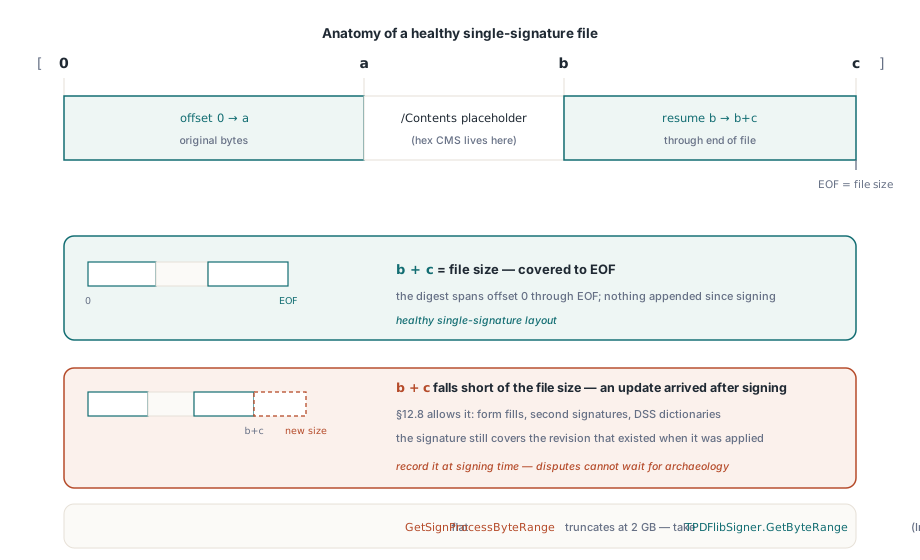
この計算を行う際は整数の幅に注意すること。フラット API の GetSignProcessByteRange は 32 ビットの Integer を返すが、内部の値は Int64 であるため、2 GB を超えるファイルではフラットのアクセサが静かに値を切り捨ててしまう。クラス層の TPDFlibSigner.GetByteRange を使えば Int64 が返るので、そちらを利用するか、上の監査コードのように GetSignatureValueByName から値を解析すること
ライブラリが委ねている部分
2 つの境界は、最終スプリントよりも設計段階で把握しておくほうがよい。フラットの TPDFlib API には署名検証用のラッパーが一切含まれていない。暗号学的な検証は 1 つ下の層、TPDFlibSignatureVerifier にあり、その VerifySignature は valid、invalid、unknown のいずれかで答える。RFC 3161 タイムスタンプ局向けの組み込み HTTP クライアントも存在しない。ライブラリは送信するハッシュを計算し、トークンが返ってきたら拡張済みの CMS を再埋め込みするが、TSA への往復通信自体は自分で書く必要がある。どちらもラップすること自体は難しくないが、リリース直前の週になって欠けていることに気づくと本当に厄介なので、最初のスケッチの段階から設計に組み込んでおくこと
コンプライアンスに関する 1 つの疑問は、はっきりさせておく価値がある。それによって最後のゲートをどこに置くかが決まるからである。署名を追加すると PDF/A は壊れるのか。それ自体では壊れない。署名は増分更新として付加され、ISO 19005-2 以降は署名済み文書を明示的に許可している。落とし穴は署名の見た目のほうにあり、これは他のページコンテンツと同じルールに従う。埋め込みフォントの要件やデバイス依存の色を使わないという制約も例外ではない。したがって、ワークベンチにおける最後のゲートは、署名済みの出力に対するもう一度のプリフライト実行になる。CheckFileCompliance はパイプライン内の高速なチェックとして扱いつつ、リリース候補は veraPDF のような独立したツールでも別途検証すること。バリデータの実装するルールセットは重なり合ってはいるものの完全には一致しないため、両者の判定が食い違った場合、指摘テキストは通常どの条項を読むべきかを教えてくれる
ここまでの内容から、順序に関する 1 つの論点が導かれる。署名とタイムスタンプは 1 回の処理ではない。まずベースラインの署名が書き込まれ、その後で別のタイムスタンププロセスが予約済みの /Contents 領域の内側で CMS を拡張する。だからこそ、先ほどの reserve-bytes の行があれほど重要だったのである。このワークベンチの上に築かれるタイムスタンプと長期検証の層については、PAdES 署名と検証のウォークスルーが署名をベースラインから B-LT まで運ぶ様子を説明しており、プリフライトの側面はPDF/A と PDF/UA プリフライトガイドでさらに深く扱う。完全な API ドキュメントと体験版のダウンロードはPDF Library for Delphi 製品ページで公開している