Due minuti per copiare tre pagine da un PDF di 40 pagine non sono un problema di ottimizzazione delle prestazioni. Sono il segnale che si sta usando il percorso API sbagliato. Quando ho visto per la prima volta questo tempo su un esempio di copia pagine del HotPDF Delphi Component, il mio istinto è stato di guardare prima la struttura del documento e poi il codice. Quell'ordine si è rivelato importante
Cosa era davvero lento
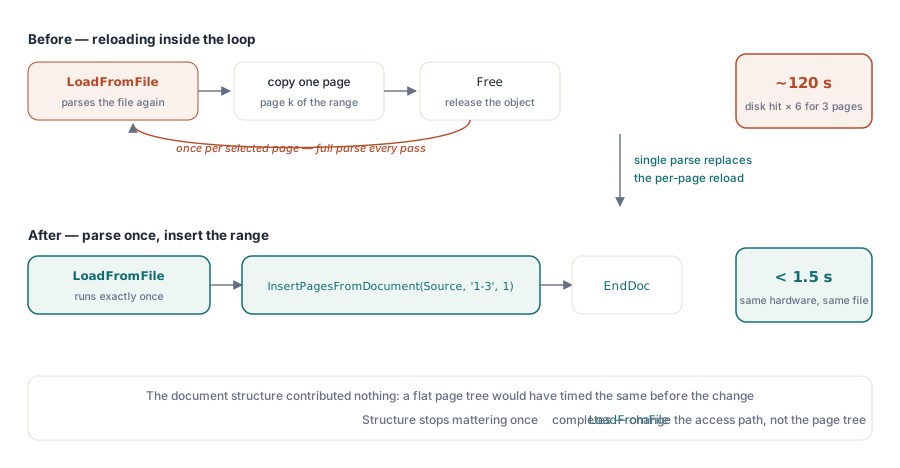
Il PDF in questione era un documento di riferimento di 40 pagine con un albero delle pagine non banale: più nodi /Pages intermedi anziché un singolo array piatto. Il codice di esempio originale chiamava LoadFromFile, poi costruiva un nuovo documento con BeginDoc, iterava sui numeri di pagina selezionati e a ogni iterazione ricaricava il documento sorgente dal disco per estrarre una pagina. Cioè il costo completo del parsing moltiplicato per quante pagine volete. Un file da 12 MB toccava il disco sei volte per un'estrazione di tre pagine, perché nessuno aveva verificato se il file dovesse restare aperto tra le iterazioni
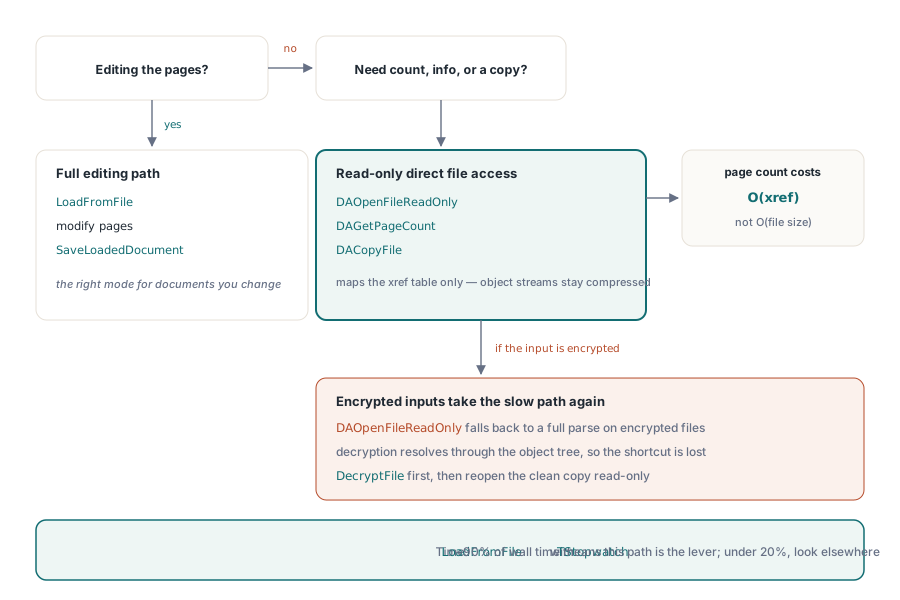
Il secondo fattore era invisibile nel codice: la LoadFromFile di HotPDF risolve l'intera tabella dei riferimenti incrociati e decomprime ogni object stream al caricamento. È il comportamento giusto per un documento che state per modificare, ma è più lavoro del necessario se vi servono solo il conteggio delle pagine e un sottoinsieme di pagine. Per l'accesso in sola lettura alla struttura, DAOpenFileReadOnly evita di deserializzare l'intero albero degli oggetti, il che conta sui file compressi con grandi risorse immagine
Nessuno dei due è un bug della libreria. In entrambi i casi è il chiamante che sceglie l'API progettata per un compito e la usa per un altro
Usare InsertPagesFromDocument per l'estrazione delle pagine
Il percorso giusto per copiare un intervallo di pagine da un documento HotPDF a un altro è InsertPagesFromDocument, chiamato dopo LoadFromFile sulla sorgente. Caricate la sorgente una volta, caricate o create la destinazione una volta, spostate le pagine e salvate. La sorgente resta in memoria per tutte le inserzioni di pagine:
procedure ExtractPages(const SourceFile, DestFile: string;
  const PageRange: string);
var
  Source, Dest: THotPDF;
begin
  Source := THotPDF.Create(nil);
  Dest   := THotPDF.Create(nil);
  try
    // Carica l'origine una sola volta: il parsing completo avviene qui e solo qui
    Source.LoadFromFile(SourceFile);

    // Costruisce un documento di destinazione minimale
    Dest.FileName := DestFile;
    Dest.BeginDoc;

    // Copia l'intervallo richiesto; '1-3' inserisce le pagine da 1 a 3
    // partendo dalla posizione 1 nella destinazione
    Dest.InsertPagesFromDocument(Source, PageRange, 1);

    Dest.EndDoc;
  finally
    Source.Free;
    Dest.Free;
  end;
end;
Il parametro PageRange accetta lo stesso formato dell'esempio a riga di comando: un elenco separato da virgole di numeri di pagina o intervalli come '1-3' o '1,5,7-9'. Le pagine partono da 1. InsertPagesFromDocument copia i content stream, i dizionari delle risorse e la geometria delle pagine senza toccare metadati, segnalibri o allegati di file incorporati, a meno che non siano referenziati dalle pagine copiate. Per un'estrazione di tre pagine da un documento di 40, è un working set piccolo
Tempi sullo stesso file da 12 MB che prima girava per due minuti: sotto 1,5 secondi con questo pattern. La maggior parte di quel tempo è la singola chiamata LoadFromFile. La struttura del documento è irrilevante una volta che la tabella degli oggetti è stata risolta la prima volta
Quando LoadFromFile è troppo: la Direct File API
Se vi serve solo contare le pagine, ispezionare le informazioni del documento o copiare un file senza toccarne i contenuti, la Direct File API evita del tutto il parsing completo. DAOpenFileReadOnly mappa la tabella dei riferimenti incrociati senza decomprimere gli object stream, quindi il conteggio delle pagine è O(dimensione xref) anziché O(dimensione file):
procedure InspectPDF(const FileName: string);
var
  Pdf: THotPDF;
  Handle, PageCount: Integer;
begin
  Pdf := THotPDF.Create(nil);
  try
    Handle := Pdf.DAOpenFileReadOnly(FileName, '');
    if Handle <= 0 then
      Exit;
    try
      PageCount := Pdf.DAGetPageCount(Handle);
      Writeln('Pages: ', PageCount);

      // DACopyFile è una copia che preserva i byte, nessuna re-serializzazione
      Pdf.DACopyFile(FileName, 'archive-copy.pdf');
    finally
      Pdf.DACloseFile(Handle);
    end;
  finally
    Pdf.Free;
  end;
end;
L'avvertenza: DAOpenFileReadOnly accetta un parametro password ma ripiega su un parsing completo per gli input cifrati, perché la decifratura richiede l'albero degli oggetti per risolvere il dizionario di cifratura. Se i vostri file sorgente sono cifrati, decifrateli prima con DecryptFile per ottenere una copia non cifrata, poi apritela con la Direct File API. La funzione a livello di file DecryptFile segue un percorso di riscrittura AES-256 diretto per la cifratura standard ed è più veloce di LoadFromFile seguito da SaveLoadedDocument per i file grandi, perché non costruisce il modello a oggetti completo in memoria
La memoria durante l'elaborazione di grandi batch
I job batch che elaborano decine di file in un ciclo hanno un pattern che sembra corretto ma accumula memoria: creare THotPDF dentro il ciclo, chiamare LoadFromFile, fare il lavoro, chiamare Free. Strutturalmente va bene. Il problema è quando il lavoro interno alloca oggetti temporanei, cattura eccezioni e lascia quegli oggetti temporanei vivi sui percorsi di errore. Il memory manager di Delphi non compatta, quindi un centinaio di leak sui percorsi di errore lungo un'esecuzione batch può spingere la memoria abbastanza in alto da rallentare l'allocazione per tutto il resto
La soluzione non è esotica. Ogni THotPDF e ogni TStream o TBitmap intermedio che partecipa al lavoro PDF appartiene a un blocco try/finally in cui Free è l'ultima istruzione. Impostate i puntatori locali a nil prima del try, in modo che il ramo finally possa usare if Assigned(x) then x.Free in sicurezza quando l'inizializzazione fallisce a metà. Questa è la normale disciplina di ownership di Delphi ed è tutta la storia per questa classe di problemi
Un'altra cosa da controllare nei contesti batch: AddImage registra le immagini in una lista interna che persiste per tutta la vita dell'istanza THotPDF. Se riutilizzate una singola istanza su molti documenti chiamando LoadFromFile ripetutamente, le registrazioni di immagini dei documenti precedenti restano nella lista. O create un'istanza nuova per documento, o invocate il percorso di svuotamento della lista immagini tra un documento e l'altro
Misurare prima di cambiare qualsiasi cosa
Prima di ricorrere a uno qualsiasi di questi pattern, misurate. Il TStopwatch di Delphi in System.Diagnostics incapsula QueryPerformanceCounter ed è abbastanza preciso per profilare a orologio l'I/O su file. Cronometrate LoadFromFile da solo e vedete quanto pesa. Se è il 90% del tempo totale, la soluzione è la Direct File API oppure ridurre quante volte fate il parsing dello stesso file. Se è sotto il 20%, il collo di bottiglia è altrove e state inseguendo la cosa sbagliata
L'estrazione da due minuti che ha dato origine a questo post si è rivelata interamente il pattern del caricamento ripetuto. La struttura del documento non contribuiva in nulla; un albero delle pagine piatto sarebbe andato allo stesso modo. Passare a una singola LoadFromFile seguita da una sola chiamata InsertPagesFromDocument l'ha portata a 1,3 secondi sullo stesso hardware senza toccare nient'altro
L'API di manipolazione delle pagine mostrata qui fa parte del HotPDF Delphi Component per Delphi e C++Builder