Quando un export da 300.000 righe sfonda il proprio budget di memoria, di solito la colpa ricade sul numero di righe. Il numero di righe di solito è innocente. Le parti costose di una cartella di lavoro grande sono quelle create come effetto collaterale: un pool di stili che cresce di una voce per cella perché la formattazione è stata aggiunta dentro il ciclo, l'XML del foglio assemblato come una sola stringa gigante al momento del salvataggio, un milione di corpi di formula identici memorizzati uno a uno. HotXLS, la libreria Delphi nativa di losLab per i file XLS e XLSX, vi dà una leva specifica per ciascuno di questi costi. Nessuna è attiva per impostazione predefinita, perché ognuna cambia un compromesso, quindi sapere quale leva corrisponde a quale sintomo è la vera abilità sulle prestazioni
Dove una cartella di lavoro grande consuma memoria
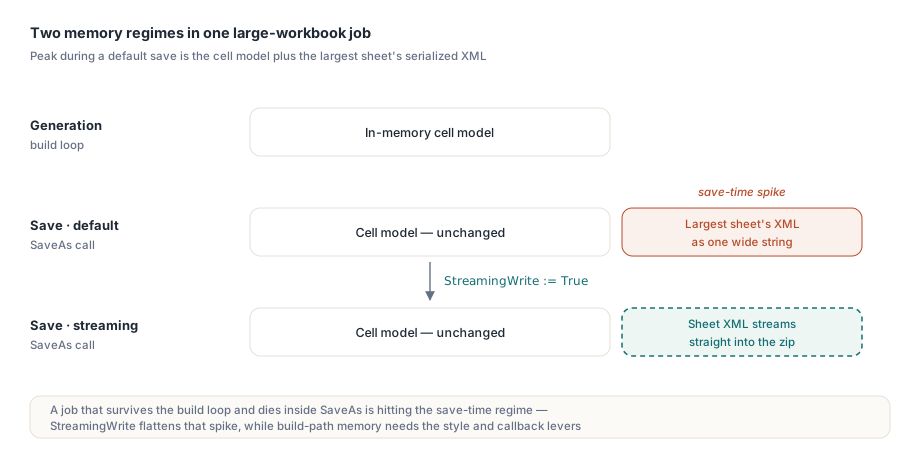
Ci sono due regimi di memoria distinti su cui ragionare. Durante la generazione, il modello di celle in memoria cresce con ogni cella che toccate: valori, formati e formule diventano tutti oggetti o voci di pool. Durante il salvataggio, il percorso XLSX predefinito rende in più l'XML di ogni foglio in una stringa larga prima di comprimerlo nel contenitore zip, quindi il picco di utilizzo è il modello più la forma serializzata del foglio più grande. Un lavoro che sopravvive al ciclo di costruzione e poi muore dentro SaveAs sta colpendo il secondo regime, non il primo, e la correzione per l'uno non fa nulla per l'altro
La dimensione del file segue una regola collegata: le celle sono solo uno dei contributi, accanto a stili, stringhe condivise, formule, immagini e commenti. Una passata di verifica con ForEachCell e i conteggi delle collezioni per foglio vi dice quale risorsa domini davvero in un file problematico, prima che ottimizziate quella sbagliata. Una sottigliezza di misura: Sheet.Cells.Count sul lato XLSX riporta il numero di celle istanziate nell'archivio sparso, non l'area dell'intervallo usato. Un foglio i cui dati occupano un rettangolo di 1000 per 50 con metà delle celle vuote conta circa 25.000, non 50.000. Quella distinzione conta quando confrontate il file "enorme" di un cliente con i vostri riferimenti, perché area dell'intervallo usato e popolazione reale delle celle possono differire di un ordine di grandezza nei layout finanziari sparsi
StreamingWrite corregge il percorso di salvataggio, non quello di costruzione
Impostare TXLSXWorkbook.StreamingWrite := True commuta SaveAs su un serializzatore a flusso che scrive l'XML dei fogli direttamente nel flusso zip, eliminando la stringa intermedia per foglio. Vale False per impostazione predefinita per compatibilità di comportamento, e attivarlo è una modifica di una riga:
Book := TXLSXWorkbook.Create;
try
  Sheet := Book.Sheets.Add('Bulk');
  for R := 1 to 100000 do
  begin
    Sheet.Cells[R, 1].Value := R;
    Sheet.Cells[R, 2].Value := 'Row ' + IntToStr(R);
    Sheet.Cells[R, 3].Value := R * 1.5;
  end;
  Book.StreamingWrite := True;   // l'XML del foglio scorre nel contenitore zip
  Book.SaveAs('bulk.xlsx');
finally
  Book.Free;
end;
Siate precisi su cosa vi compra questo: il modello di celle costruito dal ciclo occupa esattamente la stessa memoria di prima. StreamingWrite appiattisce il picco al momento del salvataggio, che è la differenza fra un lavoro batch che arriva in fondo e uno che fallisce al 95%. Se è il ciclo di costruzione stesso a esaurire la memoria, le leve che vi servono sono le due seguenti
Pool di stili: aggiungete una volta, riusate l'indice
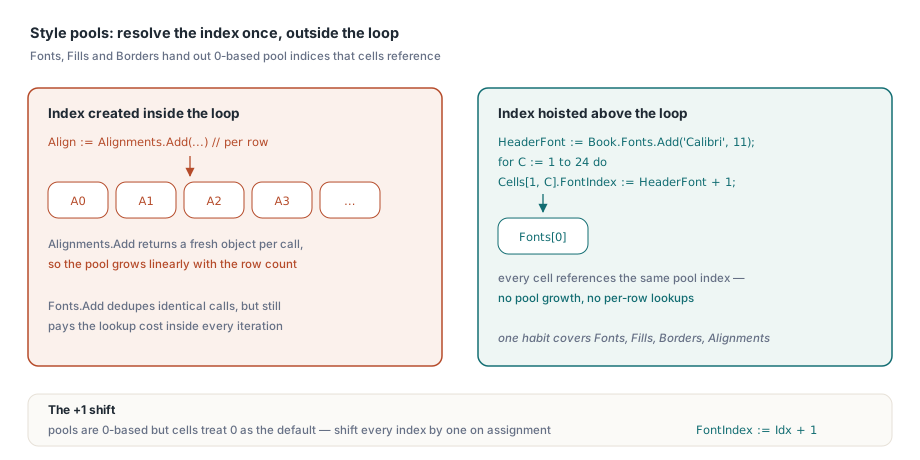
La formattazione XLSX in HotXLS è basata su pool: Book.Fonts.Add(...), Fills.AddSolid(...) e Borders.Add(...) restituiscono un indice di pool in base 0 che le celle richiamano. Chiamare Fonts.Add con parametri identici dentro un ciclo viene deduplicato, quindi spreca tempo anziché spazio. Alignments.Add si comporta diversamente: restituisce un oggetto nuovo a ogni chiamata, quindi creare un allineamento per cella fa crescere il pool linearmente con il numero di righe. Una sola abitudine copre entrambi i casi. Risolvete ogni indice di pool una volta, fuori dal ciclo, e assegnate gli indici dentro
// portate le ricerche nel pool fuori dal ciclo caldo
HeaderFont := Book.Fonts.Add('Calibri', 11, True, False);   // indice del pool in base 0
for C := 1 to 24 do
  Sheet.Cells[1, C].FontIndex := HeaderFont + 1;            // le celle memorizzano in base 1; 0 = predefinito
Il + 1 non è un refuso e dimenticarlo è il classico difetto generatore di sintomi qui: i pool distribuiscono indici in base 0, mentre le proprietà lato cella trattano lo 0 come "predefinito", quindi ogni indice di pool va aumentato di uno in assegnazione. Sbagliate per omissione e le vostre intestazioni si rendono in silenzio con il font predefinito della cartella di lavoro, un difetto che nessuno nota fino alla revisione del marchio
Sostituite il traffico di Variant per cella con callback di riga
Ogni Sheet.Cells[R, C].Value := X comporta una ricerca o creazione di cella più un'assegnazione di Variant. A qualche centinaio di migliaia di celle, quel sovraccarico per accesso diventa misurabile nei profili. HotXLS fornisce API di callback in blocco su entrambe le facciate (ForEachCell e ForEachRow in lettura, WriteCells e WriteRows in scrittura) che spostano l'iterazione dentro il motore e consegnano al vostro codice righe intere per volta:
procedure TLedgerExport.FillRow(Sender: TObject;
  SheetIndex, Row, FirstCol, LastCol: Integer;
  var Values: Variant; var Skip: Boolean; var Cancel: Boolean);
begin
  if Row > FCount then
  begin
    Cancel := True;     // interrompe l'intera scrittura
    Exit;
  end;
  Values := VarArrayOf([FRows[Row - 1].Account,
                        FRows[Row - 1].PostedOn,
                        FRows[Row - 1].Amount]);
end;

// una sola chiamata al motore invece di centinaia di migliaia di accessi a proprietà
Sheet.WriteRows(1, 1, FCount, 3, FillRow);
Il flag Skip della callback lascia una riga intatta senza interrompere, e Cancel chiude l'operazione in anticipo, cosa utile quando la sorgente è un lettore la cui lunghezza scoprite strada facendo. Abbinate WriteRows per la costruzione a StreamingWrite per il salvataggio e il percorso di generazione non ha più alcun punto caldo per cella
Leve di lettura sulla facciata XLS
I file .xls legacy di grandi dimensioni hanno il loro corredo di strumenti. _DisableGraphics := True prima di Open salta del tutto l'analisi del livello di disegno, il che accelera il caricamento di cartelle di lavoro che portano anni di forme accumulate e immagini incorporate. La restrizione è netta: il livello di disegno è allora assente dal modello, quindi salvare una simile cartella di lavoro scrive un file senza i suoi disegni. Riservate questo flag ai lavori di analisi in sola lettura. SetTempDir reindirizza i file temporanei del writer BIFF, cosa che conta sui server dove la posizione temporanea predefinita ha una quota o sta su archiviazione lenta. UseSharedFormulas raggruppa i corpi di formula ripetuti in record di formula condivisa, riducendo i file in cui una colonna di formule si ripete per sessantamila righe
I cicli di lettura sui dati XLS hanno una trappola di indicizzazione che vale la pena segnalare, perché raddoppia il lavoro quando la si gestisce in modo difensivo e corrompe i risultati quando la si manca: UsedRange riporta i propri confini FirstRow, LastRow, FirstCol e LastCol in base 0, mentre Cells.Item[Row, Col] è in base 1. Una scansione che percorre l'intervallo usato deve aggiungere uno a ciascuna coordinata all'accesso della cella, come in Cells.Item[Row + 1, Col + 1], altrimenti legge una griglia spostata in diagonale di una cella, perdendo in silenzio l'ultima riga e l'ultima colonna e includendone una prima fantasma. La callback ForEachCell aggira del tutto la discrepanza, il che è un motivo in più per preferirla nelle scansioni di interi fogli
Sondate i file prima di caricarli
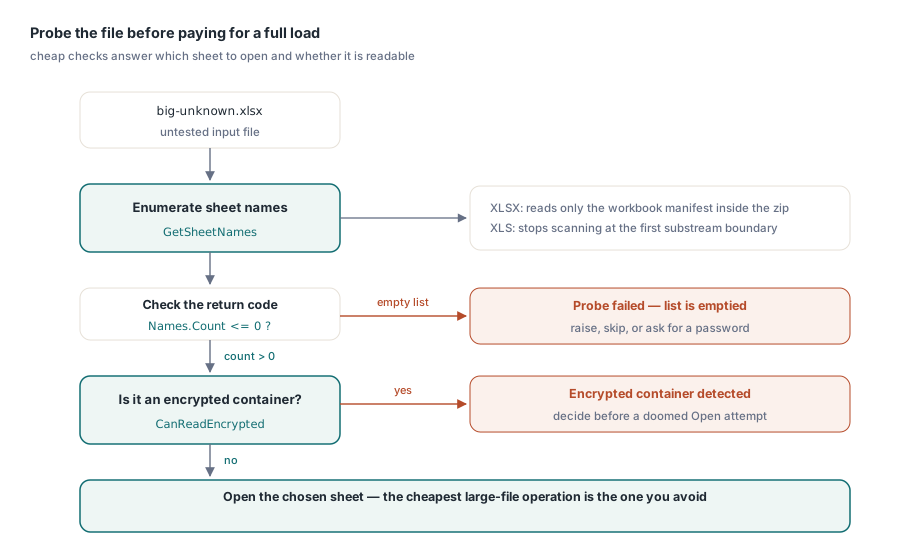
L'operazione più economica su una cartella di lavoro grande è quella che evitate. GetSheetNames su entrambe le facciate elenca i fogli di un file senza caricare i dati delle celle. L'implementazione XLSX legge solo il manifesto della cartella di lavoro dentro lo zip e lascia esplicitamente non popolata l'istanza della cartella, e la facciata XLS smette di scansionare al primo confine di sottoflusso. Questo ne fa il controllo preliminare giusto per la domanda "quale foglio deve puntare questo lavoro di importazione", mentre CanReadEncrypted risponde alla domanda "questo contenitore è cifrato" prima di un tentativo di Open destinato a fallire
Names := TStringList.Create;
Book := TXLSXWorkbook.Create;
try
  if Book.GetSheetNames('big-unknown.xlsx', Names) <= 0 then
    raise Exception.Create('cannot enumerate sheets');   // il fallimento svuota l'elenco
  // scegliete il foglio di destinazione, poi decidete se un Open completo valga la pena
finally
  Book.Free;
  Names.Free;
end;
Notate la convenzione sui codici di ritorno: queste funzioni di sondaggio segnalano il fallimento con valori pari o inferiori a zero e svuotano l'elenco di output, quindi verificate <= 0 invece di confrontare con un singolo valore di successo
Dimensionare l'approccio al lavoro
Per le pipeline non presidiate che generano molti file grandi in sequenza, altre due abitudini completano il quadro. Gli oggetti cartella di lavoro non sono sicuri per la condivisione fra thread, ma nulla impedisce una cartella di lavoro indipendente per thread di lavoro, il che parallelizza in modo pulito la conversione batch. E quando l'output va su HTTP anziché su disco, gli overload di salvataggio su TStream si combinano con StreamingWrite così che una risposta grande non si materializzi mai come file temporaneo. Si applica una nota operativa: il salvataggio su flusso scrive dalla posizione corrente senza riavvolgere, quindi impostate Position := 0 prima di consegnare il flusso al framework della risposta. L'articolo sulla scrittura a flusso e sui lavori batch sviluppa quello schema lato server, e l'articolo sull'esportazione da database mostra dove queste leve si inseriscono in un report guidato da un dataset
Infine, tenete un file di riferimento nel caso peggiore per ogni famiglia di report e cronometratelo in CI. Le regressioni di prestazioni nella generazione di documenti raramente si annunciano. Uno stile aggiunto dentro un ciclo o un sondaggio sostituito da un Open completo non cambia nulla dal punto di vista funzionale, e il batch notturno semplicemente impiega quaranta minuti in più. Un test cronometrato su un riferimento rappresentativo da mezzo milione di celle trasforma quella deriva in una build rossa invece che in un incidente operativo
Le build di valutazione, i progetti dimostrativi con un esempio di generazione in blocco e il riferimento API completo sono disponibili sulla pagina HotXLS Delphi Component