Una richiesta arriva sulla tua scrivania: prendi un lotto di estratti conto già renderizzati, oscura i numeri di conto, e spedisci due pagine per foglio per risparmiare carta. Entrambe le metà di questo compito sono chirurgia sul content stream di un PDF che non hai creato tu, quindi non c'è un comodo canvas di pagina su cui disegnare né un gestore di font su cui appoggiarti. Stai modificando direttamente il grafo di oggetti di un documento caricato, aggiungendo operatori di disegno grezzi a una pagina che ha impaginato qualche altro strumento. HotPDF espone esattamente due punti di ingresso per questo, e il più pericoloso dei due è quello che sembra innocuo
HotPDF è un componente PDF VCL nativo per Delphi e C++Builder. La sua API per documenti caricati del round nove ha aggiunto i primi metodi che creano contenuto del tutto nuovo su una pagina aperta da disco invece che costruita da zero. Due di essi sono l'oggetto di questo articolo: RedactLoadedRect, che dipinge un rettangolo opaco su una regione, e StitchLoadedPage, che scala una pagina e la disegna su un'altra. Entrambi funzionano scrivendo operatori del content stream ISO 32000-1 §8.5 nello stream /Contents della pagina. Capire cosa fanno quegli operatori, e altrettanto importante cosa non fanno, è la differenza tra uno strumento funzionante e una violazione di dati
Aggiungere operatori a una pagina caricata
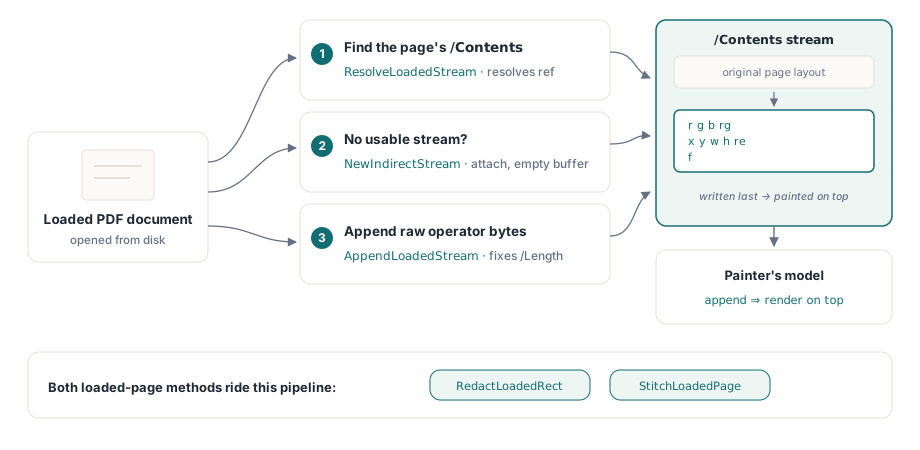
Quando costruisci una pagina con l'API normale di HotPDF, il componente possiede il content stream e serializza per te le tue chiamate TextOut e vettoriali. Una pagina caricata è diversa: il suo /Contents è un oggetto stream esistente, possibilmente condiviso, possibilmente parte di un array di contenuti, e devi innestarti al suo interno senza corrompere ciò che c'è già. Il round nove ha introdotto tre piccoli helper che rendono questo sicuro. NewIndirectStream alloca un nuovo THPDFStreamObject indiretto con un buffer vuoto e una voce /Length 0; ResolveLoadedStream segue un riferimento indiretto fino allo stream sottostante; e AppendLoadedStream scrive byte grezzi alla fine dello stream e riscrive /Length in modo che l'oggetto salvato resti ben formato
Il pattern seguito da entrambi i metodi pubblici è lo stesso. Trova il /Contents della pagina, risolvilo in uno stream, e se non c'è uno stream utilizzabile, creane uno e collegalo. Poi aggiungi gli operatori. Poiché i nuovi byte vanno alla fine dello stream, il modello del painter garantisce che vengano renderizzati sopra a tutto ciò che il layout originale ha disegnato. Questo ordinamento è l'intero meccanismo dietro il rettangolo di redazione, ed è anche il motivo per cui quel rettangolo non è ciò che la maggior parte delle persone presume che sia
RedactLoadedRect: una copertura opaca, non una cancellazione
RedactLoadedRect accetta un indice di pagina a base zero, quattro coordinate in user space e tre componenti di colore nell'intervallo 0–1:
var
  Pdf: THotPDF;
begin
  Pdf := THotPDF.Create(nil);
  try
    if Pdf.LoadFromFile('statement.pdf') > 0 then
    begin
      // Copri la banda del numero di conto sulla pagina 1 con nero pieno.
      // Le coordinate sono nello user space del PDF: origine in basso a sinistra, punti.
      Pdf.RedactLoadedRect(0, 56, 690, 320, 706, 0, 0, 0);
      Pdf.SaveLoadedDocument('statement-covered.pdf');
    end;
  finally
    Pdf.Free;
  end;
end;
Sotto il cofano il metodo emette tre operatori nel content stream: un'impostazione del colore di riempimento in DeviceRGB (r g b rg), un percorso rettangolare (x y w h re), e un riempimento (f). Larghezza e altezza sono derivate come X2 - X1 e Y2 - Y1, quindi passi due angoli opposti e lasci che il metodo calcoli l'estensione. Passa 0, 0, 0 per il colore e ottieni una barra nera; passa 1, 1, 1 per una bianca che si abbina a una pagina bianca. Le coordinate sono lo user space proprio della pagina caricata, il che significa che l'origine è l'angolo in basso a sinistra e le unità sono punti, e significa anche che ti serve il /MediaBox della pagina per posizionare qualsiasi cosa con precisione; GetLoadedPageBox con pbMediaBox te lo fornisce
Leggi questo due volte: un rettangolo riempito copre il contenuto visivamente, non lo rimuove. Il testo, l'immagine o la grafica vettoriale sotto il rettangolo sono ancora presenti nel PDF, ancora nel grafo di oggetti, ancora estraibili da chiunque copi la pagina, esegua un estrattore di testo, o semplicemente elimini il tuo rettangolo dal content stream. Questo è mascheramento visivo, non redazione nel senso legale o di sicurezza. Se stai nascondendo dati genuinamente sensibili — numeri di conto, cartelle cliniche, identità, qualsiasi cosa regolamentata — coprirli con un riquadro nero e spedire il file è una fuga di dati in attesa di essere scoperta. Una vera redazione richiede l'eliminazione degli oggetti di contenuto sottostanti, non la loro copertura con vernice
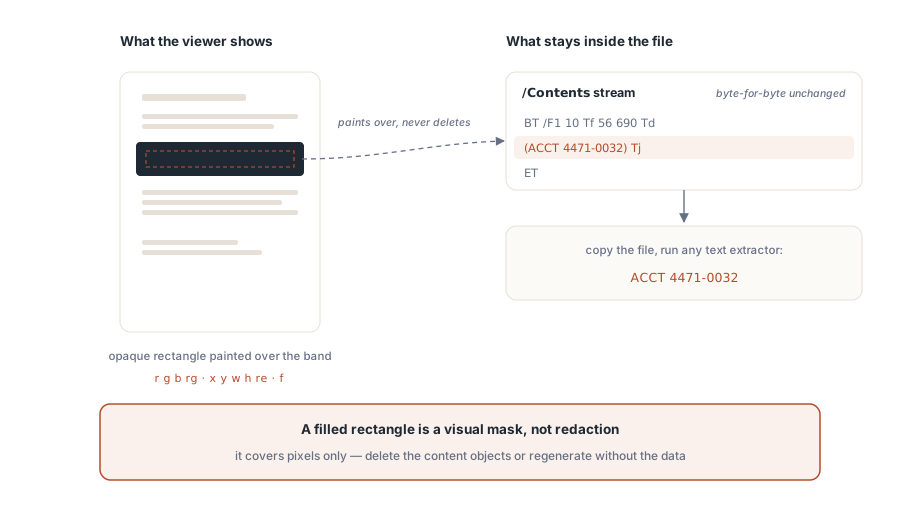
Il nome del metodo dice "Redact", e questo è un avvertimento utile su come il risultato verrà frainteso, non una promessa su cosa elimina. L'implementazione è onesta su questo nel proprio commento: si definisce "primitiva di redazione visiva" e osserva che una redazione che rimuove contenuto richiederebbe un interprete di content stream che percorra e riscriva gli operatori esistenti. Il percorso per documenti caricati di HotPDF qui non lo fa. Quindi la regola sicura è ristretta: usa RedactLoadedRect per mascheramenti cosmetici non sensibili — nascondere una filigrana di bozza, oscurare una regione prima di uno screenshot, coprire un logo obsoleto su una prova interna. Nel momento in cui ciò che sta sotto il riquadro avrebbe importanza se trapelasse, questo metodo è lo strumento sbagliato, e la risposta corretta è rigenerare il documento senza quei dati oppure usare una vera pipeline di rimozione del contenuto
StitchLoadedPage: scala, trasla, disegna
L'imposizione N-up è il problema più amichevole perché niente viene nascosto, solo riorganizzato. StitchLoadedPage accetta un indice di pagina di destinazione, un indice di pagina sorgente, un offset X/Y e un fattore di scala, e disegna la pagina sorgente su quella di destinazione in quella posizione e dimensione:
// Sovrappone la pagina 2 (indice 1) sulla pagina 1 (indice 0),
// scalata al 70% e spostata leggermente in alto a destra.
Pdf.StitchLoadedPage(0, 1, 40, 380, 0.7);

// Comodità 2-up: pagina sorgente nella metà destra della destinazione.
Pdf.StitchLoadedPageSideBySide(0, 1);
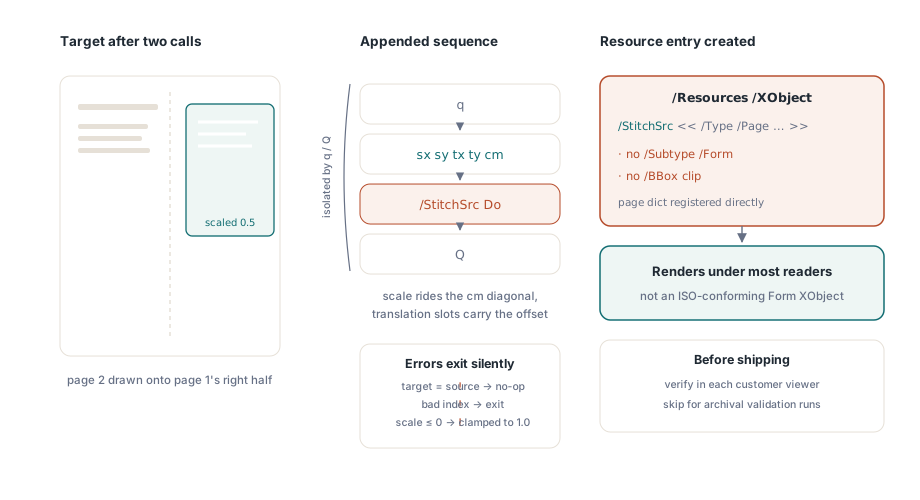
La stringa di operatori che aggiunge è una sequenza standard di trasformazione e disegno: q per salvare lo stato grafico, una matrice cm che porta la scala sulla diagonale e l'offset negli slot di traslazione, /StitchSrc Do per invocare un oggetto esterno, e Q per ripristinare lo stato. La coppia q/Q è importante: isola la trasformazione così che la pagina cucita non faccia sanguinare il proprio sistema di coordinate in qualsiasi cosa venga aggiunta dopo. Il metodo protegge anche dagli errori ovvi — indici fuori intervallo, una destinazione uguale alla sorgente, una scala non positiva (che viene forzata a 1.0) — ed esce silenziosamente invece di sollevare un'eccezione, quindi controlla i tuoi input perché un no-op silenzioso appare identico a un successo
StitchLoadedPageSideBySide è una sottile comodità sopra il metodo generale. Legge la larghezza del media-box della destinazione, la dimezza, e chiama StitchLoadedPage con quella mezza larghezza come offset X e una scala fissa di 0.5, mettendo la sorgente nella metà destra. Quello 0.5 hard-coded assume che sorgente e destinazione condividano la stessa larghezza; se non è così, la sorgente non riempirà la sua metà in modo pulito, e ti servirà il StitchLoadedPage generale con una scala che calcoli tu stesso a partire da entrambi i media box
La strategia XObject semplificata e il suo compromesso ISO
Ecco dove l'implementazione fa una scorciatoia deliberata che devi conoscere prima di fidarti dell'output tra i vari visualizzatori. Un'imposizione N-up corretta avvolge il contenuto della pagina sorgente in un Form XObject — un oggetto disegnabile autonomo che secondo ISO 32000-1 §8.10.1 deve portare /Type /XObject, /Subtype /Form, e un proprio riquadro di ritaglio /BBox. Lo stitch del round nove di HotPDF non costruisce quel wrapper. Invece registra il dizionario di pagina stesso della sorgente direttamente sotto /Resources /XObject della destinazione con il nome StitchSrc, poi lo disegna con Do. Un dizionario di pagina e un Form XObject condividono abbastanza del loro modello di contenuto — entrambi fanno riferimento a un content stream e a un dizionario di risorse — che molti reader renderizzeranno il risultato
Ma non è un Form XObject conforme. Gli manca il marcatore /Subtype /Form e un proprio /BBox, il che significa che un consumatore rigoroso è nel suo pieno diritto di ignorare il Do o di ritagliarlo diversamente da come ti aspetti. Le TechnicalNotes di questo round lo dicono chiaramente: l'approccio "si renderizza nella maggior parte dei reader" ma "non è un Form XObject rigorosamente conforme a ISO", e la piena conformità richiede di sintetizzare un vero stream Form XObject come passaggio separato. Quindi tratta l'output dello stitch come tratteresti qualsiasi costrutto non conforme: verificalo negli specifici visualizzatori usati dai tuoi clienti, non solo in quello sulla tua macchina, e se ti servono PDF archiviabili o puliti secondo un validatore rigoroso, non affidarti a questo percorso. La stessa disciplina si applica a tutto ciò che costruisci sul grafo di oggetti caricato, motivo per cui un passaggio di preflight PDF in Delphi si guadagna il suo posto nella pipeline di rilascio ogni volta che modifichi documenti a livello di programma
Dove questi strumenti si inseriscono, e dove no
Entrambi i metodi sono strumenti a livello di content stream, quindi il modello mentale è lo stesso che usi per il disegno diretto. Se hai costruito pagine da zero con il componente, gli operatori vettoriali e di colore dietro queste chiamate ti sembreranno familiari da il disegno su canvas di HotPDF in Delphi; la differenza è solo che qui stai aggiungendo a uno stream scritto da qualcun altro invece che a uno di tua proprietà. Tieni a mente tre confini:
- La redazione è cosmetica.
RedactLoadedRectdipinge sopra il contenuto e non lo elimina mai. Per qualsiasi cosa sensibile, rigenera la sorgente oppure usa una vera rimozione del contenuto — un riquadro nero non è sicurezza - Lo stitch non è conforme per progettazione. La pagina sorgente viene referenziata come uno pseudo-XObject privo del
/Subtype /Forme del/BBoxprevisti da §8.10.1, quindi conferma il rendering nei tuoi visualizzatori di destinazione ed evitalo dove è richiesta una validazione rigorosa - Le coordinate sono lo user space della pagina. Origine in basso a sinistra, punti, determinate dal media box proprio della pagina. Leggi il box con
GetLoadedPageBoxprima di posizionare qualsiasi cosa, perché la pagina che hai caricato potrebbe non avere le dimensioni che presumevi
Usata entro questi limiti, la coppia copre un flusso di lavoro reale: riorganizzare pagine per la stampa, mascherare regioni non riservate, e riscrivere il risultato con SaveLoadedDocument — tutto senza un re-render completo. L'API per documenti caricati che include queste primitive di stitch e mascheramento è inclusa in HotPDF Delphi Component per Delphi e C++Builder, insieme ai metodi per campi modulo, annotazioni e FDF dello stesso round