Alcinoe est une bibliothèque de composants open source pour Delphi et C++Builder, maintenue sur GitHub par Zeus64. Elle couvre des domaines que la VCL et la RTL FireMonkey laissent aux tiers : un lecteur vidéo accéléré par le GPU, un wrapper WebRTC, des contrôles d'édition natifs iOS et Android, un analyseur JSON/BSON bimodal, un client MongoDB avec pool de connexions, un wrapper ImageMagick et une collection de contrôles FireMonkey qui contournent entièrement le pipeline de rendu par défaut. La bibliothèque s'est forgé une réputation sur Rio (10.3.3) et Sydney (10.4.2), et a depuis suivi chaque version d'Embarcadero. Au moment de la rédaction de cet article, elle est entièrement compatible avec Delphi 11.1 Alexandria et Delphi Athens 12.3
Intégrer Alcinoe dans un projet
L'installation dépend d'une seule question : avez-vous besoin de la prise en charge au moment de la conception (design-time) pour les contrôles visuels d'Alcinoe ? Si ce n'est pas le cas, ignorez complètement le BPL. Ajoutez {alcinoe_rootdir}\source au chemin de recherche de la bibliothèque du projet et vous avez terminé. Chaque composant non visuel, y compris les analyseurs, les clients de base de données et les utilitaires de chaînes, se compile à partir des sources sans rien enregistrer
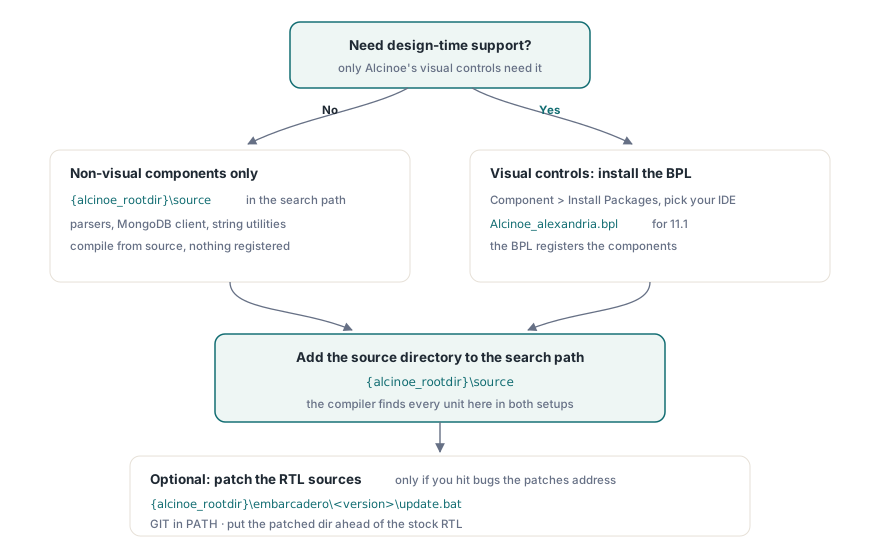
Si vous avez besoin d'une prise en charge au moment de la conception, le processus est légèrement plus long. Ouvrez Component > Install Packages dans l'EDI Delphi, parcourez jusqu'au BPL correspondant à votre version (par exemple {alcinoe_rootdir}\lib\bpl\alcinoe\Win32\alexandria\Alcinoe_alexandria.bpl), installez-le, puis ajoutez toujours {alcinoe_rootdir}\source au chemin de recherche. Le BPL enregistre les composants ; le répertoire source est ce que le compilateur trouve lorsqu'il compile votre projet
Alcinoe fournit des correctifs optionnels pour les sources RTL d'Embarcadero. Si vous les souhaitez, accédez à {alcinoe_rootdir}\embarcadero\, choisissez le sous-répertoire de votre version et exécutez update.bat. Le script s'attend à ce que GIT soit dans le PATH et suppose un emplacement d'installation d'Embarcadero par défaut. Il récupère la source RTL d'origine et applique les correctifs. Une fois terminé, ajoutez ce répertoire source corrigé au chemin de recherche de votre projet afin que le compilateur le sélectionne avant la copie en lecture seule dans l'arborescence d'installation d'Embarcadero. Rien de tout cela n'est nécessaire pour démarrer ; cela n'a d'importance que si vous rencontrez des bogues que les correctifs résolvent
Android et le proxy de désucrage (desugaring) D8
Plusieurs composants Alcinoe (WebRTC, vidéo basée sur ExoPlayer) dépendent de bibliothèques Java qui utilisent les fonctionnalités du langage Java 8. La chaîne d'outils Android fournie avec les anciennes versions de Delphi utilise dx.bat pour la conversion DEX, qui ne peut pas gérer ces bytecodes sur les niveaux d'API inférieurs à 26. La solution est le désucrage (desugaring), que D8 gère automatiquement lorsqu'il est invoqué directement. Alcinoe fournit un script proxy à {alcinoe_rootdir}\tools\D8Proxy\dx.bat qui transfère les appels du système de build Delphi vers D8, rendant le désucrage transparent. Remplacez le dx.bat d'origine dans le répertoire build-tools de votre SDK Android (généralement C:\SDKs\android\build-tools\30.0.3\) par ce proxy. Embarcadero a suivi le problème sous-jacent sous la référence RSP-24155 ; les versions ultérieures des outils du SDK l'ont résolu directement, vérifiez donc si votre chaîne d'outils actuelle a toujours besoin de cette solution de contournement
Le problème de rendu de FireMonkey et la réponse d'Alcinoe
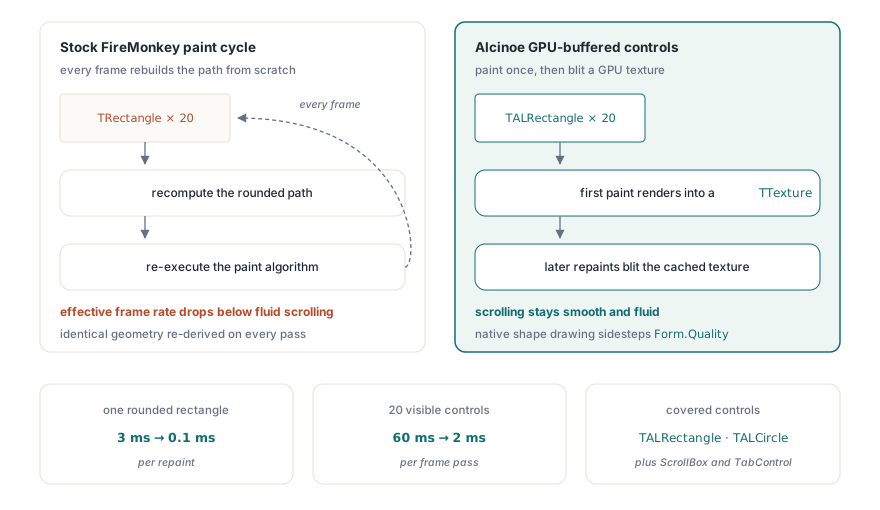
Le cycle de peinture (paint cycle) par défaut de FireMonkey devient un goulot d'étranglement dans les interfaces utilisateur à fort défilement. Un simple TRectangle avec des coins arrondis peut prendre environ 3 ms à être repeint car l'implémentation d'origine recalcule le chemin à chaque image. Avec 20 de ces contrôles visibles, cela représente 60 ms par passage d'image, ce qui plafonne la fréquence d'images effective bien en dessous du seuil pour un défilement fluide
Alcinoe résout ce problème avec un tampon résident dans le GPU pour chaque contrôle. La première peinture effectue le rendu du contrôle vers une TTexture stockée dans la mémoire du GPU. Les redessins ultérieurs transfèrent en bloc (blit) cette texture au lieu de réexécuter l'algorithme de peinture. Le résultat mesuré sur le même rectangle arrondi passe d'environ 3 ms à environ 0,1 ms. Au-delà de la mise en mémoire tampon, Alcinoe remplace le tracé de chemin OpenGL pour les formes de base par des API de dessin natives Android et iOS, contournant ainsi le compromis qualité/performances lié à Form.Quality. Les contrôles pertinents sont TALRectangle, TALCircle et un ensemble de conteneurs de disposition améliorés, notamment ScrollBox et TabControl
TALJsonDocument : DOM et SAX dans un seul type
TALJsonDocument est l'analyseur JSON et BSON d'Alcinoe. Il prend en charge deux modes de parcours. Le mode DOM construit une arborescence d'objets en mémoire, offrant un accès aléatoire à n'importe quel nœud au prix d'une mémoire proportionnelle à la taille du document. Le mode SAX déclenche des événements à mesure que l'analyseur lit chaque jeton sans conserver d'arborescence, ce qui est le bon choix lorsque vous devez filtrer un grand document et ne conserver qu'une poignée de valeurs. Les analyseurs DOM dans Delphi (DBXJSON, SuperObject et les autres) sont généralement trois à cinq fois plus lents qu'une approche SAX pour le même contenu, car chaque allocation de nœud entraîne une surcharge de création d'objet en plus du travail d'analyse lui-même
Le type suit le même modèle de navigation de nœud que TALXMLDocument. Une lecture DOM minimale ressemble à ceci :
MyJsonDoc.LoadFromJSON(AJsonStr, False {dom mode});
MyJsonDoc.ParseOptions := [poAllowComments];

// lit des valeurs scalaires
ShowMessage(MyJsonDoc.ChildNodes['name'].ChildNodes['first'].Text);
ShowMessage(IntToStr(MyJsonDoc.ChildNodes['_id'].Int32));

// parcourt un tableau
for I := 0 to MyJsonDoc.ChildNodes['contribs'].ChildNodes.Count - 1 do
  Writeln(MyJsonDoc.ChildNodes['contribs'].ChildNodes[I].Text);
Pour le mode SAX, assignez une procédure anonyme à OnParseText avant d'appeler LoadFromJSON avec le deuxième argument défini sur True. Le rappel reçoit le chemin du nœud, le nom, la valeur et un TALJSONNodeSubType qui identifie le type JSON (chaîne, entier, flottant, booléen, etc.). Ce mode ne produit aucune allocation de tas (heap) pour les nœuds, de sorte qu'il évolue pour des documents arbitrairement volumineux sans exploser le budget mémoire
TALJsonDocument lit et écrit également le BSON de manière native ; passez True comme indicateur BSON à LoadFromFile ou SaveToFile. Une deuxième variante, TALJsonDocumentU, utilise UnicodeString (UTF-16) en interne au lieu de AnsiString (UTF-8) pour les contextes où le code environnant fonctionne entièrement en Unicode
Client MongoDB et pool de connexions
Le pilote MongoDB d'Alcinoe couvre les opérations de requête courantes et gère de manière native le pool de connexions. Le client simple, TAlMongoDBClient, ouvre et ferme une seule connexion par opération. La variante avec pool, TAlMongoDBConnectionPoolClient, maintient un ensemble de connexions actives et en transmet une du pool à chaque thread appelant, en la restituant lorsque l'appel est terminé. Ce modèle empêche plusieurs threads de se bloquer mutuellement lors de la configuration de la connexion, ce qui est important chaque fois que des processus d'arrière-plan interrogent simultanément la même base de données. Pour les curseurs traçables (tailable cursors) sur des collections plafonnées (capped collections), TAlMongoDBTailMonitoringThread surveille les nouveaux documents et déclenche un rappel à leur arrivée, ce qui est le modèle standard pour la diffusion en continu (streaming) de journaux ou la notification de modifications sans interrogation (polling)
Autres composants à connaître
ALVideoPlayer effectue le rendu vidéo sur une TTexture plutôt que sur une fenêtre de superposition, de sorte que d'autres contrôles FireMonkey peuvent se situer au-dessus de lui dans l'ordre Z. Le backend Android utilise ExoPlayer, qui ajoute la prise en charge de DASH, HLS et SmoothStreaming au-delà de ce que gère le MediaPlayer intégré à Android. Le backend iOS utilise AVPlayer avec une prise en charge HLS équivalente
TALWebRTC encapsule la pile WebRTC pour l'audio et la vidéo en pair-à-pair. Il ne nécessite ni navigateur ni plugin, et la connexion traverse le NAT via la négociation ICE/STUN/TURN standard gérée par la bibliothèque sous-jacente
TALStringList remplace le tri basé sur AnsiCompareText de TStringList par une comparaison ordinale indépendante des paramètres régionaux et un tri rapide (quicksort) jusqu'à 10 fois plus rapide sur les grandes listes. La variante hachée, TALHashedStringList, ajoute une table de hachage interne pour une recherche en O(1) au prix d'une surcharge légèrement supérieure sur les petites listes. Notez que TALStringList est une liste AnsiString de 8 bits, et non une liste Unicode ; il s'intègre bien dans le code côté serveur où UTF-8 est le codage de travail et où le débit brut importe plus qu'une comparaison sensible aux paramètres régionaux
Sur Windows 64 bits, l'héritage FastCode qui a donné à de nombreuses routines de chaînes d'Alcinoe leur avantage de vitesse (principalement de l'assembleur x86 écrit à la main) n'est pas conservé. Les builds Win64 se rabattent sur les implémentations Pascal, qui s'exécutent nettement plus lentement sur des charges de travail intensives en chaînes de caractères. Le projet demo\ALStringBenchMark vous permet de mesurer l'écart sur votre matériel avant de vous engager dans un build 64 bits où le débit des chaînes est un goulot d'étranglement
Le code source complet est disponible sur github.com/Zeus64/alcinoe