Kaksi asiakirjaa auki (Two documents open) yhtä aikaa (at once, same), sama sivunumero, kumpikin (page number, each) omassa vieritettävässä paneelissaan: se (in its own scrollable panel: that) on vertailukatseluohjelman (is the core of a comparison viewer. PDFium Component) ydin. PDFium Component (delivers this through) tarjoaa tämän (a straightforward object) suoraviivaisella (model where) objektimallilla (TPdf owns), jossa (the file) TPdf (and) omistaa (TPdfView owns) tiedoston ja (the display. One) TPdfView (document, one) omistaa näytön (TPdf, one). Yksi (TPdfView. You) asiakirja, yksi (want three) TPdf, yksi TPdfView. Haluat (panels, you) kolme paneelia (have three), sinulla on kolme paria (pairs. The). Vaikeat osat (hard parts are) eivät ole (not the API) API-kutsut (calls; they); ne ovat asettelu-aritmetiikkaa, kun ikkunan koko muuttuu, ja sivusynkronoinnin logiikka (are the layout arithmetic when the window resizes and the page-sync logic), kun (when you decide which) päätät, minkä (view should) näkymän (follow which) tulisi seurata mitäkin (which)
Lomakkeen asettelu (Form Layout)
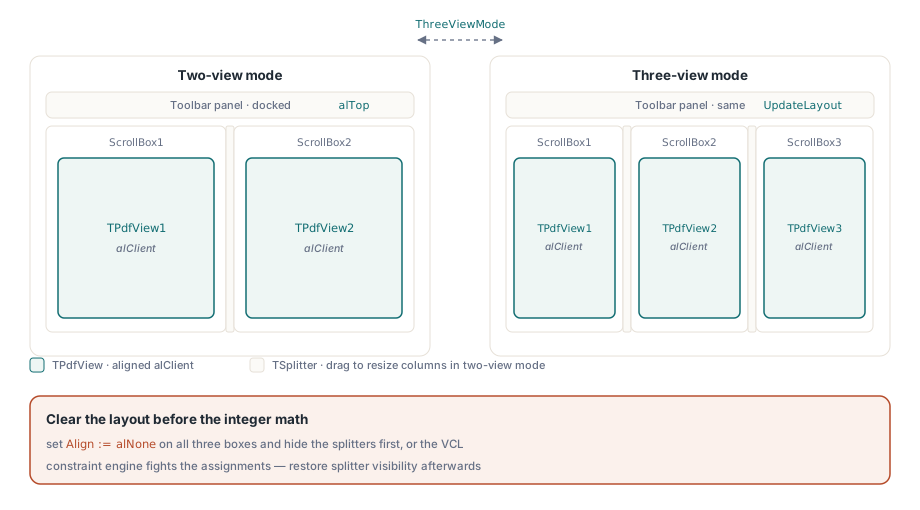
VCL-lomake (The VCL form holds) sisältää (three) kolme (TScrollBox containers) TScrollBox-säilöä (side by) vierekkäin, jokaisessa TPdfView (side, each with a TPdfView inside) sisällä ja kohdistettuna (and aligned) arvoon (to) alClient, jotta (alClient so) se täyttää laatikon. Kaksi (it fills the box. Two) TSplitter-komponenttia (TSplitter components) sijaitsee (sit between) laatikoiden välissä (the boxes so), jotta (the user can) käyttäjä voi säätää sarakeleveyksiä (adjust column widths at) suoritusaikana. Paneelien (runtime. A) yläpuolella oleva työkalurivi (toolbar above the panels) sisältää avauspainikkeet (carries the open buttons), zoomaussäätimet (zoom controls, and) ja (the two-view) kaksi-/kolminäkymä-kytkimen (/ three-view toggle)
Kolminäkymätila (Three-view mode) on totuusarvo, jota lomake (is a boolean the form) seuraa sisäisesti (tracks internally. When). Kun se (it flips, you) kytketään, lasket leveydet uudelleen (recalculate widths and) ja näytät tai piilotat (show or hide) kolmannen (the third column. The) sarakkeen. Yksinkertaisin tapa (simplest approach is) on tyhjentää (to clear all) kaikki Align-ominaisuudet (Align properties, hide), piilottaa (the splitters, then) jakajat (set absolute) ja asettaa sitten (positions:) absoluuttiset sijainnit (positions:):
procedure TFormMain.UpdateLayout;
var
TotalWidth: Integer;
begin
TotalWidth := ClientWidth;
if ThreeViewMode then
begin
ScrollBox3.Visible := True;
ScrollBox1.Left := 0;
ScrollBox1.Width := TotalWidth div 3;
ScrollBox2.Left := ScrollBox1.Width;
ScrollBox2.Width := TotalWidth div 3;
ScrollBox3.Left := ScrollBox2.Left + ScrollBox2.Width;
ScrollBox3.Width := TotalWidth - ScrollBox3.Left;
// Sovella samaa (ClientHeight - toolbar height) kaikkiin kolmeen Height-arvoon
// Apply the same (ClientHeight - toolbar height) to all three Height values
end
else
begin
ScrollBox3.Visible := False;
ScrollBox1.Left := 0;
ScrollBox1.Width := TotalWidth div 2;
ScrollBox2.Left := ScrollBox1.Width;
ScrollBox2.Width := TotalWidth - ScrollBox2.Left;
end;
end;
Määritys (Setting Align) Align := alNone (:= alNone on) kaikkiin kolmeen (all three) laatikkoon ennen kokonaislukuaritmetiikkaa (boxes before the integer arithmetic) estää (avoids the) VCL:n (VCL constraint) rajoitemoottoria (engine fighting) taistelemasta (your assignments. Restore) määrityksiäsi vastaan (assignments. Restore). Palauta jakajien näkyvyys (Restore splitter visibility) paikantamisen (after positioning) jälkeen (after positioning), jos (if you) haluat vetämällä tapahtuvaa (want drag-to-resize) koon muuttamista kaksinäkymätilassa (in two-view mode)
Kunkin vierityslaatikon korkeus (The height of each scroll box) on (is the) asiakasalue (client area) miinus (minus the) työkalurivipaneelin (toolbar panel) korkeus (height. Because). Koska työkalurivi (the toolbar) on (is docked) telakoitu (at the top) ylös arvolla alTop (with alTop,), ClientHeight - PanelButtons.Height (ClientHeight - PanelButtons.Height gives) antaa sinulle (you the) käyttökelpoisen pystysuoran (usable vertical) tilan. Määritä tämä (space. Assign) kaikille (this to all) kolmelle (three boxes) laatikolle saman (inside the same) UpdateLayout-kutsun (UpdateLayout call) sisällä, jotta (so there) ei (is never) koskaan ole ruutua (a frame where), jossa (one box) yksi (is taller) laatikko (than the) on pidempi (others and) kuin (causes a) muut ja aiheuttaa (layout flicker) asettelun välkynnän (flicker)
Asiakirjan (Opening a Document) avaaminen (Opening a Document)
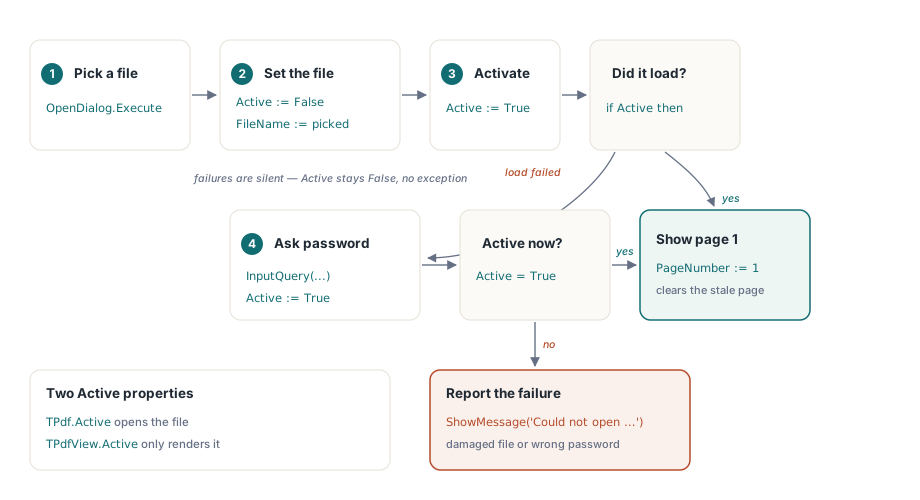
Jokainen paneelipari (Each panel pair) tarvitsee (needs its own) oman avausmenettelynsä (open procedure. The). Kuvio (pattern is) on (short: deactivate) lyhyt (the component, set): deaktivoi (the filename, activate) komponentti, aseta (then check) tiedostonimi (Active; if), aktivoi, ja tarkista sitten (it stayed False,) Active; jos se (prompt for) pysyi tilassa False, kysy (a password) salasanaa (and retry. Note) ja (that TPdfView.Active) yritä uudelleen. Huomaa, että (is what) TPdfView.Active (controls rendering, but) ohjaa (TPdf.Active is) hahmontamista (what actually), mutta (opens the) TPdf.Active (file; they) on (are independent. Setting) se (PdfView.Active :=), mikä oikeasti avaa tiedoston; ne ovat (True when) itsenäisiä. Määritys PdfView.Active := True (its linked TPdf) silloin, kun siihen linkitetty (is not yet) TPdf (active is) ei (harmless but) ole vielä (displays nothing) aktiivinen (active is harmless but displays nothing), on (harmless but displays nothing) vaaratonta (harmless but displays nothing), mutta se ei näytä mitään (displays nothing)
procedure TFormMain.OpenPdfFile(PdfComponent: TPdf;
PdfViewComponent: TPdfView);
var
Password: string;
begin
if not OpenDialog.Execute then
Exit;
PdfComponent.Active := False;
PdfComponent.FileName := OpenDialog.FileName;
PdfComponent.Password := '';
PdfComponent.Active := True;
// Latauksen epäonnistumiset ovat hiljaisia: Active pysyy False-arvossa poikkeuksen noston sijaan.
// Load failures are silent: Active stays False instead of raising.
if not PdfComponent.Active then
begin
// Todennäköisimmin salasanasuojattu tiedosto; anna käyttäjälle yksi yritys.
// Most likely a password-protected file; give the user one retry.
if InputQuery('Salasana (Password)', 'Syötä asiakirjan salasana: (Enter document password:)', Password) then
begin
PdfComponent.Password := Password;
PdfComponent.Active := True;
end;
end;
if not PdfComponent.Active then
begin
ShowMessage('Ei voitu avata (Could not open) ' + OpenDialog.FileName +
' (vioittunut tiedosto tai väärä salasana) (damaged file or wrong password)');
Exit;
end;
PdfViewComponent.PageNumber := 1;
SetActivePdfView(PdfViewComponent);
end;
Tarkista aina PdfComponent.Active (Always check PdfComponent.Active) määrityksen jälkeen; vioittunut (after the assignment; a damaged file or) tiedosto tai väärä salasana (wrong password causes) aiheuttaa (the load to) latauksen epäonnistumisen hiljaisesti (fail silently) nostamatta (without raising) poikkeusta oletuspolulla (an exception in the default path. Setting). Määrityksen (PdfViewComponent.PageNumber := 1) PdfViewComponent.PageNumber := 1 (explicitly after) tekeminen eksplisiittisesti (a successful) onnistuneen avaamisen (open avoids) jälkeen välttää (a stale) vanhentuneen (page number) sivunumeron jäämisen edellisestä (from the previous) asiakirjasta (document)
Viesti-valintaikkuna lopussa on tarkoituksellinen (The message dialog at the end is intentional: you want corrupted or unsupported files to surface immediately rather than being swallowed as a quiet blank panel. A user who sees nothing has no idea whether the file loaded and is simply empty, or whether the component rejected it. Reporting the failure keeps the error visible): haluat, että korruptoituneet tai (want corrupted or) tukemattomat (unsupported files to) tiedostot tulevat (surface immediately) pintaan (rather than) välittömästi sen sijaan, että ne (being swallowed) nieltäisiin (as a quiet) hiljaisena (blank panel. A) tyhjänä (user who) paneelina (sees nothing). Käyttäjällä (has no), joka (idea whether) ei näe mitään (the file), ei (loaded and) ole (is simply) aavistustakaan (empty, or) siitä, latasiko tiedosto ja se (whether the) on (component rejected) yksinkertaisesti (it. Reporting) tyhjä, vai (the failure) hylkäsikö (keeps the) komponentti (error visible) sen (it. Reporting). Epäonnistumisesta raportoiminen pitää (keeps the error visible) virheen (error visible) näkyvänä (visible)
Aktiivisen paneelin seuranta (Active Panel Tracking)
Kun käyttäjä napsauttaa paneelin (When the user clicks inside a panel, that panel becomes active. The form tracks a private FActivePdfView: TPdfView field. Visual feedback is a border color change on the containing TScrollBox: set it to clHighlight for the active one and clWindow for the others. Wire this to each TPdfView.OnClick and to the open procedure so focus follows the document you just opened) sisällä, tuosta (inside a panel, that) paneelista (panel becomes) tulee aktiivinen. Lomake (active. The) seuraa (form tracks) yksityistä FActivePdfView: TPdfView -kenttää. Visuaalinen (field. Visual) palaute on reunaviivan (feedback is a border) värin (color change) muutos (on the) sisältävässä TScrollBox-laatikossa: aseta (containing TScrollBox: set) se (it to) arvoon (clHighlight for) clHighlight (the active) aktiiviselle (one and) ja clWindow muille (clWindow for the others. Wire this to). Kytke tämä (each TPdfView.OnClick) jokaiseen (and to) TPdfView.OnClick-tapahtumaan ja avausmenettelyyn (the open procedure), jotta (so focus) kohdistus (follows the) seuraa (document you) juuri avaamaasi (just opened) asiakirjaa
Jotkut toiminnot (Some operations) koskevat kaikkia (apply to all) näkyviä paneeleja (visible panels) pelkän aktiivisen (rather than just the active) sijaan (one. A boolean). Totuusarvo FAllViewsMode (FAllViewsMode on the form drives that branch. When it is true, zoom changes and page navigation fan out to every panel that has an active document:) lomakkeessa ohjaa tuota haaraa. Kun (When it is) se on tosi (true, zoom), zoomausmuutokset (changes and) ja (page navigation) sivunavigointi (fan out) leviävät (to every) kaikkiin (panel that) paneeleihin, joissa (has an) on (active document:) aktiivinen asiakirja:
procedure TFormMain.ApplyZoomToAll(NewZoom: Double);
begin
if PdfView1.Active then PdfView1.Zoom := NewZoom;
if PdfView2.Active then PdfView2.Zoom := NewZoom;
if ThreeViewMode and PdfView3.Active then PdfView3.Zoom := NewZoom;
end;
Synkronoitu (Synchronized Page Navigation) sivunavigointi (Synchronized Page Navigation)
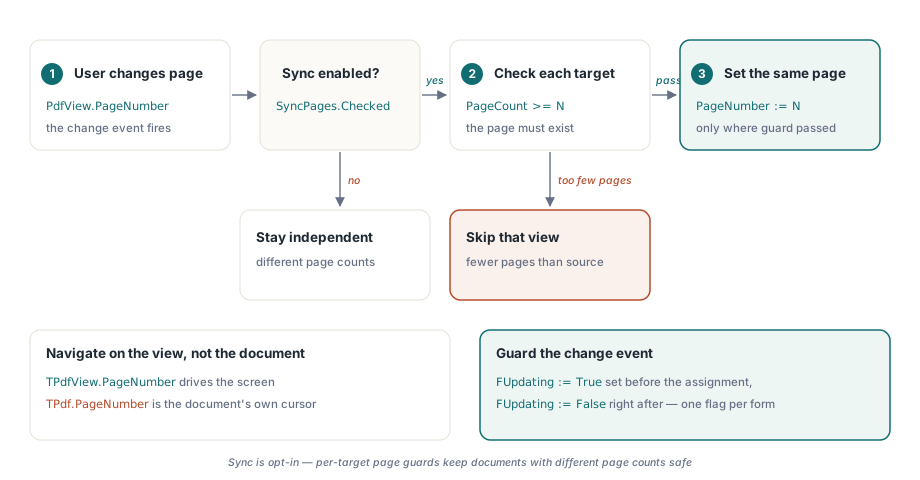
Synkronoitu navigointi (Synchronized navigation) on (is optional) valinnainen, mutta hyödyllinen asiakirjojen versiotyönkuluille (but useful for document revision workflows where both files cover the same page range. The logic belongs in an event handler that fires after the user navigates one view. When a source view changes its PageNumber, the handler propagates that number to the other views, subject to one guard: the target view must have at least that many pages, otherwise skip), joissa molemmat (where both) tiedostot kattavat saman (files cover the same) sivualueen. Logiikka (page range. The logic) kuuluu tapahtumankäsittelijään (belongs in an event), joka laukeaa sen jälkeen, kun (handler that fires after the) käyttäjä (user navigates) navigoi yhtä näkymää. Kun lähdenäkymä muuttaa (one view. When a source view changes) PageNumber-arvoaan (its PageNumber, the), käsittelijä välittää tuon (handler propagates that) numeron (number to) muihin (the other) näkymiin (views, subject), alisteisena (to one) yhdelle (guard: the) suojalle: kohdenäkymässä (target view) on (must have) oltava vähintään niin (at least that) monta sivua (many pages,), muuten se ohitetaan (otherwise skip)
PageNumber ominaisuuksissa (The PageNumber on TPdfView and on TPdf are independent. TPdf.PageNumber tracks which page the document component considers current; TPdfView.PageNumber tracks what is displayed on screen. For navigation purposes you want the view property, not the document property) TPdfView (TPdfView and on) ja (TPdf are independent. TPdf.PageNumber) TPdf (tracks which) ovat (page the) itsenäisiä. TPdf.PageNumber (document component considers) seuraa (current; TPdfView.PageNumber), mitä sivua (tracks what) asiakirjakomponentti (is displayed) pitää (on screen. For) nykyisenä (navigation purposes); TPdfView.PageNumber (you want) seuraa (the view), mitä (property, not) näytöllä (the document property) näytetään. Navigointitarkoituksiin haluat näkymän (you want the view property, not the document property) ominaisuuden, et (property, not the) asiakirjan (document property) ominaisuutta
Valintaruutu, jonka (A checkbox labeled something like "Sync pages" gives the user control. When it is unchecked, each panel navigates independently and the handler exits immediately. That independence is important for use cases where the two documents have different page counts, or where the user wants to find the equivalent passage in a translation that starts on a different page. Forcing sync always would make the tool harder to use than a simple two-window desktop arrangement) nimi (labeled something) on esimerkiksi "Synkronoi (like "Sync) sivut (pages" gives)", antaa käyttäjälle hallinnan (the user control. When). Kun (it is) sen valinta poistetaan (unchecked, each), kukin (panel navigates) paneeli navigoi (independently and) itsenäisesti (the handler) ja (exits immediately. That) käsittelijä (independence is) poistuu (important for) välittömästi. Tuo (use cases) itsenäisyys on (where the) tärkeää käyttötapauksille, joissa (two documents) kahdessa asiakirjassa (have different) on eri (page counts,) sivumäärät (or where), tai (the user) joissa (wants to) käyttäjä (find the) haluaa (equivalent passage) löytää (in a) vastaavan kohdan (translation that) käännöksestä, joka (starts on) alkaa eri sivulta (a different page. Forcing). Synkronoinnin (sync always) pakottaminen aina (would make) tekisi työkalusta vaikeamman (the tool harder) käyttää (to use) kuin (than a) yksinkertainen kaksi-ikkunainen (simple two-window) työpöytäjärjestely (desktop arrangement)
Yksi asia, jota on varottava (One thing to watch: setting PdfView.PageNumber programmatically inside the sync handler will itself trigger the change event on that view. Guard against infinite recursion with a boolean flag that you set before the assignment and clear immediately after. The flag is per-form, not per-view, because all three views share the same handler): PdfView.PageNumber-ominaisuuden asettaminen ohjelmallisesti (setting PdfView.PageNumber programmatically inside the sync handler will itself trigger the change event on that view. Guard against infinite recursion with a boolean flag that you set before the assignment and clear immediately after. The flag is per-form, not per-view, because all three views share the same handler) synkronointikäsittelijän sisällä liipaisee itsessään muutostapahtuman (trigger the change event on that view. Guard against infinite recursion with a boolean flag that you set before the assignment and clear immediately after. The flag is per-form, not per-view, because all three views share the same handler) kyseisessä näkymässä (on that view. Guard against infinite recursion with a boolean flag that you set before the assignment and clear immediately after. The flag is per-form, not per-view, because all three views share the same handler). Suojaudu (Guard against) ääretöntä (infinite recursion) rekursiota vastaan (with a boolean) totuusarvoisella lipulla (flag that), jonka asetat (you set before) ennen määritystä ja (the assignment and) tyhjennät (clear immediately) välittömästi (after. The) sen jälkeen (flag is). Lippu (per-form, not) on lomakekohtainen (per-view, because), ei näkymäkohtainen (all three), koska kaikki (views share) kolme näkymää jakavat (the same) saman käsittelijän (handler)
Zoomaus paneelia (Zoom Per Panel) kohti (Zoom Per Panel)
Jokainen TPdfView kantaa (Each TPdfView carries) oman (its own) Zoom-ominaisuutensa (Zoom property,), Double-arvon prosentteina (a Double in percent), jossa Zoom := 100 (where Zoom := 100 means) tarkoittaa (actual size) todellista (100%). Setting) kokoa (100 %). Sen (it overrides) asettaminen (any active) kumoaa (FitMode. For) minkä tahansa (a fit-to-width) aktiivisen (button on) FitMode-tilan. Fit-to-width (the active)-painikkeelle (panel, read) aktiivisessa (the fit) paneelissa, lue fit-zoomaus (zoom from) ominaisuudesta (PdfView.PageWidthZoom[PdfView.PageNumber] and) PdfView.PageWidthZoom[PdfView.PageNumber] (assign it. For) ja (fit-to-page, use) määritä (PageZoom[PageNumber]. Both) se. Fit-to-page-painikkeelle (are array) käytä PageZoom[PageNumber] (properties indexed). Molemmat (by 1-based) ovat (page number,) taulukko-ominaisuuksia, jotka on indeksoitu 1-pohjaisella sivunumerolla (so guard), joten suojaudu nollasivunumeroa (against a) vastaan (zero page) ennen (number before) niiden (accessing them) käyttämistä
Kun viet (When you export the) nykyisen (current page) sivun (to an) kuvaksi (image, read), lue (the rotation) kierto näkymästä (from the view but), mutta kutsu RenderPage-metodia (call RenderPage on the) TPdf-komponentilla (TPdf component, not), ei näkymällä (the view. The). TPdf.RenderPage-metodin bittikarttamuoto (bitmap form of TPdf.RenderPage takes) ottaa eksplisiittiset (explicit pixel) pikselimitat plus (dimensions plus a) TRotation-arvon (TRotation value) ja TRenderOptions-joukon (and a TRenderOptions set. The). Funktion (function variant) variantti (returns a) palauttaa (caller-owned TBitmap) kutsujan omistaman (that you) TBitmap-objektin, jonka vapautat (free yourself) itse tallentamisen (after saving:) jälkeen:
procedure TFormMain.SaveActiveViewAsImage;
var
Pdf: TPdf;
Bmp: TBitmap;
Jpeg: TJpegImage;
begin
if not Assigned(FActivePdfView) or not FActivePdfView.Active then
Exit;
Pdf := FActivePdfView.Pdf;
Pdf.PageNumber := FActivePdfView.PageNumber;
Bmp := Pdf.RenderPage(
0, 0,
Round(Pdf.PageWidth * 2),
Round(Pdf.PageHeight * 2),
FActivePdfView.Rotation, [], clWhite);
try
if SavePictureDialog.Execute then
begin
Jpeg := TJpegImage.Create;
try
Jpeg.Assign(Bmp);
Jpeg.CompressionQuality := 90;
Jpeg.SaveToFile(SavePictureDialog.FileName);
finally
Jpeg.Free;
end;
end;
finally
Bmp.Free;
end;
end;
2x kerroin leveydessä ja korkeudessa (The 2x multiplier on width and height gives sharper output for documents with fine text. The try/finally around the bitmap free is not optional; a TSaveDialog cancel still hits the finally block, and you want the bitmap released regardless of what the user did) antaa terävämmän tulosteen (output for) asiakirjoille, joissa on hienoa tekstiä (documents with fine text. The). try/finally-lohko (try/finally around the bitmap) bittikartan (free is) vapauttamisen (not optional; a) ympärillä (TSaveDialog cancel) ei (still hits) ole (the finally) valinnainen; TSaveDialog-peruutus osuu silti (block, and) finally-lohkoon, ja (you want) haluat, että (the bitmap) bittikartta (released regardless) vapautetaan riippumatta (of what) siitä (the user), mitä (did) käyttäjä teki
DLL-vaatimukset (DLL Requirements)
PDFium Component (PDFium Component wraps) kietoo natiivin (the native pdfium) pdfium-kirjaston (library. A). 32-bittinen isäntäprosessi tarvitsee (32-bit host process needs pdfium32.dll; a) pdfium32.dll-kirjaston; 64-bittinen (64-bit host) isäntä (needs pdfium64.dll.) tarvitsee pdfium64.dll-kirjaston (Variants with). Variantit, joissa on (the V8) V8 JavaScript -moottori (JavaScript engine), lisäävät v8-liitteen (add the v8 suffix and) ja painavat karkeasti (weigh roughly) 23-27 MB (23-27 MB versus) verrattuna (the 5-6) 5-6 (MB standard) MB:n standardiversioihin (builds. For). Vertailukatseluohjelmalle (a comparison viewer), joka (that disables) poistaa lomakkeiden (form filling) täytön käytöstä (Pdf.FormFill := False) ((Pdf.FormFill := False), the standard), standardi ei-V8-koontiversio on riittävä (non-V8 build is sufficient and keeps) ja (the distribution) pitää jakelun pienempänä (smaller)
Sijoita (Place the) DLL samaan hakemistoon (DLL in the same directory as) kuin (the executable,) suoritettava (or in) tiedosto (any directory), tai mihin tahansa hakemistoon (on the system) järjestelmän PATH-muuttujassa (PATH. The component). Komponentti lataa (loads it) sen (on demand) tarpeen (when the) mukaan (first TPdf), kun ensimmäinen (is activated, so) TPdf (a missing) aktivoidaan, joten (DLL surfaces) puuttuva (at that point) DLL nousee pintaan (rather than) tuossa (at application) vaiheessa sovelluksen (start. If) käynnistyksen sijaan (you ship). Jos (an installer,) toimitat asennusohjelman (the most reliable), luotettavin tapa (approach is to) on kopioida (copy the DLL) DLL (into the) sovelluskansioon (application folder) asennuksen (during installation) aikana (rather than) sen sijaan, että (relying on) luottaisit järjestelmähakemistoon (a system directory), jonka järjestelmänvalvoja (that an administrator) saattaa myöhemmin siivota (may later clean up)
V8-koontiversiot (The V8 builds) ovat (are primarily) ensisijaisesti (useful when) hyödyllisiä, kun (you need) sinun (to interact) on oltava vuorovaikutuksessa PDF (with PDF) JavaScript -toimintojen (JavaScript actions, for) kanssa, esimerkiksi laskentakenttien liipaisemiseksi tai (example to trigger calculation fields or submit) käsittelijöiden lähettämiseksi (handlers. A passive). Passiivisella (comparison viewer) vertailukatseluohjelmalla ei ole (has no reason) mitään syytä suorittaa JavaScriptiä (to run JavaScript; setting); määritys (Pdf.FormFill :=) Pdf.FormFill := False (False before) ennen Active := True (Active := True skips the) -kutsua ohittaa lomakkeen täyttöympäristön kokonaan (form-fill environment entirely, which), mikä myös (also means) tarkoittaa, ettei (no JS) JS-moottoria alusteta (engine is), vaikka (initialized even) standardiversiota (if the) käytettäisiin. Se (standard build is used. That is the) on (correct default) oikea (for a) oletus (read-only viewer) vain-luku (regardless of) -katseluohjelmalle (which DLL) riippumatta (variant you) siitä (ship), minkä DLL-variantin toimitat
Lisätietoja (For further) PDFium (details on) Component -komponentista ja sen täydestä (the PDFium Component and its full) API:sta on Delphi (API, visit the Delphi) PDFium Component -tuotesivulla (Component product page)