PDF-koordinaatit ovat pisteissä, tulostimen koordinaatit ovat laiteyksiköissä, eikä näillä kahdella ole mitään tekemistä toistensa kanssa, ennen kuin muunnat ne tarkoituksellisesti. Tuo epäsuhta on useimpien huonojen tulosteiden juuri Delphi-sovelluksissa: koodi lähettää oikean tiedoston, mutta sivu tulostuu rajattuna, venytettynä tai tyhjänä. PDFium Component käsittelee hahmontamisen puolen siististi; tulostimen putkisto on vakio-VCL:ää. Nämä kaksi sopivat yhteen vaatimattoman koodimäärän kanssa, kunhan ymmärrät, mitä molemmat osapuolet odottavat
Kuinka hahmonna-sitten-tulosta -liukuhihna toimii
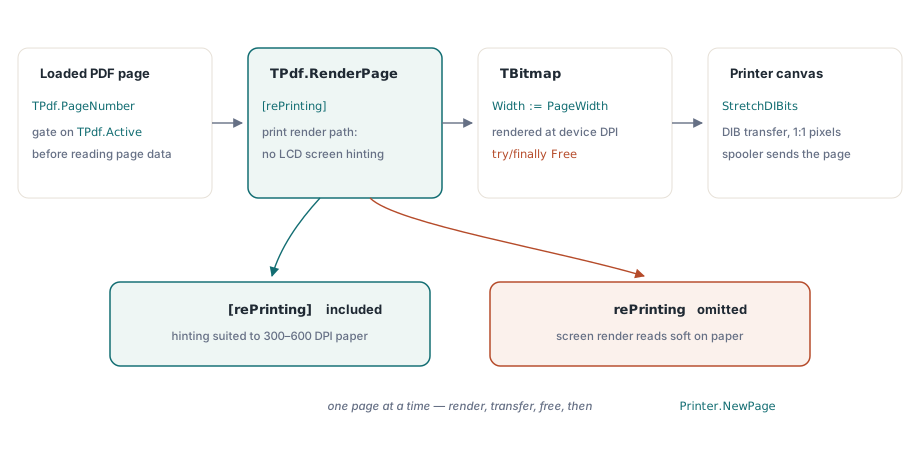
PDFium Component ei puhu suoraan tulostimille. Kuvio on: hahmonna sivu TBitmap-objektiin haluamallasi resoluutiolla, ja siirrä sitten tuo bittikartta tulostimen kankaalle StretchDIBits-funktiolla. TPdf.RenderPage palauttaa kutsujan omistaman bittikartan, joten hallitset pikselimittoja. Välitä [rePrinting]-asetus optiosarjaan, ja PDFium vaihtaa hahmonnuspolun, joka jättää pois vain näytölle tarkoitetut efektit, kuten LCD-alipikselivihjeistyksen, ja käsittelee sivun MediaBox-ominaisuutta oikein tulostetta varten. Jätä rePrinting pois, ja se, mitä lähetät tulostimeen, on näyttöhahmonnus, joka näyttää hyvältä näytöllä, mutta tuottaa tyypillisesti pehmeämmän tulosteen korkean DPI:n tulostimilla, koska 96 DPI:n näyttöjä varten tehdyt vihjeistyspäätökset eivät sovi 300 tai 600 DPI:n tulostukseen
TPdf.Active on ainoa portti, joka on tarkistettava ennen minkään sivuominaisuuden koskettamista. Komponentti nielee latausvirheet hiljaa: Active := True -määrityksen asettaminen vioittuneelle tai salasanasuojatulle tiedostolle ei nosta poikkeusta; se jättää Active-ominaisuuden yksinkertaisesti tilaan False. Tarkista se aina määrityksen jälkeen. PageCount- tai PageWidth-ominaisuuden lukeminen inaktiivisesta asiakirjasta palauttaa nollan, mikä tuottaa hiljaisia nollatoimintoja, joita on erittäin vaikea diagnosoida, kun ne saavuttavat taustatulostimen
Minimaalinen tulostussilmukka
Yksinkertaisin toimiva tapaus lataa tiedoston, avaa tulostustyön, iteroi sivut ja sulkee sen. Ainoa knoppiyksityiskohta on, että Printer.NewPage-metodia ei saa kutsua ennen ensimmäistä sivua, mistä FirstPage-lippu johtuu. StretchDIBits-siirto menee GetDIBSizes- ja GetDIB-funktioiden kautta vetääkseen laiteriippumattomat bitit bittikarttakahvasta, ja maalaa ne sitten tulostimen kankaalle koko sivun kokoisena:
procedure PrintPdfFile(const FileName: string);
var
  Pdf: TPdf;
  I: Integer;
  Bitmap: TBitmap;
  InfoHeaderSize, ImageSize: DWORD;
  InfoHeader: PBitmapInfo;
  Image: Pointer;
  FirstPage: Boolean;
begin
  Pdf := TPdf.Create(nil);
  try
    Pdf.FileName := FileName;
    Pdf.Active := True;
    if not Pdf.Active then
      Exit;  // lataus epäonnistui hiljaa; peräänny

    Printer.Title := Pdf.Title;
    Printer.BeginDoc;
    try
      FirstPage := True;
      for I := 1 to Pdf.PageCount do
      begin
        if FirstPage then
          FirstPage := False
        else
          Printer.NewPage;

        Pdf.PageNumber := I;

        // Hahmonna tulostimen resoluutiolla; rePrinting säätää hahmonnuspolkua
        Bitmap := Pdf.RenderPage(
          0, 0,
          Printer.PageWidth,
          Printer.PageHeight,
          ro0,
          [rePrinting]
        );
        try
          GetDIBSizes(Bitmap.Handle, InfoHeaderSize, ImageSize);
          InfoHeader := AllocMem(InfoHeaderSize);
          try
            Image := AllocMem(ImageSize);
            try
              GetDIB(Bitmap.Handle, 0, InfoHeader^, Image^);
              StretchDIBits(
                Printer.Canvas.Handle,
                0, 0, Printer.PageWidth, Printer.PageHeight,
                0, 0, Bitmap.Width, Bitmap.Height,
                Image, InfoHeader^, DIB_RGB_COLORS, SRCCOPY
              );
            finally
              FreeMem(Image);
            end;
          finally
            FreeMem(InfoHeader);
          end;
        finally
          Bitmap.Free;
        end;
      end;
    finally
      Printer.EndDoc;
    end;
  finally
    Pdf.Active := False;
    Pdf.Free;
  end;
end;Printer.PageWidth- ja Printer.PageHeight-arvojen välittäminen bittikartan mittoina tarkoittaa, että hahmonnat tulostimen natiivilla pikselikoolla, mikä ottaa jo huomioon laitteen DPI:n. StretchDIBits-kutsu kartoittaa sitten nuo pikselit 1:1 sivulle. Tämä antaa sinulle parhaan saavutettavissa olevan tarkkuuden ilman nimenomaista DPI-aritmetiikkaa, mutta se toimii vain silloin, kun PDF-sivu ja fyysinen paperi sattuvat olemaan samankokoisia. Kun ne eroavat, tarvitset eksplisiittistä skaalausta
Skaalaus, kun sivun ja paperin koot eroavat toisistaan
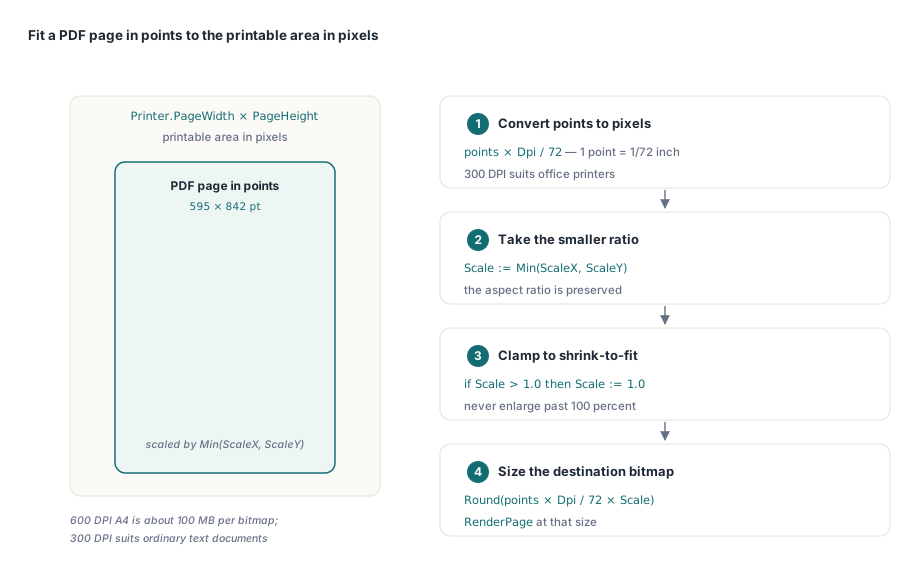
A4-muotoinen muotokuva-PDF-sivu ei automaattisesti mahdu US Letter -tulostimeen, ja maisemasivu, joka syötetään pystysuuntaiseen tulostimeen, leikkaantuu. Vakiolähestymistapa on laskea tasainen skaalauskerroin tulostimen pikselien ja PDF-pisteiden suhteesta ja soveltaa sitä sitten molempiin mittoihin, jotta kuvasuhde säilyy. Pdf.PageWidth ja Pdf.PageHeight paljastavat nykyiset sivumitat pisteinä, joissa yksi piste on 1/72 tuumaa. Kertominen tavoite-DPI:llä ja jakaminen 72:lla muuntaa pikseleiksi kyseisellä resoluutiolla. Ota Min X- ja Y-suhteista saadaksesi suurimman skaalan, joka mahtuu yhä tulostusalueen sisälle:
// Sovita PDF-sivu tulostusalueelle, säilyttäen kuvasuhde
var
  ScaleX, ScaleY, Scale: Double;
  DestWidth, DestHeight: Integer;
  Dpi: Integer;
begin
  Dpi := 300;  // kohderesoluutio
  Pdf.PageNumber := PageIndex;

  ScaleX := Printer.PageWidth  / (Pdf.PageWidth  * Dpi / 72);
  ScaleY := Printer.PageHeight / (Pdf.PageHeight * Dpi / 72);
  Scale  := Min(ScaleX, ScaleY);

  // Rajoita arvoon 1.0 vain kutistamista varten (ei suurennusta)
  if Scale > 1.0 then Scale := 1.0;

  DestWidth  := Round(Pdf.PageWidth  * Dpi / 72 * Scale);
  DestHeight := Round(Pdf.PageHeight * Dpi / 72 * Scale);

  Bitmap := Pdf.RenderPage(0, 0, DestWidth, DestHeight, ro0,
    [rePrinting, reAnnotations]);
  // ... siirrä StretchDIBits-funktiolla kuten yllä
end;
Hahmontaminen arvolla Dpi = 300 sopii useimpiin toimistotulostimiin. 600 DPI:llä yhden A4-sivun bittikartta nousee karkeasti 34 megapikseliin, mikä on noin 100 Mt 32-bittisenä bittikarttana; laadun paraneminen tavallisille tekstiasiakirjoille on minimaalista, ja sivukohtainen muistikustannus on merkittävä. Pidä 600 DPI tulostusliikkeitä tai vektoriraskaita teknisiä piirustuksia varten, joissa sillä on todella väliä
Toisen koodilohkon reAnnotations-lippu on riippumaton rePrinting-lipusta. Sisällytä se, kun käyttäjä odottaa leimojen, korostusten ja kommenttilaatikoiden näkyvän paperilla. Jätä se pois, jos tuloste on vain sisältöä varten. Molempia lippuja voi yhdistää vapaasti
Sivun kierto
PDFium tallentaa sivun kierron PDF-tiedostoon /Rotate-merkintänä, joka on saatavilla Pdf.PageRotation-ominaisuuden kautta ja joka palauttaa TRotation-arvon (ro0, ro90, ro180, ro270). Tulostimen koordinaattijärjestelmä kääntää 90 ja 270 asteen kierrot suhteessa näyttöön. Jos välität raa'an PageRotation-arvon suoraan RenderPage-metodille ilman minkäänlaista säätöä, muotokuva-asiakirjaan upotetut maisemasivut tulostuvat ylösalaisin useimmissa Windowsin tulostinohjaimissa. Korjaus on yksinkertainen vaihto ennen hahmonnuskutsua: kartoita ro90 arvoon ro270 ja ro270 takaisin arvoon ro90, jättäen ro0 ja ro180 ennalleen
Varmista tämä toiminta tietyllä kohdetulostimellasi ennen julkaisua. Ohjaimen toiminta kiertoon liittyen ei ole yhtenäistä toimittajien välillä, ja jotkut ohjaimet soveltavat omaa kiertokorjaustaan GDI-tasolla. Jos näet kaksinkertaisen kierron, poista vaihto; jos et näe lainkaan korjausta, lisää se. Sekasuuntainen asiakirja, jossa vuorottelevat pysty- ja vaakasuuntaiset sivut, on nopein tapa havaita kumpi tahansa vikatila testauksen aikana
Muistin hallinta pitkässä tulostustyössä
Jokainen RenderPage-kutsu varaa uuden TBitmap-objektin, jonka kutsuja omistaa ja joka on vapautettava. Yllä olevassa silmukassa try/finally Bitmap.Free -lohko käsittelee tämän oikein yhden sivun osalta kerrallaan. Älä kerrytä bittikarttoja sivujen yli: 300 DPI:n hahmonnus 200-sivuisesta asiakirjasta kuluttaisi gigatavuja ennen kuin ensimmäinen sivu saavuttaa taustatulostimen. Vapauta jokainen bittikartta ennen seuraavalle sivulle siirtymistä
AllocMem / FreeMem -pari siirtolohkon sisällä noudattaa samaa sääntöä. GetDIBSizes kertoo sinulle, kuinka paljon muistia DIB-otsikko ja pikselidata tarvitsevat; varaat, täytät, maalaat ja vapautat kaiken yhden sivun laajuudessa. Jommankumman lohkon vuotamisen salliminen saa tulostustyön kuluttamaan prosessin keon loppuun asiakirjoissa, jotka ovat pidempiä kuin muutama kymmenen sivua
Jos sinun on suoritettava tulostustöitä taustasäikeessä, pidä TPdf ja kaikki VCL-tulostinkutsut samassa säikeessä. TPdf itse ei ole säikeistysturvallinen sellaisten ilmentymien välillä, jotka jakavat PDFium DLL:n globaalin tilan; turvallisin malli on yksi TPdf per säie, ja kukin lataa oman kopionsa tiedostosta
Tässä esitetyt hahmonnus- ja asiakirja-API:t ovat osa PDFium Component -komponenttia Delphille ja C++Builderille