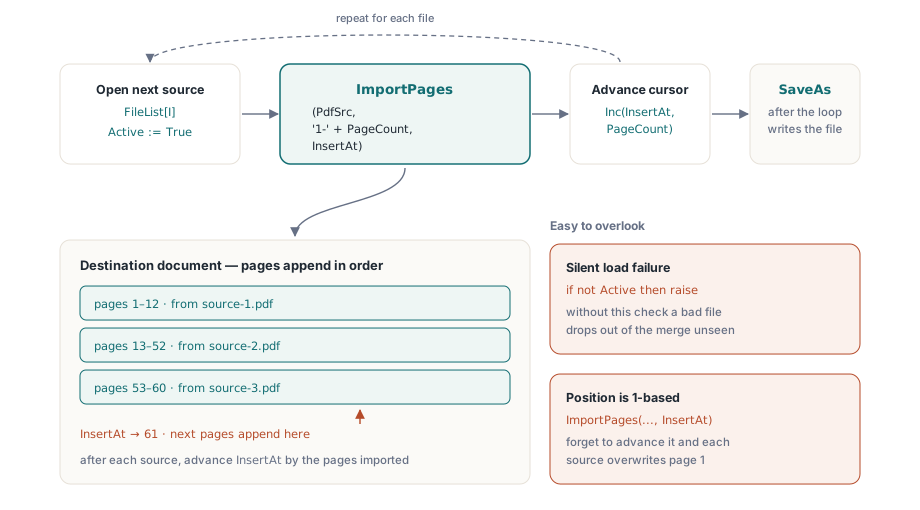
PDFium Component paljastaa PDF-tiedostojen yhdistämisen yhden metodin kautta: ImportPages. Kuvio on aina sama: luo tyhjä kohdeasiakirja, avaa jokainen lähdetiedosto, kutsu ImportPages kopioidaksesi sivut yli, sulje lähde ja toista. Kun silmukka päättyy, SaveAs kirjoittaa tuloksen levylle. Erikoista yhdistämistilaa ei ole, eikä käännettävää kokoonpanoa ole. Monimutkaisuus elää reunatapauksissa, ja niitä on muutama, jotka purevat ilman varoitusta
Ydinsilmukka
Kaksi TPdf-ilmentymää on kaikki, mitä tarvitset. Toinen pitää sisällään kohdeasiakirjan, joka on luotu tyhjänä CreateDocument-kutsulla. Toinen avaa jokaisen lähdetiedoston vuorollaan. Alla on menettely, joka ottaa luettelon tiedostopoluista ja kirjoittaa yhdistetyn tulosteen yhteen polkuun:
procedure MergeFiles(const FileList: TStrings; const OutputPath: string);
var
  PdfDest, PdfSrc: TPdf;
  InsertAt, I: Integer;
begin
  PdfDest := TPdf.Create(nil);
  PdfSrc  := TPdf.Create(nil);
  try
    PdfDest.CreateDocument;
    InsertAt := 1;  // ImportPages käyttää 1-pohjaista kohdesijaintia

    for I := 0 to FileList.Count - 1 do
    begin
      PdfSrc.FileName := FileList[I];
      PdfSrc.Active   := True;

      if not PdfSrc.Active then
        raise Exception.CreateFmt('Cannot open: %s', [FileList[I]]);

      PdfDest.ImportPages(
        PdfSrc,
        '1-' + IntToStr(PdfSrc.PageCount),  // koko asiakirjan alue
        InsertAt);

      Inc(InsertAt, PdfSrc.PageCount);
      PdfSrc.Active := False;
    end;

    PdfDest.SaveAs(OutputPath);
  finally
    PdfSrc.Free;
    PdfDest.Free;
  end;
end;
Kaksi asiaa tuossa koodissa on helppo jättää huomiotta ensimmäisellä lukukerralla. Ensimmäinen on se, miten PDFium raportoi latausvirheistä. Active := True ei koskaan nosta poikkeusta: jos tiedosto puuttuu, on vioittunut tai salasanasuojattu, PDFium nappaa virheen sisäisesti ja jättää Active-ominaisuuden tilaan False. Ilman rivin 10 eksplisiittistä tarkistusta huono tiedosto putoaisi hiljaisesti pois yhdistämisestä, eikä tulosteessa olisi mitään merkkiä tästä. Lopullisessa PDF-tiedostossa olisi vähemmän sivuja kuin odotettiin, etkä tietäisi, mikä tiedosto oli syyllinen
Toinen on InsertAt-laskuri. ImportPages-kutsun kolmas argumentti on 1-pohjainen sijainti kohteessa, mihin ensimmäinen tuotu sivu laskeutuu. 1:stä aloittaminen laittaa ensimmäisen lähdeasiakirjan muuten tyhjän tiedoston alkuun. Jokaisen lähteen jälkeen laskuri etenee PdfSrc.PageCount-arvolla, joten seuraava erä sivuja liitetään edellisen perään. Unohda kasvattaa sitä, ja jokainen myöhempi lähde ylikirjoittaa sivut sijainnissa 1, antaen sinulle vain luettelon viimeisen asiakirjan eikä mitään muuta
Valikoivat sivualueet
Sinun ei tarvitse ottaa jokaista sivua lähteestä. Toisena argumenttina välitetty aluemerkkijono noudattaa yksinkertaista pilkku- ja yhdysmerkkimuotoa: "1-3" ottaa sivut 1–3, "2,4,6" valitsee kolme tiettyä sivua, ja "1-" tarkoittaa sivua 1 asiakirjan loppuun asti. Alueita voidaan yhdistää yhteen merkkijonoon, joten "1-3,5,7-" ohittaa sivut 4 ja 6. Yksi hienous on tässä tärkeä: numerot viittaavat aina lähdeasiakirjan sivuihin alkaen numerosta 1, riippumatta siitä, mihin kyseiset sivut päätyvät kohteessa. Jos haluat sivut 40–50 200-sivuisesta luettelosta, aluemerkkijono on "40-50", ei sijainti suhteessa siihen, mitä kohteessa on jo
// Pura kansi sekä kolmisivuinen tiivistelmä pitkästä raportista
PdfSrc.FileName := 'annual-report.pdf';
PdfSrc.Active   := True;
if PdfSrc.Active then
begin
  // Sivu 1 on kansi; sivut 3-5 ovat tiivistelmä
  PdfDest.ImportPages(PdfSrc, '1,3-5', InsertAt);
  Inc(InsertAt, 4);  // 1 kansi + 3 tiivistelmäsivua = 4 lisättyä sivua
  PdfSrc.Active := False;
end;
Kun lasket lisäystä InsertAt-laskuriin, laske sivut, jotka todella toit, älä lähteen sivumäärää. Jos välität arvon '1,3-5', toit 4 sivua, joten etene 4:llä. Eteneminen PdfSrc.PageCount-arvolla jättäisi aukon tyhjiä kohdesijainteja ja sijoittaisi seuraavan lähdeasiakirjan pidemmälle tiedostoon kuin oli tarkoitus
Mitä ImportPages säilyttää ja mitä se ei säilytä
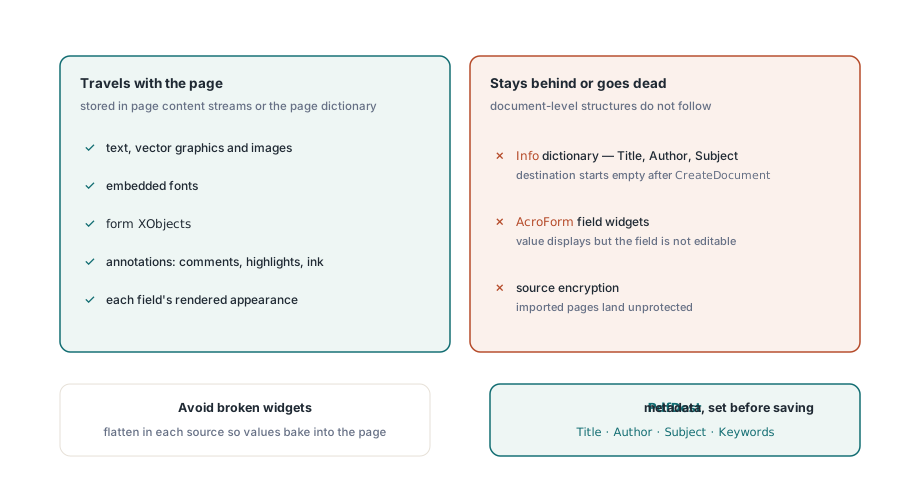
ImportPages-kutsun kopioimat sivut kantavat näkyvän sisältönsä ehjänä. Teksti, vektorigrafiikat, rasterikuvat, upotetut fontit ja lomake-XObject-objektit siirtyvät kaikki osana sivun sisältövirtoja. Myös sivutason merkinnät, mukaan lukien kommentit, korostukset ja mustevedot, tulevat mukana, koska ne on tallennettu sivusanakirjan sisään asiakirjatason sijaan
Asiakirjatason metatiedot ovat eri tarina. Lähteen Info-sanakirjassa olevat otsikko-, tekijä-, aihe- ja avainsanamerkkijonot jäävät taakse. Kohdeasiakirja alkaa tyhjillä metatiedoilla CreateDocument-kutsun jälkeen, joten jos yhdistetty tuloste tarvitsee noiden kenttien olevan täytetty, sinun on määritettävä ne suoraan PdfDest-objektiin ennen SaveAs-metodin kutsumista. TPdf:n Title-, Author-, Subject-, Keywords- ja Creator-ominaisuudet ottavat tavallisia merkkijonoja ja kirjoittavat Info-sanakirjaan tallennuksen yhteydessä
Interaktiiviset lomakekentät ovat monimutkaisempia. AcroForm-kenttien määritykset elävät asiakirjatason sanakirjassa yksittäisten sivuvirtojen sisäpuolen sijaan. Kun ImportPages kopioi sivun, joka sisältää lomakekenttiä, kyseisten kenttien visuaalinen ilme siirtyy, koska se on hahmonnettu sivun sisältövirtaan, mutta kenttien vimpaimet, jotka tekevät niistä interaktiivisia, ovat osa AcroForm-rakennetta eivätkä seuraa mukana. Tyypillisessä yhdistämisessä lähdeasiakirjasta peräisin oleva tekstikenttä näyttää arvon, joka sillä oli tuontihetkellä, mutta sitä ei voi muokata yhdistetyssä tiedostossa. Jos tarvitset kenttien pysyvän täytettävinä, litistä ne jokaisessa lähdeasiakirjassa ennen tuomista: se leipoo nykyiset arvot sisältövirtaan ja poistaa interaktiivisen peitteen, antaen sinulle puhtaan visuaalisen tuloksen ilman rikkoutuneita vimpaimia tulosteessa
Salatut lähdetiedostot
Salasanasuojatut lähdeasiakirjat avautuvat samalla tavalla kuin salaamattomatkin, mutta ensin on asetettava yksi ylimääräinen ominaisuus. Määritä salasana PdfSrc.Password-ominaisuuteen ennen Active := True -määrityksen kääntämistä, ja PDFium käyttää sitä avaamisen aikana:
PdfSrc.Password := 'user-password';
PdfSrc.FileName := 'protected.pdf';
PdfSrc.Active   := True;
if not PdfSrc.Active then
  raise Exception.Create('Wrong password or file cannot be opened');

PdfDest.ImportPages(PdfSrc, '1-' + IntToStr(PdfSrc.PageCount), InsertAt);
Inc(InsertAt, PdfSrc.PageCount);
PdfSrc.Active := False;
Väärä salasana aiheuttaa saman hiljaisen Active = False -tuloksen kuin puuttuva tiedosto, joten nimenomainen tarkistus on tässä yhtä tarpeellinen. Salaus ei siirry kohteeseen: suojatusta lähteestä tuodut sivut laskeutuvat kohteeseen suojaamattomana sisältönä. Jos yhdistetty tuloste tarvitsee myös salausta, määritä se PdfDest-objektiin ennen SaveAs-metodin kutsumista
Tuloksen tallentaminen
TPdf:n SaveAs hyväksyy joko tiedostopolun tai TStream-objektin. Useimmissa yhdistämisissä tiedostoylikuormitus on se, mitä haluat:
PdfDest.SaveAs('merged-output.pdf');Valinnainen toinen argumentti on TSaveOption, joka ohjaa tallennustilaa. Oletusarvo, saNone, kirjoittaa asteittaisen päivityksen, jos asiakirja on ladattu tiedostosta, tai täydellisen uudelleenkirjoituksen, jos se on luotu uutena. Koska CreateDocument-kutsulla rakennettu kohde on aina uusi, tuloste on kompakti yksiversioinen tiedosto. Kolmas argumentti, TPdfVersion, antaa sinun kiinnittää PDF-versio-otsikon, kun sinulla on alavirran kuluttajia, jotka vaativat tietyn version; sen jättäminen arvoon pvUnknown antaa PDFiumin valita sisällön perusteella
Tässä esitetyt ImportPages- ja SaveAs-metodit ovat osa PDFium Component -komponenttia Delphille ja C++Builderille