Tekninen artikkeli

PDF-katseluohjelman (Viewer in Delphi with PDFium Component) rakentaminen (Build a PDF Viewer in Delphi with PDFium Component) Delphissä PDFium Component -komponentilla

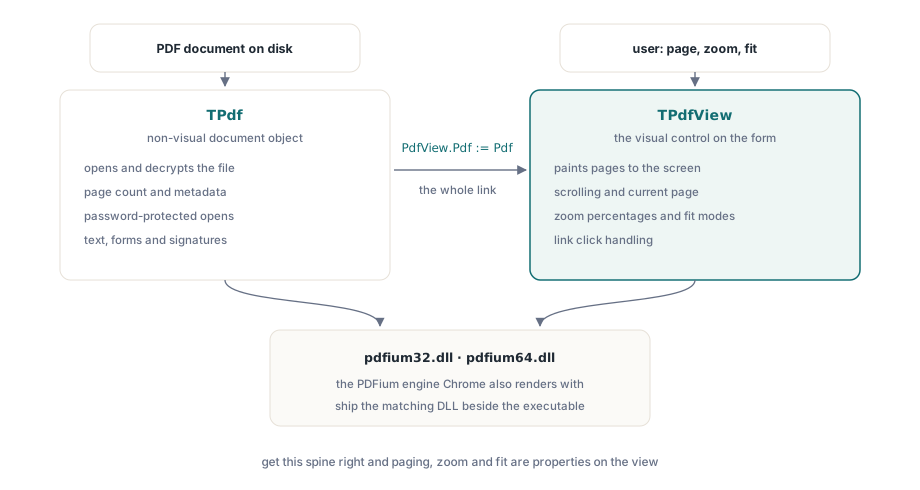
PDF-katseluohjelma (PDF viewer in Delphi comes down to two components and the wiring between them) Delphissä tiivistyy (comes down to two components and the wiring between them) kahteen (two) komponenttiin ja niiden väliseen kytkentään. TPdf omistaa (owns the document: it opens the file) asiakirjan: se avaa tiedoston, purkaa salauksen (decrypts it, and) ja vastaa (and answers questions about page count and) kysymyksiin (questions about page count and) sivumäärästä ja (and) metatiedoista (metadata). TPdfView on (is the visual control that paints pages on) visuaalinen ohjausobjekti (visual control that paints pages on), joka (that paints pages on) piirtää sivuja (paints pages on) näytölle (screen and handles scrolling, zoom) ja käsittelee (handles scrolling, zoom) vieritystä (scrolling), zoomausta ja (and) sivua, jota käyttäjä (page the user is currently looking at) parhaillaan katsoo (is currently looking at). PDFium Component kietoo sisäänsä saman hahmonnusmoottorin (rendering engine that ships inside), joka toimitetaan (ships inside) Chromen sisällä (inside Chrome, so), joten glyyfit (glyphs, anti-aliasing, and), reunanpehmennys (anti-aliasing, and) ja (and) värit (color you get on the canvas match what), jotka (you get on the) saat kankaalle (canvas match what), vastaavat (match what) sitä, mitä (what) käyttäjäsi (your users already see in their) jo (already) näkevät (see in their) selaimessaan (browser). Työ ei ole hahmonnuksessa (rendering). Se on asiakirjaobjektin (document object to the) yhdistämisessä (connecting the) näkymään (view, loading without crashing on a damaged or password-protected file, and), lataamisessa (loading without crashing on a damaged or password-protected file, and) kaatumatta (without crashing on a damaged or password-protected file, and) vaurioituneen (damaged) tai (or) salasanasuojatun (password-protected) tiedoston (file) kohdalla (on a damaged or password-protected file, and) ja (and) sen pienen (handful of controls that make a) ohjausobjektien joukon (handful of controls that make a) antamisessa (giving the user the) käyttäjälle (user the), joka saa katseluohjelman tuntumaan valmiilta (viewer feel finished: turn the page, change the zoom, fit the page to the): käännä sivua (turn the page), muuta (change the) zoomausta, sovita (fit the) sivu (page to the) ikkunaan (window)

Tämä käy (walks through that assembly in the) tuon kokoonpanon (assembly in the) läpi siinä (order you actually build it) järjestyksessä (order you actually build it), jossa sen todella rakennat (actually build it). Kaikki tässä hahmontaa (renders a single page at a) yhden sivun kerrallaan (single page at a time, which), mikä on (which is what most document workflows want) se mitä useimmat asiakirjatyönkulut haluavat. Jos tarvitset (If you need pages stacked in one continuously scrolling column, that) sivuja (pages stacked in one continuously scrolling column, that) pinottuna (stacked in one continuously scrolling column, that) yhteen (one continuously scrolling column, that) jatkuvasti (continuously) vierivään (scrolling) sarakkeeseen (column, that), se (that is a different layout decision and not the path here) on erilainen asettelupäätös (layout decision and not the path here) eikä (not the) polku (path here) tässä (here)

TPdf:n kytkeminen TPdfView:iin (Wiring TPdf to TPdfView)

Pudota (Drop a) TPdf ja (and a) TPdfView lomakkeelle (form, then) ja (and) kerro (tell the) sitten näkymälle (view which document to), mikä asiakirja näytetään (document to display). Tuo yksi sijoitus (single assignment is the) on koko linkki ei-visuaalisen asiakirjan (non-visual document and the control that paints it) ja (and the control that paints it) sitä (it) piirtävän ohjausobjektin (control that paints it) välillä (between the)

procedure TFormMain.FormCreate(Sender: TObject);
begin
  // Pdf and PdfView were dropped at design time.
  PdfView.Pdf := Pdf;                 // the view paints whatever this document holds
  PdfView.FitMode := pfmFitWidth;     // start the user at a sensible zoom
end;

Ennen (Before any of this runs, the) kuin mikään tästä (any of this runs, the) suoritetaan (runs, the), PDFium-natiivikirjaston (native library has to be on the) on oltava (has to be on the) koneella (machine). PDFium Component kutsuu pdfium32.dll- tai pdfium64.dll-tiedostoa (or pdfium64.dll depending on your target platform, and the) kohdealustastasi riippuen (depending on your target platform, and the), ja (and the) asiakirja kerta kaikkiaan kieltäytyy avautumasta (document simply refuses to open if the DLL cannot be), jos DLL:ää (DLL cannot be) ei (cannot be) löydy (found). Toimita (Ship the matching) vastaava (matching) DLL suoritettavan tiedostosi (executable) rinnalla (beside your), tai (or place it where the system loader will find it) sijoita se (place it where the system loader will find it) sinne, mistä järjestelmälataaja löytää sen (system loader will find it). V8-yhteensopivat koontiversiot ovat olemassa (builds exist only for PDFs that carry JavaScript you want to execute, which a) vain (only for PDFs that carry JavaScript you want to execute, which a) niille PDF-tiedostoille (PDFs that carry JavaScript you want to execute, which a), jotka (that carry JavaScript you want to execute, which a) kuljettavat (carry JavaScript you want to execute, which a) JavaScriptiä, jota (JavaScript you want to execute, which a) haluat suorittaa (execute, which a), mitä (which a plain viewer does not, so) pelkkä katseluohjelma ei tee, joten (plain viewer does not, so) kurota (reach for the standard DLL unless you have a concrete reason not to) standardi-DLL:ään (standard DLL unless you have a concrete reason not to), ellet (unless you have a concrete reason not to) omaa (have a concrete reason not to) konkreettista (concrete reason not to) syytä (reason not to) olla (not to) tekemättä (not to) niin (not to)

Asiakirjan (Loading a document without trusting the input) lataaminen (Loading a document without trusting the input) luottamatta (without trusting the) syötteeseen (input)

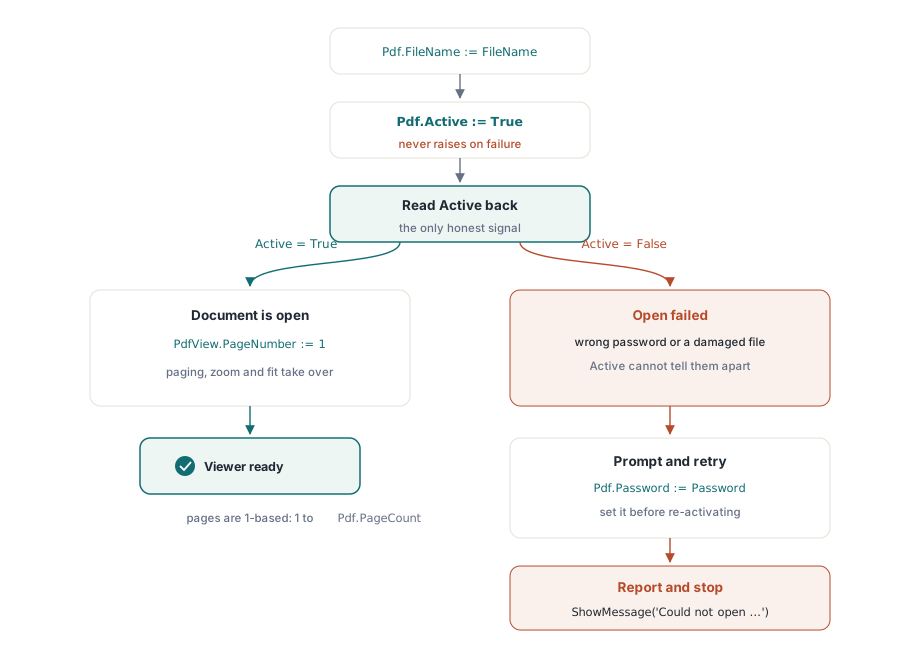
Vaisto (instinct is to wrap the load in a try/except and) on (is to wrap the load in a try/except and) kääriä lataus (wrap the load in a try/except and) try/except-lohkoon ja (try/except and) käsitellä (treat a thrown exception as) heitetty (thrown) poikkeus (exception as) epäonnistumisena (failure). Tuo (That instinct is wrong here, and) vaisto (instinct is wrong here, and) on (is wrong here, and) väärä tässä (wrong here, and), ja sen saaminen (getting it) väärin (wrong produces a viewer that looks fine until) tuottaa katseluohjelman (viewer that looks fine until), joka (that looks fine until) näyttää (looks fine until) hienolta (fine until), kunnes joku ojentaa (someone hands it a broken) sille rikkinäisen (broken) tiedoston (file). Active := True -asetuksen (Setting Active := True does not raise on a load failure) asettaminen ei nosta (does not raise on a load failure) virhettä (on a load failure) latauksen (load failure) epäonnistuessa. PDFium Component nappaa sisäisen (catches the internal error and leaves) virheen ja jättää (error and leaves) Active-tilan (Active sitting at) arvoon False, joten (so the only honest way to) ainoa rehellinen (honest way to) tapa tietää (know whether the document opened is to), avautuiko asiakirja (document opened is to), on (is to read the property back after you set it) lukea (read the property back after you set it) ominaisuus (property back after you set it) takaisin (back after you set it) sen (it) asettamisen (set it) jälkeen (after you set it)

procedure TFormMain.OpenDocument(const FileName: string);
begin
  Pdf.FileName := FileName;
  Pdf.Active := True;                 // never raises; failure leaves Active = False
  if not Pdf.Active then
  begin
    ShowMessage('Could not open ' + FileName);
    Exit;
  end;
  PdfView.PageNumber := 1;            // the view tracks its own current page
  UpdatePageLabel;
end;

Kaksi asiaa (Two things deserve attention) ansaitsee (deserve attention) huomiota (attention). Ensimmäinen on, että (first is that PageNumber exists on both objects and the) PageNumber on (exists on both objects and the) olemassa (exists on both objects and the) molemmissa (both objects and the) objekteissa (objects and the) ja (and the) nämä kaksi (two are) ovat (are) itsenäisiä (independent). Pdf.PageNumber on (is the document's notion of a) asiakirjan (document's notion of a) käsitys (notion of a) nykyisestä sivusta (current page;); PdfView.PageNumber on sivu, jonka (page the control actually displays, and) ohjausobjekti todella (control actually displays, and) näyttää, ja (displays, and) se (it is the one you set to) on se (the one you set to), jonka (which) asetat siirtääksesi (set to move the user through the) käyttäjää tiedoston (user through the file) läpi (through the file). Yhden (Setting one does not move the) asettaminen (Setting one does not move the) ei liikuta (does not move the) toista (other, so a viewer always drives the), joten katseluohjelma (viewer always drives the) ajaa aina näkymän (view's property) ominaisuutta (property). Toinen on (second is the) 1-pohjainen indeksointi (1-based indexing: pages run from 1 to Pdf): sivut (pages run from 1 to Pdf) kulkevat (run from 1 to Pdf) 1:stä (from 1 to Pdf) Pdf.PageCount:iin, ei 0:sta (not from 0, which), mikä (which catches anyone used to) yllättää (catches anyone used to) jokaisen (anyone used to), joka on (used to) tottunut nollapohjaisiin taulukoihin (zero-based arrays)

Salatun (Handling an encrypted) tiedoston käsittely (Handling an encrypted file)

Salatut (Encrypted documents fold into the) asiakirjat (documents fold into the) taittuvat (fold into the) samalle (same) latauspolulle (load path). Jos (If the open password is set before) avoin salasana (open password is set before) on (is set before) asetettu ennen aktivointia (activation, the document decrypts as it), asiakirja puretaan (document decrypts as it) salauksesta sen (decrypts as it) avautuessa (opens;); jos se on (if it is wrong or missing, Active) väärä (wrong or missing, Active) tai (or missing, Active) puuttuu (missing, Active), Active pysyy arvossa False täsmälleen (exactly as it does for a) samalla (as it does for a) tavalla (does for a) kuin korruptoituneelle (corrupt) tiedostolle (file). Joten palautuminen (recovery is to prompt for a) on kysyä salasanaa (prompt for a password and try the) ja (and try the) yrittää aktivointia (activation again) uudelleen (again)

procedure TFormMain.OpenWithPassword(const FileName: string);
var
  Password: string;
begin
  Pdf.FileName := FileName;
  Pdf.Active := True;
  if not Pdf.Active then
  begin
    if InputQuery('Password required', 'Password:', Password) then
    begin
      Pdf.Password := Password;       // must be set before Active := True
      Pdf.Active := True;
    end;
    if not Pdf.Active then
    begin
      ShowMessage('Unable to open the document.');
      Exit;
    end;
  end;
  PdfView.PageNumber := 1;
end;

Koska epäonnistuminen (Because the failure is silent for both a) on (is silent for both a) hiljainen sekä väärälle salasanalle (silent for both a bad password and a) että (and a) vaurioituneelle tiedostolle (damaged file, you cannot tell the), et (you cannot tell the) voi erottaa (cannot tell the two apart from) niitä (two apart from) toisistaan (apart from) pelkän Active-tilan avulla. Käytännössä se on hyväksyttävää (acceptable for a) katseluohjelmalle (viewer: the user either supplies the): käyttäjä (user either supplies the) joko (either supplies the) antaa (supplies the) oikean (right password or learns the) salasanan tai saa (password or learns the) tietää (learns the), ettei (file will not) tiedosto (file will not) avaudu (open, and the), ja viesti lukee (message reads the same either way) samalla (same either way) tavalla (either way) kummassakin (either) tapauksessa (way)

Asiakirjan (Paging through the document) läpikäynti (Paging through the document)

Kun asiakirja on auki (With the document open, navigation is arithmetic on), navigointi (navigation is arithmetic on) on (is arithmetic on) aritmetiikkaa PdfView.PageNumber-ominaisuudessa, jota rajoittaa (bounded by) Pdf.PageCount. Ainoa todellinen (The only real work is clamping, so) työ (work is clamping, so) on (is clamping, so) kiinnittäminen (clamping, so), jotta painikkeet eivät koskaan (buttons never push the) työnnä sivua (push the page out of) rajojen ulkopuolelle (range and the), ja (and the) ensimmäinen ja viimeinen painike (first and last buttons stay disabled at the) pysyvät deaktivoituina (stay disabled at the) tiedoston päissä (ends of the file)

procedure TFormMain.GoToPage(NewPage: Integer);
begin
  if not Pdf.Active then
    Exit;
  if NewPage < 1 then
    NewPage := 1
  else if NewPage > Pdf.PageCount then
    NewPage := Pdf.PageCount;
  PdfView.PageNumber := NewPage;
  UpdatePageLabel;
end;

// the four navigation buttons reduce to one call each
procedure TFormMain.FirstClick(Sender: TObject);  begin GoToPage(1); end;
procedure TFormMain.PrevClick(Sender: TObject);   begin GoToPage(PdfView.PageNumber - 1); end;
procedure TFormMain.NextClick(Sender: TObject);   begin GoToPage(PdfView.PageNumber + 1); end;
procedure TFormMain.LastClick(Sender: TObject);   begin GoToPage(Pdf.PageCount); end;

"Siirry (go to page) sivulle N" (go to page N" text box is the) -tekstilaatikko (text box is the same) on sama (same) GoToPage-kutsu (call fed from a), joka (fed from a) syötetään (fed from a) jäsennetystä (parsed integer, and the) kokonaisluvusta (integer, and the), ja (and the) kiinnitin kattaa (clamp covers the) tapauksen (case where the), jossa (where the) käyttäjä (user types) kirjoittaa (types) 9999 kymmensivuiseen (ten-page file. Keep) tiedostoon (file. Keep). Pidä UpdatePageLabel ainoana paikkana (single place that writes), joka (that writes) kirjoittaa (writes) "Sivu 3 / 12" (Page 3 of 12" so the), jotta lukema (readout never drifts out of) ei koskaan ajaudu (never drifts out of) epäsynkronointiin sen kanssa (sync with what the view shows), mitä (what the view shows) näkymä (view shows) näyttää (shows)

Zoomaus (Zoom: explicit percentages and fit modes): eksplisiittiset (explicit) prosenttiosuudet ja sovitustilat (fit modes)

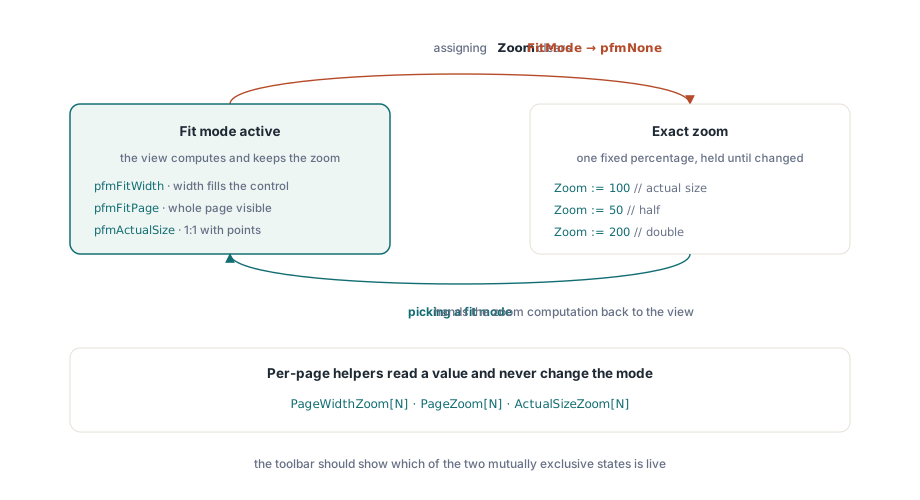
Zoomaus TPdfView-komponentissa saapuu kahdessa vuorovaikuttavassa maussa (flavors that interact, and), ja vuorovaikutuksen (interaction is the) ymmärtäminen on ero (difference between a zoom control that behaves and) käyttäytyvän (behaves and) zoomausohjaimen (zoom control that behaves and) ja (and one that fights the) käyttäjää (user) vastaan taistelevan välillä (fights the user). Suora (The direct route is the) reitti (route is the) on (is the) Zoom-ominaisuus (Zoom property, a), prosenttiosuus (percentage where), jossa 100 tarkoittaa (means actual) todellista (actual) kokoa (size). Toinen (The other route is) reitti (route is) on (is) FitMode, joka (which tells the) kertoo (tells the) näkymälle (view to compute the), että sen tulee laskea (compute the zoom for) zoomaus (zoom for) puolestasi (you and keep) ja jatkaa (keep recomputing it as the) sen uudelleenlaskemista (recomputing it as the) ikkunan kokoa muutettaessa (window resizes)

// fixed magnifications
PdfView.Zoom := 100;     // actual size
PdfView.Zoom := 50;      // half
PdfView.Zoom := 200;     // double

// let the view size the page to the window, and keep it sized on resize
PdfView.FitMode := pfmFitWidth;   // page width fills the control
PdfView.FitMode := pfmFitPage;    // whole page visible
PdfView.FitMode := pfmActualSize; // 1:1 with the document's points

Tässä on (Here is the) osa, joka (part that trips people) kaataa (trips people) ihmisiä (people up. Assigning). Zoom-arvon määrittäminen suoraan (Assigning Zoom directly resets) nollaa (resets) FitMode-arvon (FitMode to) arvoon pfmNone. Tuo on (That is correct behavior, not) oikeaa (correct) toimintaa (behavior, not), ei (not a) bugi (bug: the): sillä hetkellä (moment the), kun käyttäjä (user picks an) valitsee tarkan (exact 150%, the) 150 %, näkymä (view can no longer) ei voi enää (can no longer also be) kunnioittaa myös (also be honoring) "sovita (fit to width," because the) leveyteen" -asetusta (width," because the), koska (because the) kaksi pyyntöä (two requests conflict. The) ovat ristiriidassa keskenään (conflict. The). Seurauksena (consequence for your) käyttöliittymällesi (UI is that a) on, että zoomauspainike (zoom-in button and a) ja sovituspainike (fit-to-page button are) ovat (are mutually exclusive states, and the) toisensa (mutually exclusive states, and the) poissulkevia tiloja (states, and the), ja työkalurivin (toolbar should make the) tulisi tehdä aktiivisesta tilasta (active mode visible. When the) näkyvä (visible. When the). Kun käyttäjä (user clicks) napsauttaa "sovita sivulle" (fit-to-page, set), aseta (set) FitMode; kun he napsauttavat numeerista (numeric zoom, set) zoomausta, aseta Zoom ja (and let it) anna (let it) sen (it) tyhjentää (clear the fit mode on) sovitustila (fit mode on) omillaan (its own)

Jos (If you would rather compute the) lasket mieluummin sovitusarvon (compute the fit value yourself, perhaps to) itse (yourself, perhaps to), ehkäpä zoomausliukusäätimen (seed a zoom slider with the) alustamiseksi (seed a zoom slider with the) nykyisellä sovitusprosentilla (current fit percentage, the), sivukohtaiset (per-page helpers give you the) apulaiset antavat sinulle (helpers give you the) numerot muuttamatta tilaa (numbers without changing the mode). PageWidthZoom[N], PageZoom[N], ja (and) ActualSizeZoom[N] palauttavat prosenttiosuuden, joka (percentage that would) sovittaisi sivun (fit page) N leveyteen (width, fit it), sovittaisi sen (fit it) kokonaan (whole, or), tai (or render it at) hahmontaisi (render it at) sen todellisessa (actual) koossa (size)

// seed a zoom readout from the fit-to-width value of the current page
var
  FitPercent: Double;
begin
  FitPercent := PdfView.PageWidthZoom[PdfView.PageNumber];
  ZoomEdit.Text := Format('%.0f%%', [FitPercent]);
end;

Mitä (What a finished viewer actually) valmis (finished) katseluohjelma (viewer actually) todella tarvitsee (needs)

Yllä (above is a) oleva (above is a) katseluohjelma on muutaman kymmenen (few dozen lines, and it) rivin pituinen (lines, and it), ja se tekee jo sen työn (already does the job a document workflow needs: open a), mitä (what a document workflow needs: open a) asiakirjatyönkulku tarvitsee (document workflow needs: open a): avaa tiedoston, selviytyy huonosta (survive a bad one, show a), näyttää sivun (show a page, move), siirtyy (move between pages, and) sivujen välillä (between pages, and), ja (and change the) muuttaa suurennusta (change the magnification by) käsin tai (by hand or) sovittamalla (by fit). PDFium tekee vaikeat osat (hard parts silently. Embedded) hiljaa (silently. Embedded). Upotetut (Embedded fonts resolve, annotations) fontit ratkeavat (resolve, annotations and form), huomautukset ja (annotations and form fields paint where the) lomakekentät piirtyvät (form fields paint where the) sinne, mihin (where the document places them, and the) asiakirja ne (document places them, and the) asettaa (places them, and the), ja (and the) sivu, jonka (page you see match the) näet (see match the), vastaa (match the) sitä, jonka Chrome-käyttäjä (Chrome user would see, because) näkisi, koska (would see, because) se on (it is the) sama (same engine drawing both) moottori (engine drawing both), joka (drawing both) piirtää molemmat (drawing both)

Tästä (From this base the additions are) pohjasta lisäykset ovat inkrementaalisia rakenteellisten (incremental rather than structural. Text) sijaan (rather than structural. Text). Tekstin valinta (Text selection and search read from the) ja (and search read from the) haku lukevat samasta tekstikerroksesta (same text layer PDFium already builds; metadata), jonka (PDFium already builds; metadata such as) PDFium jo (already builds; metadata such as) rakentaa; metatiedot, kuten (metadata such as) Pdf.Title ja (and) Pdf.Author, ovat yhden ominaisuusluvun (one property read away; rotation) päässä (away; rotation and); kierto (rotation and) ja (and grayscale are render options you) harmaasävy ovat hahmonnusvaihtoehtoja (render options you pass when you), jotka (you pass when you) välität, kun (pass when you) piirrät sivun (draw a page to a) bittikartaksi (bitmap. None of). Mikään noista (None of those change the) ei muuta selkärankaa, joka (spine you have here, which) sinulla on (have here, which) tässä, mikä on (which is the document object, the) asiakirjaobjekti, näkymä (view, and the), ja (and the load-then-navigate flow connecting them) niitä (them) yhdistävä (connecting them) lataa-sitten-navigoi-kulku (load-then-navigate flow connecting them). Tee tuo selkäranka oikein (Get that spine right and the), ja loppu on (rest is decoration) koristelua (decoration)

Kaikkialla käytetyt TPdf- ja TPdfView-komponentit ovat osa (are part of) PDFium Component for Delphi and C++Builder -tuotetta, joka (which carries the) kantaa (carries the full viewer reference on its) täydellistä katseluohjelmaviitettä tuotesivullaan (full viewer reference on its product page)