RTF on ollut olemassa riittävän kauan, jotta se ilmaantuu paikkoihin, joita kukaan ei suunnitellut: vanhoihin raporttigeneraattoreihin, sähköpostien yhdistämisputkiin, laillisten asiakirjojen arkistoihin, jotka ovat ajalta ennen nykyaikaisia tekstinkäsittelyohjelmia. Sen muuntaminen PDF:ksi lennosta on toistuva vaatimus, ja menetelmä, joka oikeasti toimii Windowsissa, ei ole omistettu RTF-jäsennin, vaan renderöintireitti, jonka Windows itse jo tarjoaa TRichEdit- ja EM_FORMATRANGE-komentojen kautta. losLab PDF Libraryn DLL-versio paljastaa virtuaalisen laitekontekstin, joka liittyy suoraan kyseiseen putkeen
Mekanismi: virtuaalinen DC ja EM_FORMATRANGE
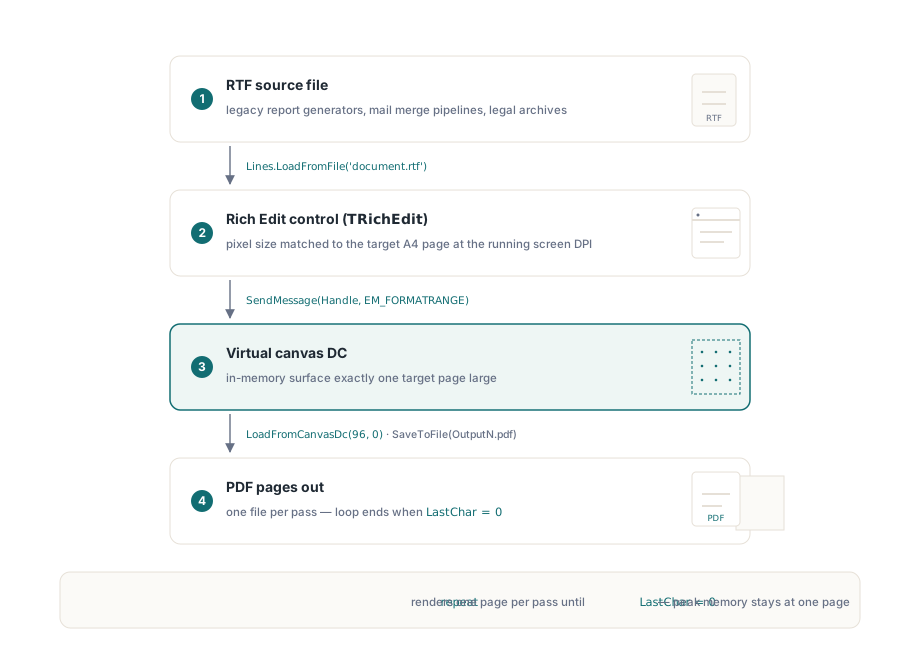
Rich Edit -kontrollit voivat sivuttaa sisältönsä millä tahansa laitekontekstilla, ei vain fyysisellä tulostimella. EM_FORMATRANGE-viesti kertoo kontrollille, että sen on aseteltava merkkialue tiettyyn DC:hen, ja palauttaa sen viimeisen merkin sijainnin, jonka se sai sovitettua. Kutsu sitä toistuvasti, siirtäen cpMin-arvoa joka kerta, ja saat sivukohtaisen tulosteen. losLab PDF Libraryn GetCanvasDC tarjoaa muistissa olevan DC:n, joka on mitoitettu määrittämiesi sivumittojen kokoiseksi; sen jälkeen kun sivu on renderöity siihen, LoadFromCanvasDc nappaa tuloksen PDF-sivuna. Se on koko putki
Yksi asia on syytä tehdä oikein alusta alkaen: TRichEdit-kontrolli on mitoitettava kohdesivua vastaavaksi. Jos kontrolli on pienempi tai suurempi kuin DC:n mitat, sivutus ei vastaa sitä, mitä PDF:ään päätyy. A4-tulosteelle vakiotapa on asettaa kontrollin pikselimitat vastaamaan 210 x 297 mm:ää 96 DPI:llä ennen RTF-tiedoston lataamista, käyttäen samoja skaalausapureita, joita käytät DC:n mitoittamiseen
Delphi-toteutus
Seuraavassa käytetään PDFlibAX_TLB-tuontiyksikköä, joka käärii kirjaston DLL-version. Lomake isännöi TRichEdit-komponenttia ja painiketta; lomakkeen OnCreate-käsittelijä mitoittaa kontrollin ja lataa RTF:n, ja painikkeen napsautus ohjaa muunnossilmukkaa
unit MainUnit;

interface

uses
  Windows, Messages, SysUtils, Classes, Graphics, Controls, Forms,
  Dialogs, StdCtrls, ComCtrls, PDFlibAX_TLB, ActiveX;

type
  TForm1 = class(TForm)
    RichEdit1: TRichEdit;
    Button1: TButton;
    procedure FormCreate(Sender: TObject);
    procedure Button1Click(Sender: TObject);
  private
    function PrintRtfBox(hDc: HDC; rtfBox: TRichEdit;
      FirstChar: Integer): Integer;
  end;

var
  Form1: TForm1;
  PdfDoc: TPDFLibrary;

implementation

{$R *.dfm}

procedure TForm1.FormCreate(Sender: TObject);
begin
  PdfDoc := TPDFLibrary.Create(Self);
  // Mitoita kontrolli A4-kokoiseksi näytön DPI:llä, jotta sivutus vastaa DC:tä
  RichEdit1.Width  := Round(ScaleX(210, mmPixel));
  RichEdit1.Height := Round(ScaleY(297, mmPixel));
  RichEdit1.Lines.LoadFromFile(
    ExtractFilePath(Application.ExeName) + 'document.rtf');
end;

procedure TForm1.Button1Click(Sender: TObject);
var
  Dc: HDC;
  PageNumber, LastChar, PdfDocId: Integer;
begin
  PageNumber := 1;
  LastChar   := 0;
  repeat
    // Hanki A4-kokoiseksi mitoitettu virtuaalinen DC
    Dc := PdfDoc.GetCanvasDC(
      Round(ScaleX(210, mmPixel)),
      Round(ScaleY(297, mmPixel)));
    // Renderöi RTF-sisällön seuraava sivu DC:hen
    LastChar := PrintRtfBox(Dc, RichEdit1, LastChar);
    // Nappaa DC:n sisältö PDF-asiakirjana
    PdfDoc.LoadFromCanvasDc(96, 0);
    PdfDocId := PdfDoc.SelectedPdfDocument;
    PdfDoc.SaveToFile(
      ExtractFilePath(Application.ExeName)
      + 'Output' + IntToStr(PageNumber) + '.pdf');
    PdfDoc.RemovePdfDocument(PdfDocId);
    Inc(PageNumber);
  until LastChar = 0;
end;

function TForm1.PrintRtfBox(hDc: HDC; rtfBox: TRichEdit;
  FirstChar: Integer): Integer;
var
  RcDrawTo, RcPage: TRect;
  Fr: TFormatRange;
  NextCharPosition: Integer;
begin
  RcPage.Left   := 0;
  RcPage.Top    := 0;
  RcPage.Right  := rtfBox.Left + rtfBox.Width  + 100;
  RcPage.Bottom := rtfBox.Top  + rtfBox.Height + 100;

  RcDrawTo.Left   := rtfBox.Left;
  RcDrawTo.Top    := rtfBox.Top;
  RcDrawTo.Right  := rtfBox.Left + rtfBox.Width;
  RcDrawTo.Bottom := rtfBox.Top  + rtfBox.Height;

  Fr.hdc         := hDc;
  Fr.hdcTarget   := hDc;
  Fr.rc          := RcDrawTo;
  Fr.rcPage      := RcPage;
  Fr.chrg.cpMin  := FirstChar;
  Fr.chrg.cpMax  := -1;

  NextCharPosition :=
    SendMessage(rtfBox.Handle, EM_FORMATRANGE, 1, LPARAM(@Fr));
  if NextCharPosition < Length(rtfBox.Text) then
    Result := NextCharPosition
  else
    Result := 0;  // merkitsee viimeistä sivua
end;

end.
Mitä silmukka tekee
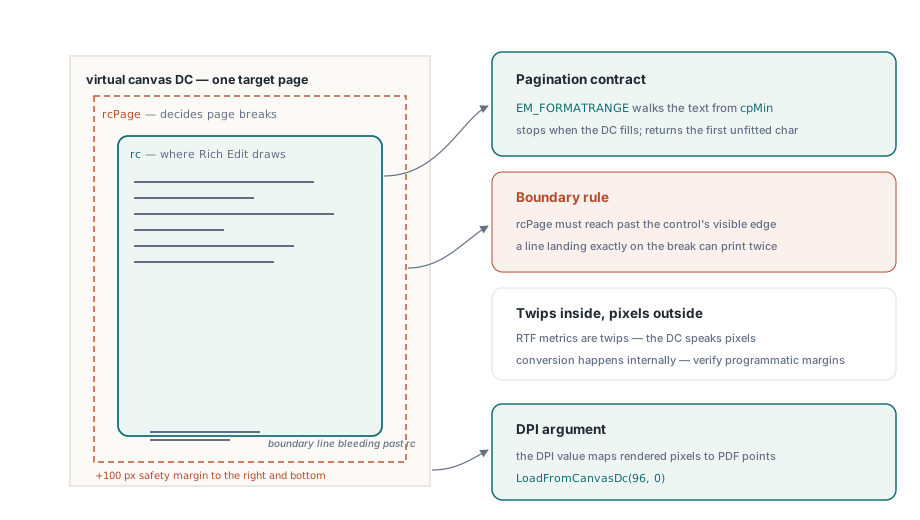
PrintRtfBox täyttää TFormatRange-rakenteen ja välittää sen Rich Edit -kontrollille SendMessage-kutsun kautta. Kontrolli renderöi merkkejä alkaen kohdasta cpMin, pysähtyen, kun DC täyttyy, ja palauttaa ensimmäisen merkin sijainnin, joka ei mahtunut. Kun paluuarvo on yhtä suuri tai suurempi kuin koko tekstin pituus, jokainen merkki on renderöity, ja funktio palauttaa nollan, mikä lopettaa repeat...until-silmukan
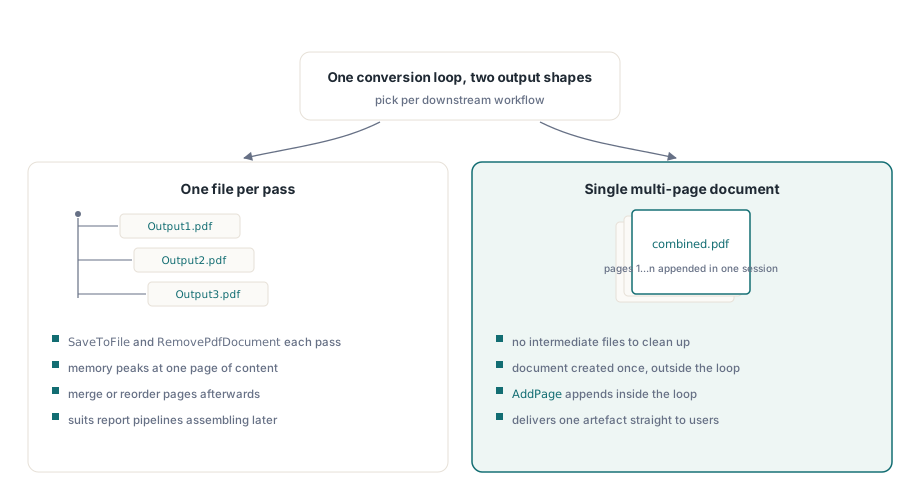
Jokainen iteraatio tuottaa yhden PDF-tiedoston, jonka nimi on Output1.pdf, Output2.pdf, ja niin edelleen. Jos haluat sen sijaan yhden monisivuisen asiakirjan, kirjaston sivunliittämis-API:n avulla voit koota ne jälkikäteen, tai voit jäsentää silmukan uudelleen kutsuaksesi AddPage-metodia yhden asiakirjaistunnon sisällä. Yllä oleva iteraatiokohtainen SaveToFile-malli, jota seuraa RemovePdfDocument, pitää huippumuistin rajattuna yhden sivun sisällön kokoiseksi, millä on merkitystä erittäin pitkien RTF-tiedostojen kohdalla
Mitoituksen yksityiskohtia, jotka saavat ihmiset kompastumaan
96 DPI:n argumentti LoadFromCanvasDc-kutsulle kertoo kirjastolle, millä näyttöresoluutiolla DC renderöitiin, jotta se voi laskea PDF-sivulle oikean pistestä pikseliksi -kartoituksen. Jos tämä menee väärin, teksti näkyy tulosteessa väärän kokoisena, vaikka kuva näyttäisi oikealta näytöllä
Kohteisiin RcPage.Right ja RcPage.Bottom lisätty +100 on pieni marginaali kontrollin näkyvän reunan ulkopuolella. Rich Edit käyttää rcPage-suorakulmiota päättääkseen, mistä sivut jaetaan; ilman marginaalia rajalle tarkalleen osuva rivi voi monistua kahdelle sivulle. Se ei ole taikavakio: haluat sen olevan riittävän suuri, jotta sivun raja osuu puhtaasti kontrollin asettelualueen sisälle eikä viimeiselle pikselille
Lopuksi kontrollin on jo oltava liitettynä näkyvään lomakeikkunaan, kun FormCreate suoritetaan, jotta sen ikkunakahva on kelvollinen ennen ensimmäistä SendMessage-kutsua. Ajonaikana dynaamisesti luotu TRichEdit vaatii eksplisiittisen HandleNeeded-kutsun ennen renderöintisilmukan alkamista, jos lomaketta ei ole vielä näytetty
Fonttien ja RTF-ominaisuuksien käsittely
Koska renderöinnin suorittaa Windowsin Rich Edit -moottori, fonttien korvaaminen noudattaa samoja sääntöjä, joita se käyttää näyttämisessä ja tulostamisessa. Koneelle asennetut fontit, joihin RTF-tiedostossa viitataan, renderöityvät uskollisesti; puuttuvat fontit korvataan hiljaisesti, mikä voi siirtää rivipituuksia ja sivutusta. Tuotantoerämuunnoksissa tämä kannattaa testata nimenomaisesti: lataa asiakirja kullakin RTF-lähteissäsi käytetyllä kirjasintyypillä ja varmista, että tulosteen sivumäärä vastaa manuaalisesta tulostuksen esikatselusta odottamaasi
Taulukot, upotetut kuvat ja useimmat Rich Text -muotoiluominaisuudet toimivat ilman minkäänlaista lisäkäsittelyä, koska Rich Edit renderöi ne natiivisti. Yksi alue, joka voi olla yllättävä, on teksti, joka käyttää twipseinä ilmaistua mukautettua kappaleväliä tai ensimmäisen rivin sisennystä: Rich Editin sisäinen koordinaattijärjestelmä on twipseinä (1/1440 tuumaa), kun taas TFormatRange-kohteeseen asettamasi DC-koordinaatit ovat pikseleinä nykyisellä DPI:llä. Kontrolli muuntaa nämä sisäisesti, mutta jos rakennat RTF:n ohjelmallisesti, sinun tulee varmistaa, että marginaaliarvosi ovat oikeassa yksikössä
DPI-tietoisuus ja korkean DPI:n näytöt
Näytöllä, joka toimii 150 %:n skaalauksella (144 DPI), ScaleX(210, mmPixel) palauttaa suuremman pikselimäärän kuin 100 %:n näytöllä. PDF Library tallentaa mitkä tahansa pikselimitat, jotka välität GetCanvasDC-kutsulle, ja käyttää LoadFromCanvasDc-kutsun DPI-argumenttia laskeakseen PDF:n fyysisen sivukoon takaperin. Niin kauan kuin välittämäsi DPI-arvo vastaa sovelluksesi käyttämää DPI:tä, tulostesivun koko on oikea näytön skaalauksesta riippumatta
Jos sovelluksesi ei ole DPI-tietoinen (vanha oletus), Windows skaalaa näytön DC:n, ja pikselilaskelmasi menevät pieleen korkean DPI:n koneilla. Yksinkertaisin korjaus on ilmoittaa DPI-tietoisuus sovelluksen manifestissa; sovellus saa tällöin todellisia laitepikseleitä, ja LoadFromCanvasDc-kutsulle välitettävä 96 tulisi korvata todellisella näytön DPI:llä, joka saadaan kutsulla GetDeviceCaps(GetDC(0), LOGPIXELSX). Yllä oleva koodiesimerkki kovakoodaa 96:n, koska se sopii 100 %:n skaalausympäristöön ja pitää esimerkin lyhyenä
Tulosteen rakenne: yksi tiedosto per sivu versus yhdistetty asiakirja
Yllä oleva silmukka kirjoittaa jokaisen sivun erilliseen PDF-tiedostoon. Se, onko tämä sitä mitä haluat, riippuu myöhemmästä käytöstä. Raporttien luomisjärjestelmät tarvitsevat usein yksittäisiä sivuja, koska ne kokoavat lopullisen asiakirjan myöhemmin yhdistämällä tai järjestämällä sivuja uudelleen. Jos haluat yhden PDF:n heti alusta alkaen, kirjasto antaa sinun luoda yhdessä istunnossa asiakirjan, jossa on useita sivuja: luo asiakirja kerran silmukan ulkopuolella, kutsu sivun lisäysmetodia SaveToFile-kutsun sijaan silmukan sisällä, ja tallenna koko asiakirja silmukan poistumisen jälkeen. Tämä välttää välitiedostot ja on oikea rakenne useimmille yhden asiakirjan muunnosskenaarioille
Suurille RTF-tiedostoille kannattaa lisätä silmukkaan jonkinlaista edistymispalautetta, koska muunnosnopeus on karkeasti verrannollinen sivumäärään, ja 200-sivuinen asiakirja voi kestää muutaman sekunnin. repeat...until-rakennetta on helppo laajentaa: seuraa merkkisiirtymää edistymispalkin päivityksessä jokaisen iteraation jälkeen käyttämällä LastChar-muuttujaa jaettuna RichEdit1.GetTextLen-kutsusta saatavalla kokonaismerkkimäärällä
Tässä esitetyt GetCanvasDC- ja LoadFromCanvasDc-metodit ovat osa losLab PDF Library -kirjastoa Delphille ja C++Builderille