PDF-sivun mitat lukitaan sillä hetkellä, kun sivu luodaan, joten sisältöä ei voi vain skaalata paikallaan samaan tapaan kuin kuvan kokoa muutettaisiin Kirjastomalli, joka tekee pienentämisestä käytännöllistä, on kaappaa-ja-piirrä-malli: kunkin sivun sisältö nostetaan asiakirjasta kahvaan, luodaan uusi tyhjä sivu alkuperäisessä mediakoossa ja piirretään kaapattu sisältö takaisin pienennettyyn rajauslaatikkoon Ympäröivästä tyhjästä tilasta tulee marginaali 70 %:n mittakaavassa A4-sivulla esimerkiksi 15 % leveydestä jää kummallekin puolelle ja sama osuus ylä- ja alareunaan, mikä on juuri se, mitä alla oleva reunalaskenta tuottaa
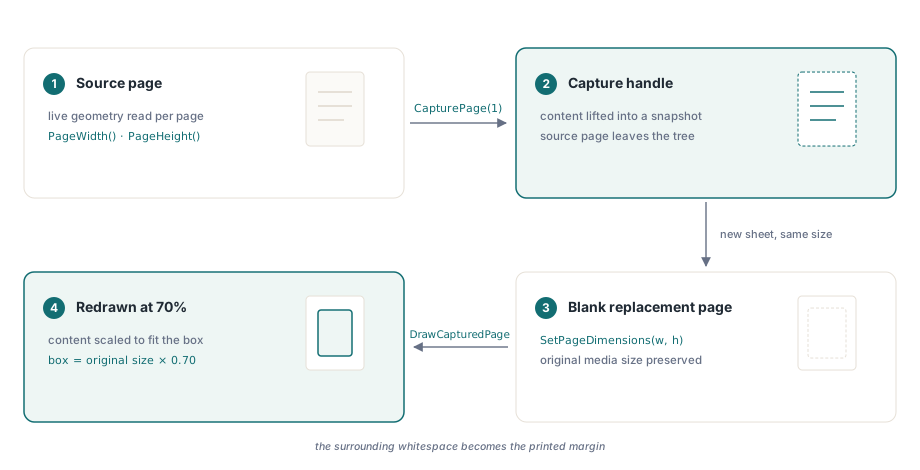
Miten CapturePage toimii
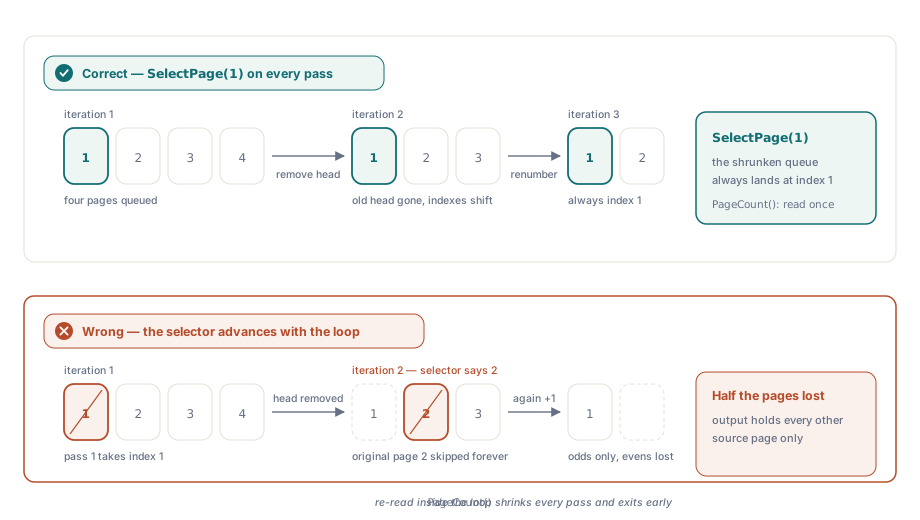
CapturePage ottaa sivunumeron, siirtää kyseisen sivun sisällön muistissa olevaan kaappausobjektiin ja poistaa sivun asiakirjan sivupuusta Poisto on tarkoituksellinen, ja siksi silmukka valitsee aina sivun 1 iteraatioindeksistä riippumatta: kun sivu 1 on kaapattu ja poistettu, entisestä sivusta 2 tulee uusi sivu 1, ja niin edelleen Jos sivuvalitsijaa kasvatetaan silmukan laskurin mukana, joka toinen sivu jää väliin ja tulos on vain puolet odotetusta
CapturePage-kutsun palauttama kaappauskahva ei ole sivuviittaus vaan pikemminkin tilannevedos sisällöstä Se pysyy voimassa, kunnes kutsutaan DrawCapturedPage-metodia tai kahva vapautetaan erikseen DrawCapturedPage ottaa tuon kahvan sekä kohdesuorakulmion, joka annetaan vasempana siirtymänä, alasiirtymänä, leveytenä ja korkeutena, kaikki pisteinä Kirjasto skaalaa kaapatun sisällön sopimaan tuohon suorakulmioon tismalleen ja säilyttää kuvasuhteen vain, jos suorakulmio sattuu vastaamaan alkuperäisiä mittasuhteita Tasaista skaalausta varten suorakulmion tulee olla alkuperäinen koko kerrottuna skaalauskertoimella ja keskitetty sivulle
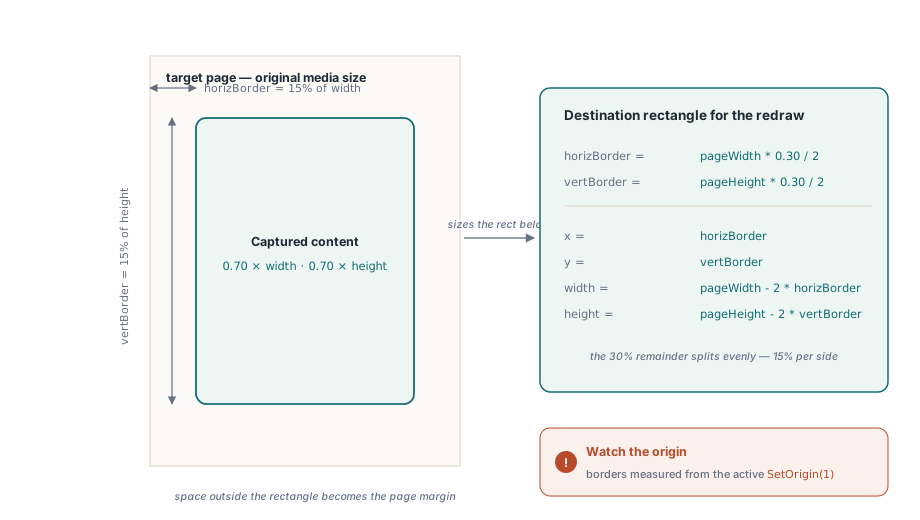
Keskityksen matematiikka
70 %:n skaalauskertoimella kummankin ulottuvuuden jäljelle jäävä 30 % jaetaan tasan kahden reunan kesken Vaakasisennys on siis pageWidth * (1.0 - 0.70) / 2, mikä on 15 % leveydestä, ja pystysisennys noudattaa samaa kaavaa sivun korkeudella DrawCapturedPage-kutsun kohdesuorakulmio alkaa siis pisteestä (horizBorder, vertBorder) ja ulottuu leveyssuunnassa arvoon pageWidth - 2 * horizBorder ja korkeussuunnassa arvoon pageHeight - 2 * vertBorder Tämä laskutoimitus ei ole kirjastokohtainen; se on vain geometriaa, jolla pienempi suorakulmio sovitetaan symmetrisesti suuremman sisään
Yksi asia kannattaa huomata: SetOrigin(1) asettaa koordinaatiston origon vasempaan yläkulmaan vasemman alakulman sijaan DrawCapturedPage-kutsulle annetut reuna-arvot mitataan siitä origosta, joka on kulloinkin asetettu, joten jos origotila vaihtuu lataamisen ja piirtämisen välillä, keskitys menee pieleen
C#-esimerkki
Seuraava koodi käy läpi jokaisen Pages.pdf-tiedoston sivun kaappaa-ja-piirrä-kierroksen kautta ja kirjoittaa tuloksen tiedostoon newpages.pdf PDFL on projektiin tiedostosta PDFlibDLL64.dll lisätty ActiveX/COM-kääreobjekti
private void ScalePages_Click(object sender, EventArgs e)
{
    File.Delete("newpages.pdf");

    double pageWidth, pageHeight, horizBorder, vertBorder;
    double scaleFactor = 0.70;
    int capturedPageId, ret;

    PDFL.LoadFromFile("Pages.pdf", "");
    PDFL.SetOrigin(1);

    int numPages = PDFL.PageCount();

    for (int i = 1; i <= numPages; i++)
    {
        // Valitse aina sivu 1: CapturePage poistaa sivun, joten sivusta 2
        // tulee sivu 1 seuraavassa iteraatiossa.
        PDFL.SelectPage(1);

        pageWidth  = PDFL.PageWidth();
        pageHeight = PDFL.PageHeight();

        horizBorder = pageWidth  * (1.0 - scaleFactor) / 2;
        vertBorder  = pageHeight * (1.0 - scaleFactor) / 2;

        capturedPageId = PDFL.CapturePage(1);

        PDFL.NewPage();
        PDFL.SetPageDimensions(pageWidth, pageHeight);

        ret = PDFL.DrawCapturedPage(
            capturedPageId,
            horizBorder, vertBorder,
            pageWidth  - 2 * horizBorder,
            pageHeight - 2 * vertBorder);
    }

    PDFL.SaveToFile("newpages.pdf");
}
Delphi-esimerkki
Delphi-versio käyttää TPDFlib-luokkaa suoraan COM-kerroksen sijaan, mutta kutsujärjestys on identtinen Käytännön ero on tulostetiedoston suojaus: FileExists ja DeleteFile komennon File.Delete sijaan, koska SaveToFile epäonnistuu, jos kohteen lukitsee edellinen ajokerta, joka on yhä auki katseluohjelmassa
procedure TForm1.ScalePagesClick(Sender: TObject);
var
  PDFLib: TPDFlib;
  pageWidth, pageHeight, horizBorder, vertBorder: Double;
  scaleFactor: Double;
  capturedPageId, ret, numPages, i: Integer;
begin
  if FileExists('newpages.pdf') then
    DeleteFile('newpages.pdf');

  scaleFactor := 0.70;

  PDFLib := TPDFlib.Create;
  try
    PDFLib.LoadFromFile('Pages.pdf', '');
    PDFLib.SetOrigin(1);

    numPages := PDFLib.PageCount();

    for i := 1 to numPages do
    begin
      PDFLib.SelectPage(1);

      pageWidth  := PDFLib.PageWidth();
      pageHeight := PDFLib.PageHeight();

      horizBorder := pageWidth  * (1.0 - scaleFactor) / 2;
      vertBorder  := pageHeight * (1.0 - scaleFactor) / 2;

      capturedPageId := PDFLib.CapturePage(1);

      PDFLib.NewPage();
      PDFLib.SetPageDimensions(pageWidth, pageHeight);

      ret := PDFLib.DrawCapturedPage(
        capturedPageId,
        horizBorder, vertBorder,
        pageWidth  - 2 * horizBorder,
        pageHeight - 2 * vertBorder);
    end;

    PDFLib.SaveToFile('newpages.pdf');
  finally
    PDFLib.Free;
  end;
end;
Mitä skaalauskerroin oikeasti ohjaa
Arvo 0.70 tarkoittaa tässä sitä, että renderöity sisältö täyttää 70 % kummastakin sivun ulottuvuudesta, ei sitä, että tiedosto olisi 70 % alkuperäisestä tavukoostaan Tiedoston koko tämän toimenpiteen jälkeen riippuu alkuperäisen sisällön monimutkaisuudesta; sivu, jolla on suuria kuvia, ei kutistu suhteessa samassa määrin, koska pikselidata piirretään uudelleen samalla resoluutiolla pienemmälle alueelle Jos tavoitteena on tavutason pakkaus, oikea lähestymistapa on LinearizeFile tai uudelleentallennus virtapakkauksella, ei geometrinen skaalaus
70 %:n lukema ei myöskään ole ehdoton raja Mikä tahansa arvo väliltä 0.0–1.0 toimii, ja yli 1.0:n arvot suurentavat sisällön alkuperäisen sivun rajan yli, mikä leikkautuu mediaboxin reunaan, ellei sivun mittoja samalla kasvateta Eri kokoisia sivuja sisältävät asiakirjat toimivat luontevasti, koska PageWidth ja PageHeight kysytään sivukohtaisesti ennen reunalaskentaa, joten asiakirja, jossa parittomat sivut ovat A4-kokoisia ja parilliset A3-kokoisia, tuottaa oikein keskitetyn tulosteen kummallekin sivukoolle ilman erityiskäsittelyä
Missä asiat voivat mennä pieleen
Kaksi virhetilaa nousee esiin käytännössä Ensimmäinen on tulostetiedosto, joka on jäänyt auki PDF-katseluohjelmaan edelliseltä ajokerralta: SaveToFile epäonnistuu tai kirjoittaa nolla tavua alustasta riippuen, eikä uusi tuloste koskaan valmistu Funktion alussa oleva tiedoston poistotarkistus hoitaa tämän kehitysvaiheessa, mutta tuotantoputkessa turvallisempaa on kirjoittaa väliaikaiseen polkuun ja nimetä tiedosto uudelleen vasta onnistumisen jälkeen
Toinen on sivumäärän ristiriita Koska CapturePage poistaa sivuja asiakirjasta sitä mukaa kuin niitä käsitellään, ennen silmukkaa PageCount()-kutsulla luettu määrä on oikea raja, jota vasten iteroidaan PageCount()-kutsu silmukan sisällä palauttaisi pienenevän luvun jokaisella kierroksella ja lopettaisi liian aikaisin, jolloin viimeiset sivut jäisivät käsittelemättä Esimerkkien silmukkamuuttuja toimii vain jäljellä olevien kierrosten laskurina; sitä ei koskaan käytetä sivun valintaan, koska valittava sivu on aina 1 aiemmin selitetystä syystä
Tässä esitellyt sivunkäsittelykutsut, kuten CapturePage, DrawCapturedPage ja SetPageDimensions, kuuluvat losLab PDF Library -kirjastoon Delphille, C#:lle, VB.NET:lle ja C++:lle