Annat valmiin työkirjan kollegalle ja pyydät häntä suodattamaan sitä, ei kirjoittamaan sitä uudelleen. Siksi suojaat taulukon. Vanhemmissa HotXLS-käännöksissä tämä ele kirjoitti tiedostoon aina saman rivin: <sheetProtection sheet="1" objects="1" scenarios="1"/>, kovakoodattuna joka kerta. Taulukko lukittui, salasanan tiiviste liitettiin mukaan, eikä käyttäjä voinut tehdä yhtään mitään — ei edes lajitella ja suodattaa, jonka olisit oikeasti halunnut jättää avoimeksi. Excelin omassa "Protect Sheet" -valintaikkunassa on juuri tästä syystä viisitoista valintaruutua, eikä moottori pystynyt ilmaisemaan yhtäkään niistä. Tämän aukon sulkee v2.91.0:n suojausmalli
HotXLS on natiivi VCL-laskentataulukkokomponentti Delphille ja C++Builderille, joka lukee ja kirjoittaa XLS- ja XLSX-tiedostoja ilman asennettua Exceliä. Tämä artikkeli käsittelee laskentataulukon suojauksen XLSX-puolta: uutta TXLSXSheetProtectionOption-enumia, AllowOption-ominaisuutta, joka kytkee kunkin oikeuden päälle tai pois, sekä sitä yhtä OOXML-koodaussääntöä, johon kompastuu jokainen, joka kirjoittaa <sheetProtection>-elementin käsin
Mitä laskentataulukon suojaus todella vartioi
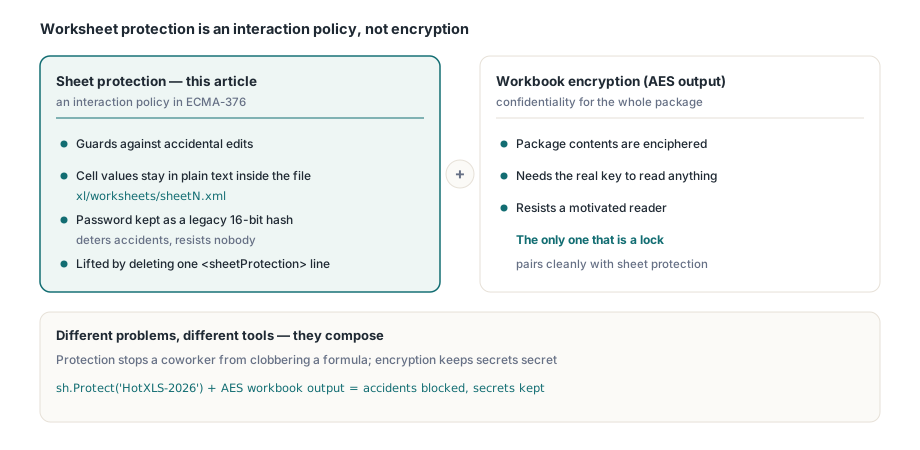
Aloitetaan rajanvedosta, sillä se ratkaisee, kuinka paljon tähän kaikkeen kannattaa luottaa. Laskentataulukon suojaus OOXML-taulukkolaskentamuodossa (ECMA-376) on vuorovaikutuskäytäntö, ei salaus. Se kertoo standardia noudattavalle sovellukselle, mitkä muokkaukset on evättävä taulukon ollessa suojattu. Solujen arvot lojuvat edelleen selväkielisenä tiedostossa xl/worksheets/sheetN.xml; pura .xlsx-tiedosto, niin ne ovat suoraan siellä. Valinnainen salasana tallennetaan lyhyenä vanhan mallin tiivisteenä, ei avaimena, joka sekoittaisi mitään. Kuka tahansa, joka nimeää tiedoston uudelleen, avaa osan ja poistaa <sheetProtection>-rivin, pääsee lukemaan ja muokkaamaan kaikkea
Suojaus siis vastaa kysymykseen "estä kollegaani töpeksimästä kaavaa vahingossa", ei kysymykseen "pidä tämä data salassa joltakulta, joka on motivoitunut murtautumaan". Nämä ovat eri ongelmia, ja niihin on eri työkalut. Jos tarvitset luottamuksellisuutta, haluat työkirjatason salauksen, jota käsitellään artikkelissa AES-suojattu XLSX-tuloste ja joka todella salaa paketin. Taulukon suojaus ja työkirjan salaus yhdistyvät saumattomasti, mutta vain jälkimmäinen on lukko. Pidä tämä raja kirkkaana mielessä, niin loppu tästä sivusta on pelkkää putkitusta
Viisitoista vaihtoehtoa ja AllowOption-ominaisuus
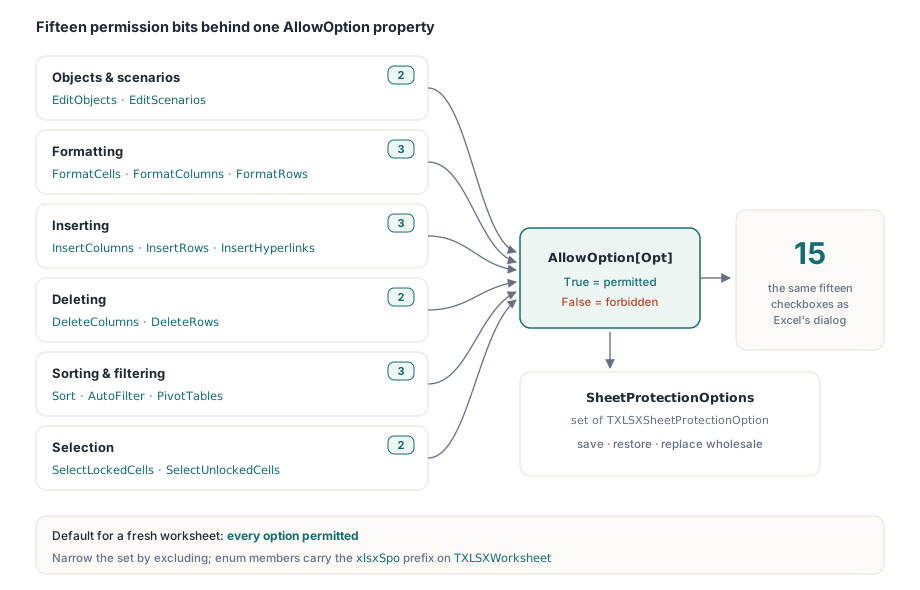
Jokaisella laskentataulukolla on nyt joukko TXLSXSheetProtectionOption-arvoja, jotka kuvaavat, mitä käyttäjä voi yhä tehdä taulukon ollessa suojattu. Jäsenet vastaavat yksi yhteen OOXML-attribuutteja ja Excelin valintaikkunan valintaruutuja:
xlsxSpoEditObjects,xlsxSpoEditScenarios— muokkaa piirrosobjekteja ja mitä jos -skenaarioitaxlsxSpoFormatCells,xlsxSpoFormatColumns,xlsxSpoFormatRows— muotoile soluja, sarakkeita, rivejäxlsxSpoInsertColumns,xlsxSpoInsertRows,xlsxSpoInsertHyperlinks— lisää sarakkeita, rivejä, linkkejäxlsxSpoDeleteColumns,xlsxSpoDeleteRows— poista sarakkeita, rivejäxlsxSpoSelectLockedCells,xlsxSpoSelectUnlockedCells— siirrä valinta lukittuihin tai lukitsemattomiin soluihinxlsxSpoSort,xlsxSpoAutoFilter,xlsxSpoPivotTables— lajittele alueita, käytä AutoFilter-pudotusvalikoita, työskentele PivotTablejen kanssa
Yksittäisiä bittejä luetaan ja kirjoitetaan TXLSXWorksheet-luokan indeksoidun AllowOption-ominaisuuden kautta. AllowOption[Opt] = True tarkoittaa, että toiminto on sallittu; asettamalla se arvoon False se kielletään. Koko joukkoon pääsee käsiksi myös kerralla SheetProtectionOptions-ominaisuuden kautta, joka on TXLSXSheetProtectionOptions (tavallinen Pascalin set of-joukko), joten voit tallentaa, palauttaa tai korvata sen kokonaan
Oletusarvolla on merkitystä, ja se on tietoinen valinta: vasta luotu laskentataulukko käynnistyy tilassa, jossa kaikki vaihtoehdot ovat sallittuja. Konstruktori alustaa SheetProtectionOptions-joukon koko vaihteluvälillä, [Low(TXLSXSheetProtectionOption)..High(TXLSXSheetProtectionOption)]. Siitä eteenpäin kavennat joukkoa sulkemalla pois ne toiminnot, jotka haluat kieltää, sen sijaan että rakentaisit oikeusjoukon tyhjästä. Juuri tämä valinta saa alla kuvatun kirjoittimen koodaussäännön täsmäämään Excelin käytöksen kanssa
Taulukon suojaus, mutta lajittelu ja suodatus avoinna
Tässä on yleinen tapaus alusta loppuun: suojaa valmis raportti niin, ettei sen asettelua voi muokata, mutta anna lukijan lajitella ja suodattaa sitä. Huomaa, että Protect ja vaihtoehdot ovat toisistaan riippumattomia. Protect kytkee taulukon suojattuun tilaan ja tallentaa valinnaisen salasanan tiivisteen; se ei koske vaihtoehtojoukkoa. AllowOption-arvoja säädetään erikseen, ja kytkimet astuvat voimaan, kun taulukko on suojattu ja tallennettu
var
  wb: TXLSXWorkbook;
  sh: TXLSXWorksheet;
begin
  wb := TXLSXWorkbook.Create;
  try
    sh := wb.Sheets.Add('Protected');
    sh.Cells[1, 1].Value := 'Region'; sh.Cells[1, 2].Value := 'Units';
    sh.Cells[2, 1].Value := 'North';  sh.Cells[2, 2].Value := 120;
    sh.Cells[3, 1].Value := 'South';  sh.Cells[3, 2].Value := 98;

    // Suojaa salasanalla. Tämä asettaa vain suojatun tilan ja tiivisteen;
    // vaihtoehtojoukko jää oletusarvoisesti kaikki sallivaksi.
    sh.Protect('HotXLS-2026');

    // Kavenna: säilytä lajittelu ja AutoFilter, kiellä uudelleenmuotoilu ja muotoilu.
    sh.AllowOption[xlsxSpoSort]          := True;
    sh.AllowOption[xlsxSpoAutoFilter]    := True;
    sh.AllowOption[xlsxSpoFormatCells]   := False;
    sh.AllowOption[xlsxSpoFormatColumns] := False;
    sh.AllowOption[xlsxSpoFormatRows]    := False;
    sh.AllowOption[xlsxSpoInsertRows]    := False;
    sh.AllowOption[xlsxSpoDeleteRows]    := False;

    if wb.SaveAs('protection.xlsx') <> 1 then
      Writeln('SaveAs failed');
  finally
    wb.Free;
  end;
end;
Kaksi asiaa tuosta pätkästä kannattaa huomata. Sort- ja AutoFilter-rivit kirjoitetaan näkyviin, vaikka molempien oletusarvo on True; tämä on dokumentaatiota seuraavalle ylläpitäjälle, ei toiminnallinen vaatimus. Ja koska oletukset ovat salliviksi asetettuja, ainoat rivit, jotka muuttavat tulostiedostoa, ovat ne, jotka asettavat vaihtoehdon arvoksi False. Tämä ei ole tämän API:n sattumaa, vaan OOXML:n siirtomuoto paistaa läpi, mikä on seuraavan osion aihe
Koodaussääntö: puuttuminen tarkoittaa sallittua, attr=0 tarkoittaa kiellettyä
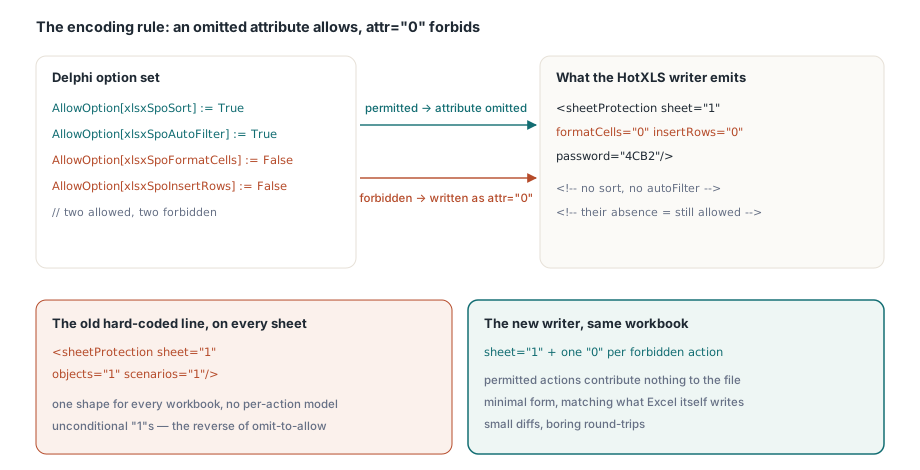
Tämä on koko ominaisuuden ainoa vastaintuitiivinen seikka, ja juuri tähän käsin kirjoitettu <sheetProtection> yleensä kompastuu. OOXML:ssä jokainen toimintokohtainen attribuutti on kielto-lippu, ja sen puuttuminen tarkoittaa lupaa. Puuttuva attribuutti tarkoittaa, että toiminto on sallittu. Attribuutti, jonka arvo on "0", tarkoittaa, että toiminto on kielletty taulukon ollessa suojattu. Kelvollisessa tiedostossa ei ole merkintää formatCells="1" tarkoittamassa "muotoilu on sallittua"; attribuutti yksinkertaisesti jätetään pois. (Puuttuvan attribuutin oletusarvo on OOXML:n totuusarvon oletus tosi, ja nämä attribuutit on nimetty niin, että "tosi" tarkoittaa, että vastaava muokkaus on sallittu.)
HotXLSin kirjoitin peilaa tämän täsmälleen. Se kirjoittaa sheet="1", kun suojaus kytketään päälle, käy sitten läpi vaihtoehtojoukon ja kirjoittaa attr="0" vain niille vaihtoehdoille, jotka on asetettu arvoon False. Sallitut toiminnot eivät tuota tulosteeseen mitään. Näin edellisen osion työkirja serialisoituu suunnilleen tähän tapaan, sisältäen vain kielletyt toiminnot sekä salasanan tiivisteen:
// Käsitteellinen tuloste yllä olevalle pätkälle (attribuutteja lyhennetty selkeyden vuoksi):
// <sheetProtection sheet="1"
//   formatCells="0" formatColumns="0" formatRows="0"
//   insertRows="0" deleteRows="0"
//   password="...4-hex..."/>
// Huomaa, mitä siellä EI ole: ei sort, ei autoFilter, ei selectLockedCells.
// Niiden puuttuminen on juuri se, mikä kertoo Excelille, että nuo toiminnot pysyvät sallittuina.
Jos tulet vanhasta kovakoodatusta merkkijonosta ja odotit näkeväsi jokaisen attribuutin kirjoitettuna auki, tämä näyttää niukalta, lähes väärältä. Se on kuitenkin oikein. Tiedosto, jossa luetellaan sort="1" ja autoFilter="1", tarkoittaisi standardia noudattavalle lukijalle samaa asiaa, mutta Excel itse kirjoittaa minimaalisen, vain kiellot sisältävän muodon, ja sen jäljittely pitää diffit pieninä ja round-tripit tylsinä. objects- ja scenarios-attribuutit noudattavat samaa sääntöä: ne ovat oletuksena sallittuja, joten ne näkyvät vain arvolla "0", kun ne kielletään, mikä on päinvastoin kuin vanha objects="1" scenarios="1", joka kirjoitettiin ehdoitta
Suojauksen lukeminen takaisin: round-trip-tarkkuus
Oikeusmalli, jota voi kirjoittaa mutta ei lukea takaisin, on yksisuuntainen ovi, ja tavallinen oire on lataa-muokkaa-tallenna-kierto, joka hiljalleen laajentaa oikeuksia. HotXLS sulkee tämän aukon. Kun ParseWorksheetXml osuu <sheetProtection>-elementtiin, se asettaa taulukon suojatuksi, tallentaa salasanan tiivisteen, jos sellainen on, ja purkaa sitten jokaisen toimintokohtaisen attribuutin takaisin AllowOption-arvoiksi käyttäen samaa käytäntöä käänteisesti: läsnä oleva attribuutti, jonka arvo on "0", kieltää toiminnon; puuttuva attribuutti jättää vaihtoehdon oletusarvoisesti sallituksi
var
  wb: TXLSXWorkbook;
  sh: TXLSXWorksheet;
begin
  wb := TXLSXWorkbook.Create;
  try
    wb.Open('protection.xlsx');
    sh := wb.Sheets[1];                  // XLSX-taulukot ovat 1-pohjaisia
    if sh.IsProtected then
    begin
      Writeln('Protected; password hash present: ',
        sh.SheetProtectHash <> '');
      Writeln('Sort allowed:       ', sh.AllowOption[xlsxSpoSort]);
      Writeln('AutoFilter allowed: ', sh.AllowOption[xlsxSpoAutoFilter]);
      Writeln('FormatCells allowed:', sh.AllowOption[xlsxSpoFormatCells]);
    end;
  finally
    wb.Free;
  end;
end;
Lataa kirjoittimen tuottama tiedosto, ja saat takaisin Sort- ja AutoFilter-arvot muodossa True, FormatCells-arvon muodossa False — täsmälleen sen joukon, jonka tallensit. Juuri tämä symmetria on koko pointti: muokkaa yhtä solua suojatussa, osittain sallitussa taulukossa ja tallenna uudelleen, ja ne neljätoista oikeutta, joihin et koskenut, säilyvät sen sijaan että romahtaisivat takaisin vanhaan kaikki-tai-ei-mitään-oletukseen
Käytännön huomautukset ja rajat
Muutama asia kannattaa tietää, ennen kuin kytket tämän raporttiputkeen:
- Salasana on tarkoituksella heikko. XLSX-laskentataulukon suojaus tallentaa 16-bittisen vanhan mallin tiivisteen (saman, jota Excel on käyttänyt vuosikymmeniä), säilytettynä täällä yhteensopivuuden vuoksi. Se estää vahingossa tapahtuvat muokkaukset; se ei kestä hyökkääjää. Älä kohtele sitä salaisuuksien vartijana. Todellista suojaa varten salaa työkirja
- Asetusten määrittäminen ennen suojausta on sallittua.
AllowOptionvoidaan asettaa riippumatta siitä, onko taulukko juuri nyt suojattu; kytkimet vain kuvaavat, mitä suojaus tulee sallimaan, kunProtectastuu voimaan.UnProtectpoistaa suojatun tilan ja tiivisteen, mutta jättää vaihtoehtojoukkosi paikalleen seuraavaa kertaa varten - Lukittujen solujen semantiikka pätee edelleen. Suojaus estää muokkaukset vain soluihin, joiden
Locked-attribuutti on asetettu (työkirjan oletusarvo). Syöttöalueen jättäminen muokattavaksi on solutyylin tehtävä, ei suojausvaihtoehto; nämä kaksi kerrosta yhdistyvät samalla tavalla kuin Excelissä - Tämä on XLSX-moottori. Vaihtoehtomalli heijastelee XLS-moottorin vanhempia
Allow*-ominaisuuksia, mutta tässä käytetyt enum- ja ominaisuusnimet (xlsxSpo*,AllowOption) kuuluvatTXLSXWorksheet-luokkaan yksikössälxHandleX. Jos ohjaat myös tulostusasettelua samoilla taulukoilla, suojauksen ja sivun asetusten läpikäynti kertoo, miten nämä asetukset toimivat yhdessä tulostusalueiden ja ylätunnisteiden kanssa, ja tietojen validointi, AutoFilter ja taulukot sopii luontevasti yhteen sen kanssa, ettäxlsxSpoAutoFilterjätetään auki lukitulla raportilla
Hienojakoinen suojausmalli ja loppu XLSX-luku- ja kirjoitusmoottorista toimitetaan HotXLS-Delphi-komponentissa Delphille ja C++Builderille; tuotesivulla on koko laskentataulukon API mukaan lukien täydellinen suojausvaihtoehtojen viiteopas