Un workbench de revisión de intake PDF es un programa pequeño con un único trabajo: mirar cada archivo antes de que nada aguas abajo pueda tocarlo. Para hacer ese trabajo tiene que ensamblar un puñado de capacidades en un solo pase. Abre el archivo (sin fiarse de él), lee lo que el archivo reclama sobre sí mismo, busca contenido que engañe a un extractor naïve o porte un ataque, decide si hay texto extraíble en absoluto, y luego enruta el documento a una cola basándose en lo que encontró. Sáltese la inspección y los fallos son silenciosos: un PDF cifrado con contraseña de propietario que envuelve un formulario XFA pasa por un extractor de texto como cadenas vacías, se indexa como un documento en blanco, y nadie lo nota hasta que alguien aguas abajo va buscando contenido que nunca se leyó. PDFium Component es un visor y biblioteca de inspección VCL/LCL de código fuente para Delphi, C++Builder y Lazarus, y expone las llamadas de introspección que este workbench necesita. Las secciones a continuación recorren qué llamada responde qué pregunta, y los dos lugares donde la llamada obvia le da una respuesta equivocada con seguridad
Cinco preguntas que responder antes de enrutar un archivo
Quítele la cuadrícula y la franja de miniaturas, y el triage de intake se reduce a cinco preguntas:
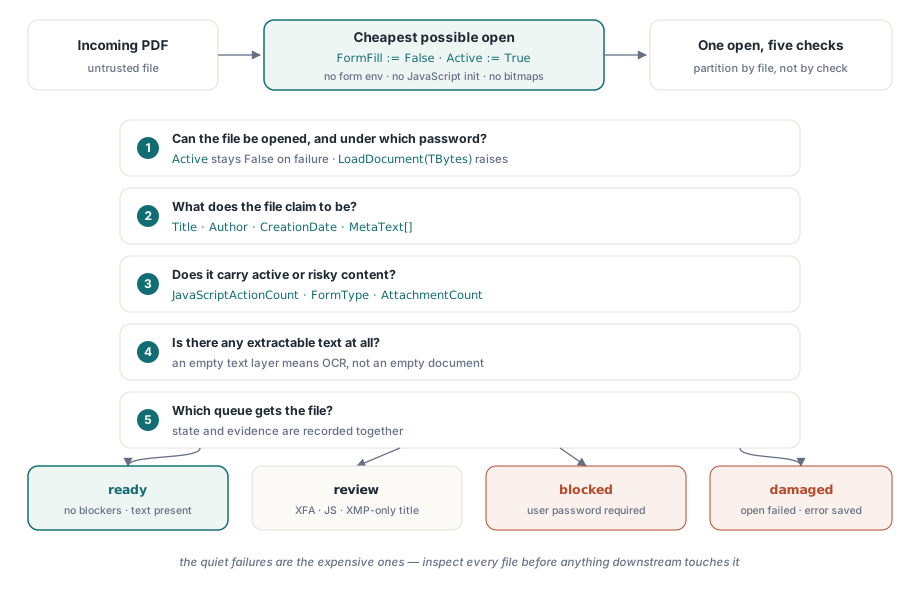
- ¿Puede abrirse el archivo en absoluto, y con qué contraseña?
- ¿Qué reclama ser: título, autor, fecha de creación?
- ¿Transporta contenido activo o riesgoso como JavaScript, un formulario XFA, o archivos incrustados?
- ¿Hay texto extraíble, o es un escaneo destinado a OCR?
- Dado todo eso, ¿a qué cola va: procesamiento directo, revisión manual, o cuarentena?
Cada pregunta se mapea a una o dos llamadas de PDFium Component. Dos de esos mapeos tienen bordes afilados que dan cuenta de la mayoría de los archivos mal enrutados que he tenido que depurar en producción. Los metadatos del documento viven en dos lugares distintos que pueden no estar de acuerdo, y el cifrado no detiene necesariamente que un documento se abra
Abrir barato: relleno de formulario desactivado, cero páginas renderizadas
El triage debería ser la apertura más barata posible. Fijar FormFill := False antes de Active := True le dice al componente que se salte el entorno de relleno de formulario por completo. Eso acorta el tiempo de carga, y (tan importante para archivos de origen desconocido) evita que cualquier JavaScript a nivel de documento se inicialice. Ninguna de las propiedades de inspección usadas abajo requiere renderizar una página, así que un pase de triage nunca tiene que producir un solo mapa de bits
procedure InspectIncoming(const IncomingPath: string; var Rec: TIntakeRecord);
var
  Pdf: TPdf;
begin
  Pdf := TPdf.Create(nil);
  try
    Pdf.FileName := IncomingPath;
    Pdf.FormFill := False;     // sin entorno de formulario, sin inicialización de JavaScript
    Pdf.Active := True;        // el fallo es silencioso: Active simplemente se queda en False

    if not Pdf.Active then
    begin
      Rec.OpenFailed := True;  // archivo dañado o bloqueo por contraseña de usuario
      Exit;                    // el bloque finally aún se ejecuta
    end;

    Rec.PageCount := Pdf.PageCount;
    CollectIdentity(Pdf, IncomingPath, Rec);
    CollectRiskSignals(Pdf, Rec);
  finally
    Pdf.Active := False;
    Pdf.Free;                  // nunca fugues la instancia con un archivo con formato incorrecto
  end;
end;
La comprobación tras la asignación no es opcional, y es una comprobación en lugar de un manejador de excepciones por una razón. Cuando el motor no puede cargar el archivo, el componente se traga el EPdfError interno y deja Active en False en lugar de propagarlo. El código que espera una excepción leerá felizmente PageCount de un documento que nunca se abrió. Si el flujo de rechazo necesita el texto de error real del motor, lea el archivo en un arreglo de bytes y llame a la sobrecarga de LoadDocument que toma TBytes; esa ruta sí levanta EPdfError con el mensaje, incluyendo el caso de contraseña. El try..finally aún se gana su sitio. Los servicios de intake corren sin supervisión durante semanas, y ninguna excepción posterior puede fugarse la instancia TPdf o retener un bloqueo con el que el pase de reintento tropezará
El rendimiento rara vez se convierte en el cuello de botella. Con el relleno de formulario desactivado y sin render, una apertura de triage está dominada por la E/S, y un solo worker inspecciona cómodamente varios archivos por segundo desde disco local. Si el volumen de intake alguna vez supera a un worker, divida el trabajo por archivo en lugar de por comprobación. Las cinco preguntas comparten una apertura, y dividirlas entre procesos multiplicaría el paso más caro en lugar de amortizarlo
Los metadatos viven en dos lugares, y no se ponen de acuerdo
ISO 32000-1 define dos hogares para los metadatos del documento: el diccionario de información del documento (cláusula 14.3.3) y un paquete XMP adjunto al catálogo (cláusula 14.3.2). Las propiedades Title, Author, Subject y CreationDate leen el diccionario Info, con MetaText[] para cualquier otra clave y DecodeDate para analizar la cadena de fecha D:YYYYMMDD.... La trampa es que los productores modernos escriben cada vez más solo XMP, una dirección que ISO 32000-2 hace oficial al deprecar la mayoría de las claves del diccionario Info en PDF 2.0. El síntoma en una herramienta de intake es concreto. Su workbench muestra un título vacío mientras Adobe Acrobat muestra uno, porque Acrobat cayó a dc:title dentro del paquete XMP, que las propiedades del diccionario Info nunca tocan
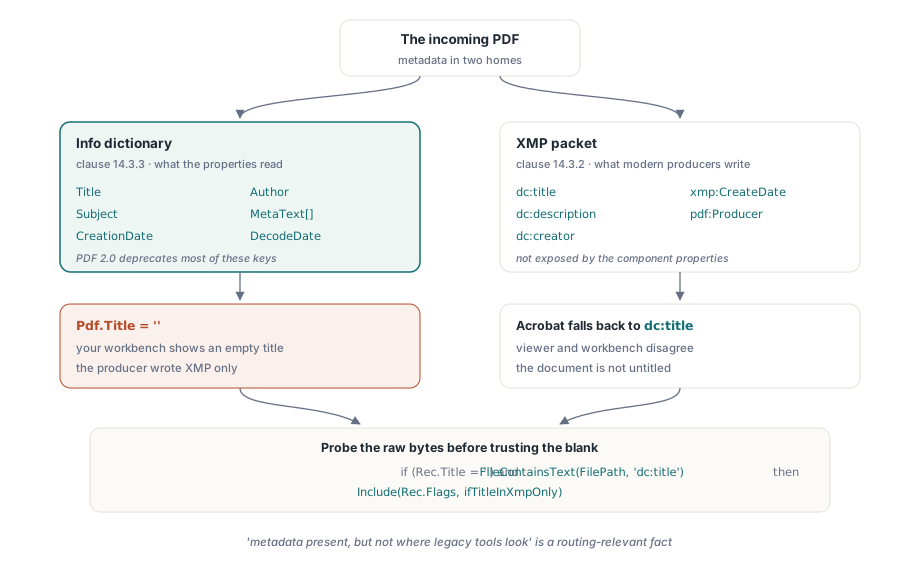
procedure CollectIdentity(Pdf: TPdf; const FilePath: string;
  var Rec: TIntakeRecord);
begin
  Rec.Title := Pdf.Title;             // valor del diccionario Info
  Rec.Author := Pdf.Author;
  Rec.CreatedAt := Pdf.CreationDate;  // cadena de fecha PDF bruta ("D:2026...")

  // Un título Info vacío no significa que el documento no tenga título. El
  // componente no expone el paquete XMP, así que sondea los bytes
  // brutos del archivo en busca del elemento dc:title antes de confiar en el blanco.
  if (Rec.Title = '') and FileContainsText(FilePath, 'dc:title') then
    Include(Rec.Flags, ifTitleInXmpOnly);
end;
Incluso la burda comprobación de subcadena anterior se gana su sitio: "metadatos presentes, pero no donde las herramientas heredadas miran" es un hecho relevante para el enrutamiento en cualquier pipeline de archivo que indexe por título o autor. Si su índice aguas abajo lee solo el diccionario Info, los archivos marcados así se volverán silenciosamente no buscables
Archivos cifrados que se abren de todas formas
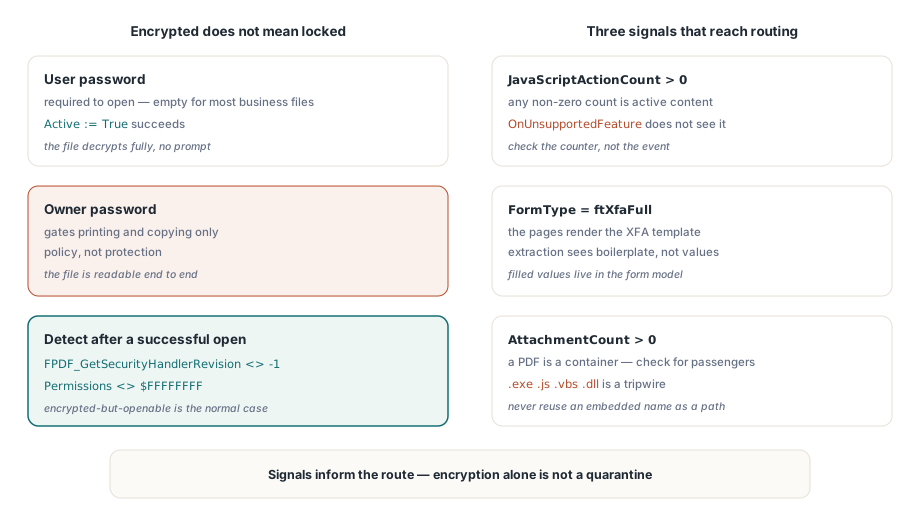
Un documento cifrado no necesariamente falla al abrir. El manejador de seguridad estándar (ISO 32000-1 cláusula 7.6.3) distingue una contraseña de usuario, requerida para abrir el documento, de una contraseña de propietario que simplemente controla permisos como impresión y copia. Una gran parte de los documentos de negocio "protegidos" están cifrados con una contraseña de propietario y una contraseña de usuario vacía. Se abren sin preguntar, se descifran por completo, y confían en que los visores se ofrezcan voluntariamente a honrar las banderas de permiso. Eso es política, no protección, y sus estados de intake deberían reflejar la diferencia
Detectar el cifrado tras una apertura exitosa toma una llamada al motor más una reserva. FPDF_GetSecurityHandlerRevision(Pdf.Document) devuelve -1 para archivos no protegidos y la revisión del manejador en caso contrario, y Pdf.Permissions devolviendo algo distinto a la máscara con todos los bits puestos $FFFFFFFF es la señal corroboradora. Para archivos genuinamente bloqueados con contraseña de usuario, asigne Password antes de fijar Active := True; si la apertura aún falla, enrute el archivo a un estado bloqueado que pida credenciales al remitente a través de un canal seguro en lugar de reintentar a ciegas. Y resista la tentación de tratar "cifrado" como cuarentena automática. En la mayoría de las industrias densas en documentos, los archivos cifrados-pero-abribles son el caso normal, no el sospechoso
Contenido activo: JavaScript, XFA y archivos incrustados
Tres hallazgos siempre deberían llegar a la decisión de enrutamiento. Primero, JavaScript: el evento OnUnsupportedFeature reporta características estructurales como XFA o contenido 3D a medida que el motor las encuentra, pero no detecta JavaScript. Compruebe JavaScriptActionCount en su lugar y trate un resultado no nulo como contenido activo. Segundo, XFA: cuando FormType devuelve ftXfaFull, las páginas visibles a menudo son poco más que un render de la plantilla XFA, y la extracción de texto convencional verá texto estándar en lugar de los valores rellenados. Tercero, adjuntos: un PDF es un formato contenedor, y AttachmentCount le dice si este lleva pasajeros
procedure CollectRiskSignals(Pdf: TPdf; var Rec: TIntakeRecord);
var
  i, PageNo: Integer;
  Ext: string;
begin
  Rec.IsEncrypted := Assigned(FPDF_GetSecurityHandlerRevision) and
    (FPDF_GetSecurityHandlerRevision(Pdf.Document) <> -1);
  Rec.HasForms := Pdf.FormType <> ftNone;
  Rec.IsXfa := Pdf.FormType = ftXfaFull;
  Rec.HasJavaScript := Pdf.JavaScriptActionCount > 0;

  // AnnotationCount es una propiedad por página; recorre las páginas para totalizarla.
  // Cargar un objeto de página no renderiza nada, así que esto sigue siendo barato.
  Rec.Annotations := 0;
  for PageNo := 1 to Pdf.PageCount do
  begin
    Pdf.PageNumber := PageNo;
    Inc(Rec.Annotations, Pdf.AnnotationCount);
  end;

  Rec.Attachments := Pdf.AttachmentCount;

  for i := 0 to Rec.Attachments - 1 do
  begin
    Ext := LowerCase(ExtractFileExt(string(Pdf.AttachmentName[i])));
    if (Ext = '.exe') or (Ext = '.js') or (Ext = '.vbs') or (Ext = '.dll') then
      Include(Rec.Flags, ifDangerousAttachment);
  end;
end;
Dos detalles en ese bucle merecen atención. El nombre del adjunto viene de dentro del documento, así que nunca lo reutilice como ruta de salida sin saneamiento previo; un nombre incrustado como ..\..\start.exe es un path traversal esperando una llamada de guardado descuidada. Y una lista de bloqueo de extensiones es un cable trampa, no una garantía. Su trabajo es forzar una decisión humana, no certificar el archivo como limpio
Convertir señales en estados de enrutamiento
Un modelo de estados viable necesita menos estados de los que la mayoría de los equipos esperan: listo (sin bloqueantes, texto presente), revisión (apertura exitosa pero algo necesita ojos, como un formulario XFA, JavaScript, una capa de texto vacía, o un título solo en XMP), bloqueado (contraseña de usuario requerida), y dañado (apertura fallida). Registre la evidencia junto al estado. El hash del archivo, el conteo de páginas, las banderas exactas, y el mensaje de error del motor para archivos dañados importan todos, porque la persona que cuestione una decisión de enrutamiento lo hará semanas después, contra un archivo que desde entonces puede haber sido reemplazado o modificado
Cuando un operador sí necesita mirar un archivo en cuarentena, no se lo entregue al visor shell predeterminado. Renderícelo dentro de un panel endurecido con scripting y manejo de enlaces desactivados, el enfoque descrito en construir una superficie de vista previa PDF segura en Delphi. Y si su intake alimenta un archivo con requisitos de conformidad, el pase de triage es el lugar natural para programar una comprobación más profunda; validación por lotes de preflight contra perfiles PDF/A y PDF/UA recoge exactamente donde esta inspección se detiene
La página del producto del componente cubre licencia, la API de inspección completa, y las demos incluidas, incluido un inspector de documentos estilo intake: PDFium Component