PDF almacena imágenes como objetos de primera clase dentro de sus flujos de contenido. Cuando una página hace referencia a una fotografía, un escaneo o un diagrama, los datos de los píxeles viven en un diccionario XObject junto a la geometría de la página. PDFium Component expone eso a través de dos propiedades en TPdf: BitmapCount, que devuelve cuántos mapas de bits incrustados hay en la página actual, y Bitmap[Index], que decodifica uno de ellos en un TBitmap que usted posee y debe liberar. Ese es todo el modelo de extracción. El bucle es de cuatro líneas; lo que requiere criterio es la plomería circundante
Apertura del documento
Lo primero que hay que saber sobre TPdf es que Active := True nunca genera una excepción. Fallas de carga, contraseñas incorrectas, archivos corruptos: todo se traga internamente y el componente simplemente permanece inactivo. Usted mismo debe verificar el indicador (flag) después de la asignación, o ingresará al bucle de la página con PageCount devolviendo cero y se preguntará por qué no se extrajo nada
var
  Pdf: TPdf;
begin
  Pdf := TPdf.Create(nil);
  try
    Pdf.FileName := 'report.pdf';
    Pdf.Active := True;
    if not Pdf.Active then
    begin
      Writeln('Failed to open: ', Pdf.FileName);
      Exit;
    end;
    Writeln(Pdf.PageCount, ' pages');
    // proceder a la extracción
  finally
    Pdf.Free;
  end;
end;
Los archivos protegidos con contraseña siguen el mismo patrón: asigne Pdf.Password antes de establecer Active := True. Si la contraseña es incorrecta, Active permanece False y usted no obtiene ninguna excepción para atrapar. En una herramienta por lotes (batch) que procesa cientos de archivos, ese comportamiento silencioso es realmente útil: usted acumula las fallas en una lista en lugar de desenrollar la pila de llamadas (call stack) para cada una de ellas
Iteración de páginas y extracción de mapas de bits
BitmapCount es por página, por lo que establece Pdf.PageNumber antes de leerlo. Los números de página están basados en 1; el valor predeterminado es 0, lo que significa que no se carga ninguna página. La propiedad Bitmap[Index] está basada en 0 y devuelve un TBitmap propiedad del llamador. Usted debe liberarlo. Si descuida la liberación (free) dentro de un bucle largo sobre un documento grande, la memoria aumenta rápidamente, porque cada mapa de bits puede ocupar varios megabytes de datos de píxeles sin procesar antes de cualquier compresión
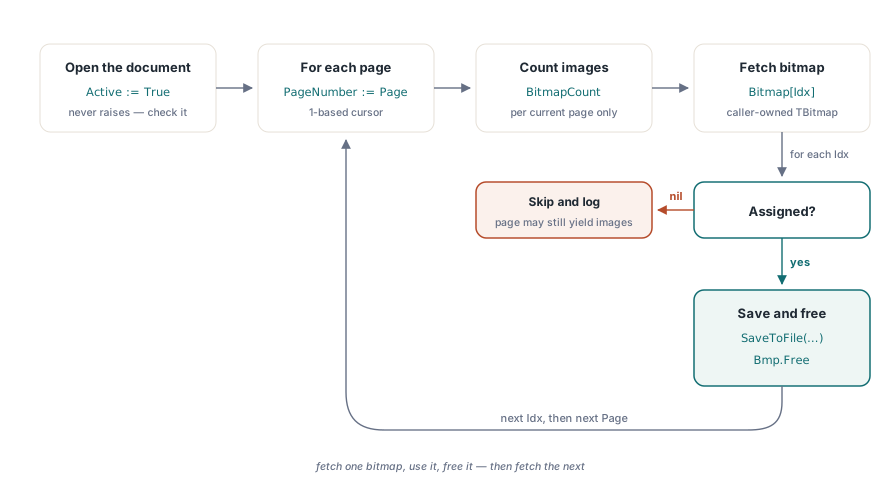
procedure ExtractAllImages(Pdf: TPdf; const OutputDir: string);
var
  Page, Idx: Integer;
  Bmp: TBitmap;
  OutPath: string;
begin
  for Page := 1 to Pdf.PageCount do
  begin
    Pdf.PageNumber := Page;
    for Idx := 0 to Pdf.BitmapCount - 1 do
    begin
      Bmp := Pdf.Bitmap[Idx];
      if not Assigned(Bmp) then
        Continue;
      try
        OutPath := Format('%s\p%d_img%d.bmp', [OutputDir, Page, Idx + 1]);
        Bmp.SaveToFile(OutPath);
      finally
        Bmp.Free;
      end;
    end;
  end;
end;
La guarda Assigned importa. Un pequeño número de generadores de PDF escribe image XObjects con dimensiones de píxeles cero o datos mal formados; en esos casos, el componente devuelve nil en lugar de un mapa de bits vacío. Tratar un retorno nil como un error y detener la extracción es el reflejo equivocado: omítalo, registre la página y el índice si necesita la pista de auditoría, y continúe. El resto de la página aún puede producir imágenes válidas
Note que el bucle exterior establece Pdf.PageNumber en cada iteración. Esa asignación es lo que carga la página en el estado interno del componente y hace que BitmapCount sea significativo. Si lo omite, leerá el recuento de la misma página repetidamente. El patrón se siente redundante cuando lo escribe, pero así es como está diseñada la API: la página es un cursor, no una colección
Elección de un formato de salida
BMP es sin pérdidas y siempre está disponible sin unidades (units) adicionales, lo que lo convierte en un formato predeterminado sólido cuando aún no sabe qué contiene la imagen. Cuando el tamaño del archivo importa, el formato de píxeles del TBitmap devuelto le indica qué códec es el adecuado. Un mapa de bits de 32 bits conlleva un canal alfa; PNG preserva eso sin pérdidas. Una imagen grande de 24 bits con tono continuo es un candidato para JPEG. Las imágenes más pequeñas o las dibujadas con una paleta limitada generalmente es mejor dejarlas como BMP en lugar de pasarlas por JPEG, lo que agrega artefactos de bloque en configuraciones de baja calidad y ahorra poco en las altas
procedure SaveBitmap(Bmp: TBitmap; const FileName: string);
var
  Jpg: TJPEGImage;
begin
  case UpperCase(ExtractFileExt(FileName)) of
    '.JPG', '.JPEG':
      begin
        Jpg := TJPEGImage.Create;
        try
          Jpg.Assign(Bmp);
          Jpg.CompressionQuality := 85;
          Jpg.SaveToFile(FileName);
        finally
          Jpg.Free;
        end;
      end;
  else
    Bmp.SaveToFile(FileName);  // BMP: sin pérdidas, sin unidades adicionales
  end;
end;
En la práctica, la selección de formato está impulsada por Bmp.PixelFormat y las dimensiones. Si PixelFormat = pf32bit usted necesita un formato que admita alfa; PNG es la opción obvia, aunque requiere la unidad PNGImage en versiones anteriores de Delphi. Para imágenes de 24 bits con un ancho superior a aproximadamente 300 píxeles, JPEG a una calidad de 85 proporciona una reducción de tamaño de tres a uno sobre BMP sin pérdidas perceptibles en la mayoría del contenido fotográfico. Por debajo de ese umbral, BMP tiene un tamaño comparable y evita la decisión de calidad por completo
Lo que BitmapCount cuenta y no cuenta
PDF distingue entre image XObjects y gráficos vectoriales dibujados con operadores de ruta. Una página que se ve visualmente compleja puede devolver un BitmapCount de cero si cada elemento es vectorial. Las páginas escaneadas casi siempre devuelven exactamente uno: el escáner escribe el escaneo completo como un único image XObject de página completa en la resolución a la que se configuró el escáner. Las páginas que mezclan texto compuesto con fotografías incrustadas devuelven una entrada por fotografía. Las líneas decorativas, los fondos sombreados y los bordes de las tablas por lo general no aparecen en absoluto en el recuento de mapas de bits
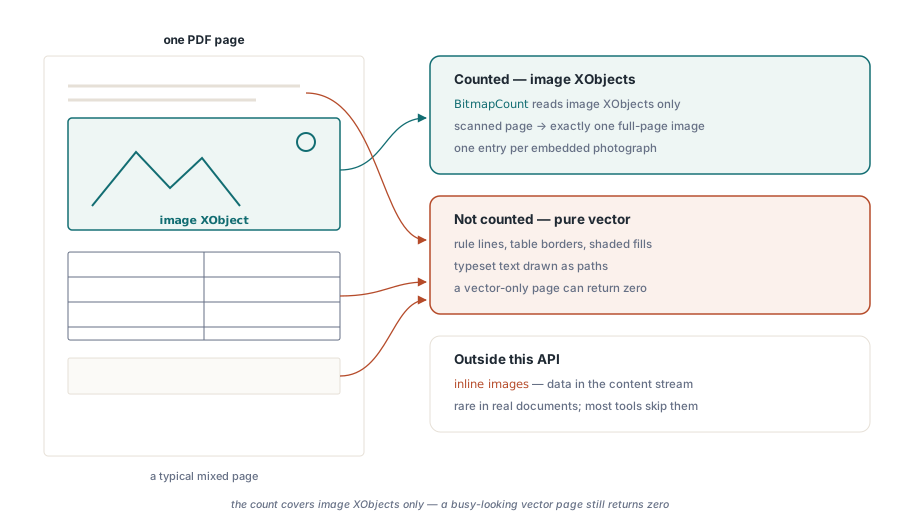
El recuento tampoco incluye imágenes en línea (inline images), un constructo PDF raramente usado donde los datos de imagen se incrustan directamente en el flujo de contenido de la página en lugar de como un XObject nombrado. Esos caen fuera de lo que esta API saca a la superficie; son lo suficientemente poco comunes en documentos reales que la mayoría de las herramientas de extracción simplemente no las manejan
Un detalle que vale la pena tener en cuenta: el BitmapCount que usted lee es para la página actual a partir de la última asignación de PageNumber. Si su código se ramifica o llama a cualquier función que cambie PageNumber entre el recuento y la extracción, es posible que lea menos imágenes de las que asignó espacio, o que se indexe más allá del final. Mantenga la lectura del recuento y el bucle Bitmap[] en la misma página sin tocar PageNumber entre medias
Uso de TPdfView en una aplicación de formulario
El componente TPdfView expone las mismas propiedades BitmapCount y Bitmap[], pero la página desde la que lee es la página mostrada actualmente en la vista, no TPdf.PageNumber. Los dos punteros de página son independientes; establecer uno no mueve el otro. En una aplicación de formulario VCL con un visor en vivo, puede llamar a Pdf.PageNumber := N para conducir la extracción a través de TPdf mientras el visor se mantiene en lo último a lo que se desplazó el usuario. Esa separación es intencional y mantiene el estado de visualización del visor limpio mientras se ejecuta una extracción en segundo plano
Memoria y rendimiento en trabajos por lotes
A lo largo de un archivo grande, el presupuesto de memoria es lo principal a observar. Cada llamada a Bitmap[] asigna un nuevo TBitmap en el montón (heap), y en una página escaneada a 300 DPI, eso es fácilmente 25 MB de datos de píxeles sin procesar antes de cualquier codificación. Si procesa páginas en un bucle cerrado sin liberarlas entre iteraciones, el conjunto de trabajo crece linealmente con el número de imágenes. La forma correcta es siempre: recupere un mapa de bits, haga lo que necesite, libérelo, recupere el siguiente. Si necesita mantener referencias a varios mapas de bits a la vez para un paso de comparación, cuéntelos primero con BitmapCount y asigne su contenedor en consecuencia, luego libere cada uno tan pronto como termine con él, en lugar de aplazarlo a la limpieza del final del documento. En un documento con 500 páginas escaneadas, esa distinción puede significar la diferencia entre picos de RSS de 25 MB y 12 GB
Las propiedades BitmapCount y Bitmap[] que se muestran aquí forman parte del PDFium Component para Delphi y C++Builder