Tres bibliotecas. Tres trabajos distintos. Elegir la incorrecta le costará semanas de soluciones alternativas, y elegir las tres cuando solo necesita una le costará gastos generales de mantenimiento que no presupuestó. Aquí hay un relato directo de lo que realmente hace cada biblioteca de PDF de losLab, dónde encaja y dónde cede el paso a sus hermanos
HotPDF: escribiendo PDF desde cero en Delphi
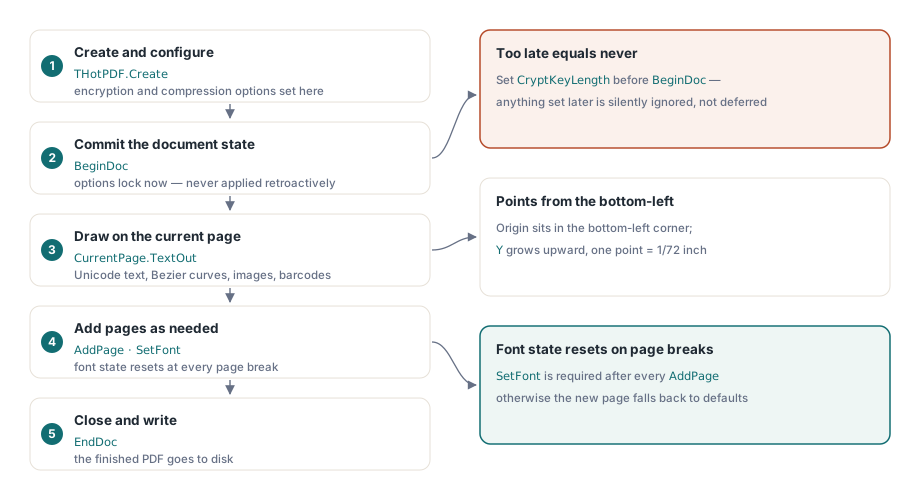
HotPDF es un componente VCL nativo para generar documentos PDF. Su modelo es imperativo y se centra en la página: usted construye una instancia de THotPDF, establece las propiedades del documento, llama a BeginDoc, dibuja en CurrentPage, agrega páginas según sea necesario y cierra con EndDoc. El orden importa porque BeginDoc confirma el diccionario de cifrado y la configuración de compresión en el momento en que se ejecuta; cualquier cosa asignada después de ese punto se ignora silenciosamente en lugar de aplicarse retroactivamente
La superficie de dibujo cubre el conjunto completo de operadores PDF al nivel de Delphi: TextOut para texto Unicode posicionado, SetFont con incrustación TrueType, primitivas vectoriales (líneas, curvas de Bezier, elipses, rectángulos), colocación de imágenes desde archivo o memoria, y generación de códigos de barras. Las coordenadas están en puntos desde la esquina inferior izquierda con la Y aumentando hacia arriba, lo que toma a todos por sorpresa alguna vez. El estado de la fuente no sobrevive a un AddPage, por lo que se requiere una llamada a SetFont después de cada salto de página
Los campos de AcroForm son ciudadanos de primera clase. Puede agregar campos de texto, casillas de verificación, botones de opción, cuadros combinados, cuadros de lista y botones de comando directamente a un objeto de página con una sola llamada a cada uno. HotPDF también puede cargar un PDF existente a través de LoadFromFile y completar o leer los valores de los campos, lo que lo hace útil en dos flujos de trabajo separados: construir formularios y automatizar su llenado
El cifrado también se maneja a nivel del documento. CryptKeyLength selecciona el esquema (RC4 de 40 bits hasta AES-256), ActivateProtection lo activa, y ProtectOptions establece los indicadores de permisos ISO. Los dos modos de revisión AES-256 (R5 y R6, controlados por UseAES256R6) existen porque la revisión 6 corrige una debilidad conocida en la revisión 5, pero requiere un visor compatible con PDF 2.0; elegir entre ellos es una decisión de compatibilidad, no de conveniencia
El soporte para firmas digitales en HotPDF cubre los perfiles de referencia PAdES, por lo que es adecuado para flujos de trabajo en los que la firma debe cumplir con los requisitos ETSI EN 319 142. Si su necesidad es solo generar salida, HotPDF es la biblioteca a la que debe acudir primero
PDFium Component: renderizado, visualización y lectura de PDF existentes
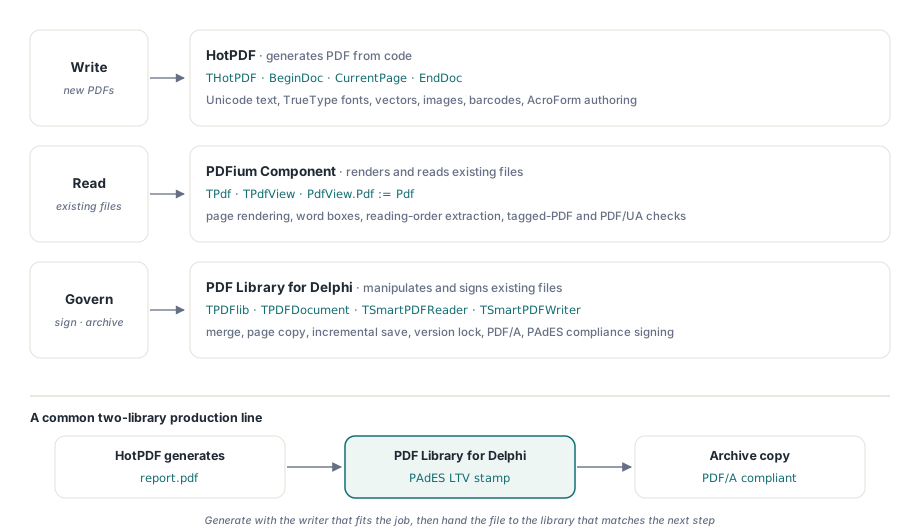
PDFium Component envuelve el motor PDFium de Google como un componente VCL, lo que le otorga un rol fundamentalmente diferente al de HotPDF. Mientras que HotPDF escribe, PDFium Component lee y renderiza. El objeto principal es TPdf, un administrador de documentos que abre un archivo configurando FileName y luego Active := True. Las fallas de carga no se generan como excepciones; Active simplemente permanece en False, por lo que verificarlo después de la asignación no es opcional
El renderizado se ejecuta a través de TPdfView, un componente visual que coloca en un formulario y vincula a una instancia de TPdf a través de PdfView.Pdf := Pdf. El zoom y el modo de ajuste se encuentran en la vista, no en el documento. Una sutileza que hace tropezar a la gente: Pdf.PageNumber y PdfView.PageNumber son propiedades independientes. Establecer una no actualiza la otra, y las API de extracción basadas en la vista (cuadros de palabras, unidades de lectura) utilizan la página actual de la vista, no la del documento
La extracción de texto es donde PDFium Component no tiene un competidor directo en la línea de losLab. ReadablePageContent devuelve texto estructurado con conciencia del orden de lectura, PageWordBoxes proporciona rectángulos delimitadores a nivel de palabra, y DocumentReadingUnits recorre todo el documento. Para el trabajo de accesibilidad, IsTagged le indica si hay un árbol de estructura presente y ValidatePdfUa ejecuta una verificación de conformidad UA. Estas API hacen de PDFium Component la elección natural para cualquier flujo de trabajo que necesite comprender qué hay dentro de un PDF existente en lugar de producir uno nuevo
El llenado de formularios también funciona en el lado de PDFium, a través de la misma capa AcroForm que expone el motor subyacente. Es adecuado cuando el documento fuente ya existe y está automatizando su llenado en lugar de construir los campos del formulario usted mismo
PDF Library for Delphi: manipulación, firma de cumplimiento y acceso directo a archivos
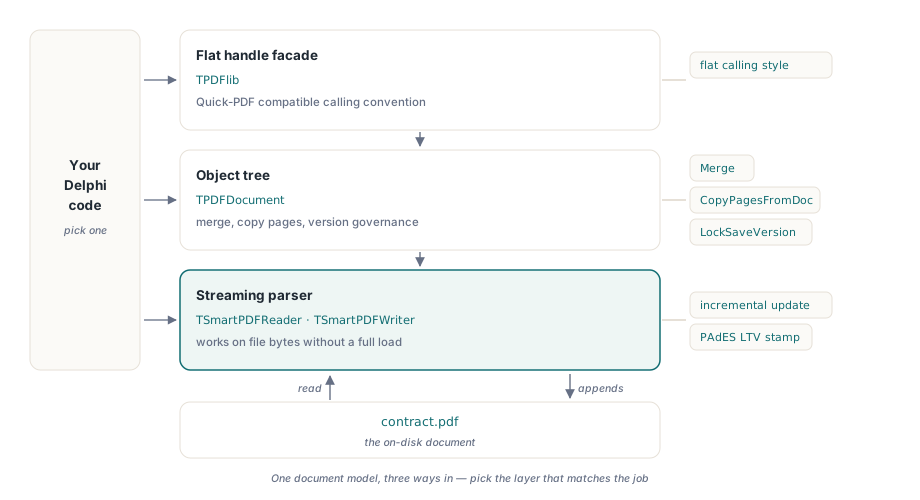
PDF Library for Delphi (versión 3.73.0) se encuentra en el otro extremo del espectro de complejidad. Expone tres capas de API sobre el mismo modelo de documento: una fachada plana basada en manejadores (TPDFlib) compatible con la convención de llamadas de Quick-PDF, una capa completa de árbol de objetos (TPDFDocument) y un analizador de transmisión (TSmartPDFReader / TSmartPDFWriter) que opera directamente en los bytes del archivo sin cargar el gráfico completo de objetos
La capa de transmisión es lo que hace de PDF Library for Delphi la elección correcta para documentos grandes. TSmartPDFWriter puede agregar una actualización incremental a un archivo en el disco sin reconstruir toda la tabla de referencias cruzadas, que es el mecanismo subyacente tanto para el guardado eficiente como para los sellos de validación a largo plazo PAdES. Para los flujos de trabajo de firma de grado de cumplimiento, en los que el hash firmado debe cubrir un rango de bytes específico y la firma se aplica sin reescribir el documento, esta capa es el único camino viable
La manipulación de documentos en el nivel TPDFDocument incluye la combinación con Merge, la copia selectiva de páginas a través de CopyPagesFromDoc con una cadena de rango, y el gobierno de versiones a través de SetMinimumVersion y LockSaveVersion. El bloqueo de versión genera el error 602 si intenta guardar una característica que llevaría la salida por encima de la versión bloqueada, lo cual es útil cuando necesita garantizar que la salida permanezca dentro de una revisión de PDF específica para el cumplimiento de archivo
El soporte para PDF/A (ISO 19005) se encuentra en la mesa de trabajo de conformidad de PDF Library for Delphi. Tenga en cuenta que el cifrado y PDF/A son mutuamente excluyentes por especificación: no puede tener ambos en un archivo. Los flujos de trabajo que necesitan una copia de distribución cifrada y una copia de archivo PDF/A deben producir dos artefactos separados
Elegir entre ellas
El típico árbol de decisiones es corto. Si está generando un nuevo documento a partir de datos, use HotPDF. Si está renderizando o extrayendo texto de un documento existente en una aplicación VCL de Delphi, use PDFium Component. Si está manipulando, combinando o firmando PDF existentes a escala para cumplimiento, o con una semántica de guardado incremental, use PDF Library for Delphi. Muchos sistemas de producción utilizan dos de las tres: HotPDF para generar resultados y PDF Library for Delphi para aplicarle un sello de validación a largo plazo antes del archivo, por ejemplo, o PDFium Component para previsualizar lo que HotPDF produjo antes de enviarlo hacia adelante
Las tres se entregan como código fuente Pascal nativo para Delphi y C++Builder, sin dependencias de tiempo de ejecución más allá de la VCL. PDFium Component agrupa adicionalmente la DLL de PDFium, que cubre el trabajo de análisis y renderizado del motor. La página del producto de cada biblioteca contiene su referencia de API completa y el historial de versiones actual
Detalles sobre las bibliotecas individuales: HotPDF Delphi Component, PDFium Component y PDF Library for Delphi