Una sola página A4 renderizada a un zoom de lectura cómodo representa unos pocos megabytes de mapa de bits de 32 bits. Si multiplica eso por un contrato de 400 páginas, la aritmética deja de ser abstracta: si renderiza cada página por adelantado, le estará solicitando a Windows mucho más de un gigabyte de mapas de bits que el usuario observará de pantalla en pantalla. La aplicación se queda sin espacio de direcciones en una compilación de 32 bits o pasa sus primeros segundos congelada mientras la GPU y el analizador de páginas procesan páginas a las que nadie se ha desplazado aún. Un lector con desplazamiento continuo debe sentirse como una sola cinta larga de páginas, pero en realidad no puede mantener todas ellas en memoria a la vez
Esa tensión representa todo el problema en este caso. El componente PDFium Component lo resuelve dentro de TPdfView, por lo que la mayor parte del trabajo consiste en elegir el modo de visualización correcto y comprender lo que el componente realiza en su nombre. Los elementos que no hace por usted, como dimensionar las páginas para un flujo de lectura y mantener la capacidad de respuesta en desplazamientos rápidos, son los puntos donde un poco de código demuestra su valor. Si todavía está ensamblando el diseño circundante (barra de herramientas, miniaturas, cuadro de búsqueda), la guía del visor repleto de características cubre ese terreno; aquí el tema es el desplazamiento en sí
El diseño es un modo de visualización, no un panel de mapas de bits
El instinto en el trabajo con formularios VCL es recurrir a una caja de desplazamiento (scroll box) y apilar controles de imagen dentro de ella, uno por página. Evítelo. Ese diseño le obliga a encargarse del posicionamiento de las páginas, de las matemáticas de desplazamiento y de la gestión de memoria a la vez, y terminará reinventando mal cada uno de estos aspectos. TPdfView ya modela el documento como una serie continua de páginas y expone el diseño a través de su propiedad DisplayMode
Pdf := TPdf.Create(Self);
PdfView := TPdfView.Create(Self);
PdfView.Parent := Self;
PdfView.Align := alClient;
PdfView.Pdf := Pdf;

PdfView.DisplayMode := dmSingleContinuous;   // una página de ancho, se desplaza verticalmente

Pdf.FileName := 'contract.pdf';
Pdf.Active := True;
if not Pdf.Active then
  ShowMessage('Could not open the document');
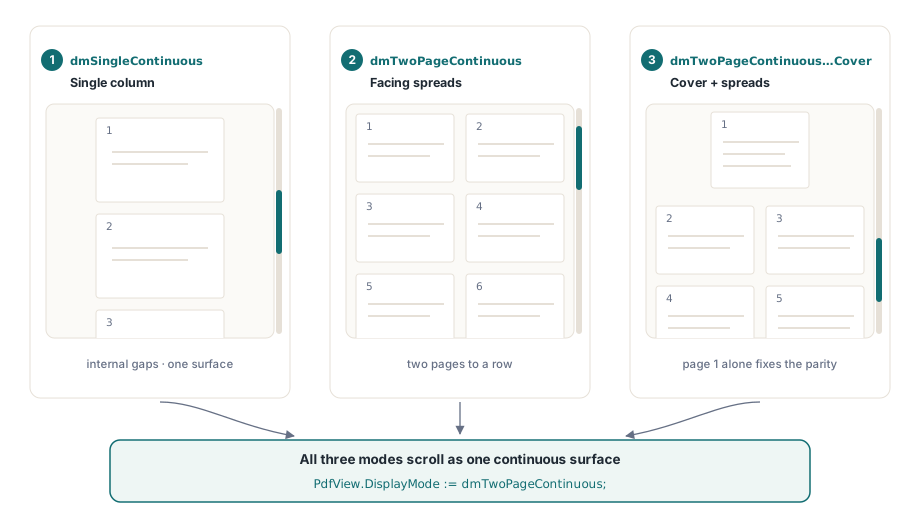
Esa es toda la configuración para el desplazamiento continuo. dmSingleContinuous organiza las páginas en una sola columna vertical con los espacios entre ellas gestionados internamente, y la vista se desplaza a través de esa columna como una sola superficie. No hay controles por página que conectar ni controladores de desplazamiento que escribir para la navegación habitual. Tenga en cuenta la comprobación de Pdf.Active después de la asignación: abrir un documento nunca produce una excepción, por lo que un archivo dañado o protegido por contraseña deja el valor de Active en False sin excepciones a capturar, y un visor que omita esta comprobación renderizará un panel en blanco y se culpará a sí mismo
La misma propiedad contiene los modos de extensión. dmTwoPageContinuous coloca las páginas frente a frente, dos por fila, para la lectura estilo libro que requieren algunos documentos; dmTwoPageContinuousWithCover realiza lo mismo pero permite que la página uno se mantenga sola como portada para que las extensiones restantes coincidan en el límite natural par-impar. Los tres modos se desplazan de forma continua. Cambiar entre ellos es una sola asignación, lo que hace que añadir un cuadro combinado de modo de visualización resulte muy sencillo posteriormente
Solo las páginas visibles se rasterizan
La razón por la que esto se adapta a un archivo de 400 páginas es que la columna es virtual. TPdfView conoce la altura de cada página a partir del árbol de páginas del documento, por lo que puede calcular la extensión total del desplazamiento y la posición de cada página sin rasterizar nada. La rasterización, el paso costoso que convierte el flujo de contenido de una página en píxeles, ocurre solo para las páginas que actualmente intersectan el área de visualización (viewport), más un pequeño margen para que la página esté lista al momento en que entre en vista. A medida que se desplaza hacia abajo, las páginas que entran en el viewport se renderizan y las que lo abandonan liberan sus mapas de bits. La memoria se mantiene proporcional a lo que cabe en pantalla, no a la longitud del documento
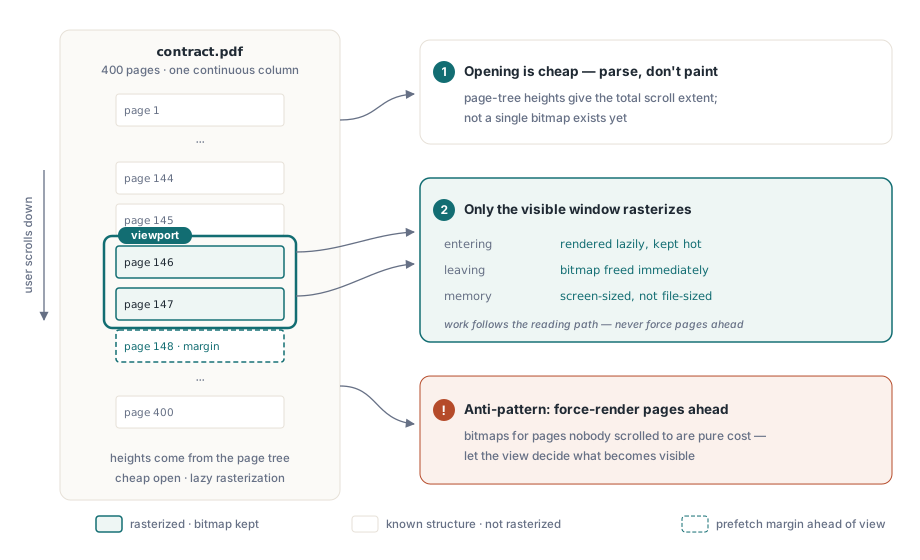
Vale la pena interiorizar esto porque cambia la forma en que analiza el coste. Abrir un documento de 400 páginas es económico: analiza la estructura, no el contenido. El gasto es por página y se realiza de forma diferida (lazy), en el momento en que una página se desplaza cerca. Un visor que se siente instantáneo al abrirse y suave al desplazarse no está haciendo menos trabajo en general; está distribuyendo el trabajo a lo largo de la ruta de lectura real del usuario y descartando lo que queda atrás. La consecuencia práctica es que casi nunca querrá forzar la renderización de páginas por delante del usuario. Permita que la vista decida qué es visible
Dimensionar las páginas al ancho y no modificar el zoom
Una columna de lectura requiere páginas dimensionadas al ancho del panel, no fijadas a un zoom absoluto. FitMode realiza esto y lo mantiene a medida que la ventana cambia de tamaño
PdfView.FitMode := pfmFitWidth; // cada página llena el ancho de la columna; la altura se ajustaCon pfmFitWidth el componente vuelve a calcular el zoom cada vez que la vista cambia de tamaño, por lo que la columna siempre llena el ancho disponible y las alturas de las páginas y, por tanto, la extensión del desplazamiento, se derivan de ello. Hay un problema que suele afectar a las personas: asignar Zoom directamente restablece FitMode de vuelta a pfmNone. Esto es deliberado, porque un zoom manual y un ajuste automático representan intenciones contradictorias, pero significa que un PdfView.Zoom := 1.0 involuntario en su código desactiva silenciosamente el ajuste al ancho y el siguiente cambio de tamaño detendrá el flujo. Si ofrece un control de zoom y un botón de ajuste, trátelos como un cambio de modo: definir uno limpia el otro, y usted decide cuál tiene prioridad
Para controles de zoom absolutos que se lean con naturalidad, la vista expone los zooms de ajuste como valores que puede aplicar o mostrar: PageWidthZoom[PageNumber] devuelve el zoom que ajustaría esa página al ancho, y el PageZoom correspondiente ajusta toda la página. Leer estos valores es la forma en que se rellena un menú "Ajustar al ancho" / "Ajustar a la página" sin programar porcentajes fijos que fallan en páginas horizontales o de gran tamaño
Mantener la capacidad de respuesta en desplazamientos rápidos con renderizado progresivo
La ruta de renderizado predeterminada dibuja una página hasta completarla antes de retornar. Para una sola página esto es correcto. Durante un desplazamiento rápido por un documento denso no lo es: cada página que pasa rápido inicia una rasterización completa, y si el usuario se desplaza más rápido de lo que las páginas pueden renderizarse, esos renderizados se acumulan y el panel se congela debido a que se realiza trabajo para páginas que ya están fuera de la pantalla cuando el proceso finaliza. La solución es hacer que el renderizado sea cancelable y abandonarlo en el momento en que el usuario continúe desplazándose
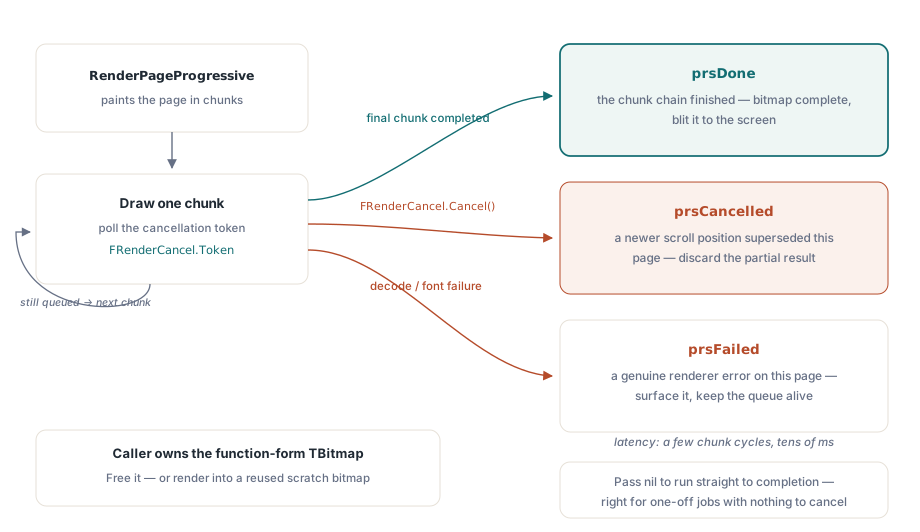
RenderPageProgressive renderiza en bloques y comprueba un token de cancelación en el límite de cada bloque, por lo que un renderizado en curso de una página que acaba de salir de la vista se puede descartar en lugar de ejecutarse hasta el final
type
  TFormMain = class(TForm)
    // ...
  private
    FRenderCancel: IPdfCancellationTokenSource;
    procedure RenderPageToBitmap(PageNo: Integer; Bmp: TBitmap);
  end;

procedure TFormMain.RenderPageToBitmap(PageNo: Integer; Bmp: TBitmap);
var
  Status: TPdfProgressiveStatus;
begin
  // Cancela lo que se estuviera renderizando; el token anterior ya está señalizado.
  if Assigned(FRenderCancel) then
    FRenderCancel.Cancel;
  FRenderCancel := TPdfCancellationTokenSource.New;

  Pdf.PageNumber := PageNo;
  Status := Pdf.RenderPageProgressive(Bmp, 0, 0, Bmp.Width, Bmp.Height,
    FRenderCancel.Token);

  case Status of
    prsDone:      ;                    // el mapa de bits está completo, píntelo
    prsCancelled: Exit;                // fue reemplazado, descarte este resultado
    prsFailed:    ShowMessage('Render failed for page ' + IntToStr(PageNo));
  end;
end;
La forma que importa es el valor devuelto. prsDone significa que el mapa de bits está completamente dibujado y vale la pena mostrarlo en pantalla; prsCancelled significa que una posición de desplazamiento más nueva reemplazó a esta página, por lo que descarta el resultado parcial en lugar de mostrarlo; prsFailed representa un error real en esa página. La cancelación se evalúa en los límites de los bloques y no de forma preventiva, por lo que debe esperar decenas de milisegundos de latencia entre llamar a Cancel y que el renderizado se detenga realmente. Esto sigue siendo mucho más económico que permitir que un renderizado de página completa obsoleto bloquee la cola. Pasar nil como token realiza el renderizado hasta completarse, que es la elección correcta para un renderizado único como una vista previa de impresión donde no hay nada contra qué cancelar
Cuando en cambio llama a la forma de función de RenderPage, la que devuelve un TBitmap nuevo, recuerde que el llamador es su propietario y debe liberarlo con Free. En un bucle de desplazamiento que asigna un mapa de bits por página, olvidar esto es una fuga que crece con cada página que el usuario recorre, exactamente el fallo de memoria sin límite que el diseño continuo debía evitar. Renderice sobre un mapa de bits reutilizado siempre que pueda
Con lo que se queda
El visor con desplazamiento continuo es principalmente responsabilidad del componente. Usted elige dmSingleContinuous para el diseño, define pfmFitWidth para que la columna cambie de flujo con la ventana, y comprueba Pdf.Active para que un archivo defectuoso falle de forma evidente. La única parte que vale la pena escribir por uno mismo es el renderizado cancelable, porque un lector se juzga por cómo se comporta cuando alguien arrastra la barra de desplazamiento hasta el final de un documento largo y el panel responde o no. Todo lo que viene después (selección de texto entre páginas, resaltado de búsquedas, un árbol de marcadores) representa trabajo de interfaz que se ubica sobre esta superficie de desplazamiento y no dentro de ella
Las API de TPdfView, DisplayMode y RenderPageProgressive mostradas aquí forman parte de PDFium Component para Delphi y Lazarus