Hola Mundo desde el componente HotPDF para Delphi.
Bienvenido a la guía completa para el componente HotPDF para Delphi. Programa de demostración de HelloWorld.
Acerca del componente HotPDF.
El componente HotPDF es una biblioteca de procesamiento de PDF potente y versátil, diseñada específicamente para desarrolladores de Delphi y C++Builder. Este componente integral proporciona una API extensa que permite a los desarrolladores crear, manipular y modificar documentos PDF con facilidad y precisión.
Características principales del componente HotPDF:
- Creación y generación de PDF: Cree documentos PDF desde cero con control total sobre el diseño, el formato y el contenido.
- Soporte de texto y gráficos: Agregue texto, imágenes, formas y gráficos complejos a las páginas PDF.
- Soporte multilingüe: Soporte completo de Unicode para la renderización de texto internacional.
- Gestión de fuentes: Incorpore fuentes para una apariencia de documento coherente en diferentes sistemas.
- Opciones de compresión: Utilice algoritmos de compresión para optimizar el tamaño del archivo.
- Características de seguridad: Cifrado de documentos, protección con contraseña y controles de permisos.
- Manipulación de documentos: Combinar, dividir y modificar documentos PDF existentes.
- Soporte para tablas y formularios: Crear tablas complejas y formularios interactivos.
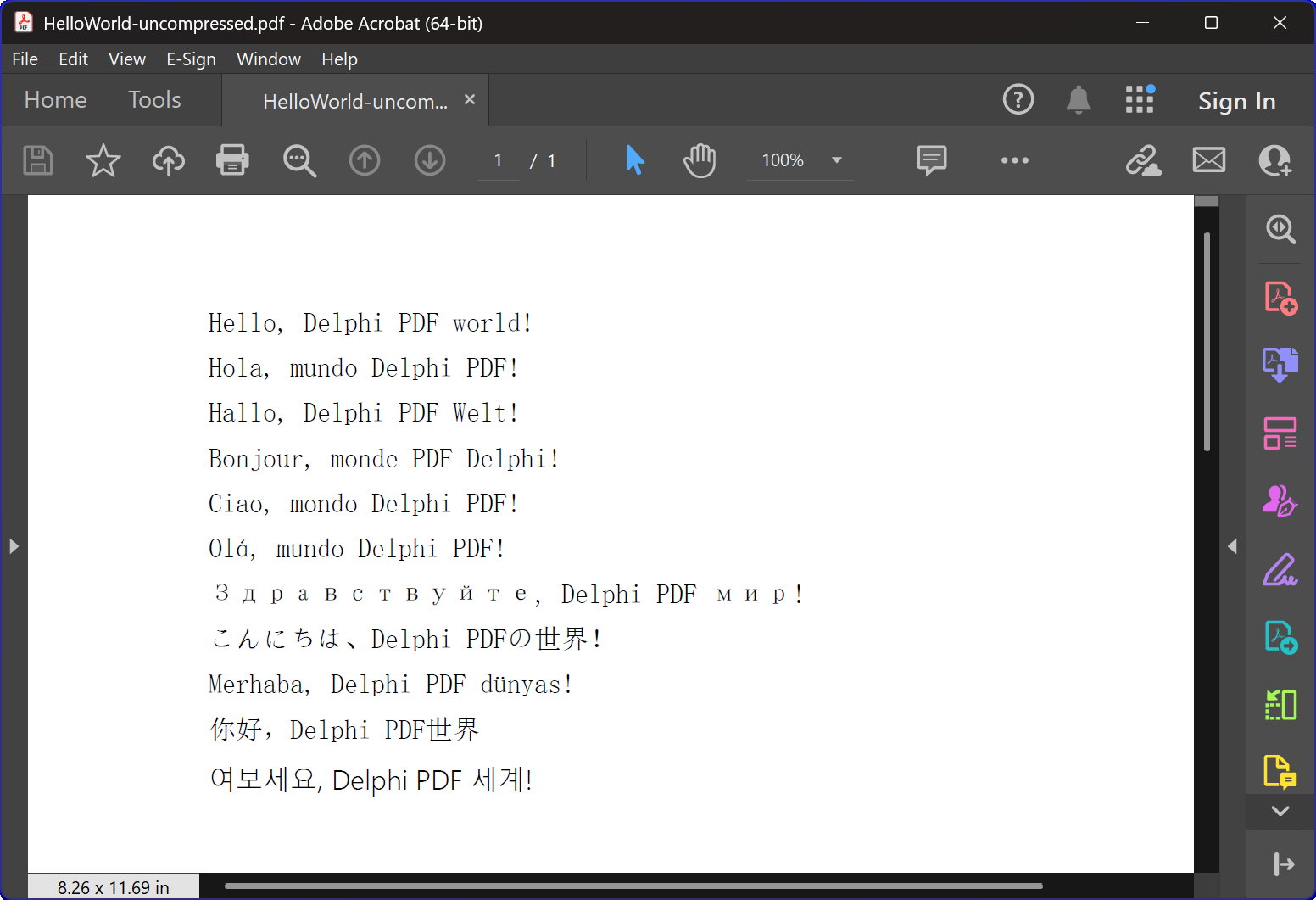
Descripción general del programa HelloWorld.dpr
El HelloWorld.dpr El programa de ejemplo sirve como una excelente introducción al componente HotPDF.
característica más básica e importante: la función TexOut. Este programa de demostración también muestra la funcionalidad básica de creación de PDF.
Funcionalidad principal:
1. Creación de documentos PDF
La función principal del programa es generar documentos PDF que contienen texto multilingüe "Hola Mundo". CreatePDF El procedimiento demuestra:
- Inicialización de componentes: Configuración y configuración correctas del componente THotPDF.
- Propiedades del documento: Configuración de metadatos como opciones de compresión y incrustación de fuentes.
- Renderizado de texto multilingüe: Visualización de texto en 11 idiomas diferentes, incluyendo inglés, español, alemán, francés, italiano, portugués, ruso, japonés, turco, chino y coreano.
- Gestión de fuentes: Uso de la fuente Arial Unicode MS para soporte de visualización multilingüe.
- Compresión: Creación de un documento PDF comprimido.
2. Gestión de ventanas e integración del sistema.
El programa incluye una funcionalidad sofisticada de enumeración de ventanas que demuestra:
- Enumeración de ventanas del sistema: Utilizando la API de Windows
EnumWindowspara iterar a través de todas las ventanas de nivel superior. - Coincidencia de títulos de ventanas: Implementando la coincidencia de subcadenas para identificar las aplicaciones objetivo.
- Cierre automático de ventanas: Enviar.
WM_CLOSEmensajes para cerrar visores de PDF que puedan tener archivos abiertos. - Prevención de conflictos: Asegurar que no se produzcan conflictos de acceso a archivos al crear nuevos archivos PDF.
3. Manejo de errores y administración de recursos.
El programa demuestra las mejores prácticas para:
- Gestión de memoria: Creación y eliminación adecuadas de instancias de componentes.
- Seguridad en caso de excepciones: Utilizando bloques try-finally para asegurar la limpieza de recursos.
- Comentarios de los usuarios: Proporcionando salida a la consola para informar a los usuarios sobre el progreso del programa.
Detalles de implementación técnica:
Tecnología de compresión.
El programa crea un documento PDF con compresión FlateDecode.
Estrategia de manejo de fuentes.
El programa emplea una estrategia sofisticada de selección de fuentes:
- Arial Unicode MS: Se utiliza para la mayoría de los idiomas debido a su amplio soporte de caracteres.
- Integración de fuentes: Asegura una apariencia consistente en diferentes sistemas.
Compatibilidad entre versiones.
El código incluye directivas de compilación condicional para admitir tanto las versiones modernas como las antiguas de Delphi:
- Compatibilidad con XE2+: Utiliza unidades con espacios de nombres (WinApi.Windows, System.SysUtils, etc.).
- Compatibilidad con versiones antiguas. Regresa a los nombres de unidades tradicionales para versiones más antiguas de Delphi.
Valor educativo.
Este ejemplo de "Hola Mundo" tiene múltiples propósitos educativos:
- Introducción a los componentes: Proporciona una introducción sencilla al uso del componente HotPDF.
- Mejores prácticas: Demuestra una gestión adecuada de recursos y manejo de errores.
- Integración del sistema: Muestra cómo integrar la generación de PDF con las operaciones del sistema Windows.
- Internacionalización: Ilustra el manejo de texto multilingüe en documentos PDF.
Primeros pasos.
Para ejecutar este programa de ejemplo:
- Asegúrese de que el componente HotPDF esté instalado correctamente en su entorno de desarrollo Delphi.
- Abra el archivo de proyecto HelloWorld.dpr.
- Compile y ejecute el programa.
- El programa creará automáticamente un archivo PDF con compresión.
- Examine los archivos generados para ver cómo se renderiza el texto multilingüe.
Código fuente.
A continuación, se muestra el código fuente completo y bien documentado para el programa de demostración HelloWorld:
|
1 2 3 4 5 6 7 8 9 10 11 12 13 14 15 16 17 18 19 20 21 22 23 24 25 26 27 28 29 30 31 32 33 34 35 36 37 38 39 40 41 42 43 44 45 46 47 48 49 50 51 52 53 54 55 56 57 58 59 60 61 62 63 64 65 66 67 68 69 70 71 72 73 74 75 76 77 78 79 80 81 82 83 84 85 86 87 88 89 90 91 92 93 94 95 96 97 98 99 100 101 102 103 104 105 106 107 108 109 110 111 112 113 114 115 116 117 118 119 120 121 122 123 124 125 126 127 128 129 130 131 132 133 134 135 136 137 138 139 140 141 142 143 144 145 146 147 148 149 150 151 152 153 154 155 156 157 158 159 160 161 162 163 164 165 166 167 |
{************************************************************} // HotPDF PDF Component // Copyright(c)2007-2025, https://www.loslab.com {************************************************************} // HelloWorld Demo Program for HotPDF Component // This program demonstrates basic PDF creation capabilities // including multilingual text support and compression options {************************************************************} program HelloWorld; {$APPTYPE CONSOLE} // Console application type {$I ..\..\..\Lib\HotPDF.inc} // Include HotPDF configuration file uses // EurekaLog units for memory leak detection and debugging (optional) {$IFDEF EurekaLog} EMemLeaks, // Memory leak detection EResLeaks, // Resource leak detection EDebugJCL, // JCL debugging support EDebugExports, // Export debugging information EFixSafeCallException, // SafeCall exception handling EMapWin32, // Win32 mapping support EAppConsole, // Console application support EDialogConsole, // Console dialog support ExceptionLog7, // Exception logging {$ENDIF EurekaLog} // System units - different namespaces for XE2+ vs older versions {$IFDEF XE2+} WinApi.Windows, // Windows API functions WinApi.Messages, // Windows message constants System.SysUtils, // System utilities System.Classes, // Base classes (TStringList, etc.) Vcl.Graphics, // Graphics support {$ELSE} Windows, // Windows API functions (older Delphi) Messages, // Windows message constants (older Delphi) SysUtils, // System utilities (older Delphi) Classes, // Base classes (older Delphi) Graphics, // Graphics support (older Delphi) {$ENDIF} HPDFDoc; // HotPDF main component unit // Creates a compressed PDF file with multilingual "Hello World" text // Parameters: // FileName: Output PDF file name procedure CreatePDF(const FileName: string); var HotPDF: THotPDF; // Main HotPDF component instance begin // Create HotPDF component instance HotPDF := THotPDF.Create(nil); try // Configure PDF properties HotPDF.AutoLaunch := true; // Automatically open PDF after creation HotPDF.FileName := FileName; // Set output file name // Enable FlateDecode compression HotPDF.Compression := cmFlateDecode; // Enable FlateDecode compression WriteLn('Creating compressed PDF: ', FileName); HotPDF.FontEmbedding := true; // Embed fonts for better compatibility HotPDF.BeginDoc; // Start PDF document creation // Set Unicode font for multilingual text support // Arial Unicode MS supports most languages except Korean // procedure SetFont ( FontName: AnsiString; FontStyle: TFontStyles; ASize: Single; FontCharset: TFontCharset = DEFAULT_CHARSET; IsVertical: boolean = false); // DEFAULT_CHARSET: 1 - Font is chosen based on Name. If the described font is not available on the system, Windows will substitute another font HotPDF.CurrentPage.SetFont('Arial Unicode MS', [], 12, 1, False); // Display "Hello World" in multiple languages // TextOut parameters: (X, Y, Angle, Text) HotPDF.CurrentPage.TextOut(80, 50, 0, 'Hello, Delphi PDF world!'); // English HotPDF.CurrentPage.TextOut(80, 70, 0, 'Hola, mundo Delphi PDF!'); // Spanish HotPDF.CurrentPage.TextOut(80, 90, 0, 'Hallo, Delphi PDF Welt!'); // German HotPDF.CurrentPage.TextOut(80, 110, 0, 'Bonjour, monde PDF Delphi!'); // French HotPDF.CurrentPage.TextOut(80, 130, 0, 'Ciao, mondo Delphi PDF!'); // Italian HotPDF.CurrentPage.TextOut(80, 150, 0, 'Olá, mundo Delphi PDF!'); // Portuguese HotPDF.CurrentPage.TextOut(80, 170, 0, 'Здравствуйте, Delphi PDF мир!'); // Russian HotPDF.CurrentPage.TextOut(80, 190, 0, 'こんにちは、Delphi PDFの世界!'); // Japanese HotPDF.CurrentPage.TextOut(80, 210, 0, 'Merhaba, Delphi PDF dünyası!'); // Turkish HotPDF.CurrentPage.TextOut(80, 230, 0, '你好,Delphi PDF世界'); // Chinese HotPDF.CurrentPage.TextOut(80, 250, 0, '여보세요, Delphi PDF 세계!'); // Korean HotPDF.EndDoc; // Finalize and save the PDF document WriteLn('PDF created successfully: ', FileName); finally HotPDF.Free; // Clean up HotPDF component end; end; // Global variables for window enumeration and PDF creation var Title: String; // Individual title string (unused in current implementation) Titles: TStrings; // List of window titles to search for Window: HWND; // Window handle (unused in current implementation) WindowText: array [0 .. 255] of Char; // Buffer for window text (unused in current implementation) WindowTitle: String; // Window title string (unused in current implementation) I: Integer; // Loop counter (unused in current implementation) // Callback function for EnumWindows API // This function is called for each top-level window in the system // Parameters: // hWnd: Handle to the current window being enumerated // lParam: User-defined data (in our case, pointer to TStrings with target titles) // Returns: True to continue enumeration, False to stop function EnumWindowsProc(HWND: HWND; lParam: lParam): BOOL; stdcall; var Titles: TStrings; // List of target window titles I: Integer; // Loop counter WindowText: array [0 .. 255] of Char; // Buffer to store window text WindowTitle: String; // Current window's title as string begin Result := true; // Continue enumeration by default Titles := TStrings(lParam); // Cast lParam back to TStrings // Get the window title text if GetWindowText(HWND, WindowText, SizeOf(WindowText)) > 0 then begin WindowTitle := String(WindowText); // Convert char array to string // Check if window title contains any of our target strings for I := 0 to Titles.Count - 1 do begin // Use Pos function to check if target string is contained in window title if Pos(Titles[I], WindowTitle) > 0 then begin // Send WM_CLOSE message to close the window PostMessage(HWND, WM_CLOSE, 0, 0); Break; // Exit loop after finding first match end; end; end; end; // Main program execution begins here begin // Close any existing PDF files that might be open in PDF viewers // This prevents file access conflicts when creating new PDFs with same names Titles := TStringList.Create; try // Define list of window title substrings to search for // Any window containing these strings will be closed // This will close Adobe and Foxit PDF reader & editor and many other PDF apps Titles.CommaText := '"HelloWorld.pdf", "Foxit"'; // Enumerate all top-level windows and close matching ones // EnumWindows calls our callback function for each window EnumWindows(@EnumWindowsProc, lParam(Titles)); finally Titles.Free; // Clean up string list end; // Display program header WriteLn('=== HotPDF HelloWorld Demo ==='); WriteLn('This demo creates a compressed PDF file with multilingual text.'); WriteLn(''); // Create compressed PDF CreatePDF('HelloWorld.pdf'); // Display completion message WriteLn(''); WriteLn('PDF file created successfully!'); WriteLn('The PDF file uses FlateDecode compression for optimal file size.'); WriteLn(''); WriteLn('Press Enter to exit...'); ReadLn; // Wait for user input before closing console end. |