Dominando las anotaciones de PDF con el componente HotPDF.
Las anotaciones PDF son una de las funciones más potentes para crear documentos interactivos y colaborativos. Permiten a los usuarios agregar comentarios, resaltados, sellos y contenido multimedia directamente a los archivos PDF sin modificar la estructura original del documento. Esta guía completa explora cómo implementar varios tipos de anotaciones PDF utilizando el. Componente HotPDF.que abarca todo, desde anotaciones de texto básicas hasta adjuntos multimedia avanzados.
Comprendiendo las anotaciones PDF: Más que solo comentarios.
Las anotaciones PDF son objetos que se pueden agregar a las páginas PDF para proporcionar información adicional, interactividad o mejoras visuales. A diferencia del contenido normal de la página, las anotaciones se almacenan como objetos separados que se pueden mostrar u ocultar, editar o eliminar sin afectar la estructura del documento subyacente. Esto las hace ideales para:
- Revisión de documentos: Agregando comentarios, notas y retroalimentación.
- Mejora de formularios: Creación de elementos interactivos y texto de ayuda.
- Integración multimedia: Incorporación de audio, video y archivos adjuntos.
- Marcado visual: Resaltado de secciones importantes con sellos y formas.
- Flujos de trabajo colaborativos: Permitir que varios usuarios contribuyan sin conflictos.
Inicio rápido: Ejemplo sencillo de anotación de texto.
Comencemos con un ejemplo básico de anotación de texto para comprender los conceptos fundamentales de las anotaciones PDF:
|
1 2 3 4 5 6 7 8 9 10 11 12 13 14 15 16 17 18 19 20 21 22 23 24 25 26 27 28 29 30 31 32 33 34 35 36 37 38 39 40 41 42 43 44 45 46 47 48 49 50 51 |
program SimpleAnnotation; {$I ..\..\..\Lib\HotPDF.inc} {$APPTYPE CONSOLE} uses {$IFDEF XE2+} System.Classes, System.SysUtils, Vcl.Graphics, {$ELSE} Classes, SysUtils, Graphics, {$ENDIF} HPDFDoc; var HotPDF: THotPDF; begin HotPDF := THotPDF.Create(nil); try // Configure PDF basic properties HotPDF.FileName := 'SimpleAnnotation.pdf'; HotPDF.Title := 'Simple Annotation Demo'; HotPDF.Author := 'HotPDF Component'; // Set font embedding for consistent display HotPDF.FontEmbedding := True; HotPDF.BeginDoc; // Set font HotPDF.CurrentPage.SetFont('Arial', [], 12, 0, False); // Add page content HotPDF.CurrentPage.TextOut(120, 65, 0, 'Click the annotation icon:'); // Add multilingual text annotations HotPDF.CurrentPage.AddTextAnnotation( 'This is a text annotation.' + #13#10 + 'Dies ist eine Textanmerkung.' + #13#10 + 'Ceci est une annotation textuelle.' + #13#10 + 'This is a text annotation.', Rect(120, 80, 140, 100), True, taComment, clBlue ); HotPDF.EndDoc; finally HotPDF.Free; end; end. |
Este ejemplo sencillo demuestra varios conceptos fundamentales de las anotaciones PDF:
- Apuntado de posición: El
Rect(120, 80, 140, 100)El parámetro define el área clickable de la anotación. - Soporte multilingüe: El contenido incluye texto en inglés, alemán, francés y chino.
- Control de visibilidad: El
TrueEl parámetro abre inicialmente la anotación. - Tipo de anotación:
taCommentCrea una anotación de comentario estándar. - Personalización visual:
clBlueEstablece el color de la anotación. - Integración de fuentes:
FontEmbedding := TrueGarantiza una visualización consistente en todos los reproductores.
Referencia completa de los tipos de anotación.
El componente HotPDF admite tipos de anotaciones integrales, cada uno optimizado para casos de uso específicos:
1. Anotaciones de texto
Las anotaciones de texto son el tipo más utilizado y ofrecen varios estilos de visualización:
|
1 2 3 4 5 6 7 8 9 10 11 12 13 14 15 16 17 18 19 20 21 22 23 24 25 26 27 28 29 30 31 32 33 34 35 36 37 38 39 40 41 42 43 44 45 46 47 48 49 50 51 52 53 54 55 |
// Available text annotation type enumeration THPDFTextAnnotationType = ( taComment, // Standard comment bubble taKey, // Key symbol for important notes taNote, // Note icon for general information taHelp, // Help icon for help text taNewParagraph, // New paragraph marker taParagraph, // Paragraph marker taInsert // Content insertion marker ); // Usage examples for different types procedure AddTextAnnotationExamples(PDF: THotPDF); begin WriteLn('Adding text annotations...'); // Section header text PDF.CurrentPage.TextOut(50, 80, 0, 'Text Annotations - Different Types and Colors:'); // Critical annotation with multilingual content PDF.CurrentPage.AddTextAnnotation( 'CRITICAL: This is a critical comment annotation requiring immediate attention.' + #13#10 + 'KRITISCH: Dies ist eine kritische Textanmerkung.' + #13#10 + 'CRITIQUE: Ceci est une annotation critique.', Rect(50, 95, 70, 115), True, taComment, clRed ); // Key point annotation PDF.CurrentPage.AddTextAnnotation( 'KEY POINT: Important information marker' + #13#10 + 'This annotation uses the key icon for emphasis.', Rect(80, 100, 100, 120), False, taKey, $0080FF // Orange ); // Help annotation PDF.CurrentPage.AddTextAnnotation( 'HELP: Click for additional assistance' + #13#10 + 'This help annotation provides user guidance.', Rect(110, 100, 130, 120), False, taHelp, clBlue ); // General note annotation PDF.CurrentPage.AddTextAnnotation( 'NOTE: General information annotation' + #13#10 + 'Standard note for supplementary information.', Rect(140, 100, 160, 120), False, taNote, clGreen ); // Insert marker annotation PDF.CurrentPage.AddTextAnnotation( 'INSERT: Content insertion marker' + #13#10 + 'Indicates where new content should be added.', Rect(170, 100, 190, 120), False, taInsert, $800080 // Purple ); end; |
2. Anotaciones de texto libre
Las anotaciones de texto libre muestran texto directamente en la página sin requerir interacción del usuario:
|
1 2 3 4 5 6 7 8 9 10 11 12 13 14 15 16 17 18 19 20 21 22 23 24 25 26 27 28 29 30 31 32 33 34 35 36 37 38 39 40 41 42 43 44 45 46 47 |
// Free text alignment options enumeration THPDFFreeTextAnnotationJust = ( ftLeftJust, // Left-aligned text ftCenter, // Center-aligned text ftRightJust // Right-aligned text ); // Example: Create free text annotations with different alignments procedure AddFreeTextAnnotationExamples(PDF: THotPDF); begin WriteLn('Adding free text annotations...'); // Section header PDF.CurrentPage.TextOut(50, 160, 0, 'Free Text Annotations - Different Alignments:'); // Left-justified free text PDF.CurrentPage.AddFreeTextAnnotation( 'LEFT TEXT ANNOTATION', Rect(50, 180, 200, 200), ftLeftJust, $008000 // Green ); // Center-justified free text PDF.CurrentPage.AddFreeTextAnnotation( 'CENTERED Text', Rect(220, 180, 370, 200), ftCenter, $0080FF // Orange ); // Right-justified free text PDF.CurrentPage.AddFreeTextAnnotation( 'RIGHT ANNOTATION', Rect(390, 180, 540, 200), ftRightJust, clFuchsia // Fuchsia ); // Document status annotation PDF.CurrentPage.AddFreeTextAnnotation( 'CONFIDENTIAL DOCUMENT', Rect(200, 210, 400, 230), ftCenter, clRed ); end; |
3. Anotaciones geométricas
Las anotaciones de línea y forma proporcionan énfasis visual y funcionalidad de marcado:
|
1 2 3 4 5 6 7 8 9 10 11 12 13 14 15 16 17 18 19 20 21 22 23 24 25 26 27 28 29 30 31 32 33 34 35 36 37 38 39 40 41 42 43 44 45 46 47 48 49 50 51 52 53 54 55 |
// Line and shape annotation examples procedure AddGeometricAnnotationExamples(PDF: THotPDF); var StartPoint, EndPoint: THPDFCurrPoint; begin WriteLn('Adding geometric annotations...'); // Section header PDF.CurrentPage.TextOut(50, 250, 0, 'Geometric Annotations - Lines and Shapes:'); // Line annotation - diagonal StartPoint.X := 50; StartPoint.Y := 270; EndPoint.X := 150; EndPoint.Y := 290; PDF.CurrentPage.AddLineAnnotation( 'Diagonal line pointing to important content', StartPoint, EndPoint, $0080FF // Orange ); // Line annotation - horizontal StartPoint.X := 170; StartPoint.Y := 280; EndPoint.X := 270; EndPoint.Y := 280; PDF.CurrentPage.AddLineAnnotation( 'Horizontal line for emphasis', StartPoint, EndPoint, clBlue ); // Circle annotation PDF.CurrentPage.AddCircleSquareAnnotation( 'Circle highlighting important area', Rect(50, 300, 120, 320), csCircle, clGreen ); // Square annotation PDF.CurrentPage.AddCircleSquareAnnotation( 'Square frame for emphasis', Rect(140, 300, 210, 320), csSquare, $800080 // Purple ); end; // Circle and square annotation types THPDFCSAnnotationType = (csCircle, csSquare); |
4. Anotaciones de sello
Las anotaciones de sellos proporcionan marcadores visuales predefinidos para el estado del documento y el flujo de trabajo:
|
1 2 3 4 5 6 7 8 9 10 11 12 13 14 15 16 17 18 19 20 21 22 23 24 25 26 27 28 29 30 31 32 33 34 35 36 37 38 39 40 41 42 43 44 45 46 47 48 49 50 51 52 53 54 55 56 57 58 59 60 61 62 63 64 65 66 67 68 69 |
// Available stamp type enumeration THPDFStampAnnotationType = ( satApproved, // Green "Approved" stamp satExperimental, // "Experimental" marker satNotApproved, // Red "Not Approved" stamp satAsIs, // "As Is" status satExpired, // "Expired" warning satNotForPublicRelease, // Confidential marker satConfidential, // "Confidential" stamp satFinal, // "Final" marker satSold, // "Sold" status satDepartmental, // Department-specific marker satForComment, // "For Comment" review stamp satTopSecret // "Top Secret" classification ); // Example: Add various stamp annotations procedure AddStampAnnotationExamples(PDF: THotPDF); begin WriteLn('Adding stamp annotations...'); // Section header PDF.CurrentPage.TextOut(50, 340, 0, 'Stamp Annotations - Document Status Markers:'); // Approval stamps PDF.CurrentPage.AddStampAnnotation( 'Document approved for release', Rect(50, 360, 150, 390), satApproved, clGreen ); PDF.CurrentPage.AddStampAnnotation( 'Document rejected - requires revision', Rect(170, 360, 270, 390), satNotApproved, clRed ); // Security stamps PDF.CurrentPage.AddStampAnnotation( 'Confidential information marker', Rect(290, 360, 390, 390), satConfidential, clRed ); PDF.CurrentPage.AddStampAnnotation( 'Final version stamp', Rect(410, 360, 510, 390), satFinal, clBlue ); // Workflow stamps PDF.CurrentPage.AddStampAnnotation( 'For comment and review', Rect(50, 400, 150, 430), satForComment, $800080 // Purple ); PDF.CurrentPage.AddStampAnnotation( 'Experimental version', Rect(170, 400, 270, 430), satExperimental, $0080FF // Orange ); end; |
Anotaciones multimedia: Más allá de la interacción con texto.
Los flujos de trabajo modernos de PDF a menudo requieren la integración de multimedia. El componente HotPDF admite anotaciones multimedia:
5. Anotaciones de adjuntos de archivos.
Las anotaciones de adjuntos de archivos permiten incrustar archivos externos en documentos PDF:
|
1 2 3 4 5 6 7 8 9 10 11 12 13 14 15 16 17 18 19 20 21 22 23 24 25 26 27 28 29 30 31 32 33 34 35 36 37 38 39 40 41 42 43 44 45 46 47 48 49 50 51 |
// File attachment annotation example procedure AddMultimediaAnnotationExamples(PDF: THotPDF); var DemoTextFile, DemoAudioFile: string; DemoContent: TStringList; begin WriteLn('Adding multimedia annotations...'); // Section header PDF.CurrentPage.TextOut(50, 450, 0, 'Multimedia Annotations - Files, Audio, and Video:'); // Create demo text file if it doesn't exist DemoTextFile := 'DemoAttachment.txt'; if not FileExists(DemoTextFile) then begin DemoContent := TStringList.Create; try DemoContent.Add('HotPDF Component Demo Attachment'); DemoContent.Add('================================'); DemoContent.Add('This is a sample text file attached to the PDF document.'); DemoContent.Add('It demonstrates the file attachment annotation capability.'); DemoContent.Add('Created: ' + DateTimeToStr(Now)); DemoContent.SaveToFile(DemoTextFile); finally DemoContent.Free; end; end; // File attachment annotation PDF.CurrentPage.AddFileAttachmentAnnotation( 'Demo text file attachment', DemoTextFile, Rect(50, 470, 90, 490), clBlue ); // Multiple file attachment examples PDF.CurrentPage.AddFileAttachmentAnnotation( 'Legal agreement document', 'Contract.docx', Rect(100, 470, 140, 490), clPurple ); PDF.CurrentPage.AddFileAttachmentAnnotation( 'Reference image for comparison', 'Reference.png', Rect(150, 470, 190, 490), clGreen ); end; |
6. Anotaciones de sonido.
Las anotaciones de sonido permiten incrustar archivos de audio para notas de voz o explicaciones:
|
1 2 3 4 5 6 7 8 9 10 11 12 13 14 15 16 17 18 19 20 21 22 23 24 25 26 27 28 29 30 31 32 33 34 35 36 37 38 39 40 41 42 |
// Sound annotation example procedure AddSoundAnnotationExample(PDF: THotPDF); var DemoAudioFile: string; begin // Check for existing multimedia files and add annotations DemoAudioFile := 'Music.wav'; if FileExists(DemoAudioFile) then begin PDF.CurrentPage.AddSoundAnnotation( 'Demo audio file - Click to play', DemoAudioFile, Rect(110, 470, 150, 490), clGreen ); end else begin PDF.CurrentPage.AddTextAnnotation( 'Audio file not found: ' + DemoAudioFile, Rect(110, 470, 130, 490), False, taNote, $0080FF // Orange ); end; // Multi-language sound annotation example PDF.CurrentPage.AddSoundAnnotation( 'English narration', 'Narration_EN.mp3', Rect(60, 350, 100, 390), clBlue ); PDF.CurrentPage.AddSoundAnnotation( 'Chinese narration', 'Narration_CN.mp3', Rect(110, 350, 150, 390), clGreen ); end; |
Ejemplo completo de anotación: Proyecto de demostración mejorado.
Aquí hay un ejemplo completo y actualizado que demuestra todos los tipos de anotaciones en un único proyecto integral:
|
1 2 3 4 5 6 7 8 9 10 11 12 13 14 15 16 17 18 19 20 21 22 23 24 25 26 27 28 29 30 31 32 33 34 35 36 37 38 39 40 41 42 43 44 45 46 47 48 49 50 51 52 53 54 55 56 57 58 59 60 61 62 63 64 65 66 67 68 69 70 71 72 73 74 75 76 77 78 79 80 81 82 83 84 85 86 87 88 89 90 91 92 93 94 95 96 97 98 99 100 101 102 103 104 105 106 107 108 109 110 111 112 113 114 115 116 117 118 119 120 121 122 123 124 125 126 127 128 129 |
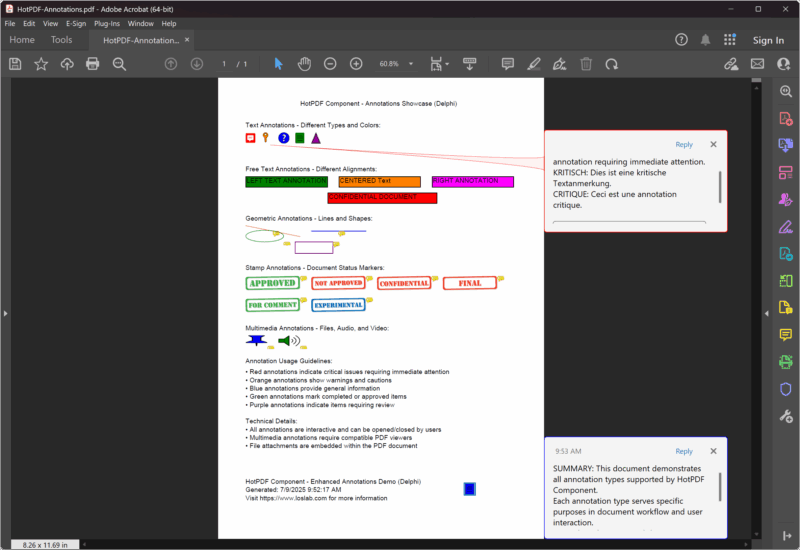
{***********************************************************} // HotPDF PDF Component - Enhanced Annotations Demo Delphi // Copyright(c)2007-2025, https://www.loslab.com // This demo showcases comprehensive annotation functionality {***********************************************************} program Annotations; {$I ..\..\..\Lib\HotPDF.inc} {$APPTYPE CONSOLE} uses {$IFDEF XE2+} System.Classes, System.SysUtils, Vcl.Graphics, {$ELSE} Classes, SysUtils, Graphics, {$ENDIF} HPDFDoc; var HotPDF: THotPDF; // ... existing code ... procedure AddDocumentationAndFooter(PDF: THotPDF); begin WriteLn('Adding documentation and footer...'); // Documentation section PDF.CurrentPage.TextOut(50, 510, 0, 'Annotation Usage Guidelines:'); PDF.CurrentPage.TextOut(50, 530, 0, '• Red annotations indicate critical issues requiring immediate attention'); PDF.CurrentPage.TextOut(50, 545, 0, '• Orange annotations show warnings and cautions'); PDF.CurrentPage.TextOut(50, 560, 0, '• Blue annotations provide general information'); PDF.CurrentPage.TextOut(50, 575, 0, '• Green annotations mark completed or approved items'); PDF.CurrentPage.TextOut(50, 590, 0, '• Purple annotations indicate items requiring review'); // Technical information PDF.CurrentPage.TextOut(50, 620, 0, 'Technical Details:'); PDF.CurrentPage.TextOut(50, 635, 0, '• All annotations are interactive and can be opened/closed by users'); PDF.CurrentPage.TextOut(50, 650, 0, '• Multimedia annotations require compatible PDF viewers'); PDF.CurrentPage.TextOut(50, 665, 0, '• File attachments are embedded within the PDF document'); // Footer PDF.CurrentPage.TextOut(50, 730, 0, 'HotPDF Component - Enhanced Annotations Demo (Delphi)'); PDF.CurrentPage.TextOut(50, 745, 0, 'Generated: ' + DateTimeToStr(Now)); PDF.CurrentPage.TextOut(50, 760, 0, 'Visit https://www.loslab.com for more information'); // Add a final summary annotation PDF.CurrentPage.AddTextAnnotation( 'SUMMARY: This document demonstrates all annotation types supported by HotPDF Component.' + #13#10 + 'Each annotation type serves specific purposes in document workflow and user interaction.' + #13#10 + 'For technical support and documentation, visit https://www.loslab.com', Rect(450, 740, 470, 760), False, taNote, clBlue ); end; begin WriteLn('HotPDF Enhanced Annotations Demo (Delphi)'); WriteLn('========================================='); WriteLn('Creating comprehensive PDF with all annotation types...'); WriteLn(''); HotPDF := THotPDF.Create(nil); try try // Configure PDF properties HotPDF.FileName := 'HotPDF-Annotations.pdf'; HotPDF.Title := 'HotPDF Annotations Demo (Delphi)'; HotPDF.Author := 'HotPDF Component'; HotPDF.Subject := 'Comprehensive annotation examples'; HotPDF.Keywords := 'PDF, Annotations, HotPDF, Demo, Interactive, Delphi'; // Set font embedding for consistent display HotPDF.FontEmbedding := True; // Enable FlateDecode compression for smaller file sizes HotPDF.Compression := cmFlateDecode; // Set initial zoom to fit page height in window HotPDF.InitialZoom := izFitV; HotPDF.BeginDoc; // Use standard font HotPDF.CurrentPage.SetFont('Arial', [], 12, 0, False); // Add page title HotPDF.CurrentPage.TextOut(150, 40, 0, 'HotPDF Component - Annotations Showcase (Delphi)'); // Add all annotation examples AddTextAnnotationExamples(HotPDF); AddFreeTextAnnotationExamples(HotPDF); AddGeometricAnnotationExamples(HotPDF); AddStampAnnotationExamples(HotPDF); AddMultimediaAnnotationExamples(HotPDF); AddDocumentationAndFooter(HotPDF); HotPDF.EndDoc; WriteLn('Annotations PDF created successfully!'); WriteLn(''); WriteLn('Output file: ' + HotPDF.FileName); WriteLn(''); WriteLn('The PDF contains:'); WriteLn('• Text annotations with different types and colors'); WriteLn('• Free text annotations with various alignments'); WriteLn('• Geometric annotations (lines, circles, squares)'); WriteLn('• Stamp annotations for document workflow'); WriteLn('• Multimedia annotations (file, audio, video)'); WriteLn('• Comprehensive documentation and usage guidelines'); except on E: Exception do begin WriteLn('Error creating PDF: ' + E.Message); ExitCode := 1; end; end; finally HotPDF.Free; end; end. |
Mejores prácticas para anotaciones PDF.
1. Estructura de código moderna y compatibilidad.
El componente HotPDF actualizado utiliza prácticas de codificación Delphi modernas:
|
1 2 3 4 5 6 7 8 9 10 11 12 13 14 15 16 17 18 19 20 21 22 23 24 25 26 27 28 29 30 31 |
// Modern unit structure with conditional compilation uses {$IFDEF XE2+} System.Classes, System.SysUtils, Vcl.Graphics, {$ELSE} Classes, SysUtils, Graphics, {$ENDIF} HPDFDoc; // Enhanced PDF configuration procedure ConfigureModernPDF(PDF: THotPDF); begin // Font embedding for consistent display across viewers PDF.FontEmbedding := True; // FlateDecode compression for smaller file sizes PDF.Compression := cmFlateDecode; // Initial zoom setting for better user experience PDF.InitialZoom := izFitV; // Fit to page height // Complete metadata for better document management PDF.Title := 'Professional PDF with Annotations'; PDF.Author := 'HotPDF Component'; PDF.Subject := 'Comprehensive annotation examples'; PDF.Keywords := 'PDF, Annotations, Interactive, Professional'; end; |
2. Manejo de errores y robustez.
Implemente un manejo de errores adecuado para aplicaciones de producción:
|
1 2 3 4 5 6 7 8 9 10 11 12 13 14 15 16 17 18 19 20 21 22 23 24 25 26 27 28 29 30 31 32 33 34 35 36 37 38 39 40 41 42 43 44 45 46 47 |
// Robust file handling with error checking procedure SafeAddFileAttachment(PDF: THotPDF; const FileName: string; const Description: string); begin if FileExists(FileName) then begin PDF.CurrentPage.AddFileAttachmentAnnotation( Description, FileName, Rect(10, 10, 50, 50), clGreen ); end else begin // Add error annotation instead PDF.CurrentPage.AddTextAnnotation( Format('File not found: %s', [ExtractFileName(FileName)]), Rect(10, 10, 30, 30), True, taKey, clRed ); end; end; // Exception handling in main program begin HotPDF := THotPDF.Create(nil); try try // PDF creation code here HotPDF.BeginDoc; // ... annotation code ... HotPDF.EndDoc; WriteLn('PDF created successfully!'); except on E: Exception do begin WriteLn('Error creating PDF: ' + E.Message); ExitCode := 1; end; end; finally HotPDF.Free; end; end; |
3. Consistencia del color y diseño visual.
Utilice esquemas de color consistentes para una mejor experiencia de usuario:
|
1 2 3 4 5 6 7 8 9 10 11 12 13 14 15 16 17 18 19 20 21 22 23 24 25 26 27 28 29 30 31 32 33 34 35 36 37 38 |
// Color constants for consistent annotation design const ANNOTATION_COLOR_ERROR = clRed; ANNOTATION_COLOR_WARNING = $0080FF; // Orange ANNOTATION_COLOR_INFO = clBlue; ANNOTATION_COLOR_SUCCESS = clGreen; ANNOTATION_COLOR_REVIEW = $800080; // Purple // Consistent color application procedure AddColorCodedAnnotations(PDF: THotPDF); begin // Error annotation PDF.CurrentPage.AddTextAnnotation( 'ERROR: Critical issue requiring immediate attention', Rect(50, 100, 70, 120), True, taKey, ANNOTATION_COLOR_ERROR ); // Warning annotation PDF.CurrentPage.AddTextAnnotation( 'WARNING: Caution required', Rect(80, 100, 100, 120), False, taComment, ANNOTATION_COLOR_WARNING ); // Information annotation PDF.CurrentPage.AddTextAnnotation( 'INFO: Additional information available', Rect(110, 100, 130, 120), False, taNote, ANNOTATION_COLOR_INFO ); end; |
Optimización del rendimiento para documentos grandes.
1. Enfoque estructurado con procedimientos.
El ejemplo actualizado utiliza un enfoque modular para una mejor mantenibilidad:
|
1 2 3 4 5 6 7 8 9 10 11 12 13 14 15 16 17 18 19 20 21 22 23 24 25 26 27 28 29 30 31 32 33 34 35 36 37 38 39 40 41 42 43 44 45 |
// Modular annotation management procedure AddTextAnnotationExamples(PDF: THotPDF); begin WriteLn('Adding text annotations...'); // Text annotation code here end; procedure AddFreeTextAnnotationExamples(PDF: THotPDF); begin WriteLn('Adding free text annotations...'); // Free text annotation code here end; procedure AddGeometricAnnotationExamples(PDF: THotPDF); begin WriteLn('Adding geometric annotations...'); // Geometric annotation code here end; // Main execution with clear structure begin HotPDF := THotPDF.Create(nil); try // Configure PDF HotPDF.FileName := 'HotPDF-Annotations.pdf'; HotPDF.FontEmbedding := True; HotPDF.Compression := cmFlateDecode; HotPDF.InitialZoom := izFitV; HotPDF.BeginDoc; HotPDF.CurrentPage.SetFont('Arial', [], 12, 0, False); // Add all annotation examples in organized manner AddTextAnnotationExamples(HotPDF); AddFreeTextAnnotationExamples(HotPDF); AddGeometricAnnotationExamples(HotPDF); AddStampAnnotationExamples(HotPDF); AddMultimediaAnnotationExamples(HotPDF); AddDocumentationAndFooter(HotPDF); HotPDF.EndDoc; finally HotPDF.Free; end; end; |
2. Gestión de memoria y limpieza de recursos.
Gestión adecuada de recursos para un funcionamiento fiable:
|
1 2 3 4 5 6 7 8 9 10 11 12 13 14 15 16 17 18 19 20 21 22 23 24 25 26 27 28 29 30 31 32 33 34 35 36 37 38 39 |
// Proper resource management procedure CreateAnnotatedPDF; var HotPDF: THotPDF; TempFiles: TStringList; begin HotPDF := THotPDF.Create(nil); TempFiles := TStringList.Create; try try // Create temporary files for demonstration CreateDemoFiles(TempFiles); // Configure and create PDF ConfigurePDF(HotPDF); HotPDF.BeginDoc; // Add annotations AddAllAnnotations(HotPDF, TempFiles); HotPDF.EndDoc; WriteLn('PDF created successfully!'); except on E: Exception do begin WriteLn('Error: ' + E.Message); raise; // Re-raise for proper error handling end; end; finally // Clean up resources TempFiles.Free; HotPDF.Free; // Clean up temporary files CleanupTempFiles; end; end; |
Características avanzadas y mejoras modernas.
1. Compresión y optimización.
El componente actualizado incluye opciones de compresión mejoradas:
|
1 2 3 4 |
// Modern compression settings HotPDF.Compression := cmFlateDecode; // Best compression ratio HotPDF.FontEmbedding := True; // Consistent font display HotPDF.InitialZoom := izFitV; // Optimal viewing experience |
2. Soporte de metadatos mejorado.
Metadatos completos para documentos profesionales:
|
1 2 3 4 5 6 7 8 9 10 |
// Complete metadata configuration procedure ConfigureDocumentMetadata(PDF: THotPDF); begin PDF.Title := 'Professional PDF with Annotations'; PDF.Author := 'HotPDF Component'; PDF.Subject := 'Comprehensive annotation examples'; PDF.Keywords := 'PDF, Annotations, HotPDF, Demo, Interactive, Delphi'; PDF.Creator := 'HotPDF Component Demo'; PDF.Producer := 'HotPDF Component v2.x'; end; |
Conclusión.
El componente HotPDF actualizado proporciona un soporte integral para anotaciones PDF con prácticas de codificación Delphi modernas. El proyecto de demostración mejorado muestra todos los tipos de anotaciones con una estructura de código mejorada, manejo de errores y administración de recursos.
Mejoras clave en la versión actualizada:
- Estructura de código moderna: Utiliza compilación condicional para compatibilidad con XE2+.
- Manejo de errores mejorado: Manejo robusto de excepciones y limpieza de recursos.
- Rendimiento mejorado: Compresión FlateDecode y incrustación de fuentes.
- Mejor organización: Procedimientos modulares para diferentes tipos de anotación.
- Características profesionales: Soporte completo de metadatos y opciones de optimización.
- Ejemplos completos: Todos los tipos de anotación con casos de uso prácticos.
Ya sea que esté construyendo sistemas de revisión de documentos, formularios interactivos o presentaciones multimedia, el componente HotPDF actualizado proporciona las herramientas y ejemplos necesarios para crear documentos PDF profesionales y con muchas funciones, con un amplio soporte para anotaciones.
El código fuente completo está disponible en el directorio Demo/Delphi/Annotations, lo que proporciona una base sólida para sus proyectos de anotación de PDF.