PDF coordinates are in points, printer coordinates are in device units, and the two have nothing to do with each other until you convert them deliberately. That mismatch is the root of most bad print output in Delphi applications: the code sends the right file but the page comes out cropped, stretched, or blank. PDFium Component handles the rendering side cleanly; the printer plumbing is standard VCL. The two fit together with a modest amount of code once you understand what each side expects
How the render-then-print pipeline works
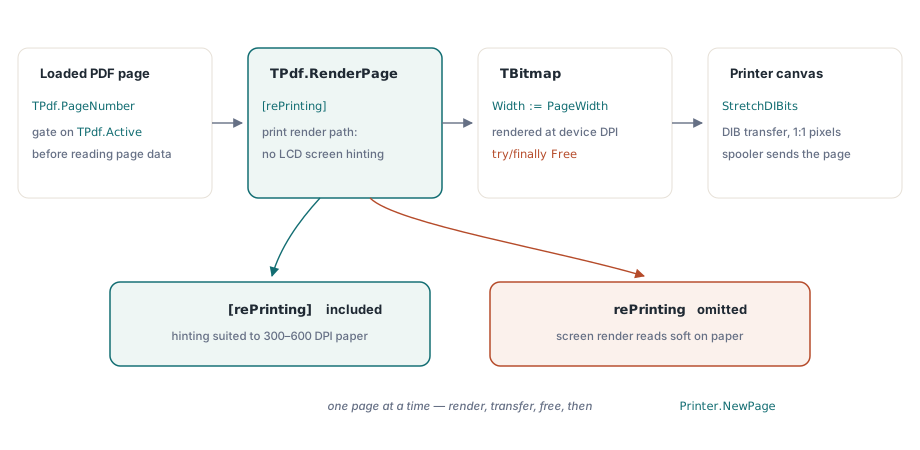
PDFium Component does not talk to printers directly. The pattern is: render a page to a TBitmap at the resolution you want, then transfer that bitmap to the printer's canvas with StretchDIBits. TPdf.RenderPage returns a caller-owned bitmap, so you control the pixel dimensions. Pass [rePrinting] in the options set and PDFium switches its rendering path to one that omits screen-only effects such as LCD subpixel hinting, and handles the page's MediaBox correctly for print output. Leave rePrinting out and what you send to the printer is a screen render, which looks fine on a monitor but tends to produce softer output on high-DPI printers because the hinting decisions made for 96 DPI screens do not suit 300 or 600 DPI printing
TPdf.Active is the only gate to check before touching any page property. The component swallows load errors silently: setting Active := True on a damaged or password-protected file does not raise an exception; it simply leaves Active as False. Always check it after the assignment. Reading PageCount or PageWidth on an inactive document returns zero, which produces silent no-ops that are very hard to diagnose once they reach the spooler
A minimal print loop
The simplest working case loads a file, opens a print job, iterates pages, and closes. The only tricky detail is that Printer.NewPage must not be called before the first page, hence the FirstPage flag. The StretchDIBits transfer goes through GetDIBSizes and GetDIB to pull device-independent bits from the bitmap handle, then paints them onto the printer canvas at the full page size:
procedure PrintPdfFile(const FileName: string);
var
  Pdf: TPdf;
  I: Integer;
  Bitmap: TBitmap;
  InfoHeaderSize, ImageSize: DWORD;
  InfoHeader: PBitmapInfo;
  Image: Pointer;
  FirstPage: Boolean;
begin
  Pdf := TPdf.Create(nil);
  try
    Pdf.FileName := FileName;
    Pdf.Active := True;
    if not Pdf.Active then
      Exit;  // load failed silently; bail out

    Printer.Title := Pdf.Title;
    Printer.BeginDoc;
    try
      FirstPage := True;
      for I := 1 to Pdf.PageCount do
      begin
        if FirstPage then
          FirstPage := False
        else
          Printer.NewPage;

        Pdf.PageNumber := I;

        // Render at printer resolution; rePrinting adjusts the render path
        Bitmap := Pdf.RenderPage(
          0, 0,
          Printer.PageWidth,
          Printer.PageHeight,
          ro0,
          [rePrinting]
        );
        try
          GetDIBSizes(Bitmap.Handle, InfoHeaderSize, ImageSize);
          InfoHeader := AllocMem(InfoHeaderSize);
          try
            Image := AllocMem(ImageSize);
            try
              GetDIB(Bitmap.Handle, 0, InfoHeader^, Image^);
              StretchDIBits(
                Printer.Canvas.Handle,
                0, 0, Printer.PageWidth, Printer.PageHeight,
                0, 0, Bitmap.Width, Bitmap.Height,
                Image, InfoHeader^, DIB_RGB_COLORS, SRCCOPY
              );
            finally
              FreeMem(Image);
            end;
          finally
            FreeMem(InfoHeader);
          end;
        finally
          Bitmap.Free;
        end;
      end;
    finally
      Printer.EndDoc;
    end;
  finally
    Pdf.Active := False;
    Pdf.Free;
  end;
end;
Passing Printer.PageWidth and Printer.PageHeight as the bitmap dimensions means you render at the printer's native pixel size, which already accounts for the device DPI. The StretchDIBits call then maps those pixels 1:1 onto the page. This gives you the best achievable fidelity without any explicit DPI arithmetic, but it only works when the PDF page and the physical paper happen to be the same size. When they differ, you need explicit scaling
Scaling when page and paper sizes differ
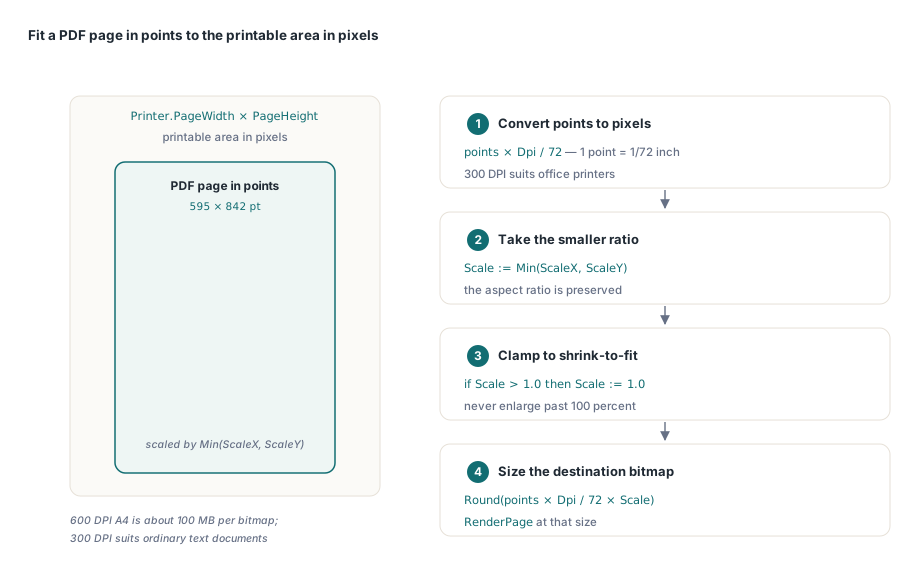
A PDF page at A4 portrait does not automatically fit a US Letter printer, and a landscape page fed to a portrait-oriented printer will clip. The standard approach is to compute a uniform scale factor from the ratio of printer pixels to PDF points, then apply it to both dimensions so the aspect ratio is preserved. Pdf.PageWidth and Pdf.PageHeight expose the current page dimensions in points, where one point is 1/72 inch. Multiplying by a target DPI and dividing by 72 converts to pixels at that resolution. Take Min of the X and Y ratios to get the largest scale that still fits within the printable area:
// Fit PDF page to printable area, preserving aspect ratio
var
  ScaleX, ScaleY, Scale: Double;
  DestWidth, DestHeight: Integer;
  Dpi: Integer;
begin
  Dpi := 300;  // target render resolution
  Pdf.PageNumber := PageIndex;

  ScaleX := Printer.PageWidth  / (Pdf.PageWidth  * Dpi / 72);
  ScaleY := Printer.PageHeight / (Pdf.PageHeight * Dpi / 72);
  Scale  := Min(ScaleX, ScaleY);

  // Clamp to 1.0 for shrink-to-fit only (no enlargement)
  if Scale > 1.0 then Scale := 1.0;

  DestWidth  := Round(Pdf.PageWidth  * Dpi / 72 * Scale);
  DestHeight := Round(Pdf.PageHeight * Dpi / 72 * Scale);

  Bitmap := Pdf.RenderPage(0, 0, DestWidth, DestHeight, ro0,
    [rePrinting, reAnnotations]);
  // ... transfer with StretchDIBits as above
end;
Rendering at Dpi = 300 suits most office printers. At 600 DPI, the bitmap for a single A4 page runs to roughly 34 megapixels, which is about 100 MB as a 32-bit bitmap; the gain in quality for ordinary text documents is minimal and the memory cost per page is significant. Keep 600 DPI for print shops or vector-heavy technical drawings where it genuinely matters
The reAnnotations flag in the second code block is independent of rePrinting. Include it when the user expects stamps, highlights, and comment boxes to appear on paper. Omit it for content-only output. Both flags can be combined freely
Page rotation
PDFium stores page rotation in the PDF as a /Rotate entry, accessible via Pdf.PageRotation, which returns a TRotation value (ro0, ro90, ro180, ro270). The printer coordinate system inverts 90 and 270 degree rotations relative to the screen. If you pass the raw PageRotation value directly to RenderPage without any adjustment, landscape pages embedded in a portrait document will print upside down on most Windows printer drivers. The fix is a simple swap before the render call: map ro90 to ro270 and ro270 back to ro90, leaving ro0 and ro180 unchanged
Verify this behavior on your specific target printer before shipping. Driver behavior around rotation is not uniform across vendors, and some drivers apply their own rotation correction at the GDI level. If you see double rotation, remove the swap; if you see no correction at all, add it. A mixed-orientation document with alternating portrait and landscape pages is the quickest way to catch either failure mode during testing
Memory management across a long print job
Each call to RenderPage allocates a new TBitmap that the caller owns and must free. In the loop above, the try/finally Bitmap.Free block handles this correctly for one page at a time. Do not accumulate bitmaps across pages: a 300-DPI render of a 200-page document would consume gigabytes before the first page reaches the spooler. Free each bitmap before advancing to the next page
The AllocMem / FreeMem pair inside the transfer block follows the same rule. GetDIBSizes tells you how much memory the DIB header and pixel data need; you allocate, fill, paint, and free all within the scope of one page. Letting either block leak will cause the print job to exhaust the process heap on documents longer than a few dozen pages
If you need to run print jobs on a background thread, keep TPdf and all VCL printer calls on the same thread. TPdf itself is not thread-safe across instances sharing the PDFium DLL's global state; the safest model is one TPdf per thread, each loading its own copy of the file
The rendering and document API shown here is part of the PDFium Component for Delphi and C++Builder