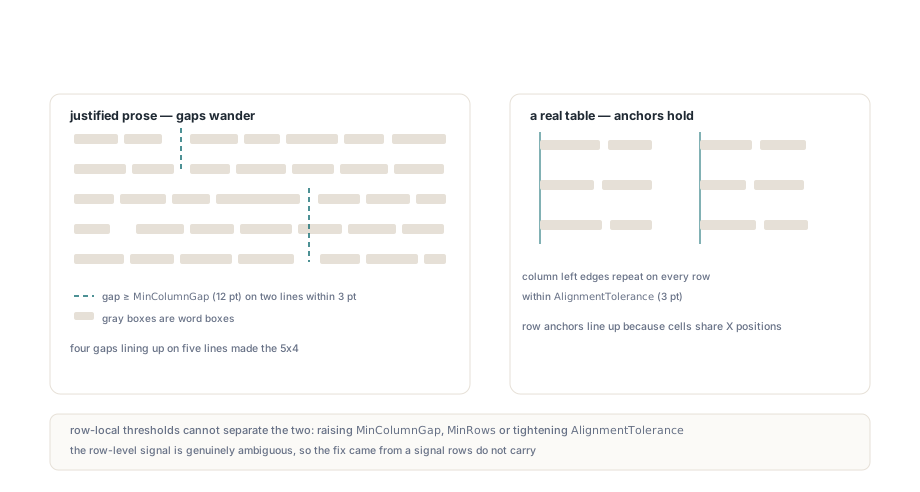
A page of justified body text can come back from a whitespace table detector as a grid of several columns, every cell holding a broken half-sentence and the confidence score well above any threshold you would think to set. There is no table on that page. The detector found word gaps wide enough to pass for column separators and a few consecutive lines where those gaps landed at nearly the same X position, and on alignment alone that is exactly what a table looks like. The answer is to stop judging a column boundary one row at a time and to ask whether a strip of blank paper runs down the page between the columns
Why does justified text pass a whitespace table test?
Justified text passes because a justified line is a row of words separated by gaps the layout engine stretched, and once a stretched gap crosses the column threshold, nothing on that single row distinguishes it from a gutter. The whitespace strategy in PDFium Component works like most whitespace detectors. TPdf.ExtractTables groups word boxes into visual rows, splits each row wherever the horizontal distance from one word to the next is at least MinColumnGap (12 points in TPdfTableExtractionOptions.Default), and clusters the left edges of the resulting word groups into column anchors within AlignmentTolerance, which defaults to 3 points. An anchor survives only if it recurs on at least MinRows rows, and every row of the candidate has to hit at least MinColumns distinct anchors. For a genuine aligned table that rule is correct, and it is the rule described in the table detection overview
The arithmetic on the prose side is less forgiving than it looks. Suppose a 10-point line in a 180-point newsletter column ends 30 points short of the right margin because the next word would not fit, and the line holds only three interword spaces because its words are long. A justifying engine spreads those 30 points across the three spaces, so each one grows from roughly 2.5 points to 12.5 points and crosses the default MinColumnGap. A second line only needs one stretched gap whose following word starts within 3 points of the first line's, and the detector has a two-row, two-column candidate
How the stretch is encoded does not matter. ISO 32000-1 §9.3.3 applies word spacing (Tw) only to the single-byte character code 32, so producers using multi-byte fonts usually position words with numeric adjustments in a TJ array (§9.4.3) instead; either way the word boxes come out identical. The last line of each paragraph is set ragged and carries ordinary spaces, which is why false positives tend to cover the body of a paragraph and stop one line short of its end
A quick way to check your own corpus is to run the detector over documents you know are prose-only, such as letters or press releases, and print every whitespace-mode table it reports. The expected output on those is nothing
uses
  SysUtils, PDFium;

// Lists every whitespace-aligned table in the loaded document so that
// pages you know contain only prose can be checked quickly
procedure ReportWhitespaceTables(Pdf: TPdf; MinRows: Integer = 2);
var
  Options: TPdfTableExtractionOptions;
  Tables: TPdfTables;
  I: Integer;
begin
  Options := TPdfTableExtractionOptions.Default;  // MinColumnGap 12, AlignmentTolerance 3
  Options.MinRows := MinRows;
  Tables := Pdf.ExtractDocumentTables(Options);   // restores the active page
  for I := 0 to High(Tables) do
    if Tables[I].DetectionMode = ptdmWhitespace then
      Writeln(Format('page %d: %dx%d whitespace table, confidence %.2f, ' +
        'first cell "%s"',
        [Tables[I].PageNumber, Tables[I].RowCount, Tables[I].ColumnCount,
         Tables[I].Confidence, Tables[I].Cells[0].Text]));
end;
What each threshold costs
Every row-level threshold trades one class of document against another, and that is the reason to leave them alone for this problem. Raising MinColumnGap to 20 points drops the compact columns of dense financial statements, where the gutter between a label column and its values is often barely wider than the default. Raising MinRows to 3 discards genuine two-row tables and only lowers the odds for long paragraphs, since a page of prose offers many chances for three lines to line up. Tightening AlignmentTolerance below 3 points starts splitting real columns whose left edges drift slightly, as they do on scanned pages with an OCR text layer
MinConfidence looks like the natural filter and is the weakest of the four. A whitespace table in PDFium Component scores 0.58 plus 0.30 times the share of non-empty cells, capped at 0.88, so the score measures how full the grid is. A paragraph fragment fills every cell, which means a prose false positive scores near the top of the range while a real table with blank cells scores lower
Two lines of justified prose and two rows of a two-column table can produce identical word groups at identical anchors. The evidence that separates them sits between the rows
A real column boundary is a vertical corridor
A real column boundary is a vertical strip of the page that stays free of text on every row it separates. A table has one between each pair of columns by construction, because its cells were laid out against shared X positions. A justified paragraph stretches its spaces at a different horizontal position on each line, so no strip survives more than a line or two. PDFium Component tests exactly this after a candidate's word groups have been assigned to anchor columns. For each pair of adjacent columns, every row with content in both cells contributes the interval from the rightmost edge of the left cell's words to the leftmost edge of the right cell's words; the intervals are intersected across rows, and the whole candidate is rejected when the intersection is narrower than half of MinColumnGap — 6 points at the default
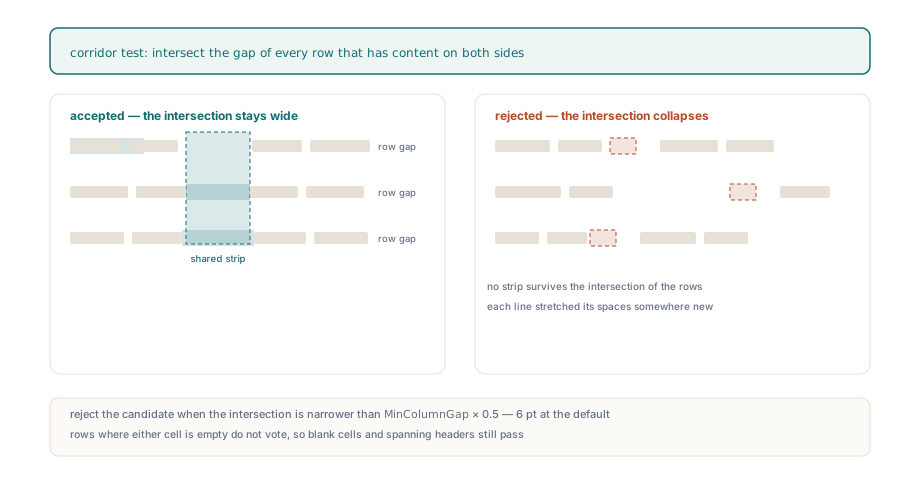
Two details matter on awkward real tables. Rows where either cell is empty do not vote, so a table with blank cells, or a header row that spans fewer columns than the body, still passes. And the corridor width is derived from MinColumnGap instead of being a separate option, because both values describe the same physical thing: the space a designer leaves between columns. Halving it leaves room for the row where a long entry in the left column runs close to the next one
The check is small enough to reproduce in your own layout code; the cell lists below are your own structure, one array of word indexes per cell in row-major order
uses
  Math, PDFium;

type
  TIndexList = array of Integer;
  TCellIndexes = array of TIndexList;   // your own structure: Row * ColumnCount + Column

// Returns False when an adjacent column pair has no text-free vertical
// corridor at least MinColumnGap / 2 wide across the rows that use it
function HasTextFreeCorridors(const Words: TPdfWordBoxes;
  const Cells: TCellIndexes; RowCount, ColumnCount: Integer;
  MinColumnGap: Double): Boolean;
var
  Col, Row, I, LeftCell, RightCell, Supported: Integer;
  CorridorLeft, CorridorRight, RowLeft, RowRight: Double;
begin
  for Col := 0 to ColumnCount - 2 do
  begin
    CorridorLeft := -MaxDouble;
    CorridorRight := MaxDouble;
    Supported := 0;
    for Row := 0 to RowCount - 1 do
    begin
      LeftCell := Row * ColumnCount + Col;
      RightCell := LeftCell + 1;
      if (Length(Cells[LeftCell]) = 0) or (Length(Cells[RightCell]) = 0) then
        Continue;                             // empty cells do not vote
      RowLeft := -MaxDouble;
      RowRight := MaxDouble;
      for I in Cells[LeftCell] do
        RowLeft := Max(RowLeft, Words[I].Rect.Right);
      for I in Cells[RightCell] do
        RowRight := Min(RowRight, Words[I].Rect.Left);
      CorridorLeft := Max(CorridorLeft, RowLeft);
      CorridorRight := Min(CorridorRight, RowRight);
      Inc(Supported);
    end;
    if (Supported > 0) and
       (CorridorRight - CorridorLeft < MinColumnGap * 0.5) then
      Exit(False);
  end;
  Result := True;
end;
Keeping ruled tables out of the whitespace pass
A ruled table would be found twice if the whitespace pass saw every word on the page, because a clean ruled table is by construction a perfectly aligned whitespace table too. On its own, a more-than-half overlap rule would let a candidate that combines the lower rows of a ruled table with a few aligned lines of text beneath it stay under the ratio and come out as a second, larger table that bleeds into its neighbor
When both DetectRuledTables and DetectWhitespaceTables are on, which is the default, ExtractTables therefore runs the ruled pass first and removes every word whose center point lies inside the bounds of a ruled table before the whitespace pass starts. The center is used instead of full containment so that a word straddling a border by a fraction of a point follows the table it visually belongs to. The whitespace strategy then sees only free words, and a small unruled table sitting directly under a ruled grid is judged on its own rows
Why can "Purpose of Request:" come out as "of Purpose Request:"?
Words inside a cell come out in the wrong order when the code that decides "same line" compares vertical centers, because word boxes built from glyph boxes do not share a center even when they share a baseline. FPDFText_GetCharBox returns the tight box of each glyph's ink in page space, not a box padded to the font's ascent and descent, and a word box is the union of its characters' boxes. In a form label such as "Purpose of Request:", the words "Purpose" and "Request:" carry descenders and "of" does not, so the box for "of" is shorter and its center sits a couple of points higher. A routine that sorts by center Y with a 1-point same-line tolerance and then by left edge puts "of" on its own line above the other two and emits it first
PDF offers no shortcut. ISO 32000-1 §9.4.4 places glyphs by displacement along the baseline, and the only vertical metrics in the file are per font: Ascent, Descent and FontBBox in the font descriptor (§9.8.1). Nothing says two glyphs share a line. The tight boxes that make selection highlighting look right, as covered in text line selection with PDFium char boxes, are poor input for a center-distance comparison
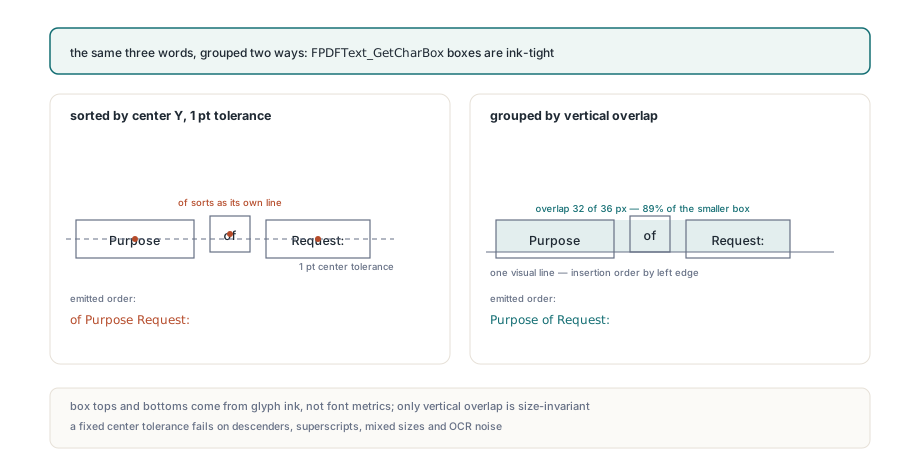
PDFium Component builds cell text by overlap instead. A word joins a visual line when its vertical overlap with the line's running bounds is at least 25 percent of the smaller of the two heights, or when the two centers are within a point of each other; each line is then sorted by left edge, and lines are joined with a CR LF pair. "Purpose" and "of" overlap across the whole x-height, far more than a quarter of the shorter box, so they land on one line and read in order
Group text lines by overlap in your own code
The same trap waits in any PDF layout code that decides "same line" by comparing centers against a fixed tolerance. Descenders are the mildest trigger. Bold labels beside smaller values, superscript footnote markers and noisy OCR boxes all move centers by more than any tolerance that still separates adjacent lines of 10-point text on 12-point leading. Overlap ratio does not care about size: two boxes on one baseline overlap across their shared x-height, and two boxes on adjacent lines overlap by nothing
TPdf.PageWordBoxes returns every word on the active page with its page-space rectangle in Rect, so grouping a page into visual lines takes one predicate and a short loop
uses
  Math, PDFium;

function SameVisualLine(const A, B: TPdfRectangle): Boolean;
var
  Overlap, MinHeight: Double;
begin
  Overlap := Min(A.Top, B.Top) - Max(A.Bottom, B.Bottom);
  MinHeight := Min(A.Top - A.Bottom, B.Top - B.Bottom);
  Result := (MinHeight > 0) and (Overlap >= MinHeight * 0.25);
end;

procedure GroupPageIntoLines(Pdf: TPdf; out Lines: TArray<TPdfWordBoxes>);
var
  Words: TPdfWordBoxes;
  Bounds: TArray<TPdfRectangle>;   // running union per line
  I, J, Found: Integer;
begin
  Words := Pdf.PageWordBoxes;            // needs an active page (Pdf.PageNumber)
  Lines := nil;
  Bounds := nil;
  for I := 0 to High(Words) do
  begin
    Found := -1;
    for J := High(Lines) downto 0 do
      if SameVisualLine(Bounds[J], Words[I].Rect) then
      begin
        Found := J;
        Break;
      end;
    if Found < 0 then
    begin
      SetLength(Lines, Length(Lines) + 1);
      SetLength(Bounds, Length(Bounds) + 1);
      Found := High(Lines);
      Bounds[Found] := Words[I].Rect;
    end;
    SetLength(Lines[Found], Length(Lines[Found]) + 1);
    Lines[Found][High(Lines[Found])] := Words[I];
    Bounds[Found].Left := Min(Bounds[Found].Left, Words[I].Rect.Left);
    Bounds[Found].Right := Max(Bounds[Found].Right, Words[I].Rect.Right);
    Bounds[Found].Top := Max(Bounds[Found].Top, Words[I].Rect.Top);
    Bounds[Found].Bottom := Min(Bounds[Found].Bottom, Words[I].Rect.Bottom);
  end;
  // sort each line by Rect.Left before reading it: PageWordBoxes returns
  // words in content-stream order, which need not match visual order
end;
The predicate is the part worth copying. For anything beyond a quick dump, start from the structured text model, which already carries blocks, lines and a reading-order source, as described in structured PDF text extraction with reading order
What table callers still control
Table callers get the corridor test, the ruled-first word filter and overlap-based cell text without touching their options. The corridor threshold is fixed at half of MinColumnGap, so the one value you tune for gutter width governs both. The whitespace strategy keeps a floor of two rows even when MinRows is set to 1; only the ruled strategy accepts single-row grids, which ExtractDocumentTables uses for table fragments continued at the top of a page. The same options record travels into TPdfReflowOptions.TableOptions, so reflow output inherits the same decisions when DetectTables is on
The corridor test decides on rows that have content on both sides of a boundary, so a two-row candidate is judged on just two such rows. For archives that are mostly prose and rarely contain genuine two-row tables — contracts, correspondence, essays — set MinRows to 3 and accept the lost two-row tables. For financial and form-heavy documents keep the default of 2, because short real tables are common there. Ragged-right text keeps ordinary single spaces and rarely produces a gap anywhere near 12 points
PDF has no general table object. ISO 32000-1 §14.8.4.3.4 defines a Table structure element, but only Tagged PDF carries it, so for everything else the grid is an inference from geometry, and a whitespace table's Confidence never goes above 0.88
The detection options, TPdfTable.ToCsv and ToJson serialization, and the TableExtractionLab demo for Delphi, C++Builder and Lazarus are covered on the PDFium Component for Delphi product page