To attach a source file to a PDF/A-3 document from Delphi, PDFium Component writes a PDF 2.0 associated-file chain: an embedded file stream with a MIME /Subtype, a file specification carrying /AFRelationship, and an /AF array hung on the catalog or a page. InjectAssociateFiles and TPdf.SaveAsWithAssociateFiles build that chain in one incremental update, and since v3.121.2 the MIME type is serialized as a single, correctly escaped PDF name. The rest of this post covers what a validator checks, the one-character bug that broke text/plain, and the places where older releases quietly did something other than what you asked
What does a PDF/A-3 associated file actually need?
A PDF/A-3 attachment passes validation only when three objects agree with each other: the embedded file stream declares /Type /EmbeddedFile plus a MIME /Subtype, the file specification dictionary (ISO 32000-2 §7.11.3) carries /F, /UF, /EF and /AFRelationship, and something in the document references that file specification through an /AF array (ISO 32000-2 §14.13). Plain embedding through the /Names /EmbeddedFiles tree, which is what TPdf.CreateAttachment does, never sets the association fields at all. PDFium Component's own PDF/A-3b validation fixture makes the dependency concrete: rename only the /AFRelationship key and the file fails exactly one rule in clause 6.8 of ISO 19005-3; drop only the MIME /Subtype and a different 6.8 rule fails; put the same attachment into a PDF/A-1b candidate and it is rejected outright, because PDF/A-1 forbids embedded files no matter how tidy the metadata is
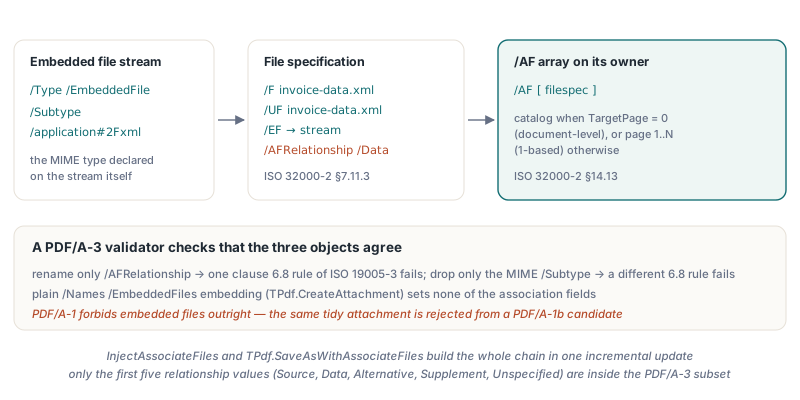
The relationship value is the part people tend to guess. TPdfAFRelationship in FPdfAssocFiles maps one enum member to each name token the injector can emit, and only the first five belong to the subset ISO 19005-3 recognizes:
afSource→/Source: the original the PDF was produced from, such as a word-processing file or a spreadsheetafData→/Data: machine-readable data the visible content was derived from or representsafAlternative→/Alternative,afSupplement→/Supplement,afUnspecified→/UnspecifiedafEncryptedPayload,afFormData,afTemplate: PDF 2.0 additions that fall outside the PDF/A-3 subset, so keep them out of archival output
Why did /Subtype /text/plain break validation?
The MIME bug was a tokenization error, not a compliance gap: before v3.121.2 the injector concatenated the caller's string straight after a slash, producing /Subtype /text/plain. In PDF syntax the second slash starts a new name object (ISO 32000-1 §7.3.5), so the stream dictionary suddenly held the key /Subtype, the name /text, and a dangling extra name /plain that unbalanced the key-value pairs. An independent PDF/A validator rejected the file while parsing the EmbeddedFile dictionary, before it ever reached a PDF/A rule, which is why the failure looked like file corruption rather than a missing attachment property
The fix routes the MIME value through EscapePdfName, which emits /text#2Fplain: one name whose decoded value is text/plain. The escaping is deliberately broader than the slash. Every byte at or below 32 (space, tab, CR, LF), every byte at or above 127, the delimiters ()<>[]{}/% and the # escape character itself become #XX. Escaping only the slash would have left a different hole: a MIME string containing >> or whitespace could close the dictionary early or inject extra keys, so the regression test feeds a hostile value with every delimiter plus tab, LF and CR and checks the exact encoded output
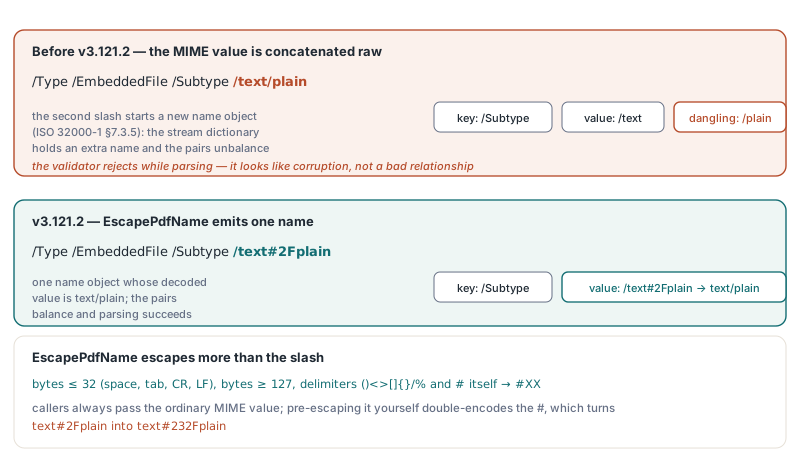
// What the injector writes for MIMEType = 'text/plain'
//   before v3.121.2:  /Type /EmbeddedFile /Subtype /text/plain     (two names)
//   v3.121.2:         /Type /EmbeddedFile /Subtype /text#2Fplain   (one name)
//
// Callers always pass the ordinary MIME value. Pre-escaping it yourself
// double-encodes the '#', which turns 'text#2Fplain' into 'text#232Fplain'
Options.Files[0].MIMEType := 'text/plain';
Building a PDF/A-3 file with InjectAssociateFiles
For PDF/A-3 output, produce the conforming base document with TPdf.SaveAsPdfAToStream and then call InjectAssociateFiles on that stream; that two-step pipeline is exactly what the validation fixture runs before it passes PDF/A-3b. TPdf.SaveAsWithAssociateFiles is the convenience wrapper, but it saves through the ordinary SaveAs path with saRemoveSecurity rather than through the PDF/A writer, so it does not add the XMP identification and output intent that PDF/A requires. Note that the record types live in FPdfAssocFiles and FPdfPdfa, so both units belong in your uses clause. Since v3.121.3, FileName and Description no longer have to be plain ASCII: /UF and /Desc are written as PDF text strings, printable ASCII literally and anything else as UTF-16BE with a byte order mark, while the legacy /F name is always portable printable ASCII with every other character replaced by _, so readers that decode /F with their own code page show an underscore instead of mojibake. Earlier builds converted all three through the system ANSI code page on Delphi or wrote raw UTF-8 bytes on Free Pascal, so keep names ASCII only if older builds must produce the same output
uses
  System.SysUtils, System.Classes, System.IOUtils,
  PDFium, FPdfPdfa, FPdfAssocFiles;

procedure SaveWithSourceData(Pdf: TPdf; const XmlPath, OutPath: string);
var
  PdfAOptions: TPdfASaveOptions;
  Options: TAssocFilesOptions;
  Base: TMemoryStream;
  Output: TFileStream;
begin
  PdfAOptions := TPdfASaveOptions.Default;
  PdfAOptions.Conformance := pac3b;

  Options := TAssocFilesOptions.Default;      // TargetPage = 0: catalog-level /AF
  SetLength(Options.Files, 1);
  Options.Files[0].FileName := 'invoice-data.xml';
  Options.Files[0].Description := 'Structured invoice data';
  Options.Files[0].Content := TFile.ReadAllBytes(XmlPath);
  Options.Files[0].Relationship := afData;
  Options.Files[0].MIMEType := 'application/xml';  // written as /application#2Fxml

  Base := TMemoryStream.Create;
  try
    if not Pdf.SaveAsPdfAToStream(Base, PdfAOptions) then
      raise Exception.Create('PDF/A-3 base save failed');
    Output := TFileStream.Create(OutPath, fmCreate);
    try
      InjectAssociateFiles(Base, Output, Options);  // rewinds Base; raises EPdfAssocFilesError on failure
    finally
      Output.Free;
    end;
  finally
    Base.Free;
  end;
end;
Catalog or page: where does the /AF array land?
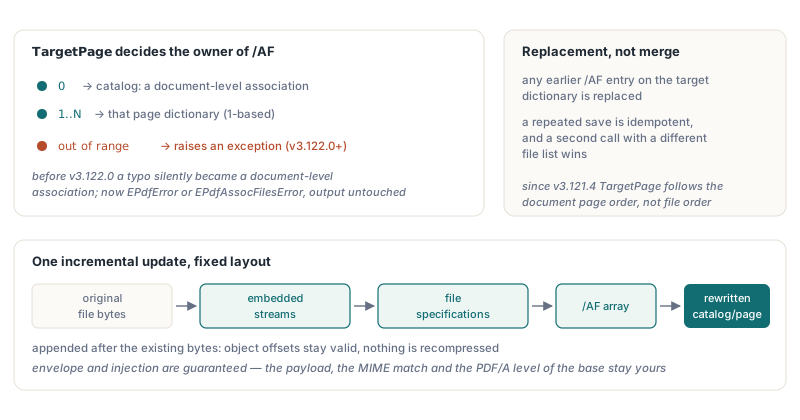
TAssocFilesOptions.TargetPage decides the owner of the /AF array: 0 attaches it to the catalog as a document-level association, and 1..N attaches it to that page dictionary, 1-based. The injector appends everything as a single incremental update in a fixed layout (the embedded streams, then the file specifications, then the /AF array, then a rewritten catalog or page object), so existing objects keep their offsets and nothing is recompressed. Any earlier /AF entry on the target dictionary is replaced, not merged, which makes a repeated save idempotent but also means a second call with a different file list wins. Two behaviors used to deserve a guard in your own code, and both have changed. Before v3.122.0 an out-of-range TargetPage did not fail; it fell back to the catalog, so a typo turned a page-level association into a document-level one without any signal. Since v3.122.0, SaveAsWithAssociateFiles and SaveAsWithAssociateFilesToStream raise EPdfError when TargetPage is outside 0..PageCount, and InjectAssociateFiles raises the new EPdfAssocFilesError for a negative TargetPage or one that names no existing page, leaving the destination stream unmodified. Before v3.121.4 the page lookup scanned the saved bytes for /Type /Page dictionaries in file order, which could attach the file to a different page once page objects were stored in another order than they are displayed, for example after pages were reordered or inserted; since v3.121.4 TargetPage names the page at that position in the document page order
procedure AttachChartSource(Pdf: TPdf; PageNumber: Integer;
  const CsvBytes: TBytes; const OutPath: string);
var
  Options: TAssocFilesOptions;
begin
  // Since v3.122.0 an out-of-range TargetPage raises EPdfError (older builds
  // silently fell back to a catalog-level /AF); checking first names the page
  if (PageNumber < 1) or (PageNumber > Pdf.PageCount) then
    raise EArgumentOutOfRangeException.CreateFmt('No page %d', [PageNumber]);

  Options := TAssocFilesOptions.Default;
  Options.TargetPage := PageNumber;
  SetLength(Options.Files, 1);
  Options.Files[0].FileName := 'chart-data.csv';
  Options.Files[0].Content := CsvBytes;
  Options.Files[0].Relationship := afSource;
  Options.Files[0].MIMEType := 'text/csv';

  if not Pdf.SaveAsWithAssociateFiles(OutPath, Options) then
    raise Exception.Create('Associated-file save failed');
end;
How do you read AFRelationship back reliably?
TPdf.AttachmentRelationship[Index] returns the /AFRelationship name of an attachment through the native FPDFAttachment_GetAFRelationship export, but an empty string has two possible meanings, so call AttachmentRelationshipFeaturesAvailable first. The binding is loaded tolerantly: when the PDFium DLL lacks that export, every relationship reads as empty, which is indistinguishable from a file specification that simply has no /AFRelationship. The property also shares its index with AttachmentCount, which counts entries in the /Names /EmbeddedFiles tree. The injector writes only the /AF chain and does not add a name-tree entry, so a file attached through InjectAssociateFiles is outside that index; to confirm the injected chain, inspect the saved bytes or run a PDF/A validator. The internals of that name tree are covered in working with PDF attachments in Delphi using PDFium Component
procedure ReportRelationships(const FileName: string);
var
  Pdf: TPdf;
  I: Integer;
  Rel: string;
begin
  if not AttachmentRelationshipFeaturesAvailable then
  begin
    Writeln('This PDFium build cannot report /AFRelationship');
    Exit;  // an empty answer would be ambiguous, so do not ask
  end;

  Pdf := TPdf.Create(nil);
  try
    Pdf.FileName := FileName;
    Pdf.Active := True;
    for I := 0 to Pdf.AttachmentCount - 1 do
    begin
      Rel := Pdf.AttachmentRelationship[I];
      if Rel = '' then
        Rel := '(no /AFRelationship)';
      Writeln(Pdf.AttachmentName[I], ': ', Rel);
    end;
  finally
    Pdf.Free;
  end;
end;
What does SaveAsWithAssociateFiles not guarantee?
TPdf.SaveAsWithAssociateFiles guarantees the file-format envelope and that the requested files were injected, not conformance. The injection part is new: before v3.122.0, when the saved bytes had no readable trailer or the catalog dictionary could not be located, InjectAssociateFiles copied the input through unchanged and the method still returned True. Since v3.122.0 InjectAssociateFiles raises EPdfAssocFilesError in those cases before writing anything, SaveAsWithAssociateFiles returns False, and because it now builds the complete output in a save store before opening the target, a rejected or failed save no longer truncates an existing file. An empty Files array still copies the document through unchanged by design. The content of the payload is also your responsibility: the injector does not check that an XML file is well formed, that the MIME type matches the bytes, or that the base document is PDF/A at all. Treat the final file as unverified until a validator has seen it, the same discipline described in PDFium Component and PDF/A archival compliance. If you also parse incoming dictionaries yourself, the same #XX name rules apply in reverse, a topic covered in name token pitfalls when parsing PDF dictionaries
Associated files, PDF/A output, attachment metadata and validation all ship in the same component, so the pipeline above runs without a second PDF library in the build. The API reference, trial download and licensing options are on the PDFium Component product page