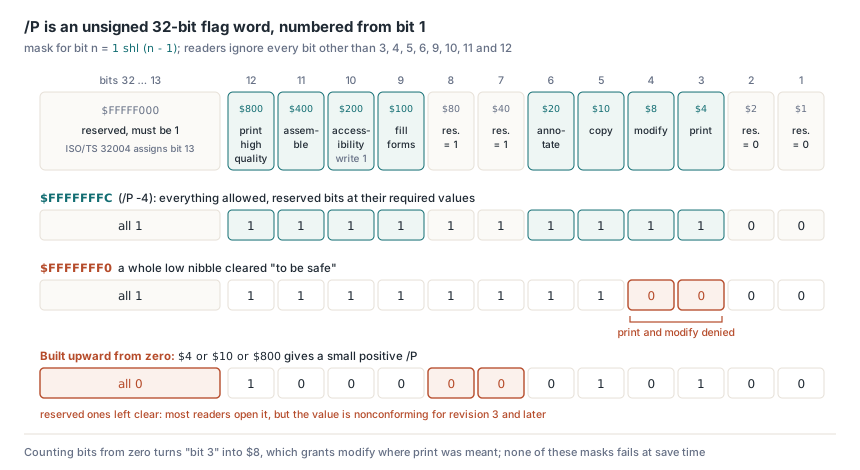
You encrypt a report with a mask meant to allow everything, $FFFFFFF0, and Acrobat's Security tab lists printing and changing the document as not allowed. /P is an unsigned 32-bit flag word numbered from bit 1, so that mask clears print (bit 3) and modify (bit 4); the all-allowed value is $FFFFFFFC, the starting point of TPdfEncryptOptions in PDFium Component
How the /P flag word is laid out
Only eight positions carry meaning, the rest are reserved, and counting starts at 1. ISO 32000-1 §7.6.3.2 says P "shall be interpreted as an unsigned 32-bit quantity", numbered from 1 at the low-order end to 32 at the high-order end, and tells conforming readers to ignore every bit other than 3, 4, 5, 6, 9, 10, 11 and 12. ISO 32000-2 §7.6.4.2 corrects Table 22 and spells out the reserved positions: bits 1–2 must be 0, bits 7–8 must be 1, and for revision 3 and later bits 13–32 must be 1. PDF 2.0 also retires bit 10, which readers now ignore and writers always set to 1 for older readers; the accessibility carve-out moves to bit 5, so a reader should act as if copying were allowed when the content goes to assistive technology. One formula covers every row below. The mask for bit n is 1 shl (n - 1) — and TPdfPermission maps onto the word the same way
| Bit | Mask | Meaning (revision 3 and later) | TPdfPermission |
|---|---|---|---|
| 1–2 | $00000003 | Reserved, must be 0 | none |
| 3 | $00000004 | Print, at a quality that depends on bit 12 | permPrint |
| 4 | $00000008 | Modify contents by operations other than those of bits 6, 9 and 11 | permModify |
| 5 | $00000010 | Copy or extract text and graphics | permCopy |
| 6 | $00000020 | Add or modify annotations, fill fields; with bit 4, create fields | permAnnotate |
| 7–8 | $000000C0 | Reserved, must be 1 | none |
| 9 | $00000100 | Fill existing form fields, including signature fields, even if bit 6 is clear | permFillForms |
| 10 | $00000200 | Accessibility extraction; unused in PDF 2.0, always written as 1 | permAccessibility |
| 11 | $00000400 | Assemble: insert, rotate or delete pages, create outline items and thumbnails | permAssemble |
| 12 | $00000800 | Print to a faithful, high-quality representation | permPrintHighQuality |
| 13–32 | $FFFFF000 | Reserved, must be 1 (ISO/TS 32004 assigns bit 13, see below) | none |
The $FFFFFFF0 mask comes from reading "the low bits are reserved" and clearing a whole nibble to be safe. The reserved region was only bits 1–2, mask $3; clearing $F also wipes out $4 and $8, which are print and modify, and any viewer that honors the flags will refuse both. The mirror-image mistake is assembling the mask upward from zero: OR together $4, $10 and $800 and you get a small positive /P with bits 7–8 and 13–32 clear. Most readers open that file without comment, because the specification tells them to ignore reserved bits, but the value is nonconforming for revision 3 and later and a strict checker is entitled to complain. A third variant shows up in code that counts bits from zero, where "bit 3" becomes $8 and the program grants modify when it meant print. None of these produce an error at save time. The permissions simply come out different from the ones the author intended
Is /P -4 the same value as /P 4294967292?
Yes. Same 32 bits, two spellings. PDF integer objects are signed, and the note just above Table 22 points out that because the reserved high-order bits are 1, the integer is written as a negative number; -4 is the conventional all-allowed value for revision 3 and later. Producers that keep the value in an unsigned variable write 4294967292 instead, and both spellings turn up in real files. The specification settles which reading is right in its own key derivation: step (d) of Algorithm 2 in ISO 32000-1 §7.6.3.3 converts P to a 32-bit unsigned binary number and passes the four bytes to MD5 low-order byte first, so for revisions 2 to 4 the values -3904 and 4294963392 produce the same file key. A parser that stores /P in a signed 32-bit Integer rejects the unsigned spelling as an overflow; switch the variable to Cardinal and the negative spelling fails instead, while code that compares the token text against a stored value ends up treating one document as two. Read the token into an Int64, accept anything from Low(Integer) to High(Cardinal), and mask to 32 bits before any comparison. PDFium Component's own decryption code reads /P that way for revisions 2 through 7, and its writer emits the signed form that the specification's note shows. The reserved-bit report in the snippet stops at bit 14, since a clear bit 13 is how ISO/TS 32004 marks a file that carries a PDF MAC
uses
  System.SysUtils;

// Normalize the /P token text from your own dictionary parser
function TryNormalizePermissions(const Token: string;
  out Mask: Cardinal): Boolean;
var
  Value: Int64;
begin
  Result := TryStrToInt64(Token, Value) and
    (Value >= Low(Integer)) and (Value <= High(Cardinal));
  if Result then
    Mask := Cardinal(Value and $FFFFFFFF);
end;

function DescribeReservedBits(Mask: Cardinal): string;
begin
  Result := '';
  if (Mask and $00000003) <> 0 then
    Result := Result + 'bits 1-2 set; ';
  if (Mask and $000000C0) <> $000000C0 then
    Result := Result + 'bits 7-8 clear; ';
  // Bit 13 ($1000) is left out: ISO/TS 32004 clears it to require a PDF MAC
  if (Mask and $FFFFE000) <> $FFFFE000 then
    Result := Result + 'bits 14-32 not all set; ';
end;

// Expected: both calls yield $FFFFFFFC and an empty reserved-bit report
//   TryNormalizePermissions('-4', M1);
//   TryNormalizePermissions('4294967292', M2);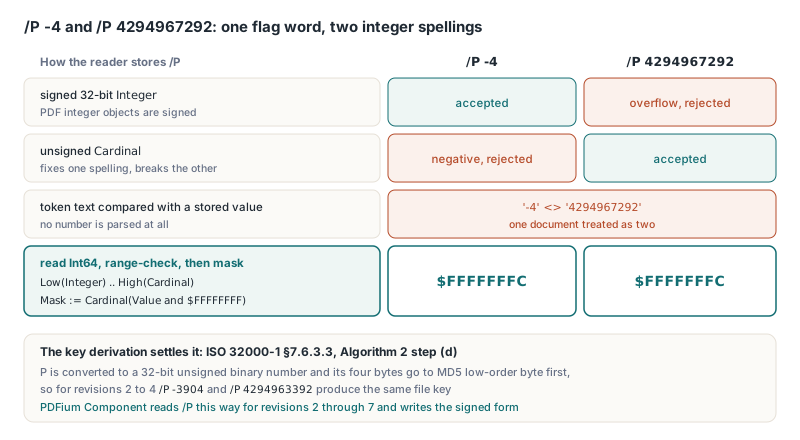
Building a mask from a TPdfPermissions set
Start with every reserved bit at its required value and OR in only what you grant, so a forgotten permission can only ever turn into a denial. TPdfEncryptOptions.Default in the FPdfEncrypt unit already holds $FFFFFFFC, which allows everything, and clearing one or two bits from it works fine for a quick restriction. A policy that lists what recipients may do reads better as a set, and the constant array below lines up with the bit positions TPdf uses to decode the word. Force bit 10 on regardless of what the caller passes. ISO 32000-2 tells writers to always set it, PDF 2.0 readers ignore it anyway, and leaving it clear only risks blocking screen readers in older software
uses
  System.SysUtils, PDFium, FPdfEncrypt;

const
  PermissionBit: array[TPdfPermission] of Cardinal = (
    $0004,   // permPrint             bit 3
    $0008,   // permModify            bit 4
    $0010,   // permCopy              bit 5
    $0020,   // permAnnotate          bit 6
    $0100,   // permFillForms         bit 9
    $0200,   // permAccessibility     bit 10
    $0400,   // permAssemble          bit 11
    $0800);  // permPrintHighQuality  bit 12

  // Bits 7-8 and 13-32 set; bits 1-2 and every permission bit clear
  ReservedOnes = Cardinal($FFFFF0C0);

function PermissionsToMask(Allowed: TPdfPermissions): Cardinal;
var
  P: TPdfPermission;
begin
  Result := ReservedOnes or PermissionBit[permAccessibility];
  for P in Allowed do
    Result := Result or PermissionBit[P];
end;

procedure SaveFillAndPrintCopy(const Source, Target: string;
  const OwnerPassword: AnsiString);
var
  Pdf: TPdf;
  Opts: TPdfEncryptOptions;
begin
  Pdf := TPdf.Create(nil);
  try
    Pdf.FileName := Source;
    Pdf.Active := True;
    if not Pdf.Active then
      raise Exception.CreateFmt('Could not open %s', [Source]);

    Opts := TPdfEncryptOptions.Default;   // Revision = erR5 here
    Opts.UserPassword := '';              // anyone may open the file
    Opts.OwnerPassword := OwnerPassword;  // guards the permission set
    Opts.Revision := erR6;
    Opts.Permissions := PermissionsToMask(
      [permPrint, permPrintHighQuality, permFillForms]);

    // Expected: /P -1084 = 4294966212 ($FFFFFBC4)
    Writeln('/P ', Integer(Opts.Permissions), ' = ', Opts.Permissions);

    if not Pdf.SaveAsEncrypted(Target, Opts) then
      raise Exception.Create('Encrypted save failed');
  finally
    Pdf.Free;
  end;
end;
Expected: the Encrypt dictionary of the output carries /P -1084, and a viewer that honors the flags offers printing at full quality and form filling while graying out content edits, copying, commenting and page assembly. Bit 13 is one position the writer manages for you. With EnableIntegrityProtection left at False, SaveAsEncrypted sets bit 13 whatever your mask says; with it set to True, the writer clears bit 13 in both /P and /Perms. The other reserved bits stay your responsibility — hence the $FFFFF0C0 starting point. The example chooses erR6 because R6 is the AES-256 revision ISO 32000-2 standardizes; the default record carries erR5
/Perms, the encrypted copy of /P in AES-256 files
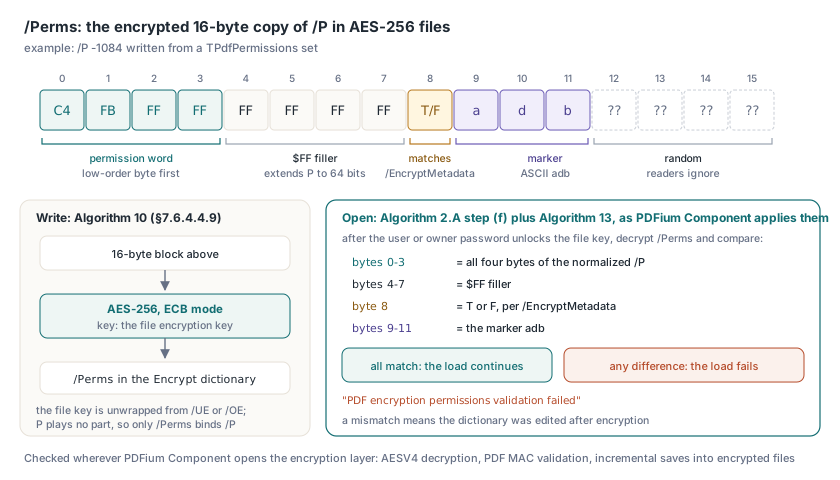
In revisions 2 to 4 the permission word is welded to the key: change one bit of /P and the MD5 input changes, the derived key is wrong, and nothing decrypts. AES-256 files break that link. Algorithm 2.A in ISO 32000-2 §7.6.4.3.3 unwraps the file encryption key from /UE or /OE, and P plays no part in that derivation, so on its own a plaintext /P could be edited freely. /Perms closes the gap. Algorithm 10 (§7.6.4.4.9) fills a 16-byte block and encrypts it with the file key using AES-256 in ECB mode:
- bytes 0–3: the permission word, low-order byte first, extended to 64 bits by bytes 4–7, which are all
$FF - byte 8: ASCII
TorF, matching/EncryptMetadata - bytes 9–11: the ASCII marker
adb - bytes 12–15: random data that readers ignore
Step (f) of Algorithm 2.A decrypts the block, verifies adb and requires bytes 0–3 to match P — shall, not should. Algorithm 13 (§7.6.4.4.12) repeats the marker and permission checks with the softer should and adds one more: byte 8 against EncryptMetadata. PDFium Component reads it the strict way wherever its own code opens the encryption layer: AESV4 decryption, PDF MAC validation and incremental saves into encrypted files. After the user or owner password unlocks the file key, that code compares all four permission bytes against the normalized /P, checks the $FF filler, the T/F byte and the marker, and fails the load with "PDF encryption permissions validation failed" on any difference, since a mismatch means someone edited the dictionary after encryption and neither copy can be taken at face value
The EncryptMetadata comparison deserves care in any reader you write. A shortcut like Pos('/EncryptMetadata false', Dict) > 0 misses /EncryptMetadata false with two spaces, a line break between key and value, or a comment in between, all legal PDF syntax. The reader then assumes the default true, finds F in a perfectly valid /Perms, and rejects the file. A valid file, refused. Parse the key and its value as tokens, and treat a non-boolean value as malformed rather than defaulting it
ISO/TS 32004 gives bit 13 a job: when it is clear, the document carries a PDF MAC that readers must check. The MAC token sits in the trailer's /AuthCode dictionary, which is not encrypted, so a check that only looks for /AuthCode concludes that a file with it deleted was never integrity-protected. Deleting /KDFSalt as well does not hide the requirement, because the cleared bit lives in /P and /P is authenticated by /Perms. PDFium Component's AESV4 decryption therefore treats a clear bit 13, or a leftover /KDFSalt, without an /AuthCode as a stripped MAC and fails, and when integrity protection is off the writer sets bit 13 so its output never announces a MAC it lacks. The key hierarchy and the byte range behind that token belong to AES-GCM encryption and the ISO/TS 32004 MAC in PDF 2.0, and the iterated password hash that unlocks the file key before any of this runs is covered in the R6 password hash and its round count
Permissions or UserPermissions: which one should your UI read?
Read Permissions to decide what the current session may do, and UserPermissions to report what the file grants an ordinary recipient. TPdf.Permissions wraps PDFium's FPDF_GetDocPermissions and describes the access this open document was granted, which depends on the password that unlocked it. TPdf.UserPermissions wraps FPDF_GetDocUserPermissions and keeps reporting the user-access grant from /P no matter which password was used, so the two can differ when the owner password opened the file. Both are LongWord; GrantedPermissions and UserGrantedPermissions decode them into TPdfPermissions sets, and HasPermission and UserHasPermission test a single member. SecurityHandlerRevision tells you whether the file has a security handler at all. The routine below prints both integer views of the raw word next to the decoded set, a quick way to see why a file "will not print"
uses
  System.SysUtils, System.TypInfo, PDFium;

procedure DumpPermissions(const FileName, Password: string);
var
  Pdf: TPdf;
  Mask: LongWord;
  Granted: TPdfPermissions;
  P: TPdfPermission;
begin
  Pdf := TPdf.Create(nil);
  try
    Pdf.FileName := FileName;
    Pdf.Password := Password;   // set before Active
    Pdf.Active := True;
    if not Pdf.Active then
      raise Exception.CreateFmt('Could not open %s', [FileName]);

    if Pdf.SecurityHandlerRevision <= 0 then
    begin
      Writeln('Not encrypted: no /P to decode');
      Exit;
    end;

    Mask := Pdf.UserPermissions;
    Granted := Pdf.UserGrantedPermissions;
    Writeln(Format('R%d  /P as Integer %d, as Cardinal %u ($%.8x)',
      [Pdf.SecurityHandlerRevision, Integer(Mask), Mask, Mask]));

    for P := Low(TPdfPermission) to High(TPdfPermission) do
      Writeln(Format('  %-22s %s',
        [GetEnumName(TypeInfo(TPdfPermission), Ord(P)),
         BoolToStr(P in Granted, True)]));

    if not Pdf.HasPermission(permCopy) then
      Writeln('  this session may not copy text');
  finally
    Pdf.Free;
  end;
end;

// Expected for the file written earlier:
//   R6  /P as Integer -1084, as Cardinal 4294966212 ($FFFFFBC4)
//   permPrint True, permModify False, permCopy False, ...
Enforcement belongs to the host application
PDFium renders, extracts text and rasterizes pages whatever the flags say. The engine reports permissions and leaves policy to the caller. Anyone holding the user password holds the decrypted content — with an empty user password, that is everyone — so confidentiality can only come from a user password the reader lacks. Put the check inside each command handler (copy, export, page deletion, print) rather than hiding toolbar buttons, since shortcuts, context menus and automation all bypass a toolbar, the same layering used in a secure PDF preview pane for Delphi apps. A print command, for instance, tests permPrint before it spools anything
In an AES-256 file, -1084 in plain text proves nothing until the first four decrypted bytes of /Perms read C4 FB FF FF. That byte-for-byte comparison runs inside the AESV4, PDF MAC and encrypted incremental-save code of PDFium Component