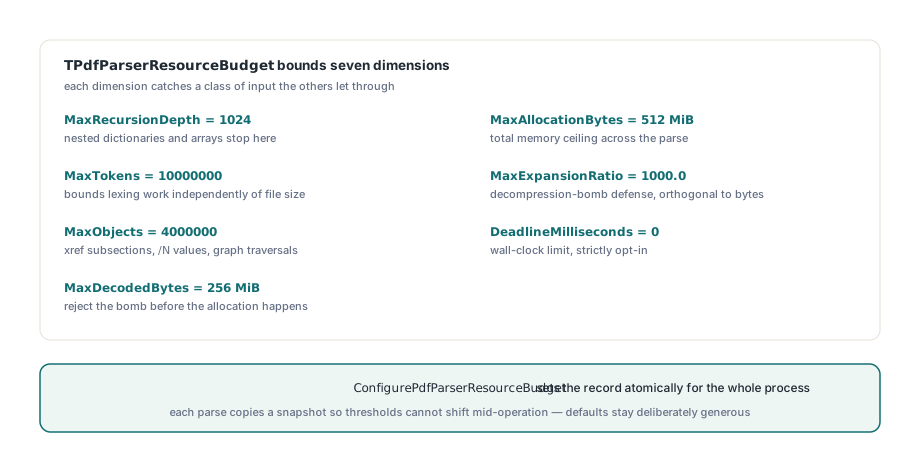
PDFium Component exposes TPdfParserResourceBudget, a single record that bounds recursion depth, token count, object count, decoded bytes, expansion ratio, allocation and a wall-clock deadline for every PDF parser in the library. ConfigurePdfParserResourceBudget sets it atomically for the process, and each parse copies a snapshot so its thresholds cannot shift mid-operation
Six parsers, six private ceilings
The situation that forced this was mundane and probably familiar. Sparse xref traversal had its own object ceiling. The stream inspector had its own decoded-byte cap. XMP had one, XFDF and FDF had another, content normalization had a third, and preflight defaults had a fourth. Every one of those numbers was defensible on its own and none of them were reachable from the outside, so a caller who wanted to say "this intake path handles anonymous uploads, nothing here may allocate more than 64 MiB or run longer than four seconds" had no place to say it. The second problem was worse because it was silent: where a limit did live in a mutable global, a parse that started under one policy could finish under another. One thread calls a setter while another is halfway through an object stream, and the first half of that traversal is bounded by the old ceiling while the second half is bounded by the new one. Nothing crashes, nothing logs, and afterwards you cannot say what limits the operation actually ran under, which is exactly the property you needed the limits for
What does TPdfParserResourceBudget actually bound?
Seven dimensions, chosen because each one catches a class of input the others let through. MaxRecursionDepth defaults to 1024 and stops nested dictionaries and arrays from turning ISO 32000-1 §7.3 object syntax into a stack overflow. MaxTokens defaults to 10,000,000 and bounds lexing work independently of file size. MaxObjects defaults to 4,000,000 and covers cross-reference subsection counts, object-stream /N values and graph traversals. MaxDecodedBytes defaults to 256 MiB and MaxAllocationBytes to 512 MiB, so a file can be rejected before the allocation rather than after it. MaxExpansionRatio defaults to 1000.0 and is the one people underestimate: ISO 32000-1 §7.4 stream filters are general-purpose compression, a few kilobytes of Flate data can legitimately expand into hundreds of megabytes, and a ratio ceiling is the standard defense against a decompression bomb. It is orthogonal to the absolute byte cap, because a 200 KiB stream that wants to become 200 MiB is under the 256 MiB ceiling and still absurd. DeadlineMilliseconds defaults to 0, meaning no deadline, so that dimension is strictly opt-in. The defaults as a set are deliberately generous, sized to keep ordinary business documents from tripping anything rather than to be a hardened profile; if your input arrives from a public upload form you want something closer to the numbers below, alongside the rules described in hardening a Delphi PDF preview pane
uses
  FPdfPdfCommon;

procedure ApplyUntrustedIntakeBudget;
var
  Budget: TPdfParserResourceBudget;
begin
  Budget := TPdfParserResourceBudget.Default;
  // Defaults kept: MaxRecursionDepth 1024, MaxTokens 10000000,
  // MaxObjects 4000000
  Budget.MaxDecodedBytes      := Int64(32) * 1024 * 1024;  // default 256 MiB
  Budget.MaxAllocationBytes   := Int64(64) * 1024 * 1024;  // default 512 MiB
  Budget.MaxExpansionRatio    := 50.0;                     // default 1000.0
  Budget.DeadlineMilliseconds := 4000;                     // default 0 = off
  ConfigurePdfParserResourceBudget(Budget);
end;
Why take a snapshot instead of reading the global?
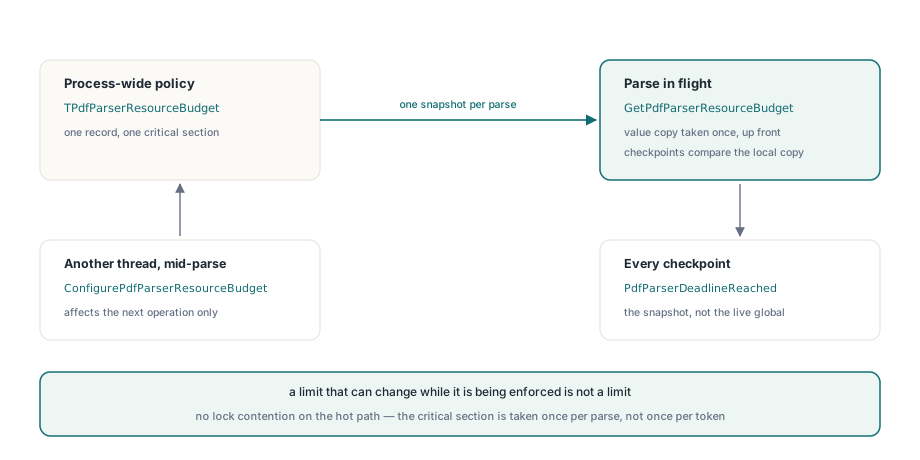
Because a limit that can change while it is being enforced is not a limit. This is the core design point of the whole feature, and it is one line of discipline at every entry point: read the policy once at the start of the operation into a local TPdfParserResourceBudget, then have every checkpoint compare against that local copy. GetPdfParserResourceBudget takes the critical section and hands back a value copy of the record, and after that the parse never touches mutable global state again. The result is that a call to ConfigurePdfParserResourceBudget from another thread affects the next operation, never the one in flight. Concurrent parses run under different policies without interfering, an operation that failed on a resource limit failed against a single coherent set of thresholds, and there is no lock contention on the hot path because the lock is taken once per parse rather than once per token
type
  TCustomScanState = record
    Budget: TPdfParserResourceBudget;
    StartTick: Cardinal;
    TokenCount: Int64;
    Depth: Integer;
  end;

procedure BeginScan(var S: TCustomScanState);
begin
  S.Budget := GetPdfParserResourceBudget;  // snapshot taken once, up front
  S.StartTick := PdfParserStartTick;
  S.TokenCount := 0;
  S.Depth := 0;
end;

function ScanCheckpoint(var S: TCustomScanState): Boolean;
begin
  Result := False;
  if PdfParserDeadlineReached(S.StartTick, S.Budget) then
    Exit;
  Inc(S.TokenCount);
  if S.TokenCount > S.Budget.MaxTokens then
    Exit;
  if S.Depth > S.Budget.MaxRecursionDepth then
    Exit;
  Result := True;
end;
If you write your own parser on top of the library, copy that shape rather than calling GetPdfParserResourceBudget inside your token loop. Calling it per token is correct but pointless: you pay a critical section on every iteration and you reintroduce the mid-operation drift the snapshot was there to prevent
Why does a byte ceiling not stop a pathological file?
Because size and cost are only loosely related in PDF. A 400 KiB file with an ISO 32000-1 §7.5.8 cross-reference stream whose /Index and /W arrays describe a plausible but hostile entry count, an object-stream chain that revisits the same offsets, or a content stream of operators that each cost more than they look, will sit comfortably under every byte and object ceiling you set and still occupy a worker thread for minutes. Byte counts bound memory; they do not bound time. That is what PdfParserStartTick and PdfParserDeadlineReached are for. PdfParserStartTick captures a tick value at the start of the operation and PdfParserDeadlineReached compares elapsed time against DeadlineMilliseconds, returning False whenever the deadline is 0. The subtraction runs in unsigned arithmetic, so a tick counter rollover does not produce a spurious timeout. Cross-reference parsing, object-stream decoding, content token normalization and the FDF and XFDF readers all check it at their loop heads, so an over-budget parse stops at a checkpoint instead of being killed from outside
Two honest caveats. It is wall-clock time, not CPU time, so a machine that swaps or a build server under load can trip a deadline a quiet machine would clear, which argues for setting it well above your observed worst case rather than close to your median. And it is off by default, because a deadline that fires on a legitimately large document during month-end batch processing is a worse failure than the one it prevents. Opt in per intake path rather than globally, and pair it with the structural checks in validating cross-reference streams
The budget is a ceiling, not a replacement for format limits
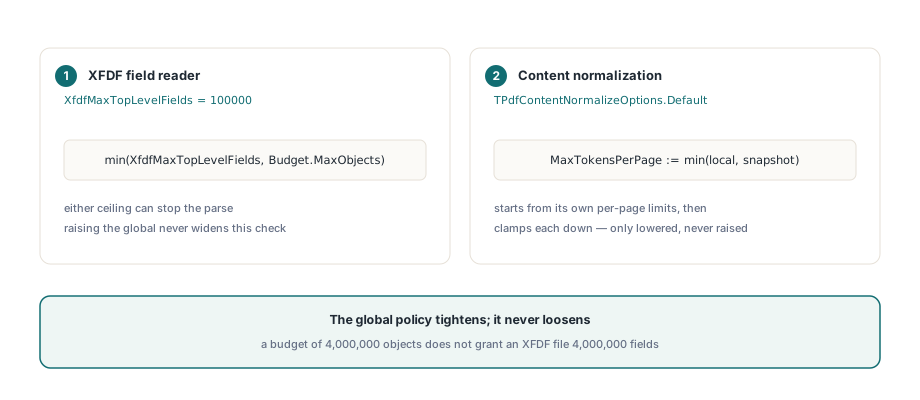
Each parser keeps its own format-specific constants and applies both. XFDF is the clearest example: the field reader enforces XfdfMaxTopLevelFields and a MaxFieldNodes constant of 100000 alongside the snapshot value, and either one can stop the parse
const
  XfdfMaxTopLevelFields = 100000;   // format-local, always applies
...
  // Both ceilings are live; whichever is lower wins
  if (FieldCount >= XfdfMaxTopLevelFields) or
     (FieldCount >= Budget.MaxObjects) then
    Exit(False);
This is intentional and worth internalizing before you go looking for a knob that does not exist. A global budget of 4,000,000 objects does not grant an XFDF file 4,000,000 fields, because 100000 fields is already far outside anything a real annotation export produces, and raising a global ceiling should not quietly widen a format-specific sanity check. Content normalization works the same way from the other direction: TPdfContentNormalizeOptions.Default starts from its own per-page limits and then clamps each of them down to the snapshot, so MaxTokensPerPage can only ever be lowered by the budget, never raised. The global policy tightens; it never loosens
Bad configuration fails when you configure it
ConfigurePdfParserResourceBudget validates before it assigns. A non-positive value in any of the six numeric dimensions raises immediately, and MaxDecodedBytes above High(Integer) is rejected as exceeding platform limits rather than being silently truncated somewhere deep in a decoder. This matters more than it sounds: a budget built from a config file with a missing key gives you zeros, and a zero object ceiling accepted at startup turns into a mystifying parse failure on the first document three hours later, at which point nobody suspects the config. The same care applies to any code that tightens the budget temporarily, including tests. The policy is process-wide, so leaving a 4-second deadline installed after a fixture finishes poisons every later one; save and restore around the change
var
  Saved: TPdfParserResourceBudget;
begin
  Saved := GetPdfParserResourceBudget;
  try
    ApplyUntrustedIntakeBudget;
    ProcessInboundDocument(FileName);
  finally
    ConfigurePdfParserResourceBudget(Saved);
  end;
end;
ResetPdfParserResourceBudget is the blunter version, restoring TPdfParserResourceBudget.Default outright. Use it in test teardown where you want a known state, and use save-and-restore in production code, where whatever the host application configured at startup is the state you must return to
Where the budget stops helping
It is a single process-wide policy, and that is its main limitation. You cannot give one worker thread a strict profile and another a permissive one, because there is one record behind one critical section; if you genuinely need per-tenant limits, the shape that works is to serialize each policy class onto its own process, or to bracket work with save-and-restore and accept that the bracket is only safe when nothing else is parsing concurrently. It also bounds parsing, not rendering: rasterization memory, font cache growth and image decoding sit outside these seven dimensions and need their own controls. And a budget tells you an operation was too expensive, never why. The ceiling that fired is the symptom, and the malformed /Index array or runaway filter chain behind it still has to be diagnosed by hand, which is why the decoding path described in object stream and predictor decoding is worth understanding before you start moving numbers. Treat the budget as the thing that keeps a bad document from taking the process down with it, and keep your logging good enough to find out what the document was doing
The full parser API surface, the budget record and a source-code build for Delphi, C++Builder and Lazarus are on the product page: PDFium Component